audio HONDA FIT 2015 3.G User Guide
[x] Cancel search | Manufacturer: HONDA, Model Year: 2015, Model line: FIT, Model: HONDA FIT 2015 3.GPages: 453, PDF Size: 21.19 MB
Page 90 of 453
89
uuClock uAdjusting the Clock
Controls
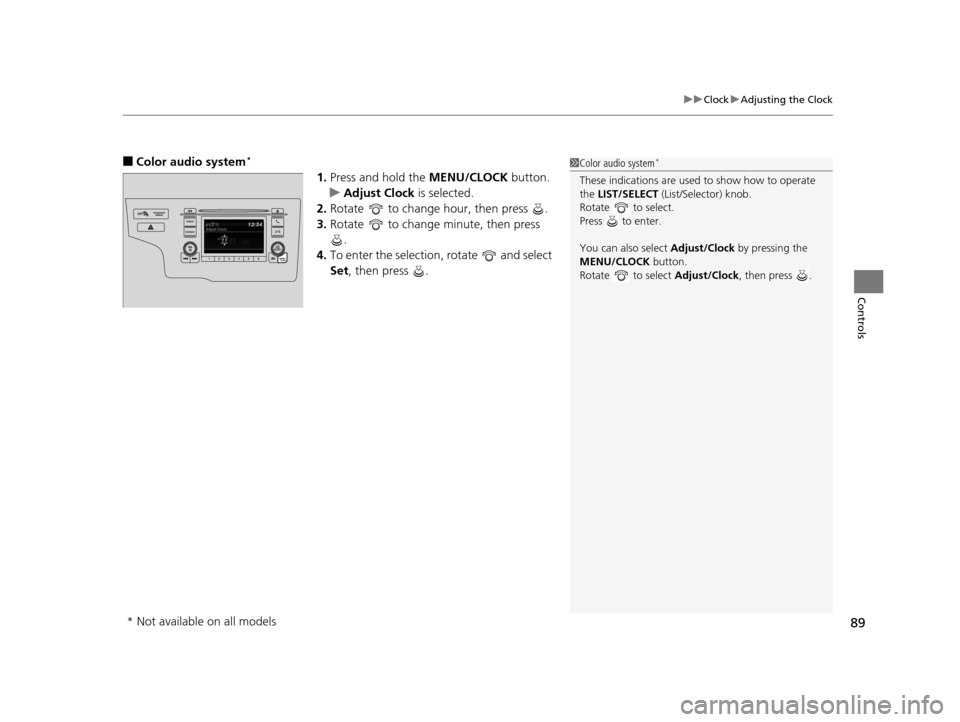
■Color audio system*
1. Press and hold the MENU/CLOCK button.
u Adjust Clock is selected.
2. Rotate to change hour, then press .
3. Rotate to change minute, then press
.
4. To enter the selection, rotate and select
Set, then press .
1Color audio system*
These indications are used to show how to operate
the LIST/SELECT (List/Selector) knob.
Rotate to select.
Press to enter.
You can also select Adjust/Clock by pressing the
MENU/CLOCK button.
Rotate to select Adjust/Clock, then press .
* Not available on all models
15 US FIT-31T5A6000.book 89 ページ 2014年3月6日 木曜日 午後7時5分
Page 117 of 453
116
Controls
Operating the Switches Around the Steering Wheel
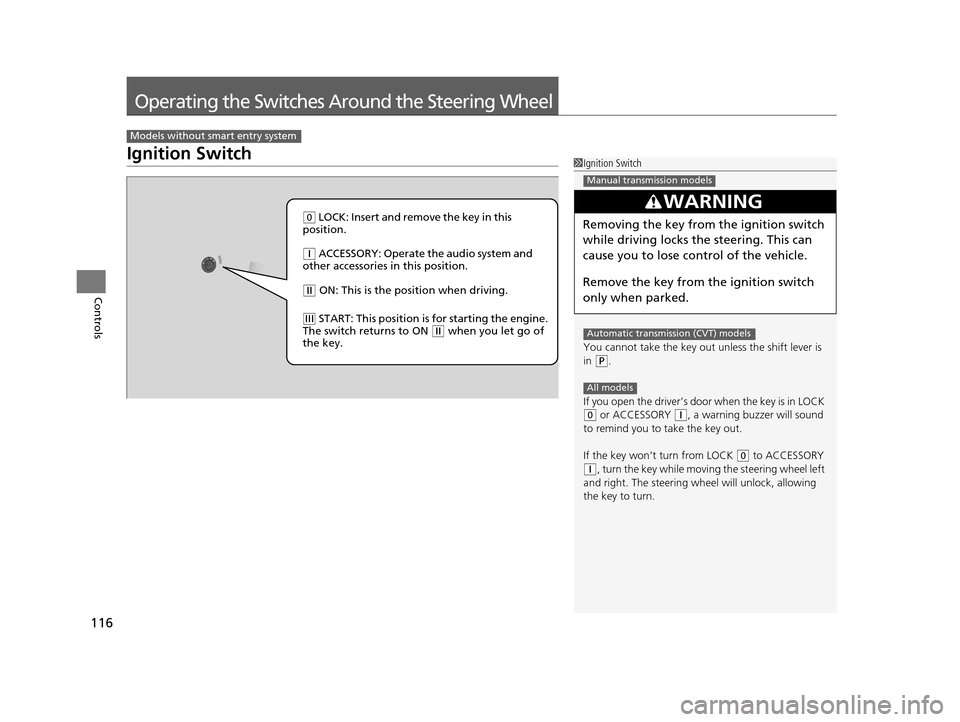
Ignition Switch
Models without smart entry system
1Ignition Switch
You cannot take the key out unless the shift lever is
in
( P.
If you open the driver’s door when the key is in LOCK
( 0 or ACCESSORY ( q, a warning buzzer will sound
to remind you to take the key out.
If the key won’t turn from LOCK
( 0 to ACCESSORY (q, turn the key while moving the steering wheel left
and right. The steering wh eel will unlock, allowing
the key to turn.
3WARNING
Removing the key from the ignition switch
while driving locks the steering. This can
cause you to lose control of the vehicle.
Remove the key from the ignition switch
only when parked.
Manual transmission models
Automatic transmission (CVT) models
All models
( 0 LOCK: Insert and remove the key in this
position.
( q ACCESSORY: Operate the audio system and
other accessories in this position.
( w ON: This is the position when driving.
(e START: This position is for starting the engine.
The switch returns to ON ( w when you let go of
the key.
15 US FIT-31T5A6000.book 116 ページ 2014年3月6日 木曜日 午後7時5分
Page 118 of 453
117
uuOperating the Switches Around the Steering Wheel uENGINE START/STOP Button
Continued
Controls
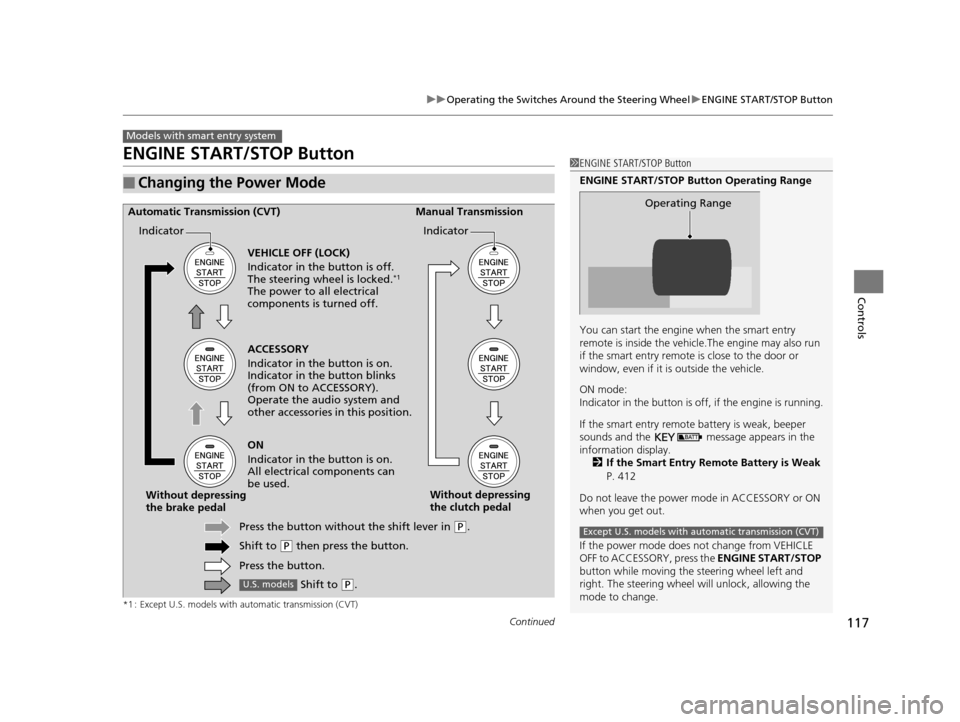
ENGINE START/STOP Button
*1 : Except U.S. models with automatic transmission (CVT)
■Changing the Power Mode
Models with smart entry system
1ENGINE START/STOP Button
ENGINE START/STOP Button Operating Range
You can start the engine when the smart entry
remote is inside the vehicl e.The engine may also run
if the smart entry remote is close to the door or
window, even if it is outside the vehicle.
ON mode:
Indicator in the button is of f, if the engine is running.
If the smart entry remote battery is weak, beeper
sounds and the message appears in the
information display. 2 If the Smart Entry Remote Battery is Weak
P. 412
Do not leave the power mode in ACCESSORY or ON
when you get out.
If the power mode does not change from VEHICLE
OFF to ACCESSORY, press the ENGINE START/STOP
button while moving the st eering wheel left and
right. The steering wheel will unlock, allowing the
mode to change.
Operating Range
Except U.S. models with automatic transmission (CVT)
ACCESSORY
Indicator in the button is on.
Indicator in th e button blinks
(from ON to ACCESSORY).
Operate the audio system and
other accessories in this position.
Automatic Transmission (CVT) Manual Transmission
VEHICLE OFF (LOCK)
Indicator in the button is off.
The steering wheel is locked.
*1
The power to all electrical
components is turned off.
ON
Indicator in the button is on.
All electrical components can
be used.
Press the button withou t the shift lever in
(P.
Shift to
( P then press the button.
Press the button.
Without depressing
the brake pedal
Without depressing
the clutch pedal
Indicator Indicator
Shift to (
P.U.S. models
15 US FIT-31T5A6000.book 117 ページ 2014年3月6日 木曜日 午後7時5分
Page 121 of 453
120
uuOperating the Switches Around the Steering Wheel uIgnition Switch and Power Mode Comparison
Controls
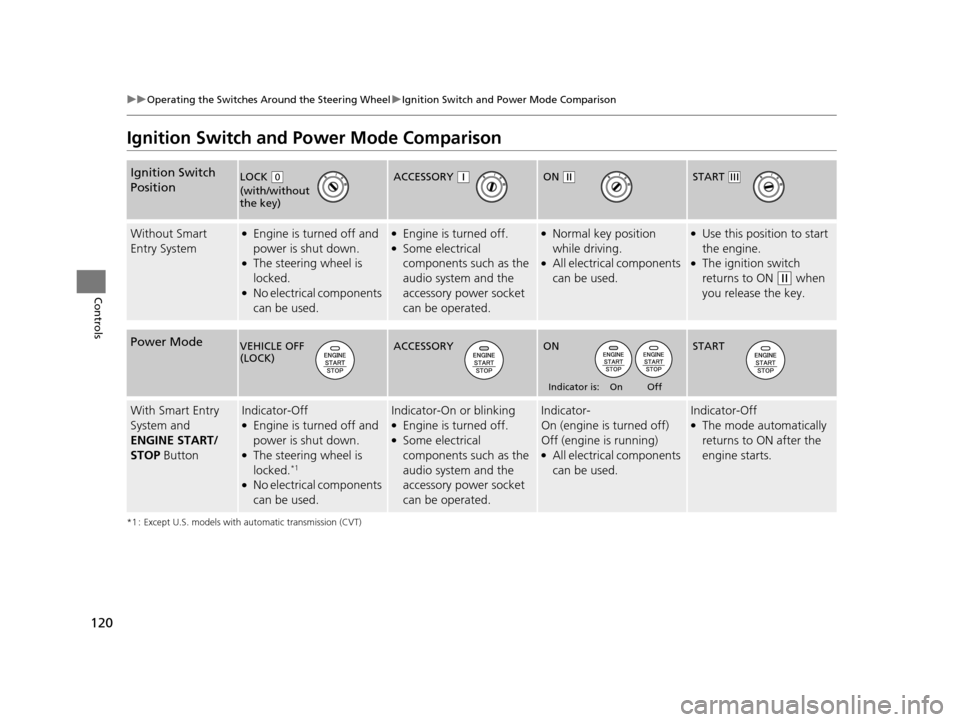
Ignition Switch and Power Mode Comparison
*1 : Except U.S. models with automatic transmission (CVT)
Ignition Switch
Position
Without Smart
Entry System●Engine is turned off and
power is shut down.
●The steering wheel is
locked.
●No electrical components
can be used.
●Engine is turned off.●Some electrical
components such as the
audio system and the
accessory power socket
can be operated.
●Normal key position
while driving.
●All electrical components
can be used.
●Use this position to start
the engine.
●The ignition switch
returns to ON
(w when
you release the key.
Power Mode
With Smart Entry
System and
ENGINE START/
STOP ButtonIndicator-Off●Engine is turned off and
power is shut down.
●The steering wheel is
locked.*1
●No electrical components
can be used.
Indicator-On or blinking●Engine is turned off.●Some electrical
components such as the
audio system and the
accessory power socket
can be operated.
Indicator-
On (engine is turned off)
Off (engine is running)
●All electrical components
can be used.
Indicator-Off●The mode automatically
returns to ON after the
engine starts.
LOCK ( 0
(with/without
the key)
ACCESSORY (qON (wSTART (e
VEHICLE OFF
(LOCK)ACCESSORY ON
Indicator is: On Off
START
15 US FIT-31T5A6000.book 120 ページ 2014年3月6日 木曜日 午後7時5分
Page 162 of 453
161
Features
This chapter describes how to operate technology features.
Audio SystemAbout Your Audio System .................... 162
USB Port(s) ........................................... 163
HDMI ® Port
*........................................ 164
Auxiliary Input Jack*............................. 165
Audio Antenna .................................... 166
Audio System Theft Protection ............. 167
Audio Remote Controls
*...................... 168
Audio System Basic Operation ............. 170
Audio/Information Screen .................... 171
Adjusting the Sound ............................ 175
Display Setup ....................................... 176
Playing the AM/FM Radio ..................... 177
Playing a CD ........................................ 179
Models with color audio system
Playing an iPod .................................... 182
Playing a USB Flash Drive ..................... 185
Playing Bluetooth ® Audio..................... 188
Audio System Basic Operation ............ 191
Audio/Information Screen .................... 192
Adjusting the Sound ............................ 197
Display Setup ....................................... 198
Playing the AM/FM Radio..................... 199
Playing a CD ........................................ 202
Playing an iPod .................................... 205
Playing Internet Radio .......................... 208
Playing a USB Flash Drive ..................... 210
Playing Bluetooth ® Audio..................... 213
Playing a Video Using the HDMI ®......... 215
Models with display audio system
Smartphone Apps................................. 217
Siri Eyes Free......................................... 218
Audio Error Messages ........................... 219
General Information on the Audio
System ............................................. 223
Customized Features ............................. 226
Bluetooth ® HandsFreeLink ®
Using HFL ............................................. 248
Using HFL ............................................. 271
Models with color audio system
Models with display audio system
* Not available on all models
15 US FIT-31T5A6000.book 161 ページ 2014年3月6日 木曜日 午後7時5分
Page 163 of 453
162
Features
Audio System
About Your Audio System
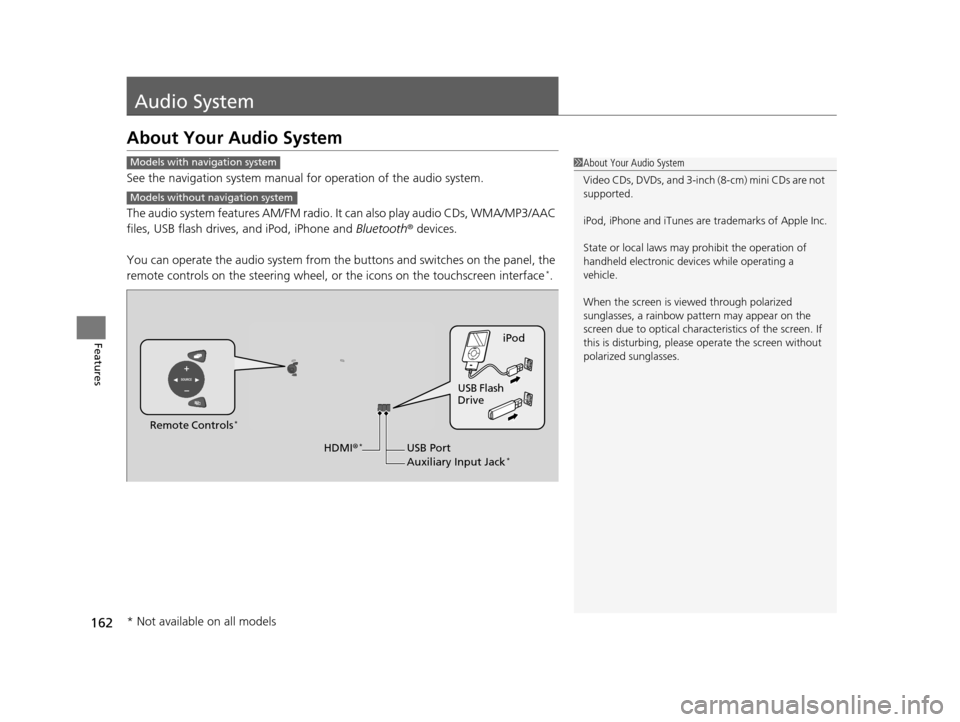
See the navigation system manual for operation of the audio system.
The audio system features AM/FM radio. It can also play audio CDs, WMA/MP3/AAC
files, USB flash drives, and iPod, iPhone and Bluetooth® devices.
You can operate the audio system from the buttons and switches on the panel, the
remote controls on the steering wheel, or the icons on the touchscreen interface
*.
1About Your Audio System
Video CDs, DVDs, and 3-inch (8-cm) mini CDs are not
supported.
iPod, iPhone and iTunes are trademarks of Apple Inc.
State or local laws may pr ohibit the operation of
handheld electronic devi ces while operating a
vehicle.
When the screen is vi ewed through polarized
sunglasses, a rainbow pa ttern may appear on the
screen due to optical characteristics of the screen. If
this is disturbing, please operate the screen without
polarized sunglasses.Models with navigation system
Models without navigation system
iPod
USB Flash
Drive
USB Port
Auxiliary Input Jack
*
Remote Controls*
HDMI ®*
* Not available on all models
15 US FIT-31T5A6000.book 162 ページ 2014年3月6日 木曜日 午後7時5分
Page 164 of 453
163
uuAudio System uUSB Port(s)
Features
USB Port(s)
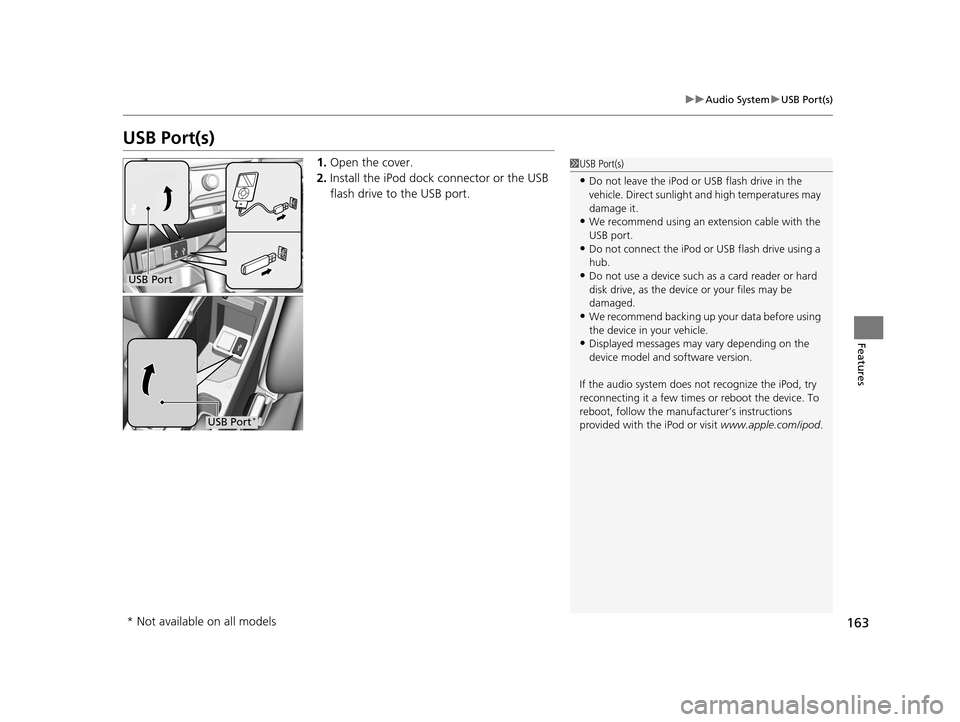
1. Open the cover.
2. Install the iPod dock connector or the USB
flash drive to the USB port.1USB Port(s)
•Do not leave the iPod or USB flash drive in the
vehicle. Direct sunlight and high temperatures may
damage it.
•We recommend using an ex tension cable with the
USB port.
•Do not connect the iPod or USB flash drive using a
hub.
•Do not use a device such as a card reader or hard
disk drive, as the device or your files may be
damaged.
•We recommend backing up yo ur data before using
the device in your vehicle.
•Displayed messages may vary depending on the
device model and software version.
If the audio system does not recognize the iPod, try
reconnecting it a few times or reboot the device. To
reboot, follow the manufac turer’s instructions
provided with the iPod or visit www.apple.com/ipod.
USB Port
USB Port*
* Not available on all models
15 US FIT-31T5A6000.book 163 ページ 2014年3月6日 木曜日 午後7時5分
Page 165 of 453
164
uuAudio System uHDMI ® Port*
Features
HDMI ® Port*
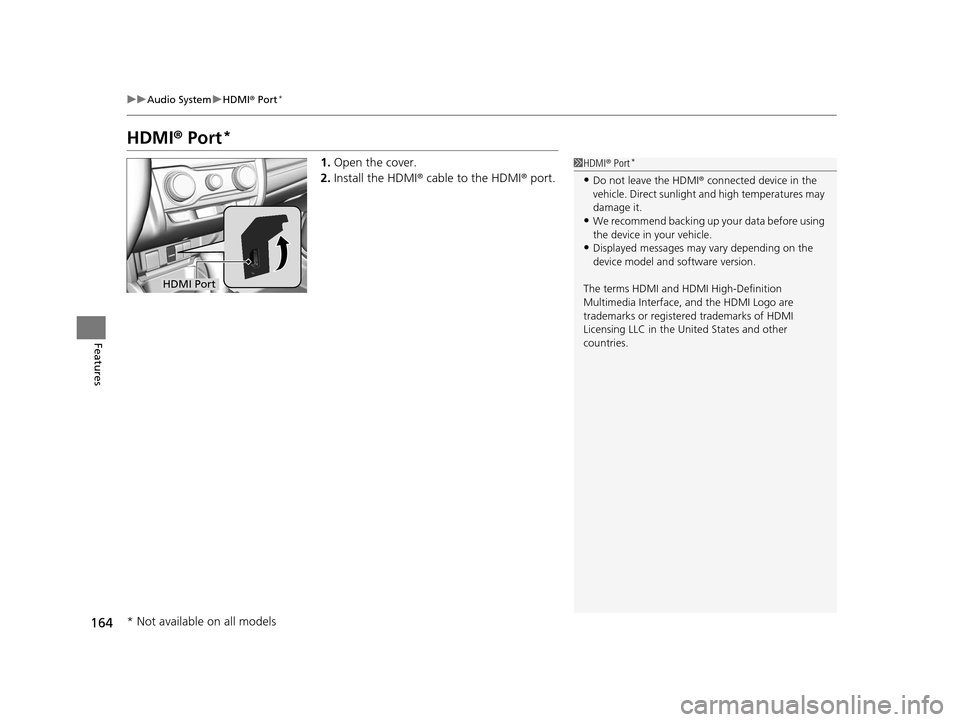
1. Open the cover.
2. Install the HDMI ® cable to the HDMI ® port.1 HDMI ® Port*
•Do not leave the HDMI ® connected device in the
vehicle. Direct sunlight and high temperatures may
damage it.
•We recommend backing up yo ur data before using
the device in your vehicle.
•Displayed messages may vary depending on the
device model and software version.
The terms HDMI and HDMI High-Definition
Multimedia Interface, and the HDMI Logo are
trademarks or registered trademarks of HDMI
Licensing LLC in the United States and other
countries.
HDMI Port
* Not available on all models
15 US FIT-31T5A6000.book 164 ページ 2014年3月6日 木曜日 午後7時5分
Page 166 of 453
165
uuAudio System uAuxiliary Input Jack*
Features
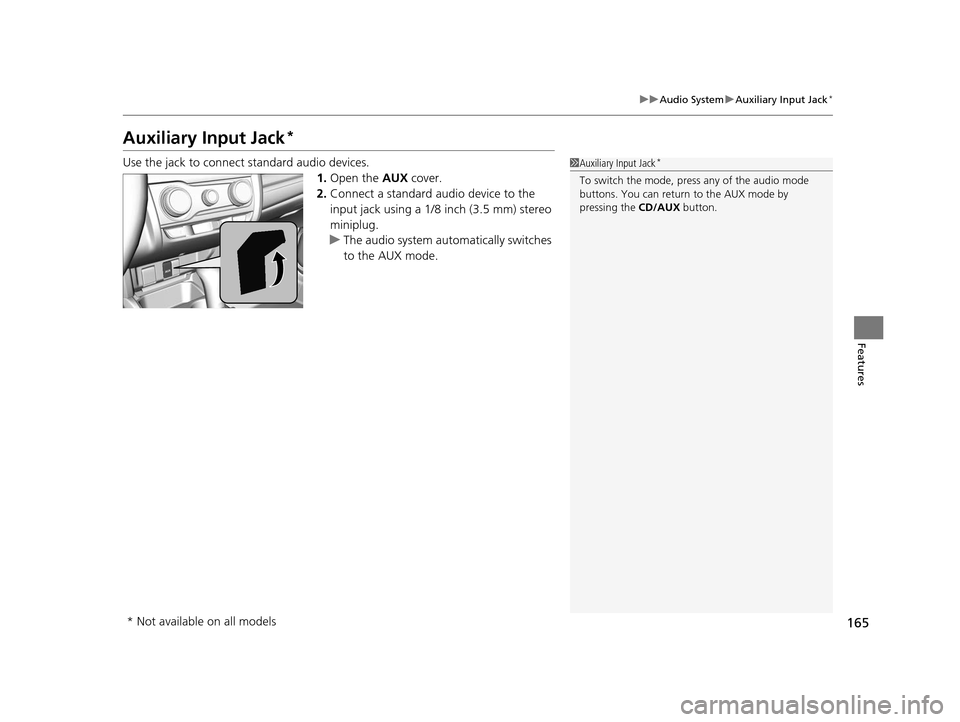
Auxiliary Input Jack*
Use the jack to connect standard audio devices.
1.Open the AUX cover.
2. Connect a standard audio device to the
input jack using a 1/8 inch (3.5 mm) stereo
miniplug.
u The audio system auto matically switches
to the AUX mode.1 Auxiliary Input Jack*
To switch the mode, pres s any of the audio mode
buttons. You can return to the AUX mode by
pressing the CD/AUX button.
* Not available on all models
15 US FIT-31T5A6000.book 165 ページ 2014年3月6日 木曜日 午後7時5分
Page 167 of 453
166
uuAudio System uAudio Antenna
Features
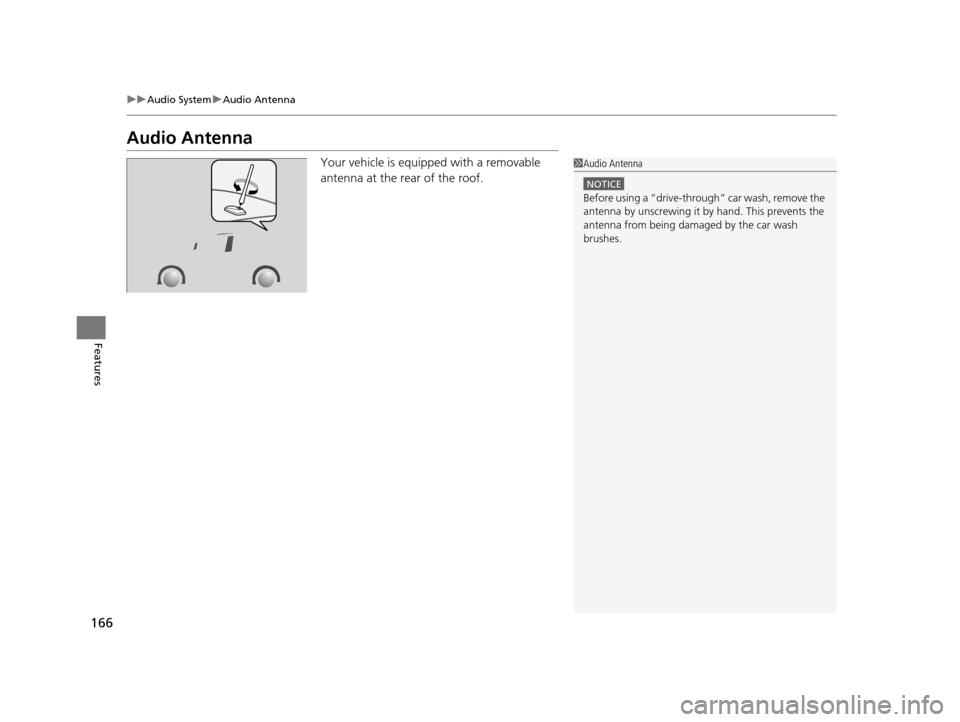
Audio Antenna
Your vehicle is equipped with a removable
antenna at the rear of the roof.1Audio Antenna
NOTICE
Before using a