remote start HONDA FIT 2015 3.G User Guide
[x] Cancel search | Manufacturer: HONDA, Model Year: 2015, Model line: FIT, Model: HONDA FIT 2015 3.GPages: 453, PDF Size: 21.19 MB
Page 113 of 453
112
uuSecurity System uSecurity System Alarm*
Controls
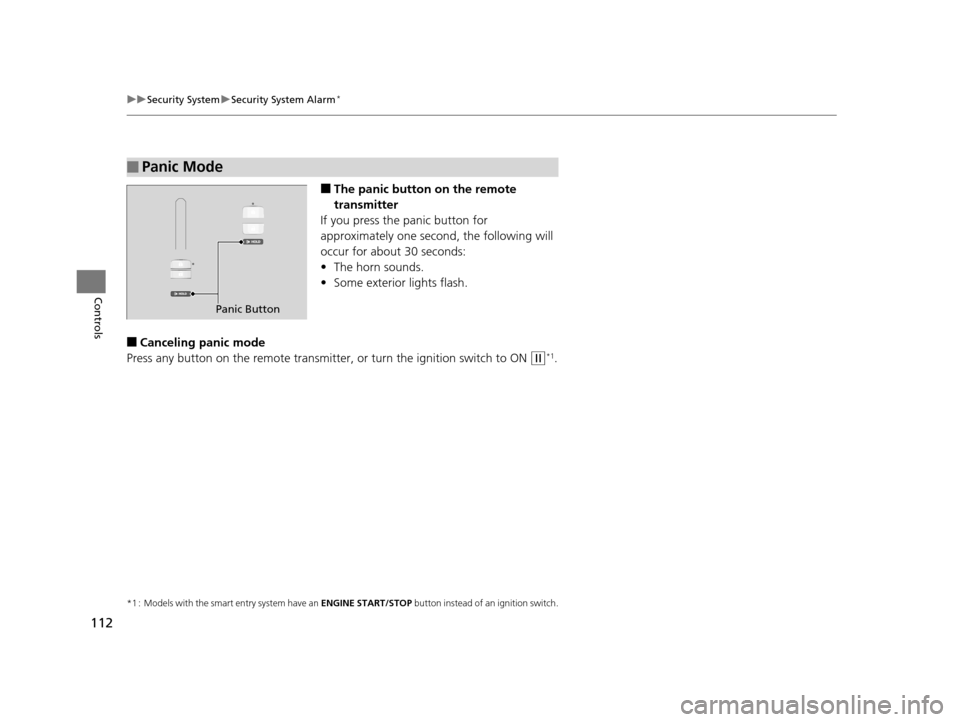
■The panic button on the remote
transmitter
If you press the panic button for
approximately one seco nd, the following will
occur for about 30 seconds:
• The horn sounds.
• Some exterior lights flash.
■Canceling panic mode
Press any button on the remote transmitter, or turn the ignition switch to ON
(w*1.
*1 : Models with the smart entry system have an ENGINE START/STOP button instead of an ignition switch.
■Panic Mode
Panic Button
15 US FIT-31T5A6000.book 112 ページ 2014年3月6日 木曜日 午後7時5分
Page 118 of 453
117
uuOperating the Switches Around the Steering Wheel uENGINE START/STOP Button
Continued
Controls
ENGINE START/STOP Button
*1 : Except U.S. models with automatic transmission (CVT)
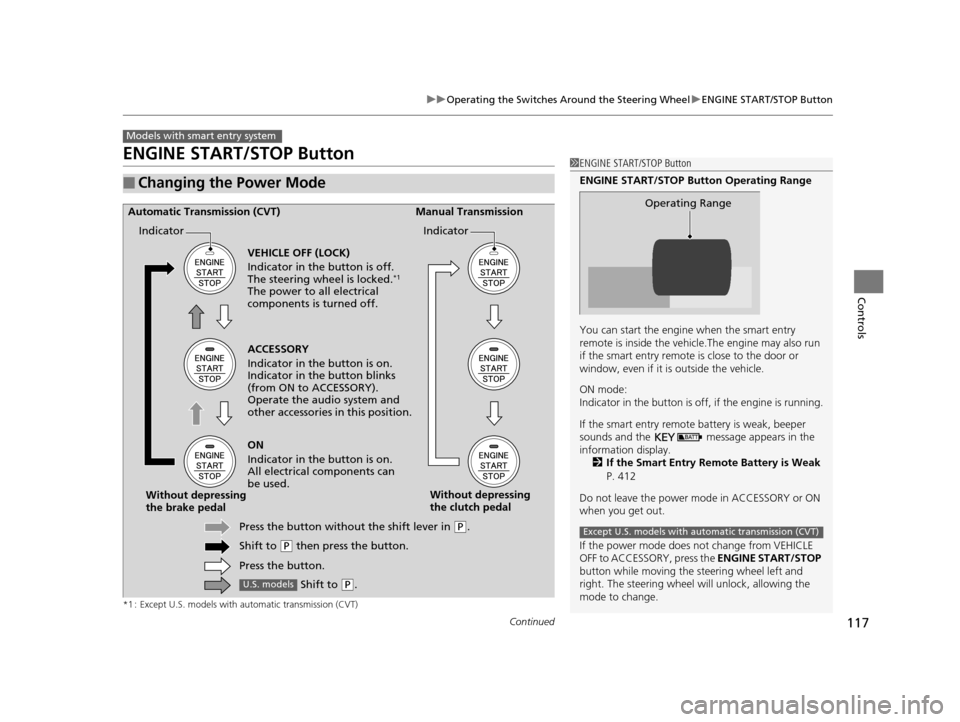
■Changing the Power Mode
Models with smart entry system
1ENGINE START/STOP Button
ENGINE START/STOP Button Operating Range
You can start the engine when the smart entry
remote is inside the vehicl e.The engine may also run
if the smart entry remote is close to the door or
window, even if it is outside the vehicle.
ON mode:
Indicator in the button is of f, if the engine is running.
If the smart entry remote battery is weak, beeper
sounds and the message appears in the
information display. 2 If the Smart Entry Remote Battery is Weak
P. 412
Do not leave the power mode in ACCESSORY or ON
when you get out.
If the power mode does not change from VEHICLE
OFF to ACCESSORY, press the ENGINE START/STOP
button while moving the st eering wheel left and
right. The steering wheel will unlock, allowing the
mode to change.
Operating Range
Except U.S. models with automatic transmission (CVT)
ACCESSORY
Indicator in the button is on.
Indicator in th e button blinks
(from ON to ACCESSORY).
Operate the audio system and
other accessories in this position.
Automatic Transmission (CVT) Manual Transmission
VEHICLE OFF (LOCK)
Indicator in the button is off.
The steering wheel is locked.
*1
The power to all electrical
components is turned off.
ON
Indicator in the button is on.
All electrical components can
be used.
Press the button withou t the shift lever in
(P.
Shift to
( P then press the button.
Press the button.
Without depressing
the brake pedal
Without depressing
the clutch pedal
Indicator Indicator
Shift to (
P.U.S. models
15 US FIT-31T5A6000.book 117 ページ 2014年3月6日 木曜日 午後7時5分
Page 119 of 453
118
uuOperating the Switches Around the Steering Wheel uENGINE START/STOP Button
Controls
If you leave the vehicle for 30 to 60 minutes with the shift lever in (P*1 and the
power mode in ACCESSORY, the vehicle automa tically goes into the mode similar to
VEHICLE OFF (LOCK) to avoid the battery drain.
When in this mode:
The steering wheel does not lock.
You cannot lock or unlock doors with th e remote transmitter or the smart entry
system.
Press the ENGINE START/STOP button three times to swit ch the mode to VEHICLE
OFF (LOCK).
*1 : Automatic transmission (CVT) models
■Automatic Power Off
Except U.S. models with automatic transmission (CVT)
15 US FIT-31T5A6000.book 118 ページ 2014年3月6日 木曜日 午後7時5分
Page 120 of 453
119
uuOperating the Switches Around the Steering Wheel uENGINE START/STOP Button
Controls
If you open the driver’s door when the power mode is set to ACCESSORY, a warning
buzzer sounds.
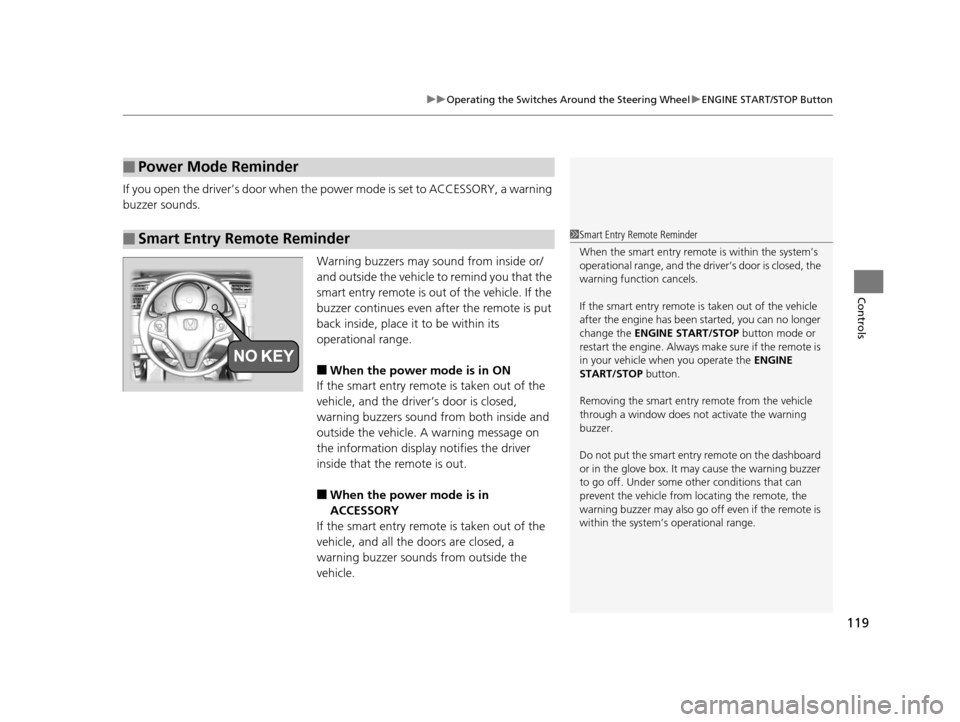
Warning buzzers may sound from inside or/
and outside the vehicle to remind you that the
smart entry remote is out of the vehicle. If the
buzzer continues even after the remote is put
back inside, place it to be within its
operational range.
■When the power mode is in ON
If the smart entry remote is taken out of the
vehicle, and the driver’s door is closed,
warning buzzers sound from both inside and
outside the vehicle. A warning message on
the information display notifies the driver
inside that the remote is out.
■When the power mode is in
ACCESSORY
If the smart entry remote is taken out of the
vehicle, and all the doors are closed, a
warning buzzer sounds from outside the
vehicle.
■Power Mode Reminder
■Smart Entry Remote Reminder1 Smart Entry Remote Reminder
When the smart entry remote is within the system’s
operational range, and the driv er’s door is closed, the
warning function cancels.
If the smart entry remote is taken out of the vehicle
after the engine has been started, you can no longer
change the ENGINE START/STOP button mode or
restart the engine. Always make sure if the remote is
in your vehicle when you operate the ENGINE
START/STOP button.
Removing the smart entry remote from the vehicle
through a window does not activate the warning
buzzer.
Do not put the smart entr y remote on the dashboard
or in the glove box. It may cause the warning buzzer
to go off. Under some other conditions that can
prevent the vehicle from locating the remote, the
warning buzzer may al so go off even if the remote is
within the system’s operational range.
15 US FIT-31T5A6000.book 119 ページ 2014年3月6日 木曜日 午後7時5分
Page 124 of 453
123
uuOperating the Switches Around the Steering Wheel uLight Switches
Controls
The headlights automatically come on when the wipers are used several times within
a certain intervals with the headlight switch in AUTO.
The headlights automatically go off a few minutes later if the wipers are stopped.
The headlights, all other exterior lights, a nd the instrument panel lights turn off 15
seconds after you remove the key or set the power mode to VEHICLE OFF (LOCK),
take the remote with you, and close the driver's door.
If you turn the igniti on switch to LOCK
(0*1 with the headlight switch on, but do
not open the door, the lights turn off afte r 10 minutes (three minutes, if the switch
is in the AUTO position).
The lights turn on again when you unlock or open the driver's door. If you unlock
the door, but do not open it within 15 seconds, the lights go off. If you open the
driver's door, you will hear a lights on reminder chime.
*1 : Models with the smart entry system have an ENGINE START/STOP button instead of an ignition switch.
■Headlight Integration with Wipers*
■Automatic Lighting Off Feature
1Headlight Integration with Wipers*
This feature activates while the headlights are off in
AUTO .
The instrument panel br ightness does not change
when the headlights come on.
When the ambient light is at dark, the automatic
lighting control feature over rides, and the headlights
come on with or without the wipers sweeping more
than several times.
* Not available on all models
15 US FIT-31T5A6000.book 123 ページ 2014年3月6日 木曜日 午後7時5分
Page 311 of 453
310
uuTowing a Trailer uTowing Your Vehicle
Driving
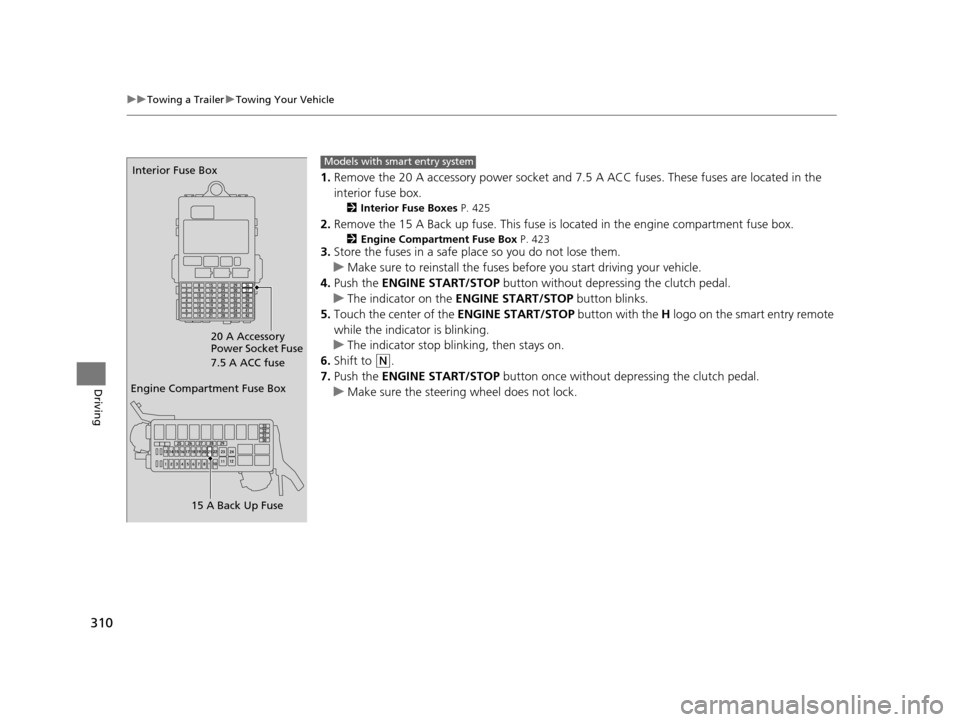
1. Remove the 20 A accessory powe r socket and 7.5 A ACC fuses. These fuses are located in the
interior fuse box.
2 Interior Fuse Boxes P. 425
2.Remove the 15 A Back up fuse. This fuse is located in the engine compartment fuse box.
2Engine Compartment Fuse Box P. 4233.Store the fuses in a safe place so you do not lose them.
u Make sure to reinstall the fuses be fore you start driving your vehicle.
4. Push the ENGINE START/STOP button without depressing the clutch pedal.
u The indicator on the ENGINE START/STOP button blinks.
5. Touch the center of the ENGINE START/STOP button with the H logo on the smart entry remote
while the indicator is blinking.
u The indicator stop blinking, then stays on.
6. Shift to
(N.
7. Push the ENGINE START/STOP button once without depressing the clutch pedal.
u Make sure the steering wheel does not lock.
Engine Compartment Fuse Box
15 A Back Up Fuse
Interior Fuse Box
20 A Accessory
Power Socket Fuse
7.5 A ACC fuseModels with smart entry system
15 US FIT-31T5A6000.book 310 ページ 2014年3月6日 木曜日 午後7時5分
Page 315 of 453
uuWhen Driving uStarting the Engine
314
Driving
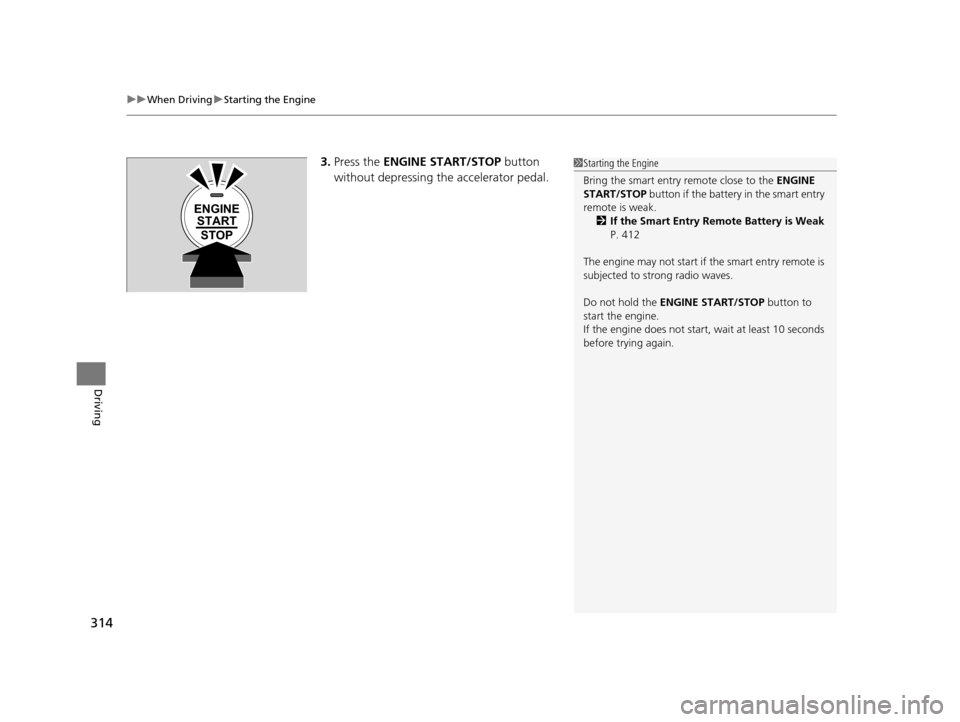
3. Press the ENGINE START/STOP button
without depressing the accelerator pedal.1 Starting the Engine
Bring the smart entry remote close to the ENGINE
START/STOP button if the battery in the smart entry
remote is weak. 2 If the Smart Entry Remote Battery is Weak
P. 412
The engine may not start if the smart entry remote is
subjected to strong radio waves.
Do not hold the ENGINE START/STOP button to
start the engine.
If the engine does not start, wait at least 10 seconds
before trying again.
ENGINE START
STOP
15 US FIT-31T5A6000.book 314 ページ 2014年3月6日 木曜日 午後7時5分
Page 404 of 453
403
Handling the Unexpected
This chapter explains how to handle unexpected troubles.
ToolsTypes of Tools .................................. 404
If a Tire Goes Flat Changing a Flat Tire ......................... 405
Engine Does Not Start Checking the Engine ........................ 411
If the Smart Entry Remote Battery is Weak ....... 412
Emergency Engine Stop ................... 413
Jump Starting .................................... 414
Shift Lever Does Not Move .............. 416
Overheating How to Handle Overheating ............. 417 Indicator, Coming On/Blinking
If the Low Oil Pressure Indicator Comes
On................................................ 419
If the Charging System Indicator Comes
On ................................................. 419
If the Malfunction Indicator Lamp Comes On or Blinks ..................................... 420
If the Brake System Indicator (Red) Comes On...................................................... 421
If the Electric Power Steering (EPS) System Indicator Comes On ....................... 421 If the Low Tire Pressure/TPMS Indicator
Comes On or Blinks ....................... 422
Fuses Fuse Locations ................................. 423
Inspecting and Changing Fuses ........ 427
Emergency Towing ........................... 428
When You Cannot Open the Tailgate..... 429
15 US FIT-31T5A6000.book 403 ページ 2014年3月6日 木曜日 午後7時5分
Page 413 of 453
412
uuEngine Does Not Start uIf the Smart Entry Remote Battery is Weak
Handling the Unexpected
If the Smart Entry Remote Battery is Weak
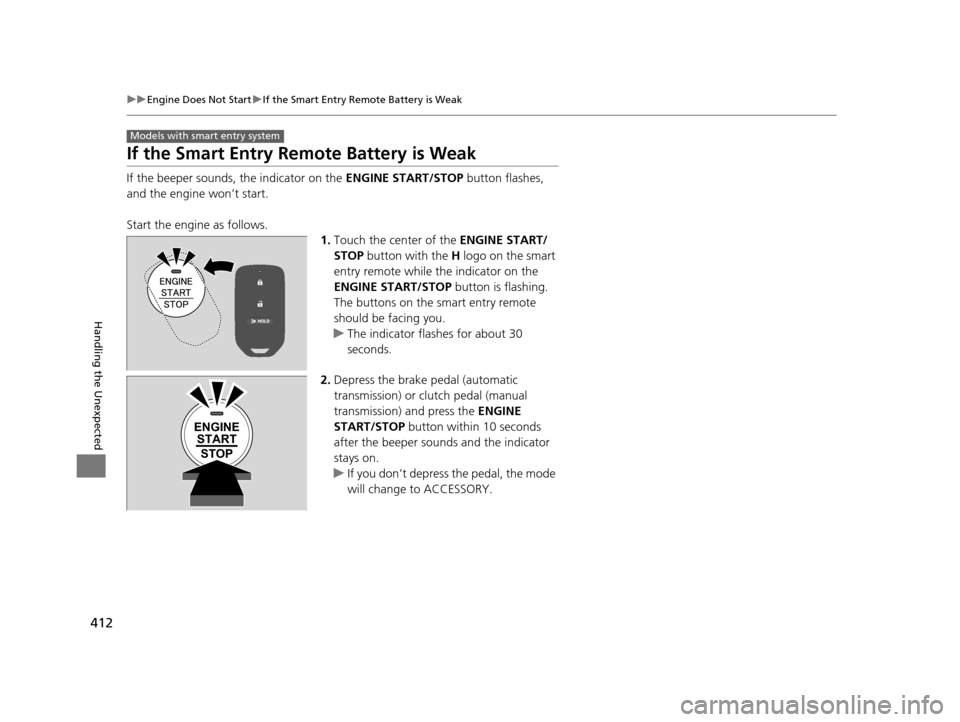
If the beeper sounds, the indicator on the ENGINE START/STOP button flashes,
and the engine won’t start.
Start the engine as follows. 1.Touch the center of the ENGINE START/
STOP button with the H logo on the smart
entry remote while the indicator on the
ENGINE START/STOP button is flashing.
The buttons on the smart entry remote
should be facing you.
u The indicator flashes for about 30
seconds.
2. Depress the brake pedal (automatic
transmission) or clutch pedal (manual
transmission) and press the ENGINE
START/STOP button within 10 seconds
after the beeper sounds and the indicator
stays on.
u If you don’t depress the pedal, the mode
will change to ACCESSORY.
Models with smart entry system
ENGINE
START
STOP
15 US FIT-31T5A6000.book 412 ページ 2014年3月6日 木曜日 午後7時5分
Page 446 of 453
Index
445
Index
Index
Numbers
7-Speed Manual Shift Mode................... 323
A
ABS (Anti-lock Brake System) .................. 342
Accessories and Modifications ................ 351
Accessory Power Socket ........................... 149
Additives Coolant .................................................. 368
Engine Oil ............................................... 363
Washer ................................................... 372
Additives, Engine Oil ............................... 363
Adjusting Armrest .................................................. 143
Front Seats.............................................. 133
Head Restraints ....................................... 135
Headlights .............................................. 373
Mirrors.................................................... 131
Rear Seats ............................................... 140
Steering Wheel ....................................... 130
Adjusting the Sound ................................ 197
Air Conditioning System Climate Control System .......................... 157
Defrosting the Windshield and Windows ...................................... 156, 158
Dust and Pollen Filter .............................. 397
Heating and Cooling System ................... 154
Air Conditioning System (Heating and Cooling System)
Cooling................................................... 156 Heating ................................................... 155
Air Pressure ....................................... 385, 433
Airbags ........................................................ 41
Advanced Airbags ..................................... 47
Airbag Care ............................................... 53
Event Data Recorder .................................... 0
Front Airbags (SRS) .................................... 44
Indicator .............................................. 51, 73
Passenger Airbag Off Indicator .................. 52
Sensors ...................................................... 41
Side Airbags .............................................. 48
Side Curtain Airbags .................................. 50
Anti-lock Brake System (ABS) .................. 342
Indicator .................................................... 73
Armrest ..................................................... 143
Audio Remote Controls ............................ 168
Audio System ............................................ 162
Adjusting the Sound ................................ 175
Auxiliary Input Jack .................................. 165
Error Messages ........................................ 219
General Information ................................ 223
MP3/WMA/AAC .............................. 185, 210
Recommended CDs ................................. 223
Recommended Devices ............................ 225
Remote Controls ................................. 5, 168
Security Code .......................................... 167
Theft Protection ....................................... 167
USB Flash Drives ...................................... 225
USB Port(s) .............................................. 163
Audio/Information Screen ............... 171, 192
Authorized Manuals ................................. 441 Auto Door Locking/Unlocking
................. 103
Customize ............................................... 104
Automatic Climate Control Sensors ........ 160
Automatic Transmission ........................... 318
7-Speed Manual Shift Mode .................... 323
Creeping ................................................. 318
Kickdown ................................................ 318
Operating the Shift Lever........... 20, 320, 322
Shift Lever Does Not Move ...................... 416
Shifting ........................................... 319, 321
Automatic Transmission (CVT)
Fluid ........................................................ 370
Auxiliary Input Jack .................................. 165
Average Fuel Economy .............................. 84
B
Battery...................................................... 393
Charging System Indicator................. 71, 419
Jump Starting .......................................... 414
Maintenance (Checki ng the Battery) ........ 393
Maintenance (Replacing) ......................... 395
Belts (Seat) .................................................. 32
Beverage Holders ..................................... 147
Bluetooth ® HandsFreeLink ®..................... 248
Booster Seats (For Children) ...................... 65
Brake System ............................................ 340
Anti-lock Brake System (ABS)................... 342
Brake Assist System ................................. 343
Fluid ........................................................ 371
Foot Brake............................................... 341
15 US FIT-31T5A6000.book 445 ページ 2014年3月6日 木曜日 午後7時5分