phone HONDA FIT 2015 3.G Owner's Manual
[x] Cancel search | Manufacturer: HONDA, Model Year: 2015, Model line: FIT, Model: HONDA FIT 2015 3.GPages: 453, PDF Size: 21.19 MB
Page 230 of 453
229
uuCustomized Features u
Continued
Features
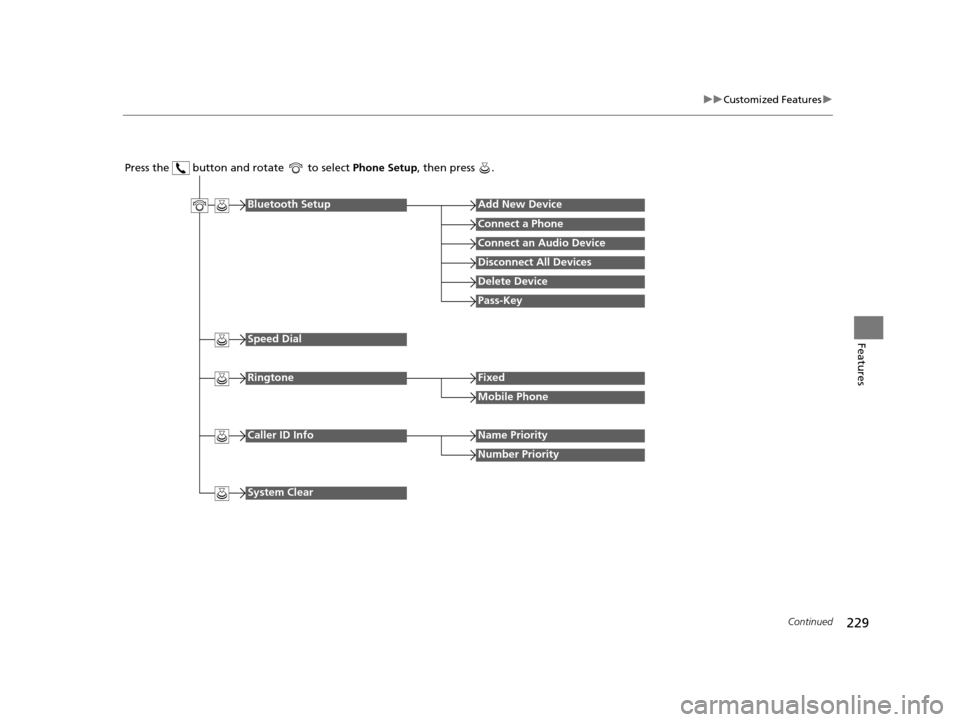
Press the button and rotate to select Phone Setup, then press .
RingtoneFixed
Mobile Phone
Bluetooth SetupAdd New Device
Connect a Phone
Connect an Audio Device
Disconnect All Devices
Delete Device
Pass-Key
Speed Dial
Caller ID InfoName Priority
Number Priority
System Clear
15 US FIT-31T5A6000.book 229 ページ 2014年3月6日 木曜日 午後7時5分
Page 231 of 453
230
uuCustomized Features u
Features
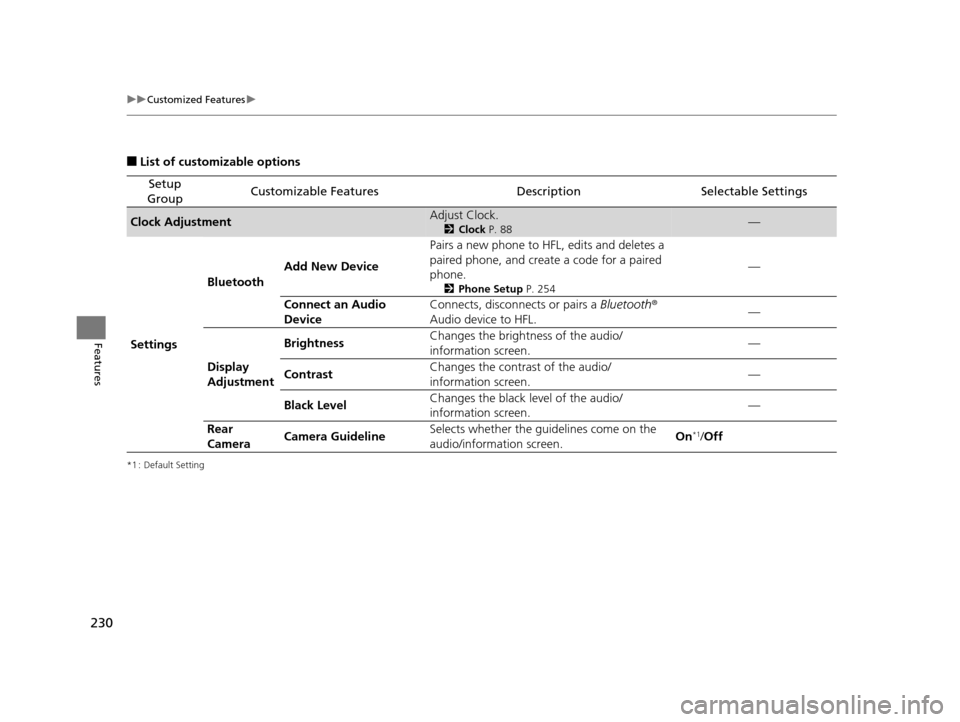
■List of customizable options
*1 : Default Setting
Setup
GroupCustomizable FeaturesDescriptionSelectable Settings
Clock AdjustmentAdjust Clock.
2 Clock P. 88—
Settings Bluetooth
Add New Device Pairs a new phone to HFL, edits and deletes a
paired phone, and create a code for a paired
phone.
2
Phone Setup P. 254
—
Connect an Audio
Device Connects, disconnects or pairs a
Bluetooth®
Audio device to HFL. —
Display
Adjustment Brightness
Changes the brightness of the audio/
information screen.
—
Contrast Changes the contrast of the audio/
information screen. —
Black Level Changes the black level of the audio/
information screen. —
Rear
Camera Camera Guideline Selects whether the guidelines come on the
audio/information screen.
On
*1/
Off
15 US FIT-31T5A6000.book 230 ページ 2014年3月6日 木曜日 午後7時5分
Page 233 of 453
232
uuCustomized Features u
Features
*1 : Default Setting
Setup
GroupCustomizable FeaturesDescriptionSelectable Settings
Phone
Setup
Bluetooth
Setup
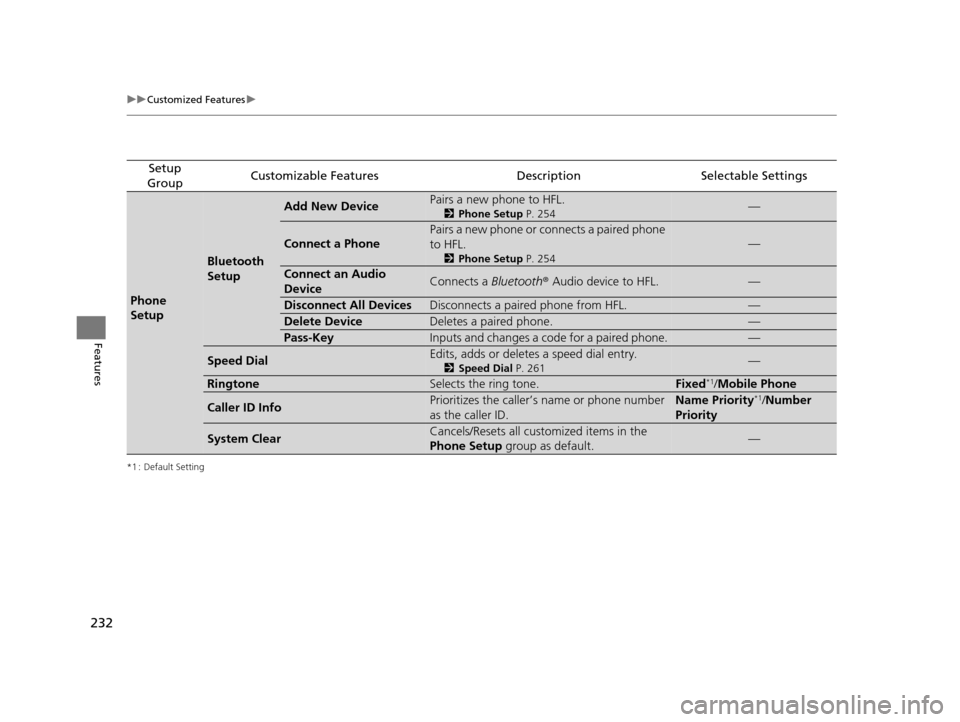
Add New DevicePairs a new phone to HFL.
2 Phone Setup P. 254—
Connect a Phone
Pairs a new phone or connects a paired phone
to HFL.
2Phone Setup P. 254
—
Connect an Audio
DeviceConnects a Bluetooth® Audio device to HFL.—
Disconnect All DevicesDisconnects a paired phone from HFL.—
Delete DeviceDeletes a paired phone.—
Pass-KeyInputs and changes a code for a paired phone.—
Speed DialEdits, adds or deletes a speed dial entry.
2Speed Dial P. 261—
RingtoneSelects the ring tone.Fixed*1/Mobile Phone
Caller ID InfoPrioritizes the caller’s name or phone number
as the caller ID.Name Priority*1/ Number
Priority
System ClearCancels/Resets all customized items in the
Phone Setup group as default.—
15 US FIT-31T5A6000.book 232 ページ 2014年3月6日 木曜日 午後7時5分
Page 235 of 453
234
uuCustomized Features u
Features
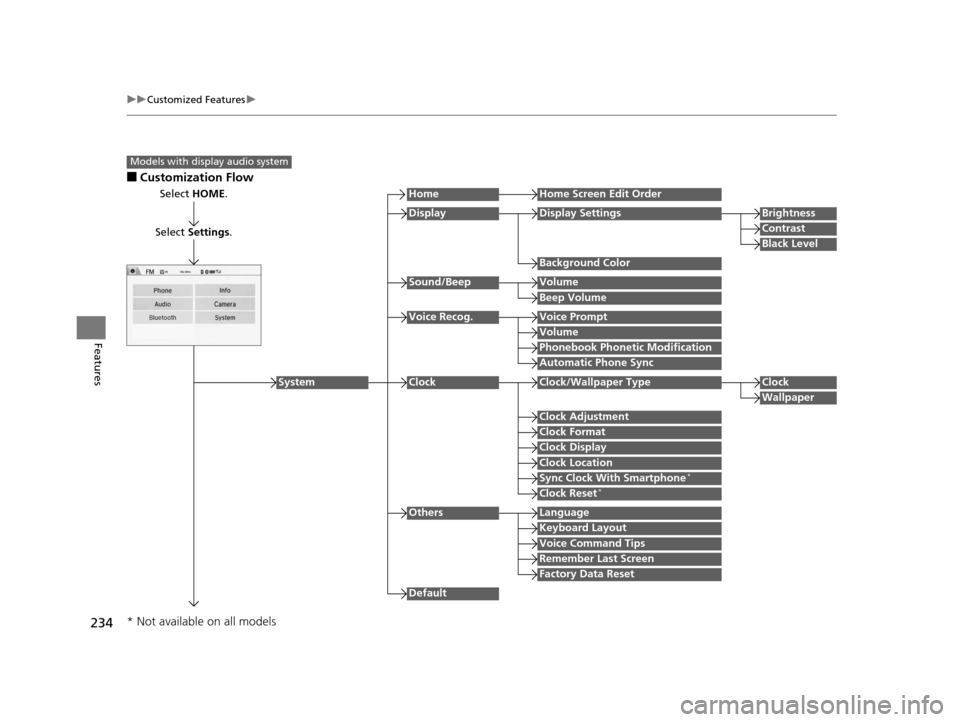
■Customization Flow
Models with display audio system
Select HOME.
Select Settings .
HomeHome Screen Edit Order
Background Color
DisplayDisplay SettingsBrightness
Contrast
Black Level
Beep Volume
Sound/BeepVolume
Volume
Voice Recog.Voice Prompt
Automatic Phone Sync
Phonebook Phonetic Modification
Default
Factory Data Reset
Clock Format
ClockClock/Wallpaper TypeClock
Wallpaper
Clock Adjustment
Clock Display
Clock Location
Sync Clock With Smartphone*
Clock Reset*
Keyboard Layout
OthersLanguage
Remember Last Screen
Voice Command Tips
System
* Not available on all models
15 US FIT-31T5A6000.book 234 ページ 2014年3月6日 木曜日 午後7時5分
Page 237 of 453
236
uuCustomized Features u
Features
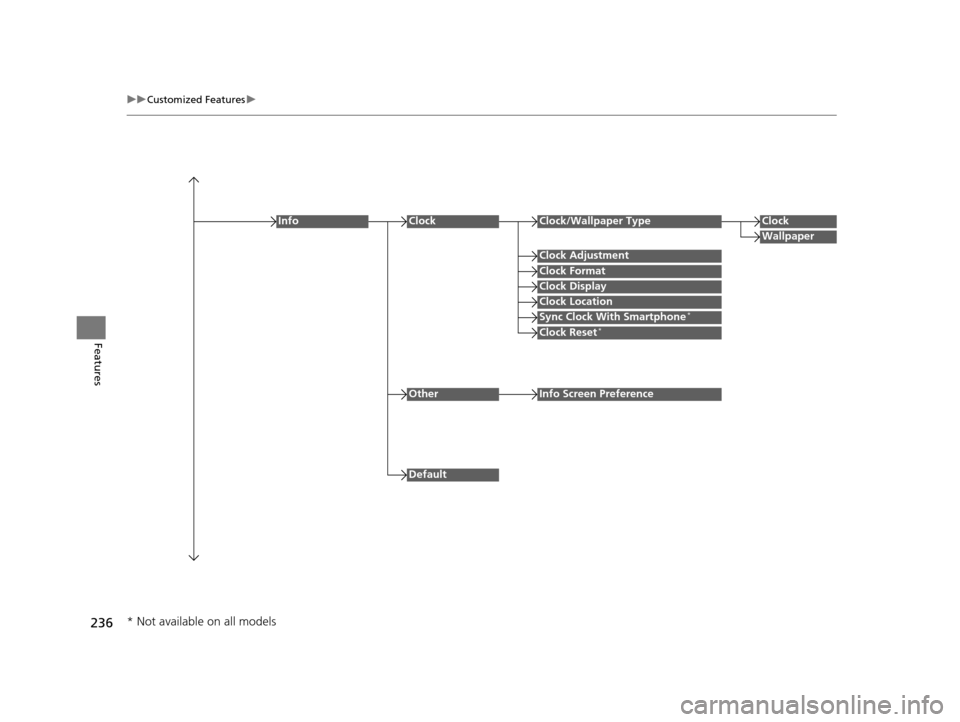
Clock Format
ClockClock/Wallpaper TypeClock
Wallpaper
Clock Adjustment
Clock Display
Clock Location
Sync Clock With Smartphone*
Clock Reset*
Info
Default
OtherInfo Screen Preference
* Not available on all models
15 US FIT-31T5A6000.book 236 ページ 2014年3月6日 木曜日 午後7時5分
Page 238 of 453
237
uuCustomized Features u
Continued
Features
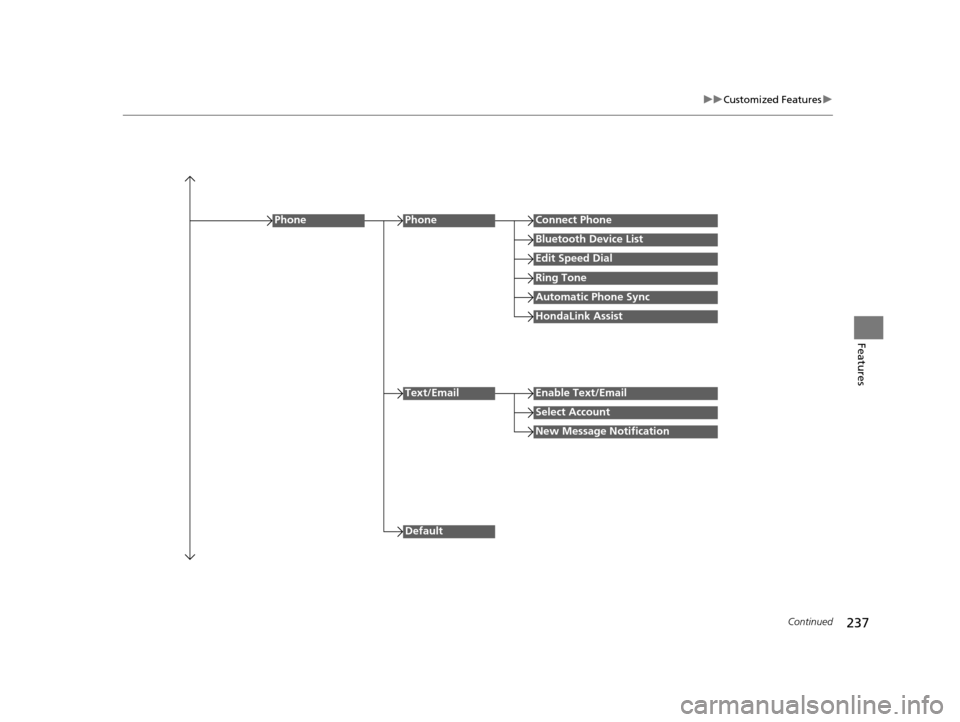
Edit Speed Dial
PhoneConnect Phone
Bluetooth Device List
Ring Tone
Automatic Phone Sync
HondaLink Assist
Phone
Default
Text/EmailEnable Text/Email
Select Account
New Message Notification
15 US FIT-31T5A6000.book 237 ページ 2014年3月6日 木曜日 午後7時5分
Page 241 of 453
240
uuCustomized Features u
Features
*1 : Default Setting
Setup
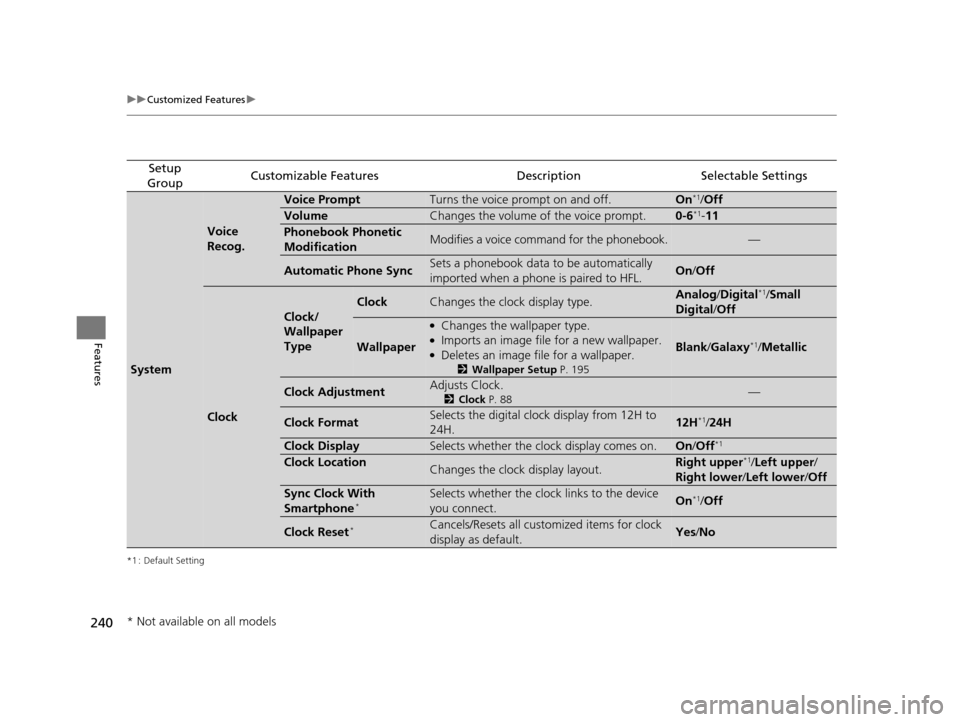
GroupCustomizable FeaturesDescriptionSelectable Settings
System
Voice
Recog.
Voice PromptTurns the voice prompt on and off.On*1/ Off
VolumeChanges the volume of the voice prompt.0-6*1- 11
Phonebook Phonetic
ModificationModifies a voice command for the phonebook.—
Automatic Phone SyncSets a phonebook data to be automatically
imported when a phone is paired to HFL.On /Off
Clock
Clock/
Wallpaper
Type
ClockChanges the clock display type.Analog /Digital*1/Small
Digital /Off
Wallpaper
●Changes the wallpaper type.●Imports an image file for a new wallpaper.●Deletes an image file for a wallpaper.
2 Wallpaper Setup P. 195
Blank/Galaxy*1/ Metallic
Clock AdjustmentAdjusts Clock.
2 Clock P. 88—
Clock FormatSelects the digital clock display from 12H to
24H.12H*1/24H
Clock DisplaySelects whether the clock display comes on.On /Off*1
Clock LocationChanges the clock display layout.Right upper*1/Left upper /
Right lower /Left lower /Off
Sync Clock With
Smartphone*Selects whether the clock links to the device
you connect. On*1/Off
Clock Reset*Cancels/Resets all customized items for clock
display as default.Yes /No
* Not available on all models
15 US FIT-31T5A6000.book 240 ページ 2014年3月6日 木曜日 午後7時5分
Page 243 of 453
![HONDA FIT 2015 3.G Owners Manual 242
uuCustomized Features u
Features
*1 : Default Setting
Setup
GroupCustomizable FeaturesDescriptionSelectable Settings
Audio [Your selected media]
Cover Art
Turns on and off the cover art display.](/img/13/5933/w960_5933-242.png "HONDA FIT 2015 3.G Owners Manual 242
uuCustomized Features u
Features
*1 : Default Setting
Setup
GroupCustomizable FeaturesDescriptionSelectable Settings
Audio [Your selected media]
Cover Art
Turns on and off the cover art display.")
242
uuCustomized Features u
Features
*1 : Default Setting
Setup
GroupCustomizable FeaturesDescriptionSelectable Settings
Audio [Your selected media]
Cover Art
Turns on and off the cover art display.
On
*1/Off
Display
Adjustment Display
Brightness
2
System P. 239Contrast
Black Level
Color Color
Changes the color of
the audio/information
screen. —
Tint Changes the tint of
the audio/information
screen. —
Aspect Ratio Adjustment Changes the aspect ratio and zoom settings of
the audio/information screen.
Normal
/Full
*1/Zoom
Change Bluetooth Audio Device Connects, disconnects or pairs a
Bluetooth®
Audio device to HFL. —
Bluetooth Device List Pairs a new phone to HFL, edits or deletes a
paired phone.
2
Phone Setup P. 279
—
Default Cancels/Resets all customized items in the
Audio
group as default. Yes
/No
iPod or USB mode
HDMI ® mode
HDMI ® mode
Bluetooth ® Audio mode
Bluetooth ® Audio mode
15 US FIT-31T5A6000.book 242 ページ 2014年3月6日 木曜日 午後7時5分
Page 244 of 453
243
uuCustomized Features u
Continued
Features
*1 : Default Setting
Setup
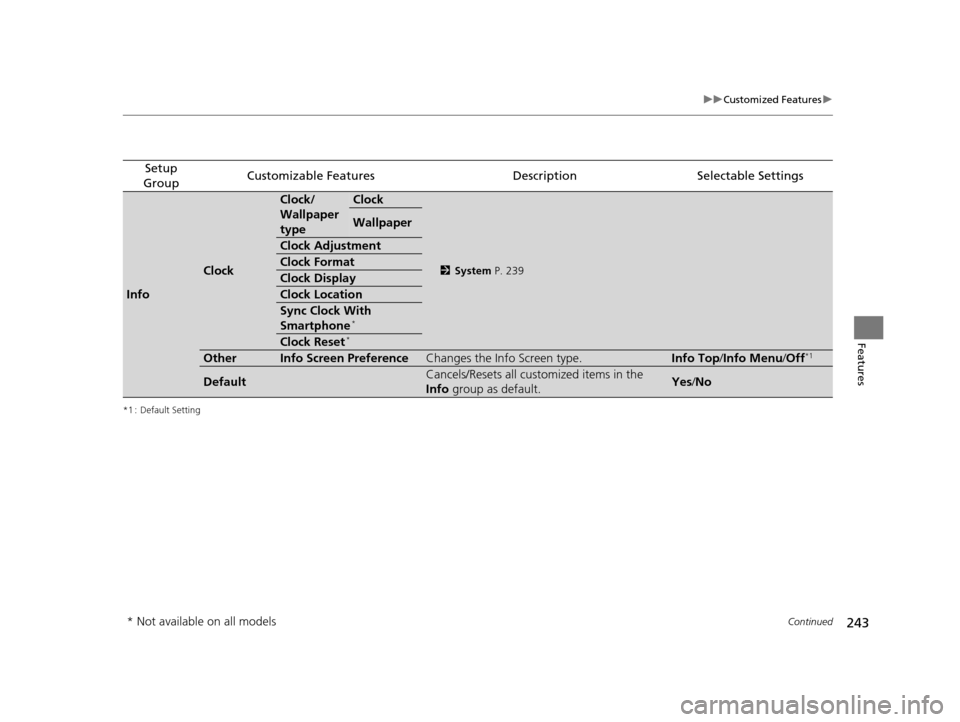
GroupCustomizable FeaturesDescriptionSelectable Settings
Info
Clock
Clock/
Wallpaper
typeClock
2 System P. 239
Wallpaper
Clock Adjustment
Clock Format
Clock Display
Clock Location
Sync Clock With
Smartphone*
Clock Reset*
OtherInfo Screen PreferenceChanges the Info Screen type.Info Top /Info Menu/ Off*1
DefaultCancels/Resets all customized items in the
Info group as default.Yes/No
* Not available on all models
15 US FIT-31T5A6000.book 243 ページ 2014年3月6日 木曜日 午後7時5分
Page 245 of 453
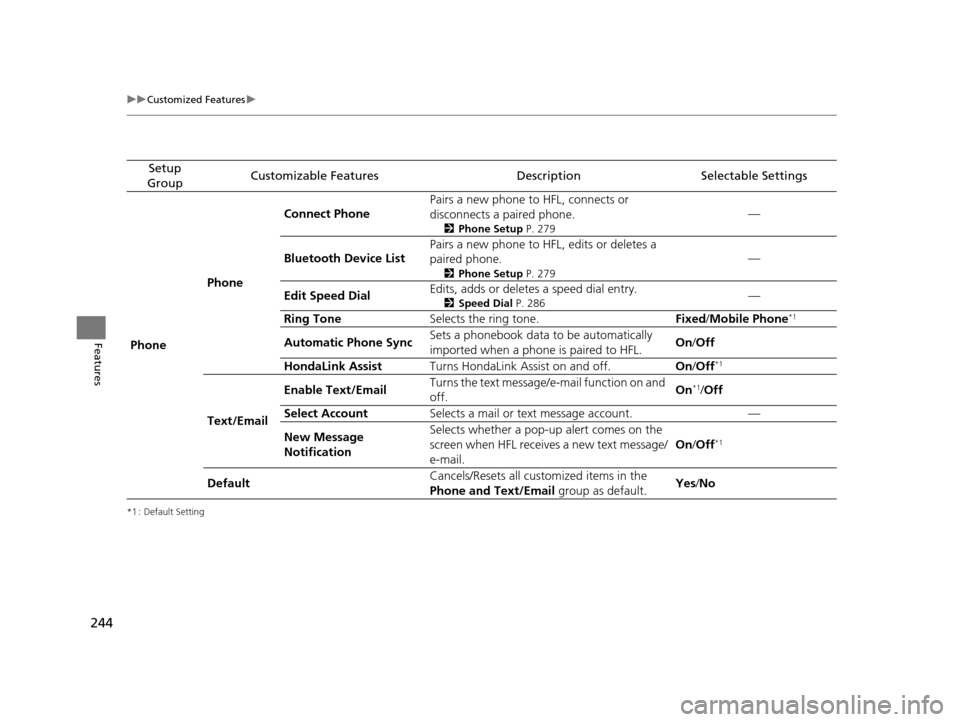
244
uuCustomized Features u
Features
*1 : Default Setting
Setup
GroupCustomizable FeaturesDescriptionSelectable Settings
Phone PhoneConnect Phone
Pairs a new phone to HFL, connects or
disconnects a paired phone.
2
Phone Setup P. 279
—
Bluetooth Device List Pairs a new phone to HFL, edits or deletes a
paired phone.
2
Phone Setup P. 279
—
Edit Speed Dial Edits, adds or deletes a speed dial entry.
2
Speed Dial P. 286—
Ring Tone Selects the ring tone. Fixed/Mobile Phone
*1
Automatic Phone Sync Sets a phonebook data to be automatically
imported when a phone is paired to HFL. On
/Off
HondaLink Assist Turns HondaLink Assist on and off. On/Off
*1
Text/Email Enable Text/Email
Turns the text message/
e-mail function on and
off. On
*1/
Off
Select Account Selects a mail or text message account. —
New Message
Notification Selects whether a pop-up
alert comes on the
screen when HFL receives a new text message/
e-mail. On
/Off
*1
Default Cancels/Resets all customized items in the
Phone and Text/Email
group as default.Yes
/No
15 US FIT-31T5A6000.book 244 ページ 2014年3月6日 木曜日 午後7時5分