econ HONDA FIT 2015 3.G Service Manual
[x] Cancel search | Manufacturer: HONDA, Model Year: 2015, Model line: FIT, Model: HONDA FIT 2015 3.GPages: 453, PDF Size: 21.19 MB
Page 188 of 453
187
uuAudio System Basic Operation uPlaying a USB Flash Drive
Features
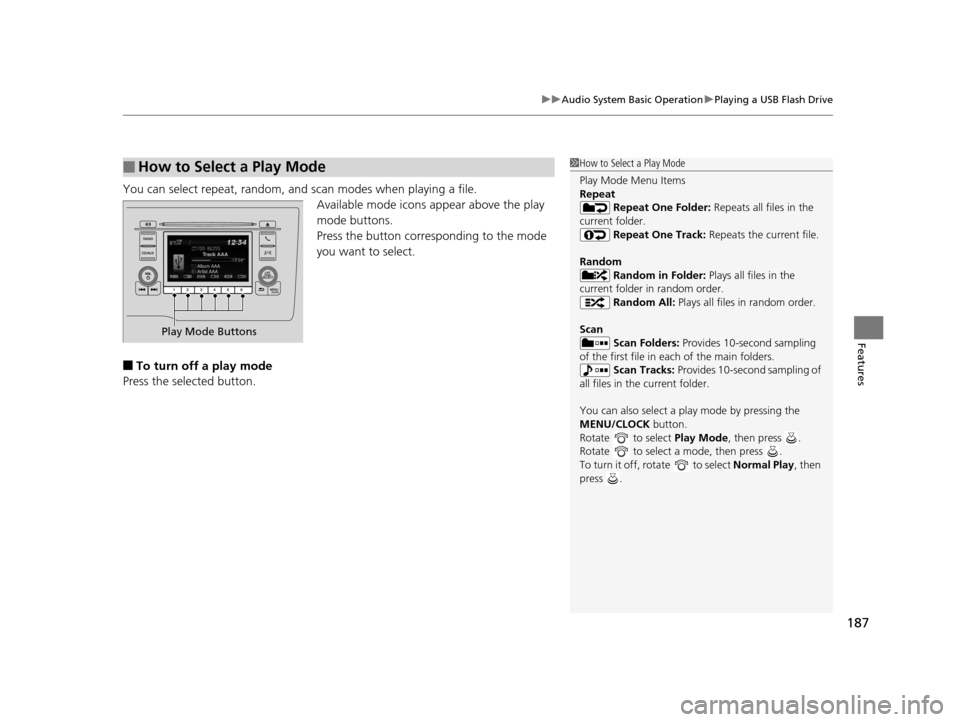
You can select repeat, random, and scan modes when playing a file.
Available mode icons appear above the play
mode buttons.
Press the button corresponding to the mode
you want to select.
■To turn off a play mode
Press the selected button.
■How to Select a Play Mode1 How to Select a Play Mode
Play Mode Menu Items
Repeat
Repeat One Folder: Repeats all files in the
current folder. Repeat One Track: Repeats the current file.
Random Random in Folder: Plays all files in the
current folder in random order. Random All: Plays all files in random order.
Scan Scan Folders: Provides 10-second sampling
of the first file in each of the main folders.
Scan Tracks: Provides 10-second sampling of
all files in the current folder.
You can also select a pl ay mode by pressing the
MENU/CLOCK button.
Rotate to select Play Mode, then press .
Rotate to select a mode, then press .
To turn it off, rotate to select Normal Play, then
press .
Play Mode Buttons
15 US FIT-31T5A6000.book 187 ページ 2014年3月6日 木曜日 午後7時5分
Page 202 of 453
201
uuAudio System Basic Operation uPlaying the AM/FM Radio
Features
■Radio text
Displays the radio text informat ion of the selected RDS station.
1. Select MENU .
2. Select View Radio Text .
■Scan
Samples each of the strongest stations on the selected band for 10 seconds.
1. Select MENU .
2. Select Scan.
To turn off scan, select Cancel.
15 US FIT-31T5A6000.book 201 ページ 2014年3月6日 木曜日 午後7時5分
Page 204 of 453
Continued203
uuAudio System Basic Operation uPlaying a CD
Features
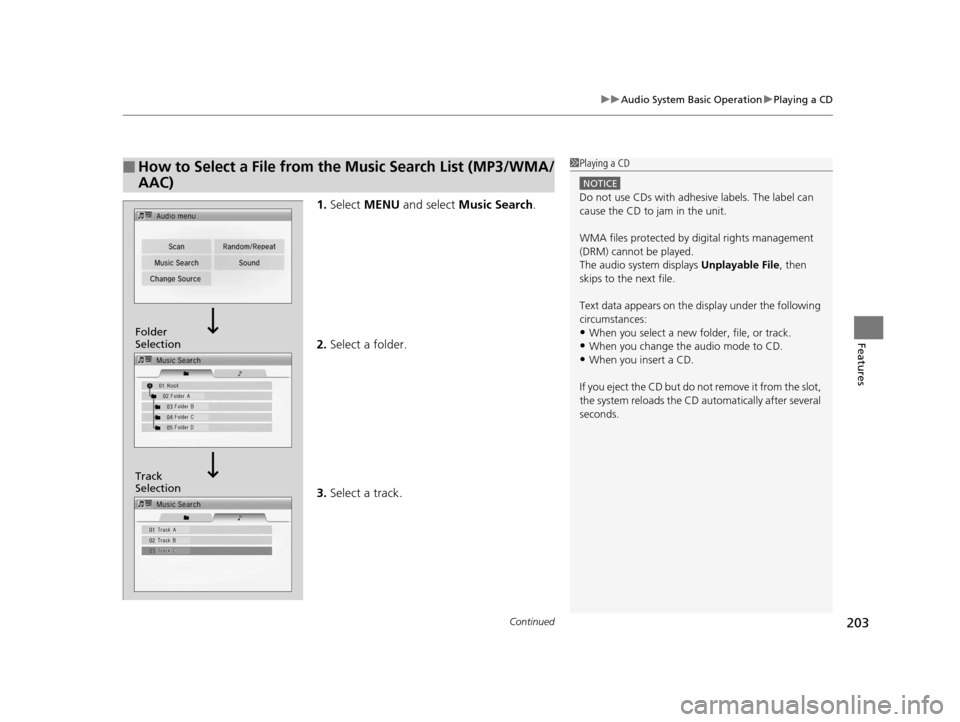
1. Select MENU and select Music Search .
2. Select a folder.
3. Select a track.
■How to Select a File from the Music Search List (MP3/WMA/
AAC)1Playing a CD
NOTICE
Do not use CDs with adhesive labels. The label can
cause the CD to jam in the unit.
WMA files protected by di gital rights management
(DRM) cannot be played.
The audio system displays Unplayable File, then
skips to the next file.
Text data appears on the di splay under the following
circumstances:
•When you select a new folder, file, or track.
•When you change the audio mode to CD.
•When you insert a CD.
If you eject the CD but do not remove it from the slot,
the system reloads the CD automatically after several
seconds.
Track
Selection Folder
Selection
15 US FIT-31T5A6000.book 203 ページ 2014年3月6日 木曜日 午後7時5分
Page 205 of 453
uuAudio System Basic Operation uPlaying a CD
204
Features
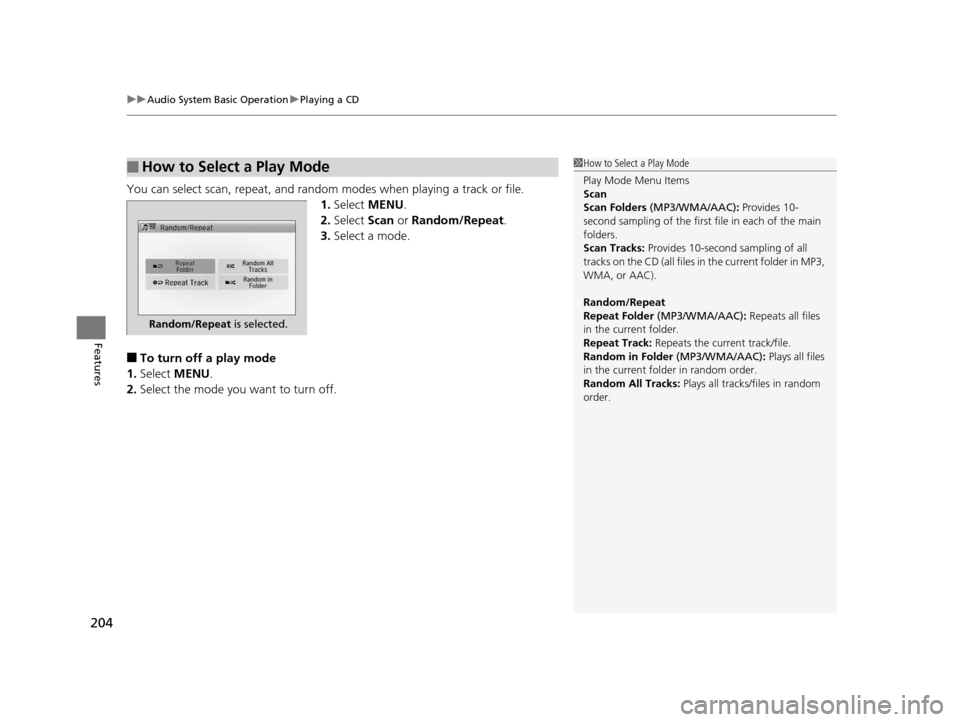
You can select scan, repeat, and random modes when playing a track or file.
1. Select MENU .
2. Select Scan or Random/Repeat .
3. Select a mode.
■To turn off a play mode
1. Select MENU .
2. Select the mode you want to turn off.
■How to Select a Play Mode1How to Select a Play Mode
Play Mode Menu Items
Scan
Scan Folders (MP3/WMA/AAC): Provides 10-
second sampling of the first f ile in each of the main
folders.
Scan Tracks: Provides 10-second sampling of all
tracks on the CD (all files in the current folder in MP3,
WMA, or AAC).
Random/Repeat
Repeat Folder (MP3/WMA/AAC): Repeats all files
in the current folder.
Repeat Track: Repeats the current track/file.
Random in Folder (MP3/WMA/AAC) : Plays all files
in the current folder in random order.
Random All Tracks: Plays all tracks/files in random
order.
Random/Repeat is selected.
15 US FIT-31T5A6000.book 204 ページ 2014年3月6日 木曜日 午後7時5分
Page 207 of 453
uuAudio System Basic Operation uPlaying an iPod
206
Features
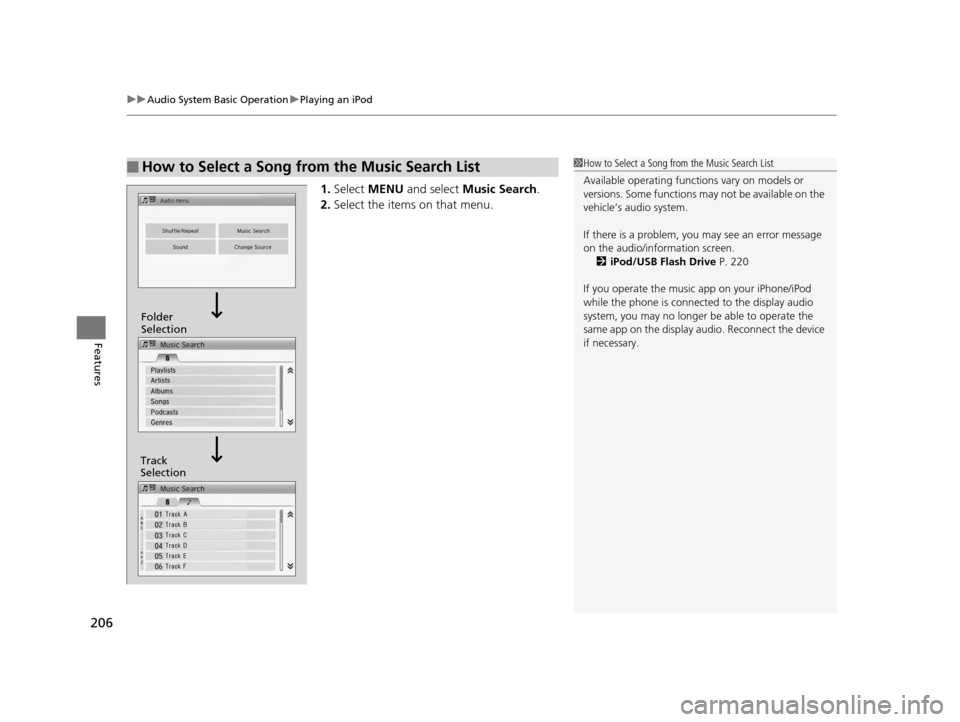
1. Select MENU and select Music Search .
2. Select the items on that menu.
■How to Select a Song from the Music Search List1How to Select a Song from the Music Search List
Available operating functi ons vary on models or
versions. Some functions ma y not be available on the
vehicle’s audio system.
If there is a problem, you may see an error message
on the audio/information screen. 2 iPod/USB Flash Drive P. 220
If you operate the musi c app on your iPhone/iPod
while the phone is connecte d to the display audio
system, you may no longer be able to operate the
same app on the display audi o. Reconnect the device
if necessary.
Track
Selection Folder
Selection
15 US FIT-31T5A6000.book 206 ページ 2014年3月6日 木曜日 午後7時5分
Page 213 of 453
uuAudio System Basic Operation uPlaying a USB Flash Drive
212
Features
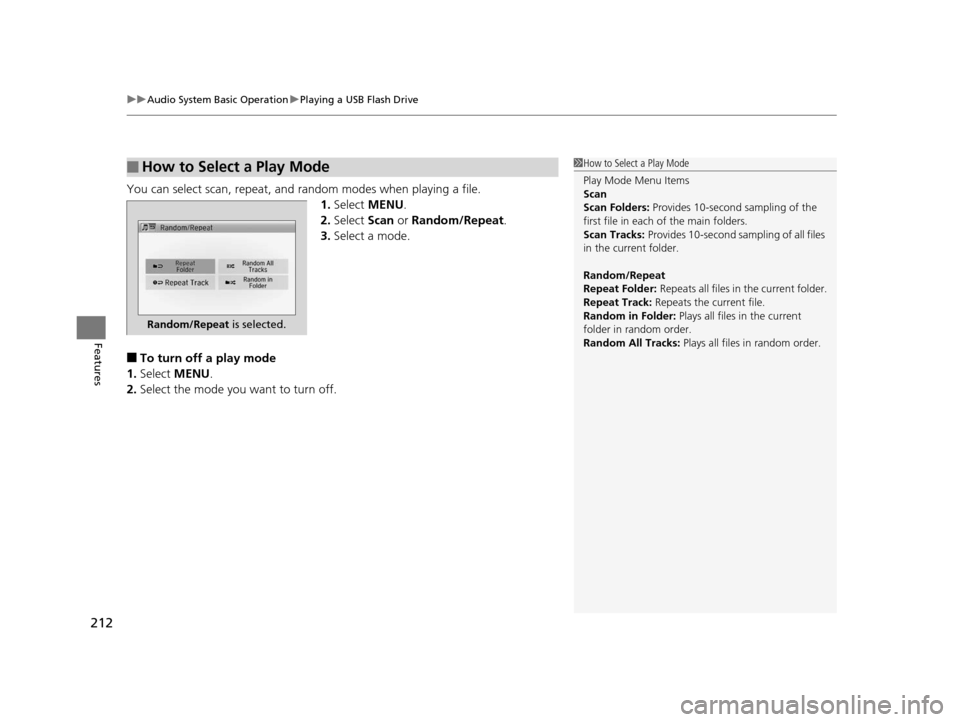
You can select scan, repeat, and random modes when playing a file.
1.Select MENU .
2. Select Scan or Random/Repeat .
3. Select a mode.
■To turn off a play mode
1. Select MENU .
2. Select the mode you want to turn off.
■How to Select a Play Mode1How to Select a Play Mode
Play Mode Menu Items
Scan
Scan Folders: Provides 10-second sampling of the
first file in each of the main folders.
Scan Tracks: Provides 10-second sa mpling of all files
in the current folder.
Random/Repeat
Repeat Folder: Repeats all files in the current folder.
Repeat Track: Repeats the current file.
Random in Folder: Plays all files in the current
folder in random order.
Random All Tracks: Plays all files in random order.
Random/Repeat is selected.
15 US FIT-31T5A6000.book 212 ページ 2014年3月6日 木曜日 午後7時5分
Page 221 of 453
220
uuAudio Error Messages uiPod/USB Flash Drive
Features
iPod/USB Flash Drive
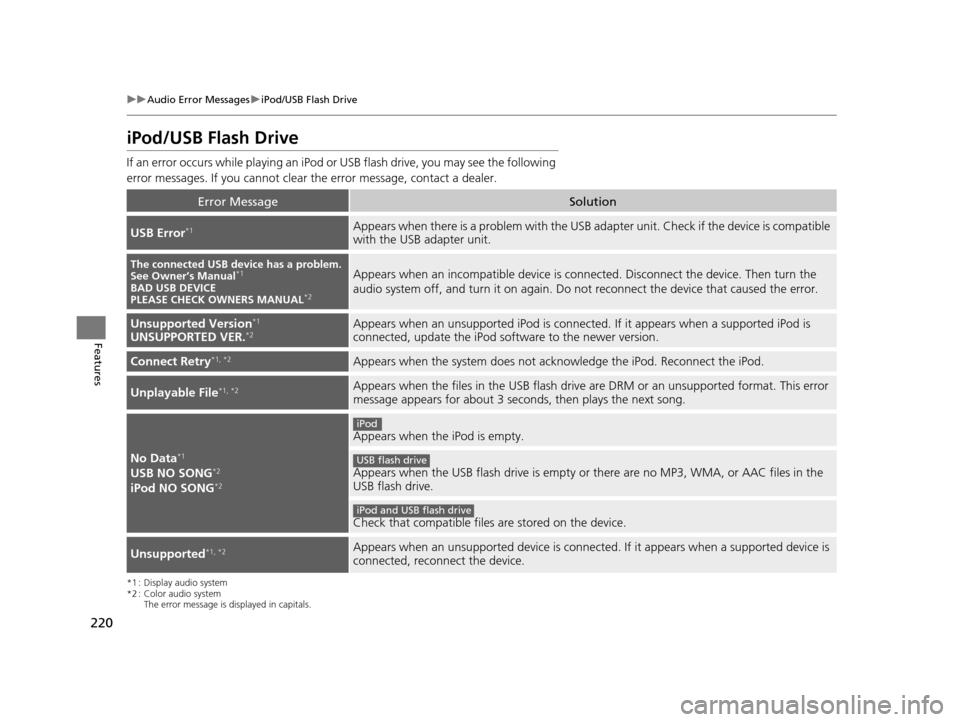
If an error occurs while play ing an iPod or USB flash driv e, you may see the following
error messages. If you cannot clear the error message, contact a dealer.
*1 : Display audio system
*2 : Color audio system
The error message is displayed in capitals.
Error MessageSolution
USB Error*1Appears when there is a problem with the USB adapter unit. Check if the device is compatible
with the USB adapter unit.
The connected USB device has a problem.
See Owner’s Manual*1
BAD USB DEVICE
PLEASE CHECK OWNERS MANUAL*2
Appears when an incompatible device is connected. Discon nect the device. Then turn the
audio system off, and turn it on again. Do not reconnect the device that caused the error.
Unsupported Version*1
UNSUPPORTED VER.*2Appears when an unsupported iPod is connected. If it appears when a supported iPod is
connected, update the iPod software to the newer version.
Connect Retry*1, *2Appears when the system does not acknowledge the iPod. Reconnect the iPod.
Unplayable File*1, *2Appears when the files in the USB flash drive are DRM or an unsupported format. This error
message appears for about 3 second s, then plays the next song.
No Data*1
USB NO SONG*2
iPod NO SONG*2
Appears when the iPod is empty.
Appears when the USB flash drive is empty or there are no MP3, WMA, or AAC files in the
USB flash drive.
Check that compatible files are stored on the device.
Unsupported*1, *2Appears when an unsupported device is connected. If it appears when a supported device is
connected, reconnect the device.
iPod
USB flash drive
iPod and USB flash drive
15 US FIT-31T5A6000.book 220 ページ 2014年3月6日 木曜日 午後7時5分
Page 223 of 453
222
uuAudio Error Messages uPandora®
Features
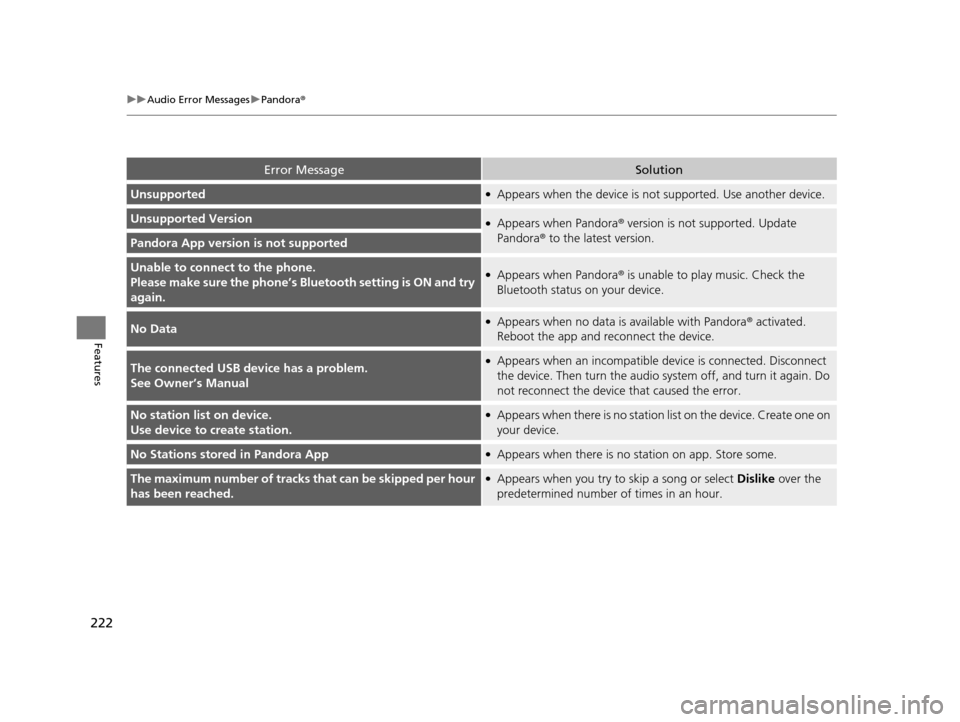
Error MessageSolution
Unsupported●Appears when the device is no t supported. Use another device.
Unsupported Version●Appears when Pandora® version is not supported. Update
Pandora ® to the latest version.
Pandora App version is not supported
Unable to connec t to the phone.
Please make sure the phone’s Bl uetooth setting is ON and try
again.●Appears when Pandora ® is unable to play music. Check the
Bluetooth status on your device.
No Data●Appears when no data is available with Pandora® activated.
Reboot the app and reconnect the device.
The connected USB device has a problem.
See Owner’s Manual●Appears when an incompatible de vice is connected. Disconnect
the device. Then turn the audio syst em off, and turn it again. Do
not reconnect the device that caused the error.
No station list on device.
Use device to create station.●Appears when there is no station list on the device. Create one on
your device.
No Stations stored in Pandora App●Appears when there is no station on app. Store some.
The maximum number of tracks that can be skipped per hour
has been reached.●Appears when you try to skip a song or select Dislike over the
predetermined number of times in an hour.
15 US FIT-31T5A6000.book 222 ページ 2014年3月6日 木曜日 午後7時5分
Page 233 of 453
232
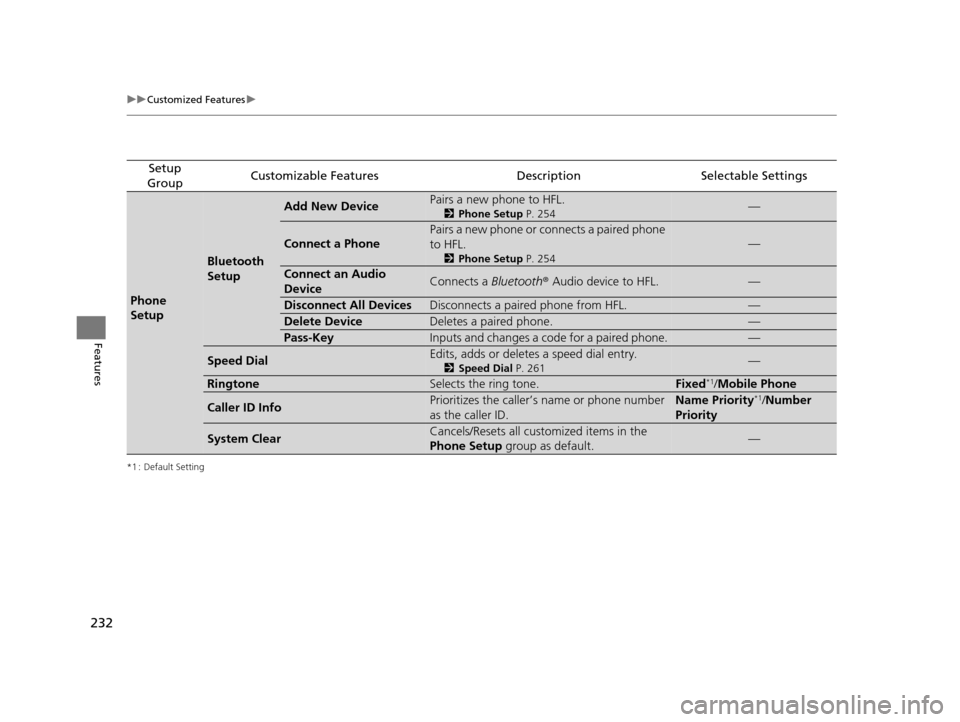
uuCustomized Features u
Features
*1 : Default Setting
Setup
GroupCustomizable FeaturesDescriptionSelectable Settings
Phone
Setup
Bluetooth
Setup
Add New DevicePairs a new phone to HFL.
2 Phone Setup P. 254—
Connect a Phone
Pairs a new phone or connects a paired phone
to HFL.
2Phone Setup P. 254
—
Connect an Audio
DeviceConnects a Bluetooth® Audio device to HFL.—
Disconnect All DevicesDisconnects a paired phone from HFL.—
Delete DeviceDeletes a paired phone.—
Pass-KeyInputs and changes a code for a paired phone.—
Speed DialEdits, adds or deletes a speed dial entry.
2Speed Dial P. 261—
RingtoneSelects the ring tone.Fixed*1/Mobile Phone
Caller ID InfoPrioritizes the caller’s name or phone number
as the caller ID.Name Priority*1/ Number
Priority
System ClearCancels/Resets all customized items in the
Phone Setup group as default.—
15 US FIT-31T5A6000.book 232 ページ 2014年3月6日 木曜日 午後7時5分
Page 238 of 453
237
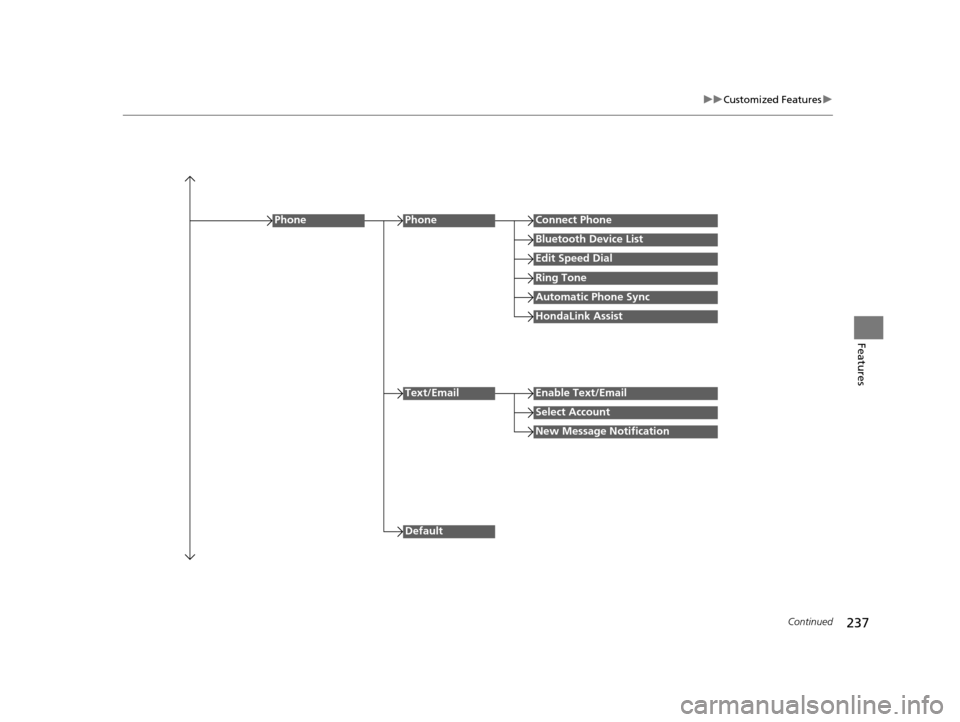
uuCustomized Features u
Continued
Features
Edit Speed Dial
PhoneConnect Phone
Bluetooth Device List
Ring Tone
Automatic Phone Sync
HondaLink Assist
Phone
Default
Text/EmailEnable Text/Email
Select Account
New Message Notification
15 US FIT-31T5A6000.book 237 ページ 2014年3月6日 木曜日 午後7時5分