econ mode HONDA FIT 2015 3.G Service Manual
[x] Cancel search | Manufacturer: HONDA, Model Year: 2015, Model line: FIT, Model: HONDA FIT 2015 3.GPages: 453, PDF Size: 21.19 MB
Page 213 of 453
uuAudio System Basic Operation uPlaying a USB Flash Drive
212
Features
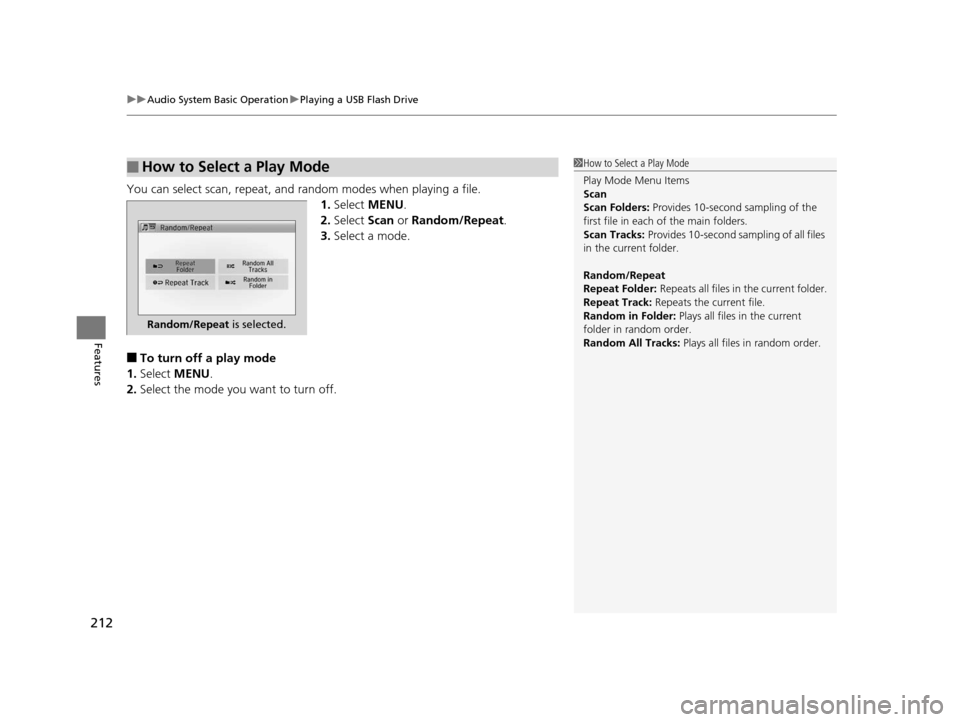
You can select scan, repeat, and random modes when playing a file.
1.Select MENU .
2. Select Scan or Random/Repeat .
3. Select a mode.
■To turn off a play mode
1. Select MENU .
2. Select the mode you want to turn off.
■How to Select a Play Mode1How to Select a Play Mode
Play Mode Menu Items
Scan
Scan Folders: Provides 10-second sampling of the
first file in each of the main folders.
Scan Tracks: Provides 10-second sa mpling of all files
in the current folder.
Random/Repeat
Repeat Folder: Repeats all files in the current folder.
Repeat Track: Repeats the current file.
Random in Folder: Plays all files in the current
folder in random order.
Random All Tracks: Plays all files in random order.
Random/Repeat is selected.
15 US FIT-31T5A6000.book 212 ページ 2014年3月6日 木曜日 午後7時5分
Page 275 of 453
274
uuBluetooth ® HandsFreeLink ®u HFL Menus
Features
HFL Menus
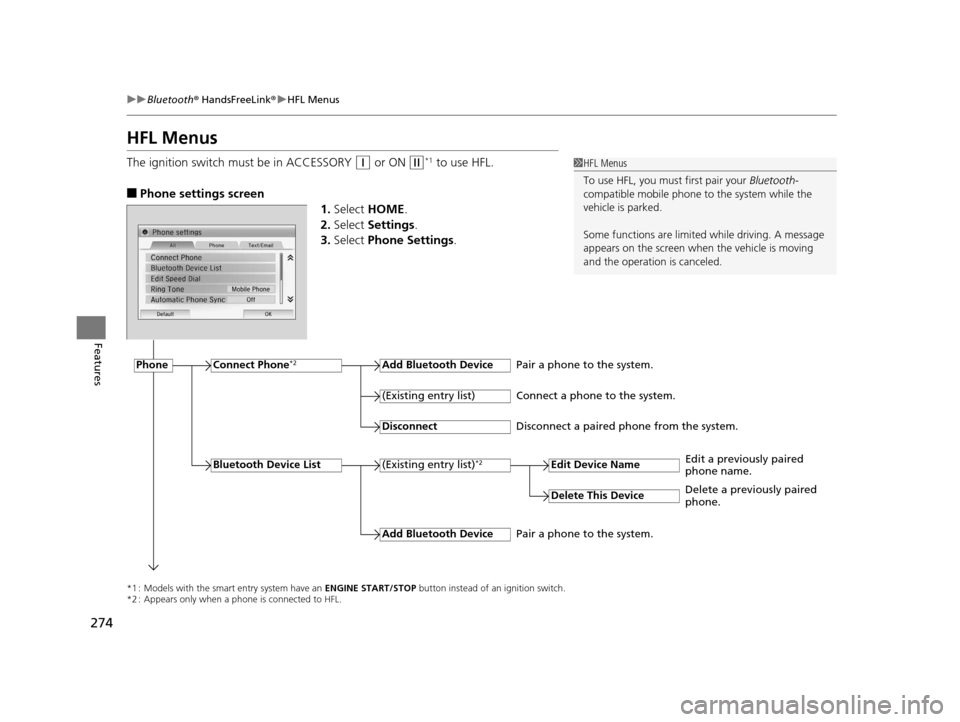
The ignition switch must be in ACCESSORY (q or ON (w*1 to use HFL.
■Phone settings screen
1.Select HOME .
2. Select Settings .
3. Select Phone Settings.
1HFL Menus
To use HFL, you must first pair your Bluetooth-
compatible mobile phone to the system while the
vehicle is parked.
Some functions are limited while driving. A message
appears on the screen when the vehicle is moving
and the operation is canceled.
*1 : Models with the smart entry system have an ENGINE START/STOP button instead of an ignition switch.
*2 : Appears only when a phone is connected to HFL.
PhoneConnect Phone*2Add Bluetooth Device
(Existing entry list)*2
(Existing entry list)
Disconnect
Edit Device Name
Add Bluetooth Device
Bluetooth Device List
Delete This Device
Pair a phone to the system.
Connect a phone to the system.
Disconnect a paired phone from the system.
Edit a previously paired
phone name.
Pair a phone to the system. Delete a previously paired
phone.
15 US FIT-31T5A6000.book 274 ページ 2014年3月6日 木曜日 午後7時5分
Page 302 of 453
301
Driving
This chapter discusses driving, refueling, and information on items such as accessories.
Before Driving
Driving Preparation .............................. 302
Maximum Load Limit............................ 305
Towing a Trailer Towing Your Vehicle ............................ 308
When Driving
Starting the Engine .............................. 311
Starting the Engine .............................. 313
Precautions While Driving..................... 317
Automatic Transmission (CVT)
*............ 318
Shifting ................................................ 319
Models without smart entry system
Models with smart entry system
Automatic transmission (CVT) models
without paddle shifters
Shifting................................................ 321
Shifting................................................ 325
ECON Button
*..................................... 328
Cruise Control*................................... 329Vehicle Stability Assist (VSA®), aka Electronic
Stability Control (ESC), System ............... 332
LaneWatchTM*...................................... 334
Tire Pressure Monitoring System (TPMS) .. 336
Tire Pressure Monitoring System (TPMS) -
Required Federal Explanation ............. 338
Automatic transmission (CVT) models
with paddle shifters
Manual transmission models
Braking Brake System ........................................ 340
Anti-lock Brake System (ABS) ................ 342
Brake Assist System .............................. 343
Parking Your Vehicle When Stopped ..................................... 344
Multi-View Rear Camera ....................... 345
Refueling Fuel Information ................................... 347
How to Refuel ...................................... 348
Fuel Economy ......................................... 350
Improving Fuel Economy....................... 350
Accessories and Modifications Accessories ........................................... 351
Modifications ....................................... 351
* Not available on all models
15 US FIT-31T5A6000.book 301 ページ 2014年3月6日 木曜日 午後7時5分
Page 313 of 453
uuWhen Driving uStarting the Engine
312
Driving
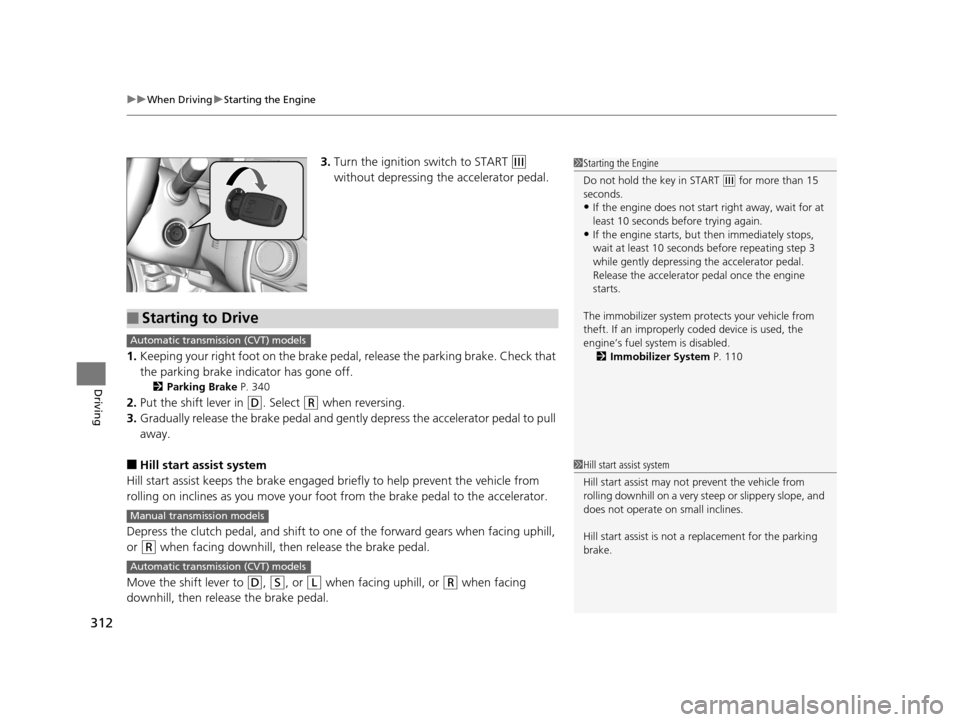
3. Turn the ignition switch to START (e
without depressing the accelerator pedal.
1. Keeping your right foot on the brake peda l, release the parking brake. Check that
the parking brake indicator has gone off.
2 Parking Brake P. 340
2.Put the shift lever in (D. Select (R when reversing.
3. Gradually release the brake pedal and gently depress the accelerator pedal to pull
away.
■Hill start assist system
Hill start assist keeps the brake engaged br iefly to help prevent the vehicle from
rolling on inclines as you move your fo ot from the brake pedal to the accelerator.
Depress the clutch pedal, and shift to on e of the forward gears when facing uphill,
or
(R when facing downhill, then release the brake pedal.
Move the shift lever to
(D, (S, or (L when facing uphill, or (R when facing
downhill, then release the brake pedal.
1 Starting the Engine
Do not hold the key in START
(e for more than 15
seconds.
•If the engine does not sta rt right away, wait for at
least 10 seconds before trying again.
•If the engine starts, but then immediately stops,
wait at least 10 seconds before repeating step 3
while gently depressing the accelerator pedal.
Release the accelerator pedal once the engine
starts.
The immobilizer system pr otects your vehicle from
theft. If an improperly c oded device is used, the
engine’s fuel system is disabled. 2 Immobilizer System P. 110
■Starting to Drive
Automatic transmission (CVT) models
Manual transmission models
Automatic transmission (CVT) models
1Hill start assist system
Hill start assist may not prevent the vehicle from
rolling downhill on a very steep or slippe ry slope, and
does not operate on small inclines.
Hill start assist is not a replacement for the parking
brake.
15 US FIT-31T5A6000.book 312 ページ 2014年3月6日 木曜日 午後7時5分
Page 324 of 453
Continued323
uuWhen Driving uShifting
Driving
Use the paddle shifters to change betw een 1st and 7th speeds without removing
your hands from the steering wheel. The transmission switches to the 7-speed
manual shift mode when you pull a paddle shifter while driving. This mode is useful
when engine braking is needed.
■When the shift lever is in (D:
The shift mode goes into the 7-speed ma nual shift mode temporarily, and the
number is displayed in the shift indicator.
The 7-speed manual shift mode is canceled automatically if you drive at constant
speed or accelerate, and the number in the shift indicator goes off.
You can cancel this mode by pulling the paddle shifter for a few seconds.
The 7-speed manual shift mode is especially useful when reducing the vehicle speed
temporarily before making a turn.
■When the shift lever is in (S:
The shift mode goes into the 7-speed manual shift mode. The M indicator and the
speed number are displayed in the shift indicator. As the vehicle speed slows down,
the transmission automatically shifts down accordingly. When the vehicle comes to
a stop, it automatically shifts down into 1st.
If the vehicle speed increases and the engi ne speed reaches near the tachometer’s
red zone, the transmission automatically shifts up.
You can only pull away in 1st speed.
When canceling the 7-speed manual shift mode, move the shift lever from
(S to
(D. When the 7-speed manual sh ift mode is canceled, the M indicator and shift
indicator go off.
■7-Speed Manual Shift Mode1 7-Speed Manual Shift Mode
To improve fuel economy, the transmission may shift
up to a higher speed than the seventh under certain
circumstances. In this case, the number in the shift
indicator remains as 7.
In the 7-speed manual shif t mode, the transmission
shifts up or down by operating either paddle shifter
under the following conditions:
Shift Up: The engine sp eed reaches the lowest
threshold of the hi gher speed position.
Shift Down: The engine sp eed reaches the highest
threshold of the lower speed position.
When the engine speed reaches near the
tachometer’s red zone, the transmission shifts up
automatically.
When the engine speed reaches the lowest threshold
of the selected speed positi on, the transmission shifts
down automatically.
Operating the paddle shifte rs on slippery surfaces
may cause the tires to lock up. In this case, the 7-
speed manual shift mode is canceled and goes back
to the normal D driving mode.
15 US FIT-31T5A6000.book 323 ページ 2014年3月6日 木曜日 午後7時5分
Page 325 of 453
uuWhen Driving uShifting
324
Driving
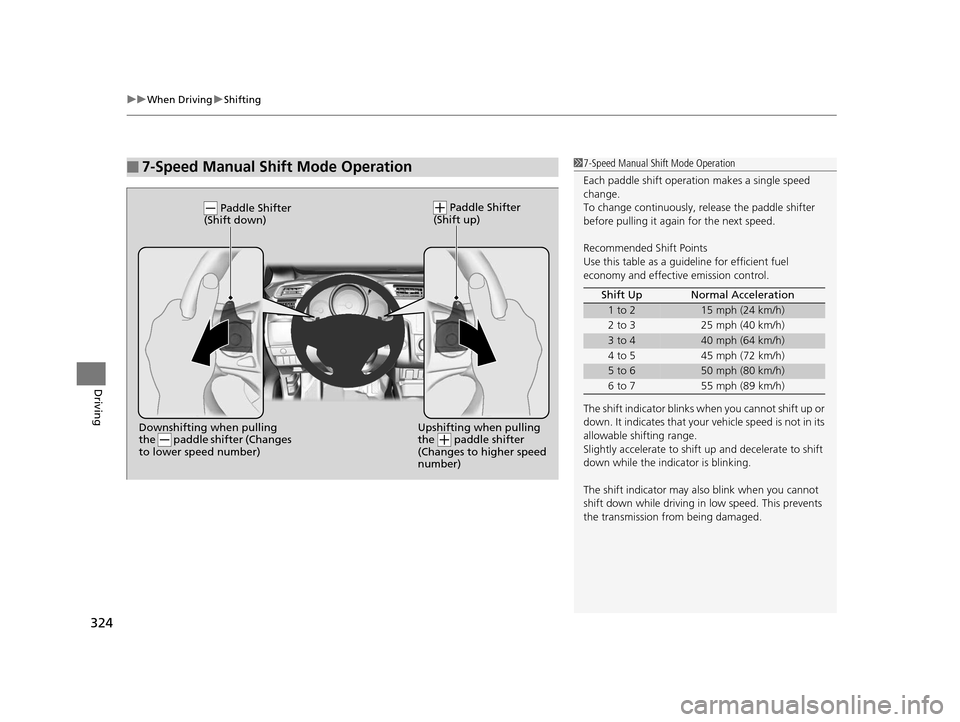
■7-Speed Manual Shift Mode Operation17-Speed Manual Shift Mode Operation
Each paddle shift operati on makes a single speed
change.
To change continuously, re lease the paddle shifter
before pulling it agai n for the next speed.
Recommended Shift Points
Use this table as a guideline for efficient fuel
economy and effectiv e emission control.
The shift indicator blinks when you cannot shift up or
down. It indicates that your vehicle speed is not in its
allowable shifting range.
Slightly accelerate to shift up and decelerate to shift
down while the indi cator is blinking.
The shift indicator may also blink when you cannot
shift down while driving in low speed. This prevents
the transmission from being damaged. Shift Up Normal Acceleration
1 to 215 mph (24 km/h)
2 to 3 25 mph (40 km/h)
3 to 440 mph (64 km/h)
4 to 5 45 mph (72 km/h)
5 to 650 mph (80 km/h)
6 to 7 55 mph (89 km/h)
Upshifting when pulling
the paddle shifter
(Changes to higher speed
number)Downshifting when pulling
the paddle shifter (Changes
to lower speed number)
Paddle Shifter
(Shift down) Paddle Shifter
(Shift up)
15 US FIT-31T5A6000.book 324 ページ 2014年3月6日 木曜日 午後7時5分
Page 326 of 453
325
uuWhen Driving uShifting
Continued
Driving
Shifting
Fully depress the clutch pedal to operate the shift lever and change gears, then
slowly release the pedal.
Depress the clutch pedal, and pause fo r a few seconds before shifting into
(R, or
shift into one of the forward gears for a mo ment. This stops the gears so they do not
“grind.”
■Shift Lever Operation
Manual transmission models
1 Shifting
NOTICE
Do not shift to (R before the vehicle comes to a
complete stop.
Shifting to
( R before stopping can damage the
transmission.
NOTICE
Before downshifting, make su re the engine will not
go into the tachometer’s red zone. Should this occur,
it can severely da mage your engine.
15 US FIT-31T5A6000.book 325 ページ 2014年3月6日 木曜日 午後7時5分
Page 329 of 453
328
uuWhen Driving uECON Button*
Driving
ECON Button*
The ECON button turns the ECON mode on
and off. The ECON mode helps you improve
your fuel economy by adjusting the
performance of the engine, transmission,
heating and cooling system
*/climate control
system*, and cruise control*.
1 ECON Button*
While in ECOM mode, the climate control system has
greater temperature fluctuations.
* Not available on all models
15 US FIT-31T5A6000.book 328 ページ 2014年3月6日 木曜日 午後7時5分
Page 330 of 453
329
uuWhen Driving uCruise Control*
Continued
Driving
Cruise Control*
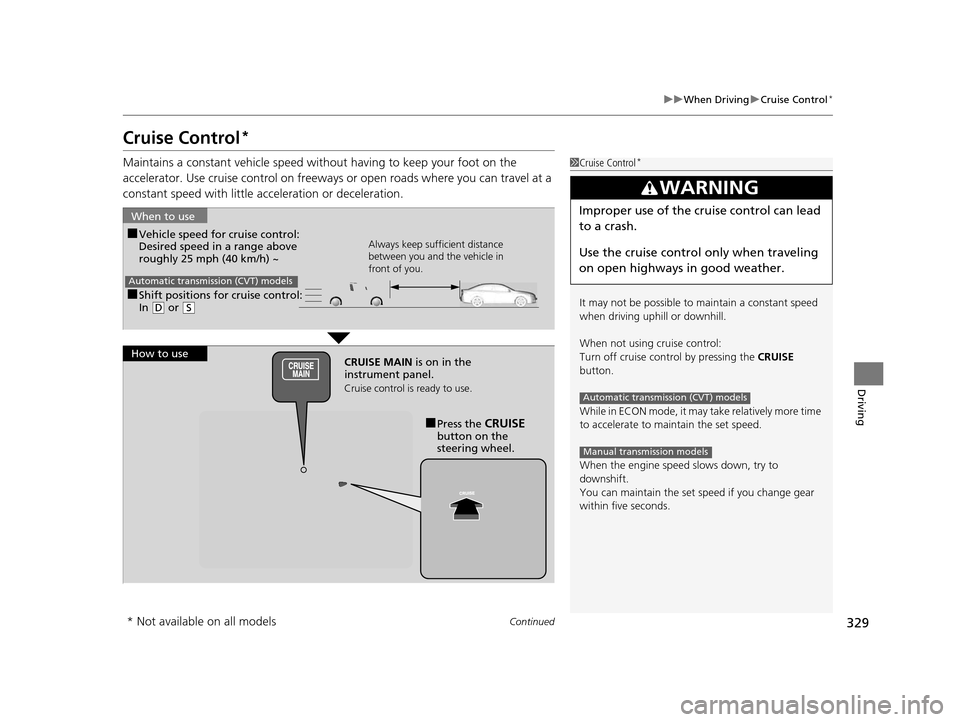
Maintains a constant vehicle speed without having to keep your foot on the
accelerator. Use cruise control on freeways or open road s where you can travel at a
constant speed with little ac celeration or deceleration.1Cruise Control*
It may not be possible to maintain a constant speed
when driving uphill or downhill.
When not using cruise control:
Turn off cruise control by pressing the CRUISE
button.
While in ECON mode, it may take relatively more time
to accelerate to maintain the set speed.
When the engine speed slows down, try to
downshift.
You can maintain the set sp eed if you change gear
within five seconds.
3WARNING
Improper use of the cruise control can lead
to a crash.
Use the cruise control only when traveling
on open highways in good weather.
Automatic transmission (CVT) models
Manual transmission models
■Shift positions for cruise control:
In ( D or (S
When to use
Always keep sufficient distance
between you and the vehicle in
front of you.
Automatic transmission (CVT) models
■Vehicle speed for cruise control:
Desired speed in a range above
roughly 25 mph (40 km/h) ~
How to use CRUISE MAIN is on in the
instrument panel.
Cruise control is ready to use.
■Press the CRUISE
button on the
steering wheel.
* Not available on all models
15 US FIT-31T5A6000.book 329 ページ 2014年3月6日 木曜日 午後7時5分
Page 332 of 453
331
uuWhen Driving uCruise Control*
Driving
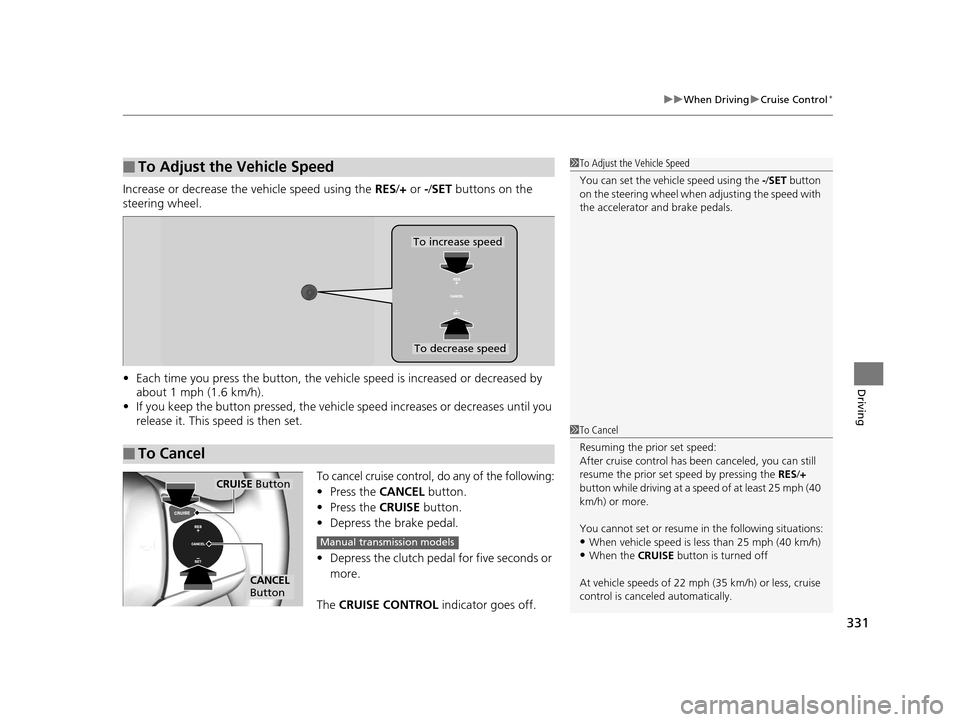
Increase or decrease the vehicle speed using the RES/+ or -/ SET buttons on the
steering wheel.
• Each time you press the button, the vehicl e speed is increased or decreased by
about 1 mph (1.6 km/h).
• If you keep the button pressed, the vehicl e speed increases or decreases until you
release it. This speed is then set.
To cancel cruise control, do any of the following:
• Press the CANCEL button.
• Press the CRUISE button.
• Depress the brake pedal.
• Depress the clutch pedal for five seconds or
more.
The CRUISE CONTROL indicator goes off.
■To Adjust the Vehicle Speed1To Adjust the Vehicle Speed
You can set the vehicle speed using the -/SET button
on the steering wheel when adjusting the speed with
the accelerator and brake pedals.
■To Cancel
To decrease speed
To increase speed
1 To Cancel
Resuming the prior set speed:
After cruise control has be en canceled, you can still
resume the prior set speed by pressing the RES/+
button while driving at a speed of at least 25 mph (40
km/h) or more.
You cannot set or resume in the following situations:
•When vehicle speed is less than 25 mph (40 km/h)•When the CRUISE button is turned off
At vehicle speeds of 22 m ph (35 km/h) or less, cruise
control is canceled automatically.
CRUISE Button
CANCEL
Button
Manual transmission models
15 US FIT-31T5A6000.book 331 ページ 2014年3月6日 木曜日 午後7時5分