display HONDA FIT 2015 3.G Repair Manual
[x] Cancel search | Manufacturer: HONDA, Model Year: 2015, Model line: FIT, Model: HONDA FIT 2015 3.GPages: 453, PDF Size: 21.19 MB
Page 219 of 453
218
uuAudio System Basic Operation uSiri Eyes Free
Features
Siri Eyes Free
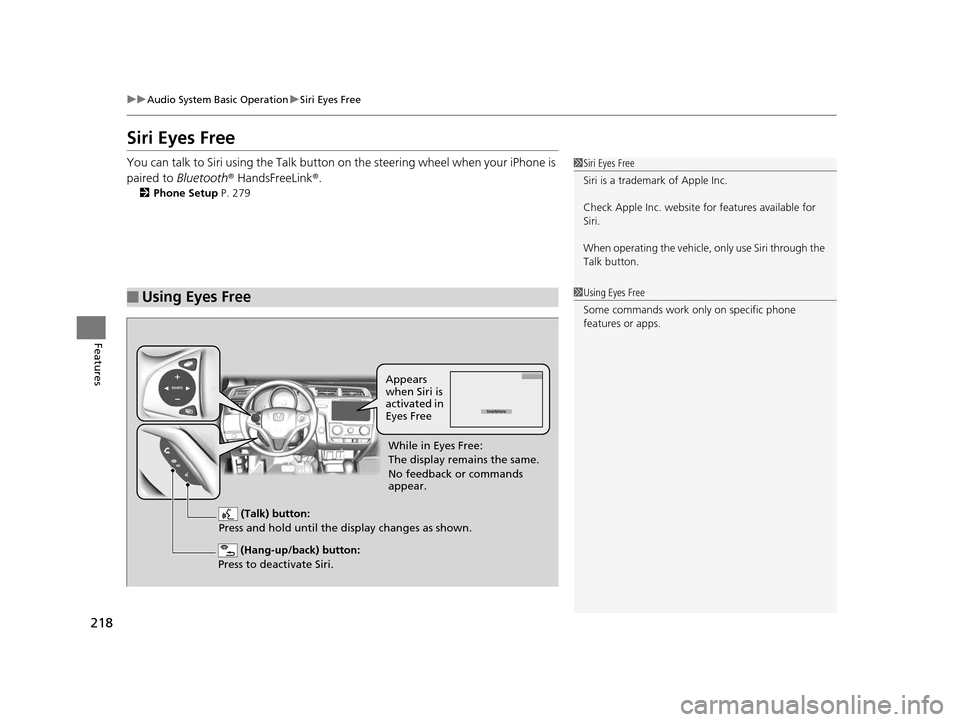
You can talk to Siri using the Talk button on the steering wheel when your iPhone is
paired to Bluetooth ® HandsFreeLink ®.
2 Phone Setup P. 279
■Using Eyes Free
1Siri Eyes Free
Siri is a trademark of Apple Inc.
Check Apple Inc. website for features available for
Siri.
When operating the vehicle, only use Siri through the
Talk button.
1 Using Eyes Free
Some commands work only on specific phone
features or apps.
(Hang-up/back) button:
Press to deactivate Siri.
(Talk) button:
Press and hold until the display changes as shown.
Appears
when Siri is
activated in
Eyes Free
While in Eyes Free:
The display remains the same.
No feedback or commands
appear.
15 US FIT-31T5A6000.book 218 ページ 2014年3月6日 木曜日 午後7時5分
Page 220 of 453
219
Features
Audio Error Messages
CD Player
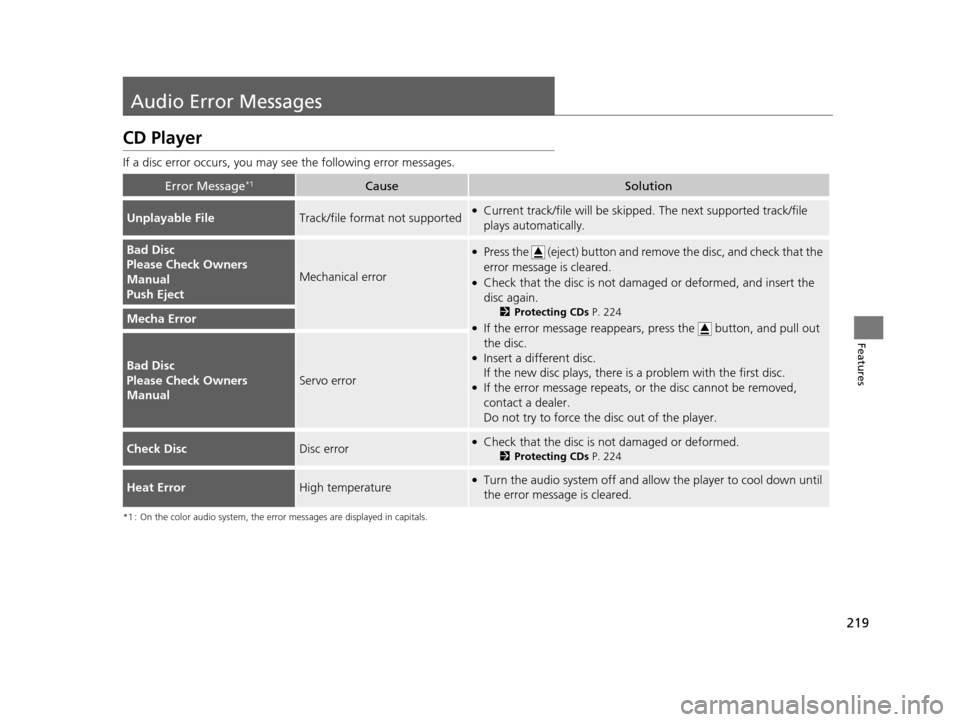
If a disc error occurs, you may see the following error messages.
*1 : On the color audio system, the error messages are displayed in capitals.
Error Message*1CauseSolution
Unplayable FileTrack/file format not supported●Current track/file will be skipped. The next supported track/file
plays automatically.
Bad Disc
Please Check Owners
Manual
Push Eject
Mechanical error
●Press the (eject) button and remo ve the disc, and check that the
error message is cleared.
●Check that the disc is not dama ged or deformed, and insert the
disc again.
2 Protecting CDs P. 224
●If the error message reappears, press the button, and pull out
the disc.
●Insert a different disc.
If the new disc plays, there is a problem with the first disc.
●If the error message repeats, or the disc cannot be removed,
contact a dealer.
Do not try to force the disc out of the player.
Mecha Error
Bad Disc
Please Check Owners
Manual
Servo error
Check DiscDisc error●Check that the disc is not damaged or deformed.
2Protecting CDs P. 224
Heat ErrorHigh temperature●Turn the audio system off and allo w the player to cool down until
the error message is cleared.
15 US FIT-31T5A6000.book 219 ページ 2014年3月6日 木曜日 午後7時5分
Page 221 of 453
220
uuAudio Error Messages uiPod/USB Flash Drive
Features
iPod/USB Flash Drive
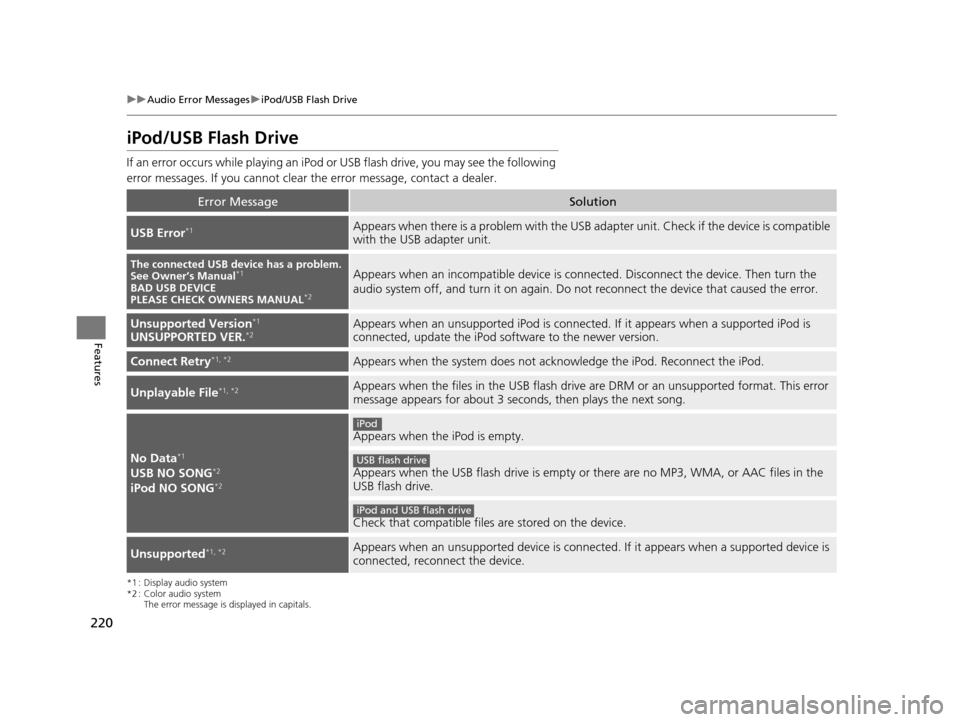
If an error occurs while play ing an iPod or USB flash driv e, you may see the following
error messages. If you cannot clear the error message, contact a dealer.
*1 : Display audio system
*2 : Color audio system
The error message is displayed in capitals.
Error MessageSolution
USB Error*1Appears when there is a problem with the USB adapter unit. Check if the device is compatible
with the USB adapter unit.
The connected USB device has a problem.
See Owner’s Manual*1
BAD USB DEVICE
PLEASE CHECK OWNERS MANUAL*2
Appears when an incompatible device is connected. Discon nect the device. Then turn the
audio system off, and turn it on again. Do not reconnect the device that caused the error.
Unsupported Version*1
UNSUPPORTED VER.*2Appears when an unsupported iPod is connected. If it appears when a supported iPod is
connected, update the iPod software to the newer version.
Connect Retry*1, *2Appears when the system does not acknowledge the iPod. Reconnect the iPod.
Unplayable File*1, *2Appears when the files in the USB flash drive are DRM or an unsupported format. This error
message appears for about 3 second s, then plays the next song.
No Data*1
USB NO SONG*2
iPod NO SONG*2
Appears when the iPod is empty.
Appears when the USB flash drive is empty or there are no MP3, WMA, or AAC files in the
USB flash drive.
Check that compatible files are stored on the device.
Unsupported*1, *2Appears when an unsupported device is connected. If it appears when a supported device is
connected, reconnect the device.
iPod
USB flash drive
iPod and USB flash drive
15 US FIT-31T5A6000.book 220 ページ 2014年3月6日 木曜日 午後7時5分
Page 222 of 453
221
uuAudio Error Messages uPandora ®
Continued
Features
Pandora ®
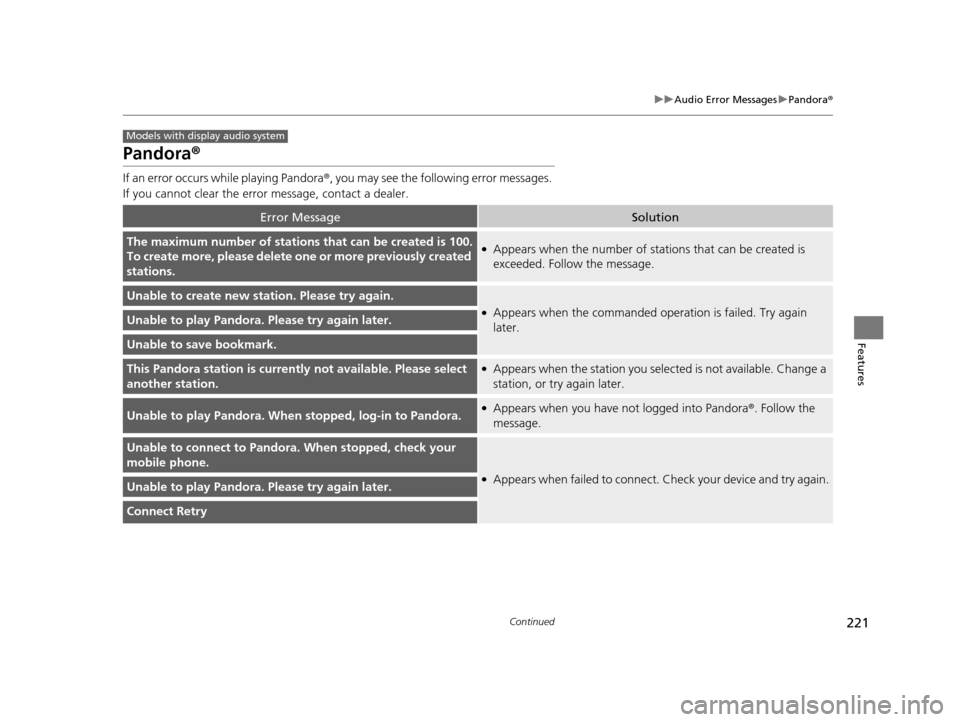
If an error occurs while playing Pandora ®, you may see the following error messages.
If you cannot clear the error message, contact a dealer.
Error MessageSolution
The maximum number of stations that can be created is 100.
To create more, please delete one or more previously created
stations.●Appears when the number of stations that can be created is
exceeded. Follow the message.
Unable to create new station. Please try again.
●Appears when the commanded op eration is failed. Try again
later.Unable to play Pandora. Please try again later.
Unable to save bookmark.
This Pandora station is currentl y not available. Please select
another station.●Appears when the station you selected is not available. Change a
station, or try again later.
Unable to play Pandora. When stopped, log-in to Pandora.●Appears when you have not logged into Pandora®. Follow the
message.
Unable to connect to Pandora. When stopped, check your
mobile phone.
●Appears when failed to connect. Check your device and try again.Unable to play Pandora. Please try again later.
Connect Retry
Models with display audio system
15 US FIT-31T5A6000.book 221 ページ 2014年3月6日 木曜日 午後7時5分
Page 224 of 453
223Continued
Features
General Information on the Audio System
Recommended CDs
•Use only high-quality CD-R or CD-RW discs labeled for audio use.
• Use only CD-R or CD-RW discs on wh ich the recordings are closed.
• Play only standard round-shaped CDs.
• Some software files may not allow for audio play or text data display.
• Some versions of MP3, WMA, or AAC formats may be unsupported.1Recommended CDs
A Dual-disc cannot play on th is audio unit. If recorded
under certain conditions, a CD-R or CD-RW may not
play either.
■CDs with MP3, WMA, or AAC files
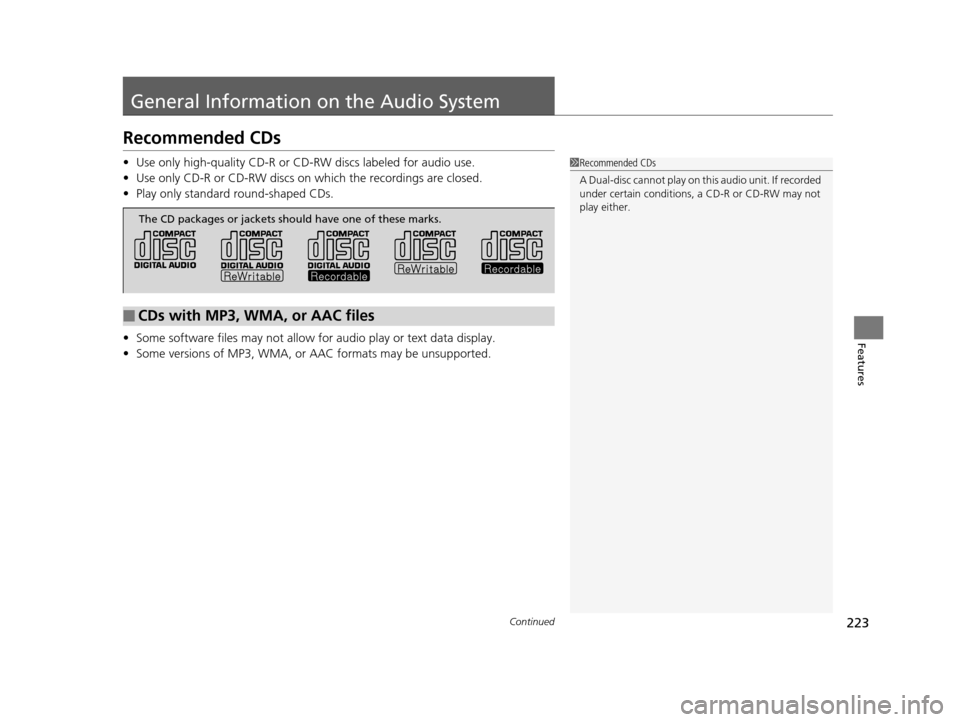
The CD packages or jackets should have one of these marks.
15 US FIT-31T5A6000.book 223 ページ 2014年3月6日 木曜日 午後7時5分
Page 226 of 453
225
uuGeneral Information on the Audio System uCompatible iPod, iPhone, and USB Flash Drives
Features
Compatible iPod, iPhone , and USB Flash Drives
•Use a recommended USB flash drive of 256 MB or higher.
• Some digital audio players may not be compatible.
• Some USB flash drives (e.g., a device with security lockout) may not work.
• Some software files may not allow for audio play or text data display.
• Some versions of MP3, WMA, or AAC formats may be unsupported.
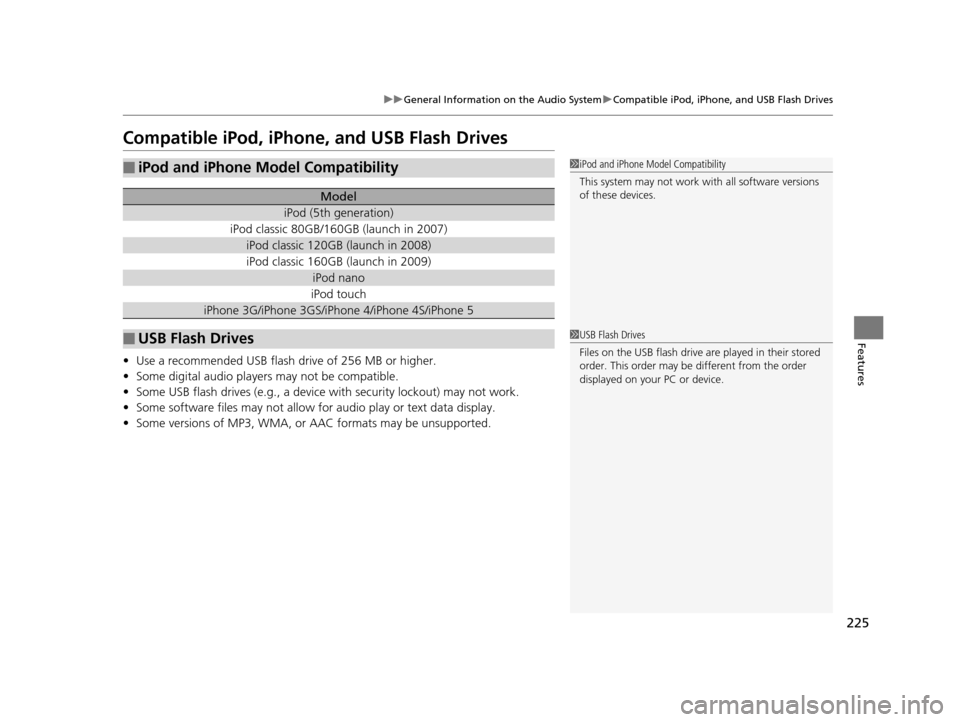
■iPod and iPhone Model Compatibility
Model
iPod (5th generation)
iPod classic 80GB/160GB (launch in 2007)
iPod classic 120GB (launch in 2008)
iPod classic 160GB (launch in 2009)
iPod nano
iPod touch
iPhone 3G/iPhone 3GS/iPhone 4/iPhone 4S/iPhone 5
■USB Flash Drives
1iPod and iPhone Model Compatibility
This system may not work with all software versions
of these devices.
1USB Flash Drives
Files on the USB flash drive are played in their stored
order. This order may be different from the order
displayed on your PC or device.
15 US FIT-31T5A6000.book 225 ページ 2014年3月6日 木曜日 午後7時5分
Page 228 of 453
227
uuCustomized Features u
Continued
Features
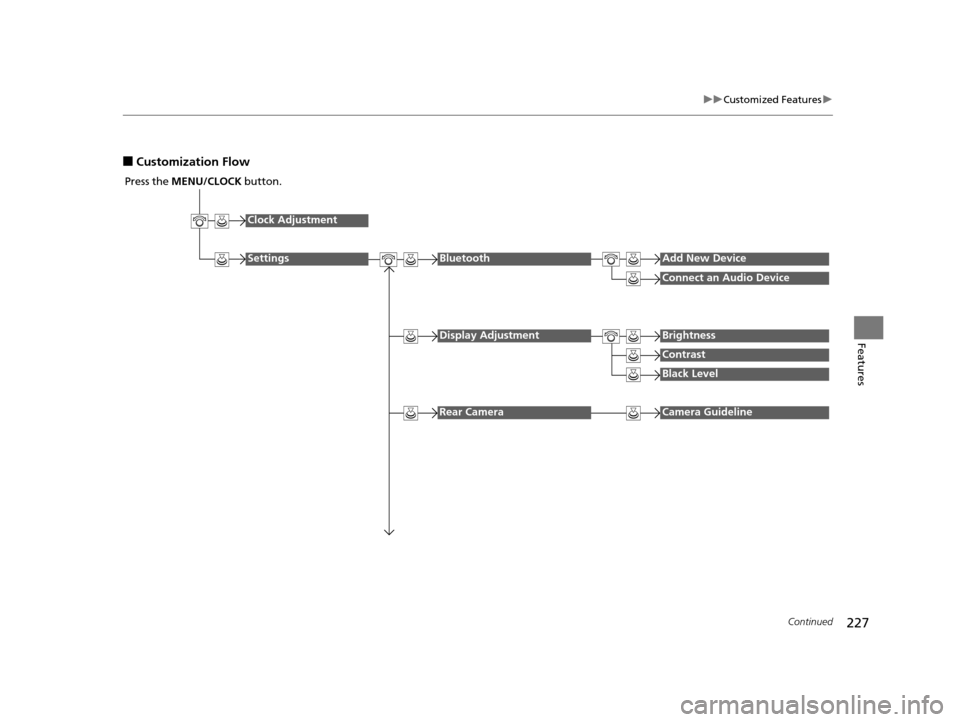
■Customization Flow
Press the MENU/CLOCK button.
Clock Adjustment
SettingsBluetoothAdd New Device
Connect an Audio Device
Display AdjustmentBrightness
Contrast
Black Level
Rear CameraCamera Guideline
15 US FIT-31T5A6000.book 227 ページ 2014年3月6日 木曜日 午後7時5分
Page 229 of 453
228
uuCustomized Features u
Features
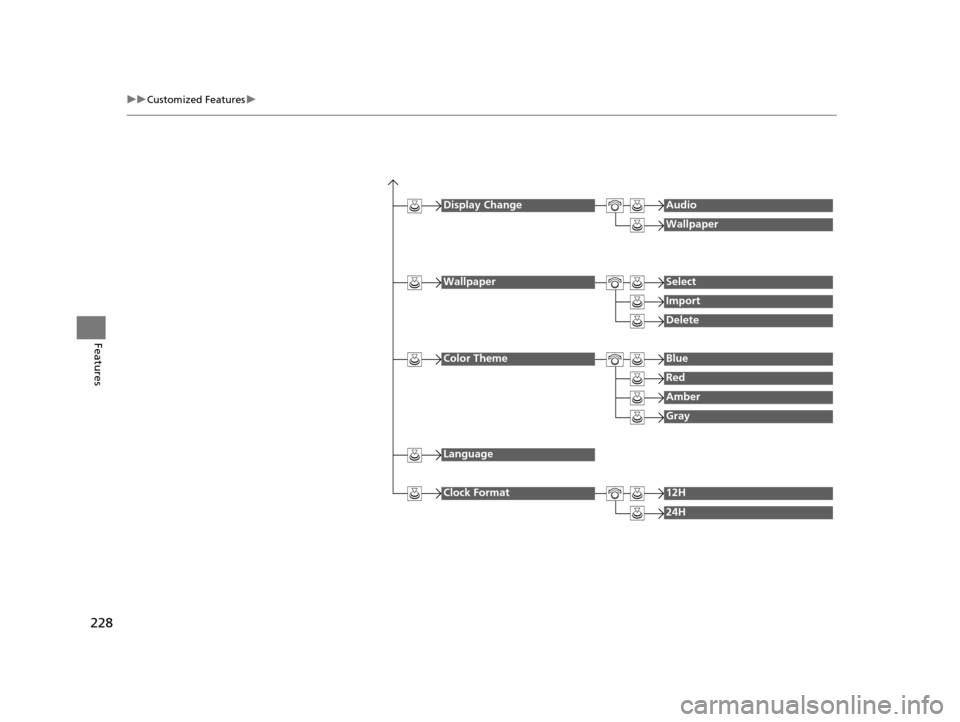
Display ChangeAudio
Wallpaper
WallpaperSelect
Import
Delete
Color ThemeBlue
Red
Amber
Gray
Language
Clock Format12H
24H
15 US FIT-31T5A6000.book 228 ページ 2014年3月6日 木曜日 午後7時5分
Page 231 of 453
230
uuCustomized Features u
Features
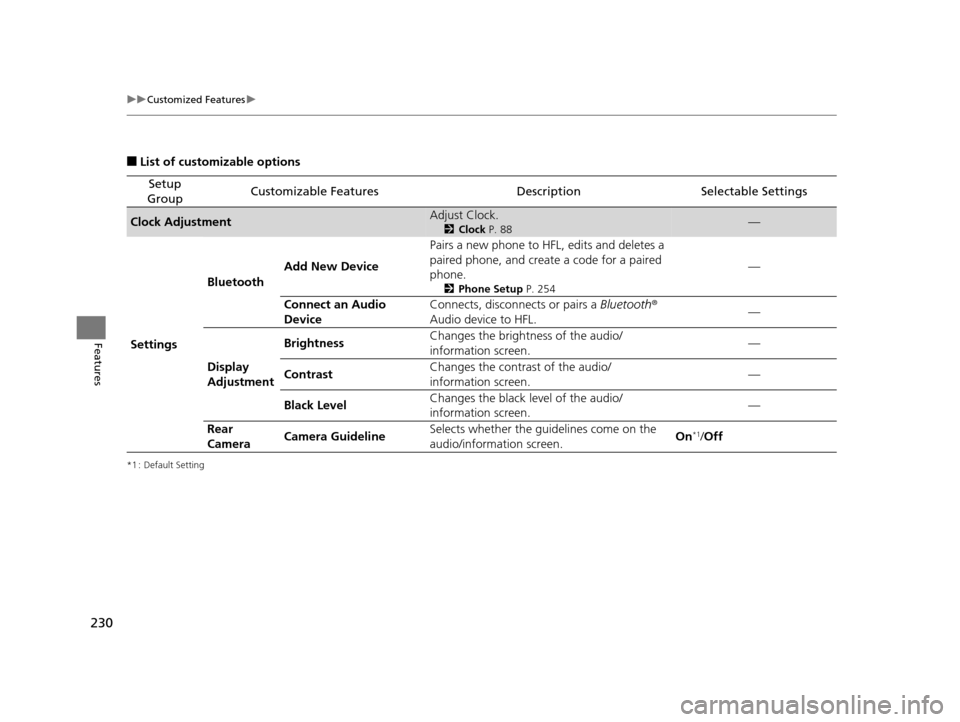
■List of customizable options
*1 : Default Setting
Setup
GroupCustomizable FeaturesDescriptionSelectable Settings
Clock AdjustmentAdjust Clock.
2 Clock P. 88—
Settings Bluetooth
Add New Device Pairs a new phone to HFL, edits and deletes a
paired phone, and create a code for a paired
phone.
2
Phone Setup P. 254
—
Connect an Audio
Device Connects, disconnects or pairs a
Bluetooth®
Audio device to HFL. —
Display
Adjustment Brightness
Changes the brightness of the audio/
information screen.
—
Contrast Changes the contrast of the audio/
information screen. —
Black Level Changes the black level of the audio/
information screen. —
Rear
Camera Camera Guideline Selects whether the guidelines come on the
audio/information screen.
On
*1/
Off
15 US FIT-31T5A6000.book 230 ページ 2014年3月6日 木曜日 午後7時5分
Page 232 of 453
231
uuCustomized Features u
Continued
Features
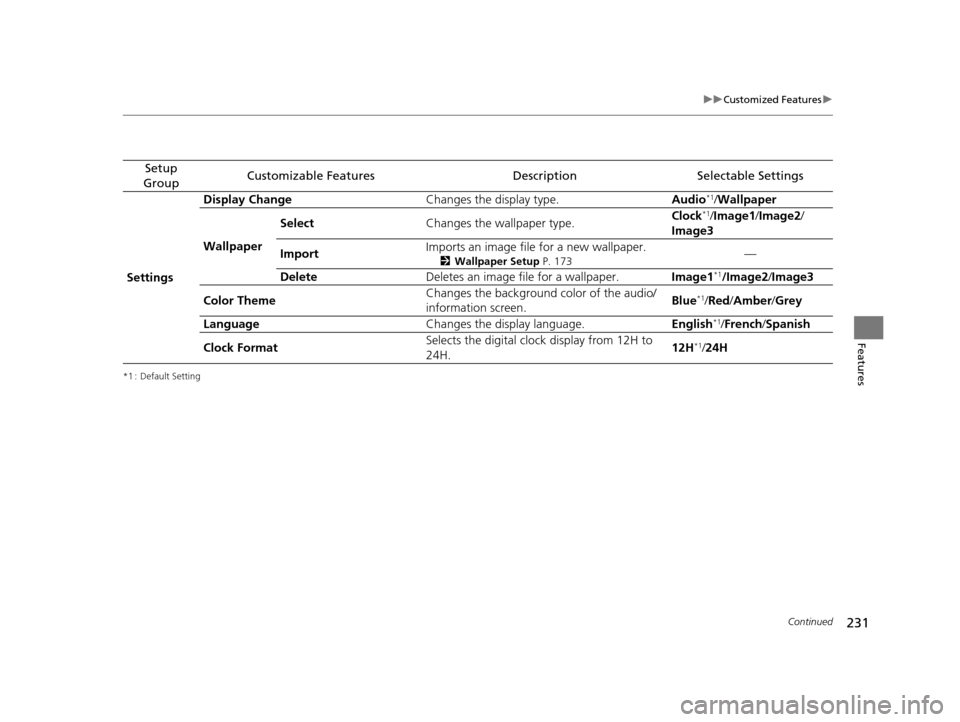
*1 : Default Setting
Setup
GroupCustomizable FeaturesDescriptionSelectable Settings
Settings Display Change
Changes the display type. Audio
*1/Wallpaper
Wallpaper Select
Changes the wallpaper type. Clock*1/
Image1 /Image2/
Image3
Import Imports an image file for a new wallpaper.
2
Wallpaper Setup P. 173—
Delete Deletes an image file for a wallpaper. Image1
*1/Image2/Image3
Color Theme Changes the background color of the audio/
information screen.
Blue
*1/
Red /Amber /Grey
Language Changes the display language. English
*1/French /Spanish
Clock Format Selects the digital clock display from 12H to
24H. 12H
*1/
24H
15 US FIT-31T5A6000.book 231 ページ 2014年3月6日 木曜日 午後7時5分