Jack HONDA FIT 2015 3.G Owners Manual
[x] Cancel search | Manufacturer: HONDA, Model Year: 2015, Model line: FIT, Model: HONDA FIT 2015 3.GPages: 453, PDF Size: 21.19 MB
Page 7 of 453
Visual Index
6
Quick Reference Guide
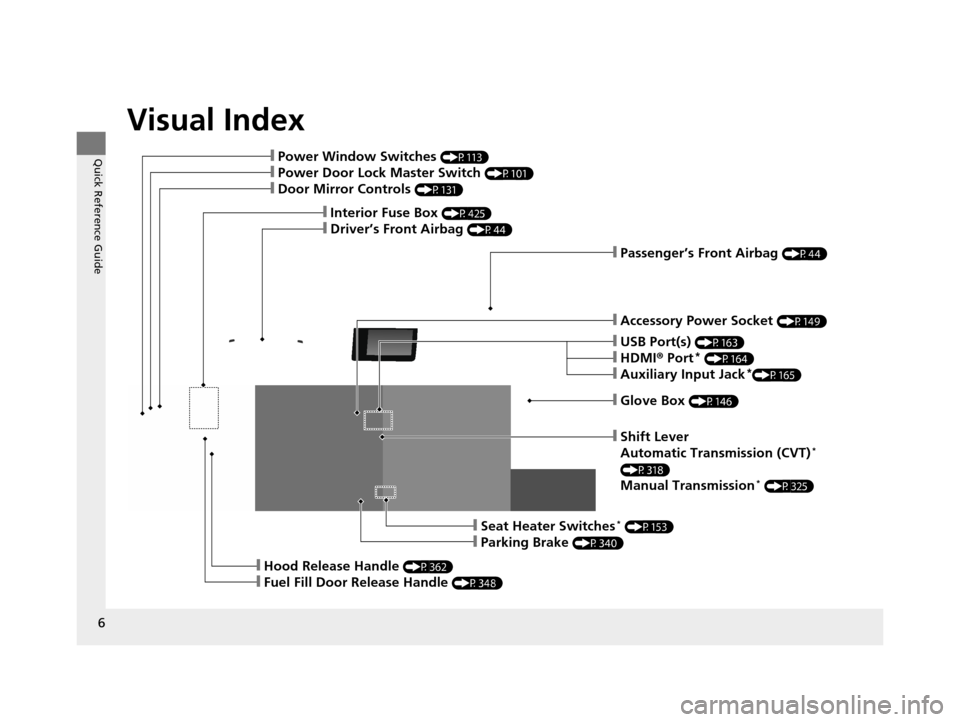
❙Glove Box (P146)
❙Shift Lever
Automatic Transmission (CVT)*
(P318)
Manual Transmission* (P325)
❙Seat Heater Switches* (P153)
❙Parking Brake (P340)
❙Hood Release Handle (P362)
❙Fuel Fill Door Release Handle (P348)
❙Accessory Power Socket (P149)
❙Passenger’s Front Airbag (P44)
❙USB Port(s) (P163)
❙HDMI® Port* (P164)
❙Auxiliary Input Jack*(P165)
❙Interior Fuse Box (P425)
❙Driver’s Front Airbag (P44)
❙Power Window Switches (P113)
❙Power Door Lock Master Switch (P101)
❙Door Mirror Controls (P131)
15 US FIT-31T5A6000.book 6 ページ 2014年3月6日 木曜日 午後7時5分
Page 162 of 453
161
Features
This chapter describes how to operate technology features.
Audio SystemAbout Your Audio System .................... 162
USB Port(s) ........................................... 163
HDMI ® Port
*........................................ 164
Auxiliary Input Jack*............................. 165
Audio Antenna .................................... 166
Audio System Theft Protection ............. 167
Audio Remote Controls
*...................... 168
Audio System Basic Operation ............. 170
Audio/Information Screen .................... 171
Adjusting the Sound ............................ 175
Display Setup ....................................... 176
Playing the AM/FM Radio ..................... 177
Playing a CD ........................................ 179
Models with color audio system
Playing an iPod .................................... 182
Playing a USB Flash Drive ..................... 185
Playing Bluetooth ® Audio..................... 188
Audio System Basic Operation ............ 191
Audio/Information Screen .................... 192
Adjusting the Sound ............................ 197
Display Setup ....................................... 198
Playing the AM/FM Radio..................... 199
Playing a CD ........................................ 202
Playing an iPod .................................... 205
Playing Internet Radio .......................... 208
Playing a USB Flash Drive ..................... 210
Playing Bluetooth ® Audio..................... 213
Playing a Video Using the HDMI ®......... 215
Models with display audio system
Smartphone Apps................................. 217
Siri Eyes Free......................................... 218
Audio Error Messages ........................... 219
General Information on the Audio
System ............................................. 223
Customized Features ............................. 226
Bluetooth ® HandsFreeLink ®
Using HFL ............................................. 248
Using HFL ............................................. 271
Models with color audio system
Models with display audio system
* Not available on all models
15 US FIT-31T5A6000.book 161 ページ 2014年3月6日 木曜日 午後7時5分
Page 163 of 453
162
Features
Audio System
About Your Audio System
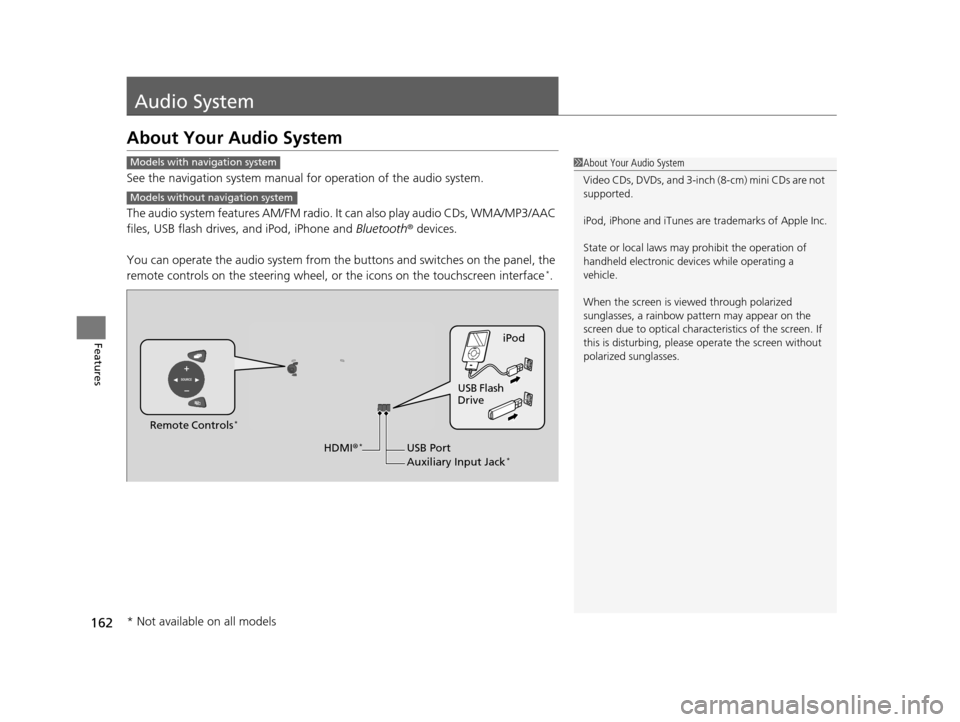
See the navigation system manual for operation of the audio system.
The audio system features AM/FM radio. It can also play audio CDs, WMA/MP3/AAC
files, USB flash drives, and iPod, iPhone and Bluetooth® devices.
You can operate the audio system from the buttons and switches on the panel, the
remote controls on the steering wheel, or the icons on the touchscreen interface
*.
1About Your Audio System
Video CDs, DVDs, and 3-inch (8-cm) mini CDs are not
supported.
iPod, iPhone and iTunes are trademarks of Apple Inc.
State or local laws may pr ohibit the operation of
handheld electronic devi ces while operating a
vehicle.
When the screen is vi ewed through polarized
sunglasses, a rainbow pa ttern may appear on the
screen due to optical characteristics of the screen. If
this is disturbing, please operate the screen without
polarized sunglasses.Models with navigation system
Models without navigation system
iPod
USB Flash
Drive
USB Port
Auxiliary Input Jack
*
Remote Controls*
HDMI ®*
* Not available on all models
15 US FIT-31T5A6000.book 162 ページ 2014年3月6日 木曜日 午後7時5分
Page 166 of 453
165
uuAudio System uAuxiliary Input Jack*
Features
Auxiliary Input Jack*
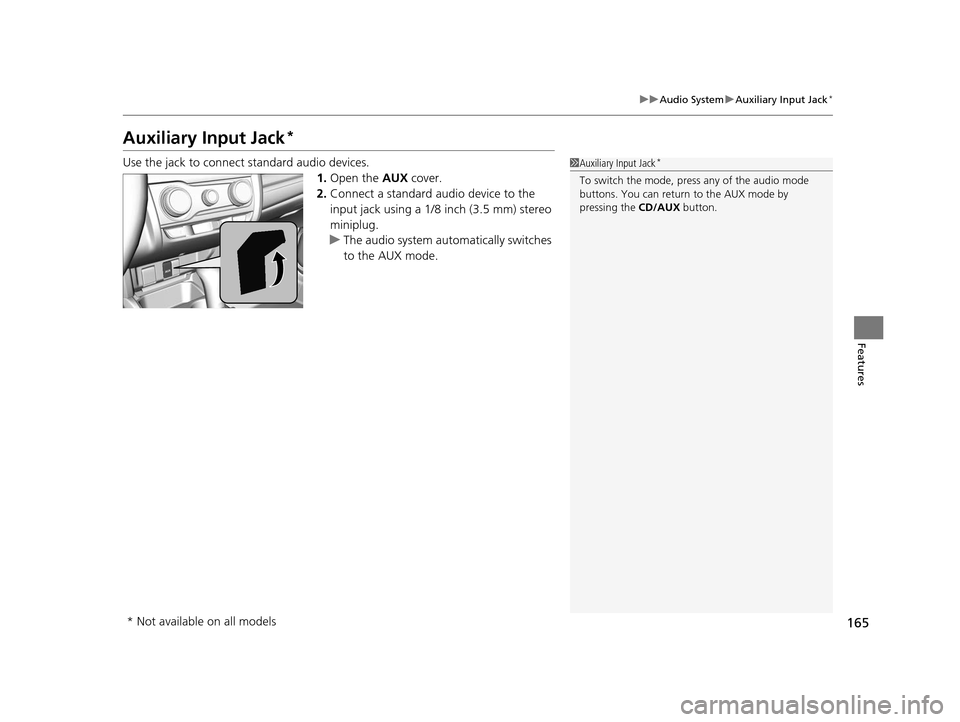
Use the jack to connect standard audio devices.
1.Open the AUX cover.
2. Connect a standard audio device to the
input jack using a 1/8 inch (3.5 mm) stereo
miniplug.
u The audio system auto matically switches
to the AUX mode.1 Auxiliary Input Jack*
To switch the mode, pres s any of the audio mode
buttons. You can return to the AUX mode by
pressing the CD/AUX button.
* Not available on all models
15 US FIT-31T5A6000.book 165 ページ 2014年3月6日 木曜日 午後7時5分
Page 190 of 453
Continued189
uuAudio System Basic Operation uPlaying Bluetooth ® Audio
Features
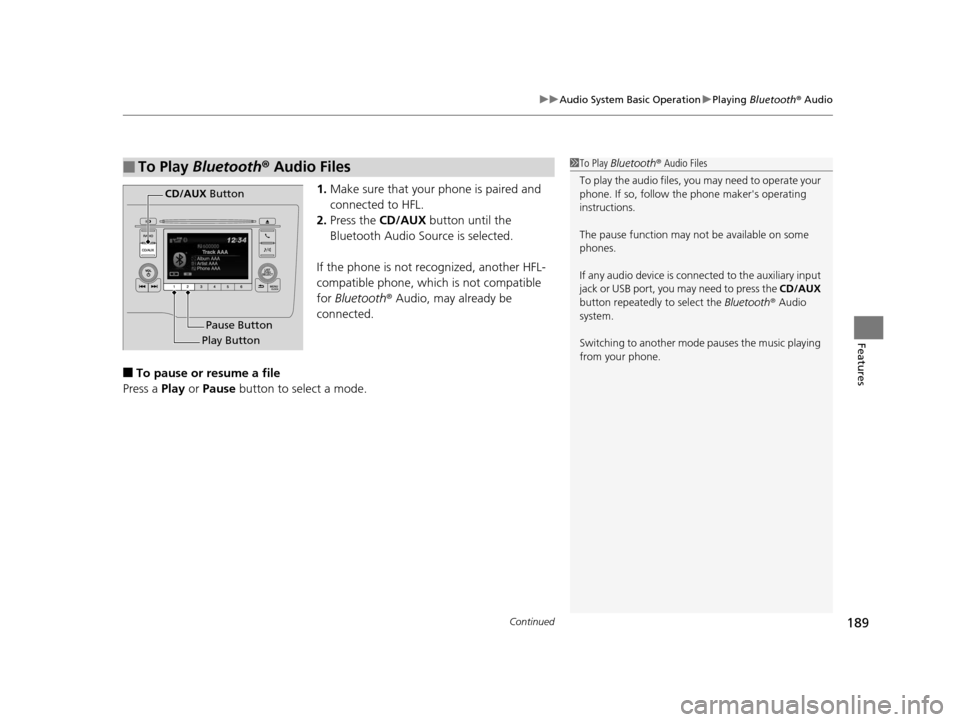
1. Make sure that your phone is paired and
connected to HFL.
2. Press the CD/AUX button until the
Bluetooth Audio Source is selected.
If the phone is not recognized, another HFL-
compatible phone, which is not compatible
for Bluetooth ® Audio, may already be
connected.
■To pause or resume a file
Press a Play or Pause button to select a mode.
■To Play Bluetooth ® Audio Files1 To Play Bluetooth ® Audio Files
To play the audio files, y ou may need to operate your
phone. If so, follow the phone maker's operating
instructions.
The pause function may no t be available on some
phones.
If any audio device is conne cted to the auxiliary input
jack or USB port, you may need to press the CD/AUX
button repeatedly to select the Bluetooth ® Audio
system.
Switching to another mode pauses the music playing
from your phone.
Play Button Pause Button
CD/AUX
Button
15 US FIT-31T5A6000.book 189 ページ 2014年3月6日 木曜日 午後7時5分
Page 224 of 453
223Continued
Features
General Information on the Audio System
Recommended CDs
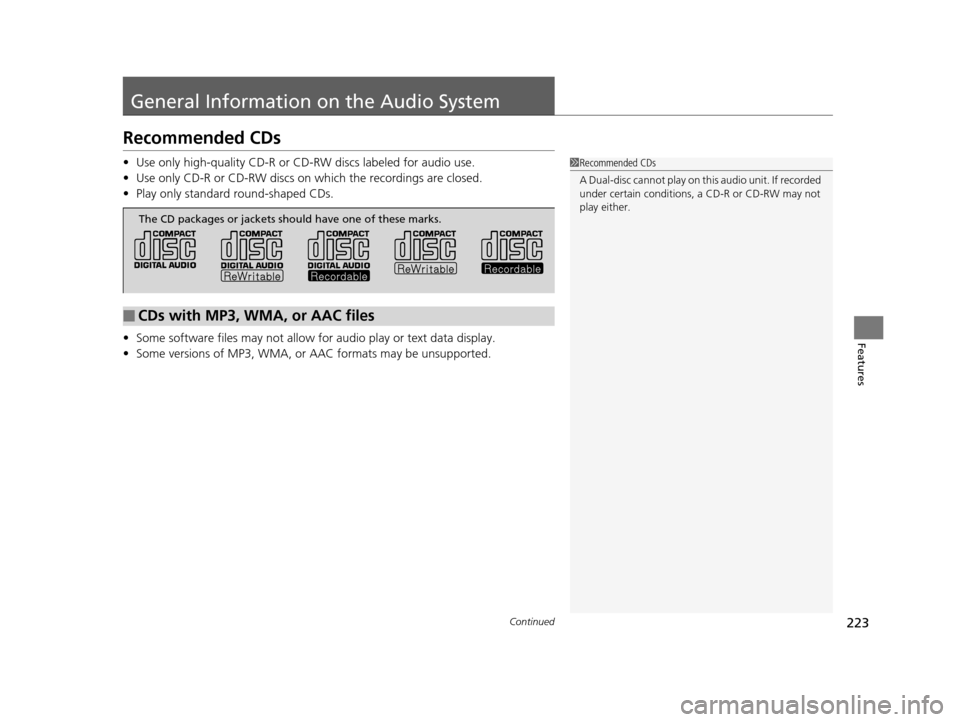
•Use only high-quality CD-R or CD-RW discs labeled for audio use.
• Use only CD-R or CD-RW discs on wh ich the recordings are closed.
• Play only standard round-shaped CDs.
• Some software files may not allow for audio play or text data display.
• Some versions of MP3, WMA, or AAC formats may be unsupported.1Recommended CDs
A Dual-disc cannot play on th is audio unit. If recorded
under certain conditions, a CD-R or CD-RW may not
play either.
■CDs with MP3, WMA, or AAC files
The CD packages or jackets should have one of these marks.
15 US FIT-31T5A6000.book 223 ページ 2014年3月6日 木曜日 午後7時5分
Page 405 of 453
404
Handling the Unexpected
Tools
Types of Tools
1Types of Tools
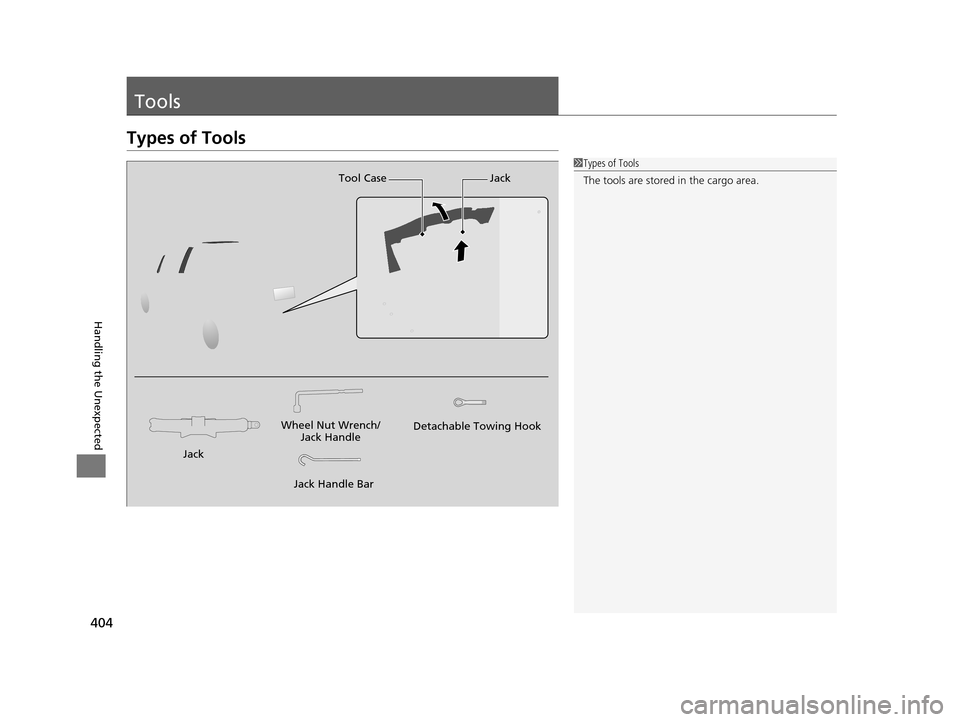
The tools are stored in the cargo area.
Wheel Nut Wrench/
Jack Handle
Jack Handle Bar Detachable Towing Hook
Tool Case Jack
Jack
15 US FIT-31T5A6000.book 404 ページ 2014年3月6日 木曜日 午後7時5分
Page 407 of 453
406
uuIf a Tire Goes Flat uChanging a Flat Tire
Handling the Unexpected
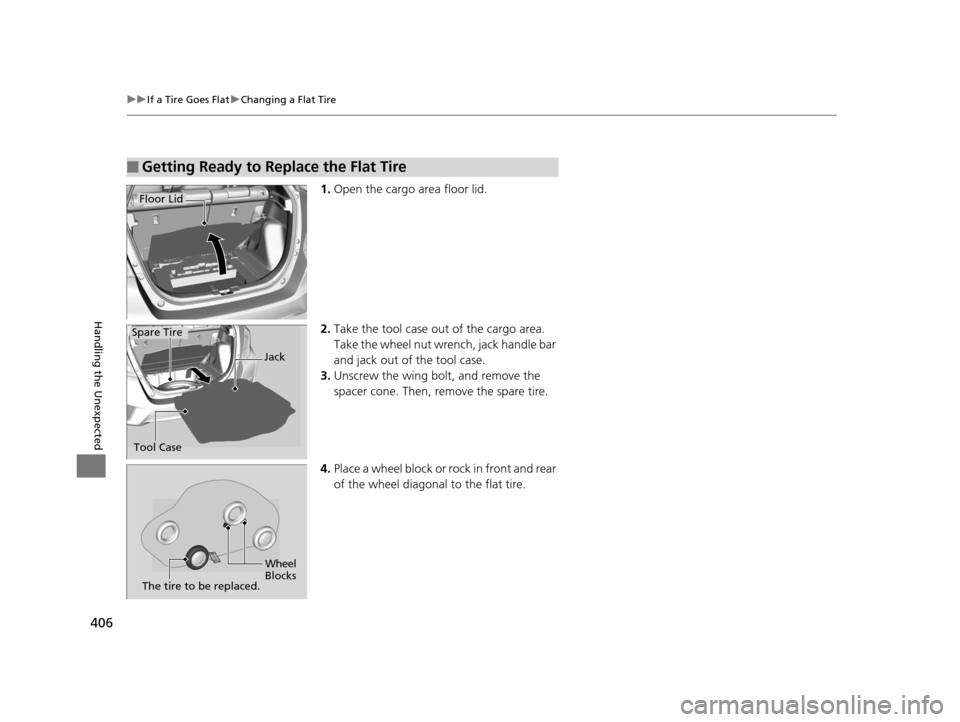
1. Open the cargo area floor lid.
2. Take the tool case out of the cargo area.
Take the wheel nut wrench, jack handle bar
and jack out of the tool case.
3. Unscrew the wing bolt, and remove the
spacer cone. Then, remove the spare tire.
4. Place a wheel block or ro ck in front and rear
of the wheel diagonal to the flat tire.
■Getting Ready to Replace the Flat Tire
Floor Lid
Tool Case Jack
Spare Tire
Wheel
Blocks
The tire to be replaced.
15 US FIT-31T5A6000.book 406 ページ 2014年3月6日 木曜日 午後7時5分
Page 408 of 453
407
uuIf a Tire Goes Flat uChanging a Flat Tire
Continued
Handling the Unexpected
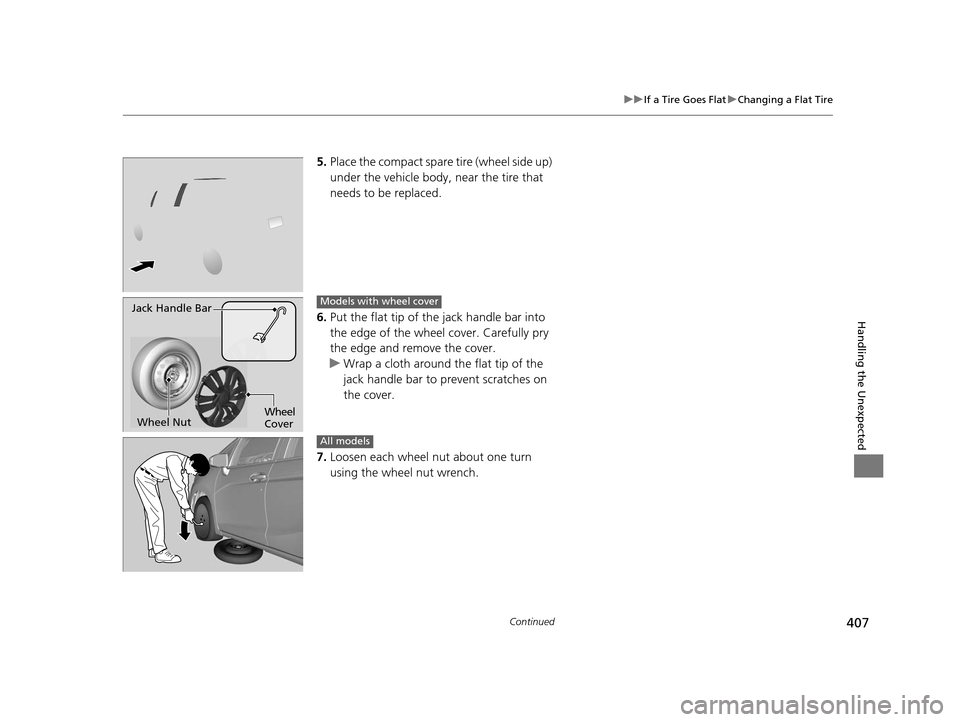
5. Place the compact spare tire (wheel side up)
under the vehicle body, near the tire that
needs to be replaced.
6. Put the flat tip of the jack handle bar into
the edge of the wheel cover. Carefully pry
the edge and remove the cover.
u Wrap a cloth around the flat tip of the
jack handle bar to prevent scratches on
the cover.
7. Loosen each wheel nut about one turn
using the wheel nut wrench.
Jack Handle Bar
Wheel Nut Wheel
CoverModels with wheel cover
All models
15 US FIT-31T5A6000.book 407 ページ 2014年3月6日 木曜日 午後7時5分
Page 409 of 453
uuIf a Tire Goes Flat uChanging a Flat Tire
408
Handling the Unexpected
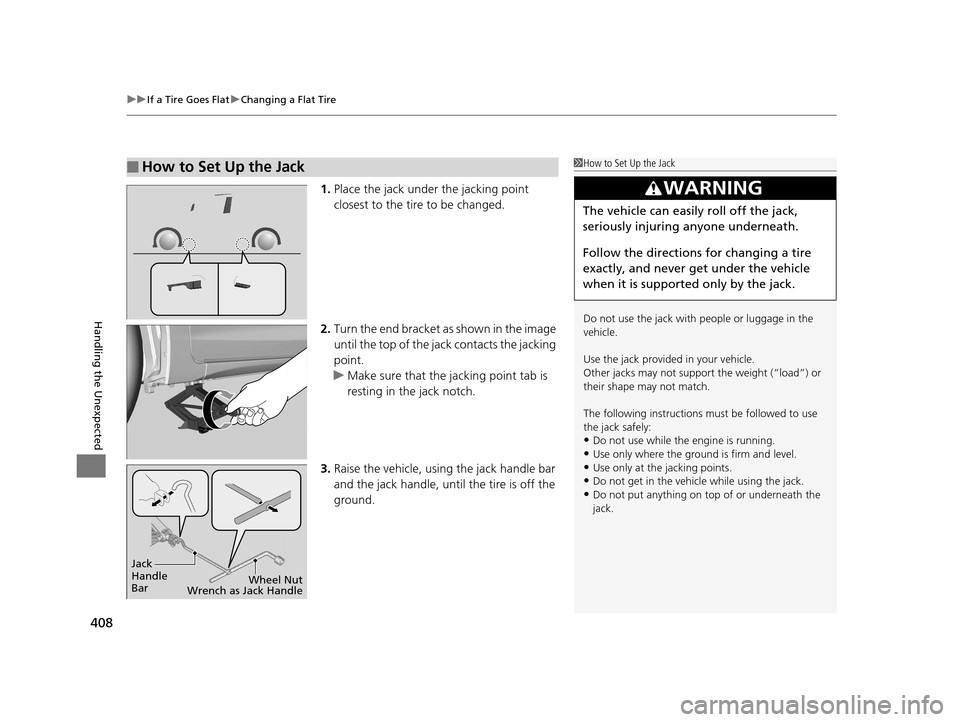
1. Place the jack under the jacking point
closest to the tire to be changed.
2. Turn the end bracket as shown in the image
until the top of the jack contacts the jacking
point.
u Make sure that the jacking point tab is
resting in the jack notch.
3. Raise the vehicle, using the jack handle bar
and the jack handle, until the tire is off the
ground.
■How to Set Up the Jack1How to Set Up the Jack
Do not use the jack with people or luggage in the
vehicle.
Use the jack provided in your vehicle.
Other jacks may not support the weight (“load”) or
their shape may not match.
The following instructions must be followed to use
the jack safely:
•Do not use while the engine is running.
•Use only where the ground is firm and level.
•Use only at the jacking points.•Do not get in the vehicl e while using the jack.
•Do not put anything on top of or underneath the
jack.
3WARNING
The vehicle can easily roll off the jack,
seriously injuring anyone underneath.
Follow the directions for changing a tire
exactly, and never get under the vehicle
when it is supported only by the jack.
Jack
Handle
Bar Wheel Nut
Wrench as Jack Handle
15 US FIT-31T5A6000.book 408 ページ 2014年3月6日 木曜日 午後7時5分