buttons HONDA FIT 2017 3.G Owners Manual
[x] Cancel search | Manufacturer: HONDA, Model Year: 2017, Model line: FIT, Model: HONDA FIT 2017 3.GPages: 465, PDF Size: 26.52 MB
Page 6 of 465
5
Quick Reference Guide
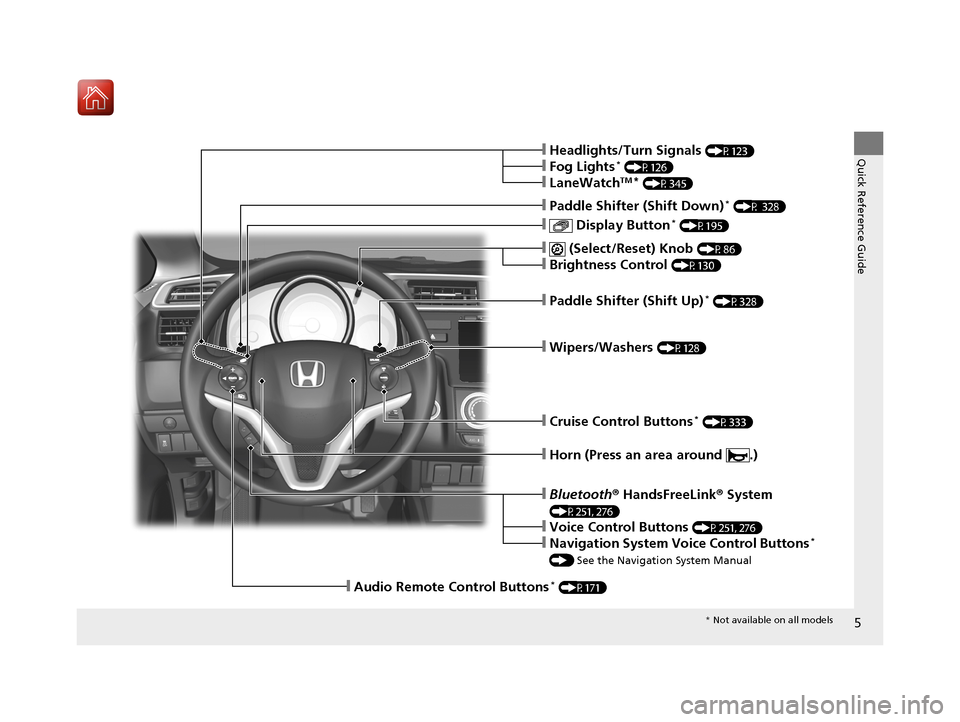
❙Wipers/Washers (P128)
❙Paddle Shifter (Shift Up)* (P328)
❙ (Select/Reset) Knob (P86)
❙Brightness Control (P130)
❙ Display Button* (P195)
❙Paddle Shifter (Shift Down)* (P 328)
❙Headlights/Turn Signals (P123)
❙Fog Lights* (P126)
❙LaneWatchTM* (P345)
❙Audio Remote Control Buttons* (P171)
❙Horn (Press an area around .)
❙Cruise Control Buttons* (P333)
❙Bluetooth® HandsFreeLink ® System
(P251, 276)
❙Voice Control Buttons (P251, 276)
❙Navigation System Voice Control Buttons*
() See the Navigation System Manual
* Not available on all models
17 FIT -31T5A6200.book 5 ページ 2016年5月27日 金曜日 午後6時33分
Page 19 of 465
18
Quick Reference Guide
Features (P165)
Audio Remote Controls*
(P171)
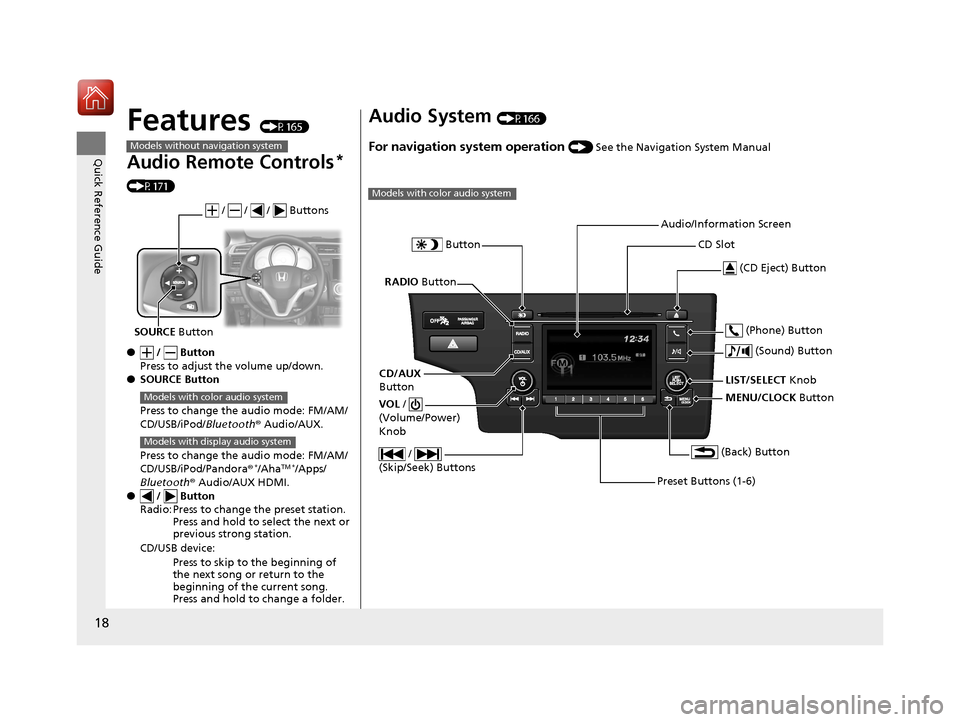
● / Button
Press to adjust the volume up/down.
● SOURCE Button
Press to change the audio mode: FM/AM/
CD/USB/iPod/Bluetooth® Audio/AUX.
Press to change the audio mode: FM/AM/
CD/USB/iPod/Pandora®
*/AhaTM */Apps/
Bluetooth ® Audio/AUX HDMI.
● / Button
Radio: Press to change the preset station. Press and hold to select the next or
previous strong station.
CD/USB device: Press to skip to the beginning of
the next song or return to the
beginning of the current song.
Press and hold to change a folder.
Models without navigation system
/ / / Buttons
SOURCE Button
Models with color audio system
Models with display audio system
Audio System (P166)
For navigation system operation () See the Navigation System Manual
Models with color audio system
MENU/CLOCK Button
LIST/SELECT
Knob
Button
(Back) Button
(Sound) Button
VOL
/
(Volume/Power)
Knob
CD Slot
(CD Eject) Button
Preset Buttons (1-6) (Phone) Button
RADIO
Button
/
(Skip/Seek) Buttons
CD/AUX
Button Audio/Information Screen
17 FIT -31T5A6200.book 18 ページ 2016年5月27日 金曜日 午後6時33分
Page 70 of 465
69
Instrument Panel
This chapter describes the buttons, indicators, and gauges that are used while driving.
Indicators............................................ 70
Information Display Warning and Information Messages ...................... 82
Gauges and Displays Gauges .............................................. 85
Information Display............................ 86
17 FIT -31T5A6200.book 69 ページ 2016年5月27日 金曜日 午後6時33分
Page 167 of 465
166
Features
Audio System
About Your Audio System
The audio system features AM/FM radio. It can also play audio CDs, WMA/MP3/AAC
files, USB flash drives, and iPod, iPhone and Bluetooth® devices.
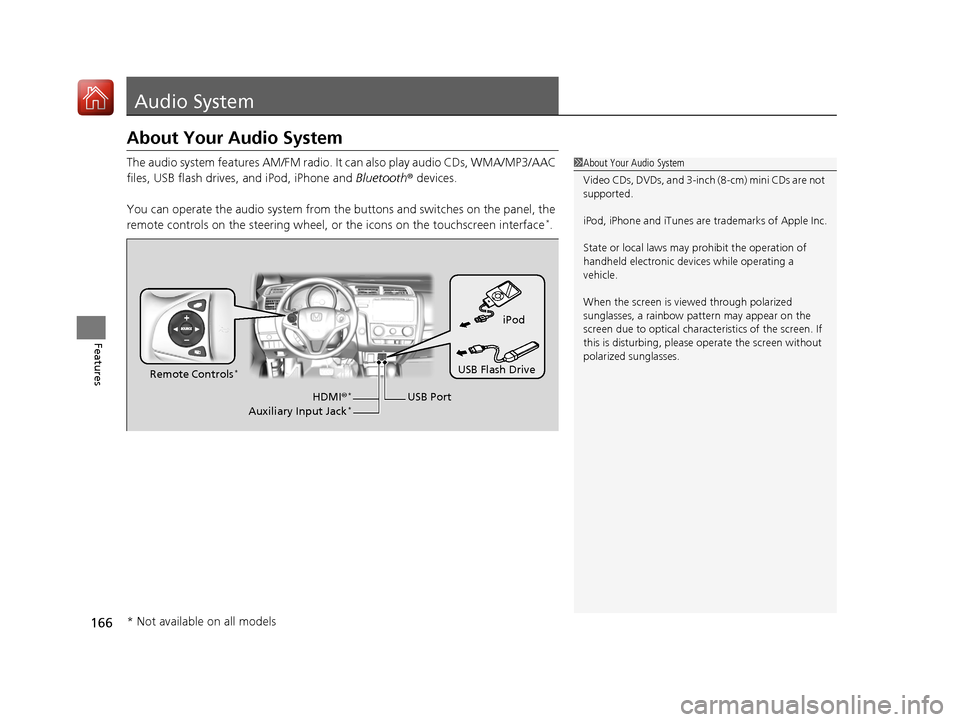
You can operate the audio system from the buttons and switches on the panel, the
remote controls on the steering wheel, or the icons on the touchscreen interface
*.
1 About Your Audio System
Video CDs, DVDs, and 3-inch (8-cm) mini CDs are not
supported.
iPod, iPhone and iTunes are trademarks of Apple Inc.
State or local laws may prohibit the operation of
handheld electronic devices while operating a
vehicle.
When the screen is vi ewed through polarized
sunglasses, a rainbow pa ttern may appear on the
screen due to optical characteristics of the screen. If
this is disturbing, please operate the screen without
polarized sunglasses.
iPod
USB Flash Drive
USB Port
Remote Controls
*
HDMI
®*
Auxiliary Input Jack*
* Not available on all models
17 FIT -31T5A6200.book 166 ページ 2016年5月27日 金曜日 午後6時33分
Page 169 of 465
168
uuAudio System uHDMI ® Port*
Features
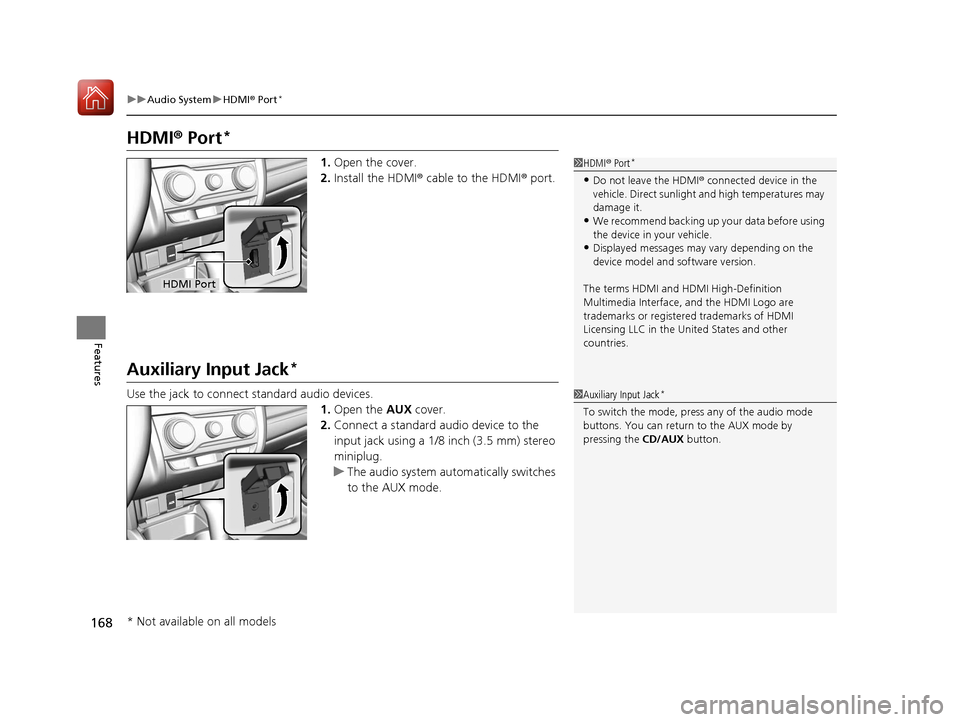
HDMI ® Port*
1. Open the cover.
2. Install the HDMI® cable to the HDMI ® port.
Auxiliary Input Jack*
Use the jack to connect standard audio devices.
1.Open the AUX cover.
2. Connect a standard audio device to the
input jack using a 1/8 inch (3.5 mm) stereo
miniplug.
u The audio system automatically switches
to the AUX mode.
1HDMI ® Port*
•Do not leave the HDMI ® connected device in the
vehicle. Direct sunlight and high temperatures may
damage it.
•We recommend backing up yo ur data before using
the device in your vehicle.
•Displayed messages may vary depending on the
device model and software version.
The terms HDMI and HDMI High-Definition
Multimedia Interface, and the HDMI Logo are
trademarks or registered trademarks of HDMI
Licensing LLC in the United States and other
countries.
HDMI Port
1 Auxiliary Input Jack*
To switch the mode, pres s any of the audio mode
buttons. You can return to the AUX mode by
pressing the CD/AUX button.
* Not available on all models
17 FIT -31T5A6200.book 168 ページ 2016年5月27日 金曜日 午後6時33分
Page 172 of 465
171
uuAudio System uAudio Remote Controls*
Continued
Features
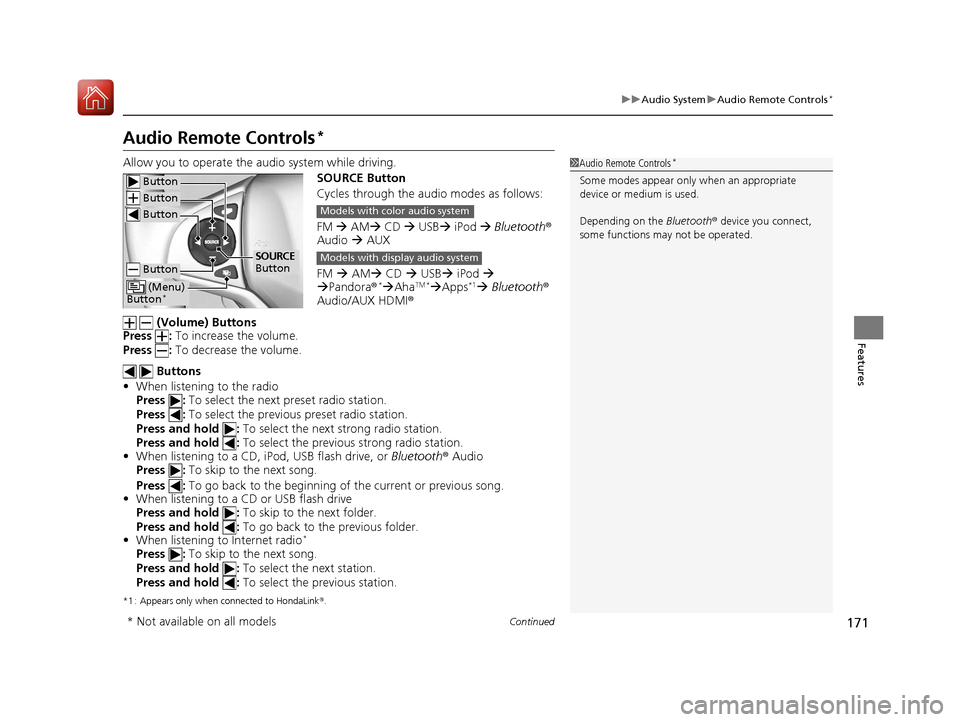
Audio Remote Controls*
Allow you to operate the au dio system while driving.
SOURCE Button
Cycles through the audio modes as follows:
FM AM CD USB iPod Bluetooth ®
Audio AUX
FM AM CD USB iPod
Pandora®
*AhaTM *Apps*1 Bluetooth ®
Audio/AUX HDMI ®
(Volume) Buttons
Press : To increase the volume.
Press : To decrease the volume.
Buttons
• When listening to the radio
Press : To select the next preset radio station.
Press : To select the previous preset radio station.
Press and hold : To select the next strong radio station.
Press and hold : To select the previous strong radio station.
• When listening to a CD, iPod, USB flash drive, or Bluetooth® Audio
Press : To skip to the next song.
Press : To go back to the beginning of the current or previous song.
• When listening to a CD or USB flash drive
Press and hold : To skip to the next folder.
Press and hold : To go back to the previous folder.
• When listening to Internet radio
*
Press : To skip to the next song.
Press and hold : To select the next station.
Press and hold : To select the previous station.
*1 : Appears only when connected to HondaLink ®.
1 Audio Remote Controls*
Some modes appear only when an appropriate
device or medium is used.
Depending on the Bluetooth® device you connect,
some functions ma y not be operated. Button
Button
Button
Button
(Menu)
Button*
SOURCE
Button
Models with color audio system
Models with display audio system
* Not available on all models
17 FIT -31T5A6200.book 171 ページ 2016年5月27日 金曜日 午後6時33分
Page 181 of 465
180
uuAudio System Basic Operation uPlaying AM/FM Radio
Features
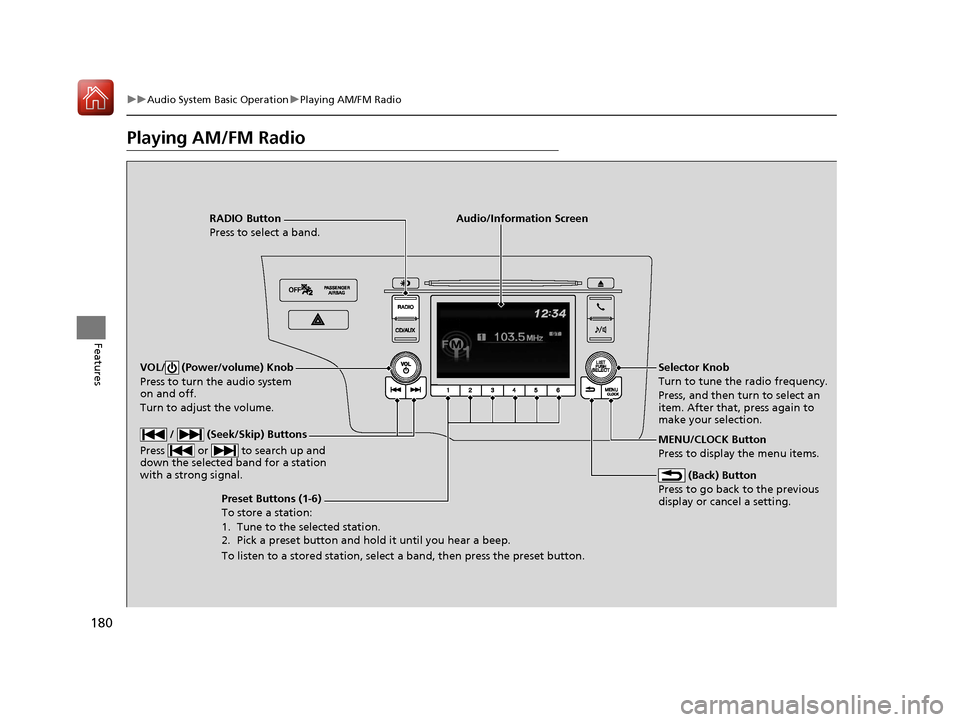
Playing AM/FM Radio
RADIO Button
Press to select a band.
(Back) Button
Press to go back to the previous
display or cancel a setting.
/ (Seek/Skip) Buttons
Press or to search up and
down the selected band for a station
with a strong signal.
VOL/ (Power/volume) Knob
Press to turn the audio system
on and off.
Turn to adjust the volume.
Preset Buttons (1-6)
To store a station:
1. Tune to the selected station.
2. Pick a preset button and hold it until you hear a beep.
To listen to a stored station, select a band, then press the preset button. Selector Knob
Turn to tune the radio frequency.
Press, and then turn to select an
item. After that, press again to
make your selection.
MENU/CLOCK Button
Press to display the menu items.
Audio/Information Screen
17 FIT -31T5A6200.book 180 ページ 2016年5月27日 金曜日 午後6時33分
Page 183 of 465
182
uuAudio System Basic Operation uPlaying a CD
Features
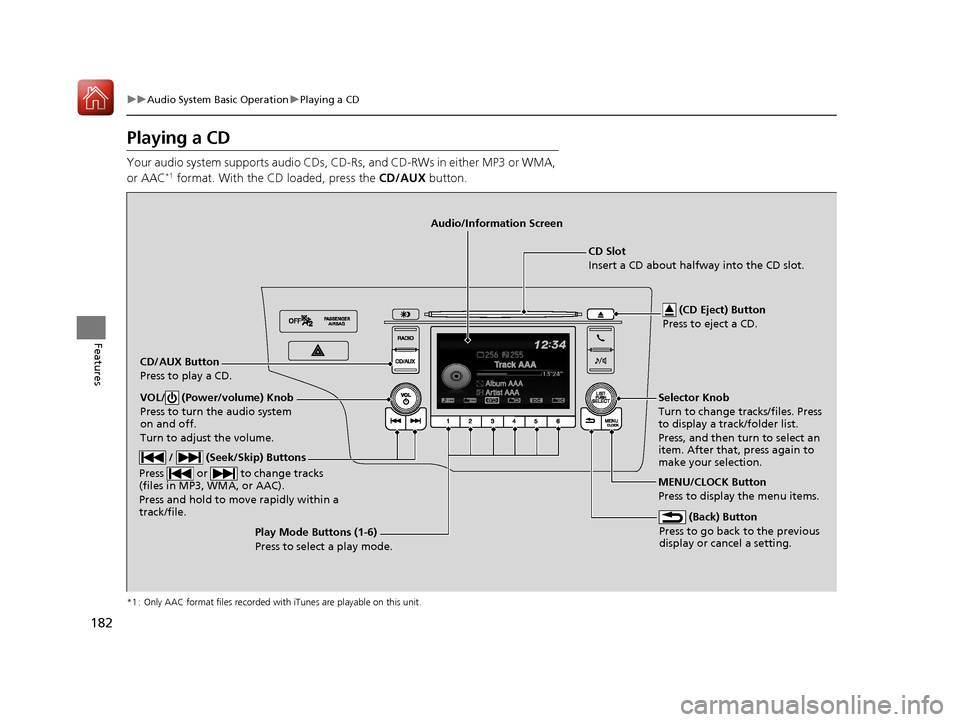
Playing a CD
Your audio system supports audio CDs, CD-Rs, and CD-RWs in either MP3 or WMA,
or AAC*1 format. With the CD loaded, press the CD/AUX button.
*1 : Only AAC format files recorded with iTunes are playable on this unit.
CD/AUX Button
Press to play a CD. (CD Eject) Button
Press to eject a CD.
CD Slot
Insert a CD about halfway into the CD slot.
(Back) Button
Press to go back to the previous
display or cancel a setting.
/ (Seek/Skip) Buttons
Press or to change tracks
(files in MP3, WMA, or AAC).
Press and hold to mo ve rapidly within a
track/file.
VOL/ (Power/volume) Knob
Press to turn the audio system
on and off.
Turn to adjust the volume.Selector Knob
Turn to change tracks/files. Press
to display a track/folder list.
Press, and then turn to select an
item. After that, press again to
make your selection.
MENU/CLOCK Button
Press to display the menu items.
Audio/Information Screen
Play Mode Buttons (1-6)
Press to select a play mode.
17 FIT -31T5A6200.book 182 ページ 2016年5月27日 金曜日 午後6時33分
Page 185 of 465
uuAudio System Basic Operation uPlaying a CD
184
Features
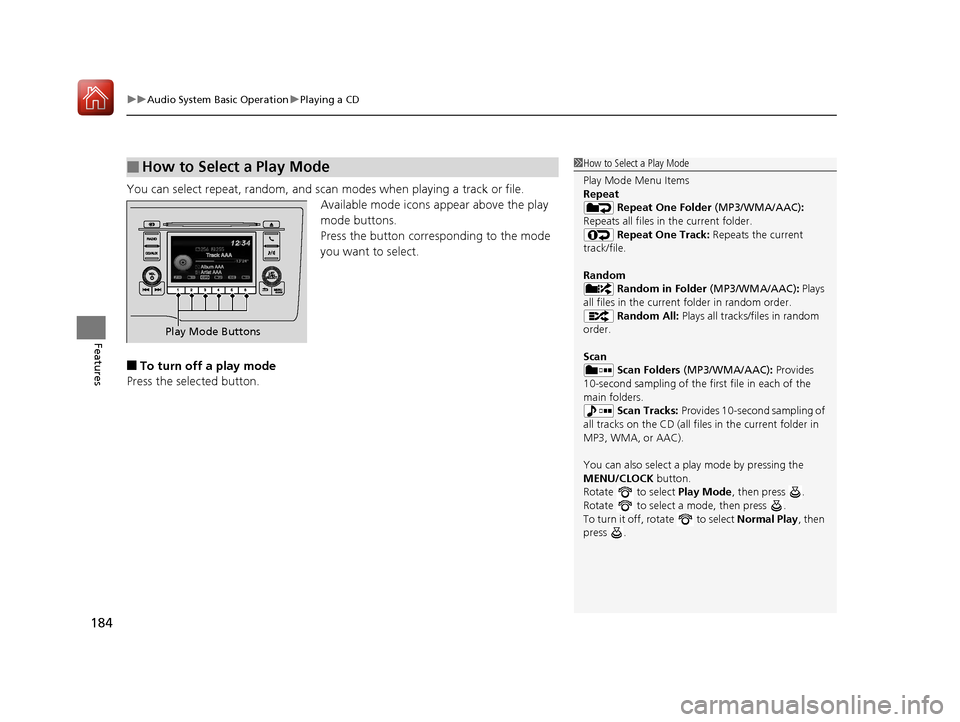
You can select repeat, random, and scan modes when playing a track or file.
Available mode icons appear above the play
mode buttons.
Press the button corresponding to the mode
you want to select.
■To turn off a play mode
Press the selected button.
■How to Select a Play Mode1 How to Select a Play Mode
Play Mode Menu Items
Repeat
Repeat One Folder (MP3/WMA/AAC):
Repeats all files in the current folder. Repeat One Track: Repeats the current
track/file.
Random Random in Folder (MP3/WMA/AAC): Plays
all files in the current folder in random order. Random All: Plays all tracks/files in random
order.
Scan Scan Folders (MP3/WMA/AAC): Provides
10-second sampling of the firs t file in each of the
main folders.
Scan Tracks: Provides 10-second sampling of
all tracks on the CD (all files in the current folder in
MP3, WMA, or AAC).
You can also select a pl ay mode by pressing the
MENU/CLOCK button.
Rotate to select Play Mode, then press .
Rotate to select a mode, then press .
To turn it off, rotate to select Normal Play, then
press .
Play Mode Buttons
17 FIT -31T5A6200.book 184 ページ 2016年5月27日 金曜日 午後6時33分
Page 186 of 465
185
uuAudio System Basic Operation uPlaying an iPod
Continued
Features
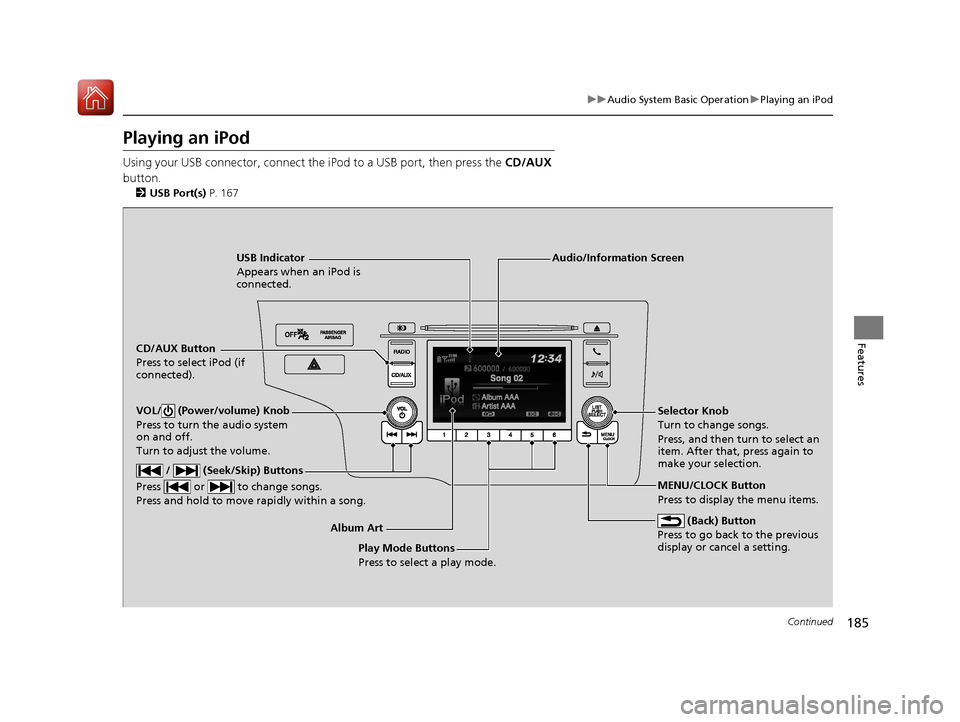
Playing an iPod
Using your USB connector, connect the iPod to a USB port, then press the CD/AUX
button.
2 USB Port(s) P. 167
USB Indicator
Appears when an iPod is
connected.
CD/AUX Button
Press to select iPod (if
connected).
(Back) Button
Press to go back to the previous
display or cancel a setting.
/ (Seek/Skip) Buttons
Press or to change songs.
Press and hold to move rapidly within a song.
VOL/ (Power/volume) Knob
Press to turn the audio system
on and off.
Turn to adjust the volume.Selector Knob
Turn to change songs.
Press, and then turn to select an
item. After that, press again to
make your selection.
MENU/CLOCK Button
Press to display the menu items.
Audio/Information Screen
Album Art Play Mode Buttons
Press to select a play mode.
17 FIT -31T5A6200.book 185 ページ 2016年5月27日 金曜日 午後6時33分