display HONDA FIT 2017 3.G Owners Manual
[x] Cancel search | Manufacturer: HONDA, Model Year: 2017, Model line: FIT, Model: HONDA FIT 2017 3.GPages: 465, PDF Size: 26.52 MB
Page 277 of 465
276
uuBluetooth ® HandsFreeLink ®u Using HFL
Features
Using HFL
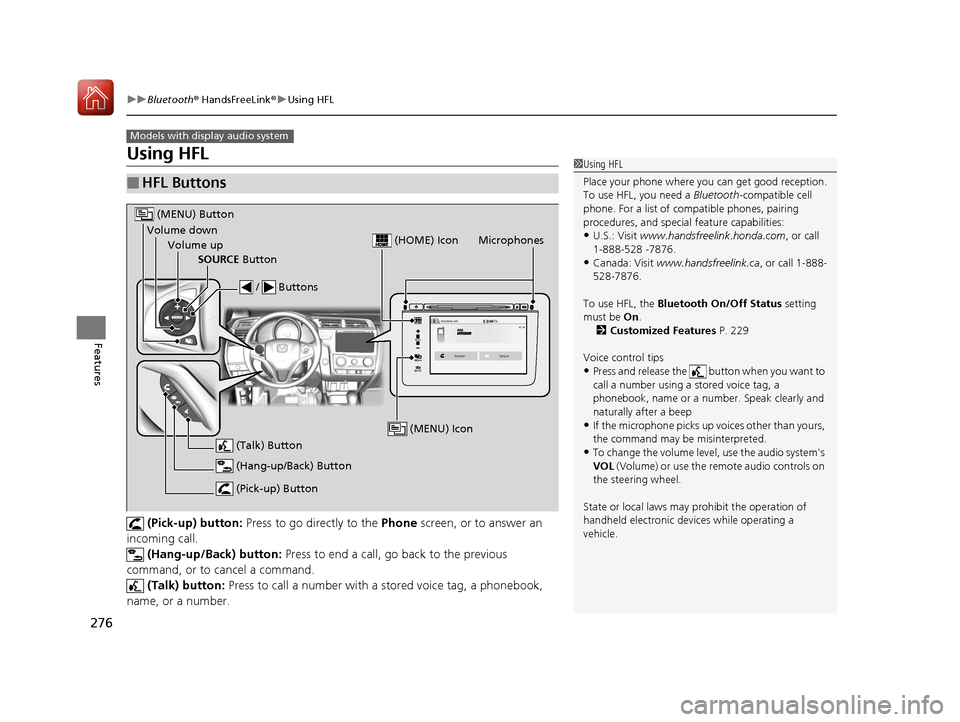
(Pick-up) button: Press to go directly to the Phone screen, or to answer an
incoming call.
(Hang-up/Back) button: Press to end a call, go back to the previous
command, or to cancel a command. (Talk) button: Press to call a number with a stored voice tag, a phonebook,
name, or a number.
■HFL Buttons
Models with display audio system
1 Using HFL
Place your phone where y ou can get good reception.
To use HFL, you need a Bluetooth-compatible cell
phone. For a list of compatible phones, pairing
procedures, and special feature capabilities:
•U.S.: Visit www.handsfreelink.honda.com , or call
1-888-528 -7876.
•Canada: Visit www.handsfreelink.ca , or call 1-888-
528-7876.
To use HFL, the Bluetooth On/Off Status setting
must be On .
2 Customized Features P. 229
Voice control tips
•Press and release the button when you want to
call a number using a stored voice tag, a
phonebook, name or a numbe r. Speak clearly and
naturally after a beep
•If the microphone picks up vo ices other than yours,
the command may be misinterpreted.
•To change the volume level, use the audio system's
VOL (Volume) or use the remote audio controls on
the steering wheel.
State or local laws may prohibit the operation of
handheld electronic devices while operating a
vehicle.
VOL
HOME
MENU
BACK
Microphones
(Pick-up) Button
(Hang-up/Back) Button
Volume up (Talk) Button
(MENU) Button
Volume downSOURCE Button / Buttons
(MENU) Icon
(HOME) Icon
17 FIT -31T5A6200.book 276 ページ 2016年5月27日 金曜日 午後6時33分
Page 278 of 465
Continued277
uuBluetooth ® HandsFreeLink ®u Using HFL
Features
button: Press to display Speed Dial, Call History , or Redial on the Phone
screen. / button: Press to select an item displayed on the Phone screen.
SOURCE button: Press to call a number listed in the selected item on the Phone
screen.
To go to the Phone menu screen:
1. Select HOME .
2. Select Phone to switch the display to the Phone screen.
3. Select MENU .1Using HFL
Up to six speed dial entrie s can be displayed among a
total of 20 that can be entered. If there is no entries
in the system, Speed Dial is disabled.
2 Speed Dial P. 291
Bluetooth ® Wireless Technology
The Bluetooth ® word mark and logos are registered
trademarks owned by Blue tooth SIG, Inc., and any
use of such marks by Honda Motor Co., Ltd., is under
license. Other trademarks and trade names are those
of their respective owners.
HFL Limitations
An incoming call on HFL will interrupt the audio
system when it is playing. It will resume when the call
is ended.
17 FIT -31T5A6200.book 277 ページ 2016年5月27日 金曜日 午後6時33分
Page 279 of 465
uuBluetooth ® HandsFreeLink ®u Using HFL
278
Features
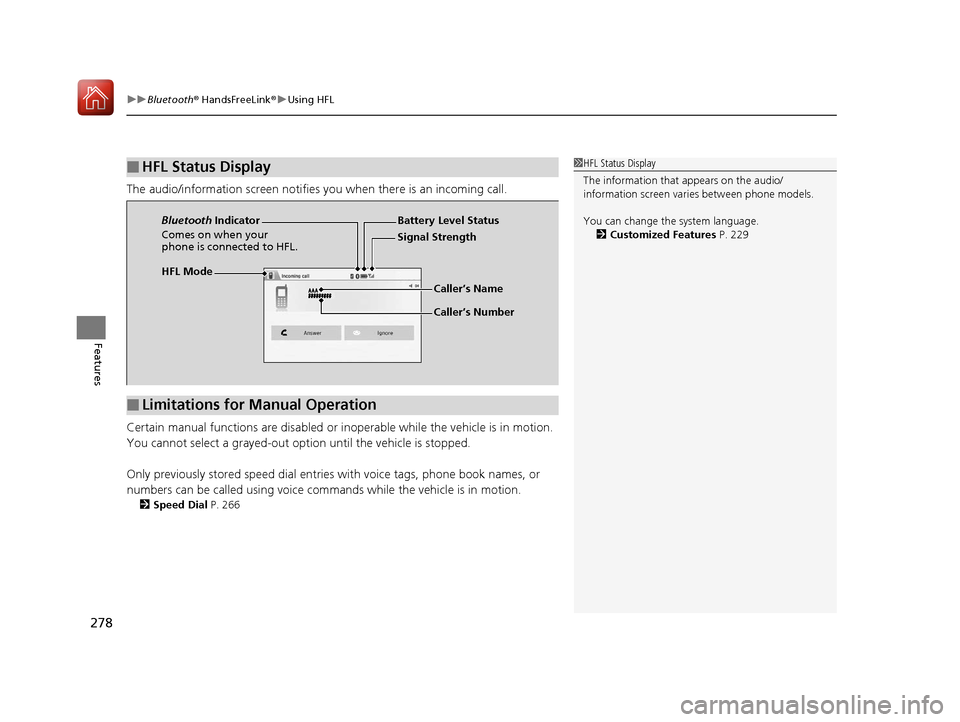
The audio/information screen notifies you when there is an incoming call.
Certain manual functions are disabled or i noperable while the vehicle is in motion.
You cannot select a grayed-out option until the vehicle is stopped.
Only previously stored speed dial entries with voice tags, phone book names, or
numbers can be called using voice commands while the vehicle is in motion.
2 Speed Dial P. 266
■HFL Status Display1HFL Status Display
The information that appears on the audio/
information screen vari es between phone models.
You can change the system language. 2 Customized Features P. 229
HFL Mode Battery Level Status
Signal Strength
Bluetooth
Indicator
Comes on when your
phone is connected to HFL.
Caller’s Name
Caller’s Number
■Limitations for Manual Operation
17 FIT -31T5A6200.book 278 ページ 2016年5月27日 金曜日 午後6時33分
Page 283 of 465
282
uuBluetooth ® HandsFreeLink ®u HFL Menus
Features
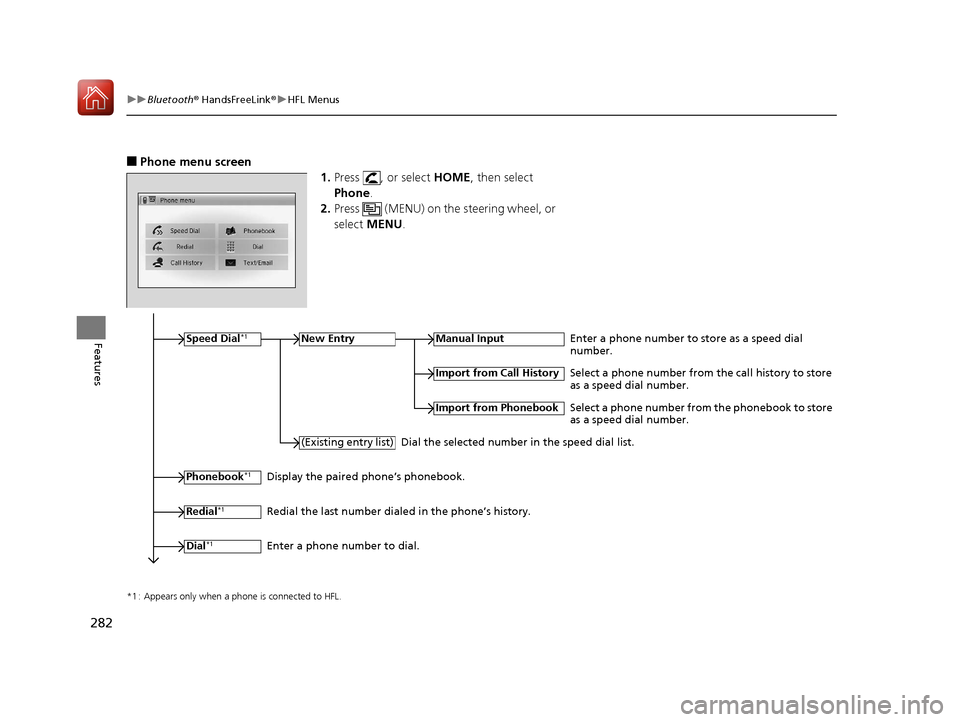
■Phone menu screen
1.Press , or select HOME, then select
Phone .
2. Press (MENU) on the steering wheel, or
select MENU .
*1 : Appears only when a phone is connected to HFL.
Speed Dial*1New EntryManual InputEnter a phone number to store as a speed dial
number.
Phonebook*1
(Existing entry list)
Import from Call History
Import from Phonebook
Select a phone number from the call history to store
as a speed dial number.
Select a phone number from the phonebook to store
as a speed dial number.
Dial the selected number in the speed dial list.
Display the paired phone’s phonebook.
Redial
*1Redial the last number dialed in the phone’s history.
Dial
*1Enter a phone number to dial.
17 FIT -31T5A6200.book 282 ページ 2016年5月27日 金曜日 午後6時33分
Page 284 of 465
283
uuBluetooth ® HandsFreeLink ®u HFL Menus
Continued
Features
*1 : Appears only when a phone is connected to HFL.
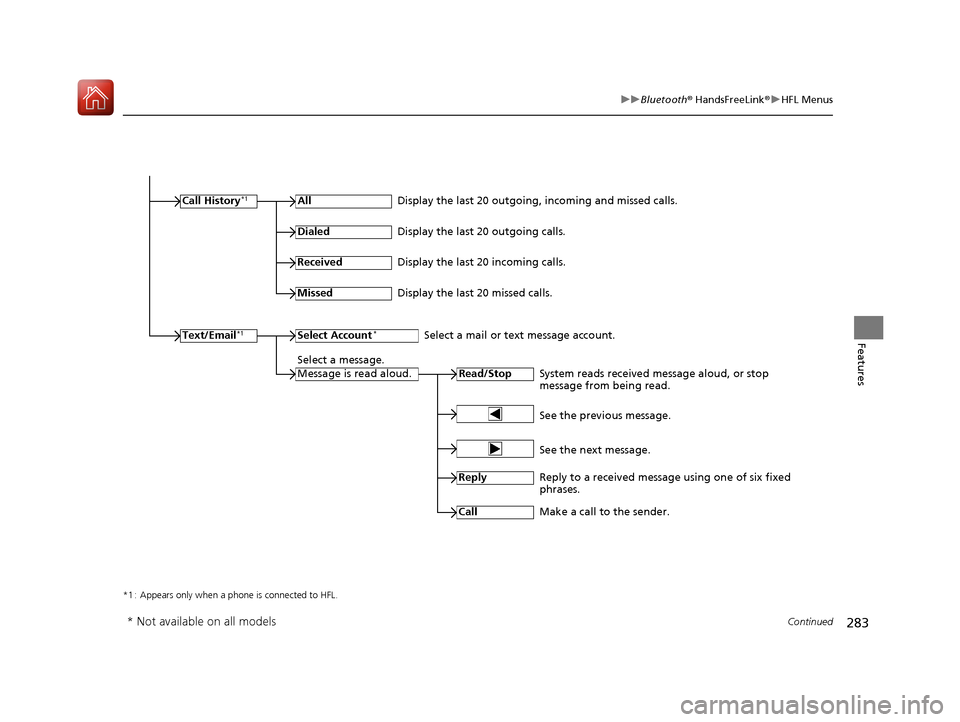
Call History*1All
Read/StopSystem reads received message aloud, or stop
message from being read.
Text/Email*1
Display the last 20 outgoing, incoming and missed calls.
Dialed
Display the last 20 outgoing calls.
Received
Display the last 20 incoming calls.
Missed
Display the last 20 missed calls.
Select Account*Select a mail or text message account.
Select a message.
Message is read aloud.
See the previous message.
See the next message.
Reply
Reply to a received message using one of six fixed
phrases.
Call
Make a call to the sender.
* Not available on all models
17 FIT -31T5A6200.book 283 ページ 2016年5月27日 金曜日 午後6時33分
Page 298 of 465
Continued297
uuBluetooth ® HandsFreeLink ®u HFL Menus
Features
HFL can display newly received text or e-mail messages as well as 20 of the most
recently received messages on a linked cell phone. Each received message can be
read aloud and replied to using a fixed common phrase.
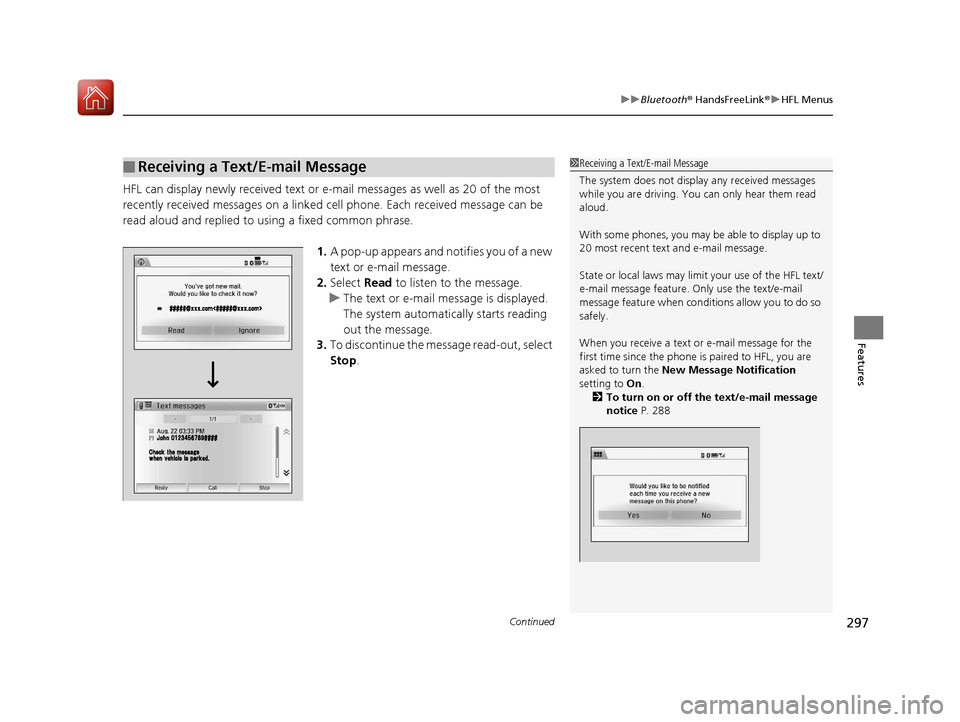
1.A pop-up appears and notifies you of a new
text or e-mail message.
2. Select Read to listen to the message.
u The text or e-mail message is displayed.
The system automatica lly starts reading
out the message.
3. To discontinue the mess age read-out, select
Stop .
■Receiving a Text/E-mail Message1Receiving a Text/E-mail Message
The system does not display any received messages
while you are driving. You can only hear them read
aloud.
With some phones, you may be able to display up to
20 most recent text and e-mail message.
State or local laws may limit your use of the HFL text/
e-mail message feature. Only use the text/e-mail
message feature when conditions allow you to do so
safely.
When you receive a text or e-mail message for the
first time since the phone is paired to HFL, you are
asked to turn the New Message Notification
setting to On .
2 To turn on or off the text/e-mail message
notice P. 288
17 FIT -31T5A6200.book 297 ページ 2016年5月27日 金曜日 午後6時33分
Page 300 of 465
Continued299
uuBluetooth ® HandsFreeLink ®u HFL Menus
Features
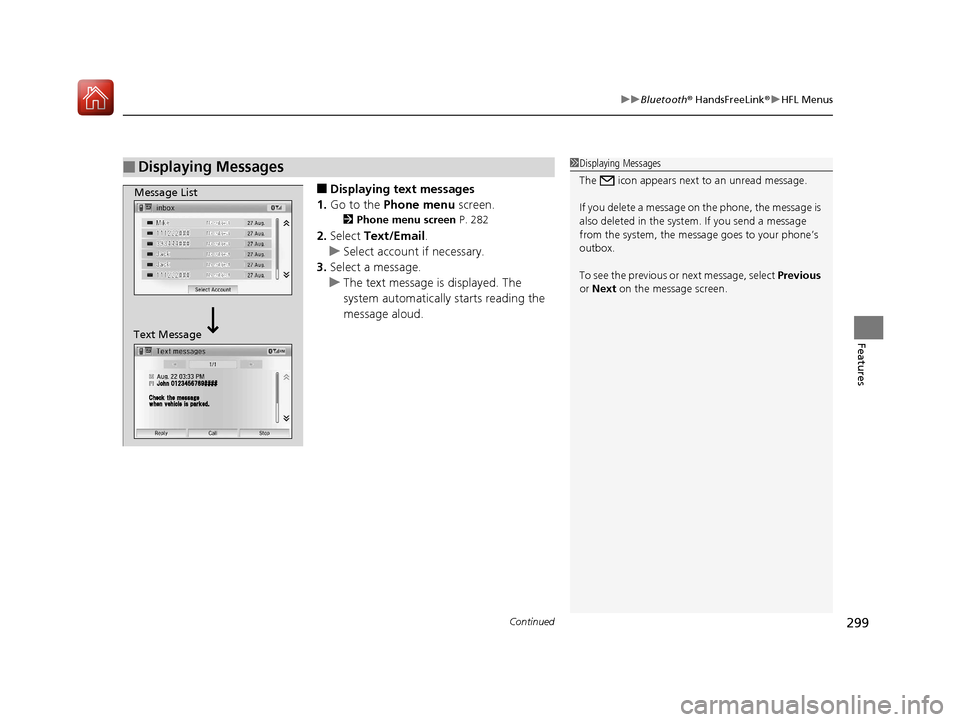
■Displaying text messages
1. Go to the Phone menu screen.
2Phone menu screen P. 282
2.Select Text/Email .
u Select account if necessary.
3. Select a message.
u The text message is displayed. The
system automatically starts reading the
message aloud.
■Displaying Messages1Displaying Messages
The icon appears next to an unread message.
If you delete a message on the phone, the message is
also deleted in the system. If you send a message
from the system, the message goes to your phone’s
outbox.
To see the previous or next message, select Previous
or Next on the message screen.
Message List
Text Message
17 FIT -31T5A6200.book 299 ページ 2016年5月27日 金曜日 午後6時33分
Page 301 of 465
300
uuBluetooth ® HandsFreeLink ®u HFL Menus
Features
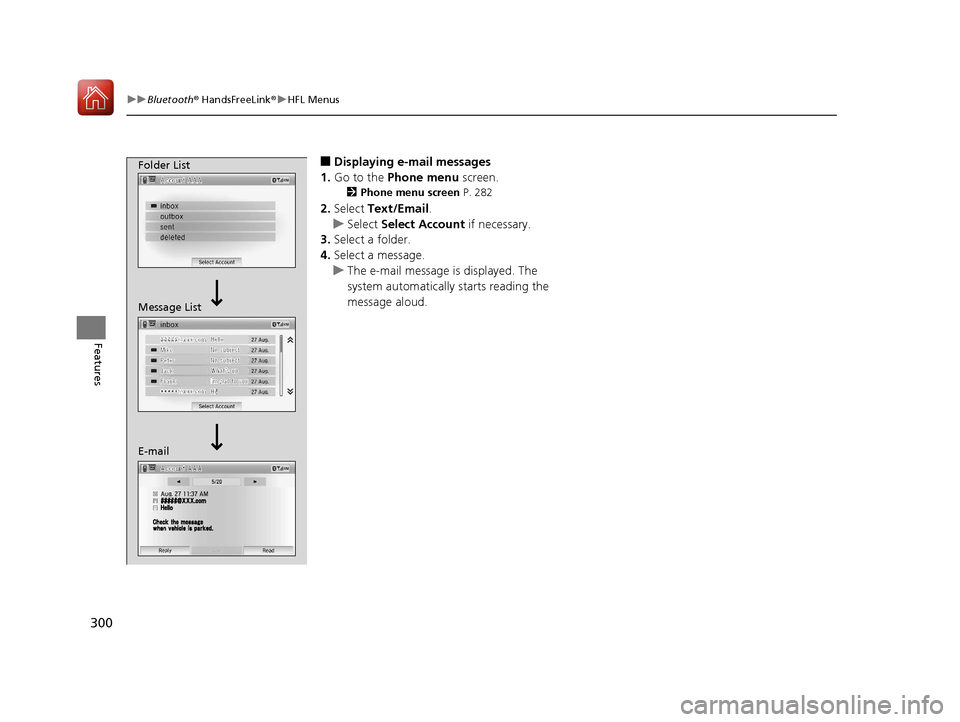
■Displaying e-mail messages
1. Go to the Phone menu screen.
2Phone menu screen P. 282
2.Select Text/Email .
u Select Select Account if necessary.
3. Select a folder.
4. Select a message.
u The e-mail message is displayed. The
system automatically starts reading the
message aloud.
Folder List
Message List
E-mail
17 FIT -31T5A6200.book 300 ページ 2016年5月27日 金曜日 午後6時33分
Page 302 of 465
Continued301
uuBluetooth ® HandsFreeLink ®u HFL Menus
Features
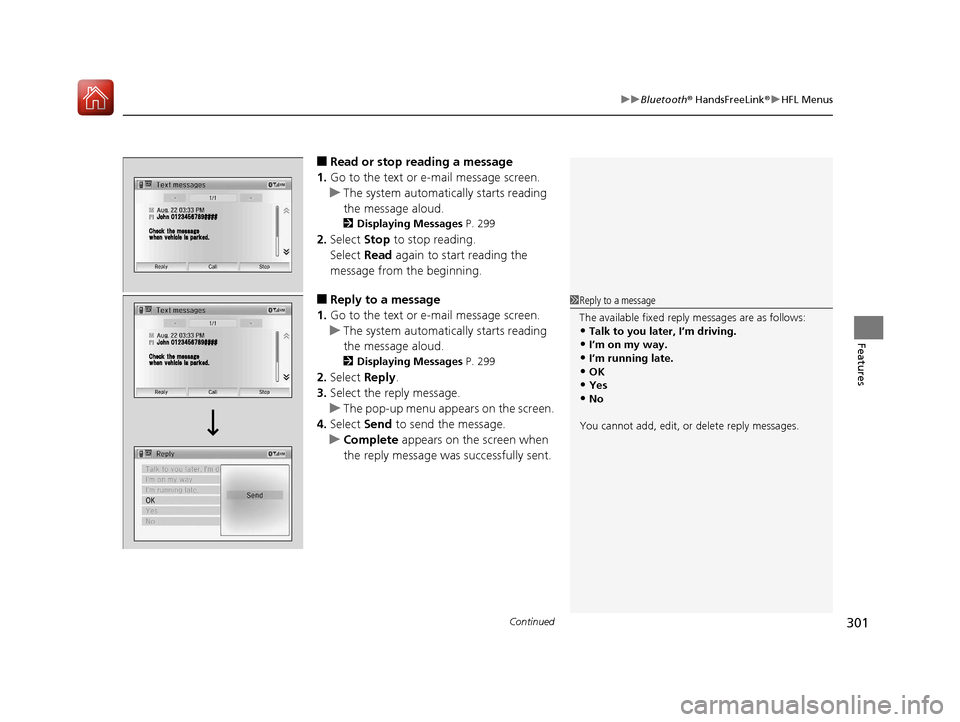
■Read or stop reading a message
1. Go to the text or e-mail message screen.
u The system automatica lly starts reading
the message aloud.
2 Displaying Messages P. 299
2.Select Stop to stop reading.
Select Read again to start reading the
message from the beginning.
■Reply to a message
1. Go to the text or e-mail message screen.
u The system automatica lly starts reading
the message aloud.
2 Displaying Messages P. 299
2.Select Reply.
3. Select the reply message.
u The pop-up menu appears on the screen.
4. Select Send to send the message.
u Complete appears on the screen when
the reply message was successfully sent.
1 Reply to a message
The available fixed reply messages are as follows:
•Talk to you later, I’m driving.•I’m on my way.
•I’m running late.
•OK•Yes
•No
You cannot add, edit, or delete reply messages.
17 FIT -31T5A6200.book 301 ページ 2016年5月27日 金曜日 午後6時33分
Page 324 of 465
323
uuWhen Driving uShifting
Continued
Driving
Shifting
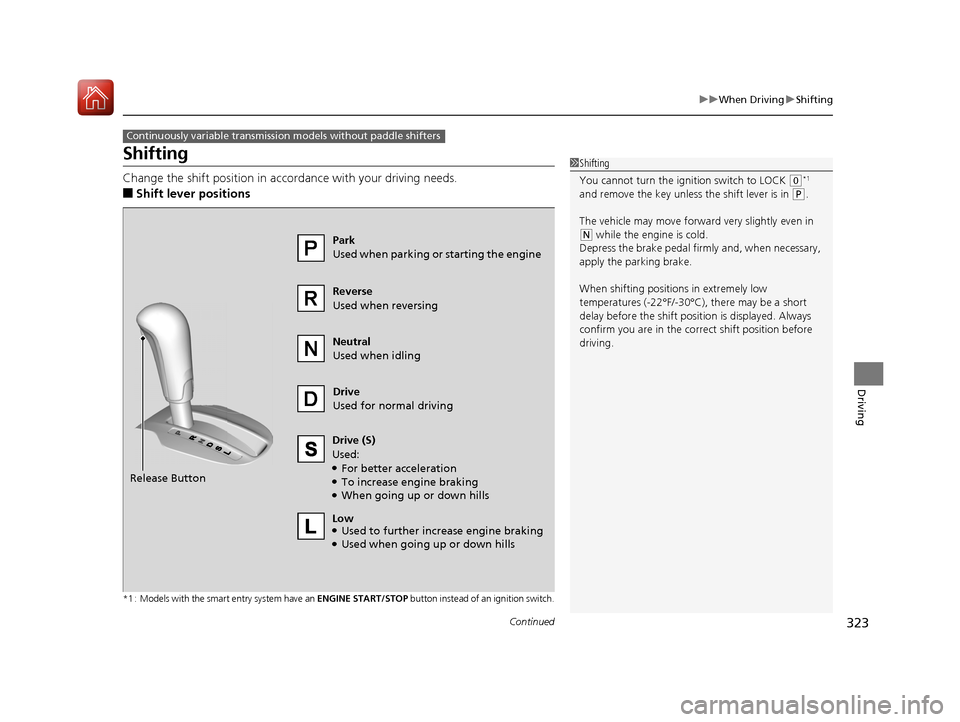
Change the shift position in accordance with your driving needs.
■Shift lever positions
*1 : Models with the smart entry system have an ENGINE START/STOP button instead of an ignition switch.
Continuously variable transmission models without paddle shifters
1Shifting
You cannot turn the ignition switch to LOCK
(0*1
and remove the key unless the shift lever is in ( P.
The vehicle may move forward very slightly even in
(N while the engine is cold.
Depress the brake pe dal firmly and, when necessary,
apply the parking brake.
When shifting positions in extremely low
temperatures (-22°F/-30°C), there may be a short
delay before the shift posit ion is displayed. Always
confirm you are in the corr ect shift position before
driving.Park
Used when parking or starting the engine
Reverse
Used when reversing
Neutral
Used when idling
Drive
Used for normal driving
Drive (S)
Used:
●For better acceleration●To increase engine braking●When going up or down hills
Release Button
Low
●Used to further increase engine braking●Used when going up or down hills
17 FIT -31T5A6200.book 323 ページ 2016年5月27日 金曜日 午後6時33分