interior light HONDA FIT 2017 3.G User Guide
[x] Cancel search | Manufacturer: HONDA, Model Year: 2017, Model line: FIT, Model: HONDA FIT 2017 3.GPages: 465, PDF Size: 26.52 MB
Page 154 of 465
Continued153
uuInterior Lights/Interior Convenience Items uInterior Convenience Items
Controls
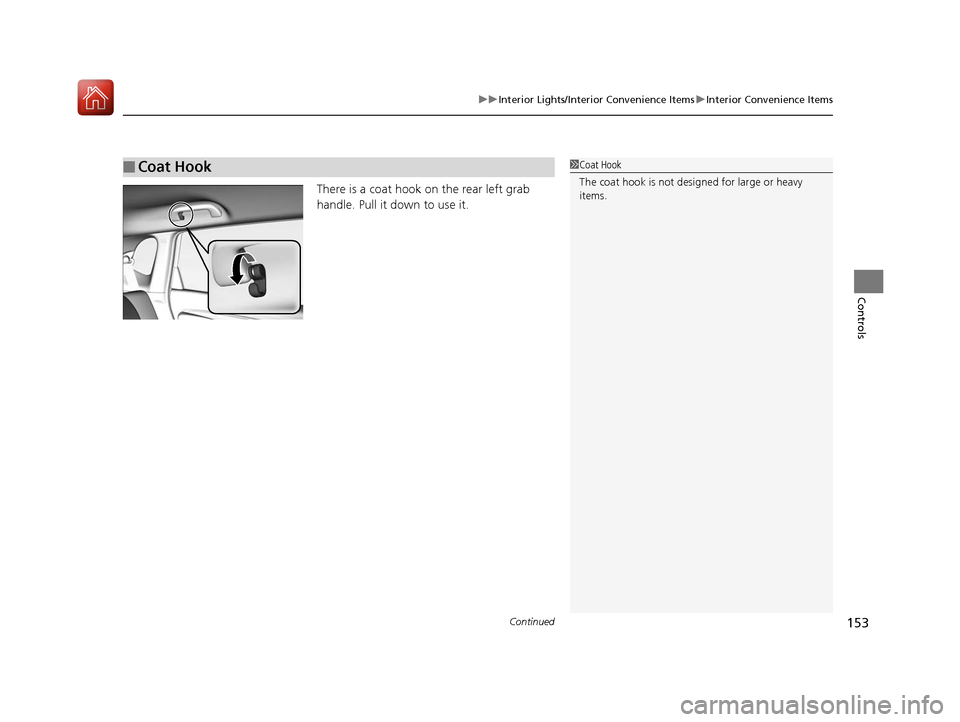
There is a coat hook on the rear left grab
handle. Pull it down to use it.
■Coat Hook1Coat Hook
The coat hook is not desi gned for large or heavy
items.
17 FIT -31T5A6200.book 153 ページ 2016年5月27日 金曜日 午後6時33分
Page 155 of 465
154
uuInterior Lights/Interior Convenience Items uInterior Convenience Items
Controls
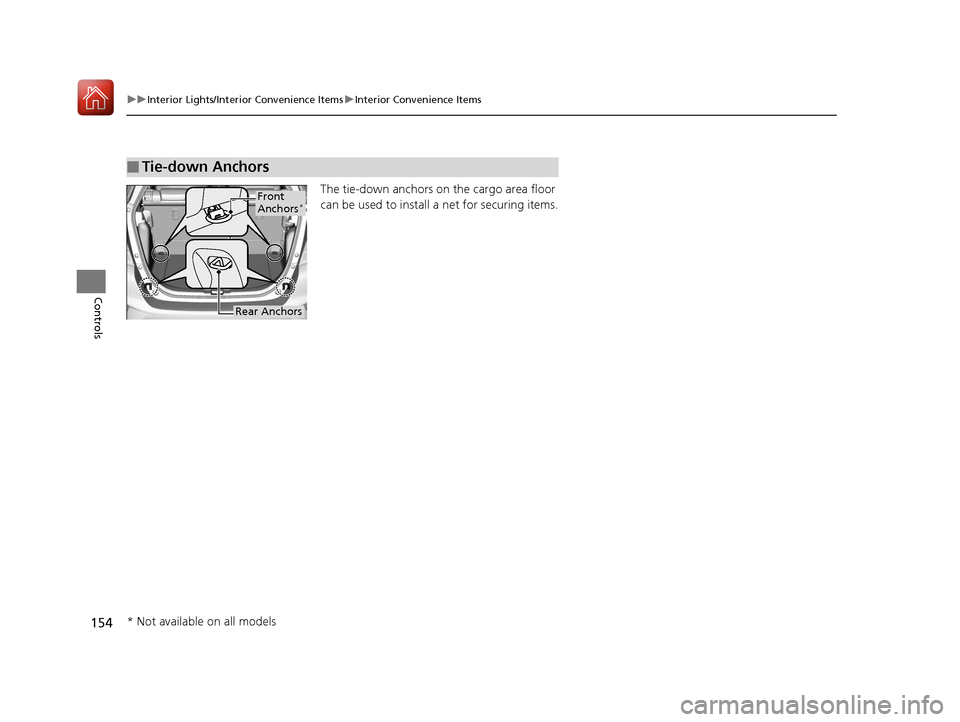
The tie-down anchors on the cargo area floor
can be used to install a net for securing items.
■Tie-down Anchors
Front
Anchors*
Rear Anchors
* Not available on all models
17 FIT -31T5A6200.book 154 ページ 2016年5月27日 金曜日 午後6時33分
Page 156 of 465
Continued155
uuInterior Lights/Interior Convenience Items uInterior Convenience Items
Controls
The cargo area cover may be removed to give you more cargo room.
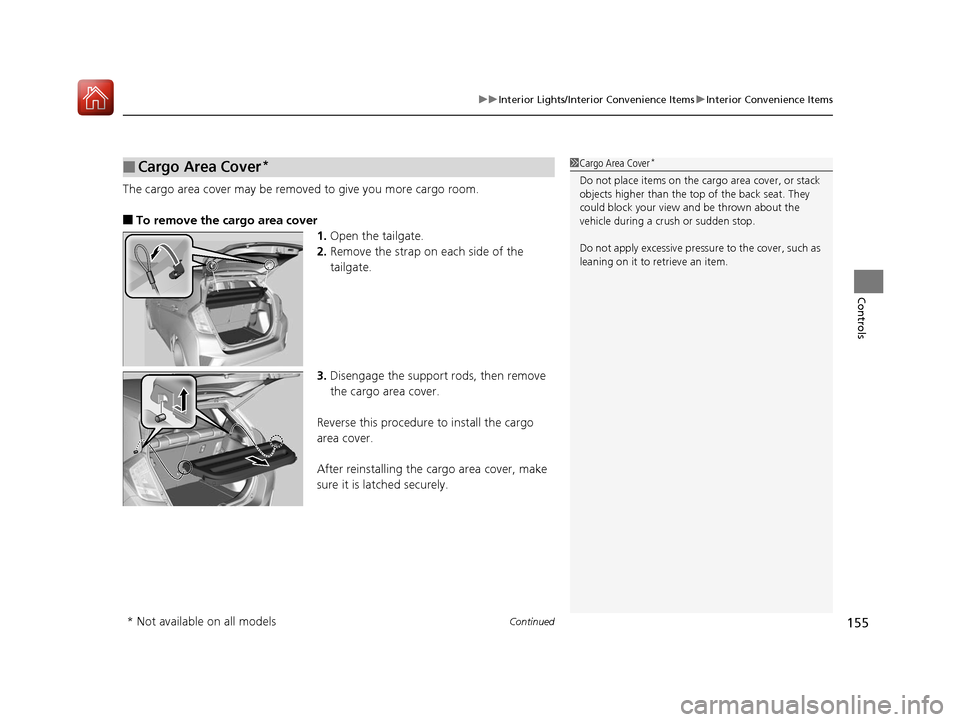
■To remove the cargo area cover
1.Open the tailgate.
2. Remove the strap on each side of the
tailgate.
3. Disengage the support rods, then remove
the cargo area cover.
Reverse this procedure to install the cargo
area cover.
After reinstalling the cargo area cover, make
sure it is latched securely.
■Cargo Area Cover*1 Cargo Area Cover*
Do not place items on the cargo area cover, or stack
objects higher than the top of the back seat. They
could block your view and be thrown about the
vehicle during a crush or sudden stop.
Do not apply excessive pressure to the cover, such as
leaning on it to retrieve an item.
* Not available on all models
17 FIT -31T5A6200.book 155 ページ 2016年5月27日 金曜日 午後6時33分
Page 157 of 465
uuInterior Lights/Interior Convenience Items uInterior Convenience Items
156
Controls
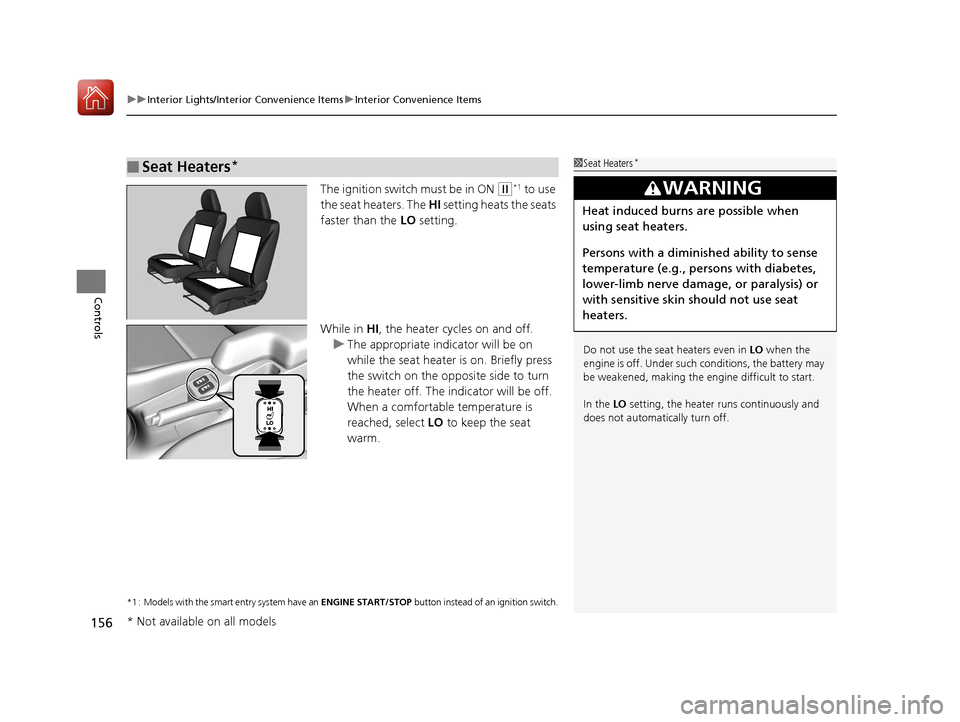
The ignition switch must be in ON (w*1 to use
the seat heaters. The HI setting heats the seats
faster than the LO setting.
While in HI, the heater cycles on and off.
u The appropriate indicator will be on
while the seat heater is on. Briefly press
the switch on the opposite side to turn
the heater off. The in dicator will be off.
When a comfortable temperature is
reached, select LO to keep the seat
warm.
*1 : Models with the smart entry system have an ENGINE START/STOP button instead of an ignition switch.
■Seat Heaters*1Seat Heaters*
Do not use the seat heaters even in LO when the
engine is off. Under such conditions, the battery may
be weakened, making the engine difficult to start.
In the LO setting, the heater runs continuously and
does not automatically turn off.
3WARNING
Heat induced burns are possible when
using seat heaters.
Persons with a diminished ability to sense
temperature (e.g., persons with diabetes,
lower-limb nerve damage, or paralysis) or
with sensitive skin should not use seat
heaters.
* Not available on all models
17 FIT -31T5A6200.book 156 ページ 2016年5月27日 金曜日 午後6時33分
Page 308 of 465
Continued307
uuBefore Driving uDriving Preparation
Driving
• Store or secure all items on board properly.
u Carrying too much cargo, or improperly storing it, can affect your vehicle’s
handling, stability, sto pping distance, and tires, and make it unsafe.
2Maximum Load Limit P. 309
•Do not pile items higher than the seat height.
u They can block your view and may be thrown forward in the event of sudden
braking.
• Do not place anything in the front seat footwells. Make sure to secure the floor
mat
*.
u An object or unsecured floor mat can in terfere with your brake and accelerator
pedal operation while driving.
• If you have any animals on board, do not let them move around in the vehicle.
u They may interfere with driving and a crash could occur.
• Securely close and lock al l doors and the tailgate.
2Locking/Unlocking the Doors from the Inside P. 101
•Adjust your seating position properly.
u Adjust the head restraint, too.
2Adjusting the Seats P. 135
2 Adjusting the Head Restraints P. 142
•Adjust the mirrors and steering wh eel properly for your driving.
u Adjust them while sitting in the proper driving position.
2 Adjusting the Mirrors P. 133
2 Adjusting the Steering Wheel P. 132
■Interior Checks1Interior Checks
The headlight aim is set by the factory, and does not
need to be adjusted. Howeve r, if you regularly carry
heavy items in the cargo area, have the aiming
readjusted at a dealer or by a qualified technician.
* Not available on all models
17 FIT -31T5A6200.book 307 ページ 2016年5月27日 金曜日 午後6時33分
Page 342 of 465
Continued341
uuWhen Driving uLane Departure Warning (LDW)*
Driving
The system begins to search for lane mark ings when all the following conditions are
met:
• The vehicle is traveling between at 45-90 mph (72-145 km/h).
• The vehicle is on a straight or slightly curved road.
• The turn signals are off.
• The brake pedal is not pressed.
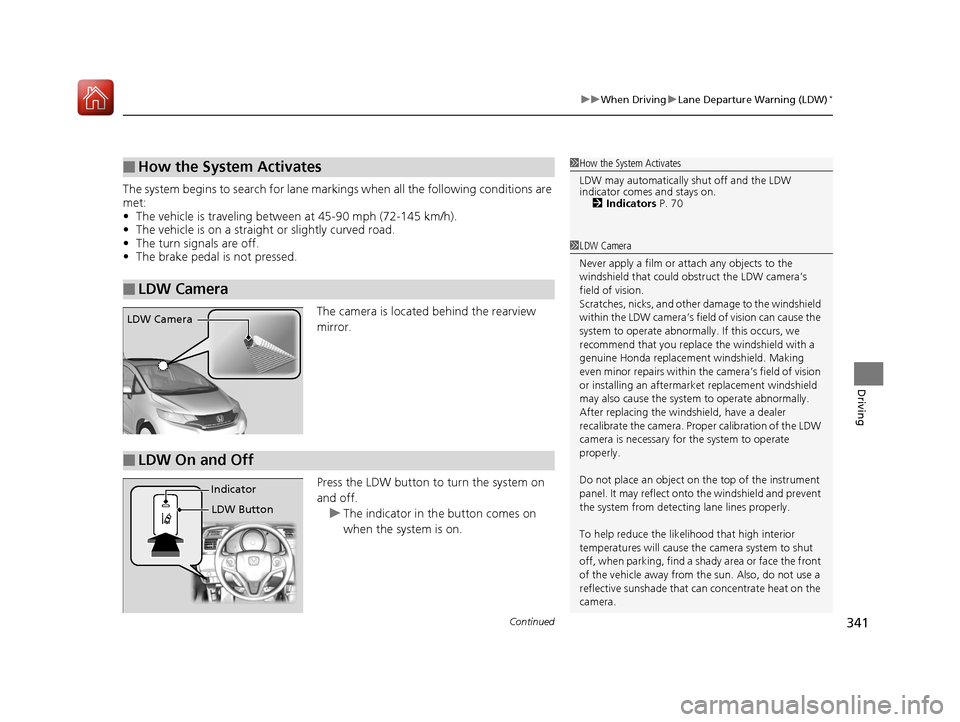
The camera is located behind the rearview
mirror.
Press the LDW button to turn the system on
and off.u The indicator in th e button comes on
when the system is on.
■How the System Activates
■LDW Camera
1 How the System Activates
LDW may automatically shut off and the LDW
indicator comes and stays on.
2 Indicators P. 70
1LDW Camera
Never apply a film or attach any objects to the
windshield that could obs truct the LDW camera’s
field of vision.
Scratches, nicks, and othe r damage to the windshield
within the LDW camera’s fi eld of vision can cause the
system to operate abnormall y. If this occurs, we
recommend that you replac e the windshield with a
genuine Honda replacem ent windshield. Making
even minor repairs within th e camera’s field of vision
or installing an aftermarket replacement windshield
may also cause the system to operate abnormally.
After replacing the winds hield, have a dealer
recalibrate the camera. Prop er calibration of the LDW
camera is necessary for the system to operate
properly.
Do not place an object on the top of the instrument
panel. It may reflect onto the windshield and prevent
the system from detecting lane lines properly.
To help reduce the likel ihood that high interior
temperatures will cause the camera system to shut
off, when parking, find a sh ady area or face the front
of the vehicle away from the sun. Also, do not use a
reflective sunshade that can concentrate heat on the
camera.
LDW Camera
■LDW On and Off
LDW Button
Indicator
17 FIT -31T5A6200.book 341 ページ 2016年5月27日 金曜日 午後6時33分
Page 343 of 465
uuWhen Driving uLane Departure Warning (LDW)*
342
Driving
LDW may not activate or may not recogniz e lanes, and may activate even when
keeping in the middle of a lane under the following conditions.
■LDW Limitations
Condition
●When you drive in bad weather (rain, fog, etc.).●A heavy load in the rear or modificati ons to the suspension tilts your vehicle.●An abnormal tire condition is detected (wrong tire size, flat tire, etc.).●When the windshield is blocked by dirt, mud, leaves, wet snow, etc.●When the temperature inside the system is high.●A sudden change between light and dark such as an entrance or exit of a tunnel.●You drive into the sunlight (e.g. at dawn or dusk).●When the windshield is dirty or cloudy.●When you drive in the shadows of trees, buildings, etc.●When you drive on a wet road su rface following another vehicle.
uThe camera may perceive the tire tracks in the water as lane lines.●When there is snow or wheel tracks on the side of the road.●When the road has many repaired areas or an erased lane line.●When the vehicle is running over painted signs or crosswalk markings.●When you drive in a lane with worn-out lane markups.
1LDW Camera
If the CAMERA HOT message appears:
•Use the heating and cooling system to cool down
the interior and, if nece ssary, the defroster mode
when windows are fogged.
•Start driving the vehicle to lower the windshield
temperature, which cool s down the area around
the LDW system.
17 FIT -31T5A6200.book 342 ページ 2016年5月27日 金曜日 午後6時33分
Page 364 of 465
363
Maintenance
This chapter discusses basic maintenance.
Before Performing MaintenanceInspection and Maintenance ............ 364
Safety When Performing Maintenance .... 365Parts and Fluids Used in Maintenance Service ........................................... 366
Maintenance Minder
TM..................... 367
Maintenance Under the Hood
Maintenance Items Under the Hood ..... 371Opening the Hood ........................... 372
Recommended Engine Oil ................ 373
Oil Check ......................................... 374
Adding Engine Oil ............................ 375
Changing the Engine Oil and Oil Filter..... 376
Engine Coolant ................................ 378
Transmission Fluid ............................ 380
Brake Fluid ....................................... 381
Refilling Window Wa sher Fluid......... 382
Replacing Light Bulbs ....................... 383
Checking and Maintaining Wiper
Blades .......................................... 390
Checking and Maintaining Tires
Checking Tires ................................. 394
Tire and Loading Information Label .. 395
Tire Labeling .................................... 395
DOT Tire Quality Grading (U.S. Vehicles) ...... 397Wear Indicators................................ 399 Tire Service Life ................................ 399
Tire and Wheel Replacement ........... 400
Tire Rotation .................................... 401
Winter Tires ..................................... 402
Battery ............................................... 403
Remote Transmitter Care
Replacing the Button Battery ........... 405
Heating and Cooling System
*/Climate
Control System* Maintenance ....... 407
Cleaning
Interior Care .................................... 408
Exterior Care.................................... 410
* Not available on all models
17 FIT -31T5A6200.book 363 ページ 2016年5月27日 金曜日 午後6時33分
Page 422 of 465
421
Handling the Unexpected
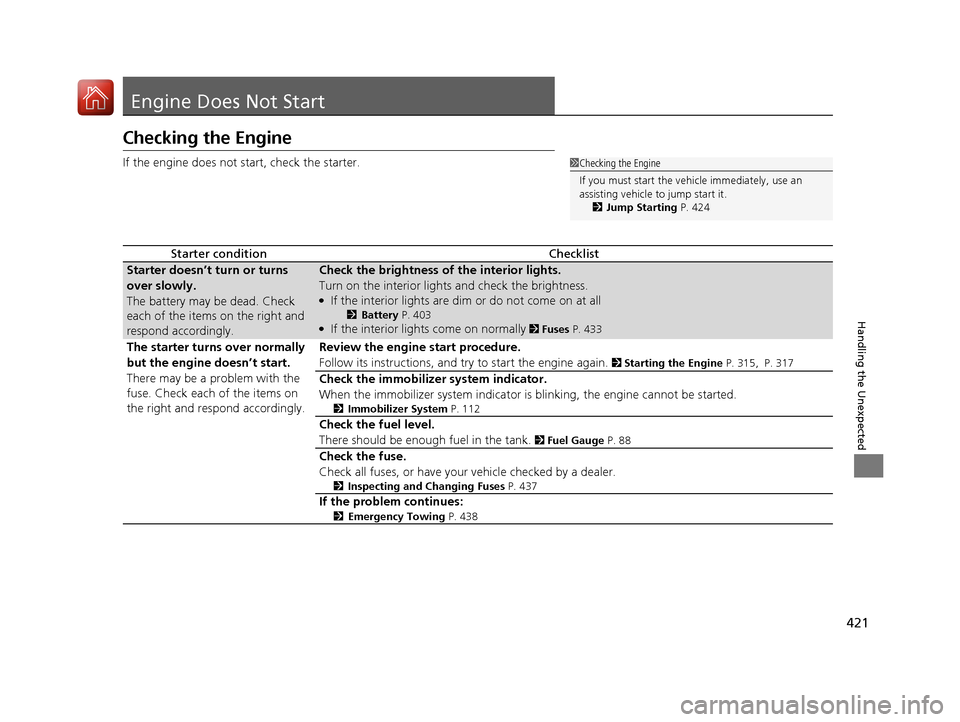
Engine Does Not Start
Checking the Engine
If the engine does not start, check the starter.
Starter conditionChecklist
Starter doesn’t turn or turns
over slowly.
The battery may be dead. Check
each of the items on the right and
respond accordingly.Check the brightness of the interior lights.
Turn on the interior lights and check the brightness.
●If the interior lights are dim or do not come on at all
2Battery P. 403●If the interior lights come on normally 2 Fuses P. 433
The starter turns over normally
but the engine doesn’t start.
There may be a problem with the
fuse. Check each of the items on
the right and respond accordingly.Review the engine start procedure.
Follow its instructions, and try to start the engine again.
2 Starting the Engine P. 315, P. 317
Check the immobilizer system indicator.
When the immobilizer system indicator is blinking, the engine cannot be started.
2Immobilizer System P. 112
Check the fuel level.
There should be enough fuel in the tank.
2 Fuel Gauge P. 88
Check the fuse.
Check all fuses, or have your vehicle checked by a dealer.
2Inspecting and Changing Fuses P. 437
If the problem continues:
2Emergency Towing P. 438
1Checking the Engine
If you must start the vehi cle immediately, use an
assisting vehicle to jump start it.
2 Jump Starting P. 424
17 FIT -31T5A6200.book 421 ページ 2016年5月27日 金曜日 午後6時33分
Page 434 of 465
433Continued
Handling the Unexpected
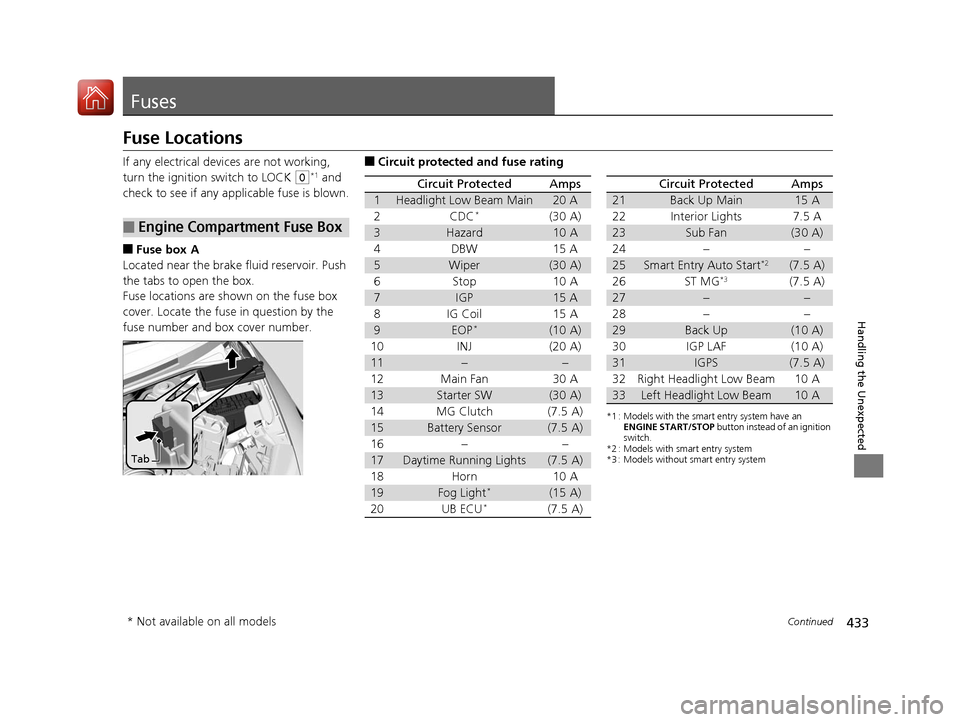
Fuses
Fuse Locations
If any electrical devices are not working,
turn the ignition switch to LOCK
(0*1 and
check to see if any appl icable fuse is blown.
■Fuse box A
Located near the brake fluid reservoir. Push
the tabs to open the box.
Fuse locations are shown on the fuse box
cover. Locate the fuse in question by the
fuse number and box cover number.
■Engine Compartment Fuse Box
Tab
■Circuit protected and fuse rating
Circuit ProtectedAmps
1Headlight Low Beam Main20 A
2CDC*(30 A)
3Hazard10 A
4DBW15 A
5Wiper(30 A)
6Stop10 A
7IGP15 A
8IG Coil15 A
9EOP*(10 A)
10INJ(20 A)
11––
12Main Fan30 A
13Starter SW(30 A)
14MG Clutch(7.5 A)
15Battery Sensor(7.5 A)
16––
17Daytime Running Lights(7.5 A)
18Horn10 A
19Fog Light*(15 A)
20UB ECU*(7.5 A)
*1 : Models with the smart entry system have an ENGINE START/STOP button instead of an ignition
switch.
*2 : Models with smart entry system
*3 : Models without smart entry system
Circuit ProtectedAmps
21Back Up Main15 A
22Interior Lights7.5 A
23Sub Fan(30 A)
24––
25Smart Entry Auto Start*2(7.5 A)
26ST MG*3(7.5 A)
27––
28––
29Back Up(10 A)
30IGP LAF(10 A)
31IGPS(7.5 A)
32Right Headlight Low Beam10 A
33Left Headlight Low Beam10 A
* Not available on all models
17 FIT -31T5A6200.book 433 ページ 2016年5月27日 金曜日 午後6時33分