instrument panel HONDA FIT 2017 3.G Owner's Manual
[x] Cancel search | Manufacturer: HONDA, Model Year: 2017, Model line: FIT, Model: HONDA FIT 2017 3.GPages: 465, PDF Size: 26.52 MB
Page 86 of 465
85
Instrument Panel
Gauges and Displays
Gauges
Gauges include the speedometer, tachometer and related indicators. They are
displayed when the ignition switch is in ON
(w*1.
Displays your driving speed in mph and km/h.
Shows the number of engine revolutions per minute.
*1 : Models with the smart entry system have an ENGINE START/STOP button instead of an ignition switch.
■Speedometer
■Tachometer
17 FIT -31T5A6200.book 85 ページ 2016年5月27日 金曜日 午後6時33分
Page 87 of 465
86
uuGauges and Displays uInformation Display
Instrument Panel
Information Display
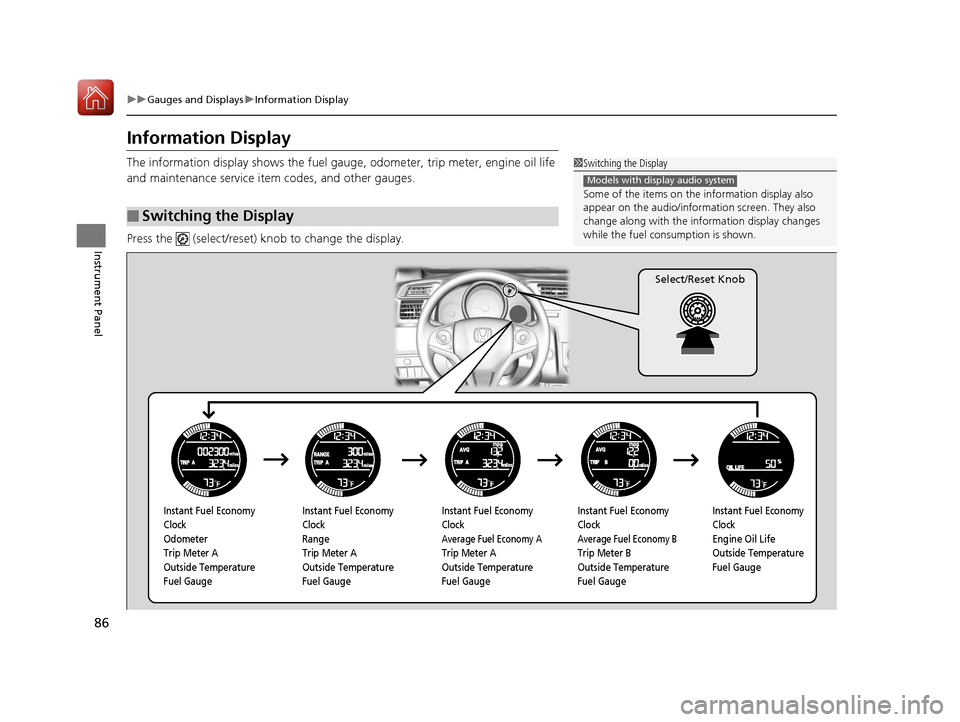
The information display shows the fuel gauge, odometer, tri p meter, engine oil life
and maintenance service item codes, and other gauges.
Press the (select/reset) knob to change the display.
■Switching the Display
1 Switching the Display
Some of the items on the information display also
appear on the audio/information screen. They also
change along with the info rmation display changes
while the fuel consumption is shown.
Models with display audio system
Instant Fuel Economy
Clock
Odometer
Trip Meter A
Outside Temperature
Fuel Gauge Instant Fuel Economy
Clock
Range
Trip Meter A
Outside Temperature
Fuel Gauge Instant Fuel Economy
Clock
Average Fuel Economy A
Trip Meter A
Outside Temperature
Fuel GaugeInstant Fuel Economy
Clock
Average Fuel Economy B
Trip Meter B
Outside Temperature
Fuel GaugeInstant Fuel Economy
Clock
Engine Oil Life
Outside Temperature
Fuel Gauge
Select/Reset Knob
17 FIT -31T5A6200.book 86 ページ 2016年5月27日 金曜日 午後6時33分
Page 88 of 465
Continued87
uuGauges and Displays uInformation Display
Instrument Panel
Shows the instant fuel economy as a bar gr aph in mpg (U.S.) or l/100 km (Canada).
Shows the total number of miles (U.S.) or kilometers (Canada) that your vehicle has
accumulated.
Shows the total number of miles (U.S.) or k ilometers (Canada) driven since the last
reset. TRIP A and B can be used to measure two separate trips.
■Resetting a trip meter
To reset a trip meter, display it, then pr ess and hold the knob. The trip meter is
reset to 0.0.
Shows the estimated distance you can travel on the remaining fuel. This distance is
estimated from the fuel economy of your previous trips.
Shows the estimated average fuel economy of each trip meter in mpg (U.S.) or l/100
km (Canada). The display is updated at set intervals. When a trip meter is reset, the
average fuel economy is also reset.
■Instant Fuel Economy
■Odometer
■Trip Meter
■Range
■Average Fuel Economy
1 Trip Meter
Switch between trip meter A and trip meter B by
pressing the knob.
17 FIT -31T5A6200.book 87 ページ 2016年5月27日 金曜日 午後6時33分
Page 89 of 465
uuGauges and Displays uInformation Display
88
Instrument Panel
Shows the outside temperature in Fahr enheit (U.S.) or Celsius (Canada).
■Adjusting the outside temperature indicator
Adjust the temperature reading up to ± 5°F or ± 3°C if the temperature reading
seems incorrect.
1. Turn the ignition switch to ON
(w*1.
2. Press and hold the (Select/Reset) knob for 10 seconds or more while the
outside temperature is show n on the information display.
u The information display goes into temp erature adjustment mode. The display
starts showing from -5°F to +5°F (U .S.) or -3°C to +3°C (Canada).
3. Release the knob when the righ t adjustment amount is shown.
u The adjustment is complete.
Shows the remaining oil life and Maintenance Minder
TM.
2 Maintenance MinderTM P. 367
Displays the amount of fuel left in the fuel tank.
*1 : Models with the smart entry system have an ENGINE START/STOP button instead of an ignition switch.
■Outside Temperature*
■Engine Oil Life and Maintenance Items
■Fuel Gauge
1Outside Temperature*
The temperature sensor is in the front bumper.
Road heat and exhaust from another vehicle can
affect the temperature reading when your vehicle
speed is less than 19 mph (30 km/h).
It may take several minutes for the display to be
updated after the temperature reading has stabilized.
When the engine oil life is shown on the information
display, you cannot adjust the outside temperature.
Push the knob to select the other display.
1 Fuel Gauge
NOTICE
You should refuel when the reading approaches .
Running out of fuel can cause the engine to misfire,
damaging the cata lytic converter.
The actual amount of remain ing fuel may differ from
the fuel gauge reading.E
* Not available on all models
17 FIT -31T5A6200.book 88 ページ 2016年5月27日 金曜日 午後6時33分
Page 114 of 465
Continued113
uuSecurity System uSecurity System Alarm
Controls
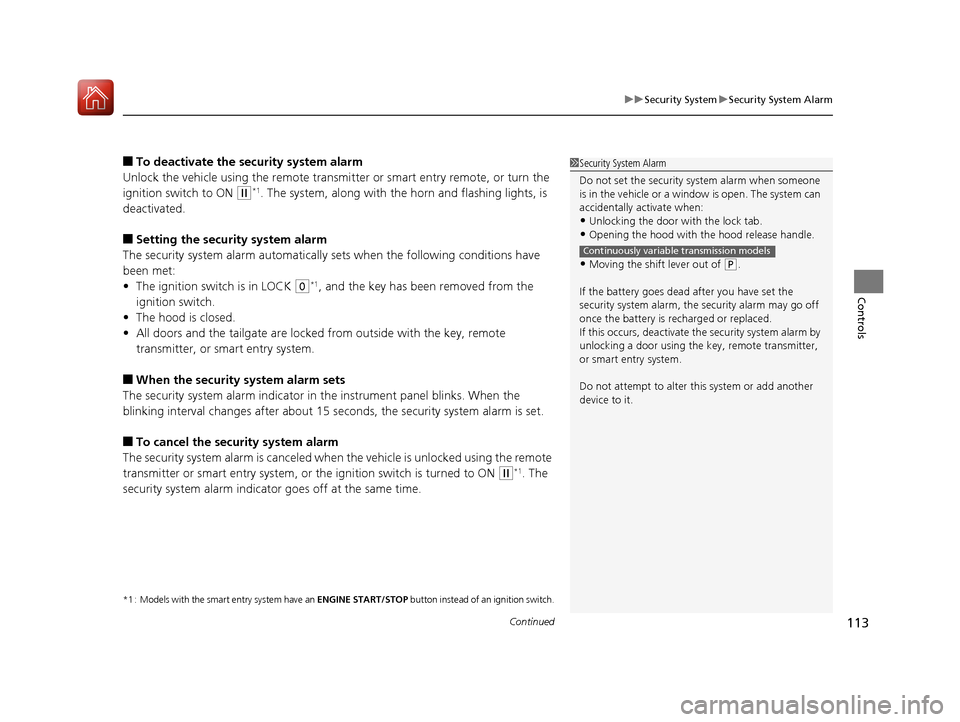
■To deactivate the security system alarm
Unlock the vehicle using the remote transmi tter or smart entry remote, or turn the
ignition switch to ON
(w*1. The system, along with the horn and flashing lights, is
deactivated.
■Setting the security system alarm
The security system alarm automatically sets when the following conditions have
been met:
• The ignition switch is in LOCK
(0*1, and the key has been removed from the
ignition switch.
• The hood is closed.
• All doors and the tailgate are locked from outside with the key, remote
transmitter, or smart entry system.
■When the security system alarm sets
The security system alarm indicator in the instrument panel blinks. When the
blinking interval changes after about 15 se conds, the security system alarm is set.
■To cancel the security system alarm
The security system alarm is canceled when the vehicle is unlocked using the remote
transmitter or smart entry system, or th e ignition switch is turned to ON
(w*1. The
security system alarm indicato r goes off at the same time.
*1 : Models with the smart entry system have an ENGINE START/STOP button instead of an ignition switch.
1Security System Alarm
Do not set the security system alarm when someone
is in the vehicle or a window is open. The system can
accidentally activate when:
•Unlocking the door with the lock tab.•Opening the hood with the hood release handle.
•Moving the shift lever out of ( P.
If the battery goes dead after you have set the
security system alarm, the security alarm may go off
once the battery is re charged or replaced.
If this occurs, deactivate the security system alarm by
unlocking a door using the ke y, remote transmitter,
or smart entry system.
Do not attempt to alter th is system or add another
device to it.
Continuously variable transmission models
17 FIT -31T5A6200.book 113 ページ 2016年5月27日 金曜日 午後6時33分
Page 126 of 465
125
uuOperating the Switches Around the Steering Wheel uLight Switches
Controls
The headlights automatically come on when the wipers are used several times within
a certain intervals with the headlight switch in AUTO.
The headlights automatically go off a few mi nutes later if the wipers are stopped.
The headlights, all other exterior lights, and the instrument panel lights turn off 15
seconds after you remove the key or set the power mode to VEHICLE OFF (LOCK),
take the remote with you, and close the driver's door.
If you turn the igniti on switch to LOCK
(0*1 with the headlight switch on, but do
not open the door, the lights turn off afte r 10 minutes (three minutes, if the switch
is in the AUTO position).
The lights turn on again when you unlock or open the driver's door. If you unlock
the door, but do not open it within 15 seconds, the lights go off. If you open the
driver's door, you will hear a lights on reminder chime.
*1 : Models with the smart entry system have an ENGINE START/STOP button instead of an ignition switch.
■Headlight Integration with Wipers*
■Automatic Lighting Off Feature
1Headlight Integration with Wipers*
This feature activates while the headlights are off in
AUTO .
The instrument panel br ightness does not change
when the headlights come on.
When the ambient light is at dark, the automatic
lighting control feature over rides, and the headlights
come on with or without the wipers sweeping more
than several times.
* Not available on all models
17 FIT -31T5A6200.book 125 ページ 2016年5月27日 金曜日 午後6時33分
Page 131 of 465
130
uuOperating the Switches Around the Steering Wheel uBrightness Control
Controls
Brightness Control
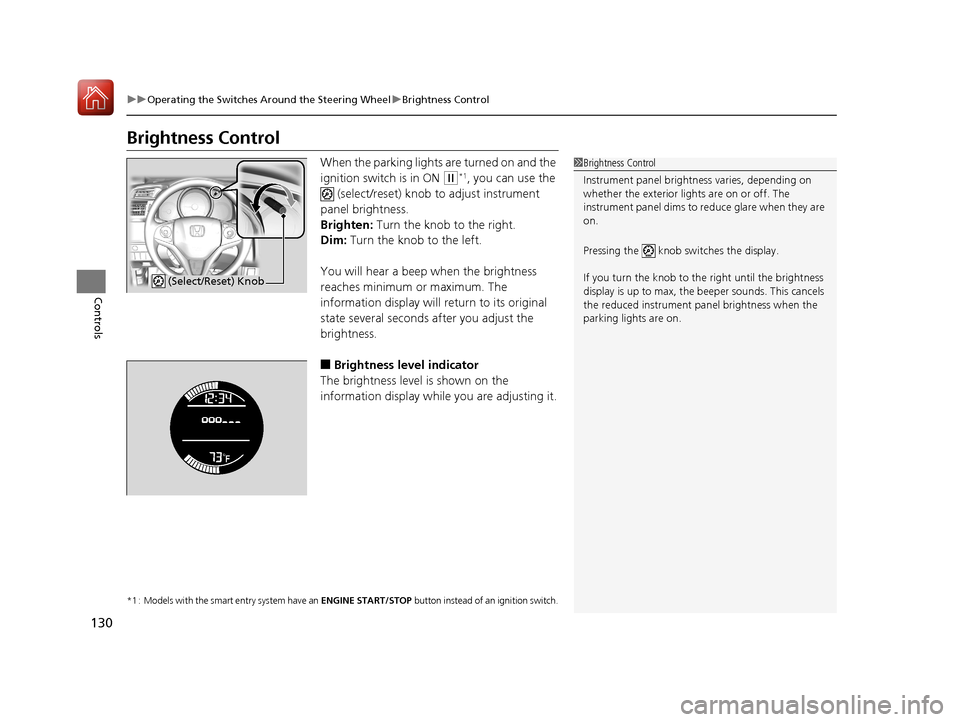
When the parking lights are turned on and the
ignition switch is in ON
(w*1, you can use the
(select/reset) knob to adjust instrument
panel brightness.
Brighten: Turn the knob to the right.
Dim: Turn the knob to the left.
You will hear a beep when the brightness
reaches minimum or maximum. The
information display will return to its original
state several seconds after you adjust the
brightness.
■Brightness level indicator
The brightness level is shown on the
information display while you are adjusting it.
*1 : Models with the smart entry system have an ENGINE START/STOP button instead of an ignition switch.
1Brightness Control
Instrument panel brightne ss varies, depending on
whether the exterior lights are on or off. The
instrument panel dims to reduce glare when they are
on.
Pressing the knob switches the display.
If you turn the knob to the right until the brightness
display is up to max, the beeper sounds. This cancels
the reduced instrument panel brightness when the
parking lights are on.
(Select/Reset) Knob
17 FIT -31T5A6200.book 130 ページ 2016年5月27日 金曜日 午後6時33分
Page 133 of 465
132
uuOperating the Switches Around the Steering Wheel uAdjusting the Steering Wheel
Controls
Adjusting the Steering Wheel
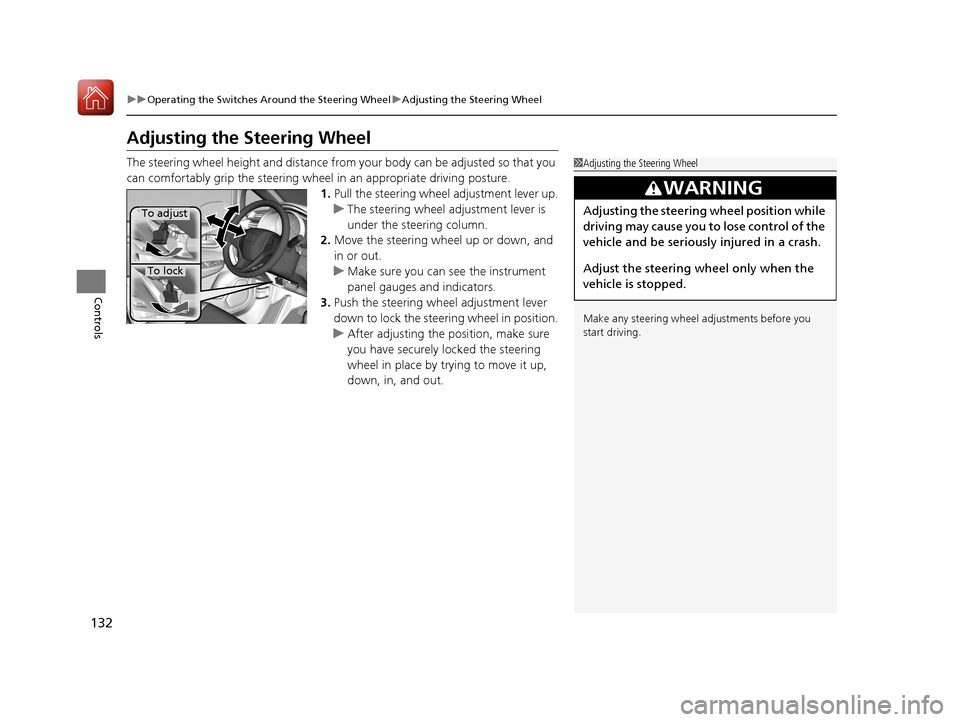
The steering wheel height and distance from your body can be adjusted so that you
can comfortably grip the steering wheel in an appropriate driving posture.
1.Pull the steering wheel adjustment lever up.
u The steering wheel adjustment lever is
under the steering column.
2. Move the steering wheel up or down, and
in or out.
u Make sure you can see the instrument
panel gauges and indicators.
3. Push the steering wheel adjustment lever
down to lock the steering wheel in position.
u After adjusting the position, make sure
you have securely locked the steering
wheel in place by trying to move it up,
down, in, and out.1Adjusting the Steering Wheel
Make any steering wheel adjustments before you
start driving.
3WARNING
Adjusting the steering wheel position while
driving may cause you to lose control of the
vehicle and be seriously injured in a crash.
Adjust the steering wheel only when the
vehicle is stopped.To adjust
To lock
17 FIT -31T5A6200.book 132 ページ 2016年5月27日 金曜日 午後6時33分
Page 334 of 465
333
uuWhen Driving uCruise Control*
Continued
Driving
Cruise Control*
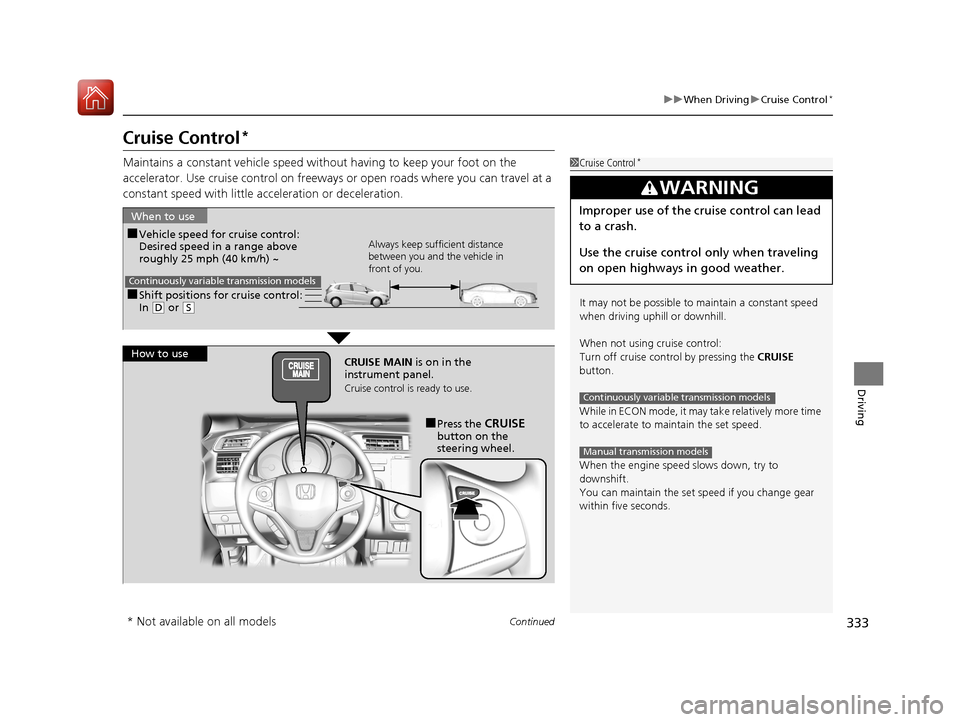
Maintains a constant vehicle speed without having to keep your foot on the
accelerator. Use cruise con trol on freeways or open roads where you can travel at a
constant speed with little ac celeration or deceleration.1Cruise Control*
It may not be possible to maintain a constant speed
when driving uphill or downhill.
When not using cruise control:
Turn off cruise control by pressing the CRUISE
button.
While in ECON mode, it may take relatively more time
to accelerate to maintain the set speed.
When the engine speed slows down, try to
downshift.
You can maintain the set sp eed if you change gear
within five seconds.
3WARNING
Improper use of the cruise control can lead
to a crash.
Use the cruise control only when traveling
on open highways in good weather.
Continuously variable transmission models
Manual transmission models
■Shift positions for cruise control:
In ( D or (S
When to use
Always keep sufficient distance
between you and the vehicle in
front of you.
Continuously variable transmission models
■Vehicle speed for cruise control:
Desired speed in a range above
roughly 25 mph (40 km/h) ~
How to use CRUISE MAIN is on in the
instrument panel.
Cruise control is ready to use.
■Press the CRUISE
button on the
steering wheel.
* Not available on all models
17 FIT -31T5A6200.book 333 ページ 2016年5月27日 金曜日 午後6時33分
Page 342 of 465
Continued341
uuWhen Driving uLane Departure Warning (LDW)*
Driving
The system begins to search for lane mark ings when all the following conditions are
met:
• The vehicle is traveling between at 45-90 mph (72-145 km/h).
• The vehicle is on a straight or slightly curved road.
• The turn signals are off.
• The brake pedal is not pressed.
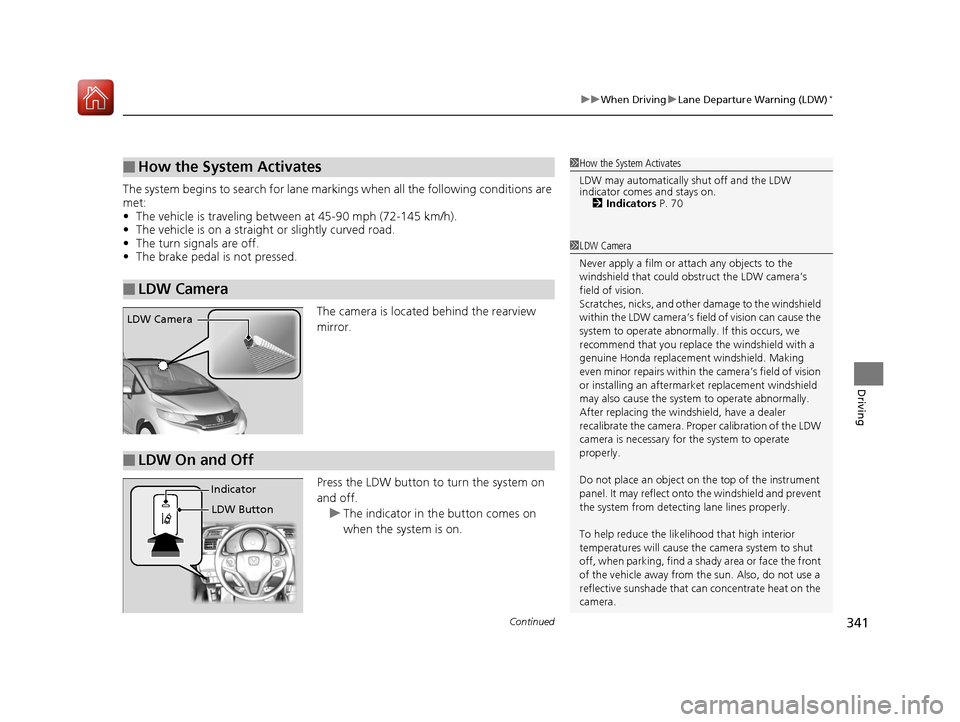
The camera is located behind the rearview
mirror.
Press the LDW button to turn the system on
and off.u The indicator in th e button comes on
when the system is on.
■How the System Activates
■LDW Camera
1 How the System Activates
LDW may automatically shut off and the LDW
indicator comes and stays on.
2 Indicators P. 70
1LDW Camera
Never apply a film or attach any objects to the
windshield that could obs truct the LDW camera’s
field of vision.
Scratches, nicks, and othe r damage to the windshield
within the LDW camera’s fi eld of vision can cause the
system to operate abnormall y. If this occurs, we
recommend that you replac e the windshield with a
genuine Honda replacem ent windshield. Making
even minor repairs within th e camera’s field of vision
or installing an aftermarket replacement windshield
may also cause the system to operate abnormally.
After replacing the winds hield, have a dealer
recalibrate the camera. Prop er calibration of the LDW
camera is necessary for the system to operate
properly.
Do not place an object on the top of the instrument
panel. It may reflect onto the windshield and prevent
the system from detecting lane lines properly.
To help reduce the likel ihood that high interior
temperatures will cause the camera system to shut
off, when parking, find a sh ady area or face the front
of the vehicle away from the sun. Also, do not use a
reflective sunshade that can concentrate heat on the
camera.
LDW Camera
■LDW On and Off
LDW Button
Indicator
17 FIT -31T5A6200.book 341 ページ 2016年5月27日 金曜日 午後6時33分