remote control HONDA FIT 2017 3.G Owner's Manual
[x] Cancel search | Manufacturer: HONDA, Model Year: 2017, Model line: FIT, Model: HONDA FIT 2017 3.GPages: 465, PDF Size: 26.52 MB
Page 167 of 465
166
Features
Audio System
About Your Audio System
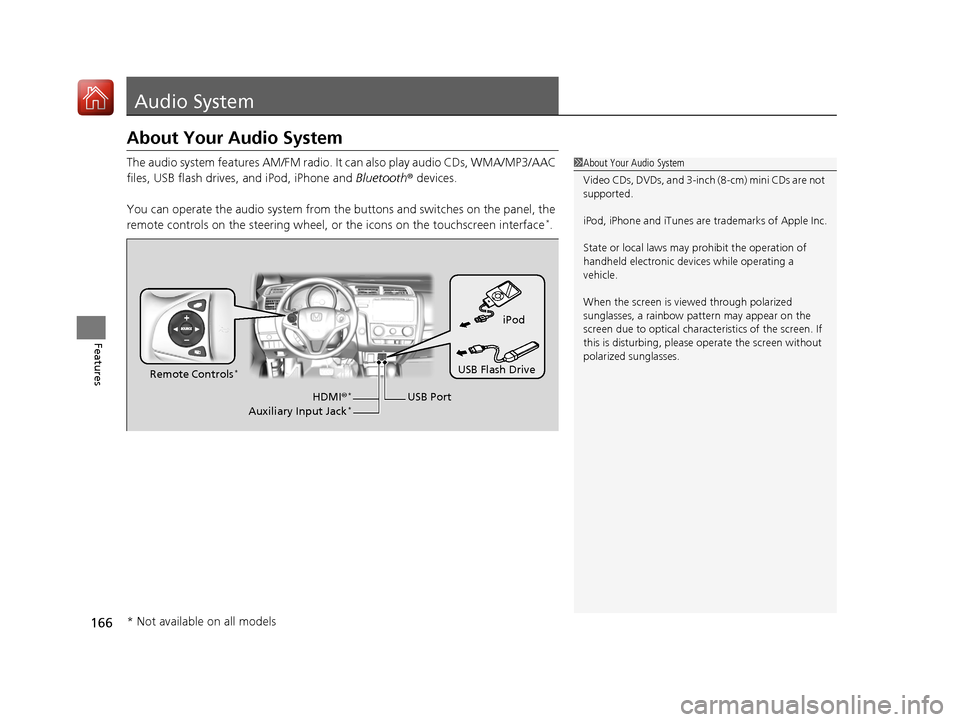
The audio system features AM/FM radio. It can also play audio CDs, WMA/MP3/AAC
files, USB flash drives, and iPod, iPhone and Bluetooth® devices.
You can operate the audio system from the buttons and switches on the panel, the
remote controls on the steering wheel, or the icons on the touchscreen interface
*.
1 About Your Audio System
Video CDs, DVDs, and 3-inch (8-cm) mini CDs are not
supported.
iPod, iPhone and iTunes are trademarks of Apple Inc.
State or local laws may prohibit the operation of
handheld electronic devices while operating a
vehicle.
When the screen is vi ewed through polarized
sunglasses, a rainbow pa ttern may appear on the
screen due to optical characteristics of the screen. If
this is disturbing, please operate the screen without
polarized sunglasses.
iPod
USB Flash Drive
USB Port
Remote Controls
*
HDMI
®*
Auxiliary Input Jack*
* Not available on all models
17 FIT -31T5A6200.book 166 ページ 2016年5月27日 金曜日 午後6時33分
Page 172 of 465
171
uuAudio System uAudio Remote Controls*
Continued
Features
Audio Remote Controls*
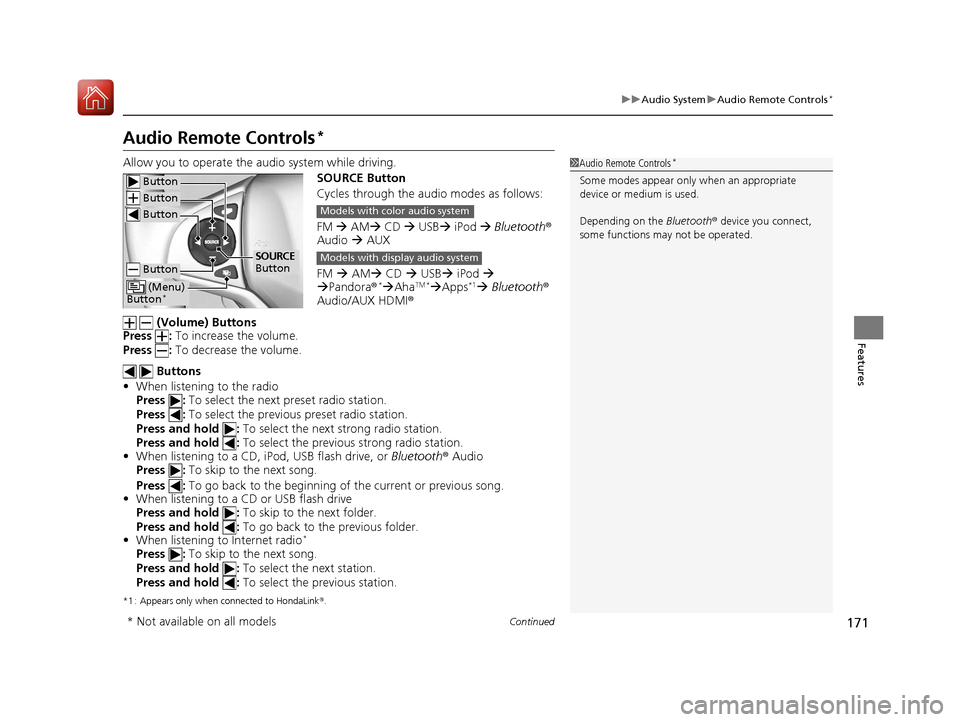
Allow you to operate the au dio system while driving.
SOURCE Button
Cycles through the audio modes as follows:
FM AM CD USB iPod Bluetooth ®
Audio AUX
FM AM CD USB iPod
Pandora®
*AhaTM *Apps*1 Bluetooth ®
Audio/AUX HDMI ®
(Volume) Buttons
Press : To increase the volume.
Press : To decrease the volume.
Buttons
• When listening to the radio
Press : To select the next preset radio station.
Press : To select the previous preset radio station.
Press and hold : To select the next strong radio station.
Press and hold : To select the previous strong radio station.
• When listening to a CD, iPod, USB flash drive, or Bluetooth® Audio
Press : To skip to the next song.
Press : To go back to the beginning of the current or previous song.
• When listening to a CD or USB flash drive
Press and hold : To skip to the next folder.
Press and hold : To go back to the previous folder.
• When listening to Internet radio
*
Press : To skip to the next song.
Press and hold : To select the next station.
Press and hold : To select the previous station.
*1 : Appears only when connected to HondaLink ®.
1 Audio Remote Controls*
Some modes appear only when an appropriate
device or medium is used.
Depending on the Bluetooth® device you connect,
some functions ma y not be operated. Button
Button
Button
Button
(Menu)
Button*
SOURCE
Button
Models with color audio system
Models with display audio system
* Not available on all models
17 FIT -31T5A6200.book 171 ページ 2016年5月27日 金曜日 午後6時33分
Page 173 of 465
uuAudio System uAudio Remote Controls*
172
Features
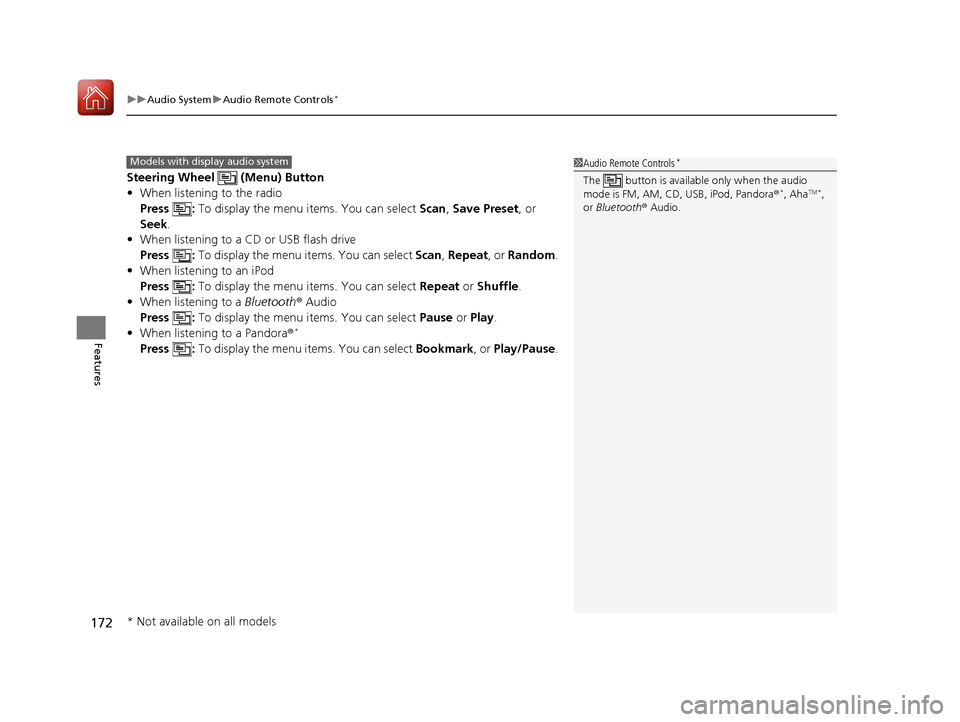
Steering Wheel (Menu) Button
• When listening to the radio
Press : To display the menu items. You can select Scan, Save Preset , or
Seek.
• When listening to a CD or USB flash drive
Press : To display the menu it ems. You can select Scan, Repeat , or Random .
• When listening to an iPod
Press : To display the menu items. You can select Repeat or Shuffle.
• When listening to a Bluetooth® Audio
Press : To display the menu items. You can select Pause or Play .
• When listening to a Pandora ®
*
Press : To display the menu items. You can select Bookmark, or Play/Pause .
1Audio Remote Controls*
The button is available only when the audio
mode is FM, AM, CD, USB, iPod, Pandora®*, AhaTM *,
or Bluetooth ® Audio.
Models with display audio system
* Not available on all models
17 FIT -31T5A6200.book 172 ページ 2016年5月27日 金曜日 午後6時33分
Page 174 of 465
173
Features
Audio System Basic Operation
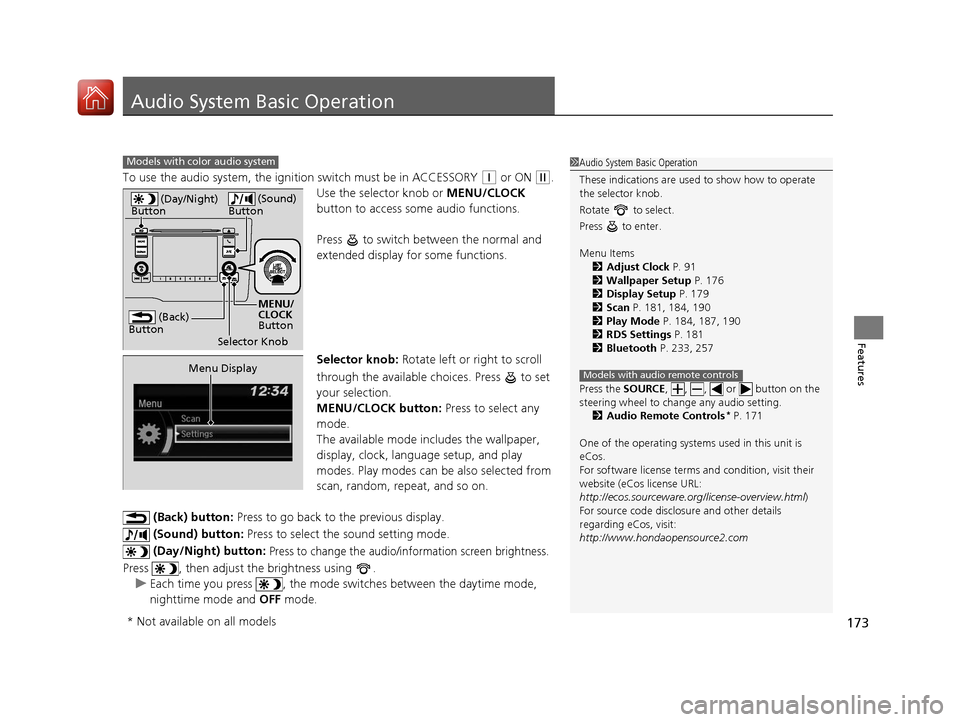
To use the audio system, the ignition switch must be in ACCESSORY (q or ON (w.
Use the selector knob or MENU/CLOCK
button to access some audio functions.
Press to switch between the normal and
extended display fo r some functions.
Selector knob: Rotate left or right to scroll
through the available choices. Press to set
your selection.
MENU/CLOCK button: Press to select any
mode.
The available mode in cludes the wallpaper,
display, clock, language setup, and play
modes. Play modes can be also selected from
scan, random, repeat, and so on.
(Back) button: Press to go back to the previous display.
(Sound) button: Press to select the sound setting mode.
(Day/Night) button:
Press to change the audio/information screen brightness.
Press , then adjust the brightness using . u Each time you press , the mode switches between the daytime mode,
nighttime mode and OFF mode.
Models with color audio system1Audio System Basic Operation
These indications are used to show how to operate
the selector knob.
Rotate to select.
Press to enter.
Menu Items 2 Adjust Clock P. 91
2 Wallpaper Setup P. 176
2 Display Setup P. 179
2 Scan P. 181, 184, 190
2 Play Mode P. 184, 187, 190
2 RDS Settings P. 181
2 Bluetooth P. 233, 257
Press the SOURCE , , , or button on the
steering wheel to cha nge any audio setting.
2 Audio Remote Controls
* P. 171
One of the operating system s used in this unit is
eCos.
For software license terms and condition, visit their
website (eCos license URL:
http://ecos.sourceware.org/license-overview.html )
For source code disclo sure and other details
regarding eCos, visit:
http://www.hondaopensource2.com
Models with audio remote controls
(Back)
Button
Selector Knob MENU/
CLOCK
Button
(Day/Night)
Button
(Sound)
Button
Menu Display
* Not available on all models
17 FIT -31T5A6200.book 173 ページ 2016年5月27日 金曜日 午後6時33分
Page 182 of 465
181
uuAudio System Basic Operation uPlaying AM/FM Radio
Features
Provides text data information related to your selected RDS capable FM station.
■To find an RDS station from Station List
1. Press while listening to an FM station.
2. Rotate to select the station, then press .
■Update List
Updates your available st ation list at any time.
1. Press while listening to an FM station.
2. Rotate to select Update List, then press .
■Radio text
Displays the radio text information of the selected RDS station.
1. Press the MENU/CLOCK button.
2. Rotate to select Settings, then press .
3. Rotate to select RDS Settings, then press .
4. Rotate to select Radio Text, then press .
■Scan
Samples each of the strongest stations on the selected band for 10 seconds.
1. Press the MENU/CLOCK button.
2. Rotate to select Scan, then press .
To turn off scan, press .
■Radio Data System (RDS)1 Playing AM/FM Radio
The ST indicator appears on the display indicating
stereo FM broadcasts.
Stereo reproduction in AM is not available.
You can store 6 AM stations and 12 FM stations into
the preset memory.
Switching the Audio Mode
Press the SOURCE button on the steering wheel.
2 Audio Remote Controls
* P. 171
Models with audio remote controls
1Radio Data System (RDS)
When you select an RDS-capable FM station, the RDS
automatically turns on, and the frequency display
changes to the station name. However, when the
signals of that station become weak, the display
changes from the statio n name to the frequency.
* Not available on all models
17 FIT -31T5A6200.book 181 ページ 2016年5月27日 金曜日 午後6時33分
Page 204 of 465
Continued203
uuAudio System Basic Operation uPlaying AM/FM Radio
Features
To store a station:
1. Tune to the selected station.
2. Select MENU .
3. Select Save Preset .
4. Select the preset number you want to store that station.
You can also store a preset station by the following procedure.
1. Select open/close icon to display a channel list.
2. Select Preset tab.
3. Press and hold the preset number for the station you want to store until you hear
a beep.
Provides text data information related to your selected RDS-capable FM station.
■To find an RDS station from Station List
1. Select MENU while listening to an FM station.
2. Select Station List .
3. Select the station.
■Manual update
Updates your available st ation list at any time.
1. Select MENU while listening to an FM station.
2. Select Station List .
3. Select Refresh .
■Preset Memory
■Radio Data System (RDS)
1Playing AM/FM Radio
The ST indicator appears on the display indicating
stereo FM broadcasts.
Stereo reproduction in AM is not available.
Switching the Audio Mode
Press the SOURCE button on the steering wheel or
select SOURCE on the list.
2 Audio Remote Controls
* P. 171
You can also switch the mode by selecting Change
Source on the MENU screen.
You can store 6 AM stations and 12 FM stations into
the preset memory.
1 Radio Data System (RDS)
When you select an RDS-capable FM station, the RDS
automatically turns on, and the frequency display
changes to the station name. However, when the
signals of that station become weak, the display
changes from the statio n name to the frequency.
* Not available on all models
17 FIT -31T5A6200.book 203 ページ 2016年5月27日 金曜日 午後6時33分
Page 252 of 465
251Continued
Features
Bluetooth® HandsFreeLink ®
See the navigation system manual for how to operate the Bluetooth® HandsFreeLink®.
Bluetooth ® HandsFreeLink ® (HFL) allows you to place and receive phone calls using
your vehicle’s audio system, without handling your cell phone.
Using HFL
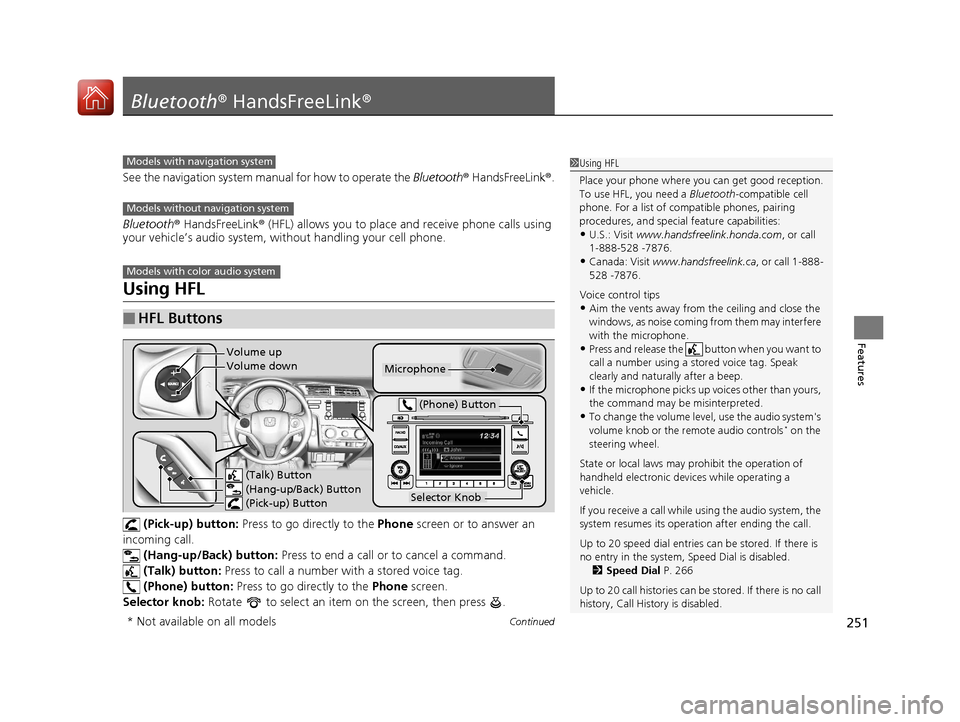
(Pick-up) button: Press to go directly to the Phone screen or to answer an
incoming call.
(Hang-up/Back) button: Press to end a call or to cancel a command.
(Talk) button: Press to call a number with a stored voice tag.
(Phone) button: Press to go directly to the Phone screen.
Selector knob: Rotate to select an item on the screen, then press .
■HFL Buttons
1Using HFL
Place your phone where y ou can get good reception.
To use HFL, you need a Bluetooth-compatible cell
phone. For a list of compatible phones, pairing
procedures, and special feature capabilities:
•U.S.: Visit www.handsfreelink.honda.com , or call
1-888-528 -7876.
•Canada: Visit www.handsfreelink.ca , or call 1-888-
528 -7876.
Voice control tips
•Aim the vents away from the ceiling and close the
windows, as noise coming fr om them may interfere
with the microphone.
•Press and release the button when you want to
call a number using a st ored voice tag. Speak
clearly and naturally after a beep.
•If the microphone picks up vo ices other than yours,
the command may be misinterpreted.
•To change the volume level, use the audio system's
volume knob or the remote audio controls* on the
steering wheel.
State or local laws may prohibit the operation of
handheld electronic devices while operating a
vehicle.
If you receive a call while using the audio system, the
system resumes its operati on after ending the call.
Up to 20 speed dial entries can be stored. If there is
no entry in the system, Speed Dial is disabled. 2 Speed Dial P. 266
Up to 20 call histories can be stored. If there is no call
history, Call History is disabled.
Models with navigation system
Models without navigation system
Models with color audio system
Microphone
(Talk) Button
(Hang-up/Back) Button
(Pick-up) Button
Selector Knob
(Phone) Button
Volume up
Volume down
* Not available on all models
17 FIT -31T5A6200.book 251 ページ 2016年5月27日 金曜日 午後6時33分
Page 277 of 465
276
uuBluetooth ® HandsFreeLink ®u Using HFL
Features
Using HFL
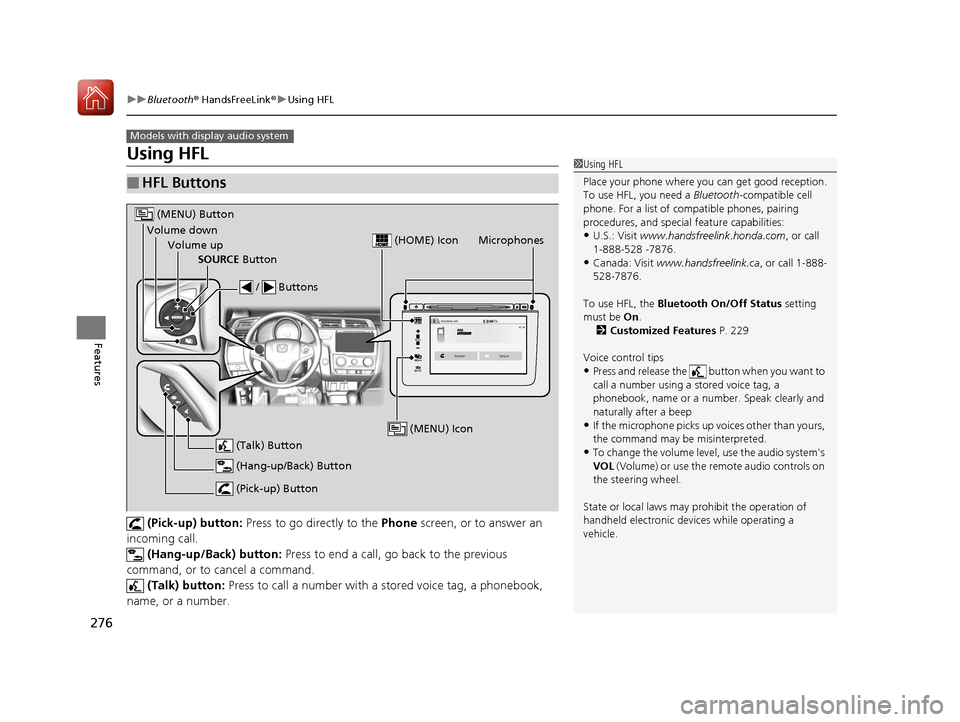
(Pick-up) button: Press to go directly to the Phone screen, or to answer an
incoming call.
(Hang-up/Back) button: Press to end a call, go back to the previous
command, or to cancel a command. (Talk) button: Press to call a number with a stored voice tag, a phonebook,
name, or a number.
■HFL Buttons
Models with display audio system
1 Using HFL
Place your phone where y ou can get good reception.
To use HFL, you need a Bluetooth-compatible cell
phone. For a list of compatible phones, pairing
procedures, and special feature capabilities:
•U.S.: Visit www.handsfreelink.honda.com , or call
1-888-528 -7876.
•Canada: Visit www.handsfreelink.ca , or call 1-888-
528-7876.
To use HFL, the Bluetooth On/Off Status setting
must be On .
2 Customized Features P. 229
Voice control tips
•Press and release the button when you want to
call a number using a stored voice tag, a
phonebook, name or a numbe r. Speak clearly and
naturally after a beep
•If the microphone picks up vo ices other than yours,
the command may be misinterpreted.
•To change the volume level, use the audio system's
VOL (Volume) or use the remote audio controls on
the steering wheel.
State or local laws may prohibit the operation of
handheld electronic devices while operating a
vehicle.
VOL
HOME
MENU
BACK
Microphones
(Pick-up) Button
(Hang-up/Back) Button
Volume up (Talk) Button
(MENU) Button
Volume downSOURCE Button / Buttons
(MENU) Icon
(HOME) Icon
17 FIT -31T5A6200.book 276 ページ 2016年5月27日 金曜日 午後6時33分
Page 364 of 465
363
Maintenance
This chapter discusses basic maintenance.
Before Performing MaintenanceInspection and Maintenance ............ 364
Safety When Performing Maintenance .... 365Parts and Fluids Used in Maintenance Service ........................................... 366
Maintenance Minder
TM..................... 367
Maintenance Under the Hood
Maintenance Items Under the Hood ..... 371Opening the Hood ........................... 372
Recommended Engine Oil ................ 373
Oil Check ......................................... 374
Adding Engine Oil ............................ 375
Changing the Engine Oil and Oil Filter..... 376
Engine Coolant ................................ 378
Transmission Fluid ............................ 380
Brake Fluid ....................................... 381
Refilling Window Wa sher Fluid......... 382
Replacing Light Bulbs ....................... 383
Checking and Maintaining Wiper
Blades .......................................... 390
Checking and Maintaining Tires
Checking Tires ................................. 394
Tire and Loading Information Label .. 395
Tire Labeling .................................... 395
DOT Tire Quality Grading (U.S. Vehicles) ...... 397Wear Indicators................................ 399 Tire Service Life ................................ 399
Tire and Wheel Replacement ........... 400
Tire Rotation .................................... 401
Winter Tires ..................................... 402
Battery ............................................... 403
Remote Transmitter Care
Replacing the Button Battery ........... 405
Heating and Cooling System
*/Climate
Control System* Maintenance ....... 407
Cleaning
Interior Care .................................... 408
Exterior Care.................................... 410
* Not available on all models
17 FIT -31T5A6200.book 363 ページ 2016年5月27日 金曜日 午後6時33分
Page 456 of 465
Index
455
Index
Index
Numbers
7-Speed Manual Shift Mode................... 327
A
ABS (Anti-lock Brake System) .................. 353
Accessories and Modifications ................ 362
Accessory Power Socket ........................... 152
Additives Coolant .................................................. 378
Engine Oil ............................................... 373
Washer ................................................... 382
Additives, Engine Oil ............................... 373
Adjusting Front Seats.............................................. 135
Head Restraints ....................................... 142
Headlights .............................................. 383
Mirrors.................................................... 133
Rear Seats ............................................... 139
Steering Wheel ....................................... 132
Adjusting the Sound ................................ 200
Air Conditioning System Climate Control System .......................... 160
Defrosting the Windshield
and Windows....................................... 161
Dust and Pollen Filter .............................. 407
Air Conditioning System
(Heating and Cooling System) Cooling................................................... 159
Defrosting the Windshield
and Windows....................................... 159 Heating ................................................... 158
Heating and Cooling System .................... 157
Air Pressure ....................................... 395, 443
Airbags ........................................................ 41
Advanced Airbags ..................................... 47
Airbag Care ............................................... 53
Event Data Recorder .................................... 0
Front Airbags (SRS) .................................... 44
Indicator .............................................. 51, 73
Passenger Airbag Off Indicator .................. 52
Sensors ...................................................... 41
Side Airbags .............................................. 48
Side Curtain Airbags .................................. 50
Anti-lock Brake System (ABS) .................. 353
Indicator .................................................... 73
Armrest ..................................................... 146
Audio Remote Controls ............................ 171
Audio System ............................................ 166
Adjusting the Sound ................................ 178
Auxiliary Input Jack .................................. 168
Error Messages ........................................ 222
General Information ................................ 226
MP3/WMA/AAC .............................. 188, 213
Recommended CDs ................................. 226
Recommended Devices ............................ 228
Remote Controls ................................. 5, 171
Security Code .......................................... 170
Theft Protection ....................................... 170
USB Flash Drives ...................................... 228
USB Port(s) .............................................. 167
Audio/Information Screen ............... 174, 195Authorized Manuals
................................ 451
Auto Door Locking/Unlocking ................. 105
Customize ............................................... 106
Automatic Climate Control Sensors ........ 163
Auxiliary Input Jack .................................. 168
Average Fuel Economy .............................. 87
B
Battery...................................................... 403
Charging System Indicator................. 71, 429
Jump Starting .......................................... 424
Maintenance (Checki ng the Battery) ........ 403
Maintenance (Replacing) ......................... 405
Belts (Seat) .................................................. 32
Beverage Holders ..................................... 150
Bluetooth ® HandsFreeLink ®..................... 251
Booster Seats (For Children) ...................... 65
Brake System ............................................ 351
Anti-lock Brake System (ABS)................... 353
Brake Assist System ................................. 354
Fluid ........................................................ 381
Foot Brake............................................... 352
Indicator............................................ 70, 431
Parking Brake .......................................... 351
Brake System Indicator .............................. 70
Brightness Control (Instrument Panel) .... 130
Bulb Replacement .................................... 383
Back-Up Light and Rear Turn Signal Lights ................................................... 387
Brake/Tail/Rear Side Marker Lights ........... 388
17 FIT -31T5A6200.book 455 ページ 2016年5月27日 金曜日 午後6時33分