steering HONDA FIT 2017 3.G Workshop Manual
[x] Cancel search | Manufacturer: HONDA, Model Year: 2017, Model line: FIT, Model: HONDA FIT 2017 3.GPages: 465, PDF Size: 26.52 MB
Page 354 of 465
353
uuBraking uAnti-lock Brake System (ABS)
Driving
Anti-lock Brake System (ABS)
Helps prevent the wheels from locking up, and helps you retain steering control by
pumping the brakes rapidly, much faster than you.
The electronic brake distribu tion (EBD) system, which is part of the ABS, also
balances the front-to-rear braking distribution according to vehicle loading.
You should never pump the brake pedal. Let the ABS work for you by always
keeping firm, steady pressure on the brake pe dal. This is sometimes referred to as
“stomp and steer.”
■ABS operation
The brake pedal may pulsate slightly when the ABS is working. Keep holding the
pedal firmly down. On dry pavement, you will need to press on the brake pedal very
hard before the ABS activates. However, you may feel the ABS activate immediately
if you are trying to stop on snow or ice.
When the vehicle speed goes under 6 mph (10 km/h), the ABS stops.
■ABS1Anti-lock Brake System (ABS)
NOTICE
The ABS may not function correctly if you use an
incorrect tire type and size.
When the ABS indicator comes on while driving,
there may be a problem with the system.
While normal braking is not affected, there is a
possibility of the ABS not operating. Have your
vehicle checked by a dealer immediately.
The ABS does not reduce the ti me or distance it takes
to stop the vehicle. It only helps with steering control
during hard braking.
In the following cases, yo ur vehicle may need more
stopping distance than a vehicle without the ABS:
•When driving on rough road surfaces, including
when driving on uneven surf aces, such as gravel or
snow.
•When tire chains are installed.
You may hear a motor sound coming from the
engine compartment while system checks are being
performed immediately after starting the engine or
while driving. This is normal.
17 FIT -31T5A6200.book 353 ページ 2016年5月27日 金曜日 午後6時33分
Page 357 of 465
356
Driving
Multi-View Rear Camera
See the Navigation System Manual.
About Your Multi-View Rear Camera
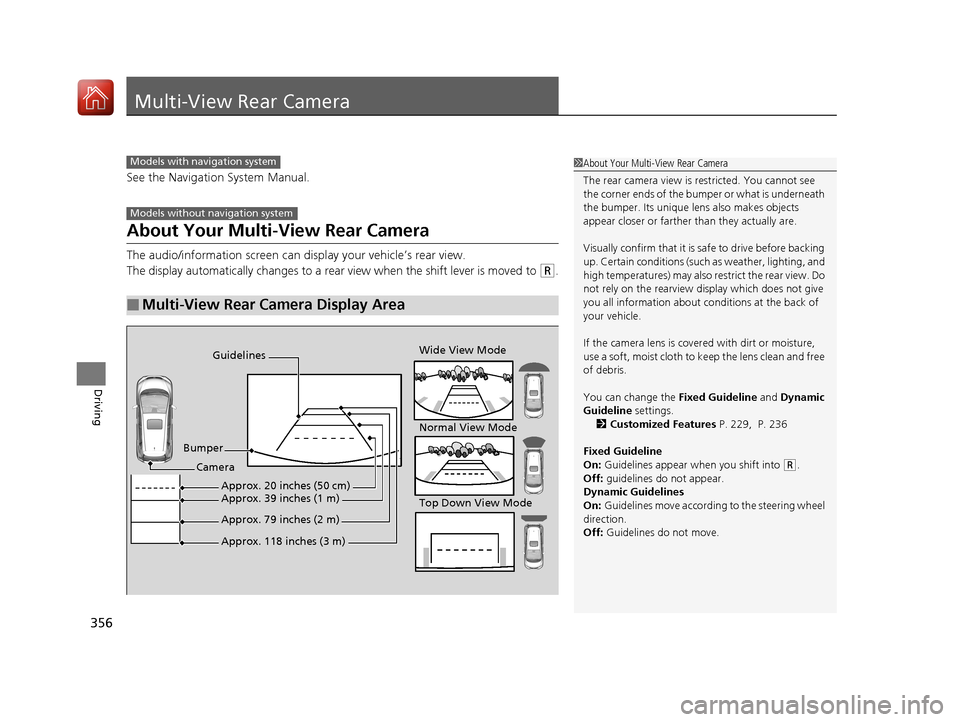
The audio/information screen can display your vehicle’s rear view.
The display automatically changes to a rear view when the shift lever is moved to
(R.
■Multi-View Rear Camera Display Area
Models with navigation system
Models without navigation system
1About Your Multi-View Rear Camera
The rear camera view is restricted. You cannot see
the corner ends of the bum per or what is underneath
the bumper. Its unique le ns also makes objects
appear closer or farther than they actually are.
Visually confirm that it is safe to drive before backing
up. Certain conditions (such as weather, lighting, and
high temperatures) may also restrict the rear view. Do
not rely on the rearview display which does not give
you all information about conditions at the back of
your vehicle.
If the camera lens is cove red with dirt or moisture,
use a soft, moist cloth to keep the lens clean and free
of debris.
You can change the Fixed Guideline and Dynamic
Guideline settings. 2 Customized Features P. 229, P. 236
Fixed Guideline
On: Guidelines appear when you shift into
(R.
Off: guidelines do not appear.
Dynamic Guidelines
On: Guidelines move according to the steering wheel
direction.
Off: Guidelines do not move.
Guidelines
Bumper Wide View Mode
Normal View Mode
Top Down View Mode
Camera
Approx. 118 inches (3 m)
Approx. 79 inches (2 m)
Approx. 39 inches (1 m)Approx. 20 inches (50 cm)
17 FIT -31T5A6200.book 356 ページ 2016年5月27日 金曜日 午後6時33分
Page 370 of 465
369
uuMaintenance MinderTMuTo Use Maintenance MinderTM
Continued
Maintenance
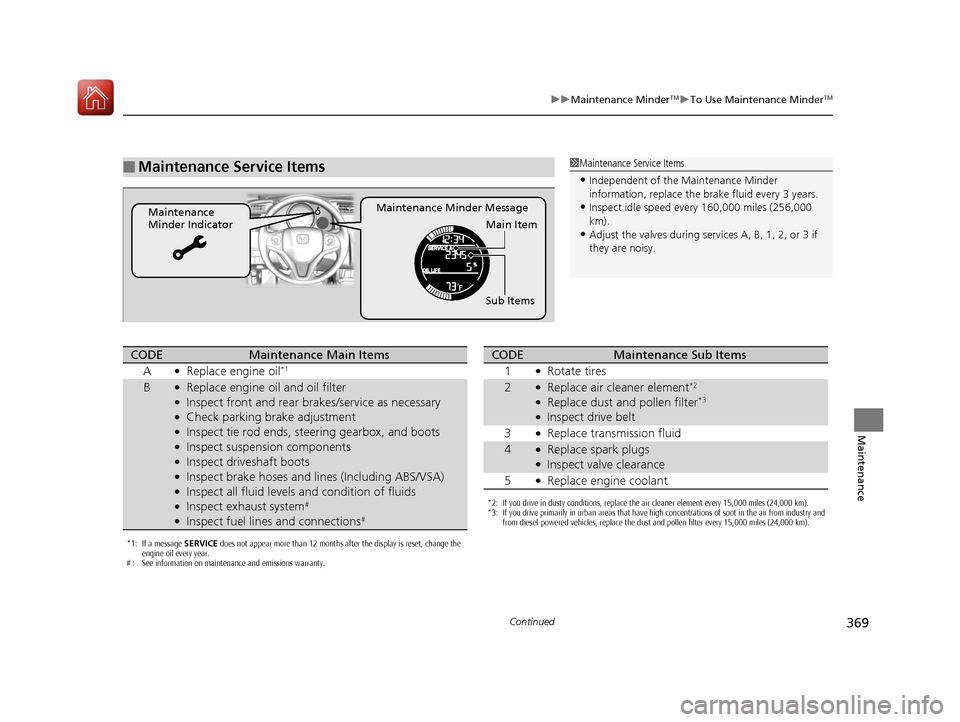
■Maintenance Service Items
Maintenance Minder Message
Maintenance
Minder Indicator
Sub Items Main Item
1Maintenance Service Items
•Independent of the Maintenance Minder
information, replace the brake fluid every 3 years.
•Inspect idle speed every 160,000 miles (256,000
km).
•Adjust the valves during services A, B, 1, 2, or 3 if
they are noisy.
*1: If a message SERVICE does not appear more than 12 months after the display is reset, change the
engine oil every year.
# : See information on maintenance and emissions warranty.
CODEMaintenance Main Items
A
●Replace engine oil*1
B●Replace engine oil and oil filter●Inspect front and rear brakes/service as necessary●Check parking brake adjustment●Inspect tie rod ends, steering gearbox, and boots●Inspect suspension components●Inspect driveshaft boots●Inspect brake hoses and li nes (Including ABS/VSA)●Inspect all fluid levels and condition of fluids●Inspect exhaust system#
●Inspect fuel lines and connections#
*2: If you drive in dusty conditions, replace the air cleaner element every 15,000 miles (24,000 km).
*3: If you drive primarily in urban areas that have high concentrations of soot in the air from industry and
from diesel-powered vehicles, replace the dust and pollen filter every 15,000 miles (24,000 km).
CODEMaintenance Sub Items
1
●Rotate tires
2●Replace air cleaner element*2
●Replace dust and pollen filter*3
●Inspect drive belt
3
●Replace transmission fluid
4●Replace spark plugs●Inspect valve clearance
5
●Replace engine coolant
17 FIT -31T5A6200.book 369 ページ 2016年5月27日 金曜日 午後6時33分
Page 403 of 465
402
uuChecking and Maintaining Tires uWinter Tires
Maintenance
Winter Tires
If driving on snowy or frozen roads, mount all season marked M+S tires, snow tires,
or tire chains; reduce speed; and maintain su fficient distance between vehicles when
driving.
Be particularly careful when operating the steering wheel or brakes to prevent
skidding.
Use tire chains, snow tires, or all season ti res when necessary or according to the law.
When mounting, refer to the following points.
For winter tires:
• Select the size and load ranges that are the same as the original tires.
• Mount the tires to all four wheels.
For tire chains:
• Install them on the front tires only.
• Because your vehicle has limited tire cl earance, we strongly recommend using the
chains listed below:
• Follow the chain manufacturer’s instruction when installing. Mount them as
tightly as you can.
• Check that the chains do not to uch the brake lines or suspension.
• Drive slowly.
Cable-type: SCC Radial Chain SC1026
1Winter Tires
NOTICE
Traction devices that are th e wrong size or improperly
installed can damage your vehicle’s brake lines,
suspension, body, and wheels. Stop driving if they are
hitting any part of the vehicle.
When tire chains are mounted, follow the chain
manufacturer’s instructi ons regarding vehicle
operational limits.
If your vehicle is equipped with summer tires, be
aware that these tires are not designed for winter
driving conditions. For more information, contact a
dealer.
3WARNING
Using the wrong chains, or not properly
installing chains, can damage the brake
lines and cause a crash in which you can be
seriously injured or killed.
Follow all instruction s in this owner’s
manual regarding the selection and use of
tire chains.
17 FIT -31T5A6200.book 402 ページ 2016年5月27日 金曜日 午後6時33分
Page 414 of 465
413
Handling the Unexpected
This chapter explains how to handle unexpected troubles.
ToolsTypes of Tools .................................. 414
If a Tire Goes Flat Changing a Flat Tire ......................... 415
Engine Does Not Start Checking the Engine ........................ 421
If the Smart Entry Remote Battery is Weak ....... 422
Emergency Engine Stop ................... 423
Jump Starting .................................... 424
Shift Lever Does Not Move .............. 426
Overheating How to Handle Overheating ............. 427 Indicator, Coming On/Blinking
If the Low Oil Pressu
re Indicator Comes
On................................................ 429
If the Charging System Indicator Comes
On ................................................. 429
If the Malfunction Indicator Lamp Comes On or Blinks ..................................... 430
If the Brake System Indicator (Red) Comes On...................................................... 431
If the Electric Power Steering (EPS) System Indicator Comes On ....................... 431 If the Low Tire Pressure/TPMS Indicator
Comes On or Blinks ....................... 432
Fuses Fuse Locations ................................. 433
Inspecting and Changing Fuses ........ 437
Emergency Towing ........................... 438
When You Cannot Open the Tailgate..... 439
17 FIT -31T5A6200.book 413 ページ 2016年5月27日 金曜日 午後6時33分
Page 416 of 465
415Continued
Handling the Unexpected
If a Tire Goes Flat
Changing a Flat Tire
If a tire goes flat while driving, grasp the steering wheel firmly, and brake gradually
to reduce speed. Then, stop in a safe plac e. Replace the flat tire with a compact
spare tire. Go to a dealer as soon as possib le to have the full-size tire repaired or
replaced.
1. Park the vehicle on firm, level, and non-slippery surface an d apply the parking
brake.
2. Move the shift lever to
(P.
2. Move the shift lever to
(R.
3. Turn on the hazard warning lights an d turn the ignition switch to LOCK
(0*1.
*1 : Models with the smart entry system have an ENGINE START/STOP button instead of an ignition switch.
1Changing a Flat Tire
Periodically check the tire pressure of the compact
spare. It should be set to the specified pressure.
Specified Pressure: 60 psi (420 kPa, 4.2 kgf/cm
2)
When driving with the compact spare tire, keep the
vehicle speed under 50 mph (80 km/h). Replace with
a full-size tire as soon as possible.
The compact spare tire and wheel in your vehicle are
specifically for this model.
Do not use them with another vehicle.
Do not use another type of compact spare tire or
wheel with your vehicle.
Do not mount tire chains on a compact spare tire.
If a chain-mounted front tire goes flat, remove one of
the full-size rear tires and replace it with the compact
spare tire. Remove the flat front tire and replace it
with the full-size tire that was removed from the rear.
Mount the tire chains on the front tire.
Continuously variable transmission models
Manual transmission models
All models
17 FIT -31T5A6200.book 415 ページ 2016年5月27日 金曜日 午後6時33分
Page 424 of 465
423
uuEngine Does Not Start uEmergency Engine Stop
Handling the Unexpected
Emergency Engine Stop
The ENGINE START/STOP button may be used to stop the engine due to an
emergency situation even while driving. If you must stop the engine, do either of the
following operations:
• Press and hold the ENGINE START/STOP button for about two seconds.
• Firmly press the ENGINE START/STOP button twice.
The steering wheel will not lock. However, because turning off the engine disables
the power assist the engine provides to the steering and braking systems, it will
require significantly more physical effort an d time to steer and slow the vehicle. Use
both feet on the brake pedal to slow down the vehicle and stop immediately in a
safe place. With manual transmission models you can also downshift the
transmission to utilize engine braking.
The power mode is in ACCESSORY when the engine is stopped.
To change the mode to VEHICLE OFF, move the shift lever to
(P after the vehicle
comes to a complete stop.
Then press the ENGINE START/STOP button twice without depressing the brake
pedal.
The power mode changes to VEHICLE OFF.
Models with smart entry system
1 Emergency Engine Stop
Do not press the button while driving unless it is
absolutely necessary for th e engine to be switched
off.
Continuously variable transmission models
Canadian continuously variable transmission models
Manual transmission models
17 FIT -31T5A6200.book 423 ページ 2016年5月27日 金曜日 午後6時33分
Page 432 of 465
431
uuIndicator, Comin g On/BlinkinguIf the Brake System Indicator (Red) Comes On
Handling the Unexpected
If the Brake System Indicator (Red) Comes On
■Reasons for the indicator to come on
• The brake fluid is low.
• There is a malfunction in the brake system.
■What to do when the indicator comes on while driving
Press the brake pedal lightly to check pedal pressure.
• If normal, check the brake fluid level the next time you stop.
• If abnormal, take immediate acti on. If necessary, downshift the
transmission to slow the vehicle using engine braking.
If the Electric Power Steeri ng (EPS) System Indicator
Comes On
■Reasons for the indicator to come on
• Comes on when there is a problem with EPS system.
• If you depress the accelerator pedal repeatedly to increase the engine
speed while the engine is idling, the indicator comes on, and
sometimes the steering wheel becomes harder to operate.
■What to do when th e indicator comes on
Stop the vehicle in a safe place and restart the engine.
If the indicator comes on and stays on, immediately have your vehicle
inspected by a dealer.
1 If the Brake System Indicator (Red) Comes On
Have your vehicle re paired immediately.
It is dangerous to drive with low brake fluid. If there
is no resistance from the brake pedal, stop
immediately in a safe plac e. If necessary downshift
the gears.
If the brake system indicator and ABS indicator come
on simultaneously, the elec tronic brake distribution
system is not working. Th is can result in vehicle
instability under sudden braking.
Have your vehicle inspecte d by a dealer immediately.U.S.
Canada
17 FIT -31T5A6200.book 431 ページ 2016年5月27日 金曜日 午後6時33分
Page 436 of 465
435
uuFuses uFuse Locations
Continued
Handling the Unexpected
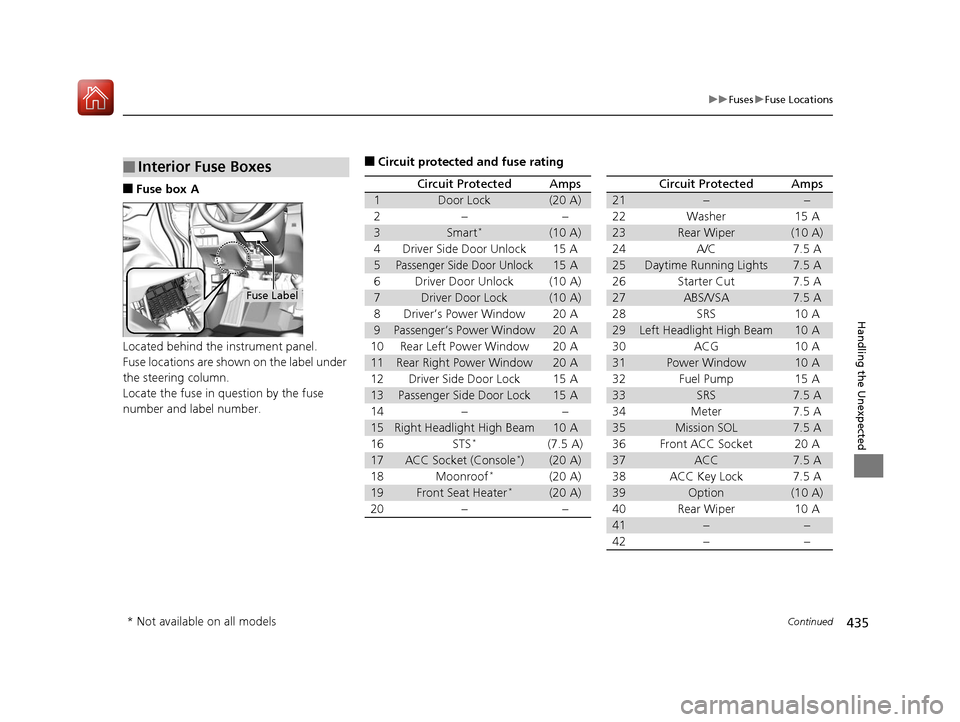
■Fuse box A
Located behind the instrument panel.
Fuse locations are shown on the label under
the steering column.
Locate the fuse in question by the fuse
number and label number.
■Interior Fuse Boxes
Fuse Label
■Circuit protected and fuse rating
Circuit ProtectedAmps
1Door Lock(20 A)
2––
3Smart*(10 A)
4Driver Side Door Unlock15 A
5Passenger Side Door Unlock15 A
6Driver Door Unlock(10 A)
7Driver Door Lock(10 A)
8Driver’s Power Window20 A
9Passenger’s Power Window20 A
10Rear Left Power Window20 A
11Rear Right Power Window20 A
12Driver Side Door Lock15 A
13Passenger Side Door Lock15 A
14––
15Right Headlight High Beam10 A
16STS*(7.5 A)
17ACC Socket (Console*)(20 A)
18Moonroof*(20 A)
19Front Seat Heater*(20 A)
20––
Circuit ProtectedAmps
21––
22Washer15 A
23Rear Wiper(10 A)
24A/C7.5 A
25Daytime Running Lights7.5 A
26Starter Cut7.5 A
27ABS/VSA7.5 A
28SRS10 A
29Left Headlight High Beam10 A
30ACG10 A
31Power Window10 A
32Fuel Pump15 A
33SRS7.5 A
34Meter7.5 A
35Mission SOL7.5 A
36Front ACC Socket20 A
37ACC7.5 A
38ACC Key Lock7.5 A
39Option(10 A)
40Rear Wiper10 A
41−−
42−−
* Not available on all models
17 FIT -31T5A6200.book 435 ページ 2016年5月27日 金曜日 午後6時33分
Page 456 of 465
Index
455
Index
Index
Numbers
7-Speed Manual Shift Mode................... 327
A
ABS (Anti-lock Brake System) .................. 353
Accessories and Modifications ................ 362
Accessory Power Socket ........................... 152
Additives Coolant .................................................. 378
Engine Oil ............................................... 373
Washer ................................................... 382
Additives, Engine Oil ............................... 373
Adjusting Front Seats.............................................. 135
Head Restraints ....................................... 142
Headlights .............................................. 383
Mirrors.................................................... 133
Rear Seats ............................................... 139
Steering Wheel ....................................... 132
Adjusting the Sound ................................ 200
Air Conditioning System Climate Control System .......................... 160
Defrosting the Windshield
and Windows....................................... 161
Dust and Pollen Filter .............................. 407
Air Conditioning System
(Heating and Cooling System) Cooling................................................... 159
Defrosting the Windshield
and Windows....................................... 159 Heating ................................................... 158
Heating and Cooling System .................... 157
Air Pressure ....................................... 395, 443
Airbags ........................................................ 41
Advanced Airbags ..................................... 47
Airbag Care ............................................... 53
Event Data Recorder .................................... 0
Front Airbags (SRS) .................................... 44
Indicator .............................................. 51, 73
Passenger Airbag Off Indicator .................. 52
Sensors ...................................................... 41
Side Airbags .............................................. 48
Side Curtain Airbags .................................. 50
Anti-lock Brake System (ABS) .................. 353
Indicator .................................................... 73
Armrest ..................................................... 146
Audio Remote Controls ............................ 171
Audio System ............................................ 166
Adjusting the Sound ................................ 178
Auxiliary Input Jack .................................. 168
Error Messages ........................................ 222
General Information ................................ 226
MP3/WMA/AAC .............................. 188, 213
Recommended CDs ................................. 226
Recommended Devices ............................ 228
Remote Controls ................................. 5, 171
Security Code .......................................... 170
Theft Protection ....................................... 170
USB Flash Drives ...................................... 228
USB Port(s) .............................................. 167
Audio/Information Screen ............... 174, 195Authorized Manuals
................................ 451
Auto Door Locking/Unlocking ................. 105
Customize ............................................... 106
Automatic Climate Control Sensors ........ 163
Auxiliary Input Jack .................................. 168
Average Fuel Economy .............................. 87
B
Battery...................................................... 403
Charging System Indicator................. 71, 429
Jump Starting .......................................... 424
Maintenance (Checki ng the Battery) ........ 403
Maintenance (Replacing) ......................... 405
Belts (Seat) .................................................. 32
Beverage Holders ..................................... 150
Bluetooth ® HandsFreeLink ®..................... 251
Booster Seats (For Children) ...................... 65
Brake System ............................................ 351
Anti-lock Brake System (ABS)................... 353
Brake Assist System ................................. 354
Fluid ........................................................ 381
Foot Brake............................................... 352
Indicator............................................ 70, 431
Parking Brake .......................................... 351
Brake System Indicator .............................. 70
Brightness Control (Instrument Panel) .... 130
Bulb Replacement .................................... 383
Back-Up Light and Rear Turn Signal Lights ................................................... 387
Brake/Tail/Rear Side Marker Lights ........... 388
17 FIT -31T5A6200.book 455 ページ 2016年5月27日 金曜日 午後6時33分