AUX HONDA FIT 2017 3.G Owners Manual
[x] Cancel search | Manufacturer: HONDA, Model Year: 2017, Model line: FIT, Model: HONDA FIT 2017 3.GPages: 465, PDF Size: 26.52 MB
Page 7 of 465
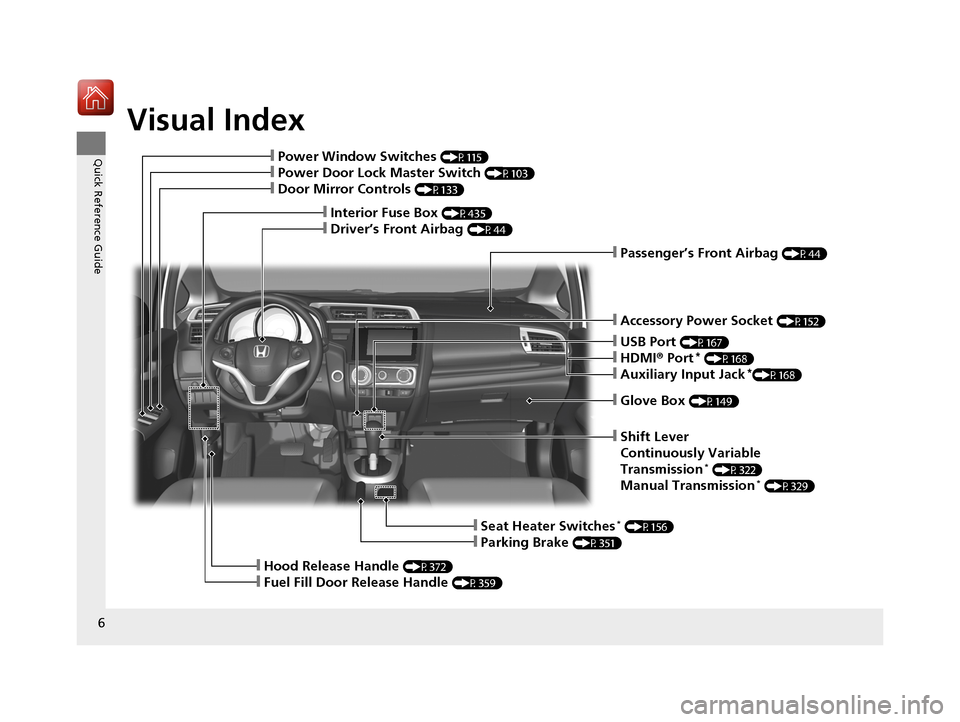
Visual Index
6
Quick Reference Guide
❙Glove Box (P149)
❙Shift Lever
Continuously Variable
Transmission
* (P322)
Manual Transmission* (P329)
❙Seat Heater Switches* (P156)
❙Parking Brake (P351)
❙Hood Release Handle (P372)
❙Fuel Fill Door Release Handle (P359)
❙Accessory Power Socket (P152)
❙Passenger’s Front Airbag (P44)
❙USB Port (P167)
❙HDMI® Port* (P168)
❙Auxiliary Input Jack*(P168)
❙Interior Fuse Box (P435)
❙Driver’s Front Airbag (P44)
❙Power Window Switches (P115)
❙Power Door Lock Master Switch (P103)
❙Door Mirror Controls (P133)
17 FIT -31T5A6200.book 6 ページ 2016年5月27日 金曜日 午後6時33分
Page 19 of 465
18
Quick Reference Guide
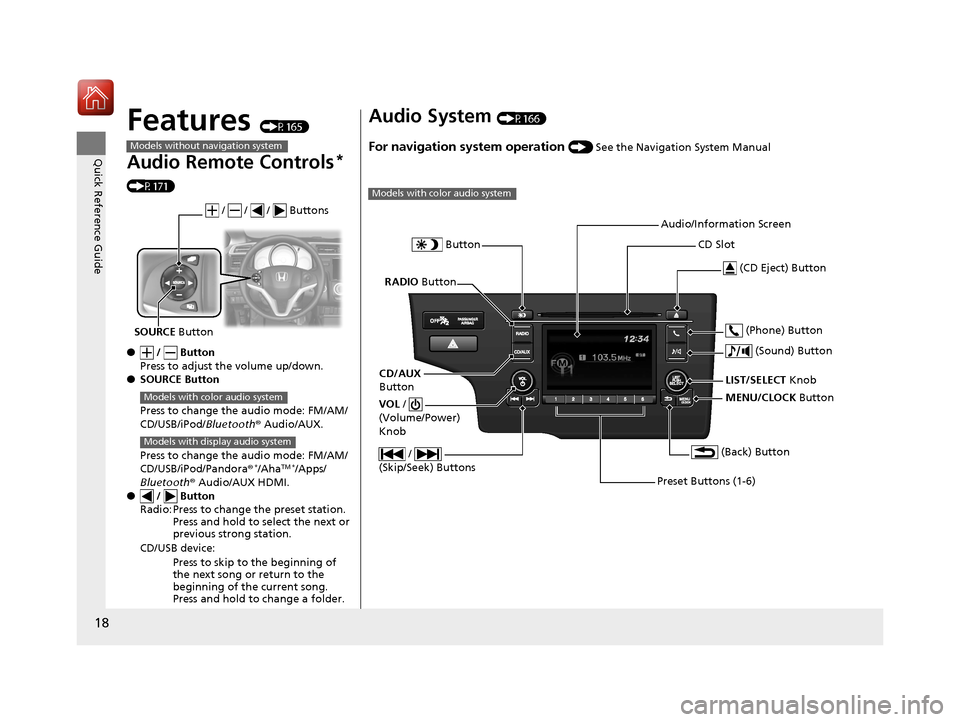
Features (P165)
Audio Remote Controls*
(P171)
● / Button
Press to adjust the volume up/down.
● SOURCE Button
Press to change the audio mode: FM/AM/
CD/USB/iPod/Bluetooth® Audio/AUX.
Press to change the audio mode: FM/AM/
CD/USB/iPod/Pandora®
*/AhaTM */Apps/
Bluetooth ® Audio/AUX HDMI.
● / Button
Radio: Press to change the preset station. Press and hold to select the next or
previous strong station.
CD/USB device: Press to skip to the beginning of
the next song or return to the
beginning of the current song.
Press and hold to change a folder.
Models without navigation system
/ / / Buttons
SOURCE Button
Models with color audio system
Models with display audio system
Audio System (P166)
For navigation system operation () See the Navigation System Manual
Models with color audio system
MENU/CLOCK Button
LIST/SELECT
Knob
Button
(Back) Button
(Sound) Button
VOL
/
(Volume/Power)
Knob
CD Slot
(CD Eject) Button
Preset Buttons (1-6) (Phone) Button
RADIO
Button
/
(Skip/Seek) Buttons
CD/AUX
Button Audio/Information Screen
17 FIT -31T5A6200.book 18 ページ 2016年5月27日 金曜日 午後6時33分
Page 166 of 465
165
Features
This chapter describes how to operate technology features.
Audio SystemAbout Your Audio System .................... 166
USB Port(s) ........................................... 167
HDMI ® Port
*........................................ 168
Auxiliary Input Jack*............................. 168
Audio Antenna .................................... 169
Audio System Theft Protection ............. 170
Audio Remote Controls
*...................... 171
Audio System Basic Operation ............. 173
Audio/Information Screen .................... 174
Adjusting the Sound ............................ 178
Display Setup ....................................... 179
Playing AM/FM Radio ........................... 180
Playing a CD ........................................ 182
Models with color audio system
Playing an iPod .................................... 185
Playing a USB Flash Drive ..................... 188
Playing Bluetooth® Audio..................... 191
Audio System Basic Operation ............ 194
Audio/Information Screen .................... 195
Adjusting the Sound ............................ 200
Display Setup ....................................... 201
Playing AM/FM Radio........................... 202
Playing a CD ........................................ 205
Playing an iPod .................................... 208
Playing Internet Radio .......................... 211
Playing a USB Flash Drive ..................... 213
Playing Bluetooth® Audio..................... 216
Playing a Video Using the HDMI ®......... 218
Models with display audio system
Smartphone Apps................................. 220
Siri ® Eyes Free ....................................... 221
Audio Error Messages ........................... 222
General Information on the Audio
System ............................................. 226
Customized Features ............................. 229
Bluetooth ® HandsFreeLink ®
Using HFL ............................................. 251
Using HFL ............................................. 276
Models with color audio system
Models with display audio system
* Not available on all models
17 FIT -31T5A6200.book 165 ページ 2016年5月27日 金曜日 午後6時33分
Page 167 of 465
166
Features
Audio System
About Your Audio System
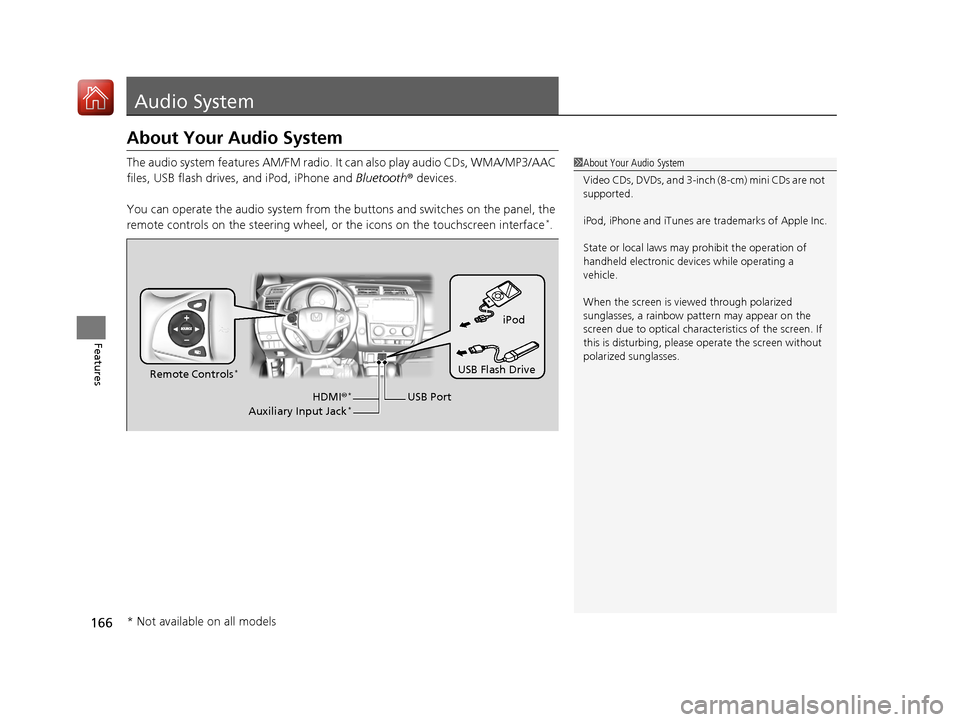
The audio system features AM/FM radio. It can also play audio CDs, WMA/MP3/AAC
files, USB flash drives, and iPod, iPhone and Bluetooth® devices.
You can operate the audio system from the buttons and switches on the panel, the
remote controls on the steering wheel, or the icons on the touchscreen interface
*.
1 About Your Audio System
Video CDs, DVDs, and 3-inch (8-cm) mini CDs are not
supported.
iPod, iPhone and iTunes are trademarks of Apple Inc.
State or local laws may prohibit the operation of
handheld electronic devices while operating a
vehicle.
When the screen is vi ewed through polarized
sunglasses, a rainbow pa ttern may appear on the
screen due to optical characteristics of the screen. If
this is disturbing, please operate the screen without
polarized sunglasses.
iPod
USB Flash Drive
USB Port
Remote Controls
*
HDMI
®*
Auxiliary Input Jack*
* Not available on all models
17 FIT -31T5A6200.book 166 ページ 2016年5月27日 金曜日 午後6時33分
Page 169 of 465
168
uuAudio System uHDMI ® Port*
Features
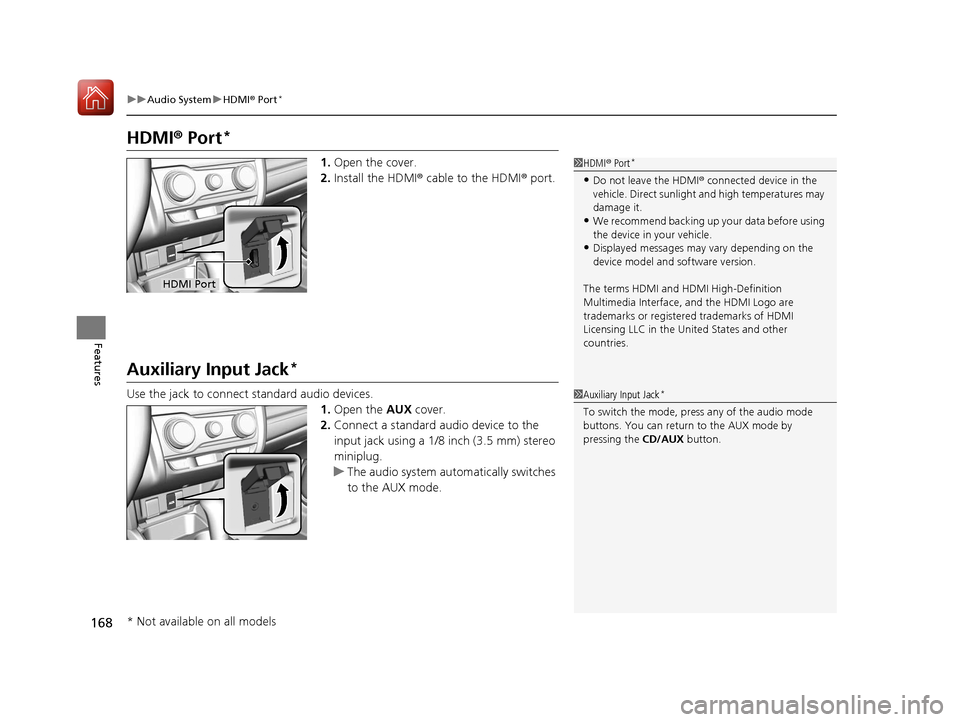
HDMI ® Port*
1. Open the cover.
2. Install the HDMI® cable to the HDMI ® port.
Auxiliary Input Jack*
Use the jack to connect standard audio devices.
1.Open the AUX cover.
2. Connect a standard audio device to the
input jack using a 1/8 inch (3.5 mm) stereo
miniplug.
u The audio system automatically switches
to the AUX mode.
1HDMI ® Port*
•Do not leave the HDMI ® connected device in the
vehicle. Direct sunlight and high temperatures may
damage it.
•We recommend backing up yo ur data before using
the device in your vehicle.
•Displayed messages may vary depending on the
device model and software version.
The terms HDMI and HDMI High-Definition
Multimedia Interface, and the HDMI Logo are
trademarks or registered trademarks of HDMI
Licensing LLC in the United States and other
countries.
HDMI Port
1 Auxiliary Input Jack*
To switch the mode, pres s any of the audio mode
buttons. You can return to the AUX mode by
pressing the CD/AUX button.
* Not available on all models
17 FIT -31T5A6200.book 168 ページ 2016年5月27日 金曜日 午後6時33分
Page 172 of 465
171
uuAudio System uAudio Remote Controls*
Continued
Features
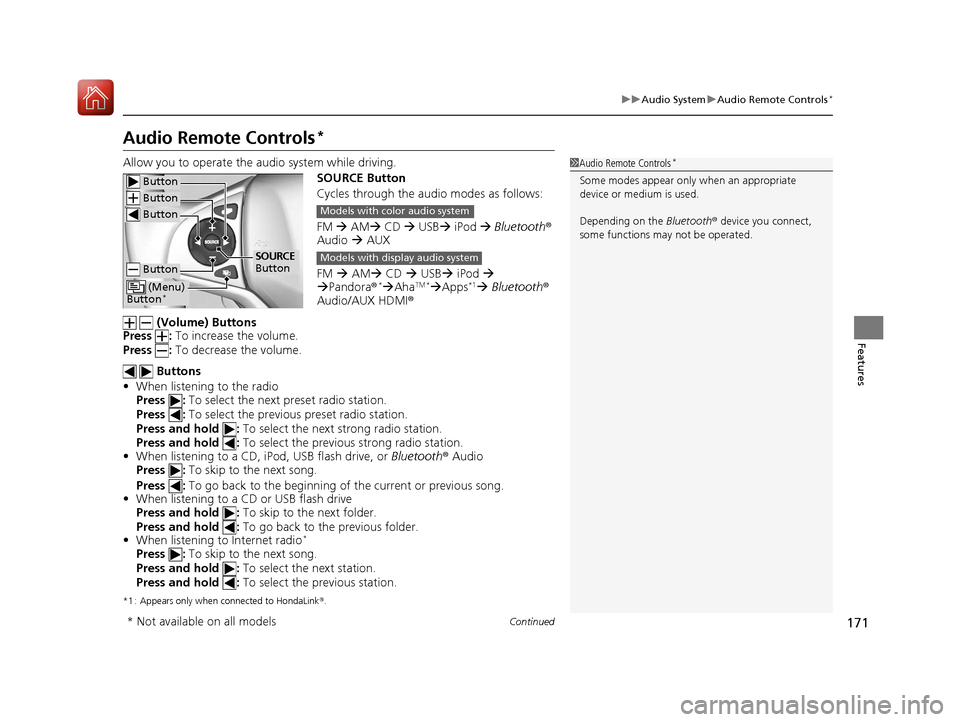
Audio Remote Controls*
Allow you to operate the au dio system while driving.
SOURCE Button
Cycles through the audio modes as follows:
FM AM CD USB iPod Bluetooth ®
Audio AUX
FM AM CD USB iPod
Pandora®
*AhaTM *Apps*1 Bluetooth ®
Audio/AUX HDMI ®
(Volume) Buttons
Press : To increase the volume.
Press : To decrease the volume.
Buttons
• When listening to the radio
Press : To select the next preset radio station.
Press : To select the previous preset radio station.
Press and hold : To select the next strong radio station.
Press and hold : To select the previous strong radio station.
• When listening to a CD, iPod, USB flash drive, or Bluetooth® Audio
Press : To skip to the next song.
Press : To go back to the beginning of the current or previous song.
• When listening to a CD or USB flash drive
Press and hold : To skip to the next folder.
Press and hold : To go back to the previous folder.
• When listening to Internet radio
*
Press : To skip to the next song.
Press and hold : To select the next station.
Press and hold : To select the previous station.
*1 : Appears only when connected to HondaLink ®.
1 Audio Remote Controls*
Some modes appear only when an appropriate
device or medium is used.
Depending on the Bluetooth® device you connect,
some functions ma y not be operated. Button
Button
Button
Button
(Menu)
Button*
SOURCE
Button
Models with color audio system
Models with display audio system
* Not available on all models
17 FIT -31T5A6200.book 171 ページ 2016年5月27日 金曜日 午後6時33分
Page 183 of 465
182
uuAudio System Basic Operation uPlaying a CD
Features
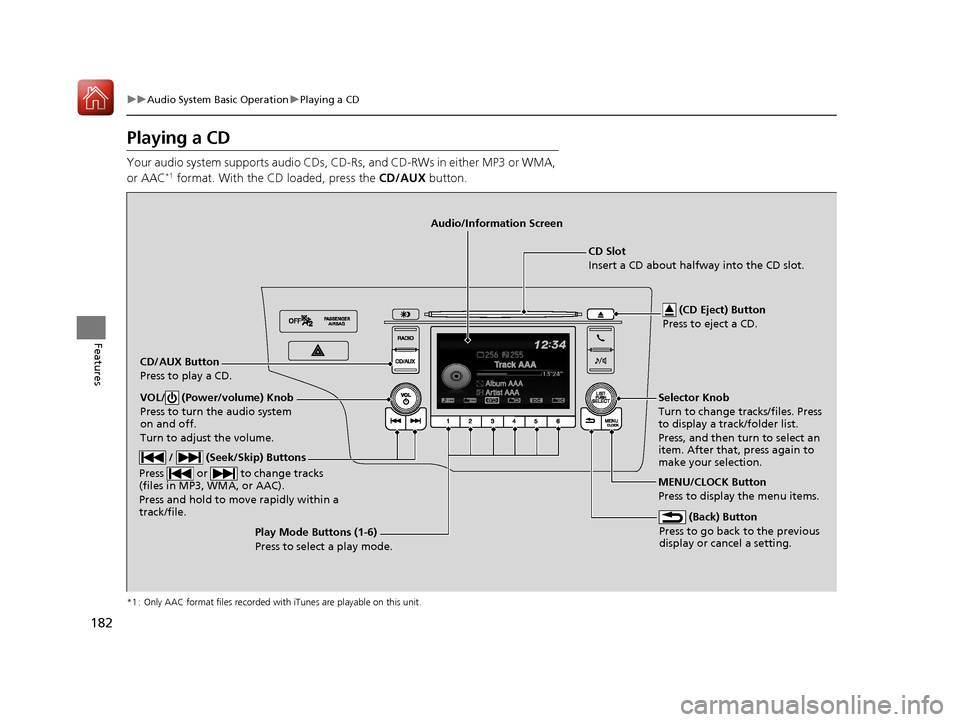
Playing a CD
Your audio system supports audio CDs, CD-Rs, and CD-RWs in either MP3 or WMA,
or AAC*1 format. With the CD loaded, press the CD/AUX button.
*1 : Only AAC format files recorded with iTunes are playable on this unit.
CD/AUX Button
Press to play a CD. (CD Eject) Button
Press to eject a CD.
CD Slot
Insert a CD about halfway into the CD slot.
(Back) Button
Press to go back to the previous
display or cancel a setting.
/ (Seek/Skip) Buttons
Press or to change tracks
(files in MP3, WMA, or AAC).
Press and hold to mo ve rapidly within a
track/file.
VOL/ (Power/volume) Knob
Press to turn the audio system
on and off.
Turn to adjust the volume.Selector Knob
Turn to change tracks/files. Press
to display a track/folder list.
Press, and then turn to select an
item. After that, press again to
make your selection.
MENU/CLOCK Button
Press to display the menu items.
Audio/Information Screen
Play Mode Buttons (1-6)
Press to select a play mode.
17 FIT -31T5A6200.book 182 ページ 2016年5月27日 金曜日 午後6時33分
Page 186 of 465
185
uuAudio System Basic Operation uPlaying an iPod
Continued
Features
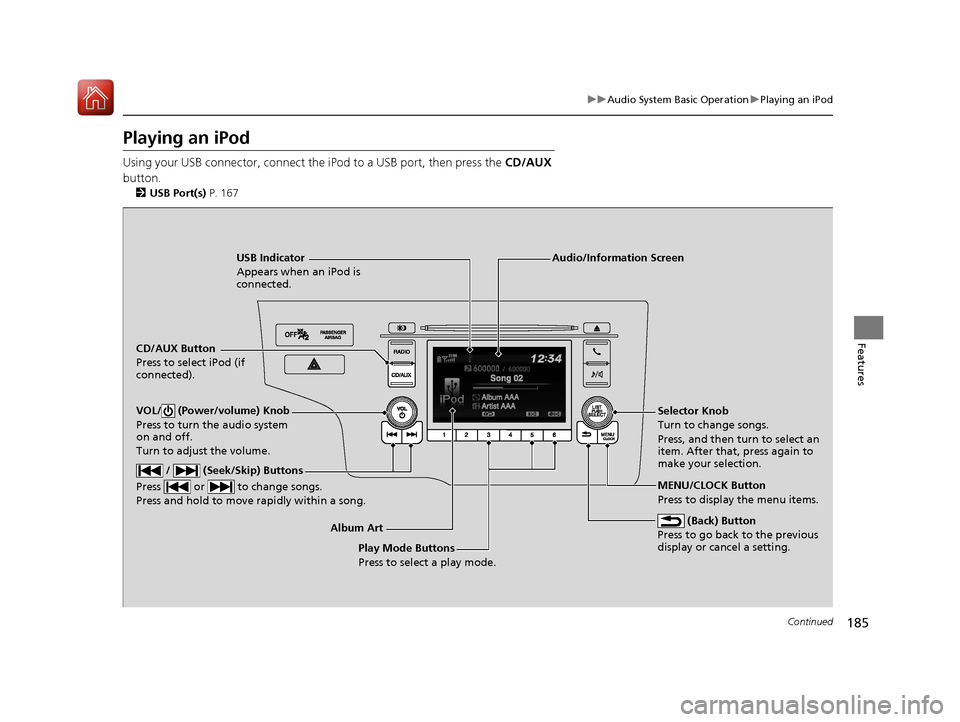
Playing an iPod
Using your USB connector, connect the iPod to a USB port, then press the CD/AUX
button.
2 USB Port(s) P. 167
USB Indicator
Appears when an iPod is
connected.
CD/AUX Button
Press to select iPod (if
connected).
(Back) Button
Press to go back to the previous
display or cancel a setting.
/ (Seek/Skip) Buttons
Press or to change songs.
Press and hold to move rapidly within a song.
VOL/ (Power/volume) Knob
Press to turn the audio system
on and off.
Turn to adjust the volume.Selector Knob
Turn to change songs.
Press, and then turn to select an
item. After that, press again to
make your selection.
MENU/CLOCK Button
Press to display the menu items.
Audio/Information Screen
Album Art Play Mode Buttons
Press to select a play mode.
17 FIT -31T5A6200.book 185 ページ 2016年5月27日 金曜日 午後6時33分
Page 189 of 465
188
uuAudio System Basic Operation uPlaying a USB Flash Drive
Features
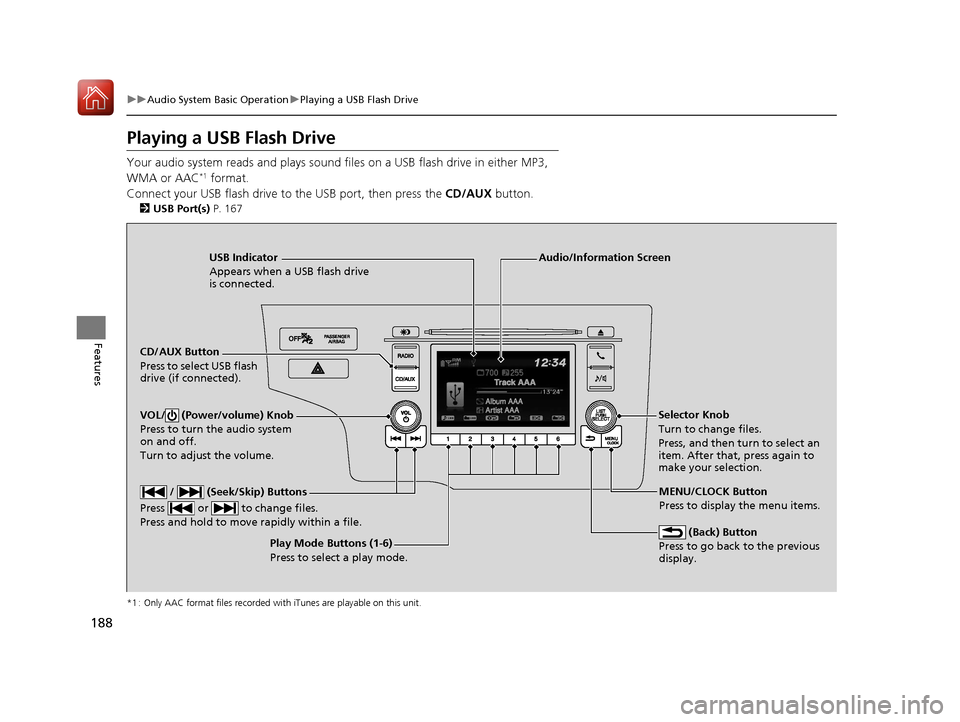
Playing a USB Flash Drive
Your audio system reads and plays sound files on a USB flash drive in either MP3,
WMA or AAC*1 format.
Connect your USB flash drive to the USB port, then press the CD/AUX button.
2USB Port(s) P. 167
*1 : Only AAC format files recorded with iTunes are playable on this unit.
USB Indicator
Appears when a USB flash drive
is connected.
CD/AUX Button
Press to select USB flash
drive (if connected).
(Back) Button
Press to go back to the previous
display.
/ (Seek/Skip) Buttons
Press or to change files.
Press and hold to move rapidly within a file.
VOL/ (Power/volume) Knob
Press to turn the audio system
on and off.
Turn to adjust the volume.Selector Knob
Turn to change files.
Press, and then tu rn to select an
item. After that, press again to
make your selection.
MENU/CLOCK Button
Press to display the menu items.
Audio/Information Screen
Play Mode Buttons (1-6)
Press to select a play mode.
17 FIT -31T5A6200.book 188 ページ 2016年5月27日 金曜日 午後6時33分
Page 192 of 465
191
uuAudio System Basic Operation uPlaying Bluetooth ® Audio
Continued
Features
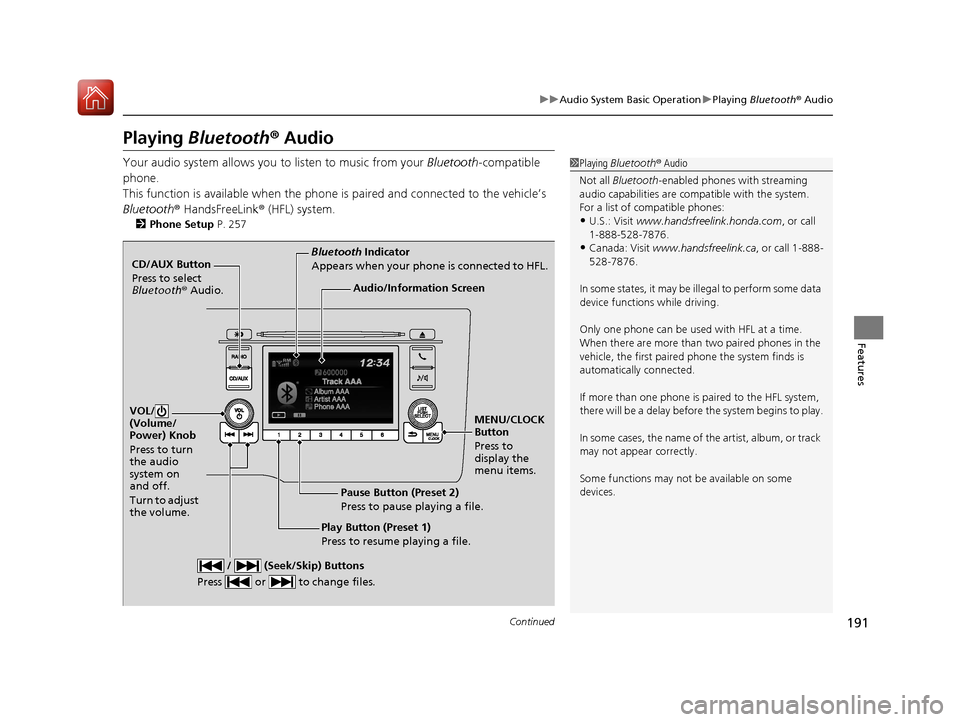
Playing Bluetooth ® Audio
Your audio system allows you to listen to music from your Bluetooth-compatible
phone.
This function is available when the phone is paired and connected to the vehicle’s
Bluetooth ® HandsFreeLink ® (HFL) system.
2Phone Setup P. 257
1Playing Bluetooth ® Audio
Not all Bluetooth -enabled phones with streaming
audio capabilities are compatible with the system.
For a list of compatible phones:
•U.S.: Visit www.handsfreelink.honda.com , or call
1-888-528-7876.
•Canada: Visit www.handsfreelink.ca , or call 1-888-
528-7876.
In some states, it may be illegal to perform some data
device functions while driving.
Only one phone can be used with HFL at a time.
When there are more than two paired phones in the
vehicle, the first paired phone the system finds is
automatically connected.
If more than one phone is paired to the HFL system,
there will be a delay before the system begins to play.
In some cases, the name of the artist, album, or track
may not appear correctly.
Some functions may not be available on some
devices.
CD/AUX Button
Press to select
Bluetooth ® Audio.
VOL/
(Volume/
Power) Knob
Press to turn
the audio
system on
and off.
Turn to adjust
the volume.
MENU/CLOCK
Button
Press to
display the
menu items.
Audio/Information Screen
Bluetooth Indicator
Appears when your phone is connected to HFL.
/ (Seek/Skip) Buttons
Press or to change files.
Play Button (Preset 1)
Press to resume playing a file. Pause Button (Preset 2)
Press to pause playing a file.
17 FIT -31T5A6200.book 191 ページ 2016年5月27日 金曜日 午後6時33分