climate control HONDA FIT 2017 3.G Owners Manual
[x] Cancel search | Manufacturer: HONDA, Model Year: 2017, Model line: FIT, Model: HONDA FIT 2017 3.GPages: 465, PDF Size: 26.52 MB
Page 3 of 465
Contents
This owner’s manual should be considered a permanent part of the
vehicle and should remain with the vehicle when it is sold.
This owner’s manual covers all models of your vehicle. You may find
descriptions of equipment and features that are not on your
particular model.
Images throughout this owner’s manual (including the front cover)
represent features and equipment that are available on some, but
not all, models. Your particular mo del may not have some of these
features.
This owner’s manual is for vehicles sold in the United States and
Canada.
The information and specifications in cluded in this publication were
in effect at the time of approval for printing. Honda Motor Co., Ltd.
reserves the right, however, to discontinue or change specifications
or design at any time without notice and without incurring any
obligation.2 Safe Driving P. 27
For Safe Driving P. 28 Seat Belts P. 32 Airbags P. 41
2Instrument Panel P. 69
Indicators P. 70 Gauges and Displays P. 85
2Controls P. 89
Clock P. 90 Locking and Unlocking the Doors P. 92
Opening and Closing the Windows P. 115
Operating the Switches Around the Steering Wheel P. 118
Interior Lights/Interior Convenience Items P. 147
2 Features P. 165
Audio System P. 166 Audio System Basic Operation P. 173
Customized Features P. 229 Bluetooth® HandsFreeLink ® P. 251
2 Driving P. 305
Before Driving P. 306 Towing a Trailer P. 311
Multi-View Rear Camera P. 356
2Maintenance P. 363
Before Performing Maintenance P. 364 Maintenance MinderTM P. 367
Checking and Maintaining Wiper Blades P. 390
Heating and Cooling System
*/Climate Control System* Maintenance P. 407
2 Handling the Unexpected P. 413
Tools P. 414 If a Tire Goes Flat P. 415
Overheating P. 427 Indicator, Coming On/Blinking P. 429 Fuses P. 433
2 Information P. 441
Specifications P. 442 Identification Numbers P. 444
Emissions Testing P. 447 Warranty Coverages P. 449
17 FIT -31T5A6200.book 2 ページ 2016年5月27日 金曜日 午後6時33分
Page 4 of 465
Contents
Child Safety P. 54Exhaust Gas Hazard P. 66Safety Labels P. 67
Opening and Closing the Tailgate P. 109 Security System P. 112
Opening and Closing the Moonroof* P. 117
Adjusting the Mirrors P. 133 Adjusting the Seats P. 135
Heating and Cooling System
* P. 157 Climate Control System* P. 160
Audio Error Messages P. 222General Information on the Audio System P. 226
When Driving P. 315 Braking P. 351Parking Your Vehicle P. 355
Refueling P. 358 Fuel Economy and CO
2 Emissions P. 361 Accessories and Modifications P. 362
Maintenance Under the Hood P. 371 Replacing Light Bulbs P. 383
Checking and Maintaining Tires P. 394 Battery P. 403 Remote Transmitter Care P. 405
Cleaning P. 408
Engine Does Not Start P. 421Jump Starting P. 424 Shift Lever Does Not Move P. 426
Emergency Towing P. 438 When You Cannot Open the Tailgate P. 439
Devices that Emit Radio Waves P. 445 Reporting Safety Defects P. 446
Authorized Manuals P. 451 Customer Service Information P. 452
Quick Reference GuideP. 4
Safe DrivingP. 27
Instrument PanelP. 69
ControlsP. 89
FeaturesP. 165
DrivingP. 305
MaintenanceP. 363
Handling the UnexpectedP. 413
InformationP. 441
IndexP. 455
17 FIT -31T5A6200.book 3 ページ 2016年5月27日 金曜日 午後6時33分
Page 5 of 465
4
Quick Reference Guide
Quick Reference Guide
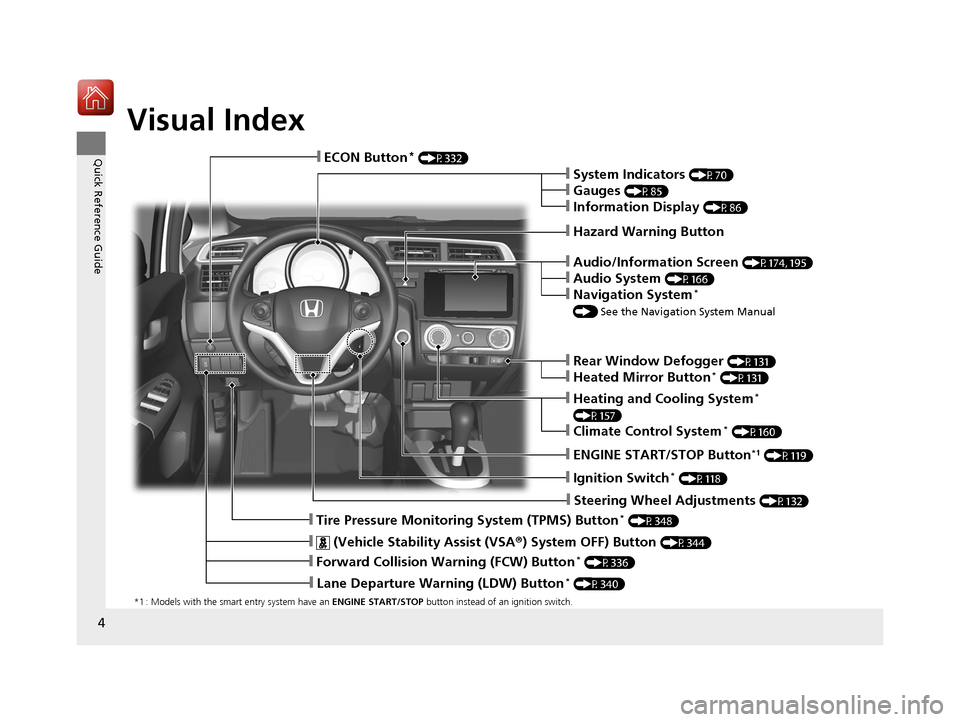
Visual Index
*1 : Models with the smart entry system have an ENGINE START/STOP button instead of an ignition switch.
❙Tire Pressure Monitoring System (TPMS) Button* (P348)
❙ENGINE START/STOP Button*1 (P119)
❙Steering Wheel Adjustments (P132)
❙Heating and Cooling System*
(P157)
❙Climate Control System* (P160)
❙Rear Window Defogger (P131)
❙Heated Mirror Button* (P131)
❙Audio/Information Screen (P174, 195)
❙Audio System (P166)
❙Navigation System*
() See the Navigation System Manual
❙Hazard Warning Button
❙System Indicators (P70)
❙Gauges (P85)
❙Information Display (P86)
❙ECON Button* (P332)
❙Ignition Switch* (P118)
❙Lane Departure Warning (LDW) Button* (P340)
❙Forward Collision Warning (FCW) Button* (P336)
❙ (Vehicle Stability Assist (VSA® ) System OFF) Button (P344)
17 FIT -31T5A6200.book 4 ページ 2016年5月27日 金曜日 午後6時33分
Page 18 of 465
17
Quick Reference Guide
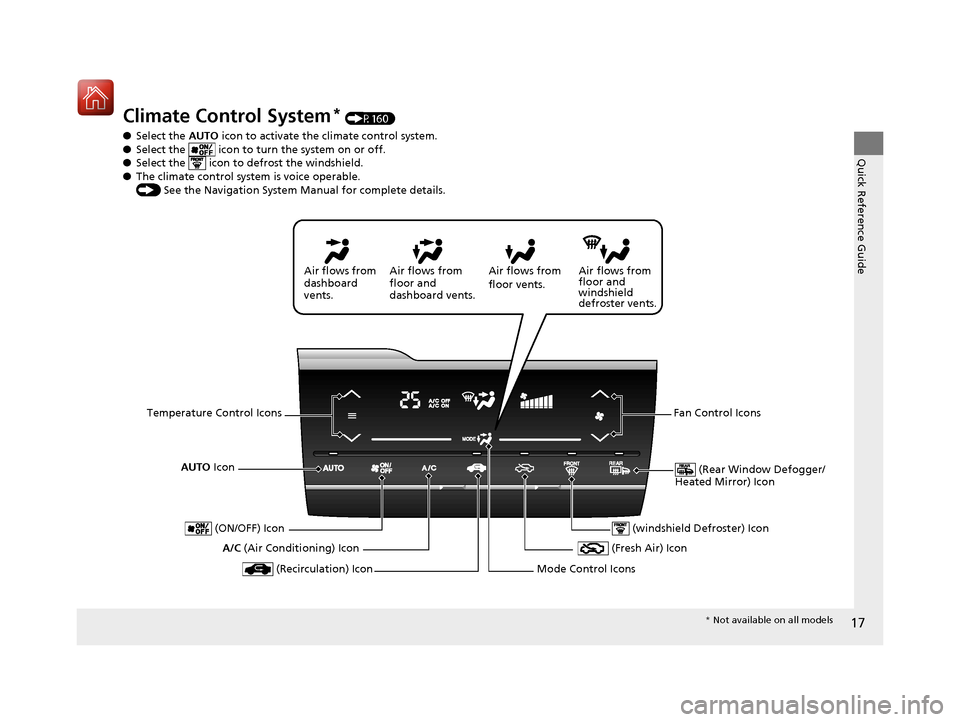
Climate Control System* (P160)
● Select the AUTO icon to activate the climate control system.
● Select the icon to tu rn the system on or off.
● Select the icon to defrost the windshield.
● The climate control system is voice operable.
() See the Navigation System Manual for complete details.
AUTO Icon
(Rear Window Defogger/
Heated Mirror) Icon
A/C (Air Conditioning) Icon Air flows from
floor and
windshield
defroster vents.
Air flows from
floor vents.
Air flows from
floor and
dashboard vents.
Air flows from
dashboard
vents.
Temperature Control Icons Fan Control Icons
(Recirculation) Icon
(ON/OFF) Icon
(Fresh Air) Icon
Mode Control Icons
(windshield Defroster) Icon
* Not available on all models
17 FIT -31T5A6200.book 17 ページ 2016年5月27日 金曜日 午後6時33分
Page 67 of 465
66
Safe Driving
Exhaust Gas Hazard
Carbon Monoxide Gas
The engine exhaust from this vehicle contains carbon monoxide, a colorless,
odorless, and highly toxic gas. As long as you properly maintain your vehicle, carbon
monoxide gas will not get into the interior.
■Have the exhaust system inspected for leaks whenever
• The exhaust system is m aking an unusual noise.
• The exhaust system may have been damaged.
• The vehicle is raised for an oil change.
When you operate a vehicle with the tailgat e open, airflow can pull exhaust gas into
the interior and create a hazardous conditio n. If you must drive with the tailgate
open, open all the windows and set the heating and cooling system
*/climate control
system* as shown below.
1. Select the fresh air mode.
2. Select the mode.
3. Set the fan speed to high.
4. Set the temperature control to a comfortable setting.
Adjust the heating and cooling system
*/climate control system* in the same manner
if you sit in your parked ve hicle with the engine running.
1Carbon Monoxide Gas
An enclosed area such as a garage can quickly fill up
with carbon monoxide gas.
Do not run the engine with the garage door closed.
Even when the garage door is open, drive out of the
garage immediat ely after starting the engine.
3WARNING
Carbon monoxide gas is toxic.
Breathing it can cause unconsciousness and
even kill you.
Avoid any enclosed areas or activities that
expose you to carbon monoxide.
* Not available on all models
17 FIT -31T5A6200.book 66 ページ 2016年5月27日 金曜日 午後6時33分
Page 72 of 465
71
uuIndicators u
Continued
Instrument Panel
*1:Models with the smart entry system have an ENGINE START/STOP button instead of an ignition switch.
IndicatorNameOn/BlinkingExplanation
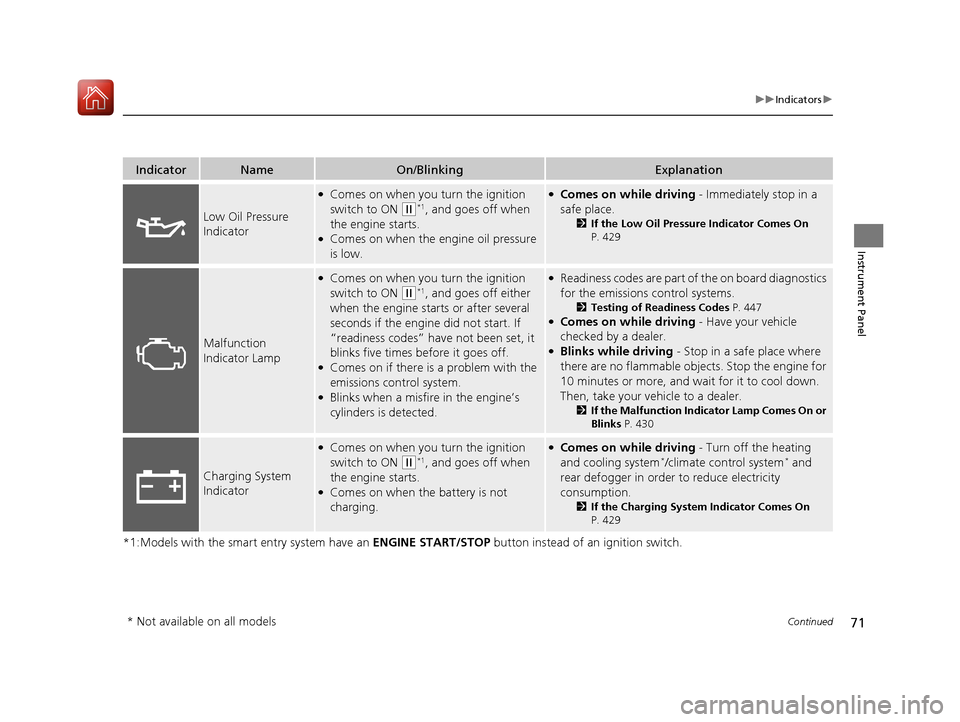
Low Oil Pressure
Indicator
●Comes on when you turn the ignition
switch to ON
(w*1, and goes off when
the engine starts.
●Comes on when the engine oil pressure
is low.
●Comes on while driving - Immediately stop in a
safe place.
2 If the Low Oil Pressure Indicator Comes On
P. 429
Malfunction
Indicator Lamp
●Comes on when you turn the ignition
switch to ON
(w*1, and goes off either
when the engine starts or after several
seconds if the engine did not start. If
“readiness codes” have not been set, it
blinks five times before it goes off.
●Comes on if there is a problem with the
emissions control system.
●Blinks when a misfire in the engine’s
cylinders is detected.
●Readiness codes are part of the on board diagnostics
for the emissions control systems.
2 Testing of Readiness Codes P. 447●Comes on while driving - Have your vehicle
checked by a dealer.
●Blinks while driving - Stop in a safe place where
there are no flammable objects. Stop the engine for
10 minutes or more, and wait for it to cool down.
Then, take your vehicle to a dealer.
2 If the Malfunction Indicator Lamp Comes On or
Blinks P. 430
Charging System
Indicator
●Comes on when you turn the ignition
switch to ON
(w*1, and goes off when
the engine starts.
●Comes on when the battery is not
charging.
●Comes on while driving - Turn off the heating
and cooling system*/climate control system* and
rear defogger in order to reduce electricity
consumption.
2 If the Charging System Indicator Comes On
P. 429
* Not available on all models
17 FIT -31T5A6200.book 71 ページ 2016年5月27日 金曜日 午後6時33分
Page 90 of 465
89
Controls
This chapter explains how to operate the various controls necessary for driving.
Clock.............................................................. 90
Locking and Unlocking the Doors Key Types and Functions ............................. 92
Low Smart Entry Remote Signal Strength*.......94Locking/Unlocking the Doors from the Outside ....95
Locking/Unlocking the Doors from the Inside .....101
Childproof Door Locks .............................. 104
Auto Door Locking/Unlocking*................. 105
Opening and Closing the Tailgate ............ 109
Security System .......................................... 112
Immobilizer System ......... ..................... ..... 112
Security System Alarm ............................... 112
Opening and Closing the Windows .......... 115
Opening and Closing the Moonroof
*....... 117 Operating the Switches Around the Steering
Wheel
Ignition Switch.......................................... 118
ENGINE START/STOP Button ..................... 119
Ignition Switch and Power Mode Comparison ... 122Turn Signals .............................................. 123
Light Switches .......................................... 123
Fog Lights
*............................................... 126
Daytime Running Lights ............................ 127
Wipers and Washers ................................. 128
Brightness Control .................................... 130
Rear Defogger/Heated Door Mirror* Button ...... 131Adjusting the Steering Wheel ................... 132
Models without smart entry system
Models with smart entry system
Adjusting the Mirrors .................................133
Interior Rearview Mirror .............................133
Power Door Mirrors ...................................133
Adjusting the Seats .................................... 135
Front Seats ................................................135
Rear Seats .................................................139
Interior Lights/Interior Convenience Items....... 147Interior Lights ............................................147
Interior Convenience Items ........................149
Heating and Cooling System
*....................157
Using Vents, Heating and A/C*.................157
Climate Control System*............................160
Using Automatic Climate Control ..............160
Automatic Climate Control Sensors ...........163
* Not available on all models
17 FIT -31T5A6200.book 89 ページ 2016年5月27日 金曜日 午後6時33分
Page 132 of 465
131
uuOperating the Switches Around the Steering Wheel uRear Defogger/Heated Door Mirror* Button
Controls
Rear Defogger/Heated Door Mirror* Button
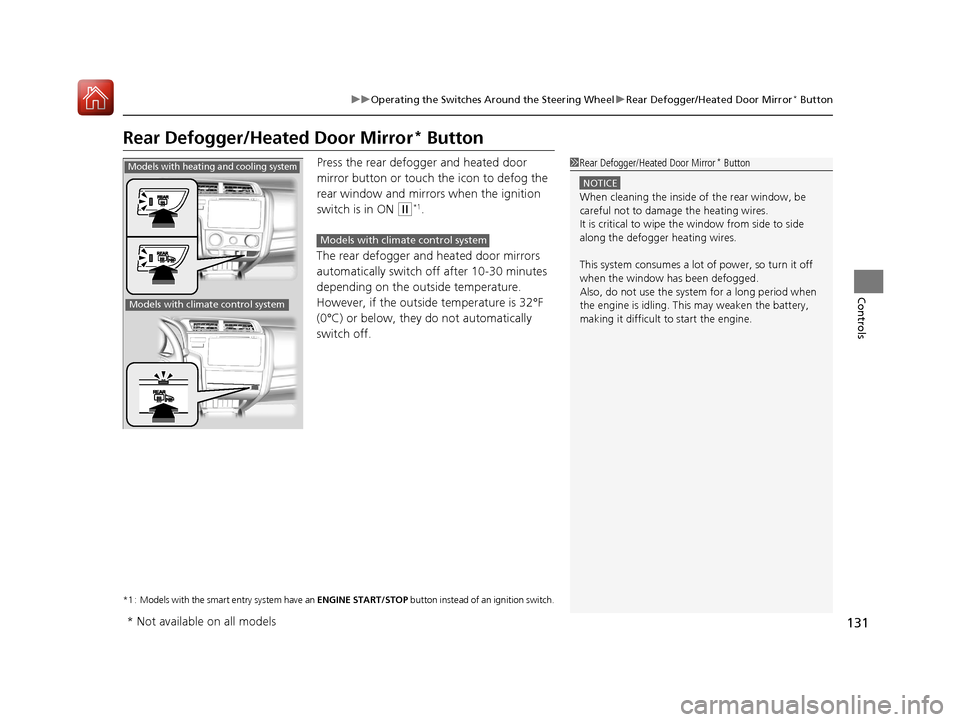
Press the rear defogger and heated door
mirror button or touch the icon to defog the
rear window and mirrors when the ignition
switch is in ON
(w*1.
The rear defogger and heated door mirrors
automatically switch of f after 10-30 minutes
depending on the outside temperature.
However, if the outsid e temperature is 32°F
(0°C) or below, they do not automatically
switch off.
*1 : Models with the smart entry system have an ENGINE START/STOP button instead of an ignition switch.
1Rear Defogger/Heated Door Mirror* Button
NOTICE
When cleaning the inside of the rear window, be
careful not to damage the heating wires.
It is critical to wipe the window from side to side
along the defogger heating wires.
This system consumes a lot of power, so turn it off
when the window has been defogged.
Also, do not use the system for a long period when
the engine is idling. This may weaken the battery,
making it difficult to start the engine.
Models with heating and cooling system
Models with climate control system
Models with climate control system
* Not available on all models
17 FIT -31T5A6200.book 131 ページ 2016年5月27日 金曜日 午後6時33分
Page 161 of 465
160
Controls
Climate Control System*
Using Automatic Climate Control
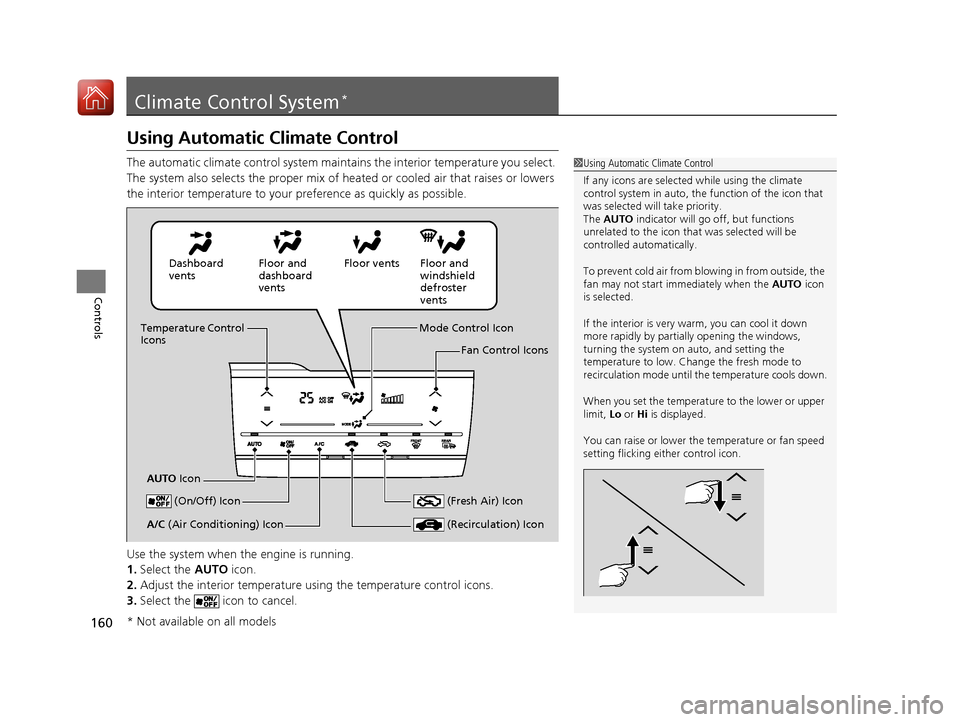
The automatic climate control system maintains the interior temperature you select.
The system also selects the proper mix of heated or cooled air that raises or lowers
the interior temperature to your preference as quickly as possible.
Use the system when the engine is running.
1. Select the AUTO icon.
2. Adjust the interior temperature us ing the temperature control icons.
3. Select the icon to cancel.1Using Automatic Climate Control
If any icons are selected while using the climate
control system in auto, the function of the icon that
was selected will take priority.
The AUTO indicator will go off, but functions
unrelated to the icon that was selected will be
controlled automatically.
To prevent cold air from bl owing in from outside, the
fan may not start i mmediately when the AUTO icon
is selected.
If the interior is very warm, you can cool it down
more rapidly by partial ly opening the windows,
turning the system on auto, and setting the
temperature to low. Change the fresh mode to
recirculation mode until the temperature cools down.
When you set the temperat ure to the lower or upper
limit, Lo or Hi is displayed.
You can raise or lower the temperature or fan speed
setting flicking either control icon.
Dashboard
vents Floor and
dashboard
ventsFloor vents Floor and
windshield
defroster
vents
Temperature Control
Icons
AUTO Icon Mode Control Icon
Fan Control Icons
(On/Off) Icon
(Recirculation) IconA/C (Air Conditioning) Icon (Fresh Air) Icon
* Not available on all models
17 FIT -31T5A6200.book 160 ページ 2016年5月27日 金曜日 午後6時33分
Page 162 of 465
Continued161
uuClimate Control System*uUsing Automatic Climate Control
Controls
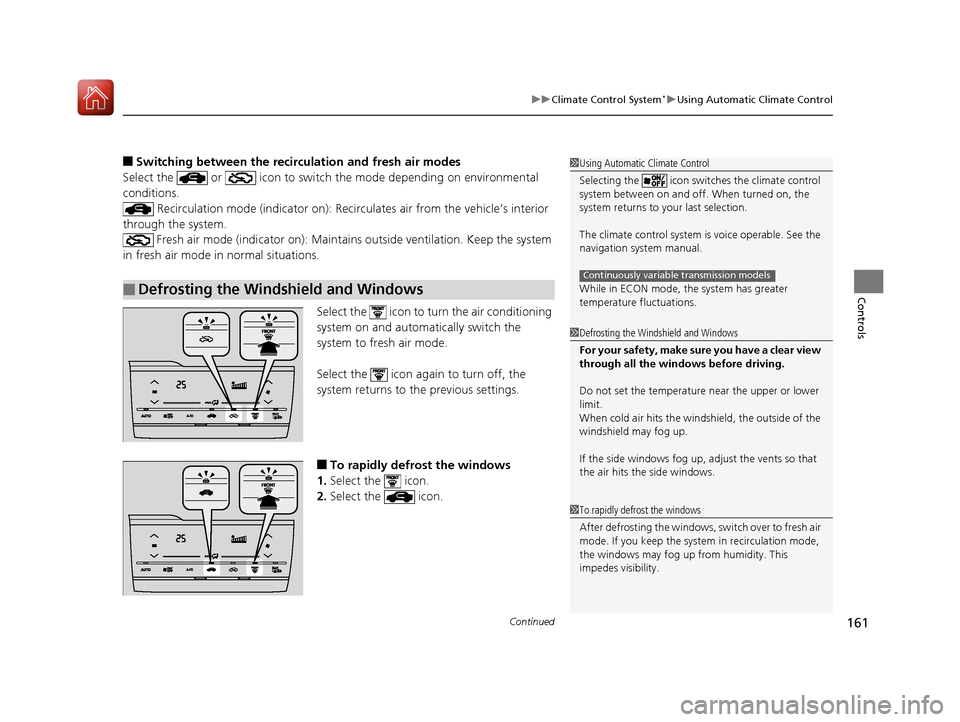
■Switching between the recirc ulation and fresh air modes
Select the or icon to switch the mode depending on environmental
conditions. Recirculation mode (indicator on): Reci rculates air from the vehicle’s interior
through the system. Fresh air mode (indicator on): Maintain s outside ventilation. Keep the system
in fresh air mode in normal situations.
Select the icon to turn the air conditioning
system on and automatically switch the
system to fresh air mode.
Select the icon again to turn off, the
system returns to the previous settings.
■To rapidly defrost the windows
1. Select the icon.
2. Select the icon.
■Defrosting the Windshield and Windows
1Using Automatic Climate Control
Selecting the icon switches the climate control
system between on and off. When turned on, the
system returns to your last selection.
The climate control system is voice operable. See the
navigation sy stem manual.
While in ECON mode, the system has greater
temperature fluctuations.
Continuously variable transmission models
1 Defrosting the Windshield and Windows
For your safety, make sure you have a clear view
through all the windows before driving.
Do not set the temperatur e near the upper or lower
limit.
When cold air hits the windshield, the outside of the
windshield may fog up.
If the side windows fog up, adjust the vents so that
the air hits th e side windows.
1To rapidly defrost the windows
After defrosting the windows, switch over to fresh air
mode. If you keep the syst em in recirculation mode,
the windows may fog up from humidity. This
impedes visibility.
17 FIT -31T5A6200.book 161 ページ 2016年5月27日 金曜日 午後6時33分