windshield HONDA FIT 2017 3.G Owners Manual
[x] Cancel search | Manufacturer: HONDA, Model Year: 2017, Model line: FIT, Model: HONDA FIT 2017 3.GPages: 465, PDF Size: 26.52 MB
Page 9 of 465
Visual Index
8
Quick Reference Guide
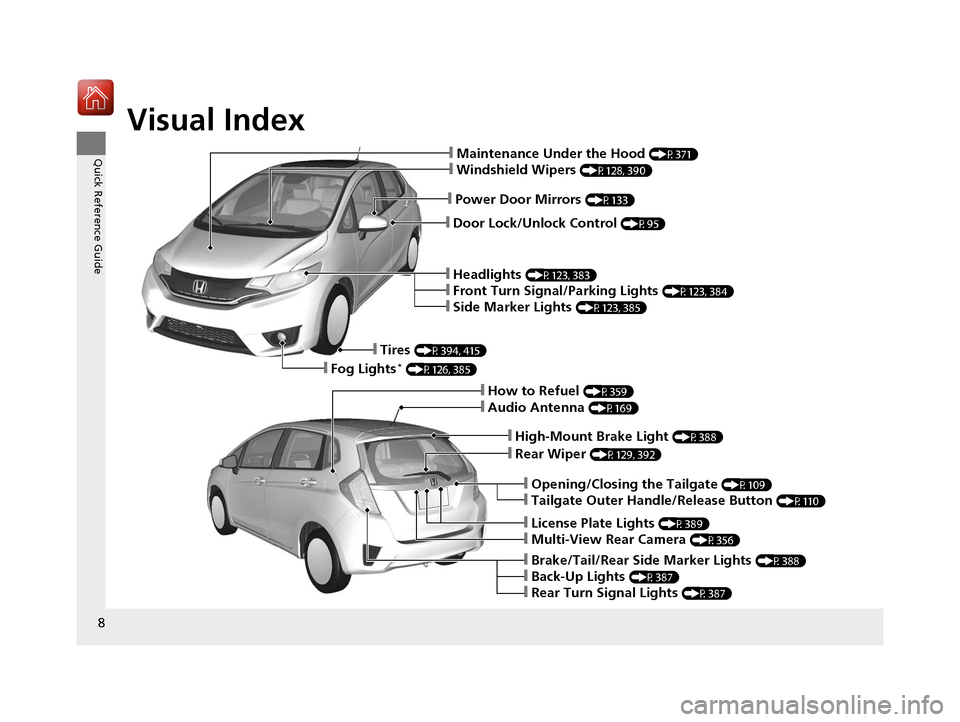
❙Door Lock/Unlock Control (P95)
❙Power Door Mirrors (P133)
❙Maintenance Under the Hood (P371)
❙Windshield Wipers (P128, 390)
❙Headlights (P123, 383)
❙Front Turn Signal/Parking Lights (P123, 384)
❙Side Marker Lights (P123, 385)
❙Tires (P394, 415)
❙Fog Lights* (P126, 385)
❙Audio Antenna (P169)
❙High-Mount Brake Light (P388)
❙Rear Wiper (P129, 392)
❙Opening/Closing the Tailgate (P109)
❙Tailgate Outer Handle/Release Button (P110)
❙License Plate Lights (P389)
❙Multi-View Rear Camera (P356)
❙Brake/Tail/Rear Side Marker Lights (P388)
❙Back-Up Lights (P387)
❙Rear Turn Signal Lights (P387)
❙How to Refuel (P359)
17 FIT -31T5A6200.book 8 ページ 2016年5月27日 金曜日 午後6時33分
Page 17 of 465
16
Quick Reference Guide
Heating and Cooling System* (P157)
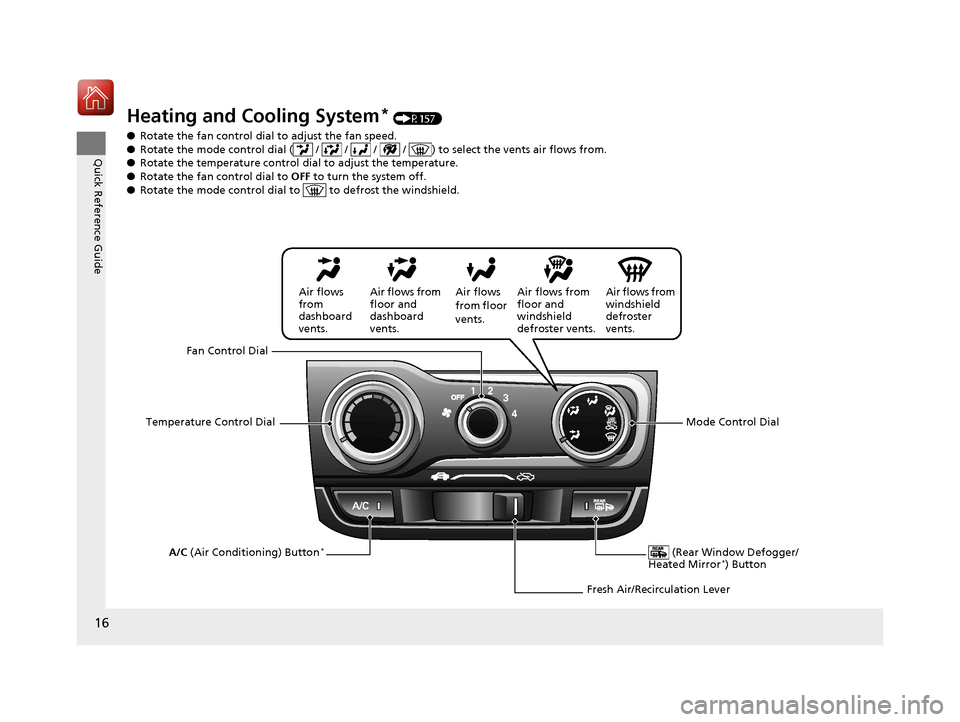
● Rotate the fan control dial to adjust the fan speed.
● Rotate the mode control dial ( / / / / ) to select the vents air flows from.
● Rotate the temperature control dial to adjust the temperature.
● Rotate the fan co ntrol dial to OFF to turn the system off.
● Rotate the mode control dial to to defrost the windshield.
Fan Control Dial
(Rear Window Defogger/
Heated Mirror
*) ButtonA/C (Air Conditioning) Button*
Air flows from
windshield
defroster
vents.
Air flows
from floor
vents.
Air flows from
floor and
dashboard
vents.
Air flows
from
dashboard
vents.
Temperature Control Dial Air flows from
floor and
windshield
defroster vents.
Mode Control Dial
Fresh Air/Recirculation Lever
17 FIT -31T5A6200.book 16 ページ 2016年5月27日 金曜日 午後6時33分
Page 18 of 465
17
Quick Reference Guide
Climate Control System* (P160)
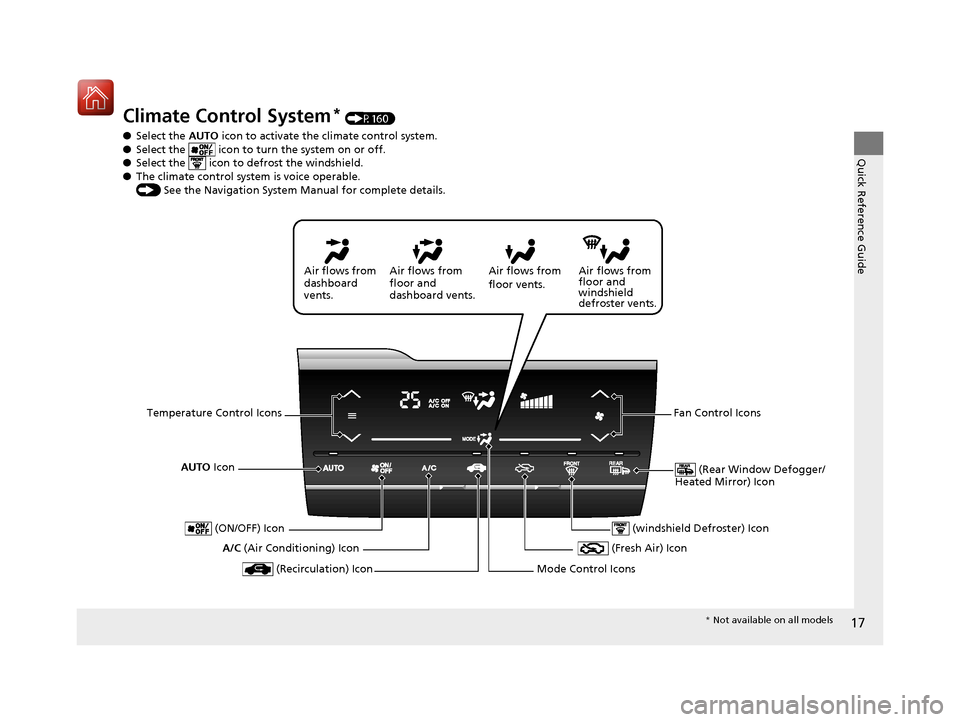
● Select the AUTO icon to activate the climate control system.
● Select the icon to tu rn the system on or off.
● Select the icon to defrost the windshield.
● The climate control system is voice operable.
() See the Navigation System Manual for complete details.
AUTO Icon
(Rear Window Defogger/
Heated Mirror) Icon
A/C (Air Conditioning) Icon Air flows from
floor and
windshield
defroster vents.
Air flows from
floor vents.
Air flows from
floor and
dashboard vents.
Air flows from
dashboard
vents.
Temperature Control Icons Fan Control Icons
(Recirculation) Icon
(ON/OFF) Icon
(Fresh Air) Icon
Mode Control Icons
(windshield Defroster) Icon
* Not available on all models
17 FIT -31T5A6200.book 17 ページ 2016年5月27日 金曜日 午後6時33分
Page 23 of 465
22
Quick Reference Guide
Maintenance (P363)
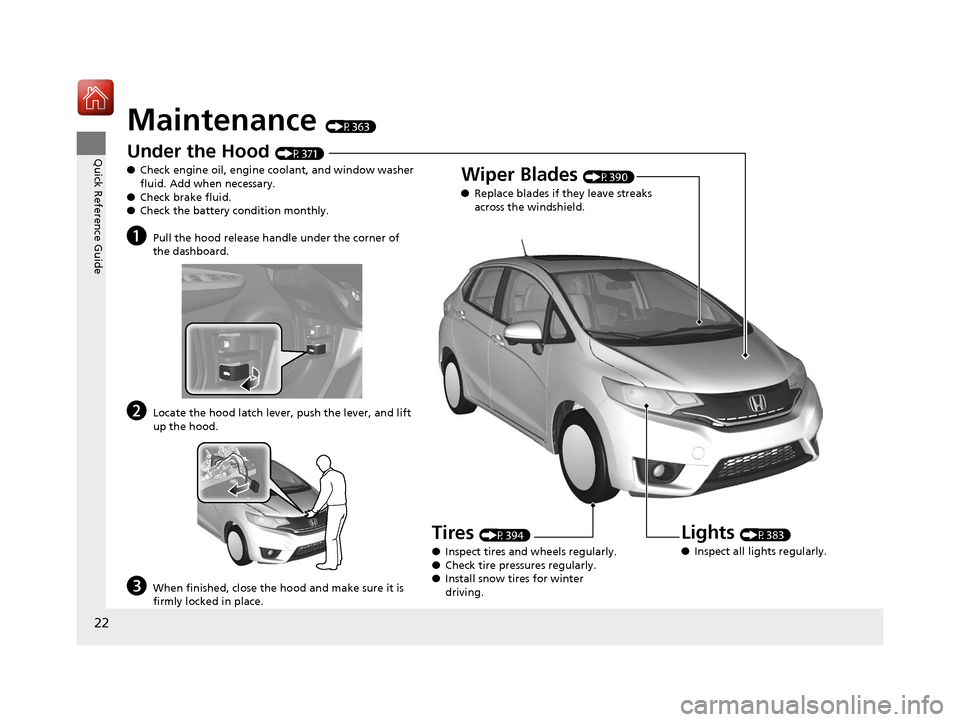
Under the Hood (P371)
● Check engine oil, engine coolant, and window washer
fluid. Add when necessary.
● Check brake fluid.
● Check the battery condition monthly.
aPull the hood release handle under the corner of
the dashboard.
bLocate the hood latch lever, push the lever, and lift
up the hood.
cWhen finished, close the hood and make sure it is
firmly locked in place.
Lights (P383)
● Inspect all lights regularly.
Wiper Blades (P390)
● Replace blades if they leave streaks
across the windshield.
Tires (P394)
● Inspect tires and wheels regularly.
● Check tire pressures regularly.
● Install snow tires for winter
driving.
17 FIT -31T5A6200.book 22 ページ 2016年5月27日 金曜日 午後6時33分
Page 129 of 465
128
uuOperating the Switches Around the Steering Wheel uWipers and Washers
Controls
Wipers and Washers
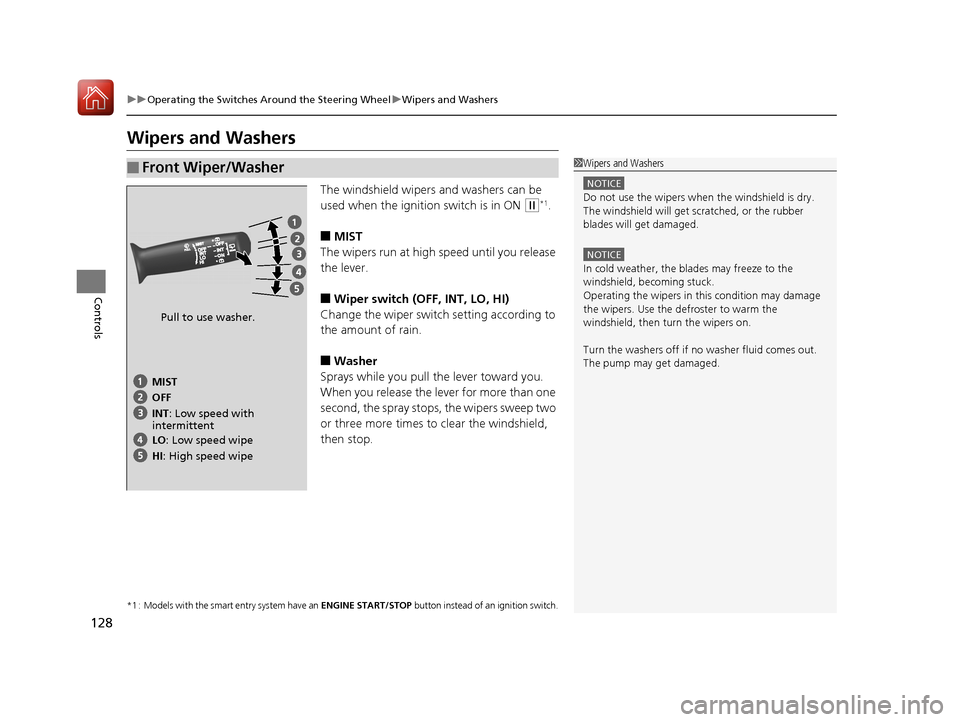
The windshield wipers and washers can be
used when the ignition switch is in ON
(w*1.
■MIST
The wipers run at high speed until you release
the lever.
■Wiper switch (OFF, INT, LO, HI)
Change the wiper switch setting according to
the amount of rain.
■Washer
Sprays while you pull the lever toward you.
When you release the lever for more than one
second, the spray stops, the wipers sweep two
or three more times to clear the windshield,
then stop.
*1 : Models with the smart entry system have an ENGINE START/STOP button instead of an ignition switch.
■Front Wiper/Washer1Wipers and Washers
NOTICE
Do not use the wipers when the windshield is dry.
The windshield will get sc ratched, or the rubber
blades will get damaged.
NOTICE
In cold weather, the blades may freeze to the
windshield, becoming stuck.
Operating the wipers in th is condition may damage
the wipers. Use the defroster to warm the
windshield, then turn the wipers on.
Turn the washers off if no washer fluid comes out.
The pump may get damaged.
Pull to use washer.
MIST
INT: Low speed with
intermittent OFF
LO : Low speed wipe
HI: High speed wipe
17 FIT -31T5A6200.book 128 ページ 2016年5月27日 金曜日 午後6時33分
Page 158 of 465
157Continued
Controls
Heating and Cooling System*
Using Vents, Heating and A/C*
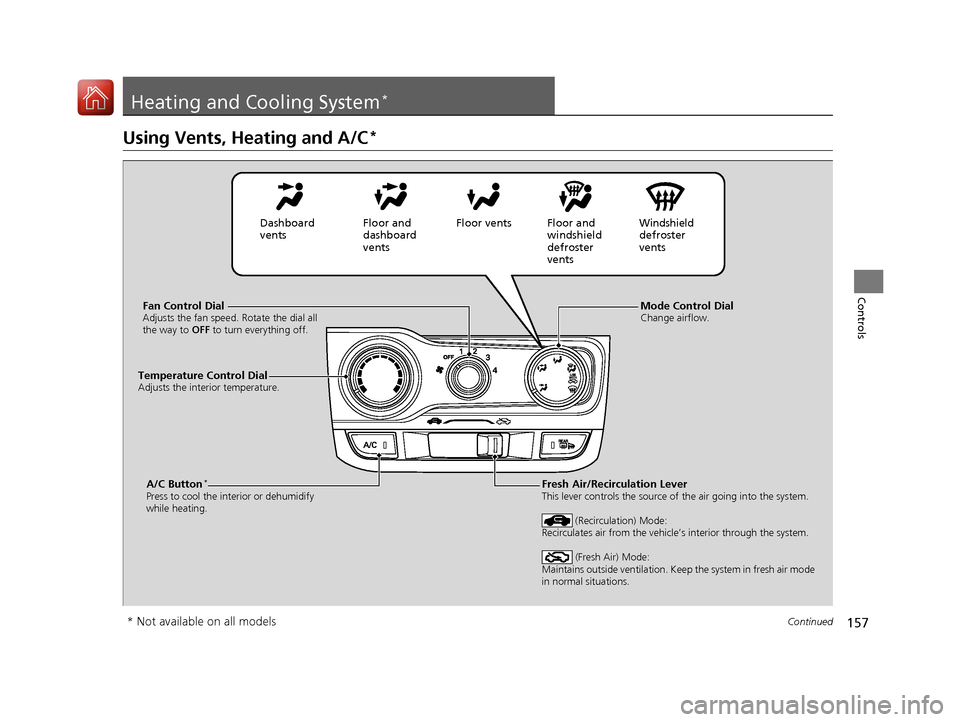
Mode Control DialChange airflow.Fan Control DialAdjusts the fan speed. Rotate the dial all
the way to OFF to turn everything off.
A/C Button*
Press to cool the interior or dehumidify
while heating.
Temperature Control DialAdjusts the interior temperature.
Fresh Air/Recirculation LeverThis lever controls the source of the air going into the system.
(Recirculation) Mode:
Recirculates air from the vehicle’s interior through the system.
(Fresh Air) Mode:
Maintains outside ventilation. Keep the system in fresh air mode
in normal situations.
Dashboard
vents Floor and
dashboard
ventsFloor vents Floor and
windshield
defroster
vents Windshield
defroster
vents
* Not available on all models
17 FIT -31T5A6200.book 157 ページ 2016年5月27日 金曜日 午後6時33分
Page 160 of 465
159
uuHeating and Cooling System*uUsing Vents, Heating and A/C*
Controls
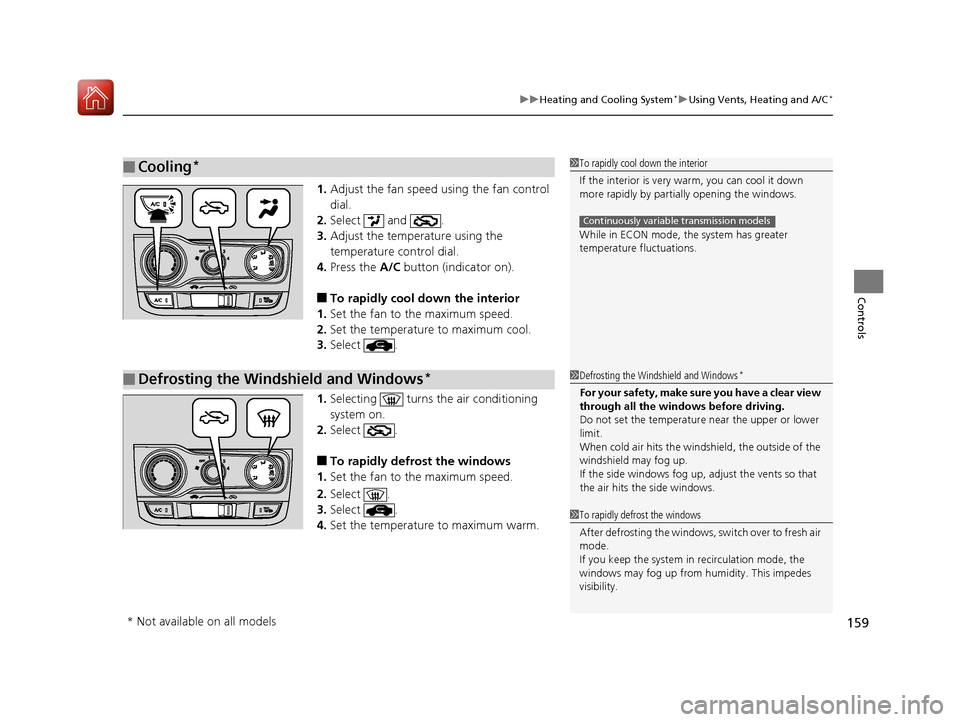
1. Adjust the fan speed using the fan control
dial.
2. Select and .
3. Adjust the temperature using the
temperature control dial.
4. Press the A/C button (indicator on).
■To rapidly cool down the interior
1. Set the fan to the maximum speed.
2. Set the temperature to maximum cool.
3. Select .
1. Selecting turns the air conditioning
system on.
2. Select .
■To rapidly defrost the windows
1. Set the fan to the maximum speed.
2. Select .
3. Select .
4. Set the temperature to maximum warm.
■Cooling*1To rapidly cool down the interior
If the interior is very warm, you can cool it down
more rapidly by parti ally opening the windows.
While in ECON mode, the system has greater
temperature fluctuations.
Continuously variable transmission models
■Defrosting the Windshield and Windows*1 Defrosting the Windshield and Windows*
For your safety, make sure you have a clear view
through all the windows before driving.
Do not set the temperatur e near the upper or lower
limit.
When cold air hits the windshield, the outside of the
windshield may fog up.
If the side windows fog up, adjust the vents so that
the air hits th e side windows.
1To rapidly defrost the windows
After defrosting the windows, switch over to fresh air
mode.
If you keep the system in recirculation mode, the
windows may fog up from humidity. This impedes
visibility.
* Not available on all models
17 FIT -31T5A6200.book 159 ページ 2016年5月27日 金曜日 午後6時33分
Page 161 of 465
160
Controls
Climate Control System*
Using Automatic Climate Control
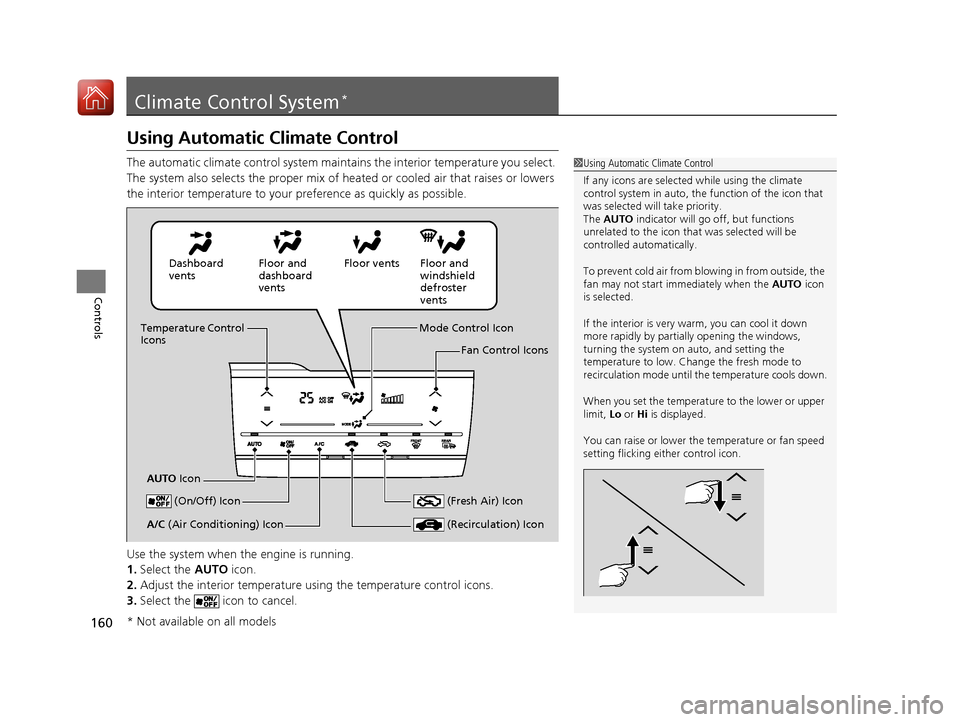
The automatic climate control system maintains the interior temperature you select.
The system also selects the proper mix of heated or cooled air that raises or lowers
the interior temperature to your preference as quickly as possible.
Use the system when the engine is running.
1. Select the AUTO icon.
2. Adjust the interior temperature us ing the temperature control icons.
3. Select the icon to cancel.1Using Automatic Climate Control
If any icons are selected while using the climate
control system in auto, the function of the icon that
was selected will take priority.
The AUTO indicator will go off, but functions
unrelated to the icon that was selected will be
controlled automatically.
To prevent cold air from bl owing in from outside, the
fan may not start i mmediately when the AUTO icon
is selected.
If the interior is very warm, you can cool it down
more rapidly by partial ly opening the windows,
turning the system on auto, and setting the
temperature to low. Change the fresh mode to
recirculation mode until the temperature cools down.
When you set the temperat ure to the lower or upper
limit, Lo or Hi is displayed.
You can raise or lower the temperature or fan speed
setting flicking either control icon.
Dashboard
vents Floor and
dashboard
ventsFloor vents Floor and
windshield
defroster
vents
Temperature Control
Icons
AUTO Icon Mode Control Icon
Fan Control Icons
(On/Off) Icon
(Recirculation) IconA/C (Air Conditioning) Icon (Fresh Air) Icon
* Not available on all models
17 FIT -31T5A6200.book 160 ページ 2016年5月27日 金曜日 午後6時33分
Page 162 of 465
Continued161
uuClimate Control System*uUsing Automatic Climate Control
Controls
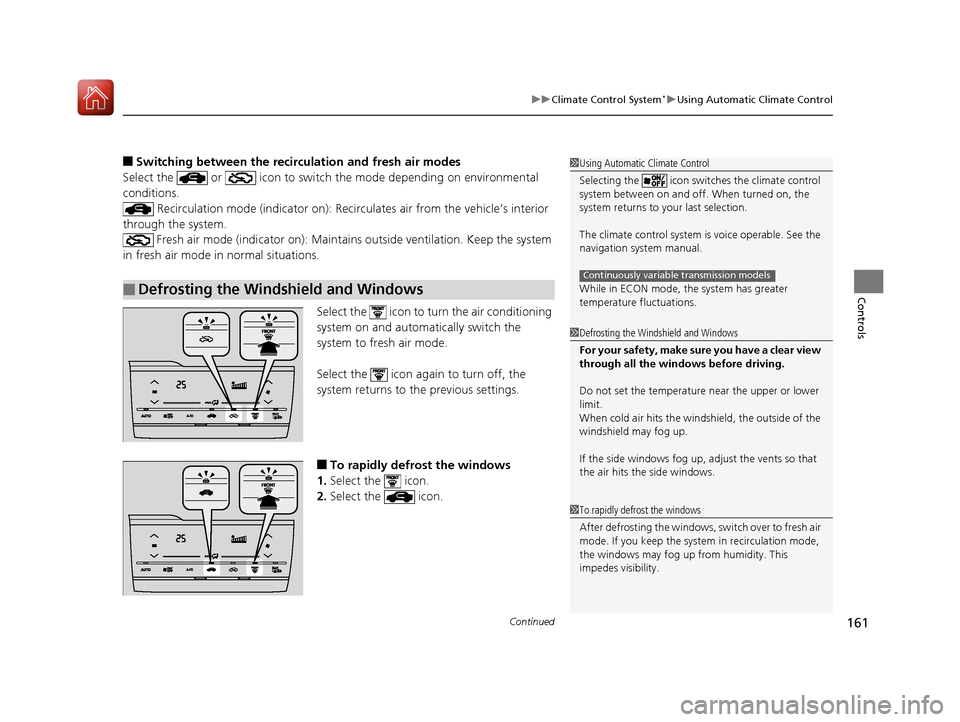
■Switching between the recirc ulation and fresh air modes
Select the or icon to switch the mode depending on environmental
conditions. Recirculation mode (indicator on): Reci rculates air from the vehicle’s interior
through the system. Fresh air mode (indicator on): Maintain s outside ventilation. Keep the system
in fresh air mode in normal situations.
Select the icon to turn the air conditioning
system on and automatically switch the
system to fresh air mode.
Select the icon again to turn off, the
system returns to the previous settings.
■To rapidly defrost the windows
1. Select the icon.
2. Select the icon.
■Defrosting the Windshield and Windows
1Using Automatic Climate Control
Selecting the icon switches the climate control
system between on and off. When turned on, the
system returns to your last selection.
The climate control system is voice operable. See the
navigation sy stem manual.
While in ECON mode, the system has greater
temperature fluctuations.
Continuously variable transmission models
1 Defrosting the Windshield and Windows
For your safety, make sure you have a clear view
through all the windows before driving.
Do not set the temperatur e near the upper or lower
limit.
When cold air hits the windshield, the outside of the
windshield may fog up.
If the side windows fog up, adjust the vents so that
the air hits th e side windows.
1To rapidly defrost the windows
After defrosting the windows, switch over to fresh air
mode. If you keep the syst em in recirculation mode,
the windows may fog up from humidity. This
impedes visibility.
17 FIT -31T5A6200.book 161 ページ 2016年5月27日 金曜日 午後6時33分
Page 338 of 465
Continued337
uuWhen Driving uForward Collision Warning (FCW)*
Driving
1Forward Collision Warning (FCW)*
Never apply a film or attach any objects to the
windshield that could obs truct the FCW camera’s
field of vision.
Scratches, nicks, and othe r damage to the windshield
within the FCW camera’s fi eld of vision can cause the
system to operate abnormall y. If this occurs, we
recommend that you replac e the windshield with a
genuine Honda replacem ent windshield. Making
even minor repairs within th e camera’s field of vision
or installing an aftermarket replacement windshield
may also cause the system to operate abnormally.
After replacing the winds hield, have a dealer
recalibrate the camera. Prop er calibration of the FCW
camera is necessary for the system to operate
properly.
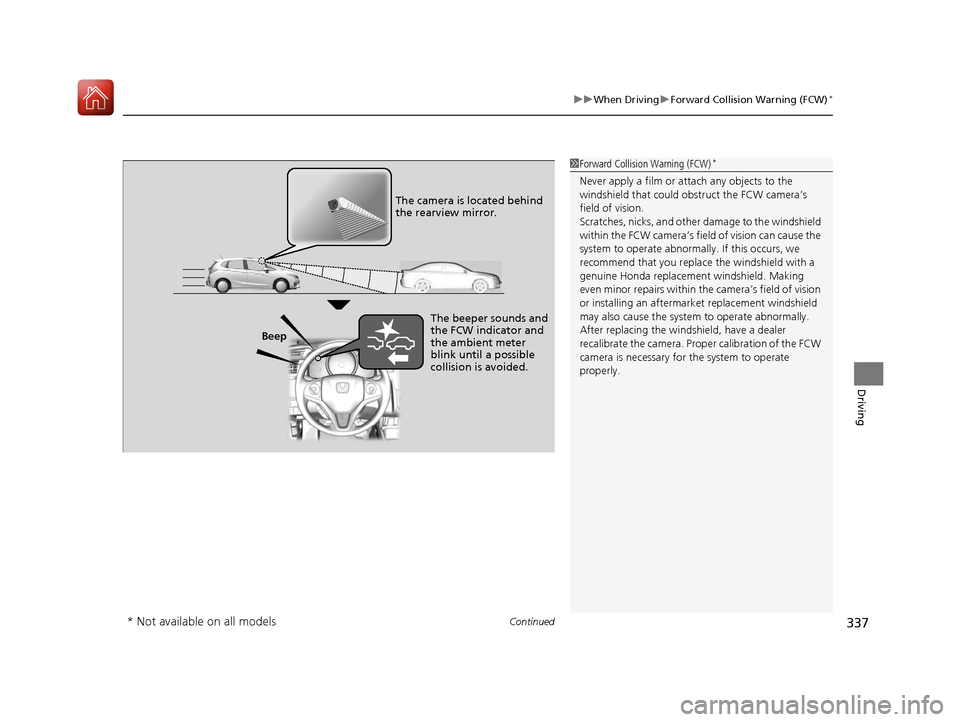
Beep The camera is located behind
the rearview mirror.
The beeper sounds and
the FCW indicator and
the ambient meter
blink until a possible
collision is avoided.
* Not available on all models
17 FIT -31T5A6200.book 337 ページ 2016年5月27日 金曜日 午後6時33分