display HONDA FIT 2017 3.G Quick Guide
[x] Cancel search | Manufacturer: HONDA, Model Year: 2017, Model line: FIT, Model: HONDA FIT 2017 3.GPages: 76, PDF Size: 8.56 MB
Page 51 of 76
94 || 95
DRIVING
DRIVING
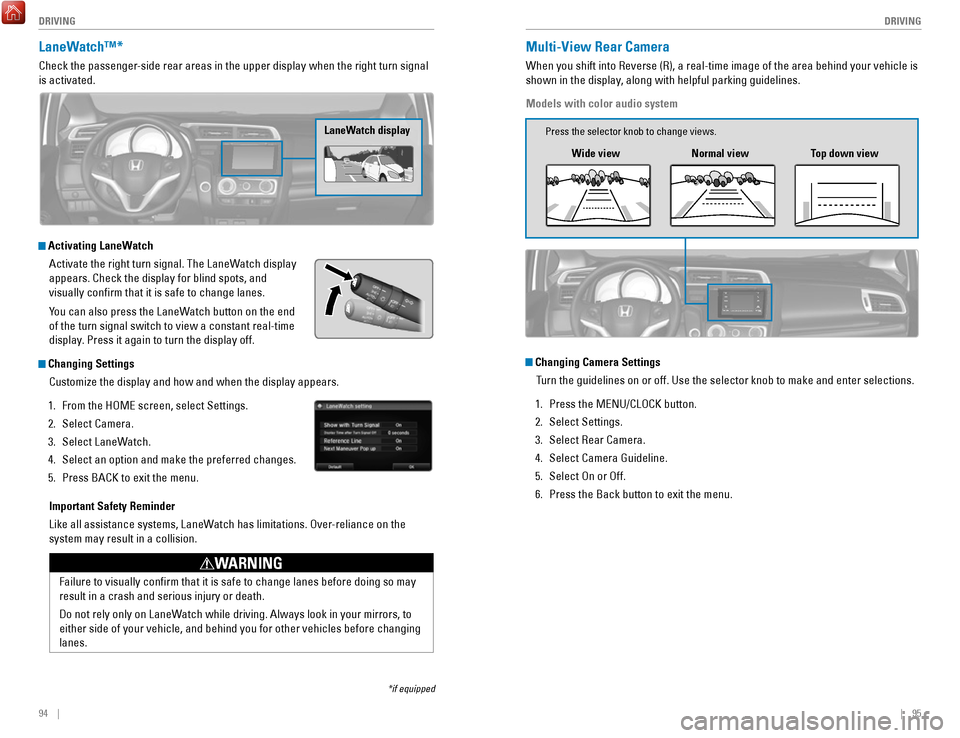
LaneWatch™*
Check the passenger-side rear areas in the upper display when the right turn signal
is activated.
LaneWatch display
Activating LaneWatch
Activate the right turn signal. The LaneWatch display
appears. Check the display for blind spots, and
visually confirm that it is safe to change lanes.
You can also press the LaneWatch button on the end
of the turn signal switch to view a constant real-time
display. Press it again to turn the display off.
Changing SettingsCustomize the display and how and when the display appears.
1.
From the HOME screen, select Settings.
2.
Select Camera.
3.
Select LaneWatch.
4.
Select an option and make the preferred changes.
5.
Press BACK to exit the menu.
Important Safety Reminder
Like all assistance systems, LaneWatch has limitations. Over-reliance on the
system may result in a collision.
Failure to visually confirm that it is safe to change lanes before doi\
ng so may
result in a crash and serious injury or death.
Do not rely only on LaneWatch while driving. Always look in your mirrors, to
either side of your vehicle, and behind you for other vehicles before ch\
anging
lanes.
WARNING
*if equipped
Multi-View Rear Camera
When you shift into Reverse (R), a real-time image of the area behind \
your vehicle is
shown in the display, along with helpful parking guidelines.
Models with color audio system
Wide view Normal viewTop down view
Changing Camera Settings
Turn the guidelines on or off. Use the selector knob to make and enter se\
lections.
1.
Press the MENU/CLOCK button.
2.
Select Settings.
3.
Select Rear Camera.
4.
Select Camera Guideline.
5.
Select On or Off.
6.
Press the Back button to exit the menu.
Press the selector knob to change views.
Page 52 of 76
96 || 97
DRIVING
DRIVING
The rear camera view is restricted. You cannot see the corner ends of the bumper or what is
underneath the bumper. Its unique lens also makes objects appear closer or farther than they \
actually are.
Visually confirm that it is safe to drive before backing up. Certain c\
onditions (such as weather,
lighting, and high temperatures) may also restrict the rear view. Do not rely on the rearview display,
which does not give you all information about conditions at the rear of \
your vehicle.
Changing Camera Settings
Turn the guidelines on or off.
1.
From the HOME screen, select Settings.
2.
Select Camera.
3.
Select Rear Wide Camera.
4.
Select one of the options.
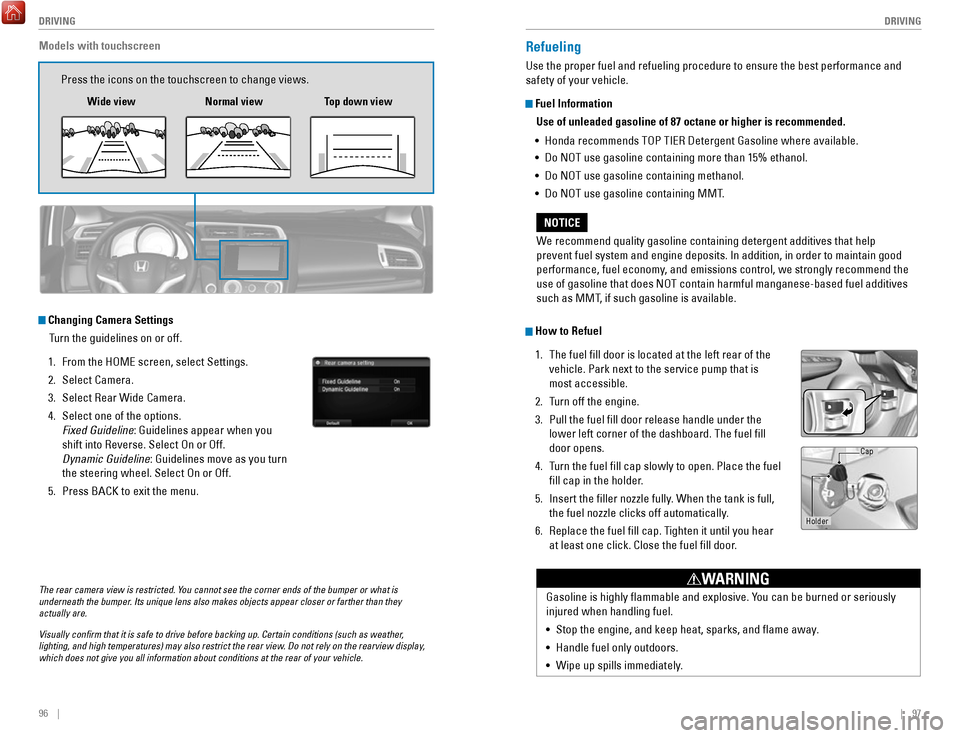
Fixed Guideline: Guidelines appear when you
shift into Reverse. Select On or Off.
Dynamic Guideline
: Guidelines move as you turn
the steering wheel. Select On or Off.
5.
Press BACK to exit the menu.
Models with touchscreen
Press the icons on the touchscreen to change views.
Wide view Normal view Top down view
Refueling
Use the proper fuel and refueling procedure to ensure the best performan\
ce and
safety of your vehicle.
Fuel Information
Use of unleaded gasoline of 87 octane or higher is recommended.
•
Honda recommends TOP TIER Detergent Gasoline where available.
•
Do NOT use gasoline containing more than 15% ethanol.
•
Do NOT use gasoline containing methanol.
•
Do NOT use gasoline containing MMT.
How to Refuel
1.
The fuel fill door is located at the left rear of the
vehicle. Park next to the service pump that is
most accessible.
2.
Turn off the engine.
3.
Pull the fuel fill door release handle under the
lower left corner of the dashboard. The fuel fill
door opens.
4.
Turn the fuel fill cap slowly to open. Place the fuel
fill cap in the holder.
5.
Insert the filler nozzle fully. When the tank is full,
the fuel nozzle clicks off automatically.
6.
Replace the fuel fill cap. Tighten it until you hear
at least one click. Close the fuel fill door.
W
e recommend quality gasoline containing detergent additives that help
prevent fuel system and engine deposits. In addition, in order to mainta\
in good
performance, fuel economy, and emissions control, we strongly recommend the
use of gasoline that does NOT contain harmful manganese-based fuel addit\
ives
such as MMT, if such gasoline is available.
NOTICE
Gasoline is highly flammable and explosive. You can be burned or seriously
injured when handling fuel.
•
Stop the engine, and keep heat, sparks, and flame away.
•
Handle fuel only outdoors.
•
Wipe up spills immediately.
WARNING
Holder Cap
Page 60 of 76
112 || 113
MAINTENANCE
MAINTENANCE
Safety Precautions
Some of the most important safety precautions are listed below; however, we cannot
warn you of every conceivable hazard that can arise in performing mainte\
nance.
Only you can decide whether or not you should perform a given task.
Maintenance Safety
•
To reduce the possibility of fire or explosion, keep cigarettes, sparks\
, and flames
away from the battery and all fuel-related parts.
•
Never leave rags, towels, or other flammable objects under the hood. H\
eat from
the engine and exhaust can ignite them, causing a fire.
•
To clean parts, use a commercially available degreaser or parts cleaner, not
gasoline.
•
Wear eye protection and protective clothing when working with the battery\
or
compressed air.
•
Do not run the engine in confined spaces where carbon monoxide gas can\
accumulate.
Vehicle Safety
•
The vehicle must be stationary, and parked on level ground with the parking
brake set and the engine off.
•
Be aware that hot parts can burn you.
•
Be aware that moving parts can injure you.
Improperly maintaining this vehicle or failing to correct a problem befo\
re
driving can cause a crash in which you can be seriously hurt or killed. \
Always follow the inspection and maintenance recommendations according
to the schedules in this guide.
WARNING
Failure to properly follow maintenance instructions and precautions can \
cause you to be seriously hurt or killed.
Always follow the procedures and precautions in this guide.
WARNING
Learn about basic maintenance that you can perform on the vehicle yourse\
lf, as well
as information about how to best maintain the vehicle.
MAINTENANCEMaintenance Minder™
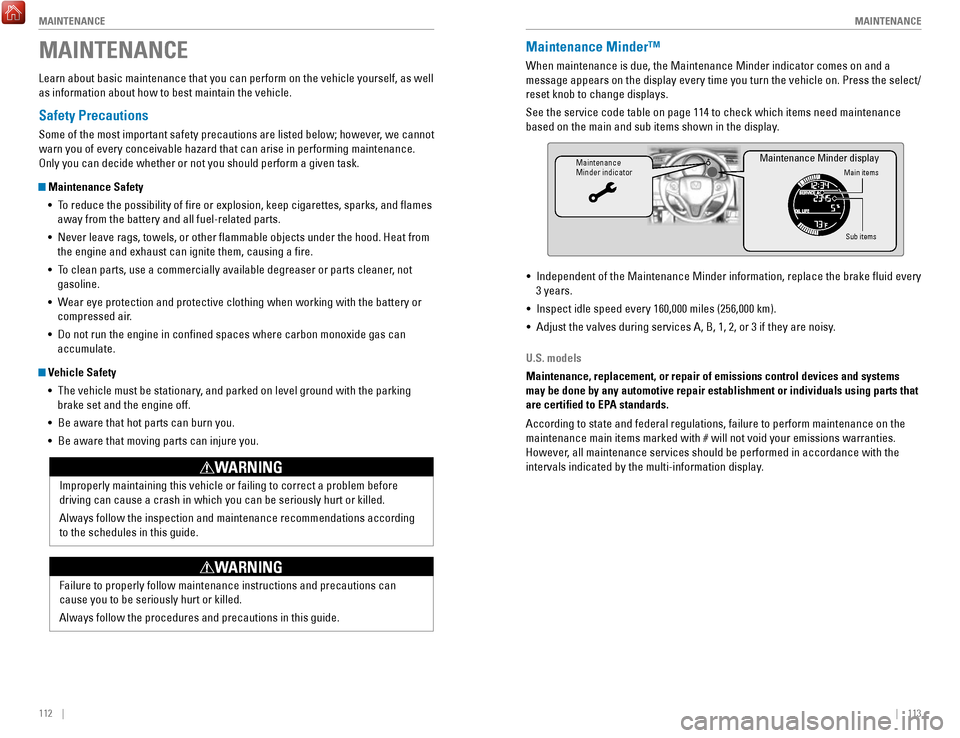
When maintenance is due, the Maintenance Minder indicator comes on and a\
message appears on the display every time you turn the vehicle on. Press\
the select/
reset knob to change displays.
See the service code table on page 114 to check which items need mainten\
ance
based on the main and sub items shown in the display.
Maintenance
Minder indicatorMain items
Sub items
Maintenance Minder display
• Independent of the Maintenance Minder information, replace the brake fl\
uid every
3 years.
•
Inspect idle speed every 160,000 miles (256,000 km).
•
Adjust the valves during services A, B, 1, 2, or 3 if they are noisy.
U.S. models
Maintenance, replacement, or repair of emissions control devices and sys\
tems
may be done by any automotive repair establishment or individuals using \
parts that
are certified to EPA standards.
According to state and federal regulations, failure to perform maintenan\
ce on the
maintenance main items marked with # will not void your emissions war
ranties.
However, all maintenance services should be performed in accordance with the
intervals indicated by the multi-information display.
Page 61 of 76
114 || 115
MAINTENANCE
MAINTENANCE
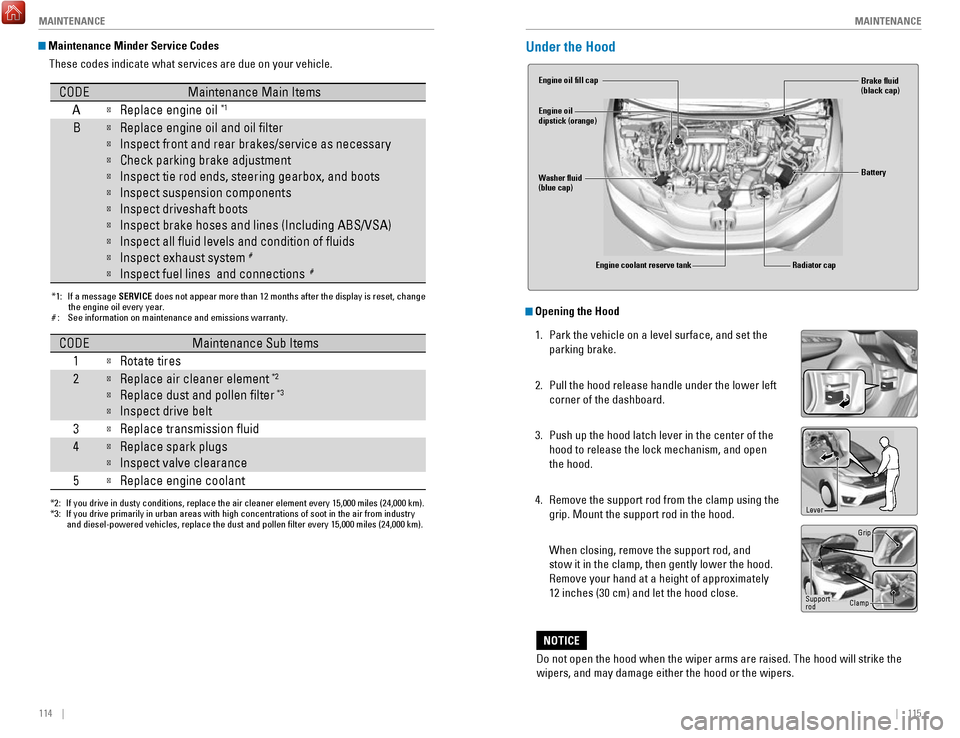
Maintenance Minder Service Codes
These codes indicate what services are due on your vehicle.
*1: If a message SERVICE does not appear more than 12 months after the display is reset, changethe engine oil every year.
#: See information on maintenance and emissions warranty.
CODEMaintenance Main Items
A
Replace engine oi l*1
BReplace engine oil and oil lter
Inspect front and rear brakes/service as necessary
Check parking brake adjustment
Inspect tie rod ends, steering gearbox, and boots
Inspect suspension component s
Inspect driveshaft boots
Inspect brake hoses and lines (Including ABS/VSA)
Inspect all uid levels and condition of uids
Inspect exhaust system#
Inspect fuel lines and connections#
*2:If you drive in dusty conditions, replace the air cleaner element every \
15,000 miles (24,000 km).*3:If you drive primarily in urban areas with high concentrations of soot i\
n the air from industryand diesel-powered vehicles, replace the dust and pollen lter every \
15,000 miles (24,000 km).
CODEMaintenance Sub Items
1
Rotate tires
2Replace air cleaner element*2
Replace dust and pollen lte r*3
Inspect drive belt
3
Replace transmission uid
4Replace spark plugs
Inspect valve clearance
5
Replace engine coolan t
Under the Hood
Opening the Hood
1.
Park the vehicle on a level surface, and set the
parking brake.
2.
Pull the hood release handle under the lower left
corner of the dashboard.
3.
Push up the hood latch lever in the center of the
hood to release the lock mechanism, and open
the hood.
4.
Remove the support rod from the clamp using the
grip. Mount the support rod in the hood.
When closing, remove the support rod, and
stow it in the clamp, then gently lower the hood.
Remove your hand at a height of approximately
12 inches (30 cm) and let the hood close.
Do not open the hood when the wiper arms are raised. The hood will strik\
e the
wipers, and may damage either the hood or the wipers.
NOTICE
Engine coolant reserve tank
Washer fluid
(blue cap) Engine oil fill cap
Engine oil
dipstick (orange)
Brake fluid
(black cap)
Battery
Radiator cap
Lever
Support
rod Grip
Clamp
Page 62 of 76
116 || 117
MAINTENANCE
MAINTENANCE
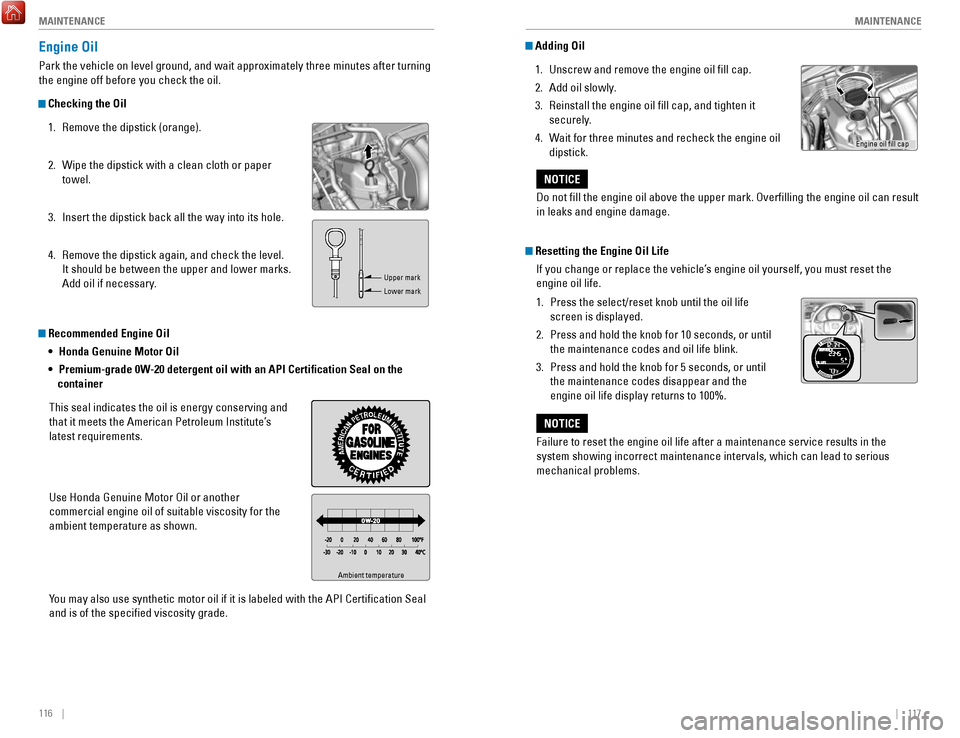
Recommended Engine Oil
• Honda Genuine Motor Oil
•
Premium-grade 0W-20 detergent oil with an API Certification Seal on the
container
This seal indicates the oil is energy conserving and
that it meets the American Petroleum Institute’s
latest requirements.
Use Honda Genuine Motor Oil or another
commercial engine oil of suitable viscosity for the
ambient temperature as shown.
Y
ou may also use synthetic motor oil if it is labeled with the API Certifi\
cation Seal
and is of the specified viscosity grade.
Engine Oil
Park the vehicle on level ground, and wait approximately three minutes after turning
the engine off before you check the oil.
Checking the Oil
1.
Remove the dipstick (orange).
2.
Wipe the dipstick with a clean cloth or paper
towel.
3.
Insert the dipstick back all the way into its hole.
4.
Remove the dipstick again, and check the level.
It should be between the upper and lower marks.
Add oil if necessary.
Ambient temperature
Upper mark
Lower mark
Adding Oil 1.
Unscrew and remove the engine oil fill cap.
2.
Add oil slowly.
3.
Reinstall the engine oil fill cap, and tighten it
securely.
4.
Wait for three minutes and recheck the engine oil
dipstick.
Resetting the Engine Oil Life If you change or replace the vehicle’s engine oil yourself, you must reset the
engine oil life.
1.
Press the select/reset knob until the oil life
screen is displayed.
2.
Press and hold the knob for 10 seconds, or until
the maintenance codes and oil life blink.
3.
Press and hold the knob for 5 seconds, or until
the maintenance codes disappear and the
engine oil life display returns to 100%.
Do not fill the engine oil above the upper mark. Overfilling the eng\
ine oil can result
in leaks and engine damage.
NOTICE
Failure to reset the engine oil life after a maintenance service results\
in the
system showing incorrect maintenance intervals, which can lead to seriou\
s
mechanical problems.
NOTICE
Engine oil fill cap
Page 71 of 76

134 || 135
VOICE COMMAND INDEX
CUSTOMER INFORMATION
Honda Roadside Assistance
24-hour emergency road service is available to you in the United States \
and Canada
throughout your 3-year/36,000-mile warranty term. Services include jump starting,
flat tire and lockout assistance, towing, and more (limitations apply\
).
Call (866) 864-5211 (U.S.) or (800) 465-7587 (Canada).
Warranty Coverages
Below is a brief summary of the warranties covering your new vehicle.
New Vehicle Limited Warranty: Covers your new vehicle, except for the emissions
control system and accessories, against defects in materials and workman\
ship.
Emissions Control Systems Defects Warranty and Emissions Performance
Warranty: Covers your vehicle’s emissions control systems. Time, mileage, and
coverage are conditional.
Seat Belt Limited Warranty: Covers seat belts that fail to function properly.
Rust Perforation Limited Warranty: Covers all exterior body panels that rust through
from the inside.
Accessory Limited Warranty: Covers Honda accessories.
Replacement Parts Limited Warranty: Covers all Honda replacement parts against
defects in materials and workmanship.
Replacement Battery Limited Warranty: Provides prorated coverage for a
replacement battery purchased from a Honda dealer.
Replacement Muffler Lifetime Limited Warranty: Covers a replacement muffler for
the duration of the ownership.
Restrictions and exclusions apply to all these warranties. See the Warranty Manual
on the Owner Information CD or at owners.honda.com (U.S.) or myhonda.ca
(Canada) for complete descriptions of each warranty, including time, mileage, and
other conditional limitations.
Your vehicle’s original tires are covered by their manufacturer. Tire warranty
information can be found on the Owner Information CD or at owners.honda.com
(U.S.) or myhonda.ca (Canada). Learn about all available voice commands to help you operate the vehicle\
. Available
on vehicles with navigation.
Press the Talk button before you say a command. To view a list of available
commands in the vehicle, say “Voice help.” Select a category to hear the commands
read aloud. General Commands
The system accepts these commands on any screen.
Navigation CommandsThe system accepts these commands on the map/guidance screen.
General Commands
•
Display map
•
Display navigation
•
Go home 1 (or 2)
Map Display Commands
•
Voice help
•
Display menu
•
Display setting
•
Display navigation
•
Display information •
Display audio
•
Display phone
•
Back/Cancel
•
What is today’s date?
•
What time is it?
•
Display current location
•
Display/Hide (specify icon type):
− AT M
− gas station
− restaurant
− post office
− grocery store
− lodging (hotel, motel)
− parking garage
− parking lot
− school
− hospital
− freeway exit information
− traffic*
− traffic speeds*
− traffic icons*
•
Display north up
•
Display heading up
•
Display 3D map
•
Display zoom in
•
Display zoom out
VOICE COMMAND INDEX
*U.S. models only
EPA Contact Information
An owner may obtain further information
concerning emission warranties or report
violations of the terms of the emission
warranties by contacting: U.S. Environmental Protection Agency
Office of Transportation and Air Quality
Compliance Division,
Light-Duty Vehicles Group
Attn: Warranty Complaints
2000 Traverwood Drive
Ann Arbor, MI 48105
Email: [email protected]
Page 72 of 76
136 || 137
VOICE COMMAND INDEX
VOICE COMMAND INDEX
Navigation Commands (continued)
Find Place Commands
•
Find nearest (specify place):
− Fuel and auto
− Honda dealers
− Gas station
− Auto parts & electronics
− Auto repair & maintenance
− Car wash & detailing
− Motorcycle dealers
− Other car dealerships
− Roadside assistance
− AT M
− Bank
− Check cashing
− Currency exchange
− Community
− Business
− City hall
− Civic center
− Convention center
− Court house
− Higher education
− Library
− Post office
− School
− Emergency room
− Hospital
− Police station
− Veterinarian
− Lodging
− Bed & breakfast
− Hotel
− Resort
− Recreation
− Amusement park
− Golf course
− Historical monument
− Marina
− Movie theater
− Museum
− Park
− Performing arts
− Sports complex
− Tourist attraction
− Restaurant
− American restaurant
− Californian restaurant
− Chinese restaurant
− Coffee shop
− Continental restaurant
− Fast food
− French restaurant
− German restaurant
− Greek restaurant
− Indian restaurant
− Italian restaurant
− Japanese restaurant
− Korean restaurant
− Mexican restaurant
− Pizza
− Seafood restaurant
− Thai restaurant
− Vegetarian restaurant
− Vietnamese restaurant
− Other restaurant
− Shopping
− Shopping area
− Accessory store
− Book store
− Clothing store
− Grocery store
− Home improvement store
− Mall
− Office supply store
− Pharmacy
− Pet food store
− Sewing store
− Shoe store
− Sporting goods store
− Toy store Route Commands
The system accepts these commands when a route is set.
•
How long to the destination?
•
How far to the destination?
•
Display destination map
•
Display entire route
− Travel center
− Airport
− Automobile club
− Bus station
− Camping
− Commuter rail station
− Ferry terminal
− Named place
− Park & ride
− Parking garage
− Parking lot
− Rental car agency
− Rest area
− Ski area
− Tourist information
− Train station
− Travel agency
− Truck stop
Climate Control Commands**
The system accepts these commands on most screens. Available on Canadian
models only.
•
Climate control automatic
(maintains selected temperature)
•
Climate control on*
•
Climate control off*
•
Air conditioner on*
•
Air conditioner off*
•
Rear defrost on*
•
Rear defrost off*
•
Climate control fresh air
•
Climate control recirculate
•
Climate control vent
•
Climate control bi-level (vent and
floor •
Climate control floor
•
Climate control floor and defrost
•
Fan speed up
•
Fan speed down
•
Fan speed # (#: 1 to 7)
•
Temperature # degrees
(#: 57 to 87°F / 15 to 29°C)
•
Temperature up
•
Temperature down
•
Driver temperature up
•
Driver temperature down
•
Temperature max heat
•
Temperature max cool
*These commands toggle the function on and off, so the command may not match your intended action. **if equipped
• Cancel route
•
Repeat guidance
•
Route menu
Page 74 of 76
140 || 141
INDEX
VOICE COMMAND INDEX
Phone Commands
The system accepts these commands on most screens.
Info CommandsThe system accepts these commands on most screens.
•
Trip computer
•
Display traffic list*
•
Display traffic on my route* •
Display clock
•
Display wallpaper
On-screen Commands
The system accepts these commands on any screen where applicable. All
available commands are highlighted in yellow when you press the Talk button.
•
Next (or previous)
•
Up (or down)
•
Right (or left)
•
Return
•
OK (excluding Startup Confirmation screen)
•
Delete
*if equipped
• Dial/call by number
•
Dial/call by name
•
Call (phone number or name)
INDEX
ABS........................................................................\
...... 25
Accessory Power Socket ........................................ 47
Airbags........................................................................\
.. 9 About Your Airbags
................................................ 11
Advanced Airbags .................................................... 9
Airbag Care ............................................................. 14
Airbag System Components ................................. 13
Airbag System Indicators ..................................... 11
Front Airbags (SRS) .................................................. 9
Passenger Airbag Off Indicator ........................... 12
Side Airbags ............................................................ 10
Side Curtain Airbags .............................................. 10
SRS Indicator .......................................................... 11
Anti-Lock Brake System (ABS) ......................... 25,
91
Audio Commands
.................................................... 138
Audio Operation ........................................................ 47
Accessory Power Socket ..................................... 47
Auxiliary Input Jack ............................................... 48
Bluetooth Audio ................................................ 55,
63
Color Audio System
................................................ 50
Compact Disc (CD) ........................................... 52, 60
FM/AM Radio .................................................... 51,
58
HDMI Port
................................................................ 47
HDMI Video ............................................................. 65
HondaLink ................................................................ 57
iPod ..................................................................... 53,
61
Pandora
.................................................................... 64
SiriusXM Radio ....................................................... 59
Sound ....................................................................... 49
Steering Wheel Controls ....................................... 48
Touchscreen Operation ......................................... 56
USB Flash Drive ................................................ 54,
62
USB Port
.................................................................. 47
AUX Commands.......................................................
139
Auxiliary Input Jack
.................................................. 48
Battery ...................................................................... 120
Bluetooth Audio...................................................
55, 63
Bluetooth Audio Commands.................................. 139
Bluetooth Handsfreelink (HFL)
................................ 66
E-Mail ....................................................................... 74
HFL Controls ...................................................... 66,
69
HondaLink Assist
.................................................... 73
Making a Call .................................................... 68,
72
Pairing a Phone
................................................ 67,
71
Phonebook
......................................................... 68,
72
Siri Eyes Free
.......................................................... 75
SMS Text Messaging ............................................. 74
Speed Dial ......................................................... 68,
73
Talk Button Tips
...................................................... 70Brake Assist System.................................................
91
Brake Fluid ............................................................... 119
Brake system ....................................................... 24,
25
Braking........................................................................\
90 Brightness Control
.................................................... 35
Calibration ................................................................ 102
Carbon Monoxide Gas................................................
4
Changing a Flat Tire
................................................ 104
Changing Settings ..................................................... 46
Changing Wiper Blades ......................................... 121
Charging system........................................................ 24 Child Safety
................................................................ 15
Childproof Door Locks ........................................... 31
Installing a LATCH-Compatible Child Seat ......... 18
Child Seat ................................................................... 17
Adding Security with a Tether .............................. 20
Installing a LATCH-Compatible Child Seat ......... 18
Selecting a Child Seat ........................................... 17
Climate Control Commands ................................... 137
Climate Control System ............................................ 44
Clock........................................................................\
.... 45
Color Audio System
.................................................. 50
Compact Disc (CD) .............................................. 52,
60
Compact Disc (CD) Commands
............................. 138
Contact Us ................................................................ 133
Continuously Variable T
ransmission (CVT)
...........88
Coolant ...................................................................... 118
Cruise Control ............................................................ 93
CRUISE MAIN ............................................................ 27
CUSTOMER Information.........................................
132
Customized Features
................................................ 46
CVT ........................................................................\
...... 88
Dashboard and Other Controls ................................. 2
Destination ................................................................. 79
Detour ........................................................................\
. 82
Dialing a Number ................................................ 68,
72
Door Mirrors
.............................................................. 42
Door Operation .......................................................... 31
Doors ........................................................................\
... 30
Door/tailgate open .................................................... 26
DOT Tire Quality Grading ....................................... 127
Page 75 of 76

142 || 143
INDEX
INDEX
Driving ........................................................................\
. 83
Braking ..................................................................... 90
Cruise Control ......................................................... 93
ECON button ............................................................ 92
Ignition ..................................................................... 87
LaneWatch .............................................................. 94
Maximum Load Limit .............................................. 85
Multi-View Rear Camera ....................................... 95
Paddle Shifters ....................................................... 89
Power Mode ............................................................ 88
Refueling .................................................................. 97
Shifting ..................................................................... 88
Vehicle Stability Assist (VSA) ............................... 92
ECON button...............................................................
92
ECON mode
................................................................ 27
Electric power steering............................................
25
E-Mail
........................................................................\
.. 74
Emergency Engine Stop ......................................... 101
Engine and Fuel ....................................................... 130
Engine Coolant.........................................................
118
Engine Oil.................................................................. 116 ENGINE START/STOP button
.................................. 88
Exterior Lights ...................................................... 27,
36
Fastening a Seat Belt
................................................. 7
Find Nearest Place ................................................... 80
Find Place Commands ............................................ 136
Flat Tire ..................................................................... 104
Floor Mats .................................................................. 39
Fluids ........................................................................\
. 131
FM/AM Radio ....................................................... 51,
58
FM/AM Radio Commands
...................................... 138
Fog lights .............................................................. 27,
36
Foot Brake
.................................................................. 90
Frequently Asked Questions ................................. 132
Front Airbags (SRS) .................................................... 9
Front Door Inner Handle .......................................... 31
Front Seats ................................................................. 38
Front Wipers .............................................................. 37
Fuel Information ........................................................ 97
Fuse Locations.........................................................
108
Hang-Up/Back button................................... 66, 69, 76
Hazards
....................................................................... 27
HDMI Port...................................................................
47
HDMI Video
................................................................ 65
Headlight-Wiper Integration ................................... 37
Head Restraints ......................................................... 40
HFL Controls ......................................................... 66,
69
High beams
................................................................ 27
High temperature ...................................................... 25
Home Address ........................................................... 79
HondaLink...................................................................
57
HondaLink Assist....................................................... 73 Honda Roadside Assistance
................................. 134
Hood ........................................................................\
.. 115
Ignition ........................................................................\
87Immobilizer
.................................................................
27
Info Commands........................................................ 140
Information Display................................................... 28
Instrument Panel
....................................................... 24
Condition Indicators ............................................... 26
Malfunction Indicators .......................................... 24
On/Off Indicators .................................................... 27
Interior Lights.............................................................
35
iPod........................................................................\
53, 61 iPod Commands....................................................... 139Jump Starting
............................................................ 98
Key ........................................................................\
....... 29
LaneWatch ................................................................. 94
Lap/Shoulder Seat Belts ............................................ 5
LATCH-Compatible Child Seat ................................. 18
Light Bulbs................................................................
130
Lights
........................................................................\
... 35
Lock Tab ...................................................................... 31
Low fuel ...................................................................... 26
Low oil pressure ........................................................ 24
Low temperature ....................................................... 25
Low tire pressure ...................................................... 26
Maintenance............................................................
112
Battery
.................................................................... 120
Brake Fluid ............................................................. 119
Engine Coolant ...................................................... 118
Engine Oil ............................................................... 116
Maintenance Minder ........................................... 113
Safety Precautions ............................................... 112
Service Codes ....................................................... 114
Under the Hood ..................................................... 115
Window Washer Fluid ......................................... 119
Wiper Blades ........................................................ 121
Maintenance Minder................................................
26
Making a Call
....................................................... 68,
72
Malfunction indicator lamp
..................................... 25
Manual Transmission ............................................... 90
Map Display Commands ........................................ 135
Map Legend ............................................................... 81
Map Lights..................................................................
35
Master Door Lock Switch
........................................ 31
Maximum Load Limit................................................. 85
Mirrors
........................................................................\
42
Moonroof .................................................................... 34
Multi-View Rear Camera ......................................... 95Navigation
..................................................................
76
Detour ....................................................................... 82
Display and Controls .............................................. 77
Entering a Destination ........................................... 79
Find Nearest Place ................................................. 80
Home Address ........................................................ 79
Map Legend ............................................................ 81
Place Category ....................................................... 80
Routing ..................................................................... 81
Steering Wheel Controls ....................................... 76
Street Address ........................................................ 79
Talk Button T
ips
......................................................78
Traffic ....................................................................... 82
Voice Prompt ........................................................... 78
Navigation Commands ........................................... 135
One-Touch Turn Signal ............................................. 36
On-screen Commands............................................ 140
Opening the Hood
................................................... 115
Overheating..............................................................
100
Paddle Shifters
.......................................................... 89
Pairing a Phone ................................................... 67,
71
Pandora
...................................................................... 64
Pandora Commands ............................................... 139
Parking Brake ...................................................... 26,
91
Passenger Airbag Off Indicator
.............................. 12
Phone .................................................................... 67,
71
Phonebook
........................................................... 68, 72
PHONE button ............................................................ 66
Phone Commands ................................................... 140
Pick-Up button ..................................................... 66,
69
Place Category
.......................................................... 80
Power Door Mirrors..................................................
42
Power Mode
.............................................................. 88
Power Moonroof ....................................................... 34
Power Window .......................................................... 33
Radio ..................................................................... 51,
58
Readiness Codes..................................................... 129 Rear Camera
.............................................................. 95
Rear Seats .................................................................. 41
Rearview Mirror ........................................................ 42
Rear Wiper ................................................................. 37
Refueling.....................................................................
97
Remote Battery Strength
......................................... 98
Remote Transmitter .................................................. 29
Reporting Safety Defects.........................................
23
Roadside Assistance
.............................................. 134
Route Commands .................................................... 137
Routing ........................................................................\
81Safety Information
......................................................
3
Carbon Monoxide Gas ............................................. 4
Childproof Door Locks ........................................... 31
Child Safety ............................................................. 15
Reporting Safety Defects ...................................... 23
Safety Label Locations .......................................... 22
Safety Messages ...................................................... 3
Seat belt reminder .................................................... 26
Seat Belts ..................................................................... 5
Fastening a Seat Belt ............................................... 7
Lap/Shoulder Seat Belts ......................................... 5
Seat Belt Inspection ................................................ 6
Seat Belt with Detachable Anchor........................ 8
Shoulder Anchor
...................................................... 7
Seat Heaters .............................................................. 44
Seats ........................................................................\
... 38
Front Seats .............................................................. 38
Rear Seats ............................................................... 41
Selector knob.............................................................
66
Select/reset knob
...................................................... 28
Service Codes..........................................................
114
Settings
....................................................................... 46
Setting the Clock ....................................................... 45
Shifting ........................................................................\
88
Shift Lever Does Not Move ..................................... 99
Shoulder Anchor ......................................................... 7
Side Airbags............................................................... 10
Side Curtain Airbags................................................. 10
Siri Eyes Free
............................................................. 75
SiriusXM Radio .......................................................... 59
SiriusXM Radio Commands ................................... 138
Smart Entry system ............................................. 25,
30
SMS Text Messaging
............................................... 74
Song By Voice Commands .................................... 138
Sound ........................................................................\
.. 49
Specifications .......................................................... 130
Speed Dial ............................................................ 68,
73
SRS (Supplemental Restraint System) Indicator
. 11
Starter system ........................................................... 25
Steering Wheel..........................................................
43
Steering Wheel and Nearby Controls
..................... 1
Steering Wheel Controls....................................
48, 76
Street Address........................................................... 79 Supplemental Restraint System (SRS)
.................. 24
Tailgate ....................................................................... 30
Tailgate Operation ..................................................... 32
Talk button ...................................................... 66,
69, 76
Talk Button Tips
................................................... 70,
78
Text Messaging
......................................................... 74