lock HONDA FIT 2017 3.G Quick Guide
[x] Cancel search | Manufacturer: HONDA, Model Year: 2017, Model line: FIT, Model: HONDA FIT 2017 3.GPages: 76, PDF Size: 8.56 MB
Page 51 of 76
94 || 95
DRIVING
DRIVING
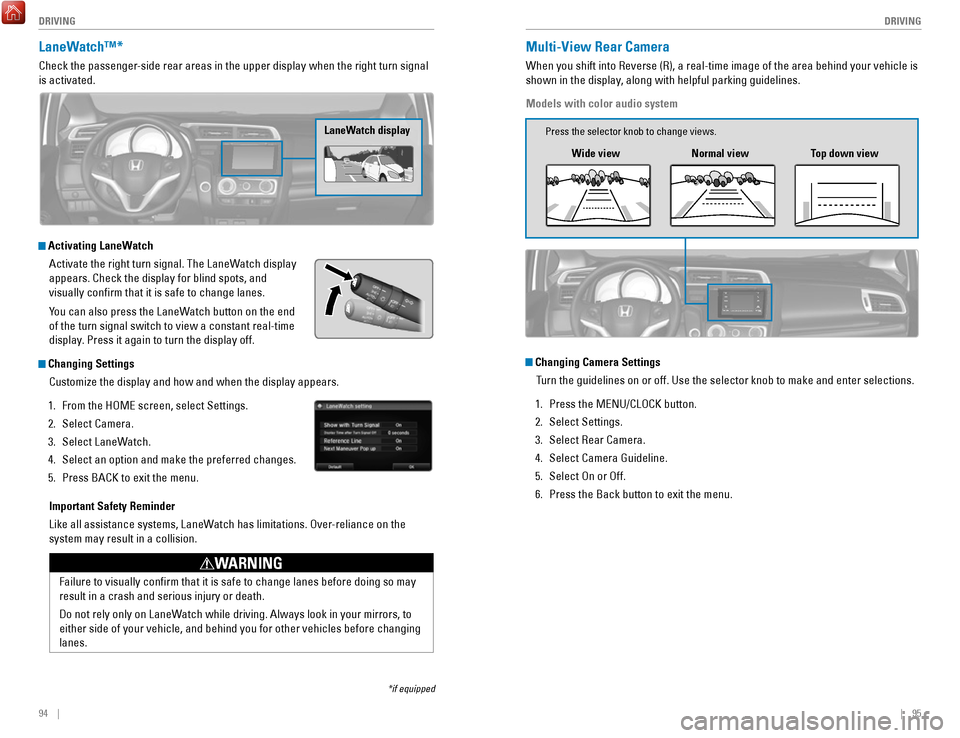
LaneWatch™*
Check the passenger-side rear areas in the upper display when the right turn signal
is activated.
LaneWatch display
Activating LaneWatch
Activate the right turn signal. The LaneWatch display
appears. Check the display for blind spots, and
visually confirm that it is safe to change lanes.
You can also press the LaneWatch button on the end
of the turn signal switch to view a constant real-time
display. Press it again to turn the display off.
Changing SettingsCustomize the display and how and when the display appears.
1.
From the HOME screen, select Settings.
2.
Select Camera.
3.
Select LaneWatch.
4.
Select an option and make the preferred changes.
5.
Press BACK to exit the menu.
Important Safety Reminder
Like all assistance systems, LaneWatch has limitations. Over-reliance on the
system may result in a collision.
Failure to visually confirm that it is safe to change lanes before doi\
ng so may
result in a crash and serious injury or death.
Do not rely only on LaneWatch while driving. Always look in your mirrors, to
either side of your vehicle, and behind you for other vehicles before ch\
anging
lanes.
WARNING
*if equipped
Multi-View Rear Camera
When you shift into Reverse (R), a real-time image of the area behind \
your vehicle is
shown in the display, along with helpful parking guidelines.
Models with color audio system
Wide view Normal viewTop down view
Changing Camera Settings
Turn the guidelines on or off. Use the selector knob to make and enter se\
lections.
1.
Press the MENU/CLOCK button.
2.
Select Settings.
3.
Select Rear Camera.
4.
Select Camera Guideline.
5.
Select On or Off.
6.
Press the Back button to exit the menu.
Press the selector knob to change views.
Page 53 of 76
98 || 99
HANDLING THE UNEXPECTED
HANDLING THE UNEXPECTED
Learn about what to do in critical or emergency situations.
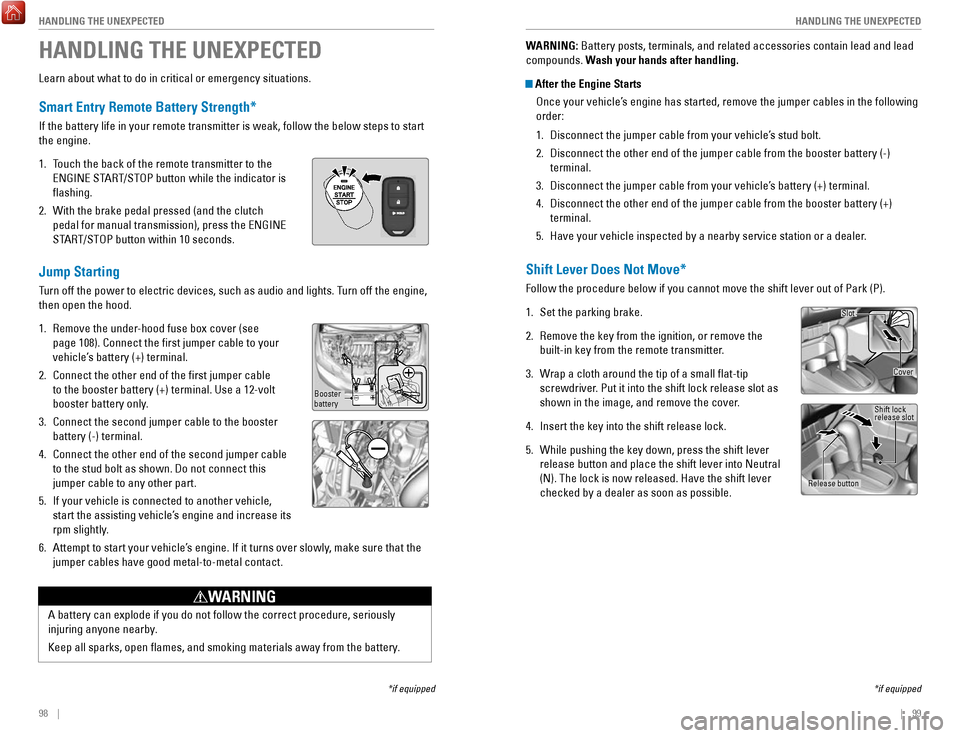
Smart Entry Remote Battery Strength*
If the battery life in your remote transmitter is weak, follow the below\
steps to start
the engine.
1.
Touch the back of the remote transmitter to the
ENGINE START/STOP button while the indicator is
flashing.
2.
With the brake pedal pressed (and the clutch
pedal for manual transmission), press the ENGINE
START/STOP button within 10 seconds.
Jump Starting
Turn off the power to electric devices, such as audio and lights. Turn off the engine,
then open the hood.
1.
Remove the under-hood fuse box cover (see
page 108). Connect the first jumper cable to your
vehicle’s battery (+) terminal.
2.
Connect the other end of the first jumper cable
to the booster battery (+) terminal. Use a 12-volt
booster battery only.
3.
Connect the second jumper cable to the booster
battery (-) terminal.
4.
Connect the other end of the second jumper cable
to the stud bolt as shown. Do not connect this
jumper cable to any other part.
5.
If your vehicle is connected to another vehicle,
start the assisting vehicle’s engine and increase its
rpm slightly.
6.
Attempt to start your vehicle’s engine. If it turns over slowly, make sure that the
jumper cables have good metal-to-metal contact.
HANDLING THE UNEXPECTED
*if equipped
A battery can explode if you do not follow the correct procedure, seriou\
sly
injuring anyone nearby.
Keep all sparks, open flames, and smoking materials away from the batt\
ery.
WARNING
Booster
battery
WARNING: Battery posts, terminals, and related accessories contain lead and lead\
compounds. Wash your hands after handling.
After the Engine Starts Once your vehicle’s engine has started, remove the jumper cables in the following
order:
1.
Disconnect the jumper cable from your vehicle’s stud bolt.
2.
Disconnect the other end of the jumper cable from the booster battery (\
-)
terminal.
3.
Disconnect the jumper cable from your vehicle’s battery (+) terminal.
4.
Disconnect the other end of the jumper cable from the booster battery (\
+)
terminal.
5.
Have your vehicle inspected by a nearby service station or a dealer.
Shift Lever Does Not Move*
Follow the procedure below if you cannot move the shift lever out of Par\
k (P).
1.
Set the parking brake.
2.
Remove the key from the ignition, or remove the
built-in key from the remote transmitter.
3.
Wrap a cloth around the tip of a small flat-tip
screwdriver. Put it into the shift lock release slot as
shown in the image, and remove the cover
.
4.
Insert the key into the shift release lock.
5.
While pushing the key down, press the shift lever
release button and place the shift lever into Neutral
(N). The lock is now released. Have the shift lever
checked by a dealer as soon as possible.
*if equipped
Slot
Release button Shift lock
release slot
Cover
Page 54 of 76

100 || 101
HANDLING THE UNEXPECTED
HANDLING THE UNEXPECTED
Overheating
If the high temperature indicator comes on, the engine suddenly loses po\
wer, or
steam or spray comes out from under the hood, your engine is overheating\
.
1.
Immediately park the vehicle in a safe place. Turn
off all accessories and turn on the hazard warning
lights.
2.
If steam or spray is not present: Keep the engine
running and open the hood.
If steam or spray is present: Turn off the engine and
wait until it subsides. Then, open the hood.
3.
Check that the cooling fan is operating and stop the engine once the hig\
h
temperature indicator goes off. If the cooling fan is not operating, imm\
ediately
stop the engine.
4.
Once the engine has cooled down, inspect the coolant level and check the\
cooling system components for leaks. If the coolant level in the reserve\
tank
is low, add coolant until it reaches the MAX mark. If there is no coolant in t\
he
reserve tank, make sure the radiator is cool, then cover the radiator ca\
p
with a
heavy cloth and open the cap. If necessary, add coolant up to the base of the
filler neck, and put the cap back on.
Once the engine has cooled sufficiently, restart it and check the high temperature
indicator. If the indicator is off, resume driving. If it stays on, contact a dealer for
repairs.
Steam and spray from an overheated engine can seriously scald you.
Do not open the hood if steam is coming out.
WARNING
Removing the radiator cap while the engine is hot can cause the coolant \
to
spray out, seriously scalding you.
Always let the engine and radiator cool down before removing the radiato\
r cap.
WARNING
Continuing to drive with the temperature gauge needle at the H mark may \
damage
the engine.
NOTICE
Reserve tank MAX
MIN
Emergency Engine Stop*
The ENGINE START/STOP button may be used to stop the engine due to an
emergency situation even while driving. Do not press the button while driving unless
it is absolutely necessary for the engine to be switched off. If you mus\
t stop the
engine, choose one of the following operations:
•
Press and hold the ENGINE START/STOP button for
two seconds, or
•
Firmly press the ENGINE START/STOP button two
times.
The steering wheel will remain unlocked. However, turning off the engine disables
the power assist to the steering and braking systems, so the vehicle wil\
l
require
significantly more effort and time to steer and slow. Downshift gears and use both
feet on the brake pedal, if necessary, to slow the vehicle and stop immediately in a
safe place.
For CVT models, the power mode changes to ACCESSORY. Manual transmission
models change to OFF.
Canadian CVT models
Then press the ENGINE START/STOP button two times without pressing the brake
pedal.
Emergency Towing
Call a professional towing service if you need to tow your vehicle.
Flat bed equipment: The operator loads your vehicle on the back of a tru\
ck. This is
the best way to transport your vehicle.
Wheel lift equipment: The tow truck uses two pivoting arms that go under\
the front
tires and lift them off the ground. The rear tires remain on the ground.\
This is an
acceptable way to tow your vehicle.
Trying to lift or tow your vehicle by the bumpers will cause serious dama\
ge. The
bumpers are not designed to support the vehicle’s weight.
Improper towing such as towing behind a motorhome or other motor vehicle\
can
damage the transmission.
NOTICE
*if equipped
Page 56 of 76
104 || 105
HANDLING THE UNEXPECTED
HANDLING THE UNEXPECTED
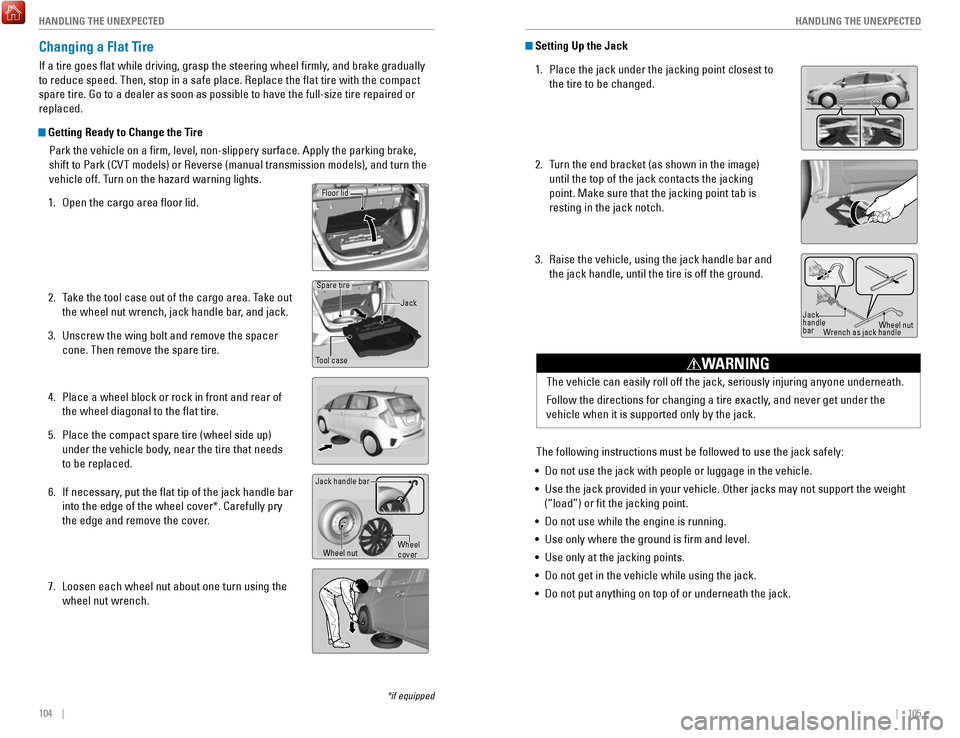
Changing a Flat Tire
If a tire goes flat while driving, grasp the steering wheel firmly, and brake gradually
to reduce speed. Then, stop in a safe place. Replace the flat tire wit\
h the compact
spare tire. Go to a dealer as soon as possible to have the full-size tir\
e repaired or
replaced.
Getting Ready to Change the Tire
Park the vehicle on a firm, level, non-slippery surface. Apply the par\
king brake,
shift to Park (CVT models) or Reverse (manual transmission models), \
and turn the
vehicle off. Turn on the hazard warning lights.
1.
Open the cargo area floor lid.
2.
Take the tool case out of the cargo area. Take out
the wheel nut wrench, jack handle bar
, and jack.
3.
Unscrew the wing bolt and remove the spacer
cone. Then remove the spare tire.
4.
Place a wheel block or rock in front and rear of
the wheel diagonal to the flat tire.
5.
Place the compact spare tire (wheel side up)
under the vehicle body, near the tire that needs
to be replaced.
6.
If necessary, put the flat tip of the jack handle bar
into the edge of the wheel cover*. Carefully pry
the edge and remove the cover.
7.
Loosen each wheel nut about one turn using the
wheel nut wrench.
Tool case Spare tire
Jack
Wheel nut
Jack handle bar
Wheel
cover
Floor lid
Setting Up the Jack1.
Place the jack under the jacking point closest to
the tire to be changed.
2.
Turn the end bracket (as shown in the image)
until the top of the jack contacts the jacking
point. Make sure that the jacking point tab is
resting in the jack notch.
3.
Raise the vehicle, using the jack handle bar and
the jack handle, until the tire is off the ground.
The following instructions must be followed to use the jack safely:
•
Do not use the jack with people or luggage in the vehicle.
•
Use the jack provided in your vehicle. Other jacks may not support the w\
eight
(“load”) or fit the jacking point.
•
Do not use while the engine is running.
•
Use only where the ground is firm and level.
•
Use only at the jacking points.
•
Do not get in the vehicle while using the jack.
•
Do not put anything on top of or underneath the jack. The vehicle can easily roll off the jack, seriously injuring anyone unde\
rneath.
Follow the directions for changing a tire exactly, and never get under the
vehicle when it is supported only by the jack.
WARNING
Jack
handle
bar
Wheel nut
Wrench as jack handle
*if equipped
Page 58 of 76

108 || 109
HANDLING THE UNEXPECTED
HANDLING THE UNEXPECTED
Fuse Locations
If any electrical devices are not working, turn the vehicle off and chec\
k to see if any
applicable fuse is blown. Fuse locations are shown on the fuse box cover\
. Locate the
fuse in question by the fuse number and box cover number.
Engine Compartment Fuse Box
Located under the hood near the brake fluid reservoir. Push the tabs to open the
box.
Circuit Protecte dAmps
2
1Headlight Low Beam Main 20 A
CDC*(30 A)
3
Hazard10 A
4
DBW15 A
5
Wiper(30 A)
6
Stop10 A
7
IG P15 A
8
IG Coi l15A
9
EOP*(10 A)
10 INJ
(20 A)
11
––
12Main Fan30 A 13
Starter SW(30 A)
14
MG Clutch(7.5 A)
15
Battery Senso r(7.5A )
16
––
17 Daytime Running Lights (7.5 A)
18
Horn10 A
19
(15 A)
20Fog Light*
*1 :M odels with the smart entry system have an
*
* ENGINE START/STO
P button instead of an ignition
switch .
2: Mo dels with smart entry system
3:Mo dels without smart entry system
Amps
21Back Up Main
Circuit Protecte d
15A
22
7.5 A
Interior Lights
23
Sub Fa n
24 (3
0A )––
26
25 Smart Entry Auto Start*2(7.5 A)
ST MG*3(7.5A)
27
––
28––
29Back Up(1 0A )
30
IGP LAF(1 0A )
31
IGPS(7.5 A)
32 Right Headlight Low Beam 10A
33 Left Headlight Low Beam 10A
UB ECU
*(7.5 A)
*if equipped
Ta b
Circuit Protecte
dAmps1Door Lock(20 A)2––3Smart*(10 A)4Driver Side Door Unlock15 A5Passenger Side Door Unlock15 A6Driver Door Unlock(10 A)7Driver Door Lock(10 A)8Driver’s Power Window20A9Passenger’s Power Window20A10Rear Left Power Window20A11Rear Right Power Window20A12Driver Side Door Lock15A13Passenger Side Door Lock15A14––15Right Headlight High Beam10A16STS*(7.5A )
17 ACC Socket (Console*) (20 A)
18 Moonroof*(20 A)
19 Front Seat Heater*(20 A)
20 – –
Circuit Protected Amps
21 – –
22 Washer 15A
23 Rear Wiper (10A )
24 A/C 7.5A
25 Daytime Running Lights 7.5 A
26 Starter Cut 7.5A
27 ABS/VSA 7.5 A
28 SRS 10A
29 Left Headlight High Beam 10A
30 ACG 10A
31 Power Window 10 A
32 Fuel Pump 15A
33 SRS 7.5A
34 Meter 7.5A
35 Mission SOL 7.5A
36 Front ACC Socket 20A
37 ACC 7.5A
38 ACC Key Lock 7.5A
39 Option (10A )
40 Rear Wiper 10 A
41
42
Interior Fuse Boxes
Fuse box A
Located behind the dashboard next to the steering wheel.
*if equipped
Fuse label
Circuit Protecte dAmps
1 Door Lock (20 A)
2 – –
3 Smart
*(10 A)
4 Driver Side Door Unlock 15 A
5
Passenger Side Door Unlock15 A
6 Driver Door Unlock (10 A)
7 Driver Door Lock (10 A)
8 Driver’s Power Window 20A
9 Passenger’s Power Window 20A
10 Rear Left Power Window 20A
11 Rear Right Power Window 20A
12 Driver Side Door Lock 15A
13 Passenger Side Door Lock 15A
14 – –
15 Right Headlight High Beam 10A
16 STS
*(7.5A )
17ACC Socket (Console*)(20 A)18Moonroof*(20 A)19Front Seat Heater*(20 A)20––
Circuit Protecte dAmps
21––22Washer15A23Rear Wiper(10A )24A/C7.5A25Daytime Running Lights7.5 A26Starter Cut7.5A27ABS/VSA7.5 A28SRS10A29Left Headlight High Beam10A30ACG10A31Power Window10 A32Fuel Pump15 A33SRS7.5A34Meter7.5A35Mission SOL7.5A36Front ACC Socket20A37ACC7.5A38ACC Key Lock7.5A39Option(10A )40Rear Wiper10 A4142
Page 59 of 76
110 || 111
HANDLING THE UNEXPECTED
HANDLING THE UNEXPECTED
Circuit ProtectedAmps
1
EPS70 A
IG Main30 A*1
50A*2
Fuse Box Main 250 AABS/VSA Motor40 AFuse Box Main 130AFuse Box Main 340A
2––
––
––
––
––
––
*1:M odels with smart entry system*2:M odels without smart entry system
3Heater30A4*1IG Main 230A
4*2––5ABS/VSA FSR30 A
7––
8–
9Small Light10 A
10 ACC Socket (Console)*(2 0A )11Rear Defogger30A
12*112*2ACC Key Lock (7.5 A)13Heated Door Mirror*(1 0A )
14 A/C Blower SW (7.5 A)
15*1––15*2Wiper30A
6
(7.5 A)*
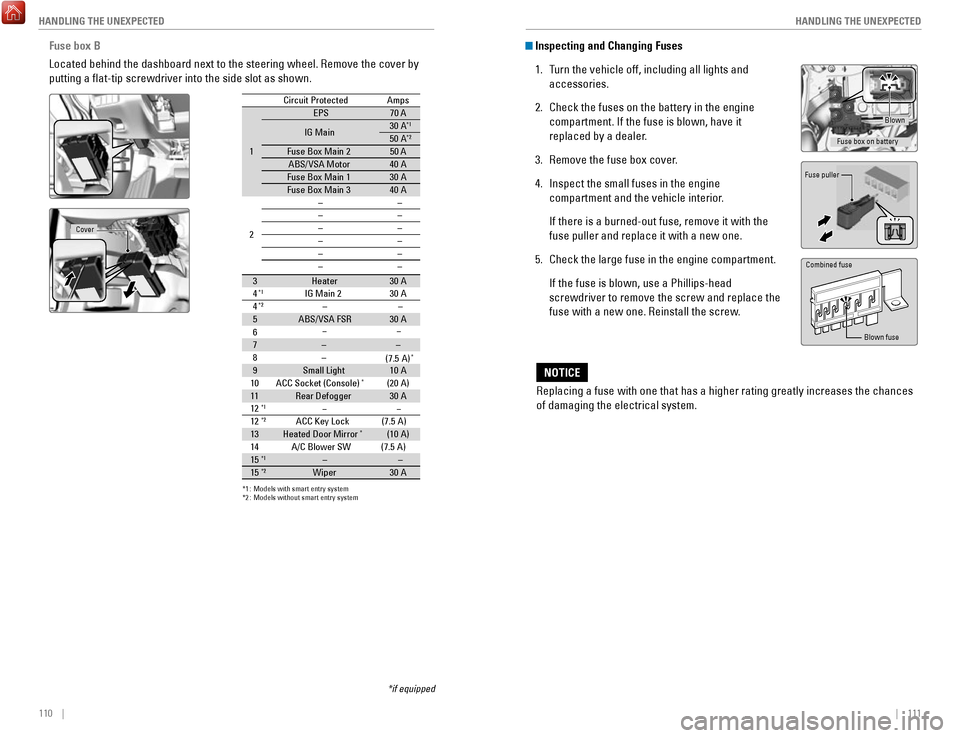
Fuse box B
Located behind the dashboard next to the steering wheel. Remove the cove\
r by
putting a flat-tip screwdriver into the side slot as shown.
*if equipped
Cover
Inspecting and Changing Fuses
1.
Turn the vehicle off, including all lights and
accessories.
2.
Check the fuses on the battery in the engine
compartment. If the fuse is blown, have it
replaced by a dealer.
3.
Remove the fuse box cover.
4.
Inspect the small fuses in the engine
compartment and the vehicle interior.
If there is a burned-out fuse, remove it with the
fuse puller and replace it with a new one.
5.
Check the large fuse in the engine compartment.
If the fuse is blown, use a Phillips-head
screwdriver to remove the screw and replace the
fuse with a new one. Reinstall the screw.
Replacing a fuse with one that has a higher rating greatly increases the\
chances
of damaging the electrical system.
NOTICE
Blown
Fuse box on battery
Fuse puller
Combined fuse
Blown fuse
Page 61 of 76
114 || 115
MAINTENANCE
MAINTENANCE
Maintenance Minder Service Codes
These codes indicate what services are due on your vehicle.
*1: If a message SERVICE does not appear more than 12 months after the display is reset, changethe engine oil every year.
#: See information on maintenance and emissions warranty.
CODEMaintenance Main Items
A
Replace engine oi l*1
BReplace engine oil and oil lter
Inspect front and rear brakes/service as necessary
Check parking brake adjustment
Inspect tie rod ends, steering gearbox, and boots
Inspect suspension component s
Inspect driveshaft boots
Inspect brake hoses and lines (Including ABS/VSA)
Inspect all uid levels and condition of uids
Inspect exhaust system#
Inspect fuel lines and connections#
*2:If you drive in dusty conditions, replace the air cleaner element every \
15,000 miles (24,000 km).*3:If you drive primarily in urban areas with high concentrations of soot i\
n the air from industryand diesel-powered vehicles, replace the dust and pollen lter every \
15,000 miles (24,000 km).
CODEMaintenance Sub Items
1
Rotate tires
2Replace air cleaner element*2
Replace dust and pollen lte r*3
Inspect drive belt
3
Replace transmission uid
4Replace spark plugs
Inspect valve clearance
5
Replace engine coolan t
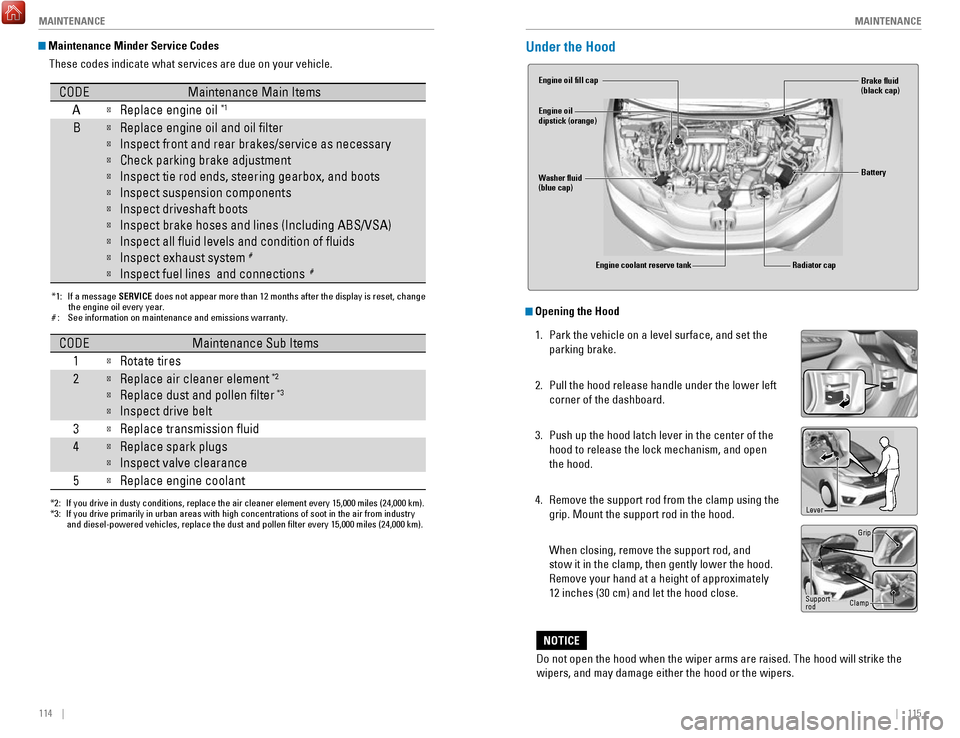
Under the Hood
Opening the Hood
1.
Park the vehicle on a level surface, and set the
parking brake.
2.
Pull the hood release handle under the lower left
corner of the dashboard.
3.
Push up the hood latch lever in the center of the
hood to release the lock mechanism, and open
the hood.
4.
Remove the support rod from the clamp using the
grip. Mount the support rod in the hood.
When closing, remove the support rod, and
stow it in the clamp, then gently lower the hood.
Remove your hand at a height of approximately
12 inches (30 cm) and let the hood close.
Do not open the hood when the wiper arms are raised. The hood will strik\
e the
wipers, and may damage either the hood or the wipers.
NOTICE
Engine coolant reserve tank
Washer fluid
(blue cap) Engine oil fill cap
Engine oil
dipstick (orange)
Brake fluid
(black cap)
Battery
Radiator cap
Lever
Support
rod Grip
Clamp
Page 63 of 76

118 || 119
MAINTENANCE
MAINTENANCE
Engine Coolant
Park the vehicle on level ground. Check the reserve tank and the coolant\
level in the
radiator. We recommend Honda Long Life Antifreeze/Coolant Type 2.
Checking the Reserve Tank
1.
Check the amount of coolant in the reserve tank.
2.
If the coolant level is below the MIN mark, add
the specified coolant until it reaches the MAX
mark.
3.
Inspect the cooling system for leaks.
Adding Coolant 1.
Make sure the engine and radiator are cool.
2.
Turn the radiator cap counterclockwise and
relieve any pressure in the coolant system. Do
not push the cap down when turning.
3.
Push down and turn the radiator cap
counterclockwise to remove it.
4.
The coolant level should be up to the base of the
filler neck. Add coolant if it is low.
5.
Put the radiator cap back on, and tighten it fully.
6.
Pour coolant into the reserve tank until it reaches
the MAX mark. Put the cap back on the reserve
tank.
If Honda antifreeze/coolant is not available, you may use another major \
brand
non-silicate coolant as a temporary replacement. Check that it is a high\
quality
coolant recommended for aluminum engines. Continued use of any non-Honda\
coolant can result in corrosion, causing the cooling system to malfuncti\
on or fail.
Have the cooling system flushed and refilled with Honda antifreeze/c\
oolant as
soon as possible.
NOTICE
Reserve tank MAX
MIN
Radiator cap
Removing the radiator cap while the engine is hot can cause the coolant \
to
spray out, seriously scalding you.
Always let the engine and radiator cool down before removing the radiato\
r
cap.
WARNING
Pour the fluid slowly and carefully so you do not spill any. Clean up any spills
immediately; they can damage components in the engine compartment.
NOTICE
Brake Fluid
The fluid level should be between the MIN and MAX marks on the side of\
the
reservoir. We recommend using Honda Heavy Duty Brake Fluid DOT 3.
Pour the fluid carefully.
If the fluid level is at or below the MIN mark, have a
dealer inspect for leaks or worn brake pads as soon as
possible.
Window Washer Fluid
Check the amount of window washer fluid by looking
at the reservoir. If the washer fluid level is low, fill the
washer reservoir. Pour the washer fluid carefully. Do not
overflow the reservoir.
Canadian models
If the washer fluid level is low, the washer level
indicator appears (see page 27).
Do not use engine antifreeze or a vinegar/water solution in the windshie\
ld washer
reservoir. Antifreeze can damage your vehicle’s paint. A vinegar/water solution
can damage the windshield washer pump.
NOTICE
Washer reservoir
Brake fluid marked DOT 5 is not compatible with your vehicle’s braking system
and can cause extensive damage.
NOTICE
MAX
MIN
Page 64 of 76

120 || 121
MAINTENANCE
MAINTENANCE
The battery gives off explosive hydrogen gas during normal operation.
A spark or flame can cause the battery to explode with enough force to\
kill or
seriously hurt you.
When conducting any battery maintenance, wear protective clothing and a \
face shield, or have a skilled technician do it.
WARNING
Checking the Battery
The battery condition is monitored by a sensor on the negative terminal.\
If there is a
problem with the battery, the charging system indicator appears (see page 24). Have
your vehicle checked by a dealer.
Check the battery terminals for corrosion monthly.
For jump starting, see page 98.
WARNING: Battery posts, terminals, and related accessories contain lead and lead\
compounds. Wash your hands after handling.
Changing Wiper Blades
If the wiper blades leave streaks across the windshield, try cleaning th\
em first with a
paper towel or soft cloth and wiper fluid. If the wiper blade rubber h\
as deteriorated,
you should change the wiper blades.
Changing the Front Wiper Blade Rubber
1.
Lift the driver side wiper arm first, then the
passenger side.
2.
Press and hold the tab, then slide the blade
from the wiper arm.
3.
Slide the wiper blade out from its holder by
pulling the tabbed end out.
4.
Slide the new wiper blade onto the holder from
the bottom end. The tab on the blade should fit
in the indent of the top of the wiper holder.
5.
Slide the wiper blade onto the wiper arm
securely.
6.
Lower the passenger side wiper arm first, then
the driver side.
Lock tab
Blade
Ta b Blade
Avoid dropping the wiper arm, as it may damage the windshield.
NOTICE
Page 70 of 76

132 || 133
CUSTOMER INFORMATION
CUSTOMER INFORMATION
Learn about information specific to you as a Honda customer and how to\
get help.
Frequently Asked Questions/Troubleshooting
Below are some frequently asked questions and troubleshooting items that\
you may
have about the vehicle.
Q:
How do I set the vehicle clock?
A:
For vehicles without navigation, see page 45. For vehicles with navigati\
on, the
time is automatically set using GPS signals.
Q:
Why doesn’t the vehicle start when I press the ENGINE START/STOP button?*
A:
The brake pedal must be pressed to start the engine.
Q:
What is the AUTO* setting on my headlight lever?
A:
When in the AUTO position, the vehicle’s exterior lights will automatically turn
on or off depending on the ambient lighting.
Q:
Why won’t the driver’s door unlock when I grab the door handle, even though
the keyless access remote is within range?*
A:
If you pull the handle too quickly, the system may not have time to confirm the
door is unlocked. Wait to hear a beep to confirm the door is unlocked. If you are
wearing gloves, the system may be slow to respond.
Q:
After my battery was disconnected or went dead, the audio system is aski\
ng for
a code. Where do I find this?
A:
In most cases, you do not need to enter a code. Turn on the vehicle and the
audio system, and press and hold the power button until the system react\
ivates.
Q:
Why can’t I operate Pandora® through the audio system?
A:
Audio may be streaming through Bluetooth® Audio. Make sure Pandora mode
is selected and the phone cable is properly connected to the USB adapter\
.
Some phones may prompt you to “Allow” a connection.
Q:
Is my phone compatible with Bluetooth features?
A:
Visit handsfreelink.com (U.S.) or
handsfreelink.ca (Canada) to check phone
compatibility for Bluetooth® Audio, Bluetooth® HandsFreeLink®, and SMS text
messaging.
Q:
Every time I press the Talk button, the system gives me voice prompts. Can I turn
these off?*
A:
From the Home screen, select Settings. Select the Voice Recog tab, then select
Voice Prompt. Select Off.
CUSTOMER INFORMATION
*if equipped
Contact Us
Honda dealer personnel are trained professionals. They should be able to\
answer
all your questions. If you encounter a problem that your dealership does\
not solve
to your satisfaction, please discuss it with the dealership’s service manager or
general manager. If you are dissatisfied with the decision made by the dealership’\
s
management, contact Honda Automobile Customer Service.
U.S. owners
American Honda Motor Co., Inc.
Honda Automobile Customer Service
1919 Torrance Blvd.
Mail Stop 500-2N-7A
Torrance, CA 90501-2746
Tel: (800) 999-1009
In Puerto Rico and
the U.S. Virgin Islands
Bella International
P.O. Box 190816
San Juan, PR 00919-0816
Tel: (787) 620-7546
When you call or write, please give us the following information:
•
Vehicle Identification Number
•
Date of purchase
•
Odometer reading of your vehicle
•
Your name, address, and telephone number
•
A detailed description of the problem
•
Name of the dealer who sold the vehicle to you
Q:
Why can’t I select an item using the selector knob or touchscreen*?
A:
To prevent driver distraction, certain items are limited or inoperable wh\
ile the
vehicle is moving. Use voice commands or pull over to select the items.
Q:
Where can I find the vehicle identification number (VIN)?
A:
Check the label on the driver’s doorjamb.
*if equipped
Canadian owners
Honda Canada, Inc.
Customer Relations
180 Honda Blvd.
Markham, ON
L6C 0H9
Tel: (888) 946-6329
Fax: (877) 939-0909
e-mail: [email protected]