ignition HONDA FIT 2018 (in English) Owner's Guide
[x] Cancel search | Manufacturer: HONDA, Model Year: 2018, Model line: FIT, Model: HONDA FIT 2018Pages: 599, PDF Size: 42.24 MB
Page 91 of 599
89
uuIndicators u
Continued
Instrument Panel
*1:Models with the smart entry system have an ENGINE START/STOP button instead of an ignition switch.
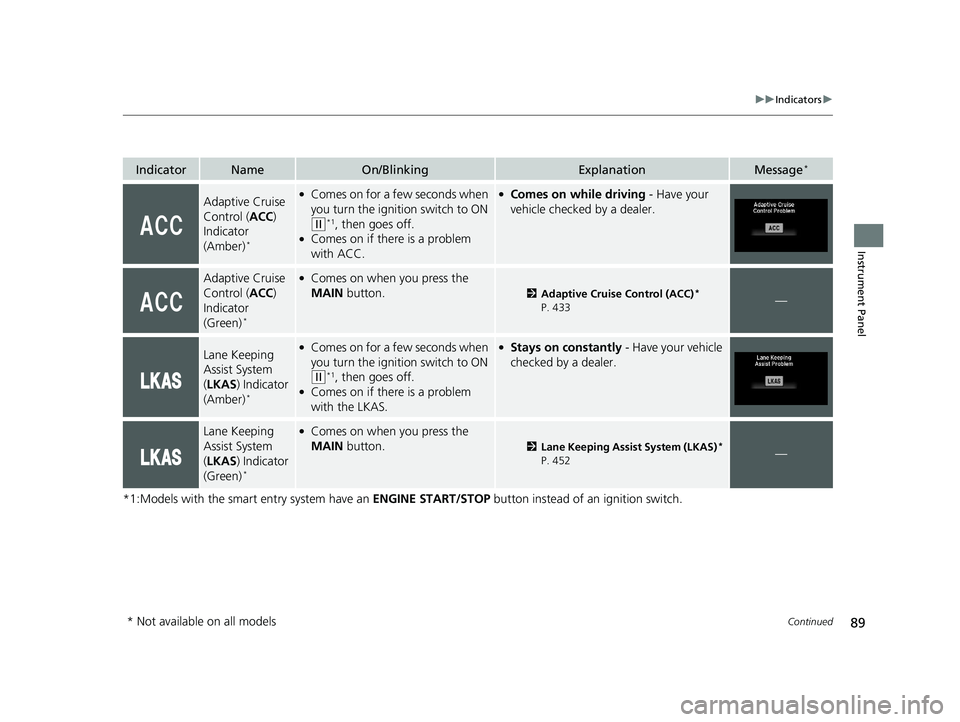
IndicatorNameOn/BlinkingExplanationMessage*
Adaptive Cruise
Control (ACC)
Indicator
(Amber)
*
●Comes on for a fe w seconds when
you turn the igniti on switch to ON
(w*1, then goes off.●Comes on if there is a problem
with ACC.
●Comes on while driving - Have your
vehicle checked by a dealer.
Adaptive Cruise
Control ( ACC)
Indicator
(Green)
*
●Comes on when you press the
MAIN button.
2Adaptive Cruise Control (ACC)*
P. 433—
Lane Keeping
Assist System
( LKAS ) Indicator
(Amber)
*
●Comes on for a fe w seconds when
you turn the igniti on switch to ON
(w*1, then goes off.●Comes on if there is a problem
with the LKAS.
●Stays on constantly - Have your vehicle
checked by a dealer.
Lane Keeping
Assist System
( LKAS ) Indicator
(Green)
*
●Comes on when you press the
MAIN button.
2Lane Keeping Assist System (LKAS)*
P. 452—
* Not available on all models
18 FIT JAZZ-31T5A6300.book 89 ページ 2018年6月29日 金曜日 午後4時11分
Page 92 of 599
90
uuIndicators u
Instrument Panel
*1:Models with the smart entry system have an ENGINE START/STOP button instead of an ignition switch.
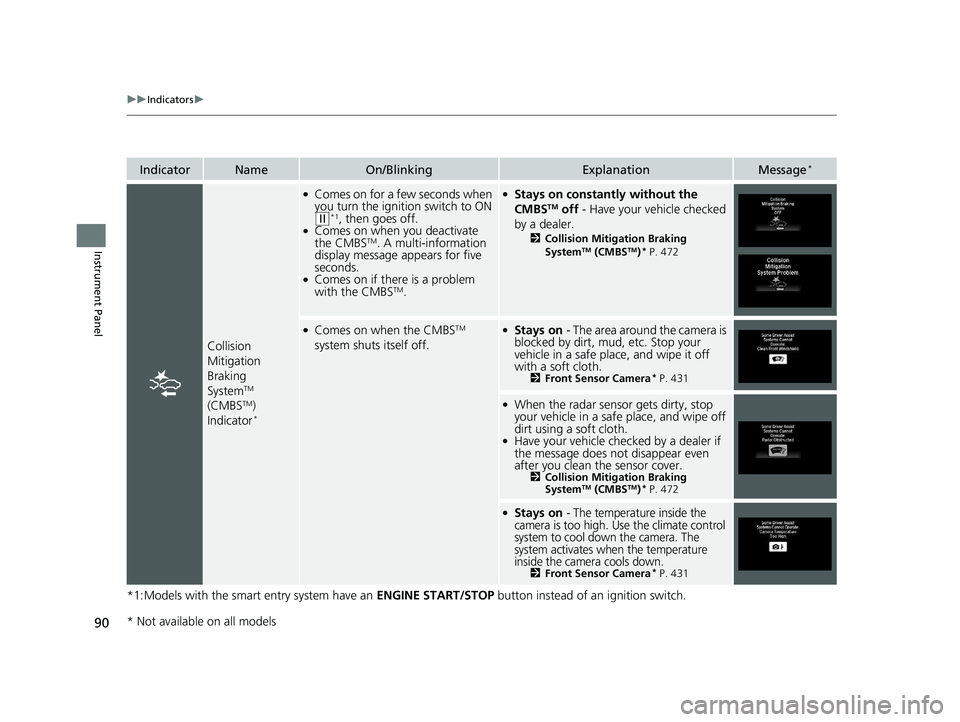
IndicatorNameOn/BlinkingExplanationMessage*
Collision
Mitigation
Braking
System
TM
(CMBSTM)
Indicator*
●Comes on for a few seconds when
you turn the ignition switch to ON
(w*1, then goes off.●Comes on when you deactivate
the CMBSTM. A multi-information
display message appears for five
seconds.
●Comes on if there is a problem
with the CMBSTM.
●Stays on constantly without the
CMBSTM off - Have your vehicle checked
by a dealer.
2 Collision Mitigation Braking
SystemTM (CMBSTM)* P. 472
●Comes on when the CMBSTM
system shuts itself off.●Stays on - The area around the camera is
blocked by dirt, mud, etc. Stop your
vehicle in a safe place, and wipe it off
with a soft cloth.
2 Front Sensor Camera* P. 431
●When the radar sensor gets dirty, stop
your vehicle in a safe place, and wipe off
dirt using a soft cloth.
●Have your vehicle checked by a dealer if
the message does not disappear even
after you clean the sensor cover.
2Collision Mitigation Braking
SystemTM (CMBSTM)* P. 472
●Stays on - The temperature inside the
camera is too high. Use the climate control
system to cool down the camera. The
system activates when the temperature
inside the camera cools down.
2 Front Sensor Camera* P. 431
* Not available on all models
18 FIT JAZZ-31T5A6300.book 90 ページ 2018年6月29日 金曜日 午後4時11分
Page 96 of 599
94
uuIndicators uMulti-Information Display Warn ing and Information Messages*
Instrument Panel
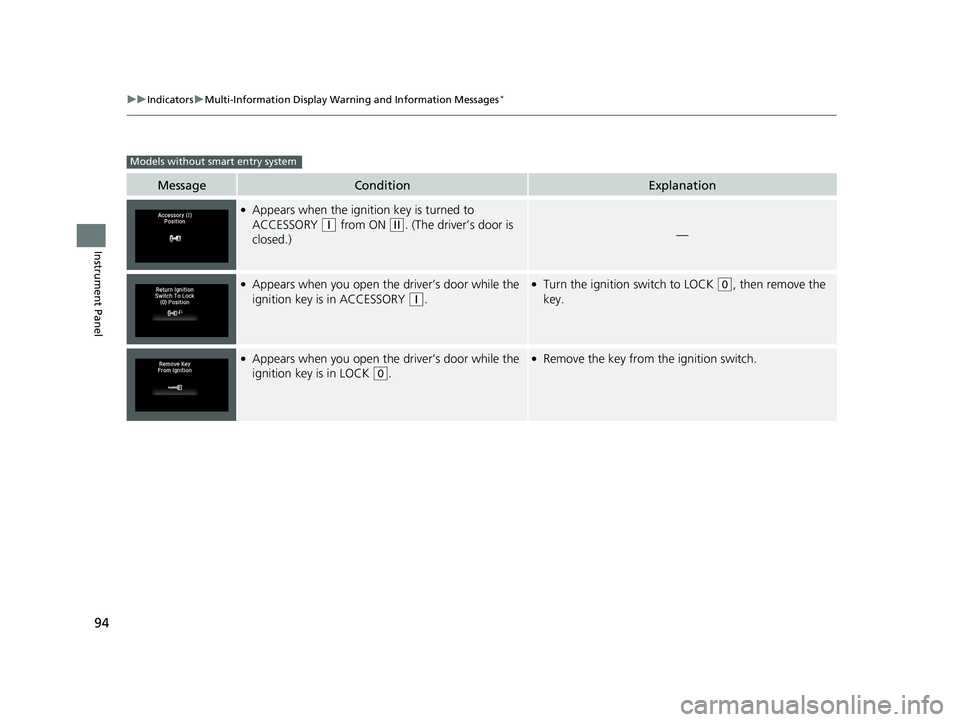
MessageConditionExplanation
●Appears when the ignition key is turned to
ACCESSORY
(q from ON (w. (The driver’s door is
closed.)—
●Appears when you open the driver’s door while the
ignition key is in ACCESSORY
(q.
●Turn the ignition switch to LOCK (0, then remove the
key.
●Appears when you open the driver’s door while the
ignition key is in LOCK
(0.
●Remove the key from the ignition switch.
Models without smart entry system
18 FIT JAZZ-31T5A6300.book 94 ページ 2018年6月29日 金曜日 午後4時11分
Page 102 of 599
100
uuIndicators uMulti-Information Display Warn ing and Information Messages*
Instrument Panel
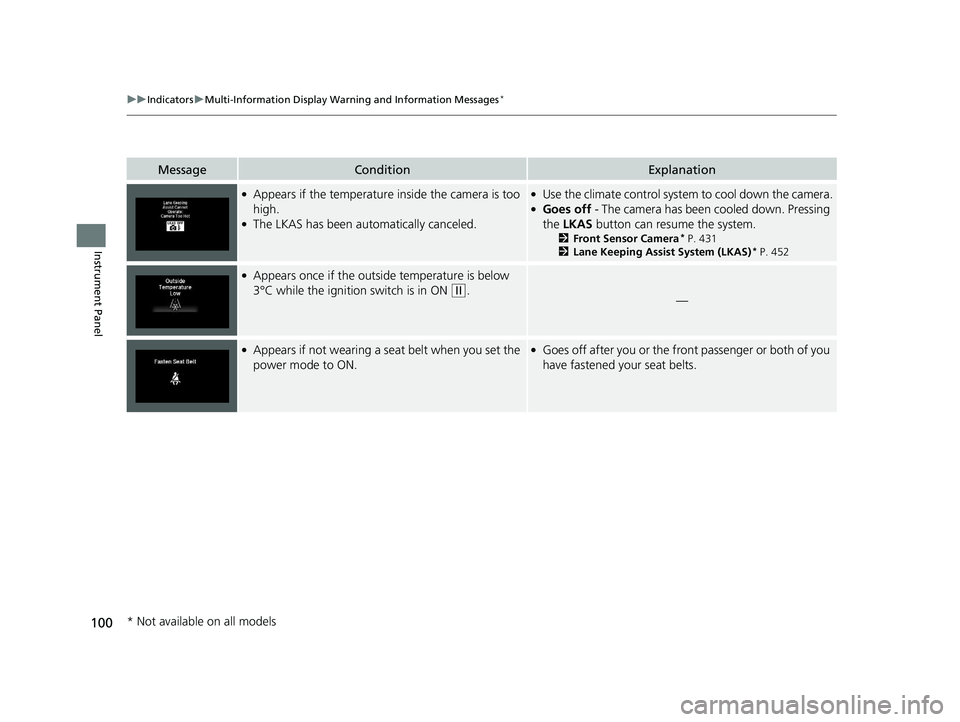
MessageConditionExplanation
●Appears if the temperature inside the camera is too
high.
●The LKAS has been automatically canceled.
●Use the climate control system to cool down the camera.●Goes off - The camera has been cooled down. Pressing
the LKAS button can resume the system.
2Front Sensor Camera* P. 431
2 Lane Keeping Assist System (LKAS)* P. 452
●Appears once if the outside temperature is below
3°C while the ignition switch is in ON
(w.—
●Appears if not wearing a seat belt when you set the
power mode to ON.●Goes off after you or the front passenger or both of you
have fastened your seat belts.
* Not available on all models
18 FIT JAZZ-31T5A6300.book 100 ページ 2018年6月29日 金曜日 午後4時11分
Page 105 of 599
103
Instrument Panel
Gauges and Displays
Gauges
Gauges include the speedometer, tachometer and related indicators. They are
displayed when the ignition switch is in ON
(w*1.
Displays your driving speed in mph and km/h.
Shows the number of engine revolutions per minute.
Shows the outside temperature in Fahr enheit (U.S.) or Celsius (Canada).
■Adjusting the outside temperature display
Adjust the temperature reading up to ±5°F or ±3°C if the temperature reading
seems incorrect.
*1 : Models with the smart entry system have an ENGINE START/STOP button instead of an ignition switch.
■Speedometer
■Tachometer
■Outside Temperature*1Outside Temperature*
The temperature sensor is in the front bumper.
Road heat and exhaust from another vehicle can
affect the temperature reading when your vehicle
speed is less than 19 mph (30 km/h).
It may take several minutes for the display to be
updated after the temperature reading has stabilized.
Use the multi-information display's customized
features to correct the temperature.
2 Customized Features P. 111
* Not available on all models
18 FIT JAZZ-31T5A6300.book 103 ページ 2018年6月29日 金曜日 午後4時11分
Page 108 of 599
uuGauges and Displays uInformation Display*
106
Instrument Panel
Shows the outside temperature in Fahr enheit (U.S.) or Celsius (Canada).
■Adjusting the outside temperature indicator
Adjust the temperature reading up to ± 5° F or ± 3°C if the temperature reading
seems incorrect.
1. Turn the ignition switch to ON
(w*1.
2. Press and hold the (select/reset) knob for 10 seconds or more while the outside
temperature is shown on the information display.
u The information display goes into temp erature adjustment mode. The display
starts showing from -5°F to +5°F (U .S.) or -3°C to +3°C (Canada).
3. Release the (select/reset) knob when the right adjustment amount is shown.
u The adjustment is complete.
Shows the remaining oil life and Maintenance Minder
TM.
2 Maintenance MinderTM P. 491
Displays the amount of fuel left in the fuel tank.
*1 : Models with the smart entry system have an ENGINE START/STOP button instead of an ignition switch.
■Outside Temperature*
■Engine Oil Life and Maintenance Items
■Fuel Gauge
1Outside Temperature*
The temperature sensor is in the front bumper.
Road heat and exhaust from another vehicle can
affect the temperature reading when your vehicle
speed is less than 19 mph (30 km/h).
It may take several minutes for the display to be
updated after the temperature reading has stabilized.
When the engine oil life is shown on the information
display, you cannot adjust the outside temperature.
Push the (select/reset) knob to select the other
display.
1 Fuel Gauge
NOTICE
You should refuel when the reading approaches .
Running out of fuel can cause the engine to misfire,
damaging the cata lytic converter.
The actual amount of remain ing fuel may differ from
the fuel gauge reading.E
* Not available on all models
18 FIT JAZZ-31T5A6300.book 106 ページ 2018年6月29日 金曜日 午後4時11分
Page 113 of 599
Continued111
uuGauges and Displays uMulti-Information Display*
Instrument Panel
Use the multi-information display to customize certain features.
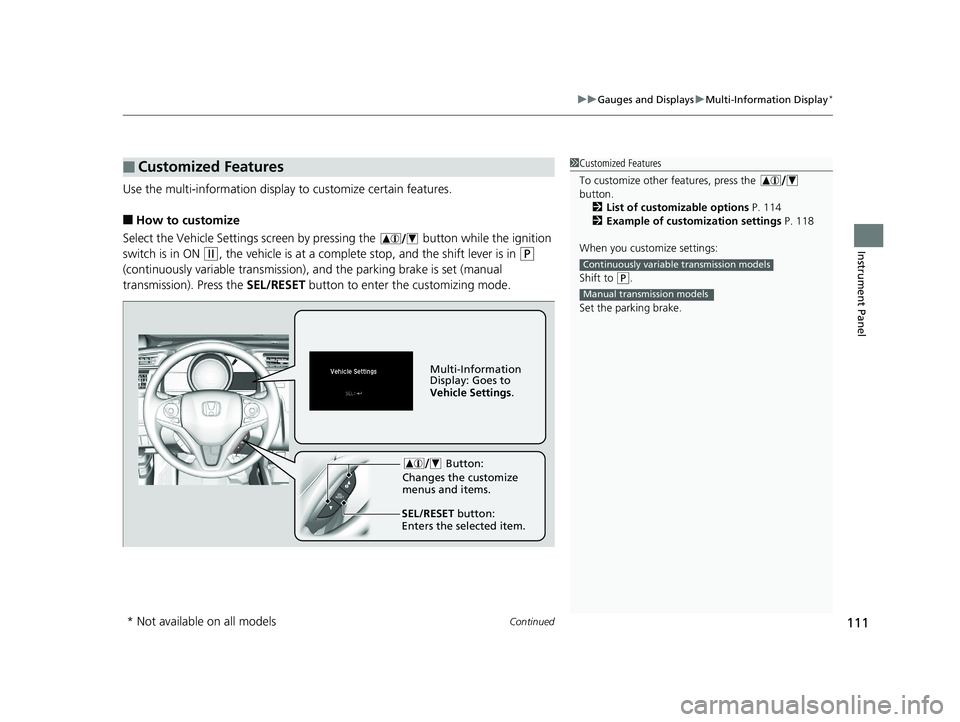
■How to customize
Select the Vehicle Settings screen by pressing the button while the ignition
switch is in ON
(w, the vehicle is at a complete stop, and the shift lever is in (P
(continuously variable transmission), and the parking brake is set (manual
transmission). Press the SEL/RESET button to enter the customizing mode.
■Customized Features1Customized Features
To customize other features, press the
button.
2 List of customizable options P. 114
2 Example of customization settings P. 118
When you customize settings:
Shift to
( P.
Set the parking brake.
Continuously variable transmission models
Manual transmission models
Button:
Changes the customize
menus and items.
Multi-Information
Display: Goes to
Vehicle Settings .
SEL/RESET button:
Enters the selected item.
* Not available on all models
18 FIT JAZZ-31T5A6300.book 111 ページ 2018年6月29日 金曜日 午後4時11分
Page 117 of 599
115
uuGauges and Displays uMulti-Information Display*
Continued
Instrument Panel
*1 : Default Setting
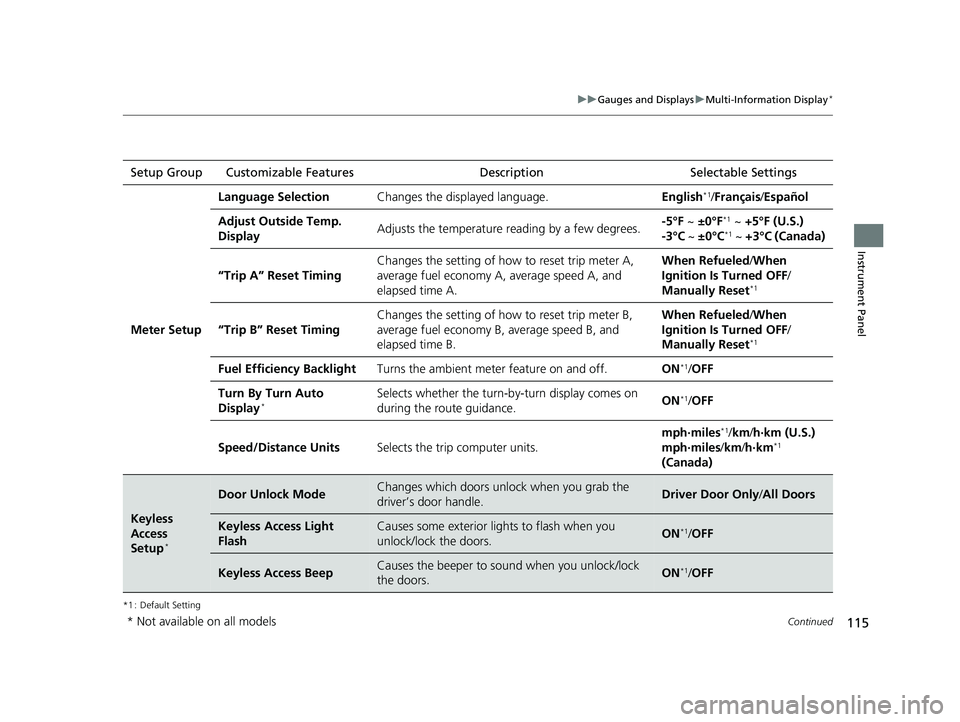
Setup Group Customizable Features Description Selectable Settings
Meter Setup
Language SelectionChanges the displayed language.English*1/Français /Español
Adjust Outside Temp.
DisplayAdjusts the temperature r eading by a few degrees.-5°F ~ ±0°F*1 ~ +5°F (U.S.)
-3°C ~ ±0°C*1 ~ +3°C (Canada)
“Trip A” Reset Timing
Changes the setting of how to reset trip meter A,
average fuel economy A, average speed A, and
elapsed time A.When Refueled /When
Ignition Is Turned OFF /
Manually Reset
*1
“Trip B” Reset Timing
Changes the setting of ho w to reset trip meter B,
average fuel economy B, average speed B, and
elapsed time B.When Refueled /When
Ignition Is Turned OFF /
Manually Reset
*1
Fuel Efficiency BacklightTurns the ambient meter feature on and off.ON*1/ OFF
Turn By Turn Auto
Display*Selects whether the turn-b y-turn display comes on
during the route guidance.ON*1/ OFF
Speed/Distance UnitsSelects the trip computer units.
mph∙miles*1/ km/ h∙km (U.S.)
mph∙miles /km/ h∙km*1
(Canada)
Keyless
Access
Setup
*
Door Unlock ModeChanges which doors unlock when you grab the
driver’s door handle.Driver Door Only /All Doors
Keyless Access Light
FlashCauses some exterior li ghts to flash when you
unlock/lock the doors.ON*1/ OFF
Keyless Access BeepCauses the beeper to sound when you unlock/lock
the doors.ON*1/OFF
* Not available on all models
18 FIT JAZZ-31T5A6300.book 115 ページ 2018年6月29日 金曜日 午後4時11分
Page 119 of 599
117
uuGauges and Displays uMulti-Information Display*
Continued
Instrument Panel
*1 : Default Setting
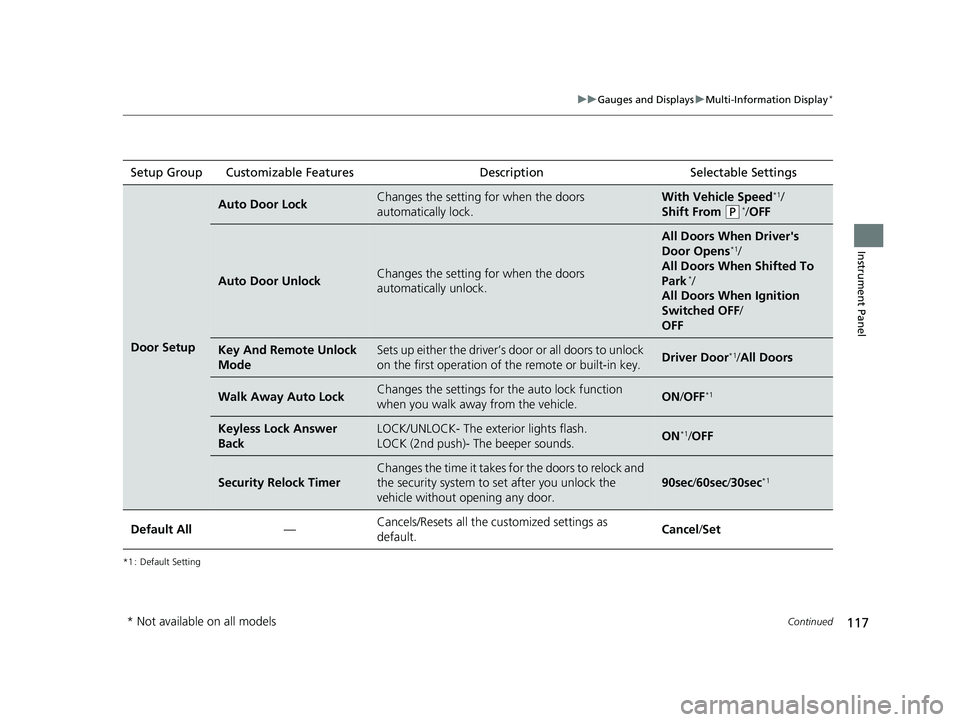
Setup Group Customizable Features Description Selectable Settings
Door Setup
Auto Door LockChanges the setting for when the doors
automatically lock.With Vehicle Speed*1/
Shift From
(P*/ OFF
Auto Door UnlockChanges the setting for when the doors
automatically unlock.
All Doors When Driver's
Door Opens*1/
All Doors When Shifted To
Park
*/
All Doors When Ignition
Switched OFF /
OFF
Key And Remote Unlock
ModeSets up either the driver’s door or all doors to unlock
on the first operation of the remote or built-in key.Driver Door*1/ All Doors
Walk Away Auto LockChanges the settings for the auto lock function
when you walk away from the vehicle.ON /OFF*1
Keyless Lock Answer
BackLOCK/UNLOCK- The exterior lights flash.
LOCK (2nd push)- The beeper sounds.ON*1/OFF
Security Relock Timer
Changes the time it takes for the doors to relock and
the security system to set after you unlock the
vehicle without opening any door.
90sec /60sec /30sec*1
Default All—Cancels/Resets all the customized settings as
default.Cancel /Set
* Not available on all models
18 FIT JAZZ-31T5A6300.book 117 ページ 2018年6月29日 金曜日 午後4時11分
Page 123 of 599
121
Controls
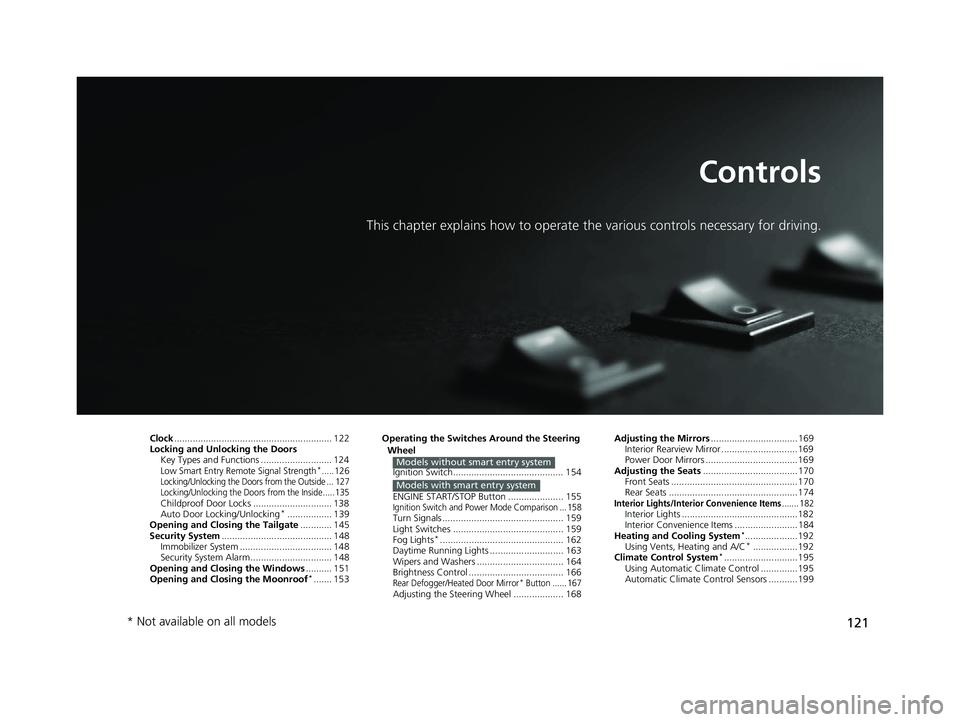
This chapter explains how to operate the various controls necessary for driving.
Clock............................................................ 122
Locking and Unlocking the Doors Key Types and Functions ........................... 124
Low Smart Entry Remote Signal Strength*.....126Locking/Unlocking the Doors from the Outside ... 127
Locking/Unlocking the Doors from the Inside .....135
Childproof Door Locks .............................. 138
Auto Door Locking/Unlocking*................. 139
Opening and Closing the Tailgate ............ 145
Security System .......................................... 148
Immobilizer System ......... ..................... ..... 148
Security System Alarm ............................... 148
Opening and Closing the Windows .......... 151
Opening and Closing the Moonroof
*....... 153 Operating the Switches Around the Steering
Wheel
Ignition Switch.......................................... 154
ENGINE START/STOP Button ..................... 155
Ignition Switch and Power Mode Comparison ... 158Turn Signals .............................................. 159
Light Switches .......................................... 159
Fog Lights
*............................................... 162
Daytime Running Lights ............................ 163
Wipers and Washers ................................. 164
Brightness Control .................................... 166
Rear Defogger/Heated Door Mirror* Button ...... 167Adjusting the Steering Wheel ................... 168
Models without smart entry system
Models with smart entry system
Adjusting the Mirrors .................................169
Interior Rearview Mirror .............................169
Power Door Mirrors ...................................169
Adjusting the Seats .................................... 170
Front Seats ................................................170
Rear Seats .................................................174
Interior Lights/Interior Convenience Items....... 182Interior Lights ............................................182
Interior Convenience Items ........................184
Heating and Cooling System
*....................192
Using Vents, Heating and A/C*.................192
Climate Control System*............................195
Using Automatic Climate Control ..............195
Automatic Climate Control Sensors ...........199
* Not available on all models
18 FIT JAZZ-31T5A6300.book 121 ページ 2018年6月29日 金曜日 午後4時11分