warning HONDA FIT 2018 (in English) Owner's Guide
[x] Cancel search | Manufacturer: HONDA, Model Year: 2018, Model line: FIT, Model: HONDA FIT 2018Pages: 599, PDF Size: 42.24 MB
Page 93 of 599
91
uuIndicators uInformation Display Warning and Information Messages*
Continued
Instrument Panel
Information Display Warning and Information Messages*
The following messages appear only on the information display.
MessageConditionExplanation
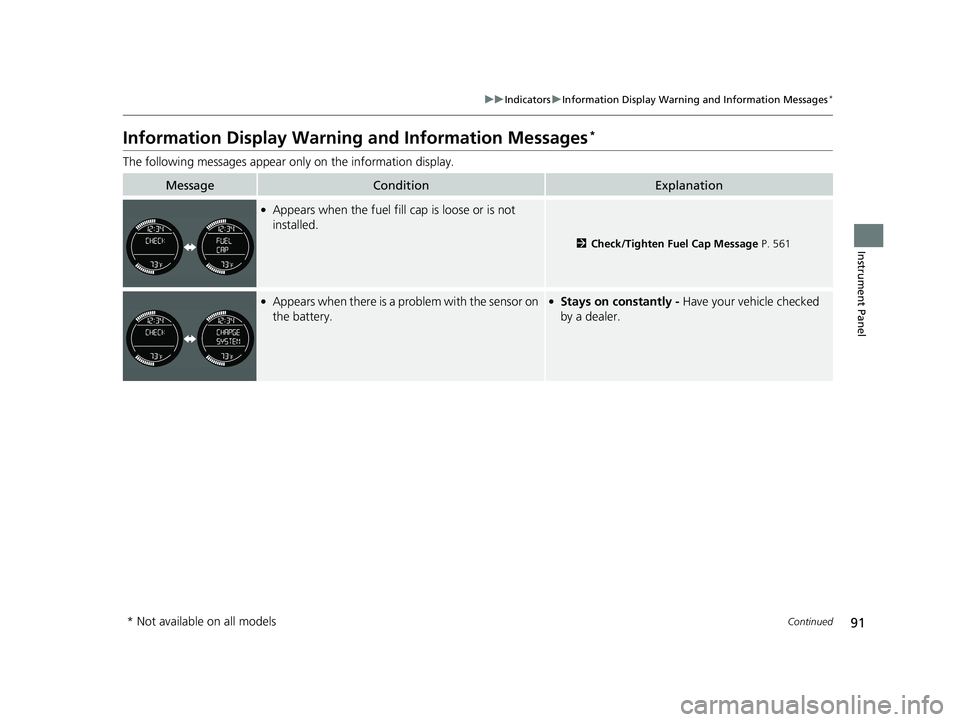
●Appears when the fuel fill cap is loose or is not
installed.
2Check/Tighten Fuel Cap Message P. 561
●Appears when there is a problem with the sensor on
the battery.●Stays on constantly - Have your vehicle checked
by a dealer.
* Not available on all models
18 FIT JAZZ-31T5A6300.book 91 ページ 2018年6月29日 金曜日 午後4時11分
Page 94 of 599
92
uuIndicators uInformation Display Warning and Information Messages*
Instrument Panel
MessageConditionExplanation
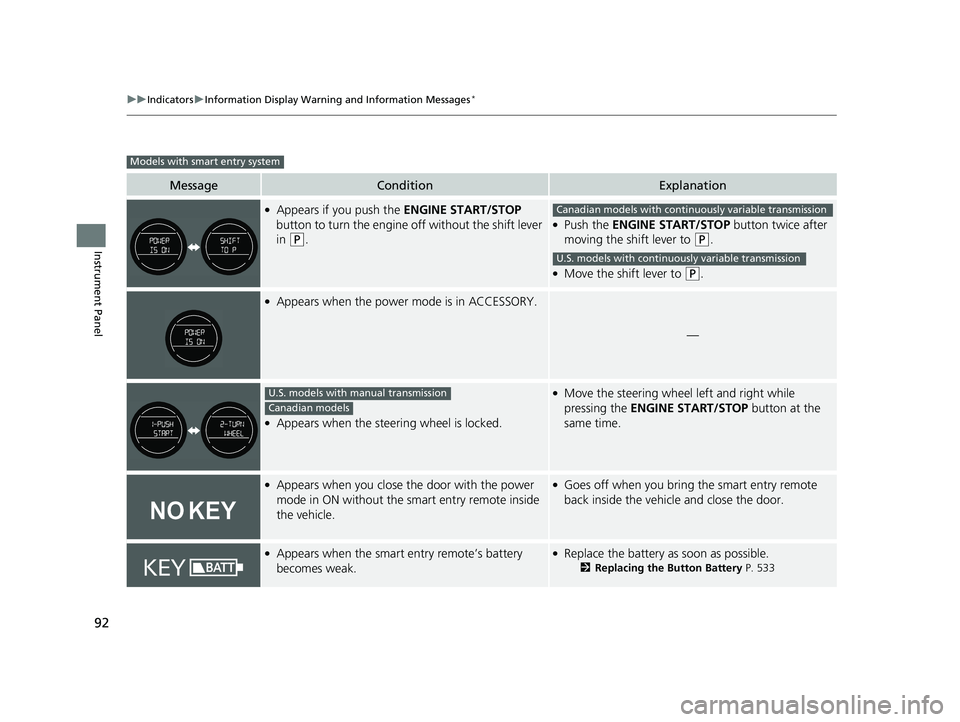
●Appears if you push the ENGINE START/STOP
button to turn the engine off without the shift lever
in
(P.
●Push the ENGINE START/STOP button twice after
moving the shift lever to
(P.
●Move the shift lever to (P.
●Appears when the power mode is in ACCESSORY.
—
●Appears when the steering wheel is locked.
●Move the steering wheel left and right while
pressing the ENGINE START/STOP button at the
same time.
●Appears when you close the door with the power
mode in ON without the smart entry remote inside
the vehicle.●Goes off when you bring the smart entry remote
back inside the vehicle and close the door.
●Appears when the smart entry remote’s battery
becomes weak.●Replace the battery as soon as possible.
2 Replacing the Button Battery P. 533
Models with smart entry system
Canadian models with continuously variable transmission
U.S. models with continuously variable transmission
U.S. models with manual transmission
Canadian models
18 FIT JAZZ-31T5A6300.book 92 ページ 2018年6月29日 金曜日 午後4時11分
Page 101 of 599
99
uuIndicators uMulti-Information Display Warn ing and Information Messages*
Continued
Instrument Panel
MessageConditionExplanation
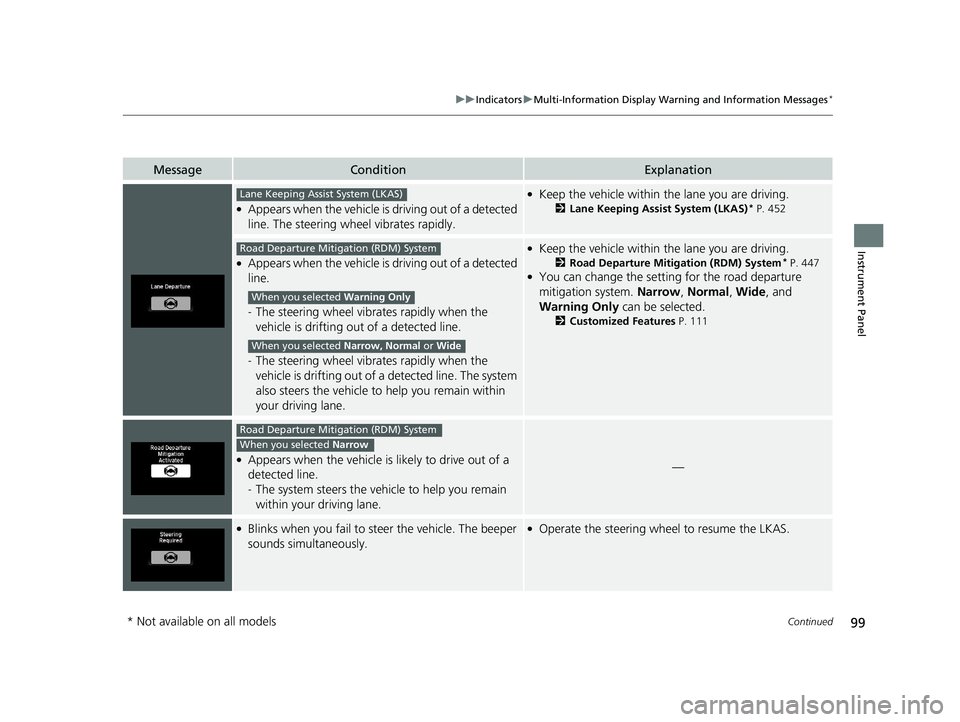
●Appears when the vehicle is driving out of a detected
line. The steering wheel vibrates rapidly.
●Keep the vehicle within the lane you are driving.
2 Lane Keeping Assist System (LKAS)* P. 452
●Appears when the vehicle is driving out of a detected
line.
- The steering wheel vibr ates rapidly when the
vehicle is drifting out of a detected line.
- The steering wheel vibr ates rapidly when the
vehicle is drifting out of a detected line. The system
also steers the vehicle to help you remain within
your driving lane.
●Keep the vehicle within the lane you are driving.
2 Road Departure Mitigation (RDM) System* P. 447●You can change the setting for the road departure
mitigation system. Narrow, Normal , Wide , and
Warning Only can be selected.
2Customized Features P. 111
●Appears when the vehicle is likely to drive out of a
detected line.
- The system steers the vehi cle to help you remain
within your driving lane.—
●Blinks when you fail to st eer the vehicle. The beeper
sounds simultaneously.●Operate the steering whee l to resume the LKAS.
Lane Keeping Assist System (LKAS)
Road Departure Mitigation (RDM) System
When you selected Warning Only
When you selected Narrow, Normal or Wide
Road Departure Mitigation (RDM) System
When you selected Narrow
* Not available on all models
18 FIT JAZZ-31T5A6300.book 99 ページ 2018年6月29日 金曜日 午後4時11分
Page 109 of 599
107
uuGauges and Displays uMulti-Information Display*
Continued
Instrument Panel
Multi-Information Display*
The multi-information display shows the odometer, trip meter, outside temperature
indicator, and other gauges.
It also displays important messages such as warnings and other helpful information.
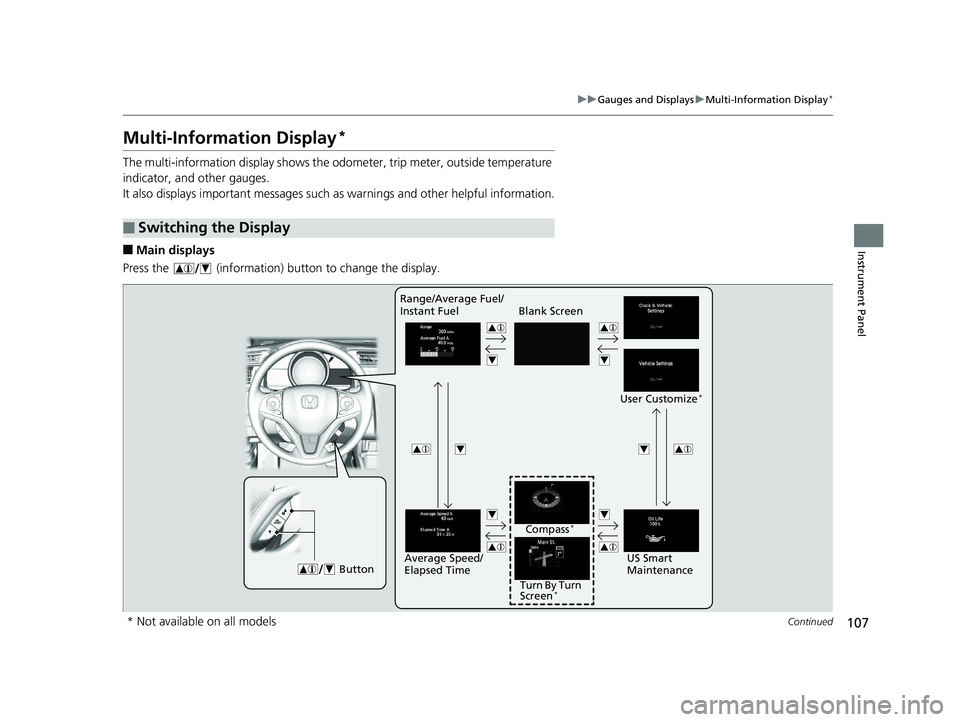
■Main displays
Press the (information) button to change the display.
■Switching the Display
Blank Screen
User Customize
*
ButtonUS Smart
Maintenance
Range/Average Fuel/
Instant Fuel
Turn By Turn
Screen
*
Compass*
Average Speed/
Elapsed Time
* Not available on all models
18 FIT JAZZ-31T5A6300.book 107 ページ 2018年6月29日 金曜日 午後4時11分
Page 112 of 599
uuGauges and Displays uMulti-Information Display*
110
Instrument Panel
Shows the average speed in mph (U.S.) or km/h (Canada) since Trip A or Trip B was reset.
Shows the instant fuel economy as a bar gr aph in mpg (U.S.) or l/100 km (Canada).
Shows the remaining oil life and Maintenance Minder
TM.
2 Maintenance MinderTM P. 491
Shows you turn-by-turn driving directions to your destination linked with the
navigation system.
2Refer to the Navigation System Manual
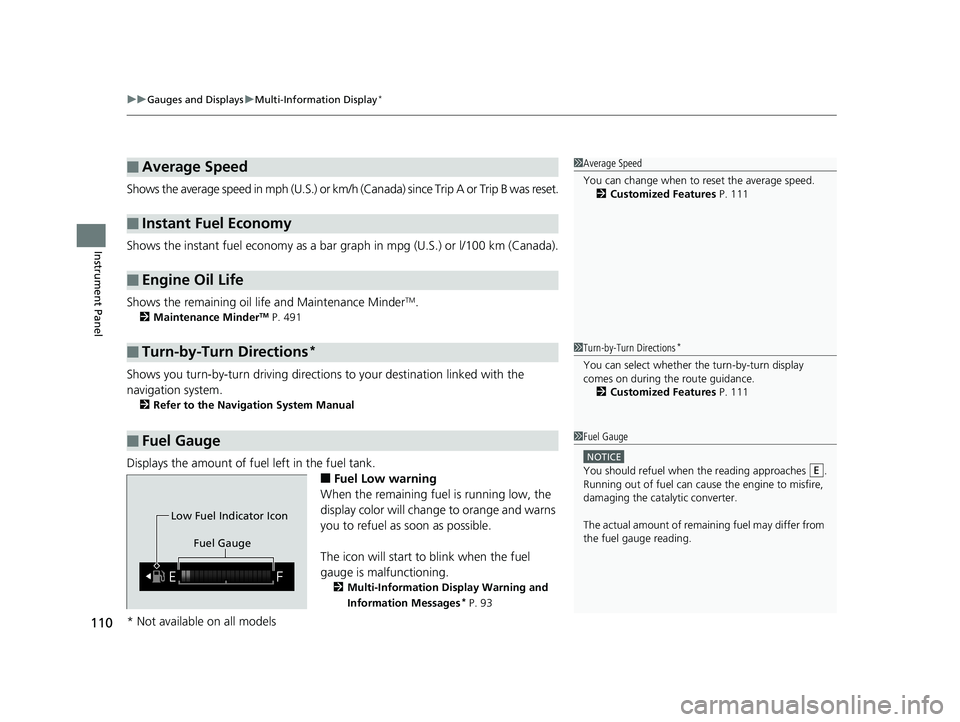
Displays the amount of fuel left in the fuel tank.
■Fuel Low warning
When the remaining fuel is running low, the
display color will change to orange and warns
you to refuel as soon as possible.
The icon will start to blink when the fuel
gauge is malfunctioning.
2 Multi-Information Display Warning and
Information Messages
* P. 93
■Average Speed
■Instant Fuel Economy
■Engine Oil Life
■Turn-by-Turn Directions*
■Fuel Gauge
1Average Speed
You can change when to reset the average speed.
2 Customized Features P. 111
1Turn-by-Turn Directions*
You can select whether th e turn-by-turn display
comes on during the route guidance. 2 Customized Features P. 111
1Fuel Gauge
NOTICE
You should refuel when th e reading approaches .
Running out of fuel can cause the engine to misfire,
damaging the cata lytic converter.
The actual amount of remain ing fuel may differ from
the fuel gauge reading.E
Fuel Gauge
Low Fuel Indicator Icon
* Not available on all models
18 FIT JAZZ-31T5A6300.book 110 ページ 2018年6月29日 金曜日 午後4時11分
Page 114 of 599
112
uuGauges and Displays uMulti-Information Display*
Instrument Panel
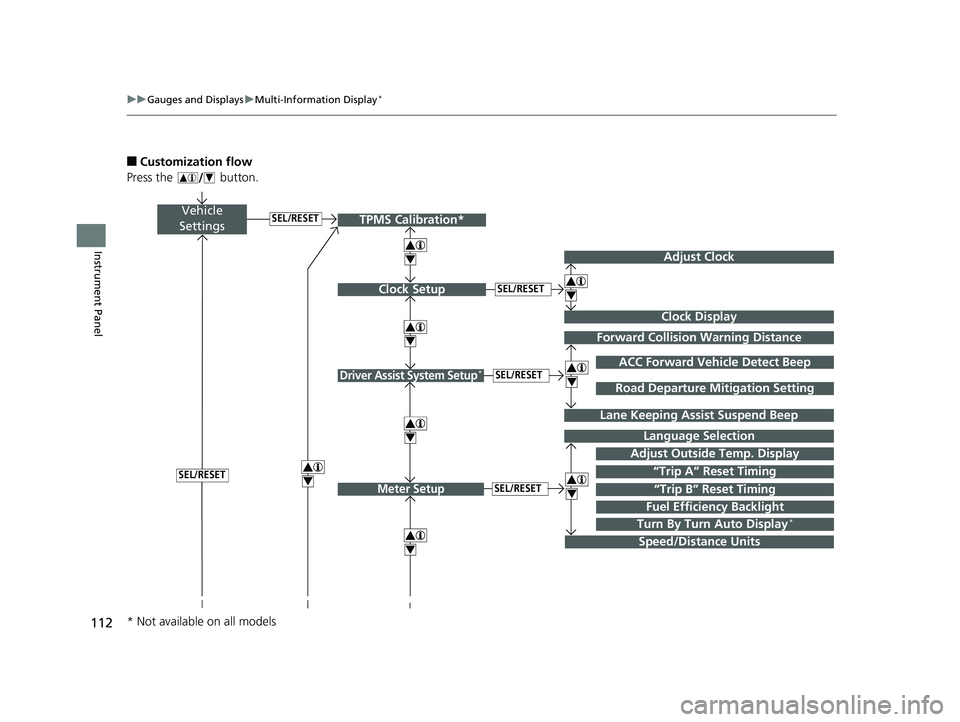
■Customization flow
Press the button.
Vehicle
Settings
Adjust Outside Temp. Display
Language Selection
Adjust Clock
4
4
Driver Assist System Setup*
Meter Setup“Trip B” Reset TimingSEL/RESET
SEL/RESET
SEL/RESET
“Trip A” Reset Timing4
ACC Forward Vehicle Detect Beep
Lane Keeping Assi st Suspend Beep
4
SEL/RESET
Forward Collision Warning Distance
4
4
SEL/RESET
Speed/Distance Units
Road Departure Mitigation Setting
Clock Display
Clock Setup
4
Fuel Efficiency Backlight
Turn By Turn Auto Display*
TPMS Calibration*
4
* Not available on all models
18 FIT JAZZ-31T5A6300.book 112 ページ 2018年6月29日 金曜日 午後4時11分
Page 116 of 599
114
uuGauges and Displays uMulti-Information Display*
Instrument Panel
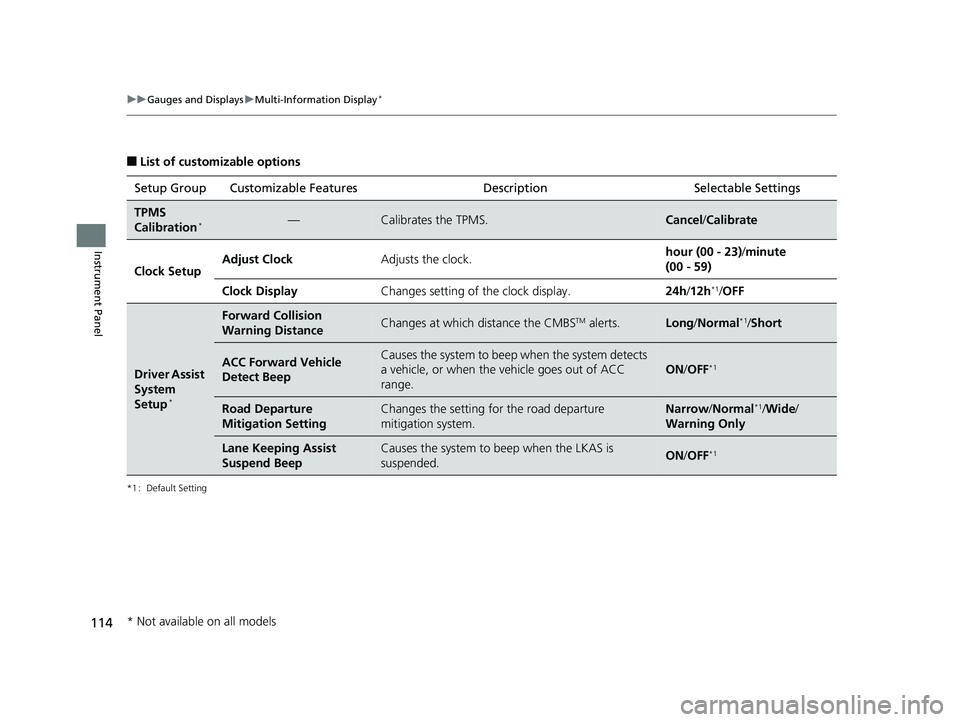
■List of customizable options
*1 : Default Setting
Setup Group Customizable Features DescriptionSelectable Settings
TPMS
Calibration*—Calibrates the TPMS.Cancel/Calibrate
Clock SetupAdjust ClockAdjusts the clock.hour (00 - 23) /minute
(00 - 59)
Clock DisplayChanges setting of the clock display.24h /12h*1/ OFF
Driver Assist
System
Setup
*
Forward Collision
Warning DistanceChanges at which distance the CMBSTM alerts.Long /Normal*1/Short
ACC Forward Vehicle
Detect BeepCauses the system to beep when the system detects
a vehicle, or when the vehicle goes out of ACC
range.
ON /OFF*1
Road Departure
Mitigation SettingChanges the setting for the road departure
mitigation system.Narrow /Normal*1/Wide /
Warning Only
Lane Keeping Assist
Suspend BeepCauses the system to beep when the LKAS is
suspended.ON /OFF*1
* Not available on all models
18 FIT JAZZ-31T5A6300.book 114 ページ 2018年6月29日 金曜日 午後4時11分
Page 130 of 599
uuLocking and Unlocking the Doors uLocking/Unlocking the Doors from the Outside
128
Controls
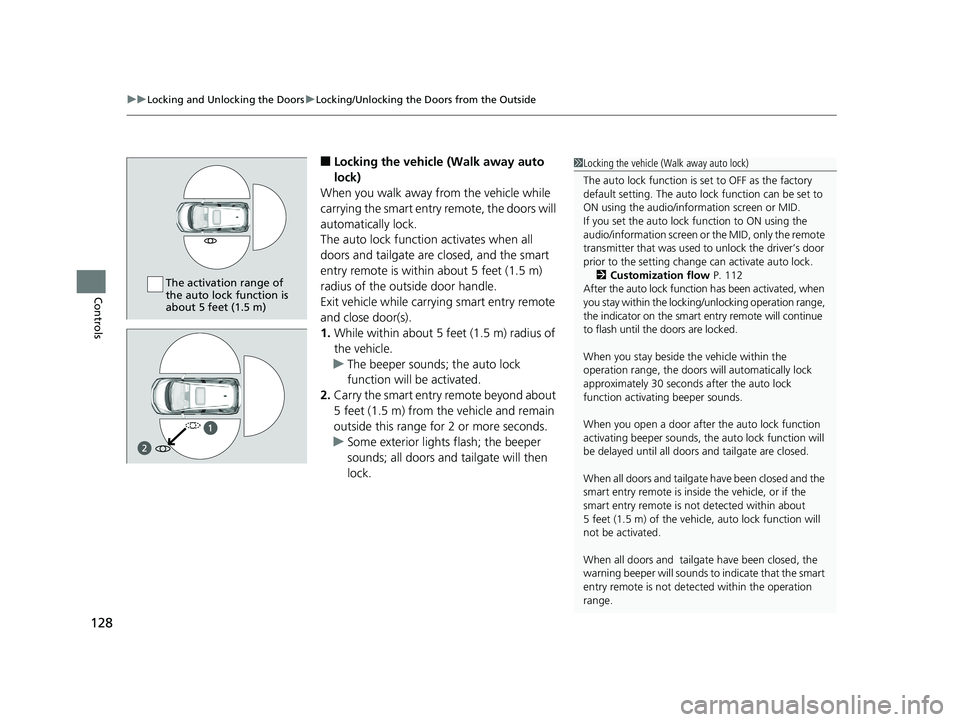
■Locking the vehicle (Walk away auto
lock)
When you walk away from the vehicle while
carrying the smart entry remote, the doors will
automatically lock.
The auto lock function activates when all
doors and tailgate are closed, and the smart
entry remote is within about 5 feet (1.5 m)
radius of the outside door handle.
Exit vehicle while carrying smart entry remote
and close door(s).
1. While within about 5 feet (1.5 m) radius of
the vehicle.
u The beeper sounds; the auto lock
function will be activated.
2. Carry the smart entry remote beyond about
5 feet (1.5 m) from the vehicle and remain
outside this range fo r 2 or more seconds.
u Some exterior lights flash; the beeper
sounds; all doors and tailgate will then
lock.1Locking the vehicle (Walk away auto lock)
The auto lock function is set to OFF as the factory
default setting. The auto lo ck function can be set to
ON using the audio/information screen or MID.
If you set the auto lock function to ON using the
audio/information screen or the MID, only the remote
transmitter that was used to unlock the driver’s door
prior to the setting change can activate auto lock. 2 Customization flow P. 112
After the auto lock function has been activated, when
you stay within the lockin g/unlocking operation range,
the indicator on the smart en try remote will continue
to flash until the doors are locked.
When you stay beside the vehicle within the
operation range, the doors wi ll automatically lock
approximately 30 seconds after the auto lock
function activating beeper sounds.
When you open a door after the auto lock function
activating beeper sounds, the auto lock function will
be delayed until all doors and tailgate are closed.
When all doors and tailgate have been closed and the
smart entry remote is inside the vehicle, or if the
smart entry remote is not detected within about
5 feet (1.5 m) of the vehicle, auto lock function will
not be activated.
When all doors and tailga te have been closed, the
warning beeper will sounds to indicate that the smart
entry remote is not dete cted within the operation
range.
The activation range of
the auto lock function is
about 5 feet (1.5 m)
18 FIT JAZZ-31T5A6300.book 128 ページ 2018年6月29日 金曜日 午後4時11分
Page 131 of 599
Continued129
uuLocking and Unlocking the Doors uLocking/Unlocking the Doors from the Outside
Controls
To temporarily deactivate the function:
1. Set the power mode to OFF.
2. Open the driv er’s door.
3. Using the master door lock switch, operate
the lock as follows:
Lock Unlock Lock Unlock.
u The beeper sounds an d the function is
deactivated.
To restore the function:
• Set the power mode to ON.
• Lock the vehicle without using the auto lock
function
• Walk away at least more than about 5 feet
(1.5 m) away from the vehicle while
carrying the smart entry remote.1Locking the vehicle (Walk away auto lock)
The auto lock function does not operate when any of
the following conditions are met.
•The smart entry remote is inside the vehicle.
•A door or the hood is not closed.•The power mode is set to any mode other than
OFF.
•The smart entry remote is not located within a
radius of about 5 feet (1 .5 m) from the vehicle
when you get out of the vehicle and close the
doors.
Auto lock function operation stop beeper
After the auto lock function has been activated, the
auto lock operation stop beeper sounds for
approximately two seconds in the following cases.
•The smart entry remote is put inside the vehicle
through a window.
•You are located too close to the vehicle.
If the warning beeper sounds, check that you are
carrying the smart entry remote. Then, open/close a
door and confirm the auto lock activation beeper
sounds once.
18 FIT JAZZ-31T5A6300.book 129 ページ 2018年6月29日 金曜日 午後4時11分
Page 147 of 599
145
Controls
Opening and Closing the Tailgate
Precautions for Opening/Closing the Tailgate
Always make sure individuals and objects are clear of the tailgate before opening or
closing it.
• Open the tailgate all the way.
u If it is not fully opened, the tailgate may begin to close under its own weight.
• Be careful when it is windy. The wi nd may cause the tailgate to close.
Keep the tailgate closed while driving to: u Avoid possible damage.
u Prevent exhaust gas from leaking into the vehicle.
2 Carbon Monoxide Gas P. 73
1Precautions for Opening/Closing the Tailgate
Be careful not to hit your head on the tailgate or to
put your hands between th e tailgate and the cargo
area when closing the tailgate.
When you are storing or pi cking up luggage from the
cargo area while the engine is idling, do not stand in
front of the exhaust pipe. You may get burned.
Do not allow any passenger in the cargo space. They
may get hurt during hard braking, a sudden
acceleration, or a crash.
3WARNING
Anyone caught in the path of a tailgate
that is being opened or closed can be
seriously injured.
Make sure that all people are clear of the
tailgate before opening or closing it.
18 FIT JAZZ-31T5A6300.book 145 ページ 2018年6月29日 金曜日 午後4時11分