fog light HONDA FIT 2018 Owner's Manual (in English)
[x] Cancel search | Manufacturer: HONDA, Model Year: 2018, Model line: FIT, Model: HONDA FIT 2018Pages: 599, PDF Size: 42.24 MB
Page 7 of 599
5
Quick Reference Guide
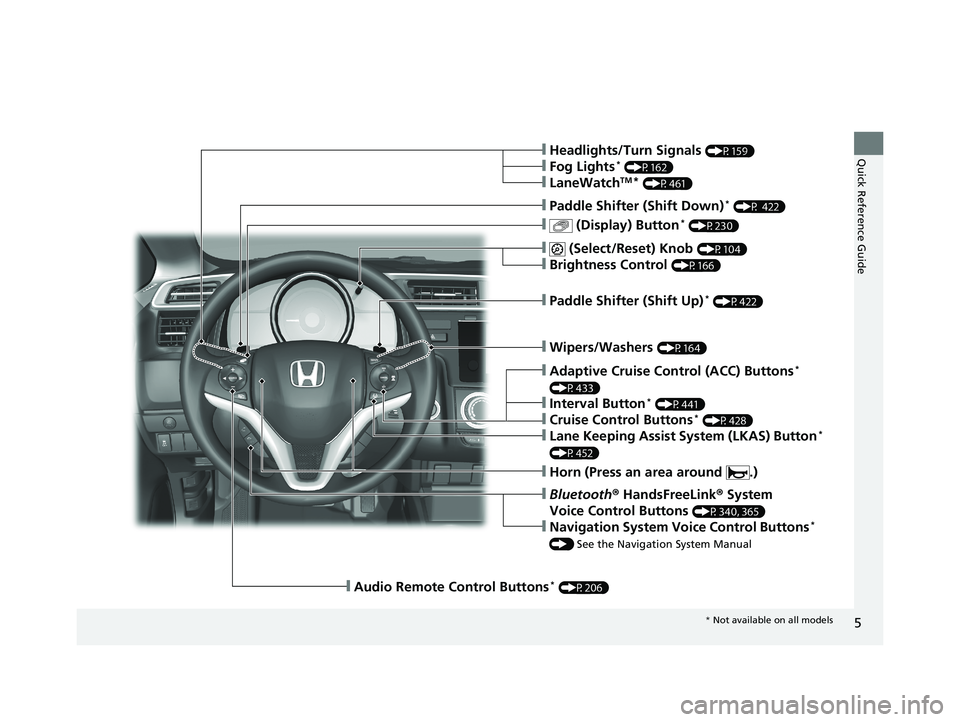
❙Wipers/Washers (P164)
❙Paddle Shifter (Shift Up)* (P422)
❙ (Select/Reset) Knob (P104)
❙Brightness Control (P166)
❙ (Display) Button* (P230)
❙Paddle Shifter (Shift Down)* (P 422)
❙Headlights/Turn Signals (P159)
❙Fog Lights* (P162)
❙LaneWatchTM* (P461)
❙Audio Remote Control Buttons* (P206)
❙Horn (Press an area around .)
❙Bluetooth® HandsFreeLink ® System
Voice Control Buttons
(P340, 365)
❙Navigation System Voice Control Buttons*
() See the Navigation System Manual
❙Adaptive Cruise Control (ACC) Buttons*
(P433)
❙Interval Button* (P441)
❙Cruise Control Buttons* (P428)
❙Lane Keeping Assist System (LKAS) Button*
(P452)
* Not available on all models
18 FIT JAZZ-31T5A6300.book 5 ページ 2018年6月29日 金曜日 午後4時11分
Page 10 of 599
Visual Index
8
Quick Reference Guide
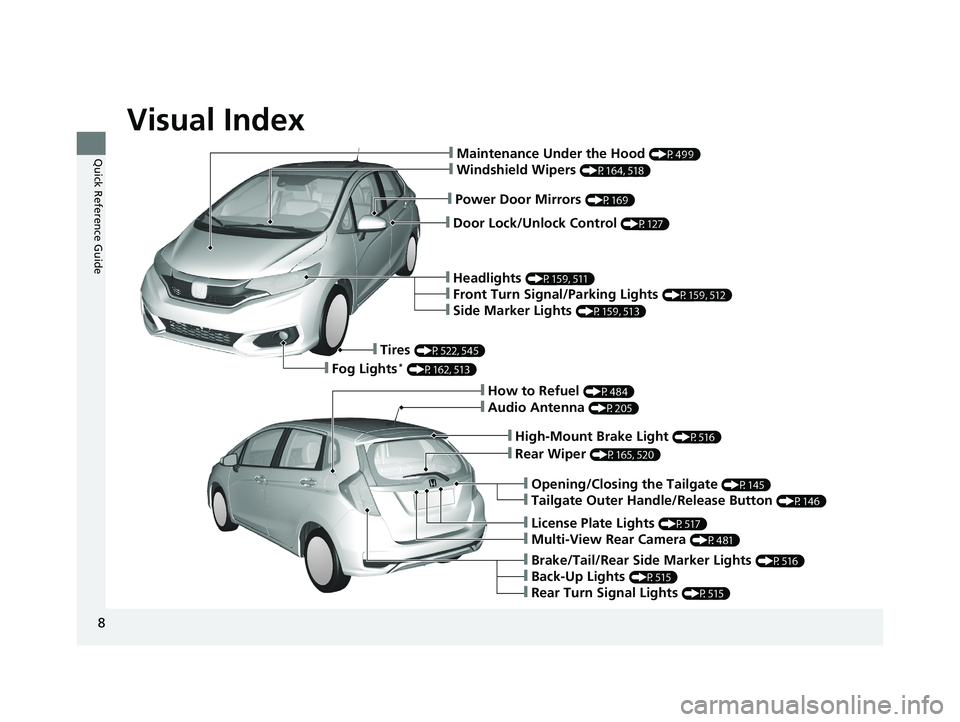
❙Door Lock/Unlock Control (P127)
❙Power Door Mirrors (P169)
❙Maintenance Under the Hood (P499)
❙Windshield Wipers (P164, 518)
❙Headlights (P159, 511)
❙Front Turn Signal/Parking Lights (P159, 512)
❙Side Marker Lights (P159, 513)
❙Tires (P522, 545)
❙Fog Lights* (P162, 513)
❙Audio Antenna (P205)
❙High-Mount Brake Light (P516)
❙Rear Wiper (P165, 520)
❙Opening/Closing the Tailgate (P145)
❙Tailgate Outer Handle/Release Button (P146)
❙License Plate Lights (P517)
❙Multi-View Rear Camera (P481)
❙Brake/Tail/Rear Side Marker Lights (P516)
❙Back-Up Lights (P515)
❙Rear Turn Signal Lights (P515)
❙How to Refuel (P484)
18 FIT JAZZ-31T5A6300.book 8 ページ 2018年6月29日 金曜日 午後4時11分
Page 13 of 599
11
Quick Reference Guide
Instrument Panel (P75)
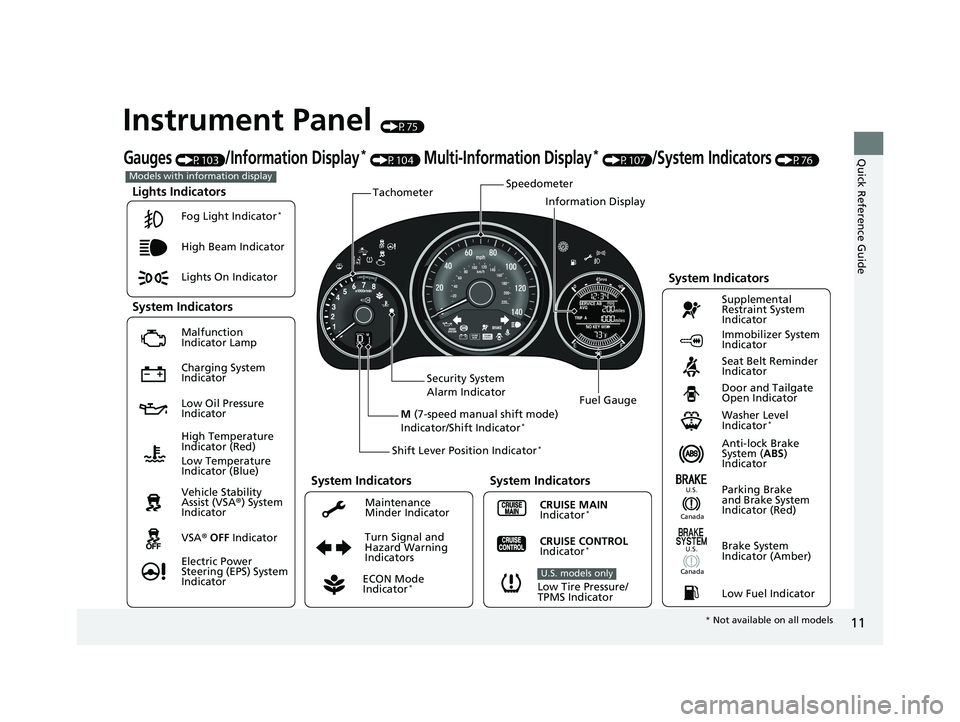
Lights Indicators
Malfunction
Indicator Lamp
Low Oil Pressure
IndicatorAnti-lock Brake
System (ABS)
Indicator
Vehicle Stability
Assist (VSA ®) System
Indicator
VSA ® OFF Indicator
Electric Power
Steering (EPS) System
Indicator Lights On Indicator High Beam Indicator
Immobilizer System
Indicator
Seat Belt Reminder
Indicator
System Indicators
CRUISE MAIN
Indicator*
Supplemental
Restraint System
Indicator
Door and Tailgate
Open Indicator
Tachometer
Speedometer
Fuel Gauge
Security System
Alarm Indicator
Shift Lever Position Indicator
*
Low Fuel Indicator
Gauges (P103)/Information Display* (P104) Multi-Information Display* (P107)/System Indicators (P76)
Turn Signal and
Hazard Warning
Indicators
High Temperature
Indicator (Red)
System Indicators
System Indicators
Low Tire Pressure/
TPMS Indicator
U.S. models only
Parking Brake
and Brake System
Indicator (Red)
CRUISE CONTROL
Indicator*
System Indicators
Charging System
Indicator
U.S.
Washer Level
Indicator*
ECON Mode
Indicator*
Maintenance
Minder Indicator
Fog Light Indicator
*
Canada
Brake System
Indicator (Amber)
Canada
U.S.
M
(7-speed manual shift mode)
Indicator/Shift Indicator*
Information Display
Models with information display
Low Temperature
Indicator (Blue)
* Not available on all models
18 FIT JAZZ-31T5A6300.book 11 ページ 2018年6月29日 金曜日 午後4時11分
Page 14 of 599
12
Quick Reference Guide
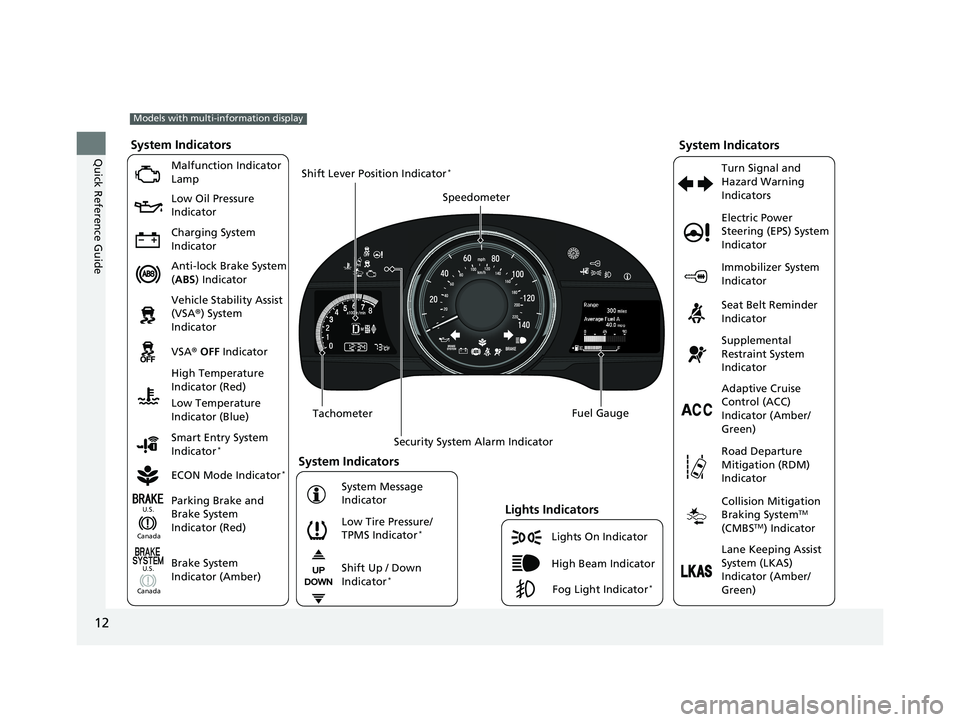
Lights On Indicator
System Indicators
Malfunction Indicator
Lamp
Low Oil Pressure
Indicator
Charging System
Indicator
Anti-lock Brake System
(ABS ) Indicator
Vehicle Stability Assist
(VSA ®) System
Indicator
VSA ® OFF Indicator
Low Tire Pressure/
TPMS Indicator
*
Electric Power
Steering (EPS) System
Indicator
Seat Belt Reminder
Indicator
System Indicators
Parking Brake and
Brake System
Indicator (Red) Supplemental
Restraint System
Indicator
Tachometer Speedometer
Fuel Gauge
Security System Alarm Indicator
Shift Lever Position Indicator
*
Immobilizer System
Indicator
ECON Mode Indicator
*
Turn Signal and
Hazard Warning
Indicators
Models with multi-information display
Brake System
Indicator (Amber)
System Indicators
High Temperature
Indicator (Red)
Low Temperature
Indicator (Blue)
Lights Indicators
High Beam Indicator
Fog Light Indicator*
Adaptive Cruise
Control (ACC)
Indicator (Amber/
Green)
System Message
Indicator Collision Mitigation
Braking System
TM
(CMBSTM) Indicator
Road Departure
Mitigation (RDM)
Indicator
Lane Keeping Assist
System (LKAS)
Indicator (Amber/
Green)
Smart Entry System
Indicator
*
U.S.
Canada
Canada U.S.
Shift Up / Down
Indicator*
18 FIT JAZZ-31T5A6300.book 12 ページ 2018年6月29日 金曜日 午後4時11分
Page 87 of 599
85
uuIndicators u
Continued
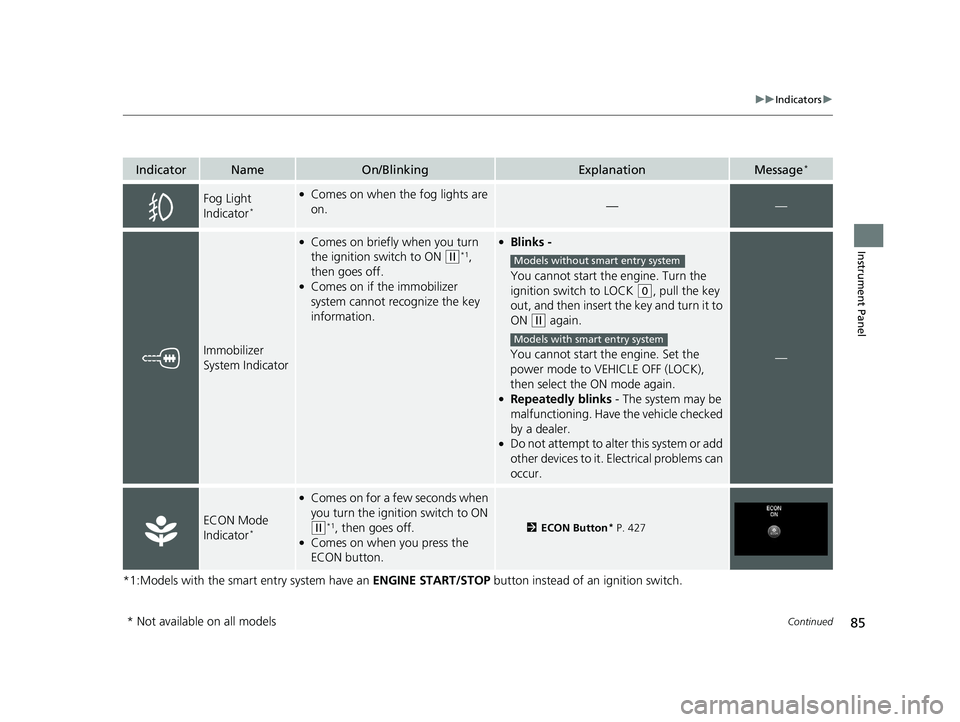
Instrument Panel
*1:Models with the smart entry system have an ENGINE START/STOP button instead of an ignition switch.
IndicatorNameOn/BlinkingExplanationMessage*
Fog Light
Indicator*
●Comes on when the fog lights are
on.——
Immobilizer
System Indicator
●Comes on briefly when you turn
the ignition switch to ON
(w*1,
then goes off.
●Comes on if the immobilizer
system cannot recognize the key
information.
●Blinks -
You cannot start the engine. Turn the
ignition switch to LOCK
(0, pull the key
out, and then insert the key and turn it to
ON
(w again.
You cannot start the engine. Set the
power mode to VEHICLE OFF (LOCK),
then select the ON mode again.
●Repeatedly blinks - The system may be
malfunctioning. Have the vehicle checked
by a dealer.
●Do not attempt to alter this system or add
other devices to it. Electrical problems can
occur.
—
ECON Mode
Indicator*
●Comes on for a fe w seconds when
you turn the igniti on switch to ON
(w*1, then goes off.●Comes on when you press the
ECON button.
2ECON Button* P. 427
Models without smart entry system
Models with smart entry system
* Not available on all models
18 FIT JAZZ-31T5A6300.book 85 ページ 2018年6月29日 金曜日 午後4時11分
Page 123 of 599
121
Controls
This chapter explains how to operate the various controls necessary for driving.
Clock............................................................ 122
Locking and Unlocking the Doors Key Types and Functions ........................... 124
Low Smart Entry Remote Signal Strength*.....126Locking/Unlocking the Doors from the Outside ... 127
Locking/Unlocking the Doors from the Inside .....135
Childproof Door Locks .............................. 138
Auto Door Locking/Unlocking*................. 139
Opening and Closing the Tailgate ............ 145
Security System .......................................... 148
Immobilizer System ......... ..................... ..... 148
Security System Alarm ............................... 148
Opening and Closing the Windows .......... 151
Opening and Closing the Moonroof
*....... 153 Operating the Switches Around the Steering
Wheel
Ignition Switch.......................................... 154
ENGINE START/STOP Button ..................... 155
Ignition Switch and Power Mode Comparison ... 158Turn Signals .............................................. 159
Light Switches .......................................... 159
Fog Lights
*............................................... 162
Daytime Running Lights ............................ 163
Wipers and Washers ................................. 164
Brightness Control .................................... 166
Rear Defogger/Heated Door Mirror* Button ...... 167Adjusting the Steering Wheel ................... 168
Models without smart entry system
Models with smart entry system
Adjusting the Mirrors .................................169
Interior Rearview Mirror .............................169
Power Door Mirrors ...................................169
Adjusting the Seats .................................... 170
Front Seats ................................................170
Rear Seats .................................................174
Interior Lights/Interior Convenience Items....... 182Interior Lights ............................................182
Interior Convenience Items ........................184
Heating and Cooling System
*....................192
Using Vents, Heating and A/C*.................192
Climate Control System*............................195
Using Automatic Climate Control ..............195
Automatic Climate Control Sensors ...........199
* Not available on all models
18 FIT JAZZ-31T5A6300.book 121 ページ 2018年6月29日 金曜日 午後4時11分
Page 162 of 599
uuOperating the Switches Around the Steering Wheel uLight Switches
160
Controls
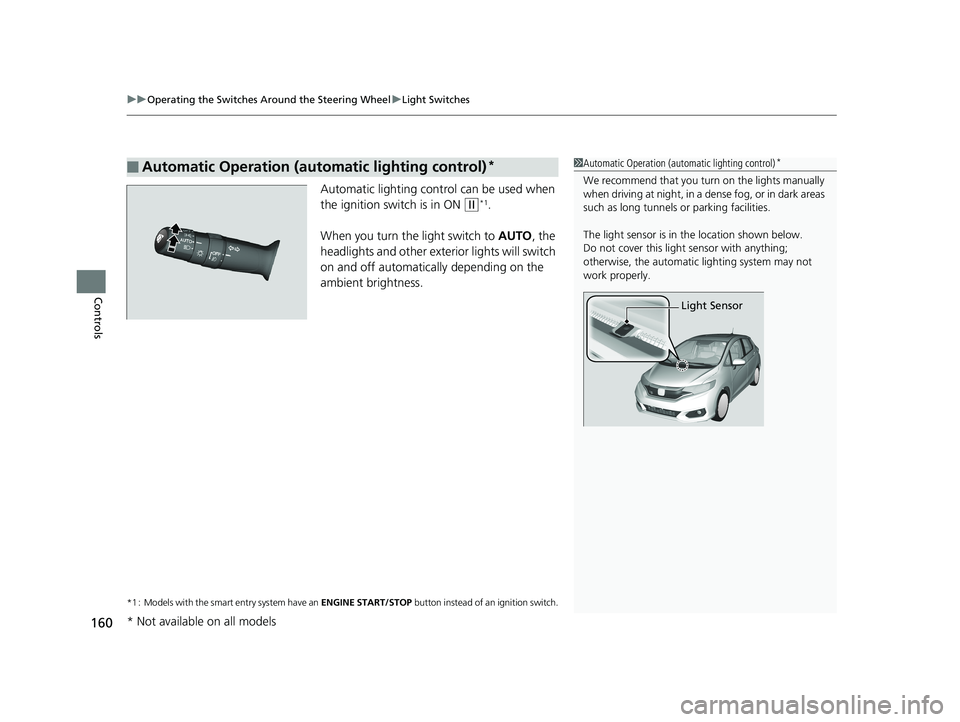
Automatic lighting control can be used when
the ignition switch is in ON
(w*1.
When you turn the light switch to AUTO, the
headlights and other exterior lights will switch
on and off automatically depending on the
ambient brightness.
*1 : Models with the smart entry system have an ENGINE START/STOP button instead of an ignition switch.
■Automatic Operation (automatic lighting control)*1Automatic Operation (aut omatic lighting control)*
We recommend that you tu rn on the lights manually
when driving at night, in a dense fog, or in dark areas
such as long tunnels or parking facilities.
The light sensor is in the location shown below.
Do not cover this light sensor with anything;
otherwise, the automatic lighting system may not
work properly.
Light Sensor
* Not available on all models
18 FIT JAZZ-31T5A6300.book 160 ページ 2018年6月29日 金曜日 午後4時11分
Page 164 of 599
162
uuOperating the Switches Around the Steering Wheel uFog Lights*
Controls
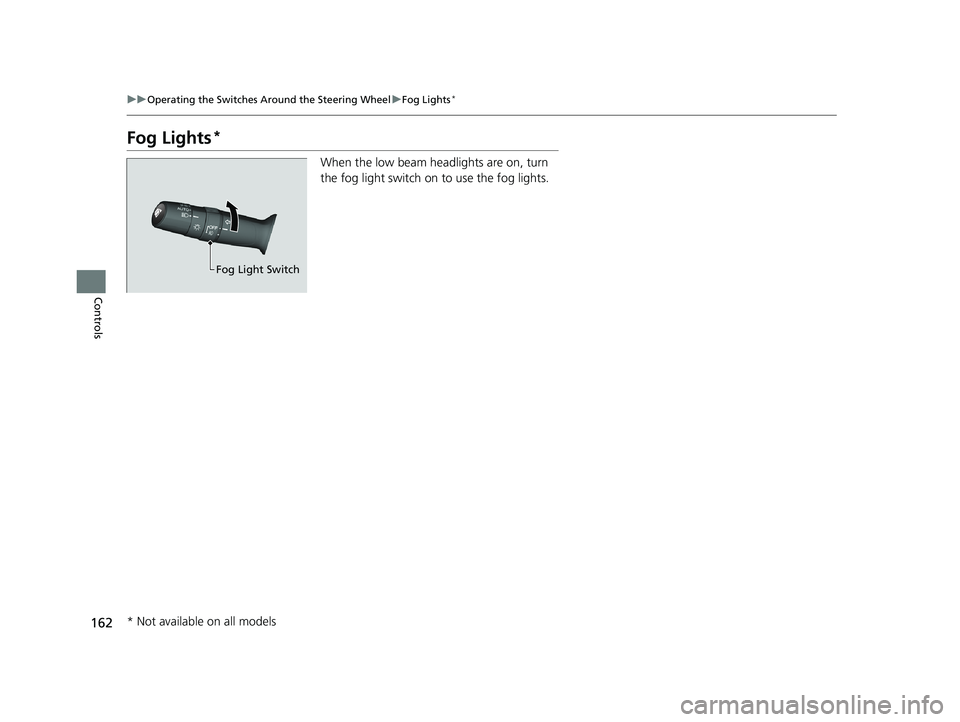
Fog Lights*
When the low beam headlights are on, turn
the fog light switch on to use the fog lights.
Fog Light Switch
* Not available on all models
18 FIT JAZZ-31T5A6300.book 162 ページ 2018年6月29日 金曜日 午後4時11分
Page 413 of 599
411
uuWhen Driving uStarting the Engine
Continued
Driving
Starting the Engine
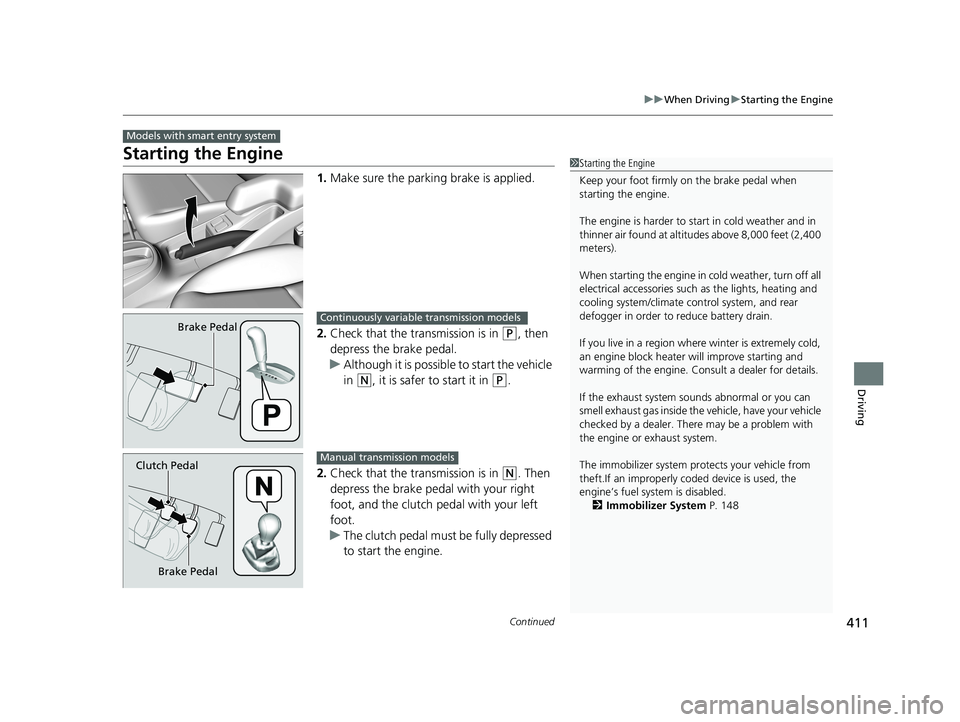
1. Make sure the parkin g brake is applied.
2. Check that the transmission is in
(P, then
depress the brake pedal.
u Although it is possible to start the vehicle
in
(N, it is safer to start it in (P.
2. Check that the transmission is in
(N. Then
depress the brake pedal with your right
foot, and the clutch pedal with your left
foot.
u The clutch pedal must be fully depressed
to start the engine.
Models with smart entry system
1Starting the Engine
Keep your foot firmly on the brake pedal when
starting the engine.
The engine is harder to st art in cold weather and in
thinner air found at altitudes above 8,000 feet (2,400
meters).
When starting the engine in cold weather, turn off all
electrical accessories such as the lights, heating and
cooling system/climate c ontrol system, and rear
defogger in order to reduce battery drain.
If you live in a region where winter is extremely cold,
an engine block heater will improve starting and
warming of the engine. Cons ult a dealer for details.
If the exhaust system sounds abnormal or you can
smell exhaust gas inside the vehicle, have your vehicle
checked by a dealer. There may be a problem with
the engine or exhaust system.
The immobilizer system pr otects your vehicle from
theft.If an improperly c oded device is used, the
engine’s fuel system is disabled.
2 Immobilizer System P. 148
Brake PedalContinuously variable transmission models
Brake Pedal
Clutch Pedal
Manual transmission models
18 FIT JAZZ-31T5A6300.book 411 ページ 2018年6月29日 金曜日 午後4時11分
Page 440 of 599
uuWhen Driving uAdaptive Cruise Control (ACC)*
438
Driving
The system may automatically shut off and the ACC indicator will come on under
certain conditions. Some examples of th ese conditions are listed below. Other
conditions may reduce some of the ACC functions.
2 Front Sensor Camera* P. 431
■Environmental conditions
• Driving in bad weather (rain, fog, snow, etc.).
■Roadway conditions
• Driving on a snowy or wet roadway (obs cured lane marking, vehicle tracks,
reflected lights, road spray, high contrast).
■Vehicle conditions
• The outside of the windshie ld is blocked by dirt, mud, leaves, wet snow, etc.
• An abnormal tire or wheel condition (Wrong sized, varied size or construction,
improperly inflated, comp act spare tire, etc.).
• The camera temperature gets too high.
• The parking brake is applied.
• When the radar sensor cover is dirty.
• The vehicle is tilted due to a heav y load or suspension modifications.
• When tire chains are installed.
■ACC Conditions and Limitations1ACC Conditions and Limitations
The radar sensor for ACC is shared with the collision
mitigation braking system
TM (CMBSTM).
2 Collision Mitigation Braking SystemTM
(CMBSTM)* P. 472
You can read about handling information for the
camera equipped with this system. 2 Front Sensor Camera
* P. 431
Always keep the radar sensor cover clean.
Never use chemical solvents or polishing powder for
cleaning the sensor cover. Clean it with water or a
mild detergent.
Do not put a sticker on the radar sensor cover or
replace the radar sensor cover.
If you need the radar sensor to be repaired, or
removed, or the radar se nsor cover is strongly
impacted, turn off the system by pressing the MAIN
button and take your vehicle to a dealer.
Have your vehicle checked by a dealer if you find any
unusual behavior of the system (e.g., the warning
message appears too frequently).
If the front of the vehicle is impacted in any of the
following situations, the ra dar sensor may not work
properly. Have your vehi cle checked by a dealer:
•The vehicle mounted onto a bump, curb, chock,
embankment, etc.
•You drive the vehicle where the water is deep.•Your vehicle has a frontal collision.
* Not available on all models
18 FIT JAZZ-31T5A6300.book 438 ページ 2018年6月29日 金曜日 午後4時11分