manual transmission HONDA FIT 2018 Owner's Manual (in English)
[x] Cancel search | Manufacturer: HONDA, Model Year: 2018, Model line: FIT, Model: HONDA FIT 2018Pages: 599, PDF Size: 42.24 MB
Page 8 of 599
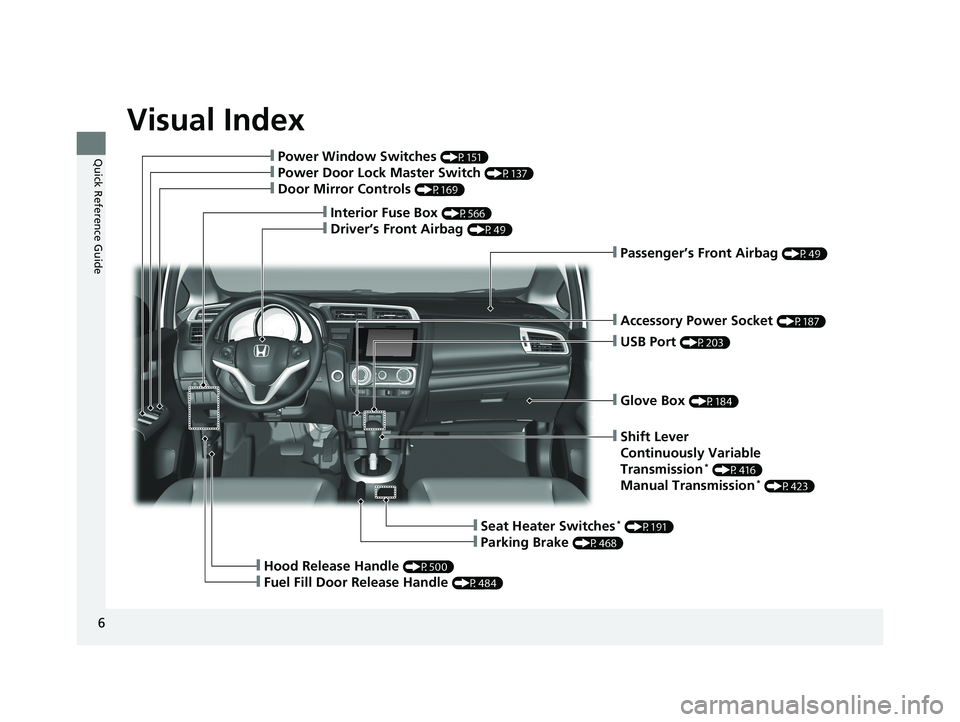
Visual Index
6
Quick Reference Guide
❙Glove Box (P184)
❙Shift Lever
Continuously Variable
Transmission
* (P416)
Manual Transmission* (P423)
❙Seat Heater Switches* (P191)
❙Parking Brake (P468)
❙Hood Release Handle (P500)
❙Fuel Fill Door Release Handle (P484)
❙Accessory Power Socket (P187)
❙Passenger’s Front Airbag (P49)
❙USB Port (P203)
❙Interior Fuse Box (P566)
❙Driver’s Front Airbag (P49)
❙Power Window Switches (P151)
❙Power Door Lock Master Switch (P137)
❙Door Mirror Controls (P169)
18 FIT JAZZ-31T5A6300.book 6 ページ 2018年6月29日 金曜日 午後4時11分
Page 23 of 599
21
Quick Reference Guide
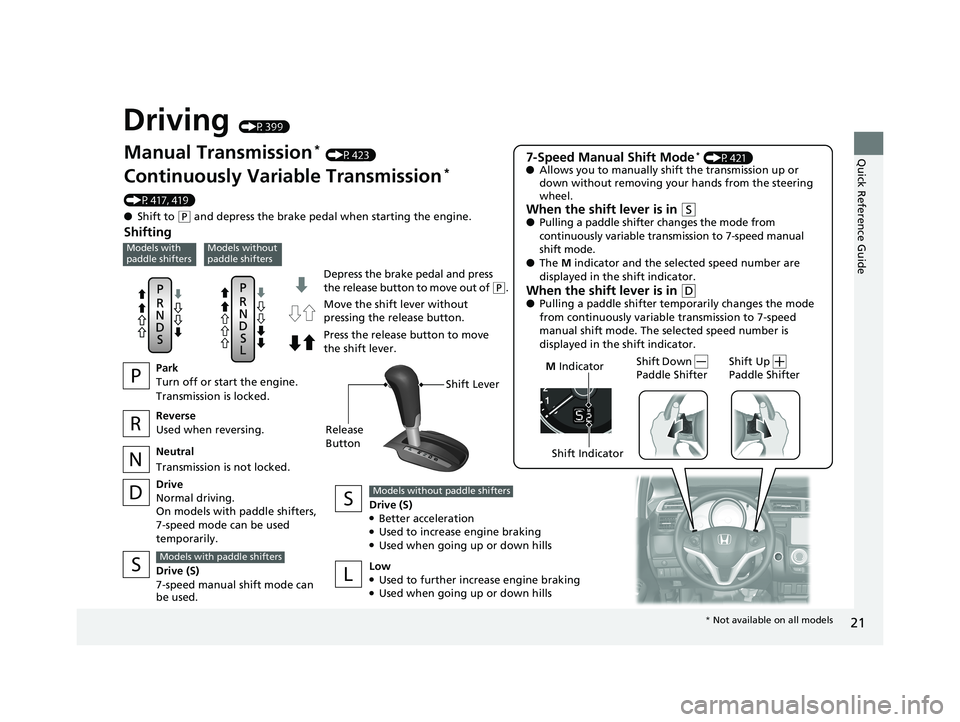
Driving (P399)
Depress the brake pedal and press
the release button to move out of (P.
Manual Transmission* (P423)
Continuously Variable Transmission*
(P417, 419)
● Shift to
(P and depress the brake pedal when starting the engine.
Shifting
Reverse
Used when reversing.
Neutral
Transmission is not locked.
Drive
Normal driving.
On models with paddle shifters,
7-speed mode can be used
temporarily. Drive (S)
●Better acceleration●Used to increase engine braking●Used when going up or down hills
Models without paddle shifters
Low●Used to further increase engine braking●Used when going up or down hills
Drive (S)
7-speed manual shift mode can
be used.
Models with paddle shifters
Move the shift lever without
pressing the release button.
Press the release button to move
the shift lever.
7-Speed Manual Shift Mode* (P421)
● Allows you to manually shift the transmission up or
down without removing yo ur hands from the steering
wheel.
When the shift lever is in (S● Pulling a paddle shifter changes the mode from
continuously variable transmission to 7-speed manual
shift mode.
● The M indicator and the selected speed number are
displayed in the shift indicator.
When the shift lever is in (D● Pulling a paddle shifter temporarily changes the mode
from continuously variable transmission to 7-speed
manual shift mode. The selected speed number is
displayed in the shift indicator.
Shift Down
Paddle Shifter
Shift Up
Paddle Shifter M Indicator
Models with
paddle shiftersModels without
paddle shifters
Shift Lever
Release
Button
Shift Indicator
Park
Turn off or start the engine.
Transmission is locked.
* Not available on all models
18 FIT JAZZ-31T5A6300.book 21 ページ 2018年6月29日 金曜日 午後4時11分
Page 29 of 599
27
Quick Reference Guide
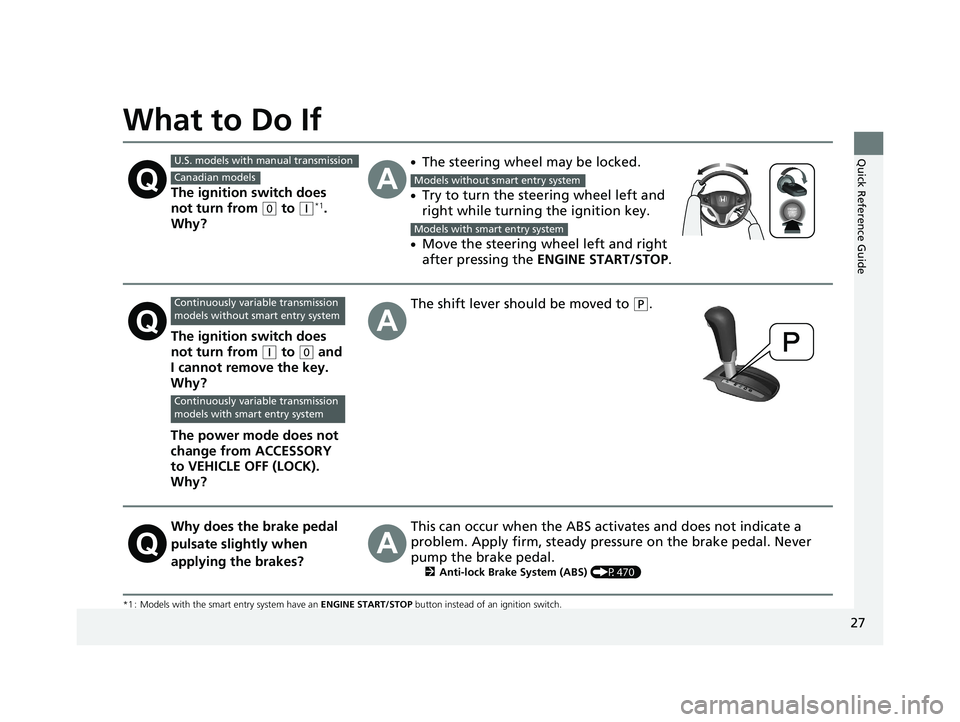
What to Do If
*1 : Models with the smart entry system have an ENGINE START/STOP button instead of an ignition switch.
The ignition switch does
not turn from
(0 to (q*1.
Why?
●The steering wheel may be locked.
●Try to turn the steering wheel left and
right while turning the ignition key.
●Move the steering wheel left and right
after pressing the ENGINE START/STOP .
The ignition switch does
not turn from
(q to (0 and
I cannot remove the key.
Why?
The power mode does not
change from ACCESSORY
to VEHICLE OFF (LOCK).
Why?
The shift lever should be moved to (P.
Why does the brake pedal
pulsate slightly when
applying the brakes?This can occur when the ABS activates and does not indicate a
problem. Apply firm, steady pressure on the brake pedal. Never
pump the brake pedal.
2 Anti-lock Brake System (ABS) (P470)
U.S. models with manual transmission
Canadian modelsModels without smart entry system
Models with smart entry system
Continuously variable transmission
models without smart entry system
Continuously variable transmission
models with smart entry system
18 FIT JAZZ-31T5A6300.book 27 ページ 2018年6月29日 金曜日 午後4時11分
Page 94 of 599
92
uuIndicators uInformation Display Warning and Information Messages*
Instrument Panel
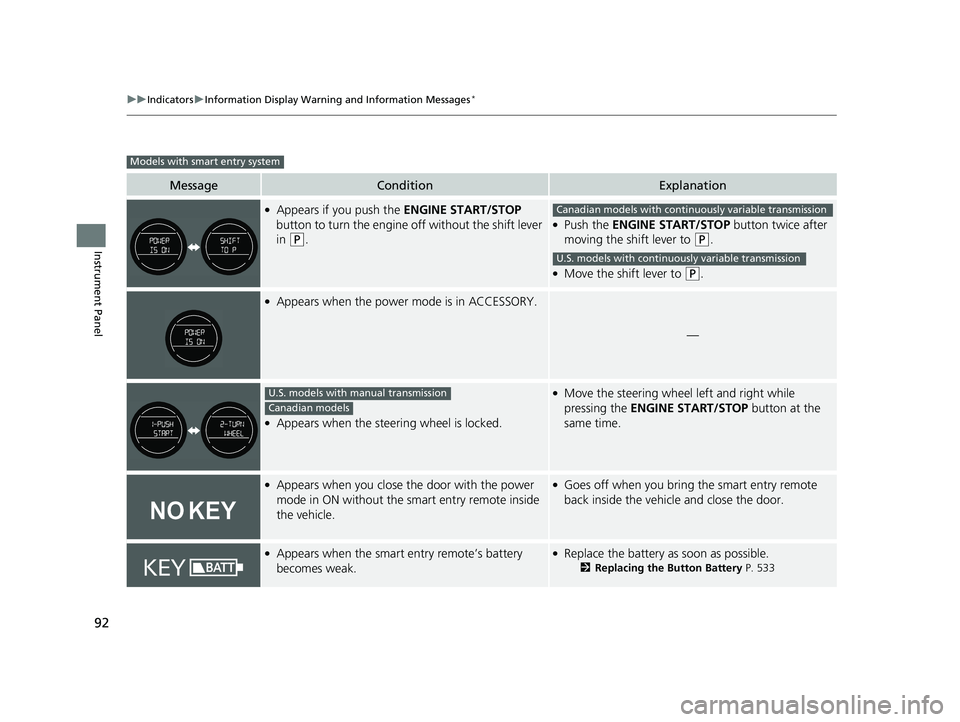
MessageConditionExplanation
●Appears if you push the ENGINE START/STOP
button to turn the engine off without the shift lever
in
(P.
●Push the ENGINE START/STOP button twice after
moving the shift lever to
(P.
●Move the shift lever to (P.
●Appears when the power mode is in ACCESSORY.
—
●Appears when the steering wheel is locked.
●Move the steering wheel left and right while
pressing the ENGINE START/STOP button at the
same time.
●Appears when you close the door with the power
mode in ON without the smart entry remote inside
the vehicle.●Goes off when you bring the smart entry remote
back inside the vehicle and close the door.
●Appears when the smart entry remote’s battery
becomes weak.●Replace the battery as soon as possible.
2 Replacing the Button Battery P. 533
Models with smart entry system
Canadian models with continuously variable transmission
U.S. models with continuously variable transmission
U.S. models with manual transmission
Canadian models
18 FIT JAZZ-31T5A6300.book 92 ページ 2018年6月29日 金曜日 午後4時11分
Page 97 of 599
95
uuIndicators uMulti-Information Display Warn ing and Information Messages*
Continued
Instrument Panel
MessageConditionExplanation
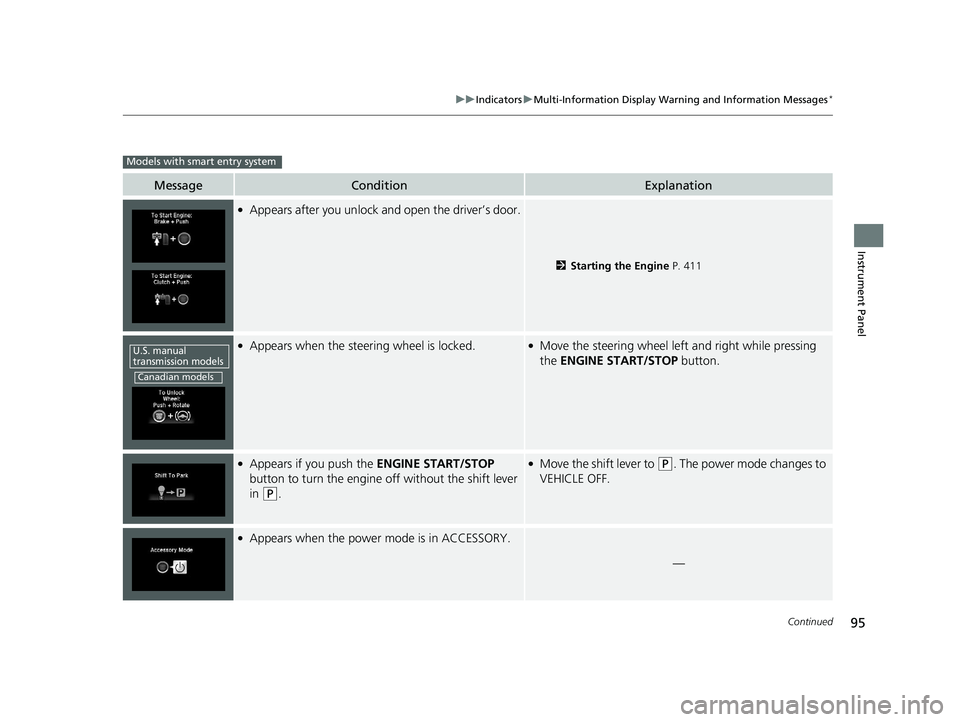
●Appears after you unlock and open the driver’s door.
2Starting the Engine P. 411
●Appears when the steering wheel is locked.●Move the steering wheel left and right while pressing
the ENGINE START/STOP button.
●Appears if you push the ENGINE START/STOP
button to turn the engine off without the shift lever
in
(P.
●Move the shift lever to (P. The power mode changes to
VEHICLE OFF.
●Appears when the power mode is in ACCESSORY.
—
Models with smart entry system
U.S. manual
transmission models
Canadian models
18 FIT JAZZ-31T5A6300.book 95 ページ 2018年6月29日 金曜日 午後4時11分
Page 98 of 599
96
uuIndicators uMulti-Information Display Warn ing and Information Messages*
Instrument Panel
MessageConditionExplanation
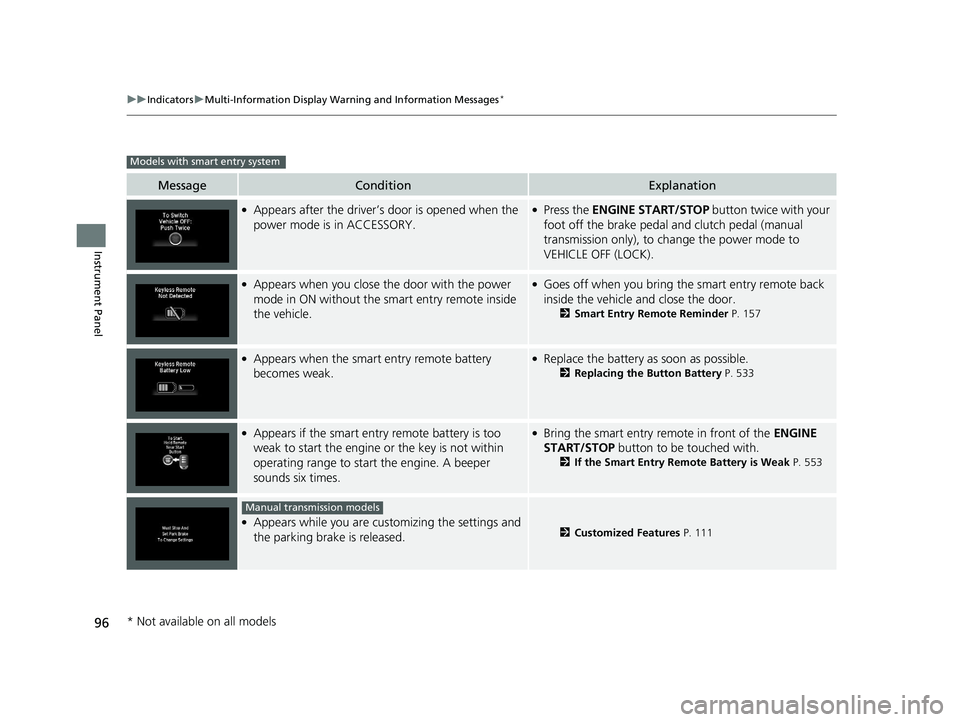
●Appears after the driver’s door is opened when the
power mode is in ACCESSORY.●Press the ENGINE START/STOP button twice with your
foot off the brake pedal and clutch pedal (manual
transmission only), to change the power mode to
VEHICLE OFF (LOCK).
●Appears when you close the door with the power
mode in ON without the smart entry remote inside
the vehicle.●Goes off when you bring the smart entry remote back
inside the vehicle and close the door.
2 Smart Entry Remote Reminder P. 157
●Appears when the smart entry remote battery
becomes weak.●Replace the battery as soon as possible.
2Replacing the Button Battery P. 533
●Appears if the smart entry remote battery is too
weak to start the engine or the key is not within
operating range to start the engine. A beeper
sounds six times.●Bring the smart entry remote in front of the ENGINE
START/STOP button to be touched with.
2If the Smart Entry Remote Battery is Weak P. 553
●Appears while you are customizing the settings and
the parking brake is released.2Customized Features P. 111
Models with smart entry system
Manual transmission models
* Not available on all models
18 FIT JAZZ-31T5A6300.book 96 ページ 2018年6月29日 金曜日 午後4時11分
Page 99 of 599
97
uuIndicators uMulti-Information Display Warn ing and Information Messages*
Continued
Instrument Panel
MessageConditionExplanation
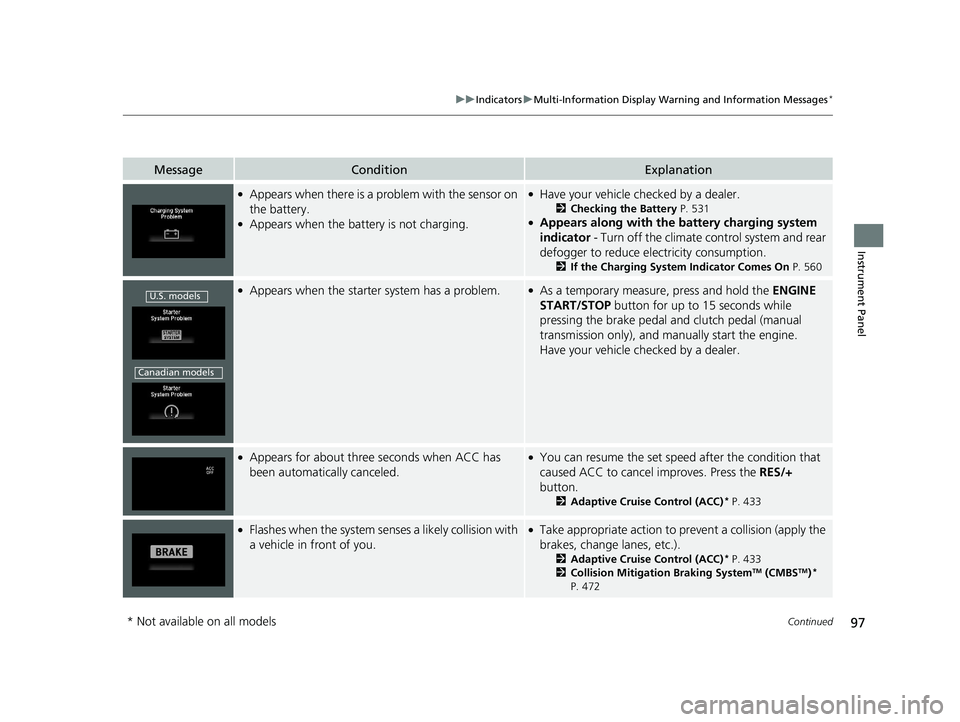
●Appears when there is a problem with the sensor on
the battery.
●Appears when the battery is not charging.
●Have your vehicle checked by a dealer.
2 Checking the Battery P. 531●Appears along with the ba ttery charging system
indicator - Turn off the climate control system and rear
defogger to reduce electricity consumption.
2 If the Charging System Indicator Comes On P. 560
●Appears when the starter system has a problem.●As a temporary measure, press and hold the ENGINE
START/STOP button for up to 15 seconds while
pressing the brake pedal and clutch pedal (manual
transmission only), and manually start the engine.
Have your vehicle checked by a dealer.
●Appears for about three seconds when ACC has
been automatically canceled.●You can resume the set speed after the condition that
caused ACC to cancel improves. Press the RES/+
button.
2 Adaptive Cruise Control (ACC)* P. 433
●Flashes when the system sens es a likely collision with
a vehicle in front of you.●Take appropriate action to pr event a collision (apply the
brakes, change lanes, etc.).
2Adaptive Cruise Control (ACC)* P. 433
2 Collision Mitigation Braking SystemTM (CMBSTM)*
P. 472
U.S. models
Canadian models
* Not available on all models
18 FIT JAZZ-31T5A6300.book 97 ページ 2018年6月29日 金曜日 午後4時11分
Page 113 of 599
Continued111
uuGauges and Displays uMulti-Information Display*
Instrument Panel
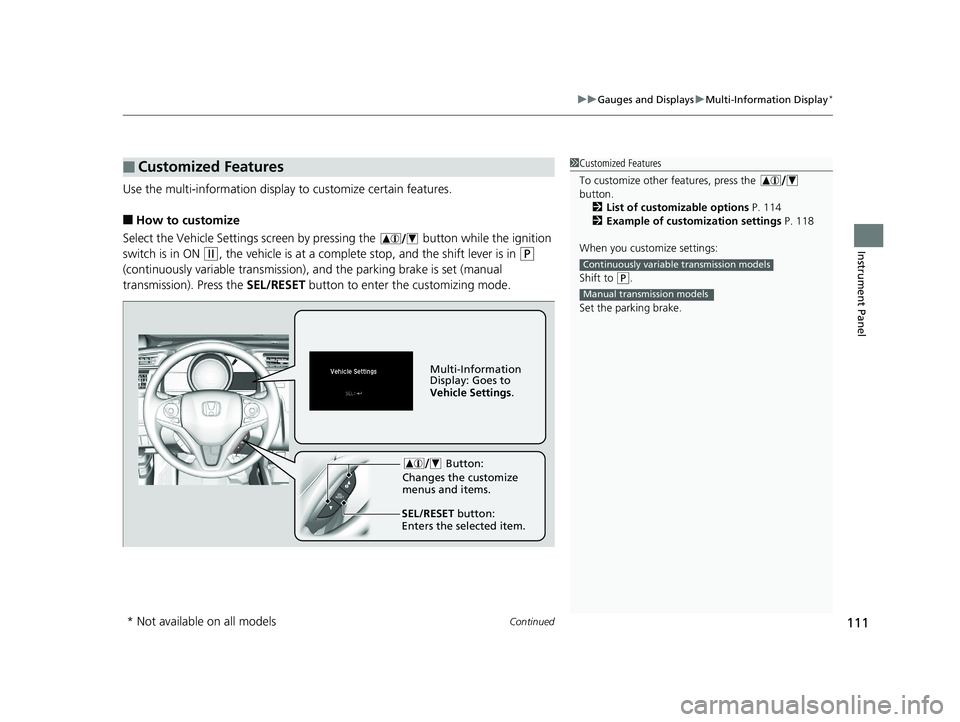
Use the multi-information display to customize certain features.
■How to customize
Select the Vehicle Settings screen by pressing the button while the ignition
switch is in ON
(w, the vehicle is at a complete stop, and the shift lever is in (P
(continuously variable transmission), and the parking brake is set (manual
transmission). Press the SEL/RESET button to enter the customizing mode.
■Customized Features1Customized Features
To customize other features, press the
button.
2 List of customizable options P. 114
2 Example of customization settings P. 118
When you customize settings:
Shift to
( P.
Set the parking brake.
Continuously variable transmission models
Manual transmission models
Button:
Changes the customize
menus and items.
Multi-Information
Display: Goes to
Vehicle Settings .
SEL/RESET button:
Enters the selected item.
* Not available on all models
18 FIT JAZZ-31T5A6300.book 111 ページ 2018年6月29日 金曜日 午後4時11分
Page 156 of 599
154
Controls
Operating the Switches Around the Steering Wheel
Ignition Switch
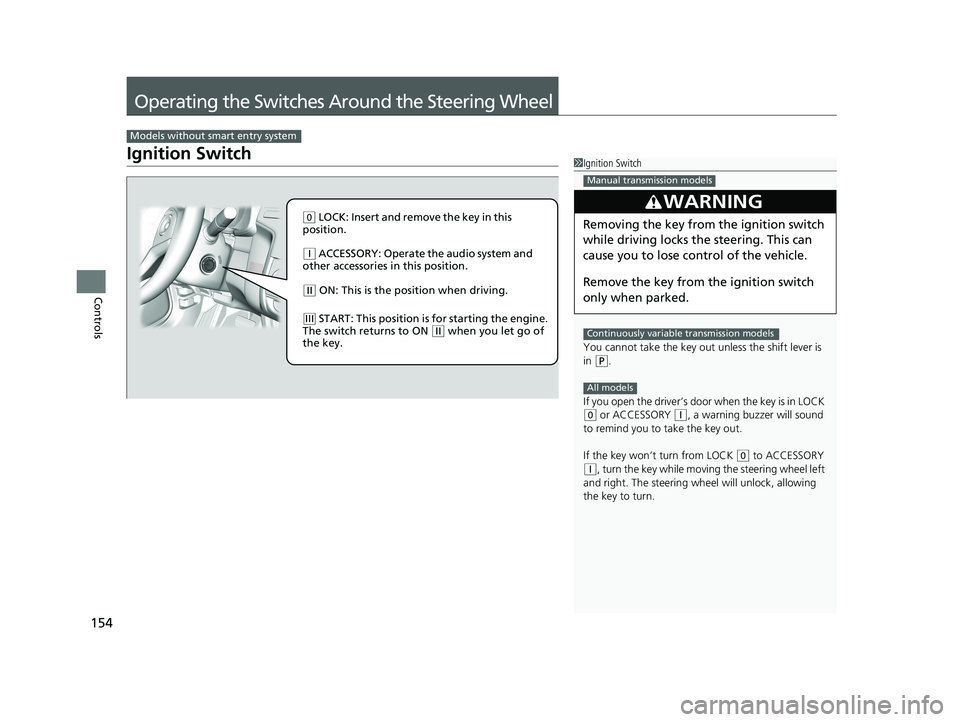
Models without smart entry system
1Ignition Switch
You cannot take the key out unless the shift lever is
in
( P.
If you open the driver’s door when the key is in LOCK
(0 or ACCESSORY ( q, a warning buzzer will sound
to remind you to take the key out.
If the key won’t turn from LOCK
( 0 to ACCESSORY (q, turn the key while moving the steering wheel left
and right. The steering wh eel will unlock, allowing
the key to turn.
3WARNING
Removing the key from the ignition switch
while driving locks the steering. This can
cause you to lose control of the vehicle.
Remove the key from the ignition switch
only when parked.
Manual transmission models
Continuously variable transmission models
All models
( 0 LOCK: Insert and remove the key in this
position.
( q ACCESSORY: Operate the audio system and
other accessories in this position.
( w ON: This is the position when driving.
(e START: This position is for starting the engine.
The switch returns to ON ( w when you let go of
the key.
18 FIT JAZZ-31T5A6300.book 154 ページ 2018年6月29日 金曜日 午後4時11分
Page 157 of 599
155
uuOperating the Switches Around the Steering Wheel uENGINE START/STOP Button
Continued
Controls
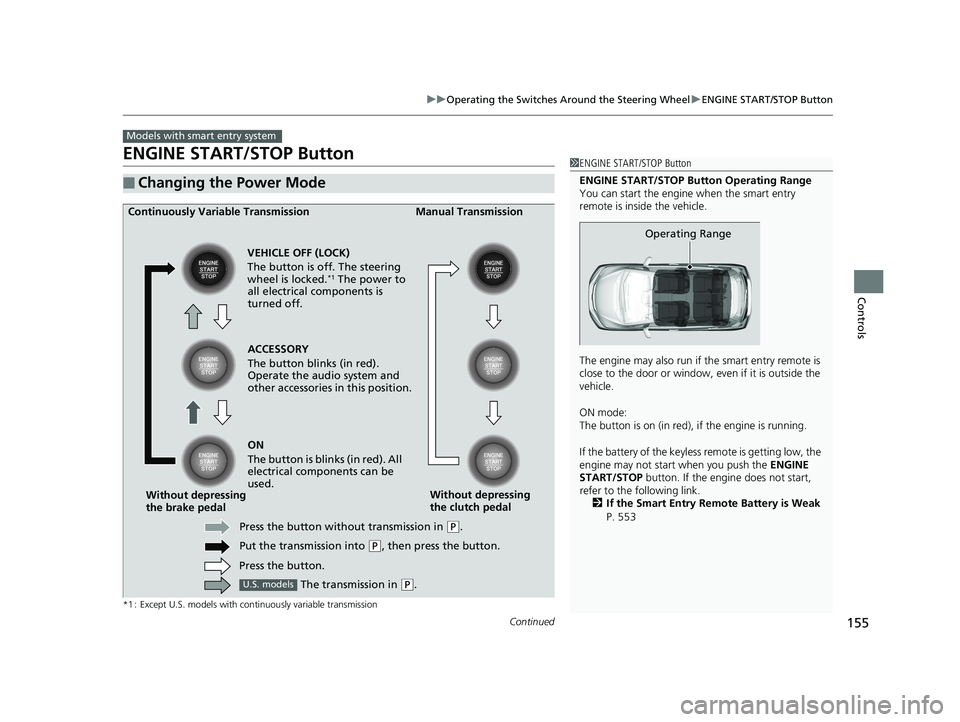
ENGINE START/STOP Button
*1 : Except U.S. models with continuously variable transmission
■Changing the Power Mode
Models with smart entry system
1ENGINE START/STOP Button
ENGINE START/STOP Button Operating Range
You can start the engine when the smart entry
remote is inside the vehicle.
The engine may also run if the smart entry remote is
close to the door or window, ev en if it is outside the
vehicle.
ON mode:
The button is on (in red), if the engine is running.
If the battery of the keyle ss remote is getting low, the
engine may not start when you push the ENGINE
START/STOP button. If the engi ne does not start,
refer to the following link. 2 If the Smart Entry Remote Battery is Weak
P. 553
Operating Range
ACCESSORY
The button blinks (in red).
Operate the audio system and
other accessories in this position.
Continuously Variable Transmission Manual Transmission
VEHICLE OFF (LOCK)
The button is off. The steering
wheel is locked.
*1 The power to
all electrical components is
turned off.
ON
The button is blinks (in red). All
electrical components can be
used.
Press the button without transmission in
( P.
Put the transmission into
( P, then press the button.
Press the button.
Without depressing
the brake pedal
Without depressing
the clutch pedal
The transmission in
( P.U.S. models
18 FIT JAZZ-31T5A6300.book 155 ページ 2018年6月29日 金曜日 午後4時11分