wipers HONDA FIT 2018 Owner's Manual (in English)
[x] Cancel search | Manufacturer: HONDA, Model Year: 2018, Model line: FIT, Model: HONDA FIT 2018Pages: 599, PDF Size: 42.24 MB
Page 7 of 599
5
Quick Reference Guide
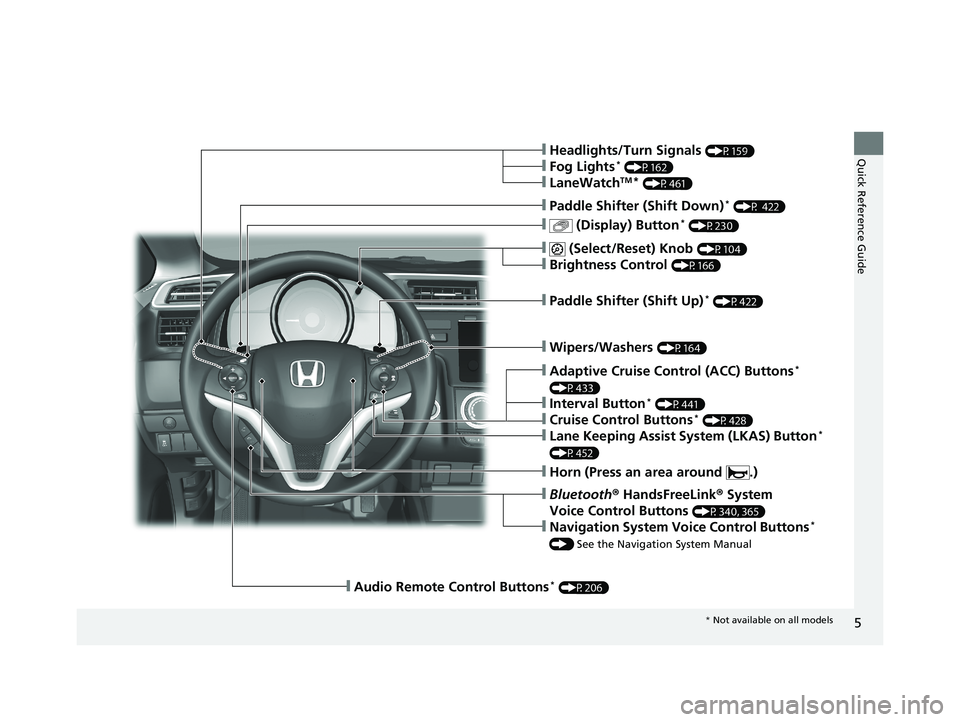
❙Wipers/Washers (P164)
❙Paddle Shifter (Shift Up)* (P422)
❙ (Select/Reset) Knob (P104)
❙Brightness Control (P166)
❙ (Display) Button* (P230)
❙Paddle Shifter (Shift Down)* (P 422)
❙Headlights/Turn Signals (P159)
❙Fog Lights* (P162)
❙LaneWatchTM* (P461)
❙Audio Remote Control Buttons* (P206)
❙Horn (Press an area around .)
❙Bluetooth® HandsFreeLink ® System
Voice Control Buttons
(P340, 365)
❙Navigation System Voice Control Buttons*
() See the Navigation System Manual
❙Adaptive Cruise Control (ACC) Buttons*
(P433)
❙Interval Button* (P441)
❙Cruise Control Buttons* (P428)
❙Lane Keeping Assist System (LKAS) Button*
(P452)
* Not available on all models
18 FIT JAZZ-31T5A6300.book 5 ページ 2018年6月29日 金曜日 午後4時11分
Page 10 of 599
Visual Index
8
Quick Reference Guide
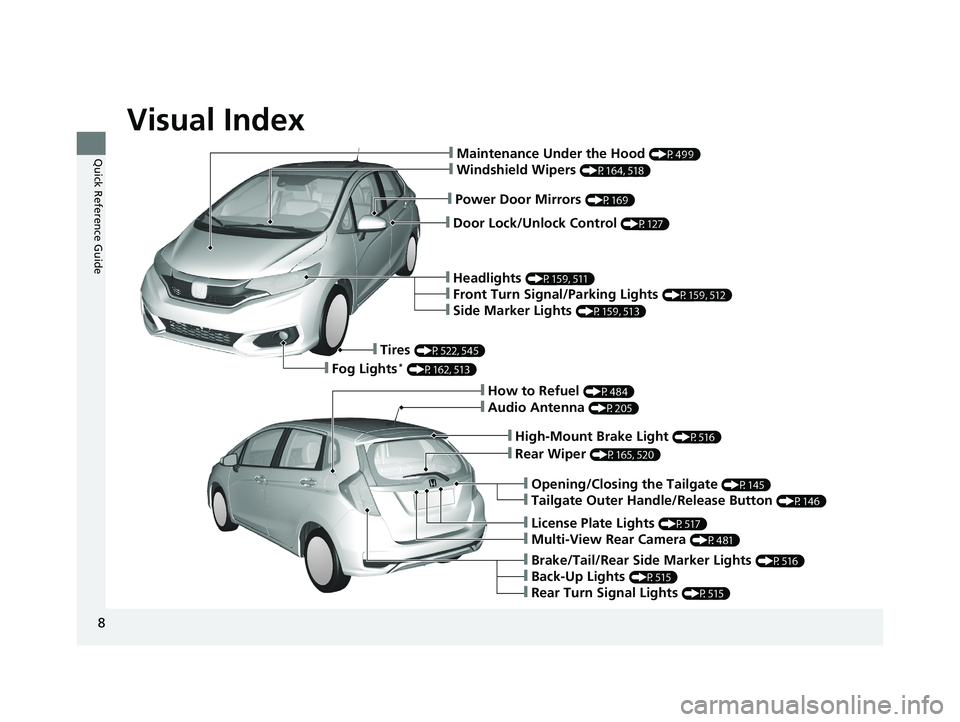
❙Door Lock/Unlock Control (P127)
❙Power Door Mirrors (P169)
❙Maintenance Under the Hood (P499)
❙Windshield Wipers (P164, 518)
❙Headlights (P159, 511)
❙Front Turn Signal/Parking Lights (P159, 512)
❙Side Marker Lights (P159, 513)
❙Tires (P522, 545)
❙Fog Lights* (P162, 513)
❙Audio Antenna (P205)
❙High-Mount Brake Light (P516)
❙Rear Wiper (P165, 520)
❙Opening/Closing the Tailgate (P145)
❙Tailgate Outer Handle/Release Button (P146)
❙License Plate Lights (P517)
❙Multi-View Rear Camera (P481)
❙Brake/Tail/Rear Side Marker Lights (P516)
❙Back-Up Lights (P515)
❙Rear Turn Signal Lights (P515)
❙How to Refuel (P484)
18 FIT JAZZ-31T5A6300.book 8 ページ 2018年6月29日 金曜日 午後4時11分
Page 16 of 599
14
Quick Reference Guide
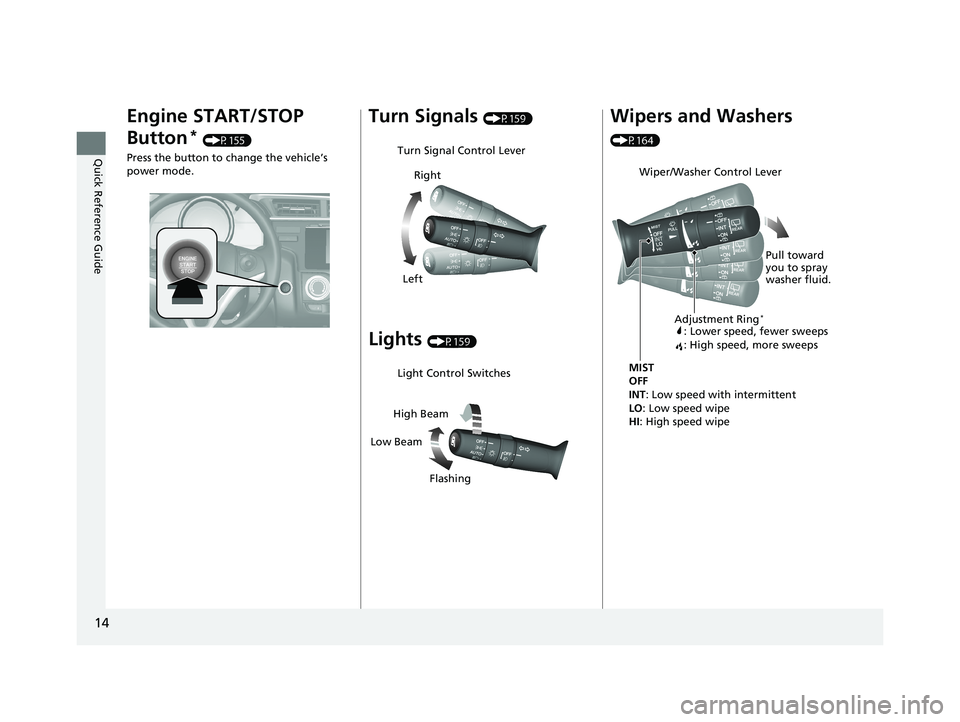
Engine START/STOP
Button
* (P155)
Press the button to change the vehicle’s
power mode.
Turn Signals (P159)
Lights (P159)
Turn Signal Control Lever
Right
Left
Light Control Switches
Low Beam High Beam
Flashing
Wipers and Washers
(P164)
Wiper/Washer Control Lever
MIST
OFF
INT: Low speed with intermittent
LO : Low speed wipe
HI: High speed wipe Pull toward
you to spray
washer fluid.
Adjustment Ring*
: Lower speed, fewer sweeps
: High speed, more sweeps
18 FIT JAZZ-31T5A6300.book 14 ページ 2018年6月29日 金曜日 午後4時11分
Page 123 of 599
121
Controls
This chapter explains how to operate the various controls necessary for driving.
Clock............................................................ 122
Locking and Unlocking the Doors Key Types and Functions ........................... 124
Low Smart Entry Remote Signal Strength*.....126Locking/Unlocking the Doors from the Outside ... 127
Locking/Unlocking the Doors from the Inside .....135
Childproof Door Locks .............................. 138
Auto Door Locking/Unlocking*................. 139
Opening and Closing the Tailgate ............ 145
Security System .......................................... 148
Immobilizer System ......... ..................... ..... 148
Security System Alarm ............................... 148
Opening and Closing the Windows .......... 151
Opening and Closing the Moonroof
*....... 153 Operating the Switches Around the Steering
Wheel
Ignition Switch.......................................... 154
ENGINE START/STOP Button ..................... 155
Ignition Switch and Power Mode Comparison ... 158Turn Signals .............................................. 159
Light Switches .......................................... 159
Fog Lights
*............................................... 162
Daytime Running Lights ............................ 163
Wipers and Washers ................................. 164
Brightness Control .................................... 166
Rear Defogger/Heated Door Mirror* Button ...... 167Adjusting the Steering Wheel ................... 168
Models without smart entry system
Models with smart entry system
Adjusting the Mirrors .................................169
Interior Rearview Mirror .............................169
Power Door Mirrors ...................................169
Adjusting the Seats .................................... 170
Front Seats ................................................170
Rear Seats .................................................174
Interior Lights/Interior Convenience Items....... 182Interior Lights ............................................182
Interior Convenience Items ........................184
Heating and Cooling System
*....................192
Using Vents, Heating and A/C*.................192
Climate Control System*............................195
Using Automatic Climate Control ..............195
Automatic Climate Control Sensors ...........199
* Not available on all models
18 FIT JAZZ-31T5A6300.book 121 ページ 2018年6月29日 金曜日 午後4時11分
Page 163 of 599
161
uuOperating the Switches Around the Steering Wheel uLight Switches
Controls
The headlights automatically come on when the wipers are used several times within
a certain number of intervals with the headlight switch in AUTO.
The headlights automatically go off a few mi nutes later if the wipers are stopped.
The headlights, all other exterior lights, and the instrument panel lights turn off 15
seconds after you remove the key or set the power mode to VEHICLE OFF (LOCK),
take the remote with you, and close the driver's door.
If you turn the igniti on switch to LOCK
(0*1 with the headlight switch on, but do
not open the door, the lights tu rn off after 10 minutes (3 minutes, if the switch is in
the AUTO position).
The lights turn on again when you unlock or open the driver's door. If you unlock
the door, but do not open it within 15 seconds, the lights go off. If you open the
driver's door, you will hear a lights on reminder chime.
*1 : Models with the smart entry system have an ENGINE START/STOP button instead of an ignition switch.
■Headlight Integration with Wipers*
■Automatic Lighting Off Feature
1Headlight Integration with Wipers*
This feature activates while the headlights are off in
AUTO .
The instrument panel br ightness does not change
when the headlights come on.
At dark ambient light leve ls, the automatic lighting
control feature turns on the headlights, regardless of
the number of wiper sweeps.
* Not available on all models
18 FIT JAZZ-31T5A6300.book 161 ページ 2018年6月29日 金曜日 午後4時11分
Page 166 of 599
164
uuOperating the Switches Around the Steering Wheel uWipers and Washers
Controls
Wipers and Washers
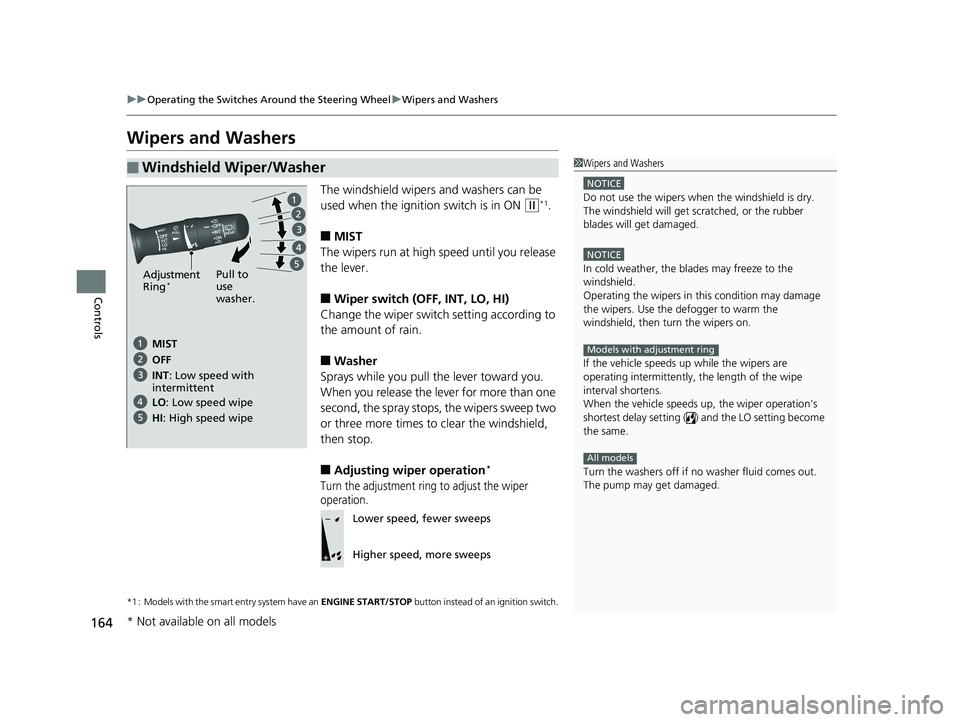
The windshield wipers and washers can be
used when the ignition switch is in ON
(w*1.
■MIST
The wipers run at high speed until you release
the lever.
■Wiper switch (OFF, INT, LO, HI)
Change the wiper switch setting according to
the amount of rain.
■Washer
Sprays while you pull the lever toward you.
When you release the lever for more than one
second, the spray stops, the wipers sweep two
or three more times to clear the windshield,
then stop.
■Adjusting wiper operation*
Turn the adjustment ring to adjust the wiper
operation.
*1 : Models with the smart entry system have an ENGINE START/STOP button instead of an ignition switch.
■Windshield Wiper/Washer1Wipers and Washers
NOTICE
Do not use the wipers when the windshield is dry.
The windshield will get sc ratched, or the rubber
blades will get damaged.
NOTICE
In cold weather, the blades may freeze to the
windshield.
Operating the wipers in th is condition may damage
the wipers. Use the defogger to warm the
windshield, then turn the wipers on.
If the vehicle speeds up while the wipers are
operating intermittently, the length of the wipe
interval shortens.
When the vehicle speeds up, the wiper operation’s
shortest delay setting ( ) and the LO setting become
the same.
Turn the washers off if no washer fluid comes out.
The pump may get damaged.
Models with adjustment ring
All models
Pull to
use
washer.
MIST
INT: Low speed with
intermittent OFF
LO : Low speed wipe
HI: High speed wipe
Adjustment
Ring*
Lower speed, fewer sweeps
Higher speed, more sweeps
* Not available on all models
18 FIT JAZZ-31T5A6300.book 164 ページ 2018年6月29日 金曜日 午後4時11分
Page 167 of 599
165
uuOperating the Switches Around the Steering Wheel uWipers and Washers
Controls
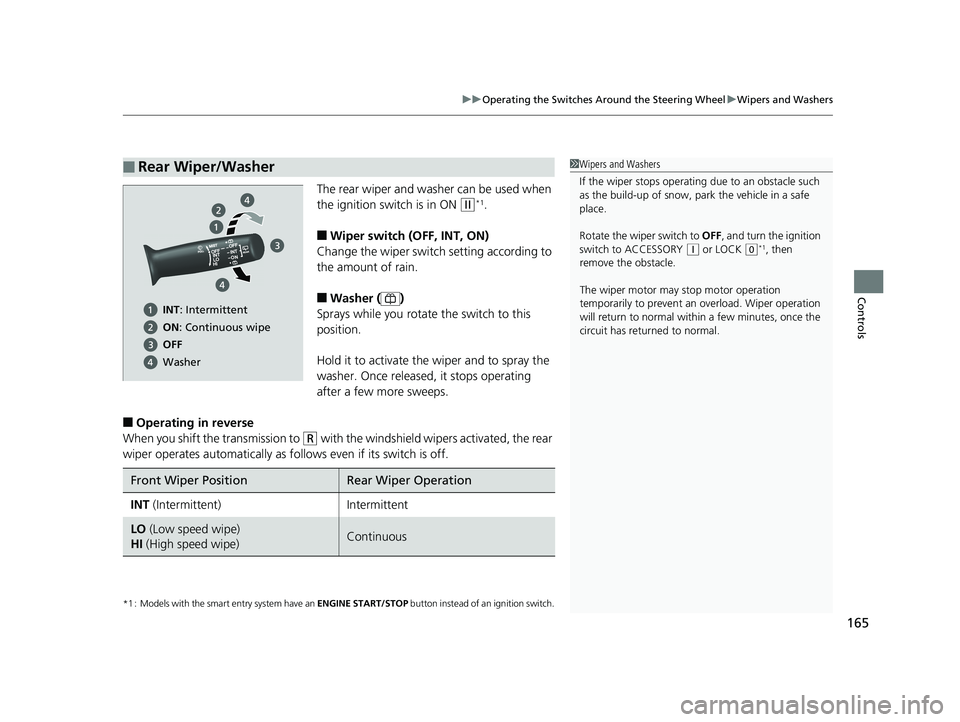
The rear wiper and washer can be used when
the ignition switch is in ON
(w*1.
■Wiper switch (OFF, INT, ON)
Change the wiper switch setting according to
the amount of rain.
■Washer ( )
Sprays while you rotate the switch to this
position.
Hold it to activate th e wiper and to spray the
washer. Once released , it stops operating
after a few more sweeps.
■Operating in reverse
When you shift the transmission to
(R with the windshield wipers activated, the rear
wiper operates automati cally as follows even if its switch is off.
*1 : Models with the smart entry system have an ENGINE START/STOP button instead of an ignition switch.
■Rear Wiper/Washer1Wipers and Washers
If the wiper stops operating due to an obstacle such
as the build-up of snow, pa rk the vehicle in a safe
place.
Rotate the wiper switch to OFF, and turn the ignition
switch to ACCESSORY
( q or LOCK (0*1, then
remove the obstacle.
The wiper motor may stop motor operation
temporarily to prevent an overload. Wiper operation
will return to normal within a few minutes, once the
circuit has returned to normal.
INT: Intermittent
ON : Continuous wipe
OFF
Washer
Front Wiper PositionRear Wiper Operation
INT (Intermittent)Intermittent
LO (Low speed wipe)
HI (High speed wipe)Continuous
18 FIT JAZZ-31T5A6300.book 165 ページ 2018年6月29日 金曜日 午後4時11分
Page 451 of 599
Continued449
uuWhen Driving uRoad Departure Mitigation (RDM) System*
Driving
The system becomes ready to start sear ching for lane markings when all the
following conditions are met:
• The vehicle is traveling between about 45 and 90 mph (72 and 145 km/h).
• The vehicle is on a straight or slightly curved road.
• The turn signals are off.
• The brake pedal is not depressed.
• The wipers are not in continuous operation.
• The vehicle is not accelera ting or braking, and the steering wheel is not being
turned.
• The system makes a determination that th e driver is not actively accelerating,
braking or steering.
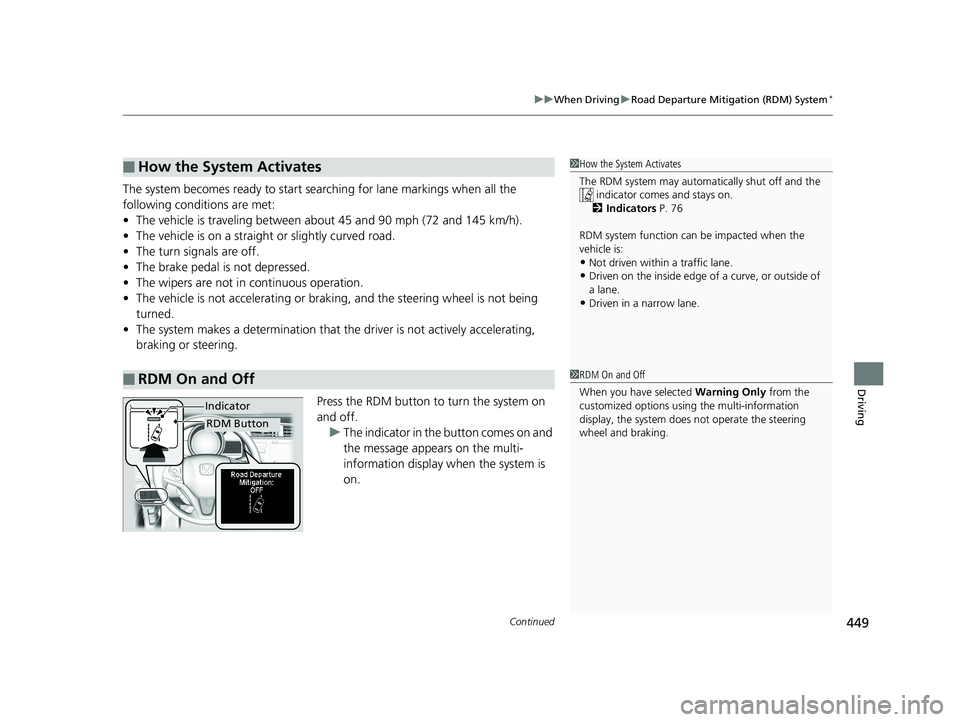
Press the RDM button to turn the system on
and off.u The indicator in the button comes on and
the message appears on the multi-
information display when the system is
on.
■How the System Activates
■RDM On and Off
1 How the System Activates
The RDM system may automa tically shut off and the
indicator comes and stays on.
2 Indicators P. 76
RDM system function can be impacted when the
vehicle is:
•Not driven within a traffic lane.
•Driven on the inside edge of a curve, or outside of
a lane.
•Driven in a narrow lane.
1 RDM On and Off
When you have selected Warning Only from the
customized options usi ng the multi-information
display, the system does not operate the steering
wheel and braking.
RDM Button
Indicator
18 FIT JAZZ-31T5A6300.book 449 ページ 2018年6月29日 金曜日 午後4時11分
Page 456 of 599
uuWhen Driving uLane Keeping Assist System (LKAS)*
454
Driving
The system can be used when the following conditions are met.
• The lane in which you are driving has dete ctable lane markers on both sides, and
your vehicle is in the center of the lane.
• The vehicle speed is between 45 and 90 mph (72 and 145 km/h).
• You are driving on a straight or slightly curved road.
• The turn signals are off.
• The brake pedal is not depressed.
• The wipers are not in continuous operation.
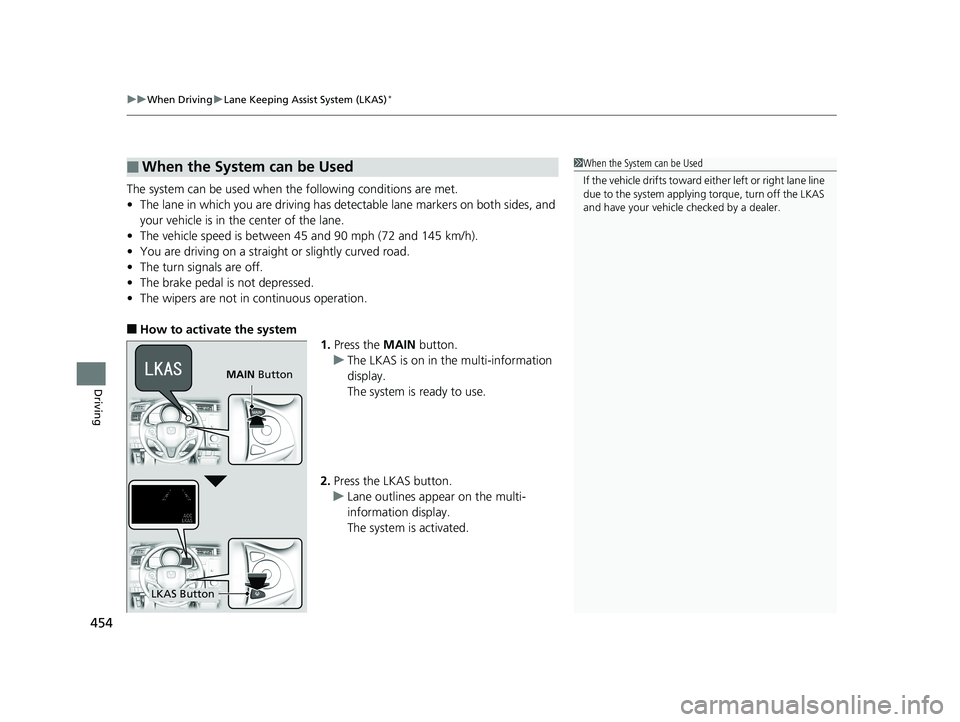
■How to activate the system
1.Press the MAIN button.
u The LKAS is on in the multi-information
display.
The system is ready to use.
2. Press the LKAS button.
u Lane outlines appear on the multi-
information display.
The system is activated.
■When the System can be Used1When the System can be Used
If the vehicle drifts toward ei ther left or right lane line
due to the system applying torque, turn off the LKAS
and have your vehicle checked by a dealer.
MAIN Button
LKAS Button
18 FIT JAZZ-31T5A6300.book 454 ページ 2018年6月29日 金曜日 午後4時11分
Page 458 of 599
456
uuWhen Driving uLane Keeping Assist System (LKAS)*
Driving
■The system operation is suspended if
you:
• Set the wipers to LO, HI or MIST to operate
continuously.
u Turning the wipers off resumes the
LKAS.
• Decrease the vehicle speed to 40 mph (64
km/h) or less.
u Increasing the vehicle speed to 45 mph (72
km/h) or more resumes the LKAS.
• Depress the brake pedal.
u The LKAS resumes and starts detecting
the lane lines again once you release the
brake pedal.
■The LKAS may automatically be suspended when:
• The system fails to detect lane lines.
• The steering wheel is quickly turned.
• You fail to steer the vehicle.
• The vehicle runs on a curved road over the speed limit.
• Driving through a sharp curve.
• Driving at a speed in excess of approximately 90 mph (145 km/h).
Once these conditions no longer exis t, the LKAS automatically resumes.
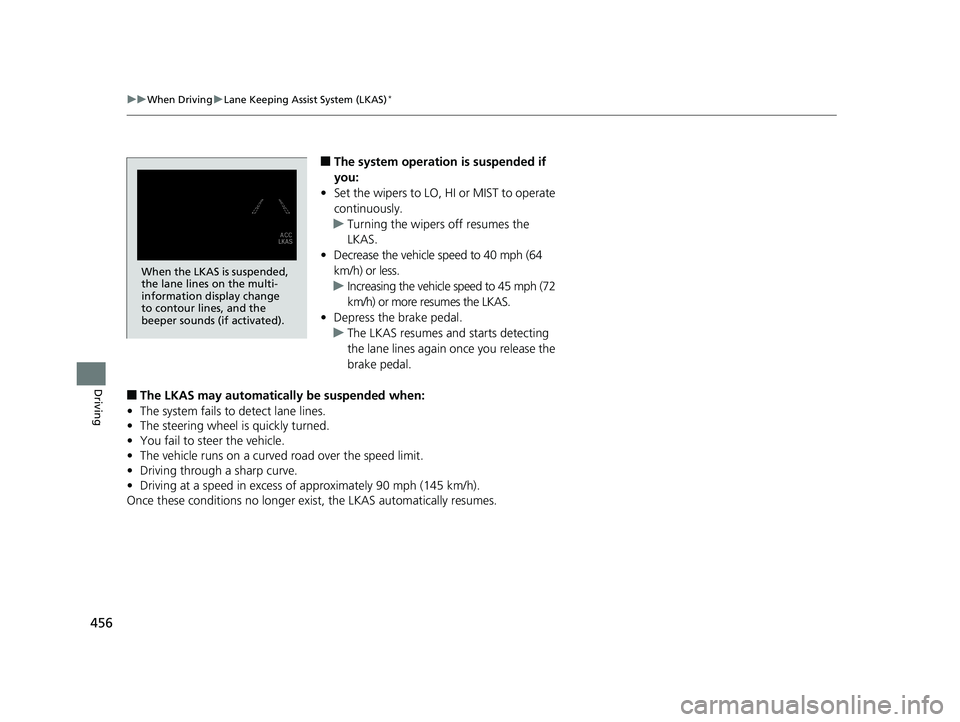
When the LKAS is suspended,
the lane lines on the multi-
information display change
to contour lines, and the
beeper sounds (if activated).
18 FIT JAZZ-31T5A6300.book 456 ページ 2018年6月29日 金曜日 午後4時11分