Start the car HONDA FIT 2019 Owner's Manual (in English)
[x] Cancel search | Manufacturer: HONDA, Model Year: 2019, Model line: FIT, Model: HONDA FIT 2019Pages: 599, PDF Size: 53.09 MB
Page 2 of 599
Event Data Recorders
This vehicle is equipped with an event data recorder (EDR).
The main purpose of an EDR is to record, in certain crash or near
crash-like situations, such as an air bag deployment or hitting a
road obstacle, data that will assi st in understanding how a vehicle’s
systems performed. The EDR is designed to record data related
to vehicle dynamics and safety systems for a short period of
time, typically 30 seconds or le ss. The EDR in this vehicle is
designed to record such data as:
• How various systems in your vehicle were operating;
• Whether or not the driver and passenger safety belts were
buckled/fastened;
3WARNING
California Proposition 65 Warning
Operating, servicing and maintaining a
passenger vehicle or off-highway motor
vehicle can expose you to chemicals including
engine exhaust, carbon monoxide,
phthalates, and lead, which are known to the
State of California to cause cancer and birth
defects or other reproductive harm. To
minimize exposure, avoid breathing exhaust,
do not idle the engine except as necessary,
service your vehicle in a well-ventilated area
and wear gloves or wash your hands
frequently when servicing your vehicle. For
more information go to
www.P65Warnings.ca.gov/passenger-vehicle.
• How far (if at all) the driver was depressing the accelerator
and/or brake pedal; and,
• How fast the vehicle was traveling.
These data can help provide a better understanding of the
circumstances in which crashes and injuries occur. NOTE: EDR data
are recorded by your vehicle only if a non-trivial crash situation
occurs; no data are recorded by the EDR under normal driving
conditions and no personal data (e.g., name, gender, age, and
crash location) are recorded. Howeve r, other parties, such as law
enforcement, could co mbine the EDR data with the type of
personally identifying data routinely acquired during a crash
investigation.
To read data recorded by an ED R, special equipment is required,
and access to the vehicle or the EDR is needed. In addition to the
vehicle manufacturer, other parties, such as law enforcement, that
have the special equipment, can re ad the information if they have
access to the vehicle or the EDR.
The data belongs to the vehicle ow ner and may not be accessed by
anyone else except as legally requ ired or with the permission of the
vehicle owner.
Service Diagnostic Recorders
This vehicle is equipped with serv ice-related devices that record
information about powertrain perform ance. The data can be used
to verify emissions law requirem ents and/or help technicians
diagnose and solve service problems. It may also be combined with
data from other sources for res earch purposes, but it remains
confidential. Some diagnostic and maintenance information is
uploaded to Honda upon vehicle start up.
19 FIT JAZZ-31T5A6400.book 0 ページ 2018年2月26日 月曜日 午後4時30分
Page 5 of 599
Contents
Child Safety P. 60Exhaust Gas Hazard P. 73Safety Labels P. 74
Opening and Closing the Tailgate P. 145 Security System P. 148
Opening and Closing the Moonroof* P. 153
Adjusting the Mirrors P. 174 Adjusting the Seats P. 175
Heating and Cooling System
* P. 197 Climate Control System* P. 200
Audio Error Messages P. 312General Information on the Audio System P. 317
When Driving P. 409 Braking P. 468Parking Your Vehicle P. 480
Refueling P. 483 Fuel Economy and CO
2 Emissions P. 486
Maintenance Under the Hood P. 499 Replacing Light Bulbs P. 511
Checking and Maintaining Tires P. 522 Battery P. 532 Remote Transmitter Care P. 534
Cleaning P. 537 Accessories and Modifications P. 542
Engine Does Not Start P. 552Jump Starting P. 555 Shift Lever Does Not Move P. 557
Emergency Towing P. 569 When You Cannot Open the Tailgate P. 570
Devices that Emit Radio Waves P. 577 Reporting Safety Defects P. 579
Authorized Manuals P. 584 Customer Service Information P. 585
Quick Reference GuideP. 4
Safe DrivingP. 31
Instrument PanelP. 75
ControlsP. 121
FeaturesP. 205
DrivingP. 399
MaintenanceP. 487
Handling the UnexpectedP. 543
InformationP. 573
IndexP. 587
19 FIT JAZZ-31T5A6400.book 3 ページ 2018年2月26日 月曜日 午後4時30分
Page 28 of 599
26
Quick Reference Guide
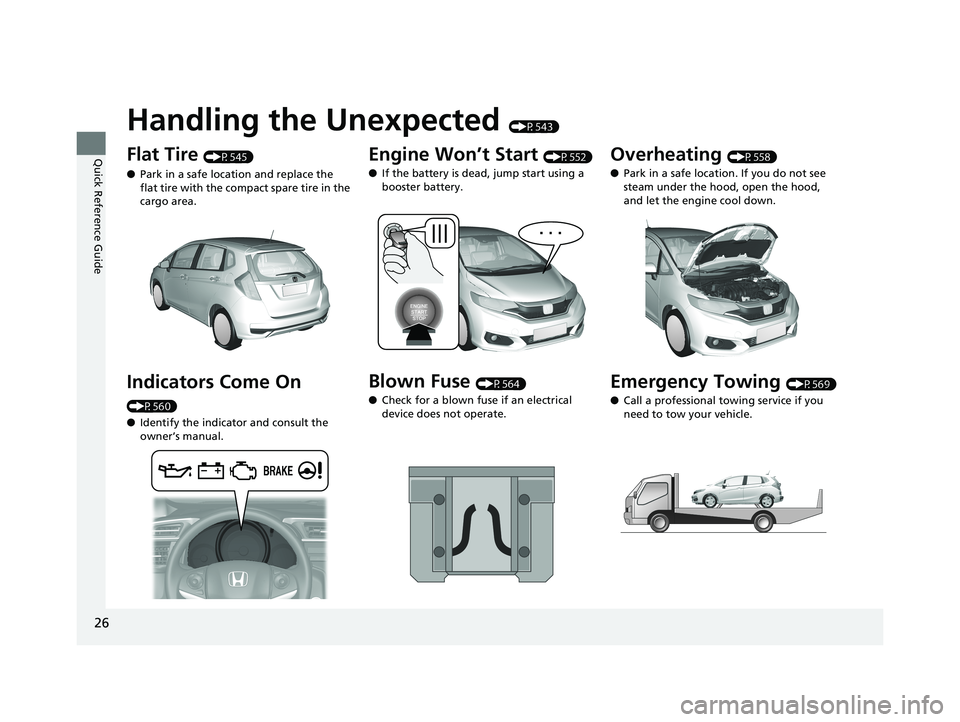
Handling the Unexpected (P543)
Flat Tire (P545)
● Park in a safe location and replace the
flat tire with the compact spare tire in the
cargo area.
Indicators Come On
(P560)
●Identify the indicator and consult the
owner’s manual.
Engine Won’t Start (P552)
● If the battery is dead, jump start using a
booster battery.
Blown Fuse (P564)
● Check for a blown fuse if an electrical
device does not operate.
Overheating (P558)
● Park in a safe location. If you do not see
steam under the hood, open the hood,
and let the engine cool down.
Emergency Towing (P569)
● Call a professional towing service if you
need to tow your vehicle.
19 FIT JAZZ-31T5A6400.book 26 ページ 2018年2月26日 月曜日 午後4時30分
Page 75 of 599
73
Safe Driving
Exhaust Gas Hazard
Carbon Monoxide Gas
The engine exhaust from this vehicle contains carbon monoxide, a colorless,
odorless, and highly toxic gas. As long as you properly maintain your vehicle, carbon
monoxide gas will not get into the interior.
■Have the exhaust system in spected for leaks whenever
• The exhaust system is making an unusual noise.
• The exhaust system may have been damaged.
• The vehicle is raised for an oil change.
When you operate a vehicle with the tailga te open, airflow can pull exhaust gas into
the interior and create a hazardous conditio n. If you must drive with the tailgate
open, open all the windows and set the heating and cooling system
*/climate control
system* as shown below.
1. Select the fresh air mode.
2. Select the mode.
3. Set the fan speed to high.
4. Set the temperature control to a comfortable setting.
Adjust the heating and cooling system
*/climate control system* in the same manner
if you sit in your parked vehicle with the engine running.
1 Carbon Monoxide Gas
An enclosed area such as a garage can quickly fill up
with carbon monoxide gas.
Do not run the engine with the garage door closed.
Even when the garage door is open, drive out of the
garage immediat ely after starting the engine.
3WARNING
Carbon monoxide gas is toxic.
Breathing it can cause unconsciousness and
even kill you.
Avoid any enclosed areas or activities that
expose you to carbon monoxide.
* Not available on all models
19 FIT JAZZ-31T5A6400.book 73 ページ 2018年2月26日 月曜日 午後4時30分
Page 128 of 599
126
uuLocking and Unlocking the Doors uLow Smart Entry Remote Signal Strength*
Controls
Low Smart Entry Remo te Signal Strength*
The vehicle transmits radio waves to loca te the smart entry remote when locking/
unlocking the doors and tailgate, or to start the engine.
In the following cases, locking/unlocking the doors and tailgate, or starting the
engine may be inhibited or operation may be unstable:
• Strong radio waves are being tra nsmitted by nearby equipment.
• You are carrying the smart entry remote together with telecommunications
equipment, laptop computers, ce ll phones, or wireless devices.
• A metallic object is touching or covering the smart entry remote.1Low Smart Entry Remote Signal Strength*
Communication between the smart entry remote and
the vehicle consumes the smart entry remote’s
battery.
Battery life is about two years, but this varies
depending on re gularity of use.
The battery is consumed whenever the smart entry
remote is receivi ng strong radio wave s. Avoid placing
it near electrical appliances such as televisions and
personal computers.
* Not available on all models
19 FIT JAZZ-31T5A6400.book 126 ページ 2018年2月26日 月曜日 午後4時30分
Page 129 of 599
127
uuLocking and Unlocking the Doors uLocking/Unlocking the Doors from the Outside
Continued
Controls
Locking/Unlocking the Doors from the Outside
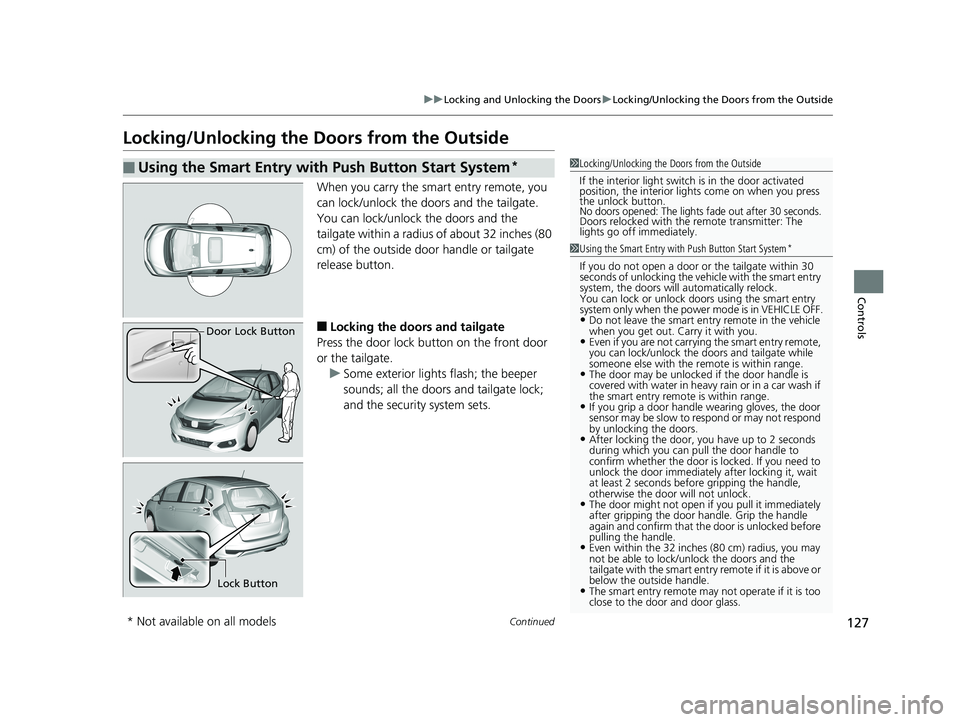
When you carry the sm art entry remote, you
can lock/unlock the doors and the tailgate.
You can lock/unlock the doors and the
tailgate within a radius of about 32 inches (80
cm) of the outside door handle or tailgate
release button.
■Locking the doors and tailgate
Press the door lock button on the front door
or the tailgate. u Some exterior lights flash; the beeper
sounds; all the doors and tailgate lock;
and the security system sets.
■Using the Smart Entry with Push Button Start System*1Locking/Unlocking the Doors from the Outside
If the interior light switch is in the door activated
position, the interior light s come on when you press
the unlock button.
No doors opened: The lights fade out after 30 seconds.Doors relocked with the remote transmitter: The
lights go off immediately.
1 Using the Smart Entry with Push Button Start System*
If you do not open a door or the tailgate within 30
seconds of unlocking the vehicle with the smart entry
system, the doors will automatically relock.
You can lock or unlock doors using the smart entry
system only when the power mode is in VEHICLE OFF.
•Do not leave the smart entry remote in the vehicle
when you get out. Carry it with you.
•Even if you are not carrying the smart entry remote,
you can lock/unlock the doors and tailgate while
someone else with the remote is within range.
•The door may be unlocked if the door handle is
covered with water in heavy rain or in a car wash if
the smart entry remote is within range.
•If you grip a door handle wearing gloves, the door
sensor may be slow to respond or may not respond
by unlocking the doors.
•After locking the door, you have up to 2 seconds
during which you can pull the door handle to
confirm whether the door is locked. If you need to
unlock the door immediately after locking it, wait
at least 2 seconds befo re gripping the handle,
otherwise the door will not unlock.
•The door might not open if you pull it immediately
after gripping the door handle. Grip the handle
again and confirm that th e door is unlocked before
pulling the handle.
•Even within the 32 inches (80 cm) radius, you may
not be able to lock/unlock the doors and the
tailgate with the smart entry remote if it is above or
below the outside handle.
•The smart entry remote may not operate if it is too
close to the door and door glass.
Door Lock Button
Lock Button
* Not available on all models
19 FIT JAZZ-31T5A6400.book 127 ページ 2018年2月26日 月曜日 午後4時30分
Page 167 of 599
Continued165
uuOperating the Switches Around the Steering Wheel uAuto High-Beam*
Controls
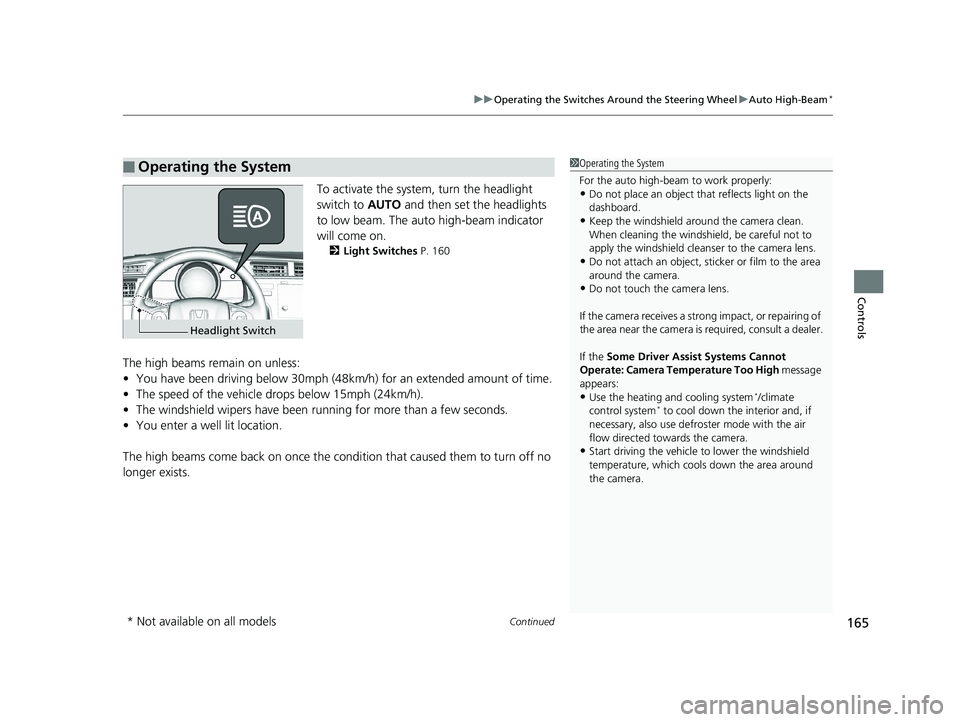
To activate the system , turn the headlight
switch to AUTO and then set the headlights
to low beam. The auto high-beam indicator
will come on.
2 Light Switches P. 160
The high beams remain on unless:
•You have been driving below 30mph (48km/h) for an extended amount of time.
• The speed of the vehicle drops below 15mph (24km/h).
• The windshield wipers have been ru nning for more than a few seconds.
• You enter a well lit location.
The high beams come back on once the condi tion that caused them to turn off no
longer exists.
■Operating the System1 Operating the System
For the auto high-beam to work properly:
•Do not place an object that reflects light on the
dashboard.
•Keep the windshield around the camera clean.
When cleaning the windshield, be careful not to
apply the windshield cleans er to the camera lens.
•Do not attach an object, sticker or film to the area
around the camera.
•Do not touch the camera lens.
If the camera receives a st rong impact, or repairing of
the area near the camera is required, consult a dealer.
If the Some Driver Assist Systems Cannot
Operate: Camera Temperature Too High message
appears:
•Use the heating and cooling system*/climate
control system* to cool down the interior and, if
necessary, also use defr oster mode with the air
flow directed towards the camera.
•Start driving the vehicle to lower the windshield
temperature, which cool s down the area around
the camera.
Headlight Switch
* Not available on all models
19 FIT JAZZ-31T5A6400.book 165 ページ 2018年2月26日 月曜日 午後4時30分
Page 174 of 599
172
uuOperating the Switches Around the Steering Wheel uRear Defogger/Heated Door Mirror* Button
Controls
Rear Defogger/Heated Door Mirror* Button
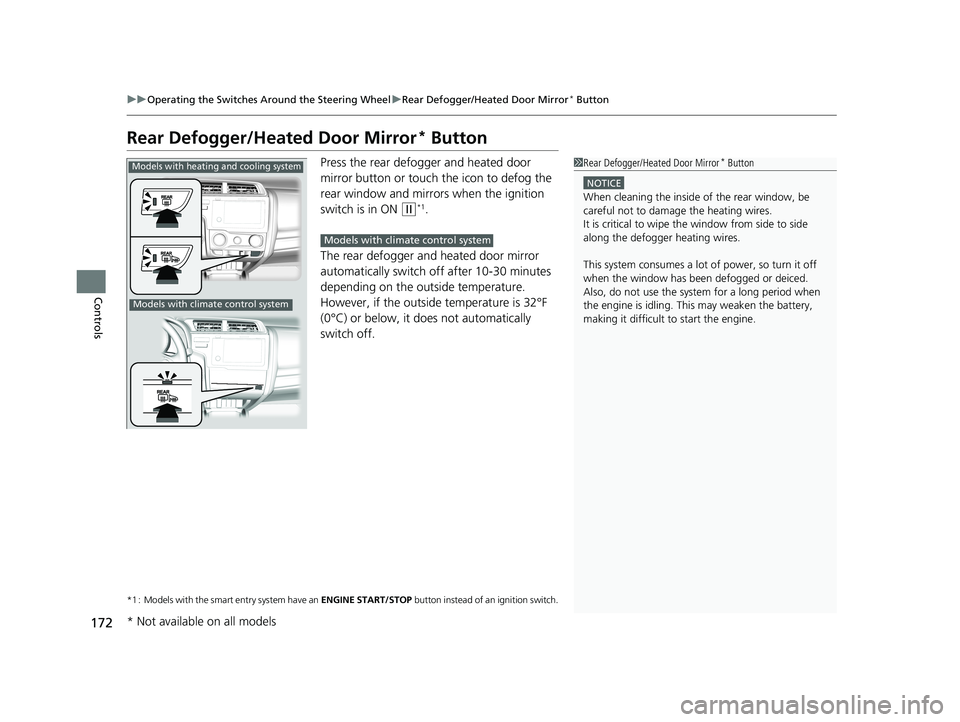
Press the rear defogger and heated door
mirror button or touch the icon to defog the
rear window and mirrors when the ignition
switch is in ON
(w*1.
The rear defogger and heated door mirror
automatically switch off after 10-30 minutes
depending on the outside temperature.
However, if the outside temperature is 32°F
(0°C) or below, it does not automatically
switch off.
*1 : Models with the smart entry system have an ENGINE START/STOP button instead of an ignition switch.
1Rear Defogger/Heated Door Mirror* Button
NOTICE
When cleaning the inside of the rear window, be
careful not to damage the heating wires.
It is critical to wipe the window from side to side
along the defogger heating wires.
This system consumes a lot of power, so turn it off
when the window has been defogged or deiced.
Also, do not use the system for a long period when
the engine is idling. This may weaken the battery,
making it difficult to start the engine.
Models with heating and cooling system
Models with climate control system
Models with climate control system
* Not available on all models
19 FIT JAZZ-31T5A6400.book 172 ページ 2018年2月26日 月曜日 午後4時30分
Page 209 of 599
207
uuAudio System uUSB Port(s)
Features
USB Port(s)
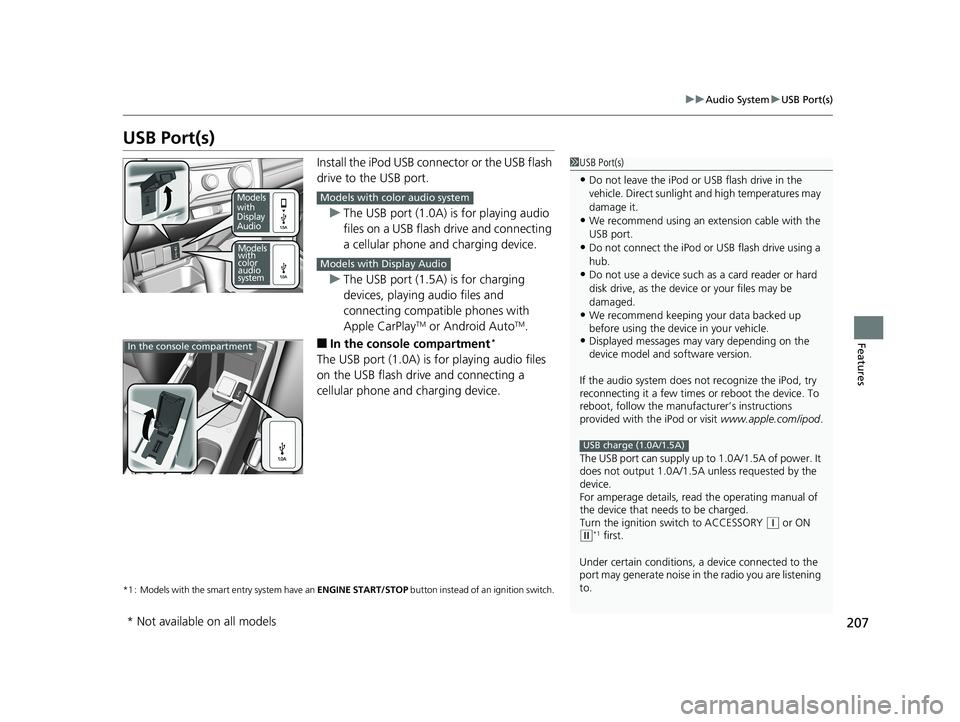
Install the iPod USB connector or the USB flash
drive to the USB port.
u The USB port (1.0A) is for playing audio
files on a USB flash drive and connecting
a cellular phone and charging device.
u The USB port (1.5A) is for charging
devices, playing audio files and
connecting compatib le phones with
Apple CarPlay
TM or Android AutoTM.
■In the consol e compartment*
The USB port (1.0A) is for playing audio files
on the USB flash drive and connecting a
cellular phone and charging device.
*1 : Models with the smart entry system have an ENGINE START/STOP button instead of an ignition switch.
1USB Port(s)
•Do not leave the iPod or USB flash drive in the
vehicle. Direct sunlight and high temperatures may
damage it.
•We recommend using an ex tension cable with the
USB port.
•Do not connect the iPod or USB flash drive using a
hub.
•Do not use a device such as a card reader or hard
disk drive, as the device or your files may be
damaged.
•We recommend k eeping your data backed up
before using the device in your vehicle.
•Displayed messages may vary depending on the
device model and software version.
If the audio system does not recognize the iPod, try
reconnecting it a few times or reboot the device. To
reboot, follow the manufac turer’s instructions
provided with the iPod or visit www.apple.com/ipod.
The USB port can supply up to 1.0A/1.5A of power. It
does not output 1.0A/1.5A unless requested by the
device.
For amperage details, read the operating manual of
the device that ne eds to be charged.
Turn the ignition switch to ACCESSORY
( q or ON (w*1 first.
Under certain condi tions, a device connected to the
port may generate noise in the radio you are listening
to.
USB charge (1.0A/1.5A)
Models
with
Display
Audio
Models
with
color
audio
system
Models with color audio system
Models with Display Audio
In the console compartment
* Not available on all models
19 FIT JAZZ-31T5A6400.book 207 ページ 2018年2月26日 月曜日 午後4時30分
Page 255 of 599
253
uuAudio System Basic Operation uVoice Control Operation
Continued
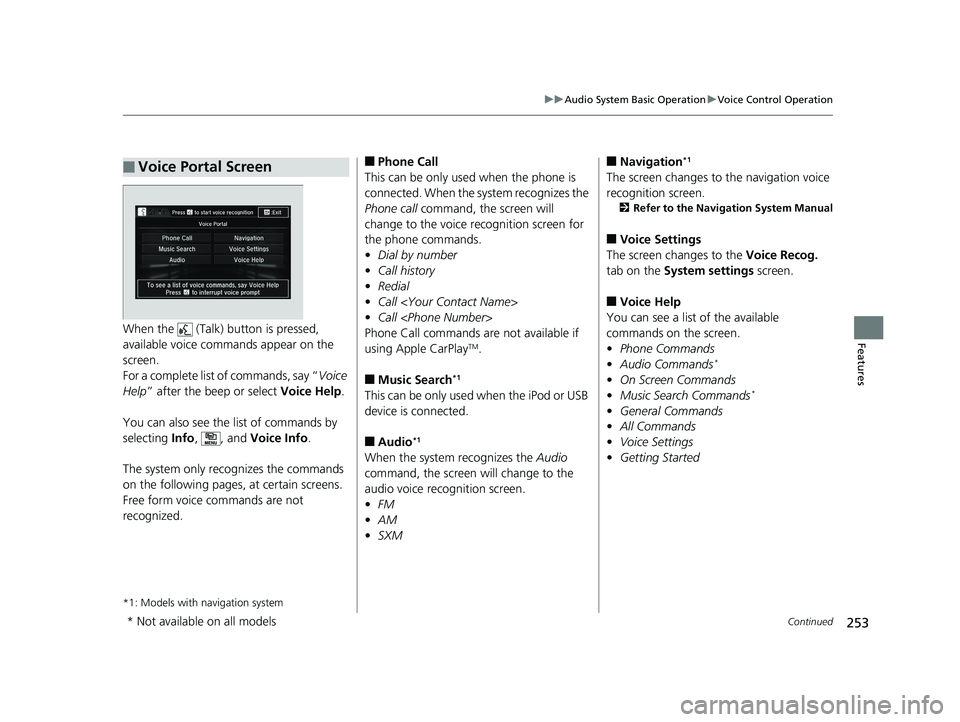
FeaturesWhen the (Talk) button is pressed,
available voice comma nds appear on the
screen.
For a complete list of commands, say “ Voice
Help ” after the beep or select Voice Help.
You can also see the list of commands by
selecting Info, , and Voice Info .
The system only recognizes the commands
on the following pages, at certain screens.
Free form voice commands are not
recognized.
*1: Models with navigation system
■Voice Portal Screen■Phone Call
This can be only used when the phone is
connected. When the sy stem recognizes the
Phone call command, the screen will
change to the voice re cognition screen for
the phone commands.
• Dial by number
• Call history
• Redial
• Call
• Call
Phone Call commands are not available if
using Apple CarPlay
TM.
■Music Search*1
This can be only used when the iPod or USB
device is connected.
■Audio*1
When the system recognizes the Audio
command, the screen will change to the
audio voice recognition screen.
• FM
• AM
• SXM
■Navigation*1
The screen changes to the navigation voice
recognition screen.
2 Refer to the Navigation System Manual
■Voice Settings
The screen changes to the Voice Recog.
tab on the System settings screen.
■Voice Help
You can see a list of the available
commands on the screen.
• Phone Commands
• Audio Commands
*
•On Screen Commands
• Music Search Commands*
•General Commands
• All Commands
• Voice Settings
• Getting Started
* Not available on all models
19 FIT JAZZ-31T5A6400.book 253 ページ 2018年2月26日 月曜日 午後4時30分