camera cover HONDA FIT 2019 Owner's Manual (in English)
[x] Cancel search | Manufacturer: HONDA, Model Year: 2019, Model line: FIT, Model: HONDA FIT 2019Pages: 599, PDF Size: 53.09 MB
Page 4 of 599
Contents
This owner’s manual should be considered a permanent part of the
vehicle and should remain with the vehicle when it is sold.
This owner’s manual covers all models of your vehicle. You may find
descriptions of equipment and features that are not on your
particular model.
Images throughout this owner’s manual (including the front cover)
represent features and equipment that are available on some, but
not all, models. Your particular mo del may not have some of these
features.
This owner’s manual is for vehicles sold in the United States and
Canada.
The information and specifications in cluded in this publication were
in effect at the time of approval for printing. Honda Motor Co., Ltd.
reserves the right, however, to discontinue or change specifications
or design at any time without notice and without incurring any
obligation.2 Safe Driving P. 31
For Safe Driving P. 32 Seat Belts P. 36 Airbags P. 46
2Instrument Panel P. 75
Indicators P. 76 Gauges and Displays P. 103
2Controls P. 121
Clock P. 122 Locking and Unlocking the Doors P. 124
Opening and Closing the Windows P. 151
Operating the Switches Around the Steering Wheel P. 154
Interior Lights/Interior Convenience Items P. 187
2 Features P. 205
Audio System P. 206 Audio System Basic Operation P. 212, 233
Customized Features P. 321, 328 Bluetooth® HandsFreeLink ® P. 343, 368
2 Driving P. 399
Before Driving P. 400 Towing a Trailer P. 405
Multi-View Rear Camera P. 481
2Maintenance P. 487
Before Performing Maintenance P. 488 Maintenance MinderTM P. 491
Checking and Maintaining Wiper Blades P. 518
Heating and Cooling System
*/Climate Control System* Maintenance P. 536
2 Handling the Unexpected P. 543
Tools P. 544 If a Tire Goes Flat P. 545
Overheating P. 558 Indicator, Coming On/Blinking P. 560 Fuses P. 564
2 Information P. 573
Specifications P. 574 Identification Numbers P. 576
Emissions Testing P. 580 Warranty Coverages P. 582
19 FIT JAZZ-31T5A6400.book 2 ページ 2018年2月26日 月曜日 午後4時30分
Page 90 of 599
88
uuIndicators u
Instrument Panel
*1:Models with the smart entry system have an ENGINE START/STOP button instead of an ignition switch.
IndicatorNameOn/BlinkingExplanationMessage*
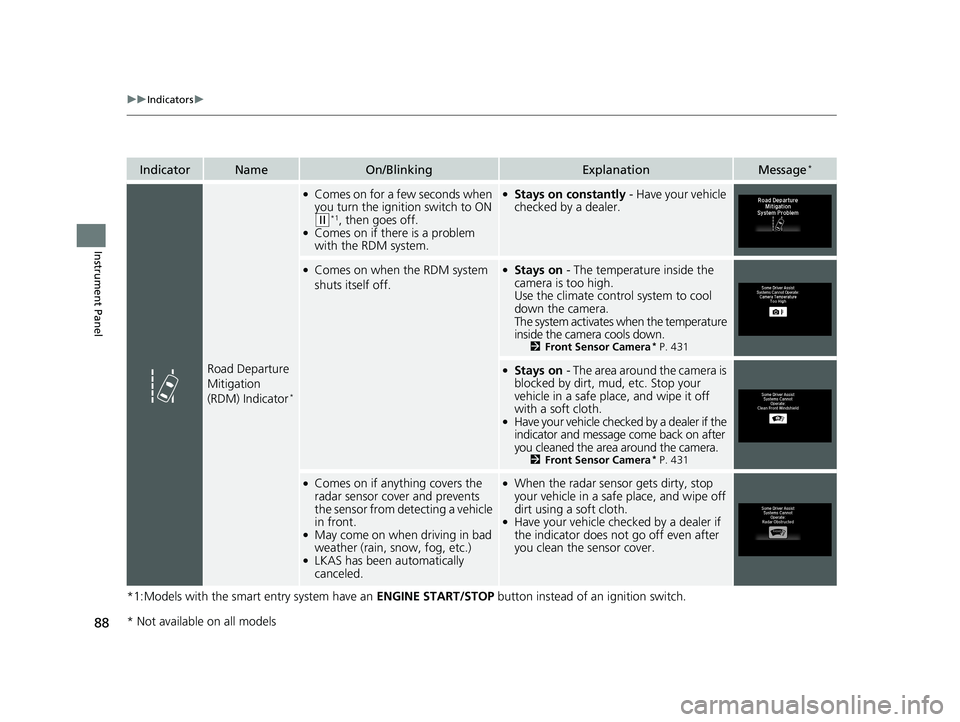
Road Departure
Mitigation
(RDM) Indicator
*
●Comes on for a few seconds when
you turn the ignition switch to ON
(w*1, then goes off.●Comes on if there is a problem
with the RDM system.
●Stays on constantly - Have your vehicle
checked by a dealer.
●Comes on when the RDM system
shuts itself off.●Stays on - The temperature inside the
camera is too high.
Use the climate control system to cool
down the camera.
The system activates when the temperature
inside the camera cools down.
2 Front Sensor Camera* P. 431
●Stays on - The area around the camera is
blocked by dirt, mud, etc. Stop your
vehicle in a safe place, and wipe it off
with a soft cloth.
●Have your vehicle checked by a dealer if the
indicator and message come back on after
you cleaned the area around the camera.
2 Front Sensor Camera* P. 431
●Comes on if anything covers the
radar sensor cover and prevents
the sensor from detecting a vehicle
in front.
●May come on when driving in bad
weather (rain, snow, fog, etc.)
●LKAS has been automatically
canceled.
●When the radar sensor gets dirty, stop
your vehicle in a safe place, and wipe off
dirt using a soft cloth.
●Have your vehicle checked by a dealer if
the indicator does not go off even after
you clean the sensor cover.
* Not available on all models
19 FIT JAZZ-31T5A6400.book 88 ページ 2018年2月26日 月曜日 午後4時30分
Page 92 of 599
90
uuIndicators u
Instrument Panel
*1:Models with the smart entry system have an ENGINE START/STOP button instead of an ignition switch.
IndicatorNameOn/BlinkingExplanationMessage*
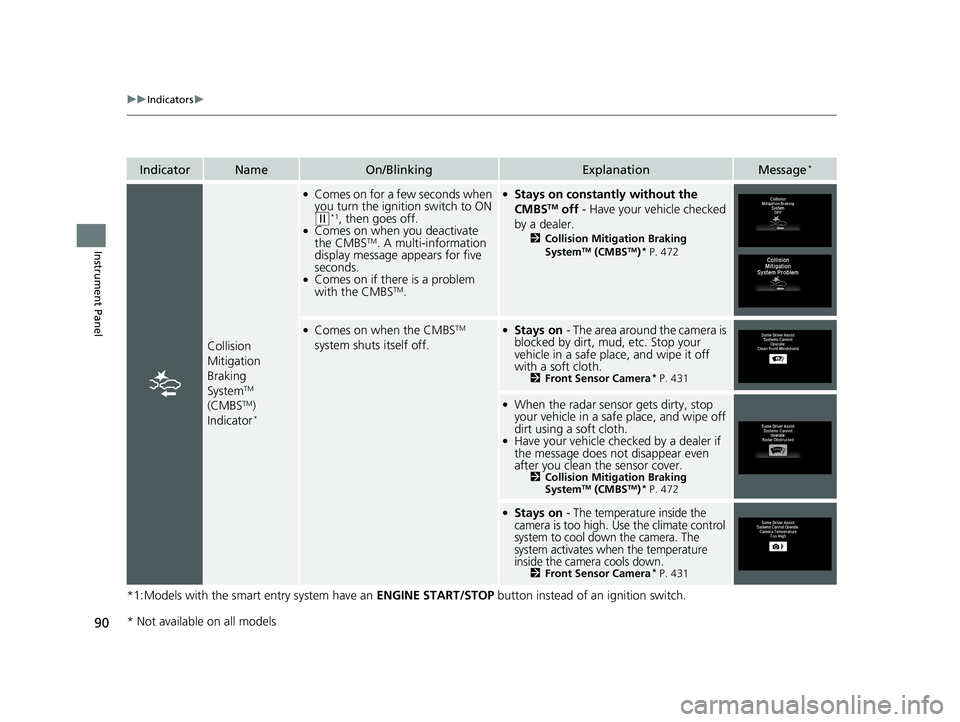
Collision
Mitigation
Braking
System
TM
(CMBSTM)
Indicator*
●Comes on for a few seconds when
you turn the ignition switch to ON
(w*1, then goes off.●Comes on when you deactivate
the CMBSTM. A multi-information
display message appears for five
seconds.
●Comes on if there is a problem
with the CMBSTM.
●Stays on constantly without the
CMBSTM off - Have your vehicle checked
by a dealer.
2 Collision Mitigation Braking
SystemTM (CMBSTM)* P. 472
●Comes on when the CMBSTM
system shuts itself off.●Stays on - The area around the camera is
blocked by dirt, mud, etc. Stop your
vehicle in a safe place, and wipe it off
with a soft cloth.
2 Front Sensor Camera* P. 431
●When the radar sensor gets dirty, stop
your vehicle in a safe place, and wipe off
dirt using a soft cloth.
●Have your vehicle checked by a dealer if
the message does not disappear even
after you clean the sensor cover.
2Collision Mitigation Braking
SystemTM (CMBSTM)* P. 472
●Stays on - The temperature inside the
camera is too high. Use the climate control
system to cool down the camera. The
system activates when the temperature
inside the camera cools down.
2 Front Sensor Camera* P. 431
* Not available on all models
19 FIT JAZZ-31T5A6400.book 90 ページ 2018年2月26日 月曜日 午後4時30分
Page 99 of 599
97
uuIndicators uMulti-Information Display Warn ing and Information Messages*
Continued
Instrument Panel
MessageConditionExplanation
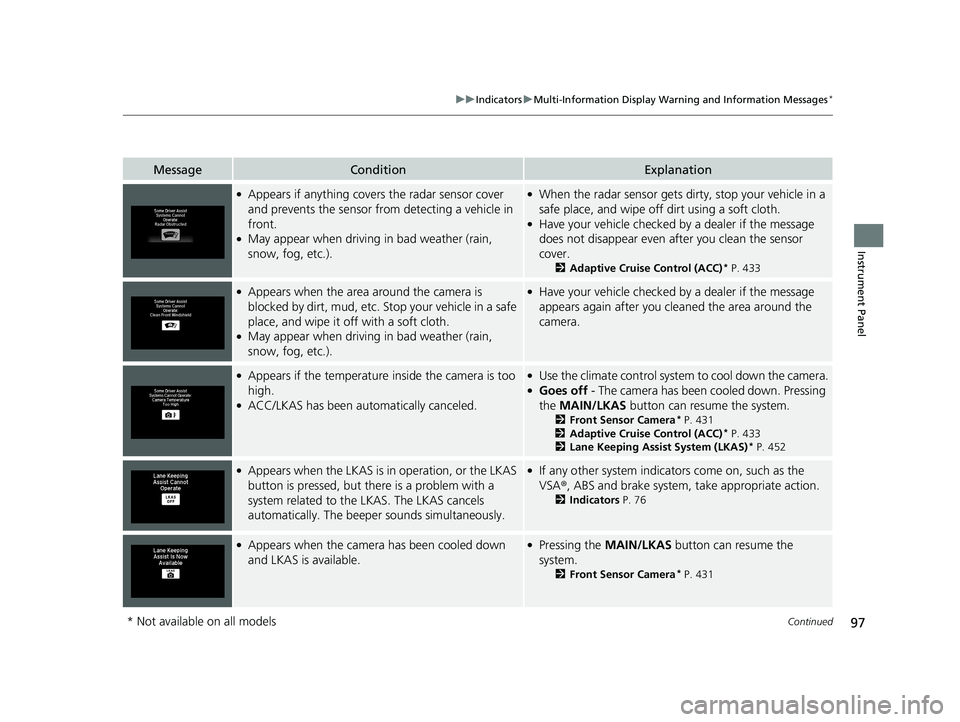
●Appears if anything covers the radar sensor cover
and prevents the sensor from detecting a vehicle in
front.
●May appear when driving in bad weather (rain,
snow, fog, etc.).
●When the radar sensor gets dirty, stop your vehicle in a
safe place, and wipe off dirt using a soft cloth.
●Have your vehicle checked by a dealer if the message
does not disappear even a fter you clean the sensor
cover.
2 Adaptive Cruise Control (ACC)* P. 433
●Appears when the area around the camera is
blocked by dirt, mud, etc. Stop your vehicle in a safe
place, and wipe it off with a soft cloth.
●May appear when driving in bad weather (rain,
snow, fog, etc.).
●Have your vehicle checked by a dealer if the message
appears again after you cleaned the area around the
camera.
●Appears if the temperature inside the camera is too
high.
●ACC/LKAS has been automatically canceled.
●Use the climate control system to cool down the camera.●Goes off - The camera has been cooled down. Pressing
the MAIN/LKAS button can resume the system.
2Front Sensor Camera* P. 431
2 Adaptive Cruise Control (ACC)* P. 433
2 Lane Keeping Assist System (LKAS)* P. 452
●Appears when the LKAS is in operation, or the LKAS
button is pressed, but there is a problem with a
system related to the LKAS. The LKAS cancels
automatically. The beeper sounds simultaneously.●If any other system indicato rs come on, such as the
VSA ®, ABS and brake system, take appropriate action.
2 Indicators P. 76
●Appears when the camera has been cooled down
and LKAS is available.●Pressing the MAIN/LKAS button can resume the
system.
2 Front Sensor Camera* P. 431
* Not available on all models
19 FIT JAZZ-31T5A6400.book 97 ページ 2018年2月26日 月曜日 午後4時30分
Page 332 of 599
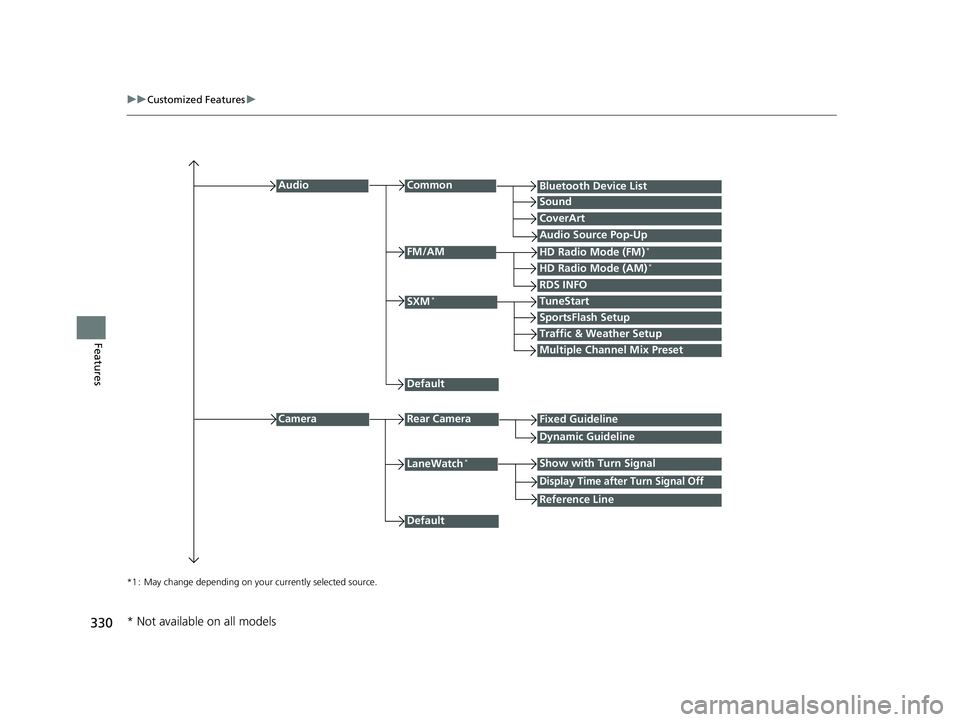
330
uuCustomized Features u
Features
*1 : May change depending on your currently selected source.
Common
Multiple Channel Mix Preset
Audio
Sound
Audio Source Pop-Up
SXM*
HD Radio Mode (AM)*HD Radio Mode (FM)*
TuneStart
Traffic & Weather Setup
CameraRear Camera
LaneWatch*
Default
CoverArt
RDS INFO
Bluetooth Device List
FM/AM
Fixed Guideline
Dynamic Guideline
Show with Turn Signal
Default
Display Time after Turn Signal Off
Reference Line
SportsFlash Setup
* Not available on all models
19 FIT JAZZ-31T5A6400.book 330 ページ 2018年2月26日 月曜日 午後4時30分
Page 433 of 599
431
uuWhen Driving uFront Sensor Camera*
Continued
Driving
Front Sensor Camera*
The camera, used in systems such as LKAS, RDM, ACC, CMBSTM, and auto high-
beam, is designed to detect an object that triggers any of the systems to operate
their functions.
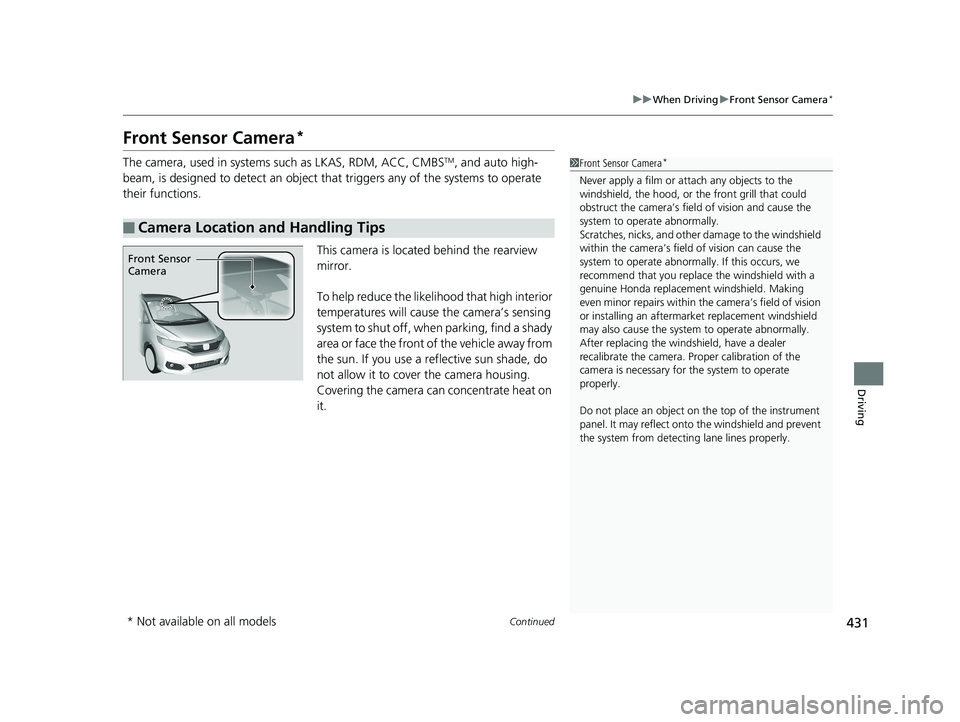
This camera is located behind the rearview
mirror.
To help reduce the likelihood that high interior
temperatures will cause the camera’s sensing
system to shut off, when parking, find a shady
area or face the front of the vehicle away from
the sun. If you use a reflective sun shade, do
not allow it to cover the camera housing.
Covering the camera can concentrate heat on
it.
■Camera Location and Handling Tips
1Front Sensor Camera*
Never apply a film or attach any objects to the
windshield, the hood, or the front grill that could
obstruct the camera’s fiel d of vision and cause the
system to operate abnormally.
Scratches, nicks, and othe r damage to the windshield
within the camera’s fiel d of vision can cause the
system to operate abnormall y. If this occurs, we
recommend that you replac e the windshield with a
genuine Honda replacem ent windshield. Making
even minor repairs within th e camera’s field of vision
or installing an aftermarket replacement windshield
may also cause the system to operate abnormally.
After replacing the winds hield, have a dealer
recalibrate the camera. Pr oper calibration of the
camera is necessary for the system to operate
properly.
Do not place an object on the top of the instrument
panel. It may reflect onto the windshield and prevent
the system from detecting lane lines properly.
Front Sensor
Camera
* Not available on all models
19 FIT JAZZ-31T5A6400.book 431 ページ 2018年2月26日 月曜日 午後4時30分
Page 435 of 599
433
uuWhen Driving uAdaptive Cruise Control (ACC)*
Continued
Driving
Adaptive Cruise Control (ACC)*
Helps maintain a constant vehicle speed an d a set following-interval behind a vehicle
detected ahead of yours, without you having to keep your foot on the brake or the
accelerator.1 Adaptive Cruise Control (ACC)*
Important Reminder
As with any system, there are limits to ACC. Use the
brake pedal whenever necessary, and always keep a
safe interval betw een your vehicle and other vehicles.
Be careful not to severely impact the radar sensor
cover.
Shift up when the engine revolutions is increasing.
Shift down when the engine revolutions is decreasing.
You can keep the set speed if you change the shift
position within five sec ond after depressing the
clutch pedal.
3WARNING
Improper use of ACC can lead to a crash.
Use ACC only when driving on expressways or
freeways in good weather conditions.
3WARNING
ACC has limited braking capability.
When your vehicle speed drops below
22 mph (35 km/h), ACC will automatically
cancel and no longer will apply your
vehicle’s brakes.
Always be prepared to apply the brake
pedal when conditions require.
Manual transmission models
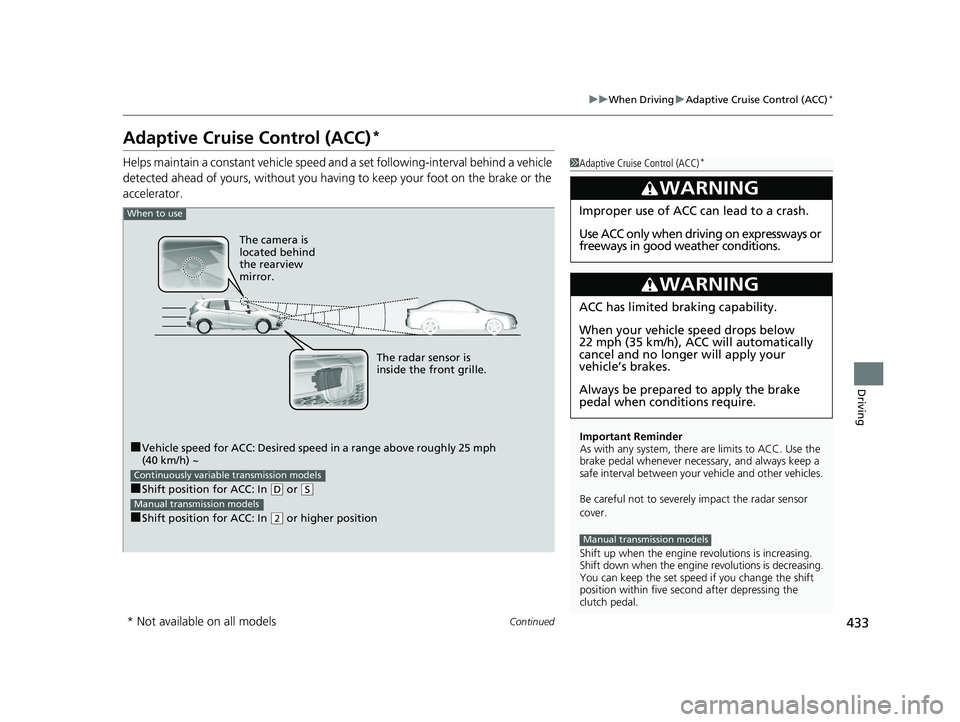
When to use
■Vehicle speed for ACC: Desired speed in a range above roughly 25 mph
(40 km/h) ~
■Shift position for ACC: In ( D or (S
■Shift position for ACC: In (2 or higher position
Continuously variable transmission models
Manual transmission models
The radar sensor is
inside the front grille.
The camera is
located behind
the rearview
mirror.
* Not available on all models
19 FIT JAZZ-31T5A6400.book 433 ページ 2018年2月26日 月曜日 午後4時30分
Page 440 of 599
uuWhen Driving uAdaptive Cruise Control (ACC)*
438
Driving
The system may automatically shut off and the ACC indicator will come on under
certain conditions. Some examples of th ese conditions are listed below. Other
conditions may reduce some of the ACC functions.
2 Front Sensor Camera* P. 431
■Environmental conditions
• Driving in bad weather (rain, fog, snow, etc.).
■Roadway conditions
• Driving on a snowy or wet roadway (obs cured lane marking, vehicle tracks,
reflected lights, road spray, high contrast).
■Vehicle conditions
• The outside of the windshie ld is blocked by dirt, mud, leaves, wet snow, etc.
• An abnormal tire or wheel condition (Wrong sized, varied size or construction,
improperly inflated, comp act spare tire, etc.).
• The camera temperature gets too high.
• The parking brake is applied.
• When the radar sensor cover is dirty.
• The vehicle is tilted due to a heav y load or suspension modifications.
• When tire chains are installed.
■ACC Conditions and Limitations1ACC Conditions and Limitations
The radar sensor for ACC is shared with the collision
mitigation braking system
TM (CMBSTM).
2 Collision Mitigation Braking SystemTM
(CMBSTM)* P. 472
You can read about handling information for the
camera equipped with this system. 2 Front Sensor Camera
* P. 431
Always keep the radar sensor cover clean.
Never use chemical solvents or polishing powder for
cleaning the sensor cover. Clean it with water or a
mild detergent.
Do not put a sticker on the radar sensor cover or
replace the radar sensor cover.
If you need the radar sensor to be repaired, or
removed, or the radar se nsor cover is strongly
impacted, turn off the system by pressing the MAIN
button and take your vehicle to a dealer.
Have your vehicle checked by a dealer if you find any
unusual behavior of the system (e.g., the warning
message appears too frequently).
If the front of the vehicle is impacted in any of the
following situations, the ra dar sensor may not work
properly. Have your vehi cle checked by a dealer:
•The vehicle mounted onto a bump, curb, chock,
embankment, etc.
•You drive the vehicle where the water is deep.•Your vehicle has a frontal collision.
* Not available on all models
19 FIT JAZZ-31T5A6400.book 438 ページ 2018年2月26日 月曜日 午後4時30分
Page 464 of 599
uuWhen Driving uLaneWatchTM*
462
Driving
■Customizing the LaneWatch settings
You can customize the following items using the audio/information screen.
• Show with Turn Signal: Selects whether LaneWatch monitor comes on when
you operate the turn signal light lever.
• Display Time after Turn Signal Off: Changes the remaining Lane Watch
display time after you pull the turn signal lever back.
• Reference Line: Selects whether the reference lin es appear on the LaneWatch
monitor.
• Display: Adjusts display settings.
2Customized Features P. 328
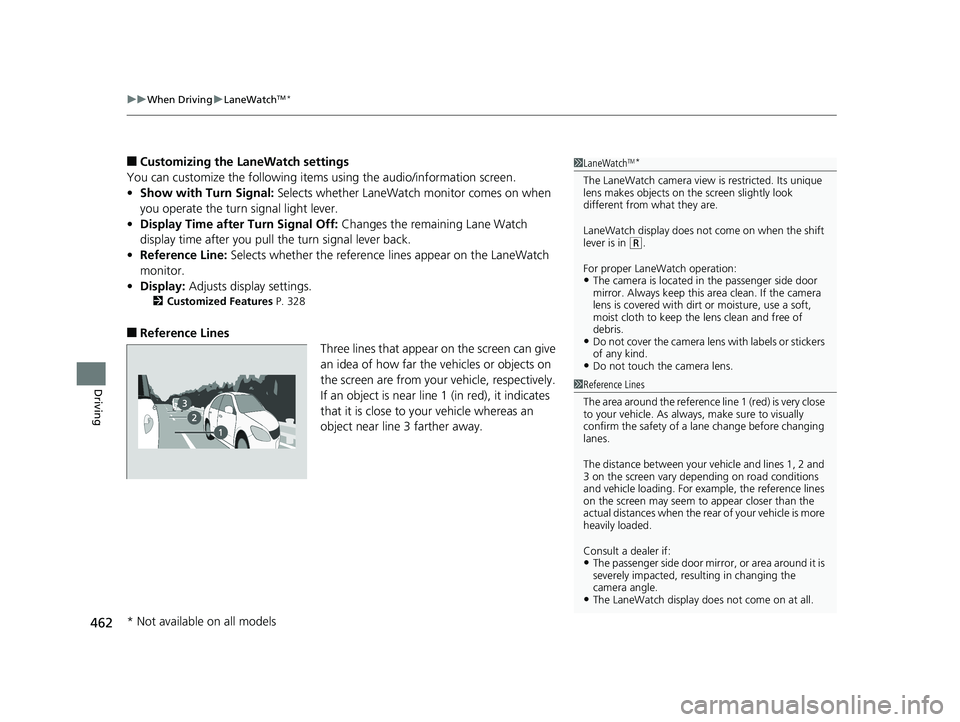
■Reference Lines
Three lines that appear on the screen can give
an idea of how far the vehicles or objects on
the screen are from your vehicle, respectively.
If an object is near line 1 (in red), it indicates
that it is close to your vehicle whereas an
object near line 3 farther away.
1 LaneWatchTM*
The LaneWatch camera view is restricted. Its unique
lens makes objects on the screen slightly look
different from what they are.
LaneWatch display does not come on when the shift
lever is in
( R.
For proper LaneWatch operation:
•The camera is located in the passenger side door
mirror. Always keep this area clean. If the camera
lens is covered with dirt or moisture, use a soft,
moist cloth to keep the lens clean and free of
debris.
•Do not cover the camera lens with labels or stickers
of any kind.
•Do not touch the camera lens.
1 Reference Lines
The area around the reference li ne 1 (red) is very close
to your vehicle. As always, make sure to visually
confirm the safety of a la ne change before changing
lanes.
The distance betwee n your vehicle and lines 1, 2 and
3 on the screen vary depending on road conditions
and vehicle loading. For ex ample, the reference lines
on the screen may seem to appear closer than the
actual distances when the rear of your vehicle is more
heavily loaded.
Consult a dealer if:
•The passenger side door mirr or, or area around it is
severely impacted, resulting in changing the
camera angle.
•The LaneWatch display doe s not come on at all.
* Not available on all models
19 FIT JAZZ-31T5A6400.book 462 ページ 2018年2月26日 月曜日 午後4時30分
Page 474 of 599
472
uuBraking uCollision Mitigation Braking SystemTM (CMBSTM)*
Driving
Collision Mitigati on Braking SystemTM (CMBSTM)*
Can assist you when there is a possibility of your vehicle colliding with a vehicle or a
pedestrian detected in front of yours. The CMBSTM is designed to alert you when a
potential collision is determined, as well as to reduce your vehicle speed to help
minimize collision severity when a collision is deemed unavoidable.
■How the system works
1 Collision Mitigation Braking SystemTM (CMBSTM)*
Important Safety Reminder
The CMBSTM is designed to reduce the severity of an
unavoidable collision. It does not prevent collision nor
stop the vehicle automatically. It is still your
responsibility to operate the brake pedal and steering
wheel appropriately acco rding to the driving
conditions.
The CMBS
TM may not activate or may not detect a
vehicle in front of y our vehicle under certain
conditions: 2 CMBS
TM Conditions and Limitations P. 476
You can read about handling information for the
camera equipped with this system. 2 Front Sensor Camera
* P. 431
Be careful not to severely impact the radar sensor
cover.
Rapid vibrations on the steering wheel alert you
when your vehicle speed is between 19 and 62 mph
(30 and 100 km/h) with an oncoming vehicle
detected in front of you.
When the CMBS
TM activates, it may automatically
apply the brake. It will be canceled when your vehicle
stops or a potential coll ision is not determined.
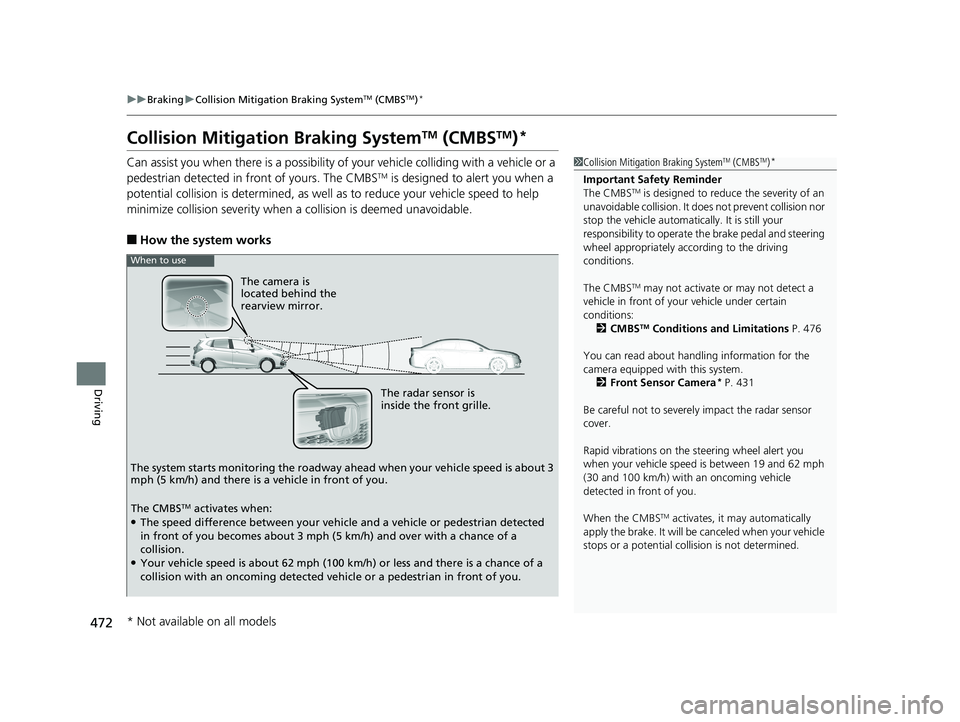
The radar sensor is
inside the front grille.
The camera is
located behind the
rearview mirror.
The system starts monitoring the roadway ah ead when your vehicle speed is about 3
mph (5 km/h) and there is a vehicle in front of you.
When to use
The CMBSTM activates when:●The speed difference between your vehicle and a vehicle or pedestrian detected
in front of you becomes about 3 mph (5 km/h) and over with a chance of a
collision.
●Your vehicle speed is about 62 mph (100 km/h) or less and there is a chance of a
collision with an oncoming detected vehicle or a pedestrian in front of you.
* Not available on all models
19 FIT JAZZ-31T5A6400.book 472 ページ 2018年2月26日 月曜日 午後4時30分