battery HONDA HR-V 2016 2.G Service Manual
[x] Cancel search | Manufacturer: HONDA, Model Year: 2016, Model line: HR-V, Model: HONDA HR-V 2016 2.GPages: 489, PDF Size: 26.59 MB
Page 445 of 489
444
uuEngine Does Not Start uIf the Smart Entry Remote Battery is Weak
Handling the Unexpected
If the Smart Entry Remote Battery is Weak
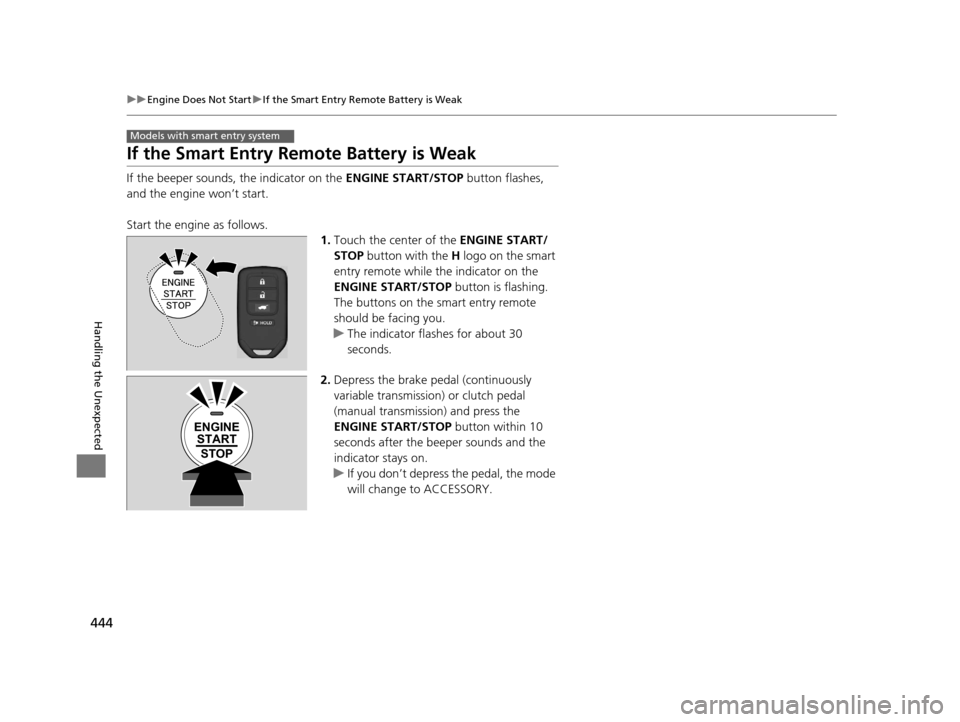
If the beeper sounds, the indicator on the ENGINE START/STOP button flashes,
and the engine won’t start.
Start the engine as follows. 1.Touch the center of the ENGINE START/
STOP button with the H logo on the smart
entry remote while the indicator on the
ENGINE START/STOP button is flashing.
The buttons on the smart entry remote
should be facing you.
u The indicator flashes for about 30
seconds.
2. Depress the brake pedal (continuously
variable transmission) or clutch pedal
(manual transmission) and press the
ENGINE START/STOP button within 10
seconds after the beeper sounds and the
indicator stays on.
u If you don’t depress the pedal, the mode
will change to ACCESSORY.
Models with smart entry system
ENGINE
START
STOP
15 HR-V GAS-31T7A6000.book 444 ページ 2015年6月29日 月曜日 午前11時36分
Page 447 of 489
446
Handling the Unexpected
Jump Starting
Turn off the power to electric devices, such as audio and lights. Turn off the engine,
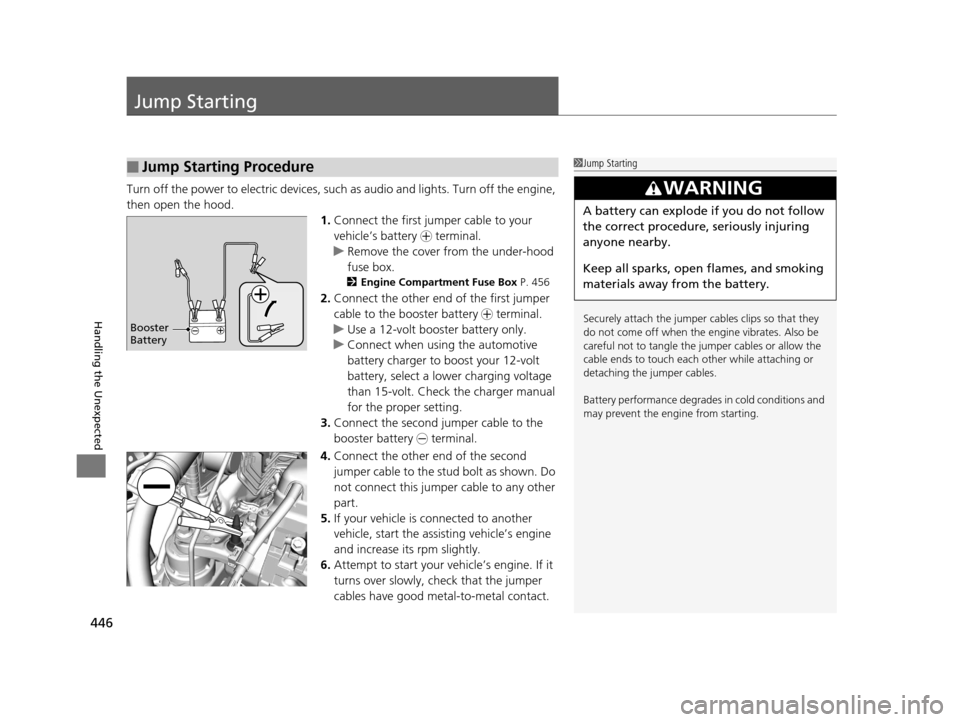
then open the hood. 1.Connect the first jump er cable to your
vehicle’s battery + terminal.
u Remove the cover from the under-hood
fuse box.
2 Engine Compartment Fuse Box P. 456
2.Connect the other end of the first jumper
cable to the booster battery + terminal.
u Use a 12-volt booster battery only.
u Connect when using the automotive
battery charger to boost your 12-volt
battery, select a lo wer charging voltage
than 15-volt. Check the charger manual
for the proper setting.
3. Connect the second jumper cable to the
booster battery - terminal.
4. Connect the other end of the second
jumper cable to the stud bolt as shown. Do
not connect this jumper cable to any other
part.
5. If your vehicle is connected to another
vehicle, start the assisting vehicle’s engine
and increase its rpm slightly.
6. Attempt to start your vehicle’s engine. If it
turns over slowly, check that the jumper
cables have good metal-to-metal contact.
■Jump Starting Procedure1Jump Starting
Securely attach the jumper cables clips so that they
do not come off when the e ngine vibrates. Also be
careful not to tangle the ju mper cables or allow the
cable ends to touch each other while attaching or
detaching the jumper cables.
Battery performance degrades in cold conditions and
may prevent the engi ne from starting.
3WARNING
A battery can explode if you do not follow
the correct procedure, seriously injuring
anyone nearby.
Keep all sparks, open flames, and smoking
materials away from the battery.
Booster
Battery
15 HR-V GAS-31T7A6000.book 446 ページ 2015年6月29日 月曜日 午前11時36分
Page 448 of 489
447
uuJump Starting u
Handling the Unexpected
Once your vehicle’s engine has started, re move the jumper cables in the following
order.
1. Disconnect the jumper cable from your vehicle’s stud bolt.
2. Disconnect the other end of the jumper cable from the booster battery -
terminal.
3. Disconnect the jumper cable from your vehicle’s battery + terminal.
4. Disconnect the other end of the jumper cable from the booster battery +
terminal.
Have your vehicle inspected by a n earby service station or a dealer.
■What to Do After the Engine Starts
15 HR-V GAS-31T7A6000.book 447 ページ 2015年6月29日 月曜日 午前11時36分
Page 452 of 489
451
Handling the Unexpected
Indicator, Coming On/Blinking
If the Low Oil Pressure Indicator Comes On
■Reasons for the indicator to come on
Comes on when the engine oil pressure is low.
■What to do as soon as the indicator comes on
1. Immediately park the vehicle on level ground in a safe place.
2. If necessary, turn the hazard warning lights on.
■What to do after parking the vehicle
1. Stop the engine and let it sit for about three minutes.
2. Open the hood and check the oil level.
u Add oil as necessary.
2 Oil Check P. 390
3.Start the engine and check th e low oil pressure indicator.
u The indicator goes off: Start driving again.
u The indicator does not go off within 10 seconds: Stop the engine
and contact a dealer for repairs immediately.
If the Charging System Indicator Comes On
■Reasons for the indicator to come on
Comes on when the battery is not being charged.
■What to do when th e indicator comes on
Turn off the heating and cooling system*/climate control system*, rear
defogger, and other electrical system s, and immediately contact a dealer
for repairs.
1 If the Low Oil Pressure Indicator Comes On
NOTICE
Running the engine with low oil pressure can cause
serious mechanical damage almost immediately.
1If the Charging System Indicator Comes On
If you need to stop temporarily, do not turn off the
engine. Restarting the engi ne may rapidly discharge
the battery.
* Not available on all models
15 HR-V GAS-31T7A6000.book 451 ページ 2015年6月29日 月曜日 午前11時36分
Page 457 of 489
456
Handling the Unexpected
Fuses
Fuse Locations
If any electrical devices are not working,
turn the ignition switch to LOCK
(0*1 and
check to see if any appl icable fuse is blown.
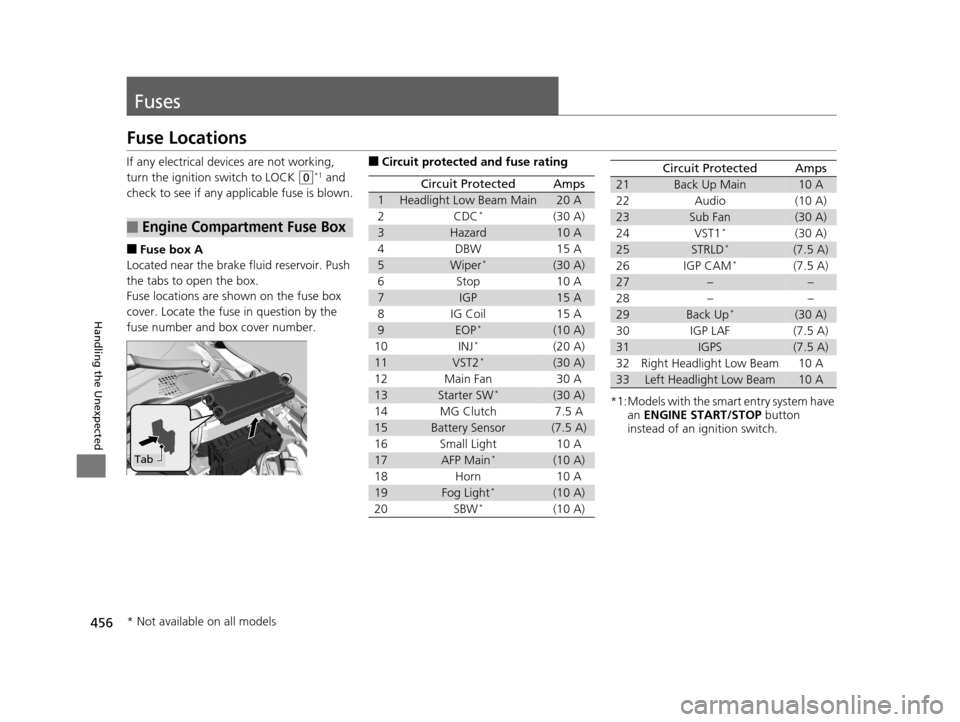
■Fuse box A
Located near the brake fluid reservoir. Push
the tabs to open the box.
Fuse locations are shown on the fuse box
cover. Locate the fuse in question by the
fuse number and box cover number.
■Engine Compartment Fuse Box
Tab
■Circuit protected and fuse rating
Circuit ProtectedAmps
1Headlight Low Beam Main20 A
2CDC*(30 A)
3Hazard10 A
4DBW15 A
5Wiper*(30 A)
6Stop10 A
7IGP15 A
8IG Coil15 A
9EOP*(10 A)
10INJ*(20 A)
11VST2*(30 A)
12Main Fan30 A
13Starter SW*(30 A)
14MG Clutch7.5 A
15Battery Sensor(7.5 A)
16Small Light10 A
17AFP Main*(10 A)
18Horn10 A
19Fog Light*(10 A)
20SBW*(10 A)
*1:Models with the sma rt entry system have
an ENGINE START/STOP button
instead of an ignition switch.
Circuit ProtectedAmps
21Back Up Main10 A
22Audio(10 A)
23Sub Fan(30 A)
24VST1*(30 A)
25STRLD*(7.5 A)
26IGP CAM*(7.5 A)
27––
28––
29Back Up*(30 A)
30IGP LAF(7.5 A)
31IGPS(7.5 A)
32Right Headlight Low Beam10 A
33Left Headlight Low Beam10 A
* Not available on all models
15 HR-V GAS-31T7A6000.book 456 ページ 2015年6月29日 月曜日 午前11時36分
Page 458 of 489
457
uuFuses uFuse Locations
Continued
Handling the Unexpected
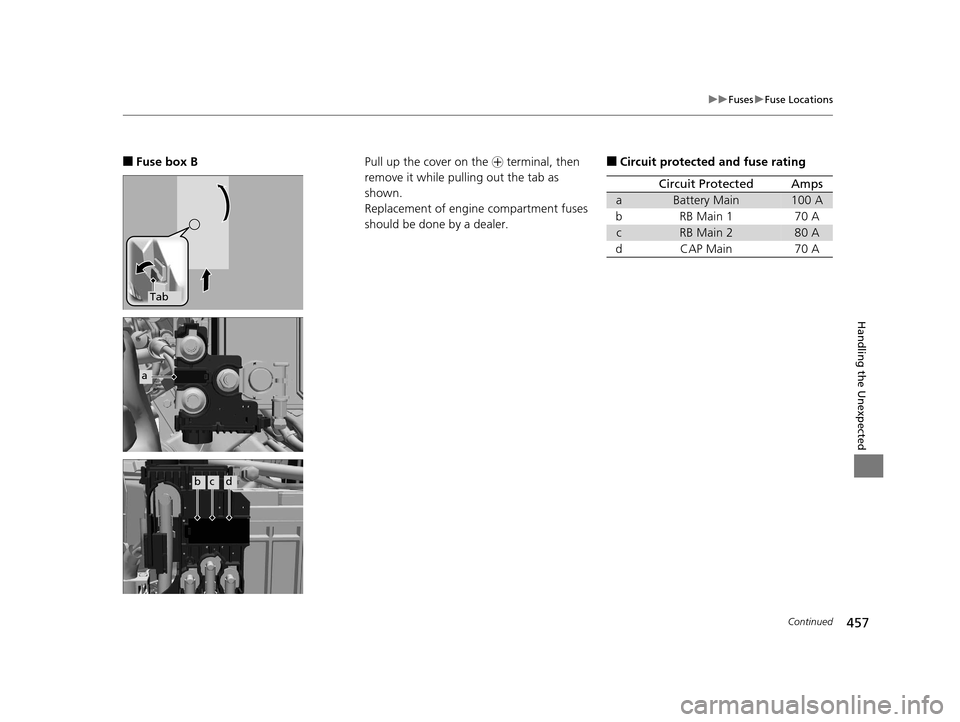
■Fuse box B
Tab
a
bcd
Pull up the cover on the + terminal, then
remove it while pulling out the tab as
shown.
Replacement of engine compartment fuses
should be done by a dealer.■Circuit protected and fuse rating
Circuit ProtectedAmps
aBattery Main100 A
bRB Main 170 A
cRB Main 280 A
dCAP Main70 A
15 HR-V GAS-31T7A6000.book 457 ページ 2015年6月29日 月曜日 午前11時36分
Page 461 of 489
460
uuFuses uInspecting and Changing Fuses
Handling the Unexpected
Inspecting and Changing Fuses
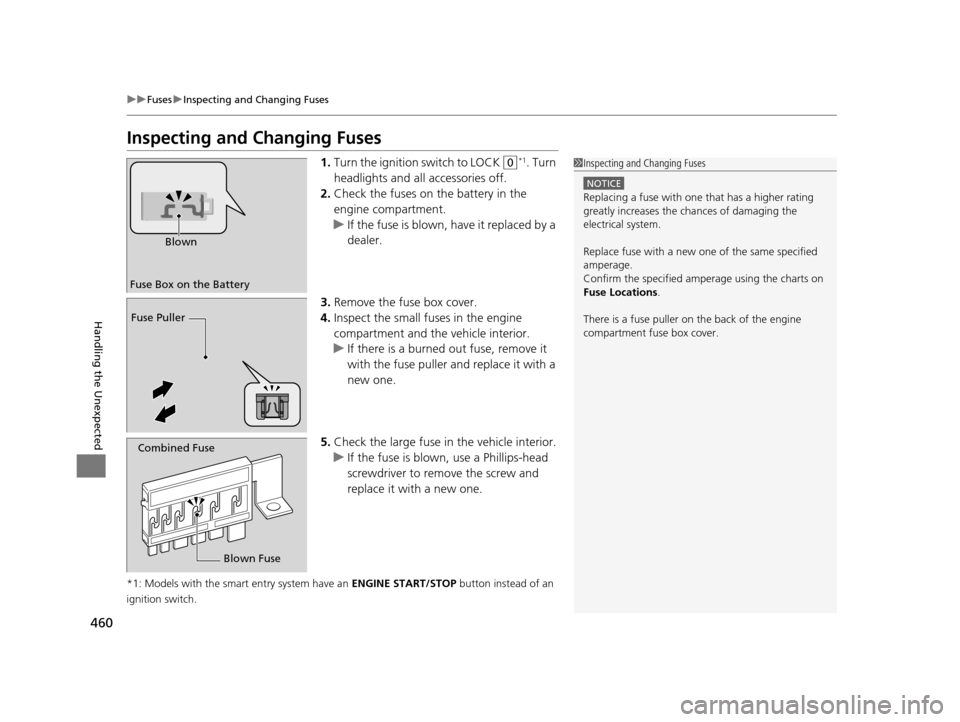
1. Turn the ignition switch to LOCK (0*1. Turn
headlights and all accessories off.
2. Check the fuses on the battery in the
engine compartment.
u If the fuse is blown, have it replaced by a
dealer.
3. Remove the fuse box cover.
4. Inspect the small fuses in the engine
compartment and the vehicle interior.
u If there is a burned out fuse, remove it
with the fuse puller and replace it with a
new one.
5. Check the large fuse in the vehicle interior.
u If the fuse is blown, use a Phillips-head
screwdriver to remo ve the screw and
replace it with a new one.
*1: Models with the smart entry system have an ENGINE START/STOP button instead of an
ignition switch.
1 Inspecting and Changing Fuses
NOTICE
Replacing a fuse with one that has a higher rating
greatly increases the chances of damaging the
electrical system.
Replace fuse with a new one of the same specified
amperage.
Confirm the specified amperage using the charts on
Fuse Locations .
There is a fuse puller on the back of the engine
compartment fuse box cover.
Fuse Box on the Battery Blown
Fuse Puller
Combined Fuse
Blown Fuse
15 HR-V GAS-31T7A6000.book 460 ページ 2015年6月29日 月曜日 午前11時36分
Page 472 of 489
471Continued
Information
Emissions Testing
Testing of Readiness Codes
Your vehicle has “Readiness Codes,” as part of the onboard self diagnostic system.
Some states use these codes as a test to see if your vehicle’s emissions components
are working properly.
The codes may not be read properly if testing is performed just after the battery has
gone dead or been disconnected.
To check if they are set, tu rn the ignition switch to ON
(w*1, without starting the
engine. The malfunction indicator lamp will co me on for several seconds. If it then
goes off, the readiness codes are set. If it blinks five times, the readiness codes are
not set.
If you are required to have your vehicle te sted before the readiness codes are ready,
prepare the vehicle for retest ing by doing the following:
1. Fill the gas tank to approximately 3/4 full.
2. Park the vehicle and leave the engine off for 6 hours or more.
3. Make sure the ambient temperature is between 40°F and 95°F (4°C and 35°C).
4. Start the engine without touching the ac celerator pedal, and let it idle for 20
seconds.
5. Keep the vehicle in
(P (continuously variable transmission) or (N (manual
transmission). Increase the engine speed to 2,000 rpm, and hold it there for about
three minutes.
6. Let the engine idle with your foot off the accelerator for 20 seconds.
*1: Models with the smart entry system have an ENGINE START/STOP button instead of an
ignition switch.
1 Testing of Readiness Codes
The readiness codes are erased when the battery is
disconnected, and set again only after several days of
driving under a variety of conditions.
If a testing facility determines that the readiness
codes are not set, you may be requested to return at
a later date to complete the test.
If the testing facility determines the readiness codes
are still not set, see a dealer.
15 HR-V GAS-31T7A6000.book 471 ページ 2015年6月29日 月曜日 午前11時36分
Page 475 of 489
474
uuWarranty Coverages u
Information
Replacement Battery Limited Warranty – provides prorated coverage for a
replacement battery purchased from a dealer.
Replacement Muffler Life time Limited Warranty – provides coverage for as
long as the purchaser of the muffler owns the vehicle.
Restrictions and exclusions apply to a ll these warranties. Please read the Honda
warranty information booklet that came with your vehicle for precise information on
warranty coverages. Your vehi cle’s original tires are covered by their manufacturer.
Tire warranty information is in a separate booklet.
■Canadian Owners
Please refer to the warranty manual that came with your vehicle.
15 HR-V GAS-31T7A6000.book 474 ページ 2015年6月29日 月曜日 午前11時36分
Page 479 of 489
Index
478
Index
Index
Numbers
7-Speed Manual Shift Mode.................... 338
A
ABS (Anti-lock Brake System) ................... 369
Accessories and Modifications ................. 377
Accessory Power Sockets .......................... 156
Additives Coolant ................................................... 394
Engine Oil ................................................ 389
Washer .................................................... 398
Additives, Engine Oil ................................ 389
Adjusting Armrest ................................................... 149
Front Seats .............................................. 140
Head Restraints........................................ 142
Headlights ............................................... 399
Mirrors .................................................... 138
Rear Seats................................................ 146
Steering Wheel ........................................ 137
Adjusting the Sound ......................... 187, 209
Air Conditioning System Climate Control System ........................... 165
Defrosting the Windshield and Windows ....................................... 164, 168
Dust and Pollen Filter ............................... 424
Heating and Cooling System .................... 161
Air Conditioning System (Climate Control System)
Synchronized Mode ................................. 172 Air Conditioning System (Heating and
Cooling System)
Cooling ................................................... 164
Heating ................................................... 163
Air Pressure ....................................... 412, 467
Airbags ........................................................ 44
Advanced Airbags ..................................... 50
Airbag Care............................................... 56
Event Data Recorder .................................... 0
Front Airbags (SRS) .................................... 47
Indicator.............................................. 54, 77
Passenger Airbag Off Indicator .................. 55
Sensors ..................................................... 44
Side Airbags .............................................. 51
Side Curtain Airbags.................................. 53
All-Wheel Drive (AWD) ............................ 358
Anti-lock Brake System (ABS) .................. 369
Indicator.................................................... 77
Armrest ..................................................... 149
Audio Remote Controls ........................... 180
Audio System ............................................ 176
Adjusting the Sound........................ 187, 209
Auxiliary Input Jack.................................. 178
Error Messages ........................................ 231
General Information ................................ 235
HDMI ® Port ............................................. 178
iPod ................................................ 194, 217
MP3/WMA/AAC .............................. 197, 222
Recommended CDs ................................. 235
Recommended Devices............................ 237
Remote Controls ................................. 5, 180 Security Code ......................................... 179
Theft Protection ...................................... 179
USB Flash Drives...................................... 237
USB Port(s) .............................................. 177
Audio/Information Screen ............... 183, 204
Authorized Manuals ................................ 475
Auto Door Locking/Unlocking ................ 109
Customize .............................................. 110
Automatic Brake Hold ............................. 366
Indicator ........................................... 74, 366
Automatic Brake Hold System
Indicator ........................................... 73, 366
Automatic Climate Control Sensors ........ 173
Auxiliary Input Jack ................................. 178
Average Fuel Economy .............................. 90
B
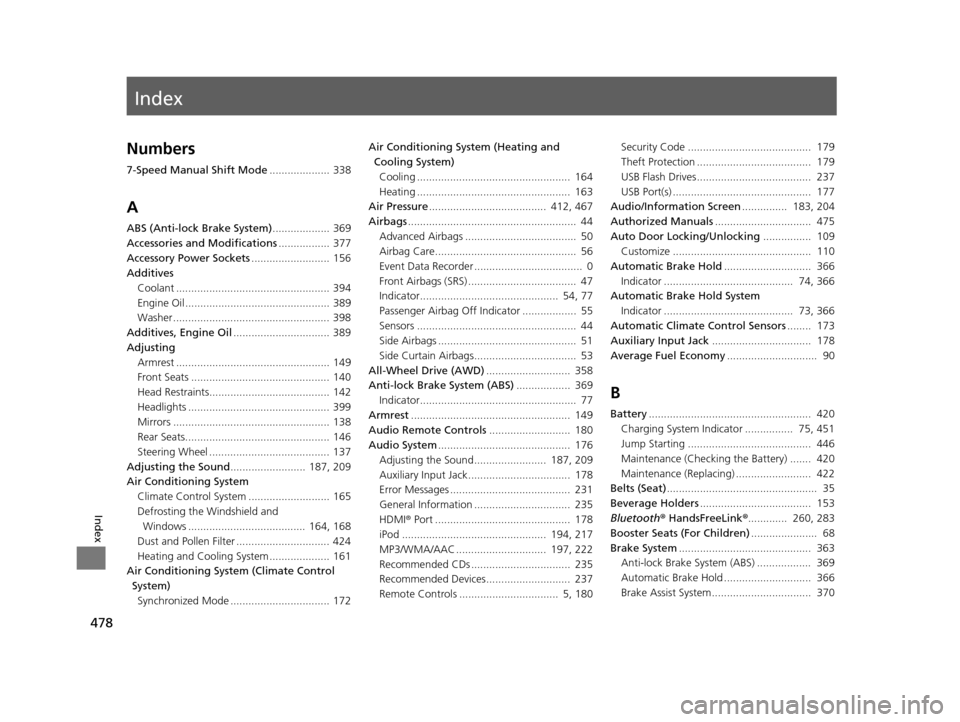
Battery...................................................... 420
Charging System Indicator ................ 75, 451
Jump Starting ......................................... 446
Maintenance (Checking the Battery) ....... 420
Maintenance (Replacing) ......................... 422
Belts (Seat) .................................................. 35
Beverage Holders ..................................... 153
Bluetooth ® HandsFreeLink ®............. 260, 283
Booster Seats (For Children) ...................... 68
Brake System ............................................ 363
Anti-lock Brake System (ABS) .................. 369
Automatic Brake Hold ............................. 366
Brake Assist System................................. 370
15 HR-V GAS-31T7A6000.book 478 ページ 2015年6月29日 月曜日 午前11時36分