service HONDA HR-V 2016 2.G Owners Manual
[x] Cancel search | Manufacturer: HONDA, Model Year: 2016, Model line: HR-V, Model: HONDA HR-V 2016 2.GPages: 489, PDF Size: 26.59 MB
Page 1 of 489
California Proposition 65 Warning
Event Data Recorders
This vehicle is equipped with an event data recorder (EDR).
The main purpose of an EDR is to record, in certain crash or near
crash-like situations, such as an air bag deployment or hitting a
road obstacle, data that will assi st in understanding how a vehicle’s
systems performed. The EDR is designed to record data related
to vehicle dynamics and safety systems for a short period of
time, typically 30 seconds or le ss. The EDR in this vehicle is
designed to record such data as:
• How various systems in your vehicle were operating;
• Whether or not the driver and passenger safety belts were
buckled/fastened;
• How far (if at all) the driver was depressing the accelerator
and/or brake pedal; and,
• How fast the vehicle was traveling.
These data can help provide a better understanding of the
circumstances in which crashes and injuries occur. NOTE: EDR data
are recorded by your vehicle only if a non-trivial crash situation
occurs; no data are recorded by the EDR under normal driving
conditions and no personal data (e.g., name, gender, age, and
crash location) are recorded. Howe ver, other parties, such as law
enforcement, could combine the EDR data with the type of
personally identifying data routinely acquired during a crash
investigation.
WARNING: This product contains or emits
chemicals known to the state of California to cause
cancer and birth defects or other reproductive
harm.
To read data recorded by an ED R, special equipment is required,
and access to the vehicle or the EDR is needed. In addition to the
vehicle manufacturer, other parties, such as law enforcement, that
have the special equipment, can re ad the information if they have
access to the vehicle or the EDR.
The data belongs to the vehicle ow ner and may not be accessed by
anyone else except as legally requ ired or with the permission of the
vehicle owner.
Service Diagnostic Recorders
This vehicle is equipped with serv ice-related devices that record
information about powertrain perform ance. The data can be used
to verify emissions law requirem ents and/or help technicians
diagnose and solve service problems. It may also be combined with
data from other sources for res earch purposes, but it remains
confidential.
California Perchlorate Contamination Prevention Act
The airbags, seat belt tensioners , and CR type batteries in this
vehicle may contain perchlorate materials - special handling may
apply. See www.dtsc.ca.gov/hazardouswaste/perchlorate/
As you read this manual, you will find information that is preceded
by a symbol. This information is intended to help you avoid
damage to your vehicle, othe r property, or the environment.
NOTICE
15 HR-V GAS-31T7A6000.book 0 ページ 2015年6月29日 月曜日 午前11時36分 00X31-T7A-6002 2016 HR-V Owner's Manual Ver.3 AOM02134
Page 4 of 489
Contents
Child Safety P. 57Exhaust Gas Hazard P. 69Safety Labels P. 70
Opening and Closing the Tailgate P. 113 Security System P. 116
Opening and Closing the Moonroof* P. 121
Adjusting the Mirrors P. 138 Adjusting the Seats P. 140
Heating and Cooling System
* P. 161 Climate Control System* P. 165
Audio Error Messages P. 231General Information on the Audio System P. 235
Off-Highway Driving Guidelines P. 323 When Driving P. 325 Braking P. 363
Refueling P. 374 Fuel Economy P. 376Accessories and Modifications P. 377
Maintenance Under the Hood P. 387 Replacing Light Bulbs P. 399
Checking and Maintaining Tires P. 411 Battery P. 420 Remote Transmitter Care P. 422
Cleaning P. 425
Engine Does Not Start P. 443 Jump Starting P. 446 Shift Lever Does Not Move P. 448
Emergency Towing P. 461 When You Cannot Open the Tailgate P. 462
Devices that Emit Radio Waves P. 469 Reporting Safety Defects P. 470
Authorized Manuals P. 475 Customer Service Information P. 476
Quick Reference GuideP. 4
Safe DrivingP. 29
Instrument PanelP. 71
ControlsP. 93
FeaturesP. 175
DrivingP. 313
MaintenanceP. 379
Handling the UnexpectedP. 431
InformationP. 465
IndexP. 478
15 HR-V GAS-31T7A6000.book 3 ページ 2015年6月29日 月曜日 午前11時36分
Page 25 of 489
24
Quick Reference Guide
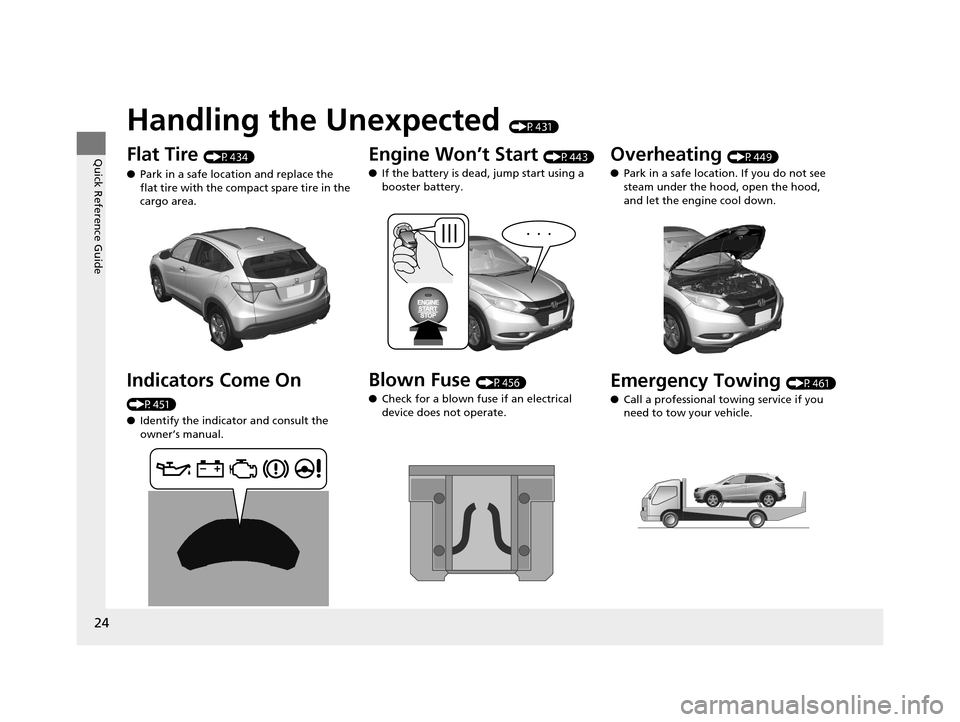
Handling the Unexpected (P431)
Flat Tire (P434)
● Park in a safe location and replace the
flat tire with the compact spare tire in the
cargo area.
Indicators Come On
(P451)
●Identify the indicator and consult the
owner’s manual.
Engine Won’t Start (P443)
● If the battery is dead, jump start using a
booster battery.
Blown Fuse (P456)
● Check for a blown fuse if an electrical
device does not operate.
Overheating (P449)
● Park in a safe location. If you do not see
steam under the hood, open the hood,
and let the engine cool down.
Emergency Towing (P461)
● Call a professional towing service if you
need to tow your vehicle.
15 HR-V GAS-31T7A6000.book 24 ページ 2015年6月29日 月曜日 午前11時36分
Page 57 of 489
56
uuAirbags uAirbag Care
Safe Driving
Airbag Care
You do not need to, and should not, perform any maintenance on or replace any
airbag system components yourself. However, you should have your vehicle
inspected by a dealer in the following situations:
■When the airbags have deployed
If an airbag has inflated, th e control unit and other related parts must be replaced.
Similarly, once an automatic seat belt tensioner has been activated, it must be
replaced.
■When the vehicle has been in a moderate-to-severe collision
Even if the airbags did not inflate, have your dealer inspect the following: the driver’s
seat position sensor, weight sensors in the passenger’s seat, front seat belt
tensioners, and each seat belt that was worn during the crash.
■Do not remove or modify a front seat without cons ulting a dealer
This would likely disable the driver’s seat position sensor or the weight sensors in the
passenger’s seat. If it is necessary to remo ve or modify a front seat to accommodate
a person with disabilities, contact a Honda dealer, or for U.S. vehicles, American
Honda Automobile Customer Service at 800-999-1009 and for Canadian vehicles,
Honda Canada Customer Relations at 888-9-HONDA-9.
1 Airbag Care
We recommend against the use of salvaged airbag
system components, including the airbag, tensioners,
sensors, and control unit.
15 HR-V GAS-31T7A6000.book 56 ページ 2015年6月29日 月曜日 午前11時36分
Page 90 of 489
89
uuGauges and Displays uInformation Display
Continued
Instrument Panel
Information Display
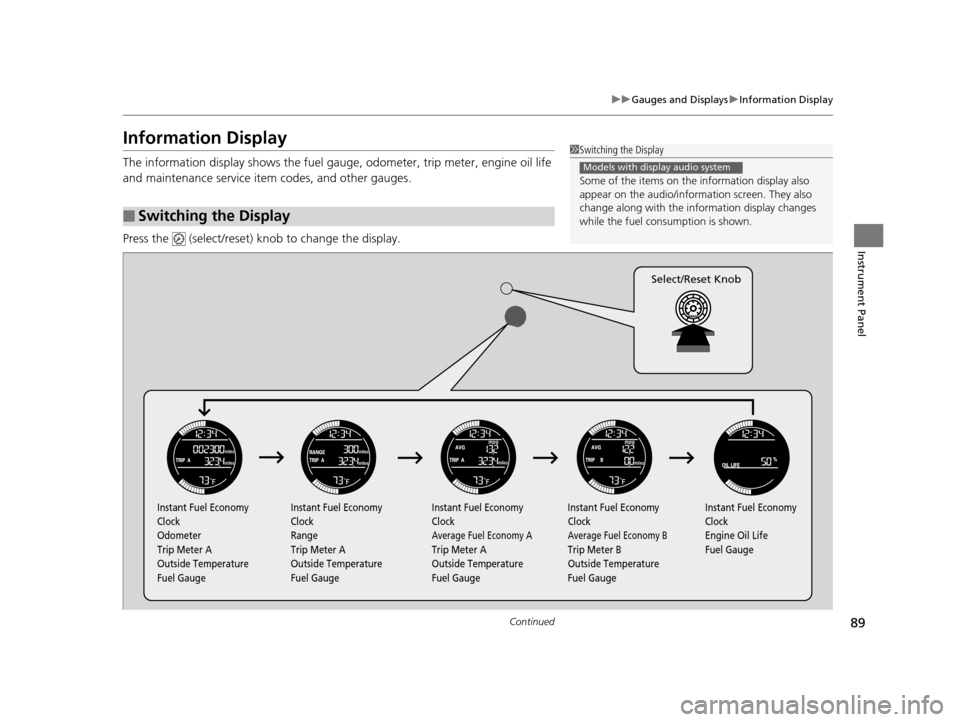
The information display shows the fuel gauge, odometer, trip meter, engine oil life
and maintenance service item codes, and other gauges.
Press the (select/reset) knob to change the display.
■Switching the Display
1Switching the Display
Some of the items on the information display also
appear on the audio/information screen. They also
change along with the info rmation display changes
while the fuel consumption is shown.
Models with display audio system
Instant Fuel Economy
Clock
Odometer
Trip Meter A
Outside Temperature
Fuel Gauge Instant Fuel Economy
Clock
Range
Trip Meter A
Outside Temperature
Fuel Gauge Instant Fuel Economy
Clock
Average Fuel Economy A
Trip Meter A
Outside Temperature
Fuel GaugeInstant Fuel Economy
Clock
Average Fuel Economy B
Trip Meter B
Outside Temperature
Fuel Gauge Instant Fuel Economy
Clock
Engine Oil Life
Fuel Gauge
Select/Reset Knob
15 HR-V GAS-31T7A6000.book 89 ページ 2015年6月29日 月曜日 午前11時36分
Page 221 of 489
220
uuAudio System Basic Operation uPlaying Internet Radio
Features
Playing Internet Radio
Connect a compatible phone through Bluetooth®.
2Phone Setup P. 291
You can also connect the phone using your dock connector to the USB port. Select
Source to select Pandora mode.
*1:Some or all of the lists may not be displayed.
U.S. models
Compatible phones only
1 Playing Internet Radio
Pandora ®, the Pandora logo, and the Pandora trade
dress are trademarks or registered trademarks of
Pandora Media, Inc., used with permission. Pandora
is currently available exclusively in the United States.
To find out if your phone is compatible with this
feature, visit www.handsfreelink.honda.com , or call
1-888-528-7876
To use this service in your vehicle, the Pandora ® app
must first be installed on your phone. Visit
www.pandora.com . for more information.
iPhone only
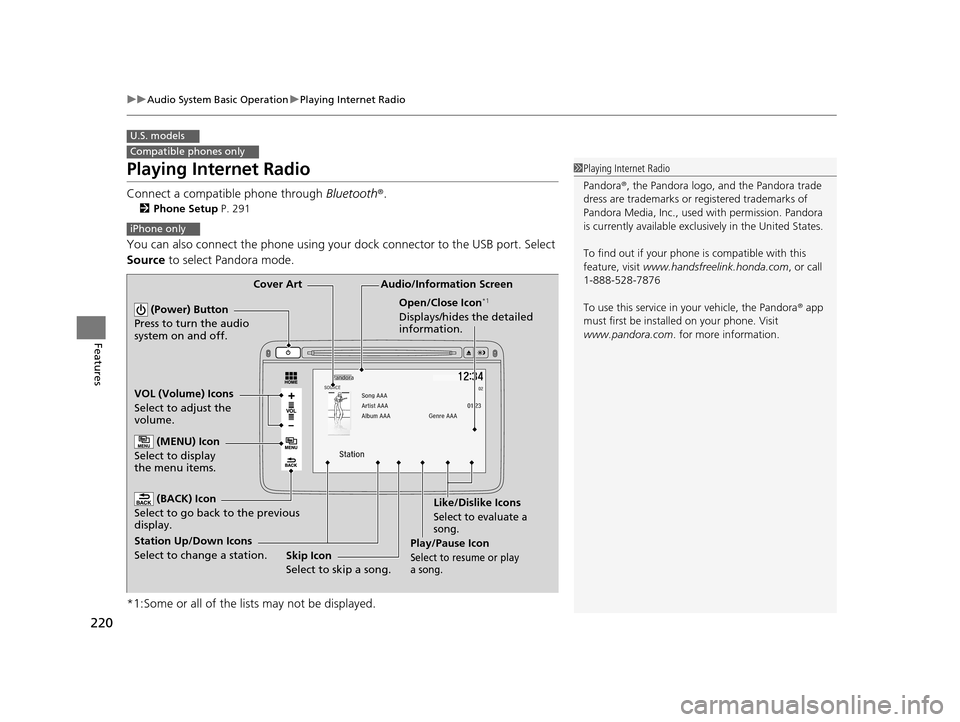
Audio/Information Screen
Cover Art
VOL (Volume) Icons
Select to adjust the
volume. (BACK) Icon
Select to go back to the previous
display.
(Power) Button
Press to turn the audio
system on and off.
(MENU) Icon
Select to display
the menu items.
Play/Pause Icon
Select to resu me or play
a song.
Open/Close Icon*1
Displays/hides the detailed
information.
Station Up/Down Icons
Select to change a station. Skip Icon
Select to skip a song.Like/Dislike Icons
Select to evaluate a
song.
15 HR-V GAS-31T7A6000.book 220 ページ 2015年6月29日 月曜日 午前11時36分
Page 222 of 489
221
uuAudio System Basic Operation uPlaying Internet Radio
Features
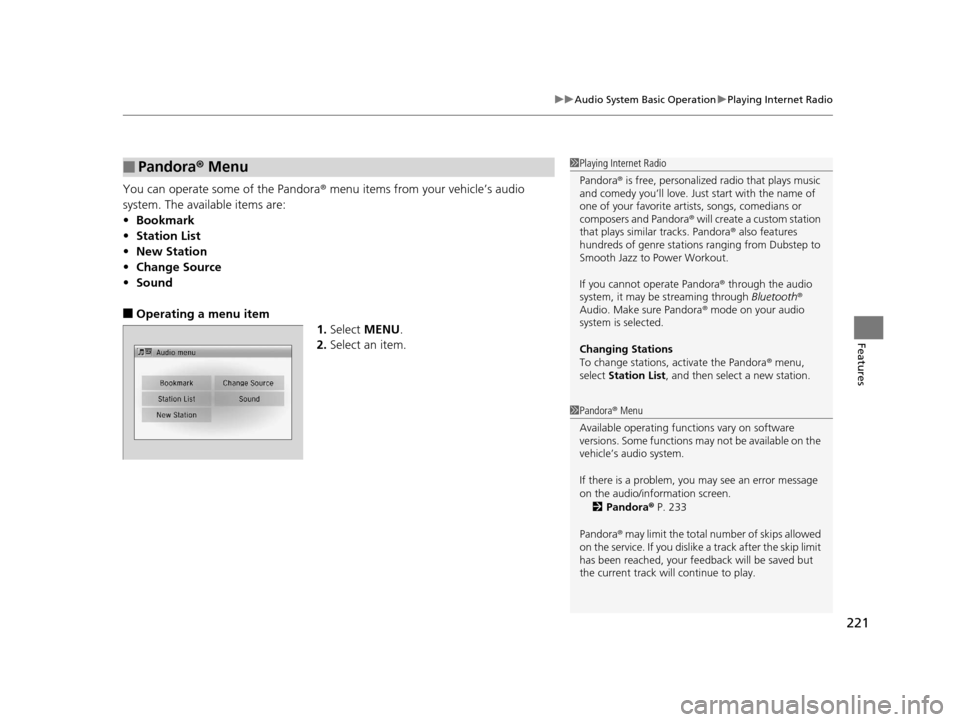
You can operate some of the Pandora ® menu items from your vehicle’s audio
system. The available items are:
• Bookmark
• Station List
• New Station
• Change Source
• Sound
■Operating a menu item
1.Select MENU .
2. Select an item.
■Pandora ® Menu1 Playing Internet Radio
Pandora ® is free, personalized radio that plays music
and comedy you’ll love. Just start with the name of
one of your favorite arti sts, songs, comedians or
composers and Pandora ® will create a custom station
that plays similar tracks. Pandora ® also features
hundreds of genre stations ranging from Dubstep to
Smooth Jazz to Power Workout.
If you cannot operate Pandora ® through the audio
system, it may be streaming through Bluetooth®
Audio. Make sure Pandora ® mode on your audio
system is selected.
Changing Stations
To change stations, activate the Pandora ® menu,
select Station List , and then select a new station.
1Pandora ® Menu
Available operating functi ons vary on software
versions. Some functions ma y not be available on the
vehicle’s audio system.
If there is a problem, you may see an error message
on the audio/information screen.
2 Pandora ® P. 233
Pandora ® may limit the total number of skips allowed
on the service. If you dislike a track after the skip limit
has been reached, your fe edback will be saved but
the current track will continue to play.
15 HR-V GAS-31T7A6000.book 221 ページ 2015年6月29日 月曜日 午前11時36分
Page 311 of 489
uuBluetooth ® HandsFreeLink ®u HFL Menus
310
Features
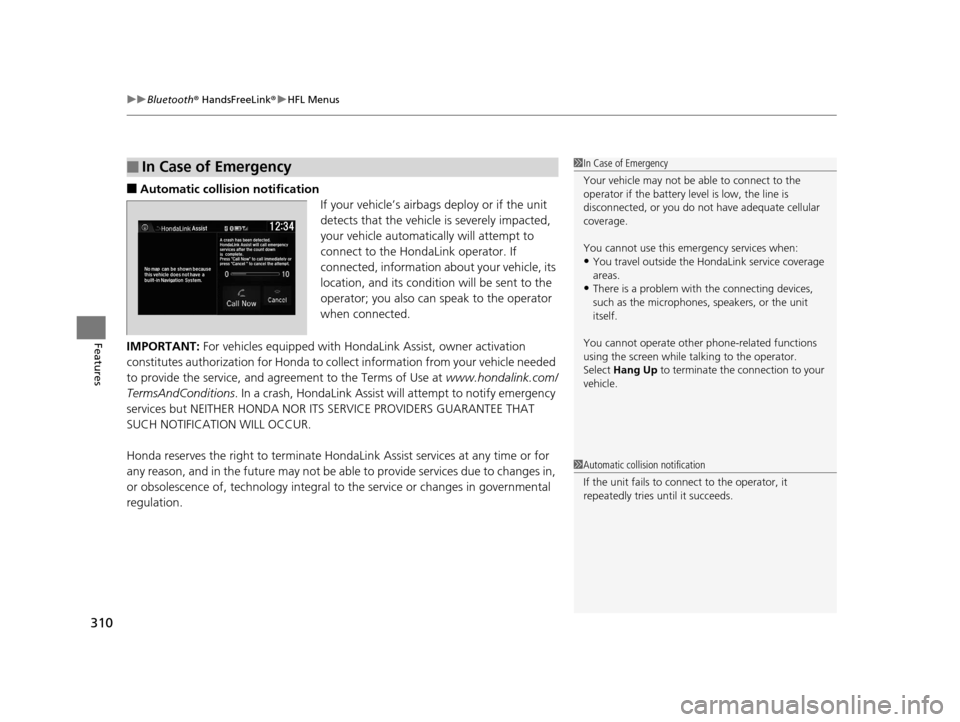
■Automatic collisi on notification
If your vehicle’s airbags deploy or if the unit
detects that the vehicle is severely impacted,
your vehicle automatically will attempt to
connect to the HondaLink operator. If
connected, information about your vehicle, its
location, and its condition will be sent to the
operator; you also can speak to the operator
when connected.
IMPORTANT: For vehicles equipped with Ho ndaLink Assist, owner activation
constitutes authorization for Honda to co llect information from your vehicle needed
to provide the service, and agr eement to the Terms of Use at www.hondalink.com/
TermsAndConditions . In a crash, HondaLink Assist w ill attempt to notify emergency
services but NEITHER HONDA NOR ITS SERVICE PROVIDERS GUARANTEE THAT
SUCH NOTIFICATION WILL OCCUR.
Honda reserves the right to terminate HondaLink Assist services at any time or for
any reason, and in the future may not be ab le to provide services due to changes in,
or obsolescence of, technology integral to the service or changes in governmental
regulation.
■In Case of Emergency1 In Case of Emergency
Your vehicle may not be able to connect to the
operator if the battery level is low, the line is
disconnected, or you do not have adequate cellular
coverage.
You cannot use this emergency services when:
•You travel outside the HondaLink service coverage
areas.
•There is a problem with the connecting devices,
such as the microphones, speakers, or the unit
itself.
You cannot operate othe r phone-related functions
using the screen while talking to the operator.
Select Hang Up to terminate the connection to your
vehicle.
1 Automatic collision notification
If the unit fails to connect to the operator, it
repeatedly tries until it succeeds.
15 HR-V GAS-31T7A6000.book 310 ページ 2015年6月29日 月曜日 午前11時36分
Page 375 of 489
374
Driving
Refueling
Fuel Information
■Fuel recommendation
Use of lower octane gasoline can cause a persistent, heavy metallic knocking noise
that can lead to engine damage.
■Top tier detergent gasoline
Because the level of detergency and additive s in gasoline vary in the market, Honda
endorses the use of “TOP TIER Deterg ent Gasoline” where available to help
maintain the performance and reliability of your vehicle. TOP TIER Detergent
Gasoline meets a new gasoline standard join tly established by leading automotive
manufacturers to meet the need s of today’s advanced engines.
Qualifying gasoline retailers will, in most cases, identify their gasoline as having met
“TOP TIER Detergent Gasoline” standards at the retail location. This fuel is
guaranteed to contain the proper level of detergent additives and be free of metallic
additives. The proper level of detergent additives, and absence of harmful metallic
additives in gasoline, help avoid build-up of deposits in your engine and emission
control system.
For further important fuel-related information for your vehicle, or on information on
gasoline that does not contain MMT, visit www.hondacars.com. In Canada, visit
www.honda.ca for additional information on gasolin e. For more information on top
tier gasoline, visit www.toptiergas.com .
■Fuel tank capacity: 13.2 US gal (50 liters)
Unleaded gasoline, pump octane number 87 or higher
1Fuel Information
NOTICE
We recommend quality ga soline containing
detergent additives that help prevent fuel system and
engine deposits. In addition, in order to maintain
good performance, fuel economy, and emissions
control, we strongly reco mmend the use of gasoline
that does NOT contain harmful manganese-based
fuel additives such as MMT, if such gasoline is
available.
Use of gasoline with these additives may adversely
affect performance, a nd cause the malfunction
indicator lamp on your inst rument panel to come on.
If this happens, contact a dealer for service.
Some gasoline today is ble nded with oxygenates such
as ethanol. Your vehicle is designed to operate on
oxygenated gasoline containing up to 15% ethanol
by volume. Do not use gaso line containing methanol.
If you notice any undesira ble operating symptoms, try
another service station or sw itch to another brand of
gasoline.
15 HR-V GAS-31T7A6000.book 374 ページ 2015年6月29日 月曜日 午前11時36分
Page 376 of 489
375
uuRefueling uHow to Refuel
Driving
How to Refuel
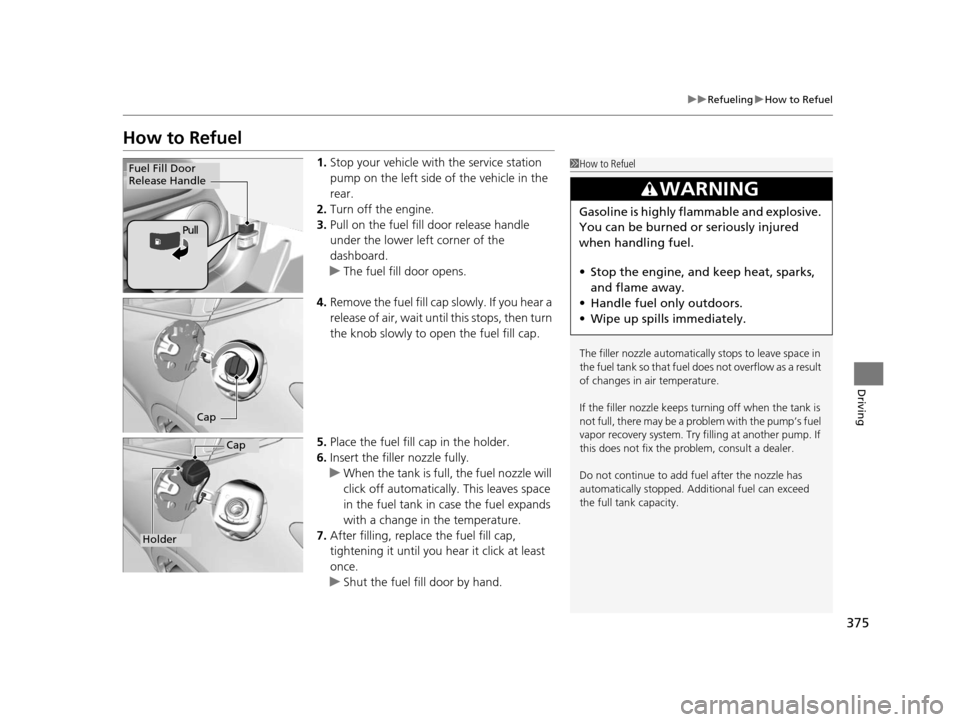
1. Stop your vehicle with the service station
pump on the left side of the vehicle in the
rear.
2. Turn off the engine.
3. Pull on the fuel fill door release handle
under the lower left corner of the
dashboard.
u The fuel fill door opens.
4. Remove the fuel fill cap slowly. If you hear a
release of air, wait until this stops, then turn
the knob slowly to open the fuel fill cap.
5. Place the fuel fill cap in the holder.
6. Insert the filler nozzle fully.
u When the tank is full, the fuel nozzle will
click off automatically. This leaves space
in the fuel tank in case the fuel expands
with a change in the temperature.
7. After filling, replace the fuel fill cap,
tightening it until you hear it click at least
once.
u Shut the fuel fill door by hand.1How to Refuel
The filler nozzle automatically stops to leave space in
the fuel tank so that fuel does not overflow as a result
of changes in air temperature.
If the filler nozzle keeps tu rning off when the tank is
not full, there may be a problem with the pump’s fuel
vapor recovery system. Try fi lling at another pump. If
this does not fix the problem, consult a dealer.
Do not continue to add fuel after the nozzle has
automatically stopped. Addi tional fuel can exceed
the full tank capacity.
3WARNING
Gasoline is highly flammable and explosive.
You can be burned or seriously injured
when handling fuel.
• Stop the engine, and keep heat, sparks,
and flame away.
• Handle fuel only outdoors.
• Wipe up spills immediately.
Fuel Fill Door
Release Handle
Pull
Cap
Cap
Holder
15 HR-V GAS-31T7A6000.book 375 ページ 2015年6月29日 月曜日 午前11時36分