air condition HONDA HR-V 2016 2.G Quick Guide
[x] Cancel search | Manufacturer: HONDA, Model Year: 2016, Model line: HR-V, Model: HONDA HR-V 2016 2.GPages: 77, PDF Size: 14.93 MB
Page 67 of 77
126 || 127 MAINTENANCE MAINTENANCE
TABLE OF CONTENTS
INDEX
VISUAL INDEX
VOICE COMMAND
INDEX
SAFETY
INFORMATION
CUSTOMER
INFORMATION
INSTRUMENT PANEL
SPECIFICATIONS
VEHICLE
CONTROLS
MAINTENANCE
AUDIO AND
CONNECTIVITY
HANDLING THE
UNEXPECTED
BLUETOOTH®
HANDSFREELINK®
DRIVING
HONDALINK®
NAVIGATION
Tire Information
To safely operate your vehicle, your tires must be of the proper type and size, in good
condition with adequate tread, and properly infl ated.
Inflation Guidelines
• Properly infl ated tires provide the best combination of handling, tread life, and
comfort. Refer to the driver’s doorjamb label or the specifi cations (see page
134) for the specifi ed pressure.
• Underinfl ated tires wear unevenly, adversely affect handling and fuel economy,
and are more likely to fail from overheating.
• Overinfl ated tires make your vehicle ride harshly, are more prone to road
hazards, and wear unevenly.
• Every day before you drive, look at each of the tires. If one looks lower than the
others, check the pressure with a tire gauge.
• Measure the air pressure when tires are cold. This means the vehicle has been
parked for at least 3 hours, or driven less than 1 mile (1.6 km). If necessary, add
or release air until the specifi ed pressure is reached, and then calibrate the
system (see page 106). If checked when hot, tire pressure can be as much as
4–6 psi (30–40 kPa, 0.3–0.5 kgf/cm
2) higher than checked when cold.
• At least once a month or before long trips, use a gauge to measure the pressure
in all tires, including the spare. Even tires in good condition can lose 1–2 psi
(10–20 kPa, 0.1–0.2 kgf/cm
2) per month.
Inspection Guidelines
Every time you infl ate the tires, check for the following:
• Any damage to tires, including bumps, bulges, cuts, splits, or cracks in the side
or tread. Remove any foreign objects and inspect for air leaks. Replace tires if
you see fabric or cord.
• Uneven or excessive tread wear. Have a dealer check the wheel alignment.
• Cracks or other damage around the valve stems.
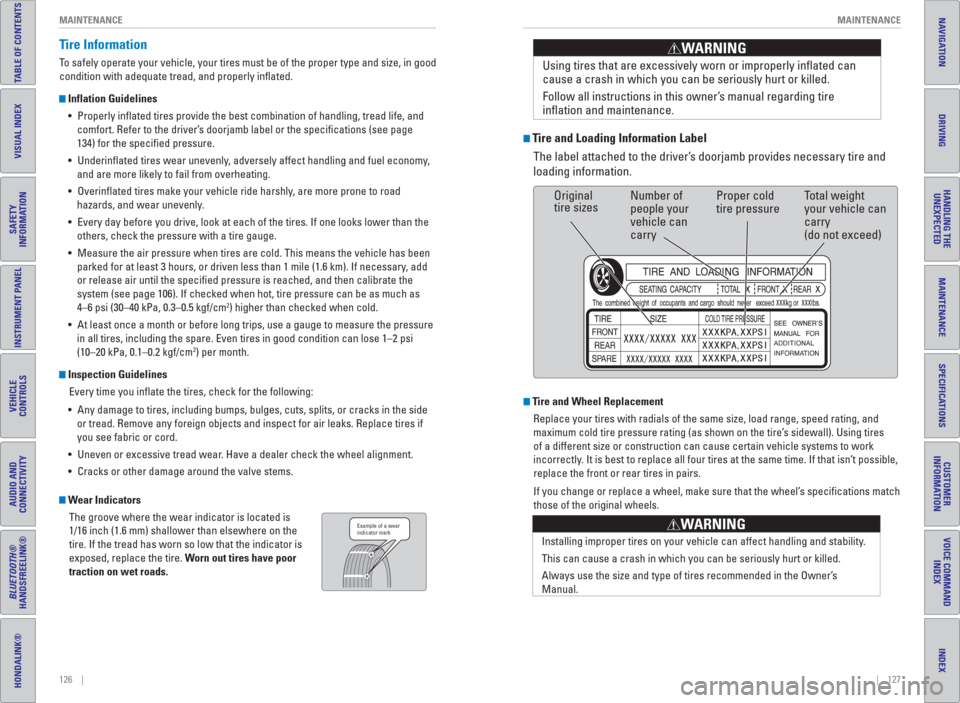
Wear Indicators
The groove where the wear indicator is located is
1/16 inch (1.6 mm) shallower than elsewhere on the
tire. If the tread has worn so low that the indicator is
exposed, replace the tire. Worn out tires have poor
traction on wet roads.Example of a wear
indicator mark
Tire and Loading Information Label
The label attached to the driver’s doorjamb provides necessary tire and
loading information.Using tires that are excessively worn or improperly infl ated can
cause a crash in which you can be seriously hurt or killed.
Follow all instructions in this owner’s manual regarding tire
infl ation and maintenance
.
WARNING
Original
tire sizesNumber of
people your
vehicle can
carryProper cold
tire pressureTotal weight
your vehicle can
carry
(do not exceed)
Tire and Wheel Replacement
Replace your tires with radials of the same size, load range, speed rating, and
maximum cold tire pressure rating (as shown on the tire’s sidewall). Using tires
of a different size or construction can cause certain vehicle systems to work
incorrectly. It is best to replace all four tires at the same time. If that isn’t possible,
replace the front or rear tires in pairs.
If you change or replace a wheel, make sure that the wheel’s specifi cations match
those of the original wheels.
Installing improper tires on your vehicle can affect handling and stability.
This can cause a crash in which you can be seriously hurt or killed.
Always use the size and type of tires recommended in the Owner’s
Manual.
WARNING
Page 68 of 77
128 || 129 MAINTENANCE MAINTENANCE
TABLE OF CONTENTS
INDEX
VISUAL INDEX
VOICE COMMAND
INDEX
SAFETY
INFORMATION
CUSTOMER
INFORMATION
INSTRUMENT PANEL
SPECIFICATIONS
VEHICLE
CONTROLS
MAINTENANCE
AUDIO AND
CONNECTIVITY
HANDLING THE
UNEXPECTED
BLUETOOTH®
HANDSFREELINK®
DRIVING
HONDALINK®
NAVIGATION
Tire Service Life
The life of your tires is dependent on many factors, including driving habits, road
conditions, vehicle loading, infl ation pressure, maintenance history, speed, and
environmental conditions (even when the tires are not in use).
In addition to regular inspections and infl ation pressure maintenance, it is
recommended that you have annual inspections performed once the tires reach
fi ve years old. All tires, including the spare, should be removed from service after
10 years from the date of manufacture, regardless of their condition or state of
wear.
Winter Tires
If driving on snowy or frozen roads, mount all season tires marked “M+S”, snow
tires, or tire chains; reduce speed; and maintain suffi cient distance between
vehicles when driving. For winter tires, select the size and load ranges that are the
same as the original tires, and mount them to all four wheels.
Tire Chains
Install tire chains on the front tires only. Because your vehicle has limited tire
clearance, we strongly recommend using the following chains: Cable type: SCC
Radial Chain SC1034.
Mount chains as tightly as you can, and make sure that they do not touch the
brake lines or suspension.
Traction devices that are the wrong size or improperly installed can damage your
vehicle’s brake lines, suspension, body, and wheels. Stop driving if they are hitting
any part of the vehicle.
NOTICE
Using the wrong chains, or not properly installing chains, can damage the
brake lines and cause a crash in which you can be seriously injured or killed.
Follow all instructions in this guide regarding the selection and use of tire
chains.
WARNING
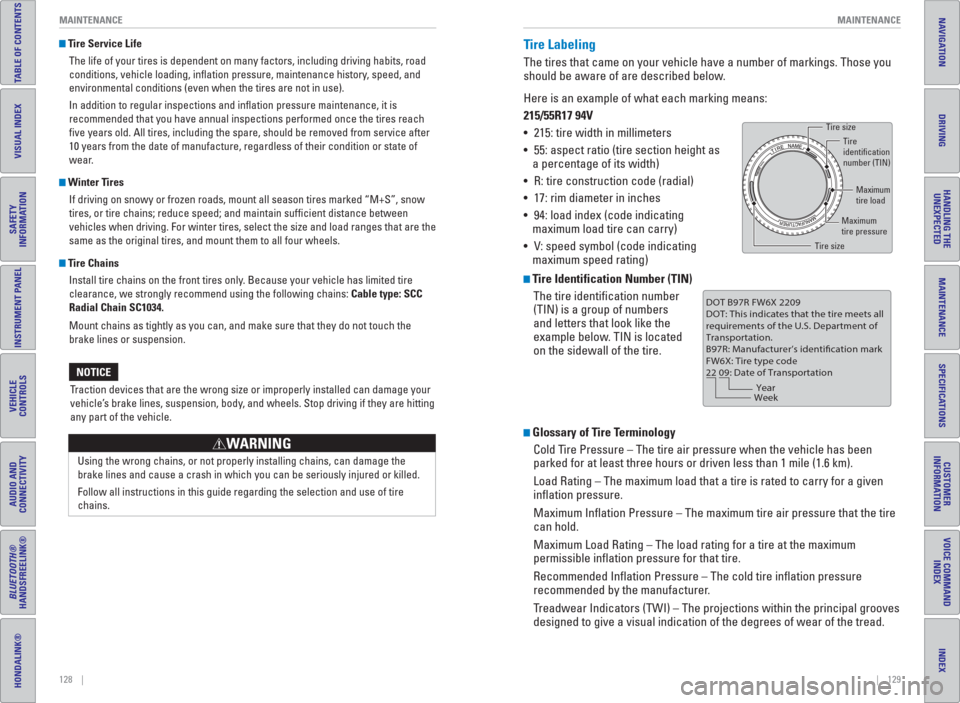
Tire Labeling
The tires that came on your vehicle have a number of markings. Those you
should be aware of are described below.
Here is an example of what each marking means:
215/55R17 94V
• 215: tire width in millimeters
• 55: aspect ratio (tire section height as
a percentage of its width)
• R: tire construction code (radial)
• 17: rim diameter in inches
• 94: load index (code indicating
maximum load tire can carry)
• V: speed symbol (code indicating
maximum speed rating)
Tire Identification Number (TIN)
The tire identifi cation number
(TIN) is a group of numbers
and letters that look like the
example below. TIN is located
on the sidewall of the tire.
Glossary of Tire Terminology
Cold Tire Pressure – The tire air pressure when the vehicle has been
parked for at least three hours or driven less than 1 mile (1.6 km).
Load Rating – The maximum load that a tire is rated to carry for a given
infl ation pressure.
Maximum Infl ation Pressure – The maximum tire air pressure that the tire
can hold.
Maximum Load Rating – The load rating for a tire at the maximum
permissible infl ation pressure for that tire.
Recommended Infl ation Pressure – The cold tire infl ation pressure
recommended by the manufacturer.
Treadwear Indicators (TWI) – The projections within the principal grooves
designed to give a visual indication of the degrees of wear of the tread.
Tire size
Tire
identification
number (TIN)
Maximum
tire load
Maximum
tire pressure
Tire size
DOT B97R FW6X 2209
DOT: This indicates that the tire meets all
requirements of the U.S. Department of
Transportation.
B97R: Manufacturer’s identification mark
FW6X: Tire type code
22 09: Date of Transportation
Year
Week
Page 71 of 77
134 || 135 CUSTOMER INFORMATION SPECIFICATIONS
TABLE OF CONTENTS
INDEX
VISUAL INDEX
VOICE COMMAND
INDEX
SAFETY
INFORMATION
CUSTOMER
INFORMATION
INSTRUMENT PANEL
SPECIFICATIONS
VEHICLE
CONTROLS
MAINTENANCE
AUDIO AND
CONNECTIVITY
HANDLING THE
UNEXPECTED
BLUETOOTH®
HANDSFREELINK®
DRIVING
HONDALINK®
NAVIGATION
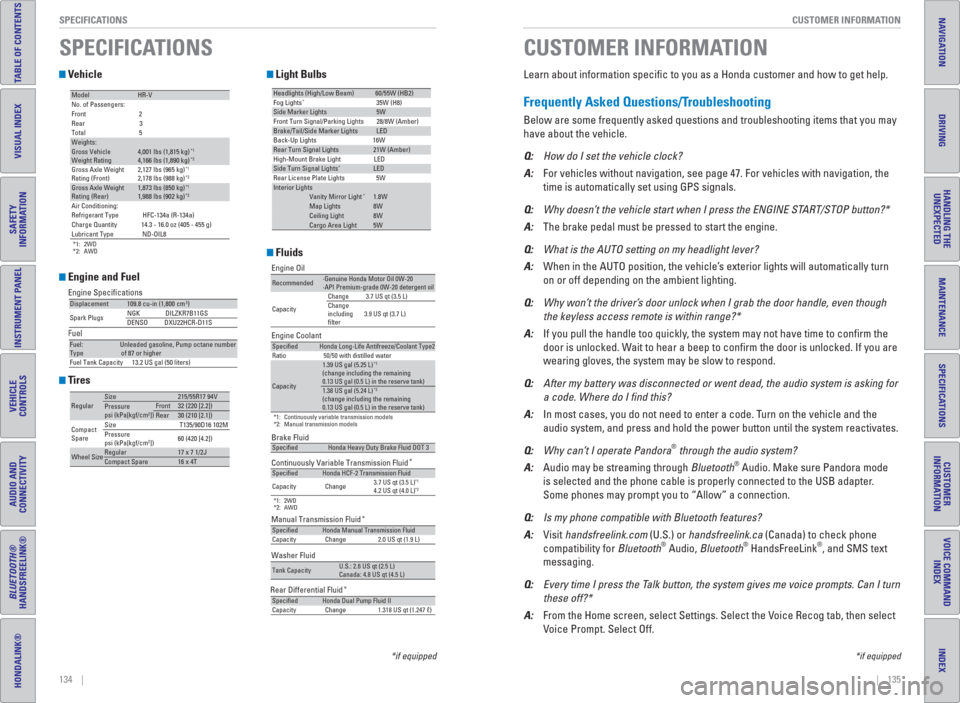
Vehicle
Engine and Fuel
Tires
Light Bulbs
Fluids*1: 2WD
*2: AWD
ModelHR-V
No. of Passengers:
Front 2
Rear 3
Total 5
Weights:Gross Vehicle
Weight Rating 4,001 lbs (1,815 kg)*14,166 lbs (1,890 kg)*2Gross Axle Weight
Rating (Front)2,127 lbs (965 kg)*12,178 lbs (988 kg)*2Gross Axle Weight
Rating (Rear)1,873 lbs (850 kg)*11,988 lbs (902 kg)*2Air Conditioning:
Refrigerant Type HFC-134a (R-134a)
Charge Quantity 14.3 - 16.0 oz (405 - 455 g)
Lubricant Type ND-OIL8
Engine Specifications
Fuel
Displacement109.8 cu-in (1,800 cm3)
Spark PlugsNGK DILZKR7B11GS
DENSODXU22HCR-D11S
Fuel:
TypeUnleaded gasoline, Pump octane number
of 87 or higher
Fuel Tank Capacity 13.2 US gal (50 liters)
RegularSize215/55R17 94VPressure
psi (kPa[kgf/cm2])Front32 (220 [2.2])Rear30 (210 [2.1])
Compact
SpareSize T135/90D16 102M
Pressure
psi (kPa[kgf/cm
2])60 (420 [4.2])
Wheel SizeRegular17 x 7 1/2JCompact Spare16 x 4T
Headlights (High/Low Beam)60/55W (HB2)
Fog Lights*35W (H8)Side Marker Lights5W
Front Turn Signal/Parking Lights 28/8W (Amber)
Brake/Tail/Side Marker LightsLED
Back-Up Lights 16W
Rear Turn Signal Lights21W (Amber)
High-Mount Brake Light LED
Side Turn Signal Lights*LED
Rear License Plate Lights 5W
Interior LightsVanity Mirror Light*1.8WMap Lights8WCeiling Light8WCargo Area Light5W
Brake Fluid
Continuously Variable Transmission Fluid
*
*1: 2WD
*2: AWD
Manual Transmission Fluid*
SpecifiedHonda Heavy Duty Brake Fluid DOT 3
SpecifiedHonda HCF-2 Transmission Fluid
Capacity Change3.7 US qt (3.5 L)*14.2 US qt (4.0 L)*2
SpecifiedHonda Manual Transmission Fluid
Capacity Change 2.0 US qt (1.9 L)
Engine Oil
Engine Coolant
*1: Continuously variable transmission models
*2: Manual transmission models
Recommended·Genuine Honda Motor Oil 0W-20
·API Premium-grade 0W-20 detergent oil
CapacityChange 3.7 US qt (3.5 L)
Change
including
filter3.9 US qt (3.7 L)
SpecifiedHonda Long-Life Antifreeze/Coolant Type2
Ratio 50/50 with distilled water
Capacity
1.39 US gal (5.25 L)*1(change including the remaining
0.13 US gal (0.5 L) in the reserve tank)
1.38 US gal (5.24 L)*2
(change including the remaining
0.13 US gal (0.5 L) in the reserve tank)
Washer Fluid
Tank CapacityU.S.: 2.6 US qt (2.5 L)
Canada: 4.8 US qt (4.5 L)
Rear Differential Fluid*SpecifiedHonda Dual Pump Fluid II
Capacity Change 1.318 US qt (1.247 ℓ)
SPECIFICATIONS
Learn about information specifi c to you as a Honda customer and how to get help.
Frequently Asked Questions/ Troubleshooting
Below are some frequently asked questions and troubleshooting items that you may
have about the vehicle.
Q: How do I set the vehicle clock?
A: For vehicles without navigation, see page 47. For vehicles with navigation, the
time is automatically set using GPS signals.
Q: Why doesn’t the vehicle start when I press the ENGINE START/STOP button?*
A: The brake pedal must be pressed to start the engine.
Q: What is the AUTO setting on my headlight lever?
A: When in the AUTO position, the vehicle’s exterior lights will automatically turn
on or off depending on the ambient lighting.
Q: Why won’t the driver’s door unlock when I grab the door handle, even though
the keyless access remote is within range?*
A: If you pull the handle too quickly, the system may not have time to confi rm the
door is unlocked. Wait to hear a beep to confi rm the door is unlocked. If you are
wearing gloves, the system may be slow to respond.
Q: After my battery was disconnected or went dead, the audio system is asking for
a code. Where do I nd this?
A: In most cases, you do not need to enter a code. Turn on the vehicle and the
audio system, and press and hold the power button until the system reactivates.
Q: Why can’t I operate Pandora
® through the audio system?
A: Audio may be streaming through Bluetooth® Audio. Make sure Pandora mode
is selected and the phone cable is properly connected to the USB adapter.
Some phones may prompt you to “Allow” a connection.
Q: Is my phone compatible with Bluetooth features?
A: Visit handsfreelink.com (U.S.) or handsfreelink.ca (Canada) to check phone
compatibility for Bluetooth
® Audio, Bluetooth® HandsFreeLink®, and SMS text
messaging.
Q: Every time I press the Talk button, the system gives me voice prompts. Can I turn
these off?*
A: From the Home screen, select Settings. Select the Voice Recog tab, then select
Voice Prompt. Select Off.
CUSTOMER INFORMATION
*if equipped *if equipped
Page 74 of 77
140 || 141 VOICE COMMAND INDEX VOICE COMMAND INDEX
TABLE OF CONTENTS
INDEX
VISUAL INDEX
VOICE COMMAND
INDEX
SAFETY
INFORMATION
CUSTOMER
INFORMATION
INSTRUMENT PANEL
SPECIFICATIONS
VEHICLE
CONTROLS
MAINTENANCE
AUDIO AND
CONNECTIVITY
HANDLING THE
UNEXPECTED
BLUETOOTH®
HANDSFREELINK®
DRIVING
HONDALINK®
NAVIGATION
Route Commands
The system accepts these commands when a route is set.
• How long to the destination?
• How far to the destination?
• Display destination map
• Display entire route − Travel center
− Airport
− Automobile club
− Bus station
− Camping
− Commuter rail station
− Ferry terminal
− Named place
− Park & ride − Parking garage
− Parking lot
− Rental car agency
− Rest area
− Ski area
− Tourist information
− Train station
− Travel agency
− Truck stop
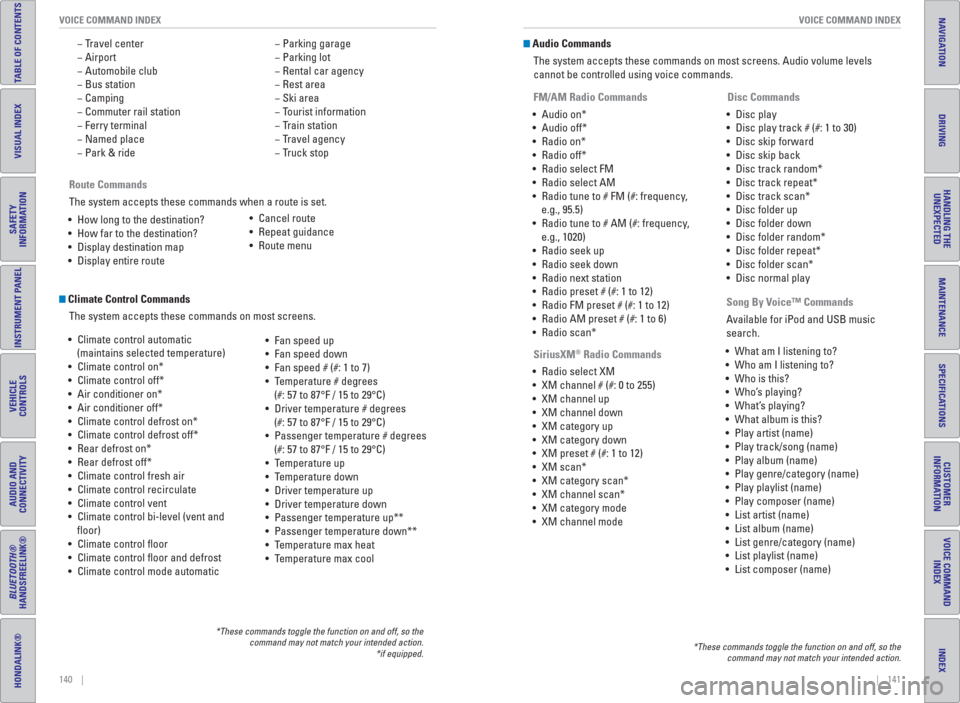
Climate Control Commands
The system accepts these commands on most screens.
• Climate control automatic
(maintains selected temperature)
• Climate control on*
• Climate control off*
• Air conditioner on*
• Air conditioner off*
• Climate control defrost on*
• Climate control defrost off*
• Rear defrost on*
• Rear defrost off*
• Climate control fresh air
• Climate control recirculate
• Climate control vent
• Climate control bi-level (vent and
fl oor)
• Climate control fl oor
• Climate control fl oor and defrost
• Climate control mode automatic• Fan speed up
• Fan speed down
• Fan speed # (#: 1 to 7)
• Temperature # degrees
(#: 57 to 87°F / 15 to 29°C)
• Driver temperature # degrees
(#: 57 to 87°F / 15 to 29°C)
• Passenger temperature # degrees
(#: 57 to 87°F / 15 to 29°C)
• Temperature up
• Temperature down
• Driver temperature up
• Driver temperature down
• Passenger temperature up**
• Passenger temperature down**
• Temperature max heat
• Temperature max cool
*These commands toggle the function on and off, so the
command may not match your intended action.
*if equipped.
• Cancel route
• Repeat guidance
• Route menu
Audio Commands
The system accepts these commands on most screens. Audio volume levels
cannot be controlled using voice commands.
FM/AM Radio Commands
• Audio on*
• Audio off*
• Radio on*
• Radio off*
• Radio select FM
• Radio select AM
• Radio tune to # FM (#: frequency,
e.g., 95.5)
• Radio tune to # AM (#: frequency,
e.g., 1020)
• Radio seek up
• Radio seek down
• Radio next station
• Radio preset # (#: 1 to 12)
• Radio FM preset # (#: 1 to 12)
• Radio AM preset # (#: 1 to 6)
• Radio scan*
SiriusXM
® Radio Commands
• Radio select XM
• XM channel # (#: 0 to 255)
• XM channel up
• XM channel down
• XM category up
• XM category down
• XM preset # (#: 1 to 12)
• XM scan*
• XM category scan*
• XM channel scan*
• XM category mode
• XM channel mode Disc Commands
• Disc play
• Disc play track # (#: 1 to 30)
• Disc skip forward
• Disc skip back
• Disc track random*
• Disc track repeat*
• Disc track scan*
• Disc folder up
• Disc folder down
• Disc folder random*
• Disc folder repeat*
• Disc folder scan*
• Disc normal play
*These commands toggle the function on and off, so the
command may not match your intended action.
Song By Voice™ Commands
Available for iPod and USB music
search.
• What am I listening to?
• Who am I listening to?
• Who is this?
• Who’s playing?
• What’s playing?
• What album is this?
• Play artist (name)
• Play track/song (name)
• Play album (name)
• Play genre/category (name)
• Play playlist (name)
• Play composer (name)
• List artist (name)
• List album (name)
• List genre/category (name)
• List playlist (name)
• List composer (name)
Page 76 of 77
144 || 145 INDEX INDEX
TABLE OF CONTENTS
INDEX
VISUAL INDEX
VOICE COMMAND
INDEX
SAFETY
INFORMATION
CUSTOMER
INFORMATION
INSTRUMENT PANEL
SPECIFICATIONS
VEHICLE
CONTROLS
MAINTENANCE
AUDIO AND
CONNECTIVITY
HANDLING THE
UNEXPECTED
BLUETOOTH®
HANDSFREELINK®
DRIVING
HONDALINK®
NAVIGATION
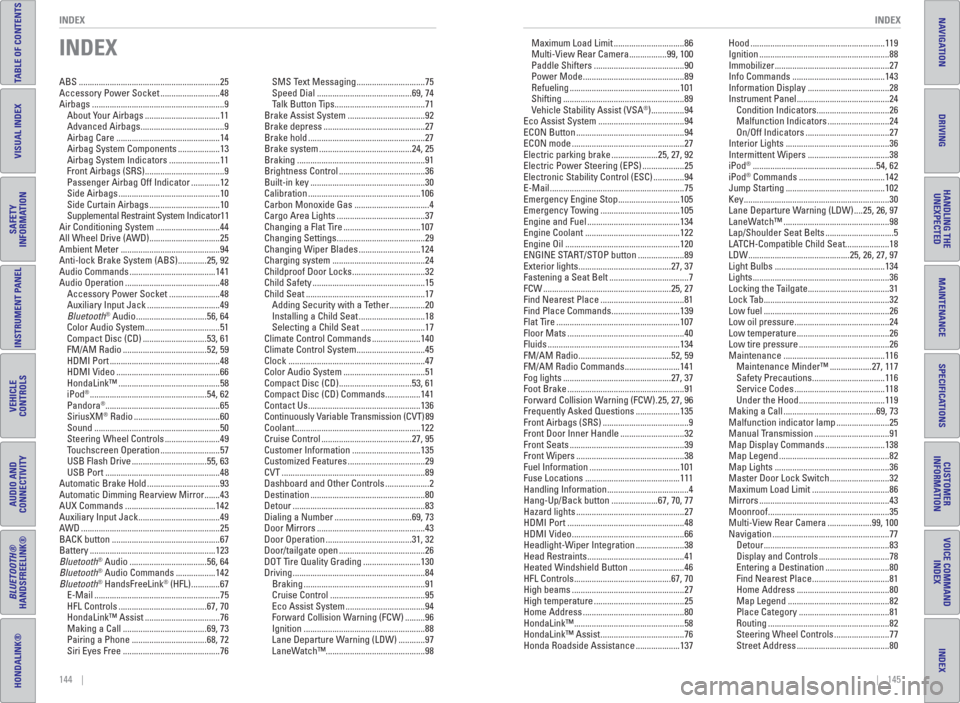
INDEX
ABS ................................................................25
Accessory Power Socket ...........................48
Airbags ............................................................9
About Your Airbags ..................................11
Advanced Airbags ......................................9
Airbag Care ...............................................14
Airbag System Components ...................13
Airbag System Indicators .......................11
Front Airbags (SRS) ....................................9
Passenger Airbag Off Indicator .............12
Side Airbags ..............................................10
Side Curtain Airbags ................................10
Supplemental Restraint System Indicator 11
Air Conditioning System .............................44
All Wheel Drive (AWD) ................................25
Ambient Meter .............................................94
Anti-lock Brake System (ABS) .............25, 92
Audio Commands .......................................141
Audio Operation ...........................................48
Accessory Power Socket .......................48
Auxiliary Input Jack .................................49
Bluetooth
® Audio ................................56, 64
Color Audio System ..................................51
Compact Disc (CD) .............................53, 61
FM/AM Radio ......................................52, 59
HDMI Port ..................................................48
HDMI Video ...............................................66
HondaLink™ ..............................................58
iPod
® .....................................................54, 62
Pandora® ....................................................65
SiriusXM® Radio .......................................60
Sound .........................................................50
Steering Wheel Controls .........................49
Touchscreen Operation ...........................57
USB Flash Drive ..................................55, 63
USB Port ....................................................48
Automatic Brake Hold .................................93
Automatic Dimming Rearview Mirror .......43
AUX Commands .........................................142
Auxiliary Input Jack .....................................49
AWD ...............................................................25
BACK button .................................................67
Battery .........................................................123
Bluetooth
® Audio ...................................56, 64
Bluetooth® Audio Commands ..................142
Bluetooth® HandsFreeLink® (HFL) .............67
E-Mail .........................................................75
HFL Controls ........................................67, 70
HondaLink™ Assist ..................................76
Making a Call ......................................69, 73
Pairing a Phone ..................................68, 72
Siri Eyes Free ............................................76SMS Text Messaging ...............................75
Speed Dial ...........................................69, 74
Talk Button Tips .........................................71
Brake Assist System ...................................92
Brake depress ..............................................27
Brake hold .....................................................27
Brake system ..........................................24, 25
Braking ..........................................................91
Brightness Control .......................................36
Built-in key ....................................................30
Calibration ...................................................106
Carbon Monoxide Gas ..................................4
Cargo Area Lights ........................................37
Changing a Flat Tire ...................................107
Changing Settings ........................................29
Changing Wiper Blades ............................124
Charging system ..........................................24
Childproof Door Locks .................................32
Child Safety ...................................................15
Child Seat ......................................................17
Adding Security with a Tether ................20
Installing a Child Seat ..............................18
Selecting a Child Seat .............................17
Climate Control Commands ......................140
Climate Control System ...............................45
Clock ..............................................................47
Color Audio System .....................................51
Compact Disc (CD) .................................53, 61
Compact Disc (CD) Commands ................141
Contact Us ...................................................136
Continuously Variable Transmission (CVT) 89
Coolant .........................................................122
Cruise Control .........................................27, 95
Customer Information ...............................135
Customized Features ...................................29
CVT .................................................................89
Dashboard and Other Controls ....................2
Destination ....................................................80
Detour ............................................................83
Dialing a Number ...................................69, 73
Door Mirrors .................................................43
Door Operation .......................................31, 32
Door/tailgate open .......................................26
DOT Tire Quality Grading ..........................130
Driving ............................................................84
Braking .......................................................91
Cruise Control ...........................................95
Eco Assist System ....................................94
Forward Collision Warning (FCW) .........96
Ignition .......................................................88
Lane Departure Warning (LDW) ............97
LaneWatch™ .............................................98Maximum Load Limit ................................86
Multi-View Rear Camera .................99, 100
Paddle Shifters .........................................90
Power Mode ..............................................89
Refueling ..................................................101
Shifting .......................................................89
Vehicle Stability Assist (VSA
®) ...............94
Eco Assist System .......................................94
ECON Button .................................................94
ECON mode ...................................................27
Electric parking brake .....................25, 27, 92
Electric Power Steering (EPS) ...................25
Electronic Stability Control (ESC) ..............94
E-Mail .............................................................75
Emergency Engine Stop ............................105
Emergency Towing ....................................105
Engine and Fuel ..........................................134
Engine Coolant ...........................................122
Engine Oil ....................................................120
ENGINE START/STOP button .....................89
Exterior lights ..........................................27, 37
Fastening a Seat Belt ....................................7
FCW ..........................................................25, 27
Find Nearest Place ......................................81
Find Place Commands ...............................139
Flat Tire ........................................................107
Floor Mats .....................................................40
Fluids ............................................................134
FM/AM Radio ..........................................52, 59
FM/AM Radio Commands .........................141
Fog lights .................................................27, 37
Foot Brake .....................................................91
Forward Collision Warning (FCW) .25, 27, 96
Frequently Asked Questions ....................135
Front Airbags (SRS) .......................................9
Front Door Inner Handle .............................32
Front Seats ....................................................39
Front Wipers .................................................38
Fuel Information .........................................101
Fuse Locations ...........................................111
Handling Information .....................................4
Hang-Up/Back button .....................67, 70, 77
Hazard lights .................................................27
HDMI Port .....................................................48
HDMI Video ...................................................66
Headlight-Wiper Integration ......................38
Head Restraints ............................................41
Heated Windshield Button .........................46
HFL Controls ............................................67, 70
High beams ...................................................27
High temperature .........................................25
Home Address ..............................................80
HondaLink™ ..................................................58
HondaLink™ Assist ......................................76
Honda Roadside Assistance ....................137Hood .............................................................119
Ignition ...........................................................88
Immobilizer ....................................................27
Info Commands ..........................................143
Information Display .....................................28
Instrument Panel ..........................................24
Condition Indicators .................................26
Malfunction Indicators ............................24
On/Off Indicators ......................................27
Interior Lights ...............................................36
Intermittent Wipers .....................................38
iPod
® ........................................................54, 62
iPod® Commands .......................................142
Jump Starting .............................................102
Key ..................................................................30
Lane Departure Warning (LDW) ....25, 26, 97
LaneWatch™ ................................................98
Lap/Shoulder Seat Belts ...............................5
LATCH-Compatible Child Seat....................18
LDW ..............................................25, 26, 27, 97
Light Bulbs ..................................................134
Lights ..............................................................36
Locking the Tailgate .....................................31
Lock Tab .........................................................32
Low fuel .........................................................26
Low oil pressure ...........................................24
Low temperature ..........................................26
Low tire pressure .........................................26
Maintenance ..............................................116
Maintenance Minder™ ...................27, 117
Safety Precautions .................................116
Service Codes .........................................118
Under the Hood .......................................119
Making a Call ..........................................69, 73
Malfunction indicator lamp ........................25
Manual Transmission ..................................91
Map Display Commands ...........................138
Map Legend ..................................................82
Map Lights ....................................................36
Master Door Lock Switch ...........................32
Maximum Load Limit ...................................86
Mirrors ...........................................................43
Moonroof .......................................................35
Multi-View Rear Camera ....................99, 100
Navigation .....................................................77
Detour .........................................................83
Display and Controls ................................78
Entering a Destination .............................80
Find Nearest Place ...................................81
Home Address ..........................................80
Map Legend ..............................................82
Place Category .........................................81
Routing .......................................................82
Steering Wheel Controls .........................77
Street Address ..........................................80