change time HONDA HR-V 2017 2.G User Guide
[x] Cancel search | Manufacturer: HONDA, Model Year: 2017, Model line: HR-V, Model: HONDA HR-V 2017 2.GPages: 489, PDF Size: 29.22 MB
Page 186 of 489
Continued185
uuAudio System Basic Operation uAudio/Information Screen
Features
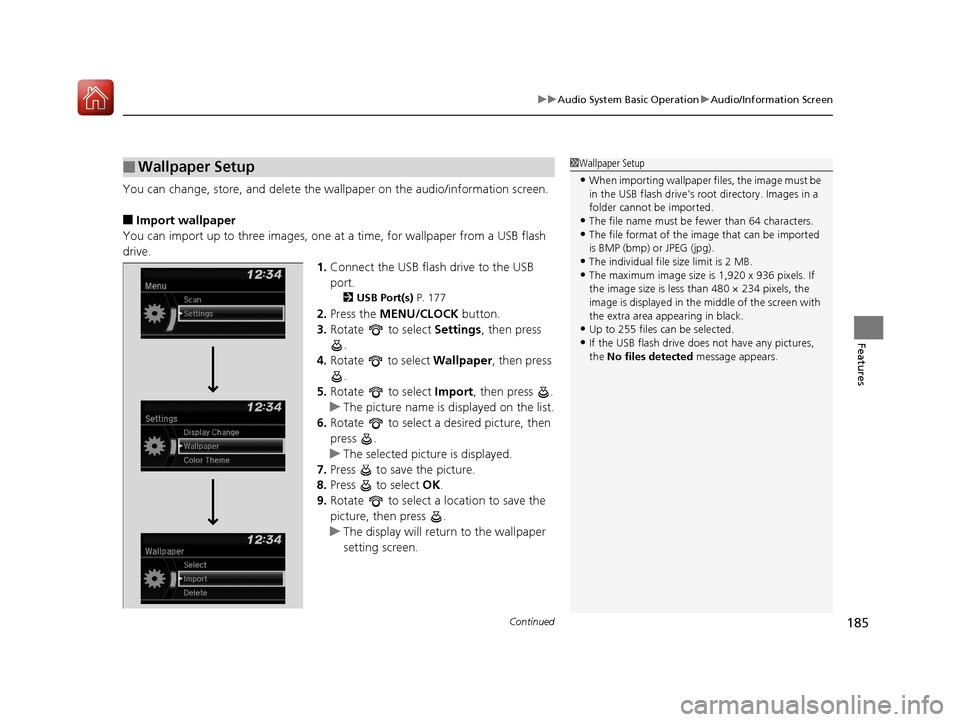
You can change, store, and delete the wallpaper on the audio/ information screen.
■Import wallpaper
You can import up to three images, one at a time, for wallpaper from a USB flash
drive.
1.Connect the USB flash drive to the USB
port.
2 USB Port(s) P. 177
2.Press the MENU/CLOCK button.
3. Rotate to select Settings, then press
.
4. Rotate to select Wallpaper, then press
.
5. Rotate to select Import, then press .
u The picture name is displayed on the list.
6. Rotate to select a desired picture, then
press .
u The selected picture is displayed.
7. Press to save the picture.
8. Press to select OK.
9. Rotate to select a location to save the
picture, then press .
u The display will return to the wallpaper
setting screen.
■Wallpaper Setup1Wallpaper Setup
•When importing wallpaper files, the image must be
in the USB flash drive’s root directory. Images in a
folder cannot be imported.
•The file name must be fewer than 64 characters.•The file format of the im age that can be imported
is BMP (bmp) or JPEG (jpg).
•The individual file size limit is 2 MB.•The maximum image size is 1,920 x 936 pixels. If
the image size is less than 480 × 234 pixels, the
image is displayed in the middle of the screen with
the extra area appearing in black.
•Up to 255 files can be selected.
•If the USB flash drive doe s not have any pictures,
the No files detected message appears.
17 HR-V HDMC-31T7A6100.book 185 ページ 2016年7月20日 水曜日 午前9時50分
Page 191 of 489
uuAudio System Basic Operation uPlaying AM/FM Radio
190
Features
Provides text data information related to your selected RDS capable FM station.
■To find an RDS station from Station List
1. Press while listening to an FM station.
2. Rotate to select the station, then press .
■Update List
Updates your available station list at any time.
1. Press while listening to an FM station.
2. Rotate to select Update List, then press .
■Radio text
Displays the radio text informat ion of the selected RDS station.
1. Press the MENU/CLOCK button.
2. Rotate to select Settings, then press .
3. Rotate to select RDS Settings, then press .
4. Rotate to select Radio Text, then press .
■Scan
Samples each of the strongest stations on the selected band for 10 seconds.
1. Press the MENU/CLOCK button.
2. Rotate to select Scan, then press .
To turn off scan, press .
■Radio Data System (RDS)1 Playing AM/FM Radio
The ST indicator appears on the display indicating
stereo FM broadcasts.
Stereo reproduction in AM is not available.
You can store 6 AM stations and 12 FM stations into
the preset memory.
Switching the Audio Mode
Press the SOURCE button on the steering wheel.
2 Audio Remote Controls P. 180
1Radio Data System (RDS)
When you select an RDS-capable FM station, the RDS
automatically turns on, and the frequency display
changes to the station name. However, when the
signals of that station become weak, the display
changes from the statio n name to the frequency.
17 HR-V HDMC-31T7A6100.book 190 ページ 2016年7月20日 水曜日 午前9時50分
Page 201 of 489
200
uuAudio System Basic Operation uPlaying Bluetooth ® Audio
Features
Playing Bluetooth® Audio
Your audio system allows you to listen to music from your Bluetooth-compatible
phone.
This function is available when the phone is paired and connected to the vehicle’s
Bluetooth ® HandsFreeLink ® (HFL) system.
2 Phone Setup P. 266
1Playing Bluetooth ® Audio
Not all Bluetooth -enabled phones with streaming
audio capabilities are compatible with the system.
For a list of compatible phones:
•U.S.: Visit www.handsfreelink.honda.com , or call
1-888-528-7876.
•Canada: Visit www.handsfreelink.ca , or call 1-888-
528-7876.
In some states, it may be illegal to perform some data
device functions while driving.
Only one phone can be used with HFL at a time.
When there are more than two paired phones in the
vehicle, the first paired phone the system finds is
automatically connected.
If more than one phone is paired to the HFL system,
there will be a delay before the system begins to play.
In some cases, the name of the artist, album, or track
may not appear correctly.
Some functions may not be available on some
devices.
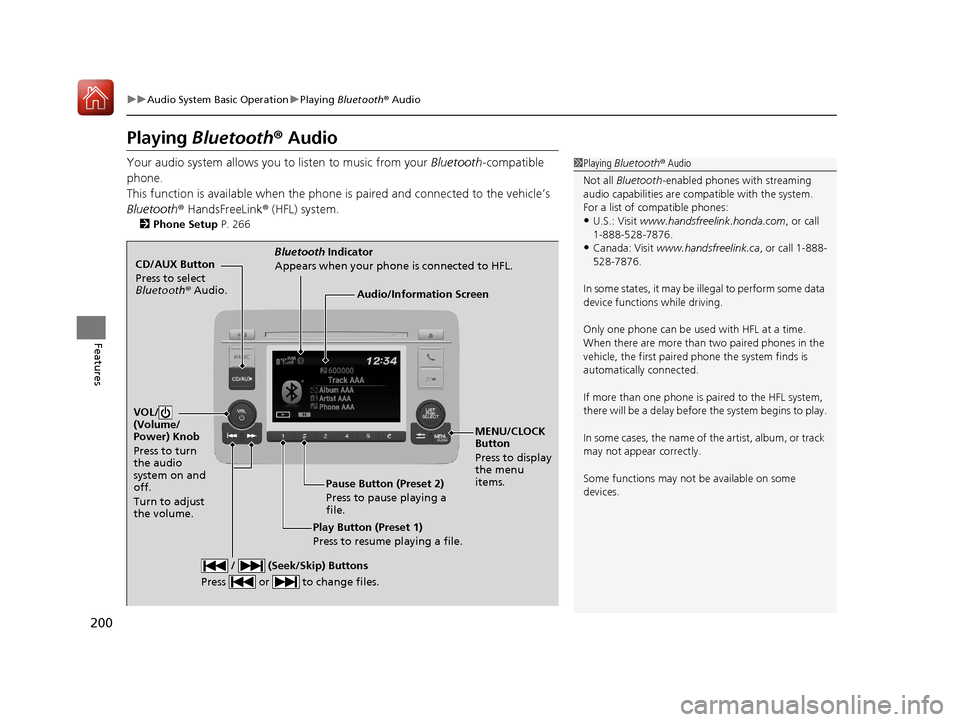
CD/AUX Button
Press to select
Bluetooth ® Audio.
VOL/
(Volume/
Power) Knob
Press to turn
the audio
system on and
off.
Turn to adjust
the volume.
MENU/CLOCK
Button
Press to display
the menu
items.
Audio/Information Screen
Bluetooth Indicator
Appears when your phone is connected to HFL.
/ (Seek/Skip) Buttons
Press or to change files.
Play Button (Preset 1)
Press to resume playing a file. Pause Button (Preset 2)
Press to pause playing a
file.
17 HR-V HDMC-31T7A6100.book 200 ページ 2016年7月20日 水曜日 午前9時50分
Page 204 of 489
203
Features
Audio System Basic Operation
To use the audio system function, the ignition swit ch must be in ACCESSORY (q or
ON
(w*1.
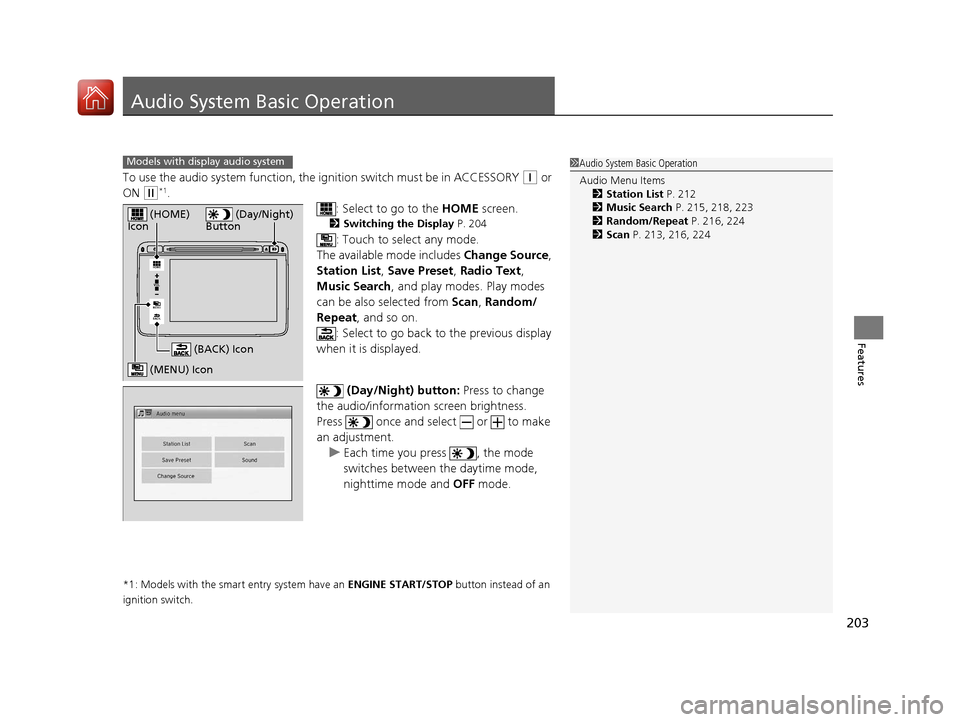
: Select to go to the HOME screen.
2Switching the Display P. 204
: Touch to select any mode.
The available mode includes Change Source,
Station List , Save Preset, Radio Text ,
Music Search , and play mode s. Play modes
can be also selected from Scan, Random/
Repeat , and so on.
: Select to go back to the previous display
when it is displayed.
(Day/Night) button: Press to change
the audio/information screen brightness.
Press once and select or to make
an adjustment. u Each time you press , the mode
switches between the daytime mode,
nighttime mode and OFF mode.
*1: Models with the smart entry system have an ENGINE START/STOP button instead of an
ignition switch.
1 Audio System Basic Operation
Audio Menu Items
2 Station List P. 212
2 Music Search P. 215, 218, 223
2 Random/Repeat P. 216, 224
2 Scan P. 213, 216, 224Models with display audio system
VOL
HOME
MENU
BACK
(Day/Night)
Button (HOME)
Icon
(MENU) Icon
(BACK) Icon
17 HR-V HDMC-31T7A6100.book 203 ページ 2016年7月20日 水曜日 午前9時50分
Page 208 of 489
Continued207
uuAudio System Basic Operation uAudio/Information Screen
Features
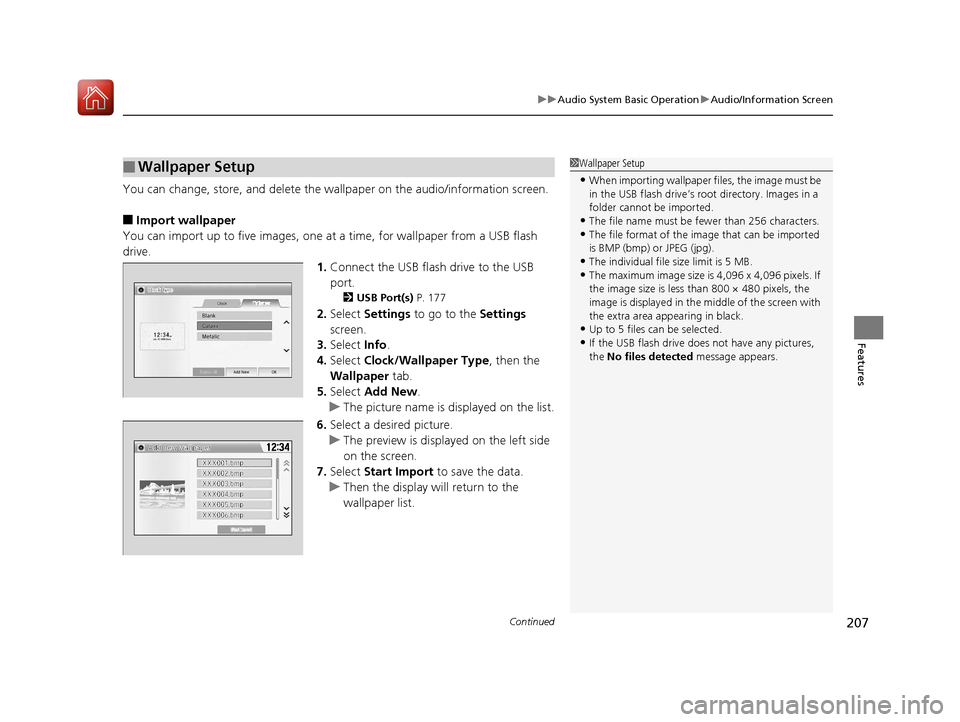
You can change, store, and delete the wallpaper on the audio/ information screen.
■Import wallpaper
You can import up to five images, one at a time, for wallpaper from a USB flash
drive. 1.Connect the USB flash drive to the USB
port.
2 USB Port(s) P. 177
2.Select Settings to go to the Settings
screen.
3. Select Info.
4. Select Clock/Wallpaper Type , then the
Wallpaper tab.
5. Select Add New .
u The picture name is displayed on the list.
6. Select a desired picture.
u The preview is displayed on the left side
on the screen.
7. Select Start Import to save the data.
u Then the display will return to the
wallpaper list.
■Wallpaper Setup1Wallpaper Setup
•When importing wallpaper files, the image must be
in the USB flash drive’s root directory. Images in a
folder cannot be imported.
•The file name must be fewer than 256 characters.•The file format of the im age that can be imported
is BMP (bmp) or JPEG (jpg).
•The individual file size limit is 5 MB.•The maximum image size is 4,096 x 4,096 pixels. If
the image size is less than 800 × 480 pixels, the
image is displayed in the middle of the screen with
the extra area appearing in black.
•Up to 5 files can be selected.
•If the USB flash drive doe s not have any pictures,
the No files detected message appears.
17 HR-V HDMC-31T7A6100.book 207 ページ 2016年7月20日 水曜日 午前9時50分
Page 213 of 489
uuAudio System Basic Operation uPlaying AM/FM Radio
212
Features
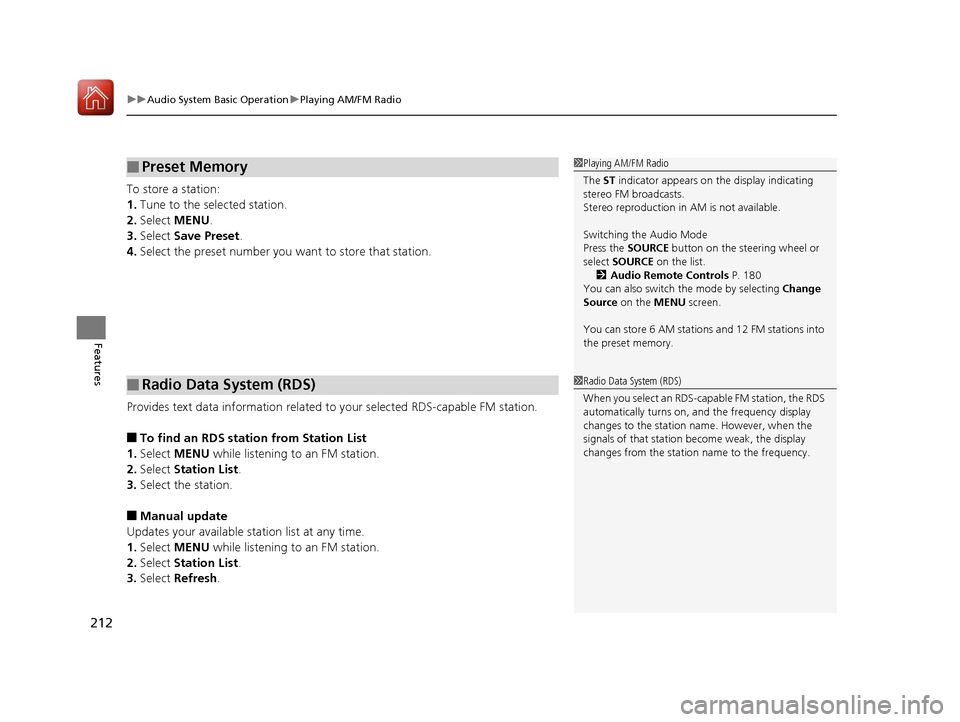
To store a station:
1. Tune to the selected station.
2. Select MENU .
3. Select Save Preset .
4. Select the preset number you want to store that station.
Provides text data information related to your selected RDS-capable FM station.
■To find an RDS station from Station List
1. Select MENU while listening to an FM station.
2. Select Station List .
3. Select the station.
■Manual update
Updates your available station list at any time.
1. Select MENU while listening to an FM station.
2. Select Station List .
3. Select Refresh .
■Preset Memory
■Radio Data System (RDS)
1Playing AM/FM Radio
The ST indicator appears on the display indicating
stereo FM broadcasts.
Stereo reproduction in AM is not available.
Switching the Audio Mode
Press the SOURCE button on the steering wheel or
select SOURCE on the list.
2 Audio Remote Controls P. 180
You can also switch the mode by selecting Change
Source on the MENU screen.
You can store 6 AM stations and 12 FM stations into
the preset memory.
1 Radio Data System (RDS)
When you select an RDS-capable FM station, the RDS
automatically turns on, and the frequency display
changes to the station name. However, when the
signals of that station become weak, the display
changes from the statio n name to the frequency.
17 HR-V HDMC-31T7A6100.book 212 ページ 2016年7月20日 水曜日 午前9時50分
Page 226 of 489
225
uuAudio System Basic Operation uPlaying Bluetooth ® Audio
Continued
Features
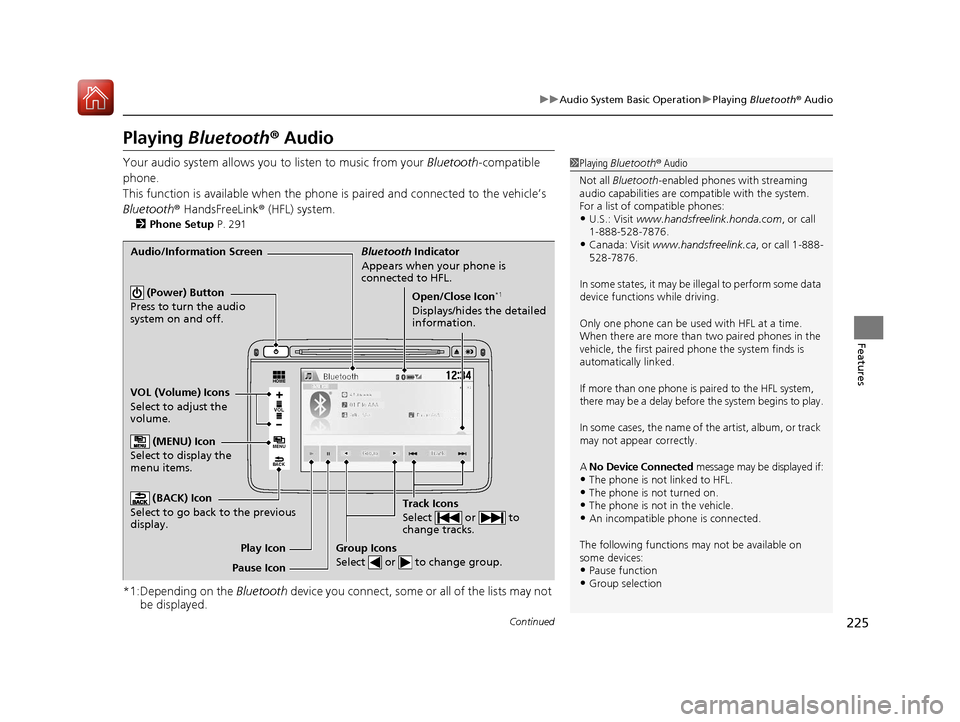
Playing Bluetooth ® Audio
Your audio system allows you to listen to music from your Bluetooth-compatible
phone.
This function is available when the phone is paired and connected to the vehicle’s
Bluetooth ® HandsFreeLink ® (HFL) system.
2Phone Setup P. 291
*1:Depending on the Bluetooth device you connect, some or all of the lists may not
be displayed.
1 Playing Bluetooth ® Audio
Not all Bluetooth -enabled phones with streaming
audio capabilities are compatible with the system.
For a list of compatible phones:
•U.S.: Visit www.handsfreelink.honda.com , or call
1-888-528-7876.
•Canada: Visit www.handsfreelink.ca , or call 1-888-
528-7876.
In some states, it may be illegal to perform some data
device functions while driving.
Only one phone can be used with HFL at a time.
When there are more than two paired phones in the
vehicle, the first paired phone the system finds is
automatically linked.
If more than one phone is paired to the HFL system,
there may be a delay before the system begins to play.
In some cases, the name of the artist, album, or track
may not appear correctly.
A No Device Connected message may be displayed if:
•The phone is not linked to HFL.•The phone is not turned on.•The phone is not in the vehicle.•An incompatible phone is connected.
The following functions may not be available on
some devices:
•Pause function•Group selection
VOL
HOME
MENU
BACK
Audio/Information Screen Bluetooth Indicator
Appears when your phone is
connected to HFL.
Track Icons
Select or to
change tracks.
VOL (Volume) Icons
Select to adjust the
volume. (BACK) Icon
Select to go back to the previous
display.
(Power) Button
Press to turn the audio
system on and off.Open/Close Icon*1
Displays/hides the detailed
information.
(MENU) Icon
Select to display the
menu items.
Group Icons
Select or to change group.
Pause Icon Play Icon
17 HR-V HDMC-31T7A6100.book 225 ページ 2016年7月20日 水曜日 午前9時50分
Page 258 of 489
257
uuCustomized Features u
Continued
Features
*1:Default Setting
Setup
GroupCustomizable FeaturesDescriptionSelectable Settings
Camera
Rear Wide
Camera
Fixed GuidelineSelects whether the fixed guidelines come on
on the rear camera monitor.On*1/ Off
Dynamic GuidelineSelects whether the dynamic guidelines come
on on the rear camera monitor.On*1/Off
DefaultCancels/Resets all cust omized items in the
Rear Wide Camera group as default.Yes/No
LaneWatch*
Show with Turn Signal
Selects whether the LaneWatch display comes
on when you move the turn signal lever to the
passenger side.
On*1/Off
Display Time after Turn
Signal OffChanges the length of time the LaneWatch
display stays on after you pull the turn signal
lever back.
0 second*1/ 2 seconds
Reference LineSelects whether the reference lines come on
the LaneWatch monitor.On*1/Off
DefaultCancels/Resets all cust omized items in the
LaneWatch group as default.Yes/No
* Not available on all models
17 HR-V HDMC-31T7A6100.book 257 ページ 2016年7月20日 水曜日 午前9時50分
Page 293 of 489
uuBluetooth ® HandsFreeLink ®u HFL Menus
292
Features
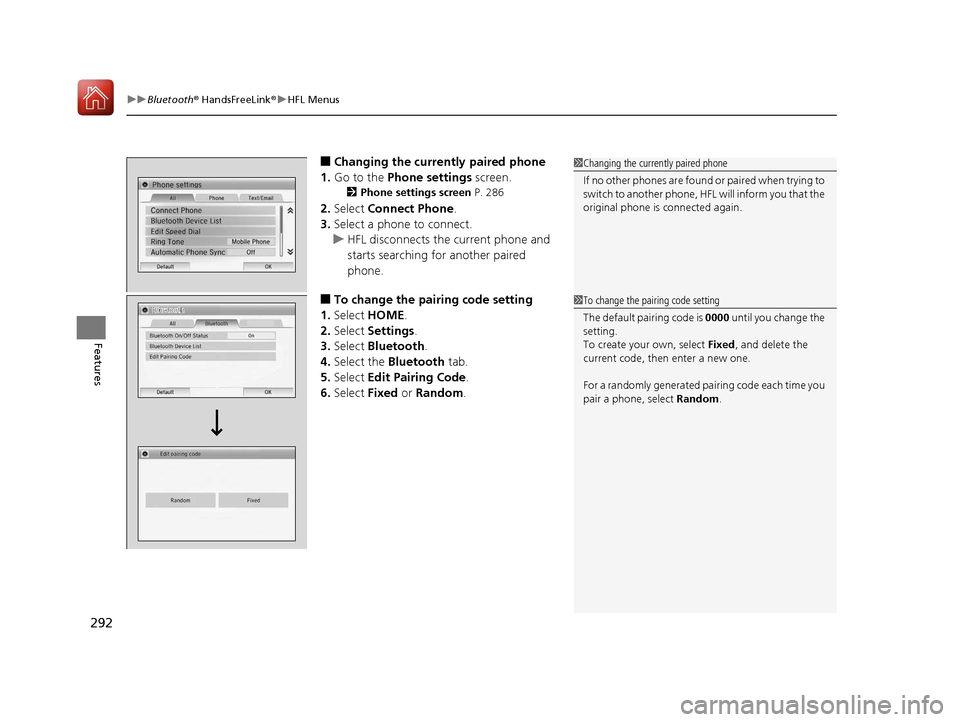
■Changing the currently paired phone
1. Go to the Phone settings screen.
2Phone settings screen P. 286
2.Select Connect Phone .
3. Select a phone to connect.
u HFL disconnects the current phone and
starts searching for another paired
phone.
■To change the pairing code setting
1. Select HOME .
2. Select Settings .
3. Select Bluetooth .
4. Select the Bluetooth tab.
5. Select Edit Pairing Code .
6. Select Fixed or Random .
1Changing the currently paired phone
If no other phones are found or paired when trying to
switch to another phone, HFL will inform you that the
original phone is connected again.
1 To change the pairing code setting
The default pair ing code is 0000 until you change the
setting.
To create your own, select Fixed, and delete the
current code, then enter a new one.
For a randomly generated pa iring code each time you
pair a phone, select Random.
17 HR-V HDMC-31T7A6100.book 292 ページ 2016年7月20日 水曜日 午前9時50分
Page 311 of 489
uuBluetooth ® HandsFreeLink ®u HFL Menus
310
Features
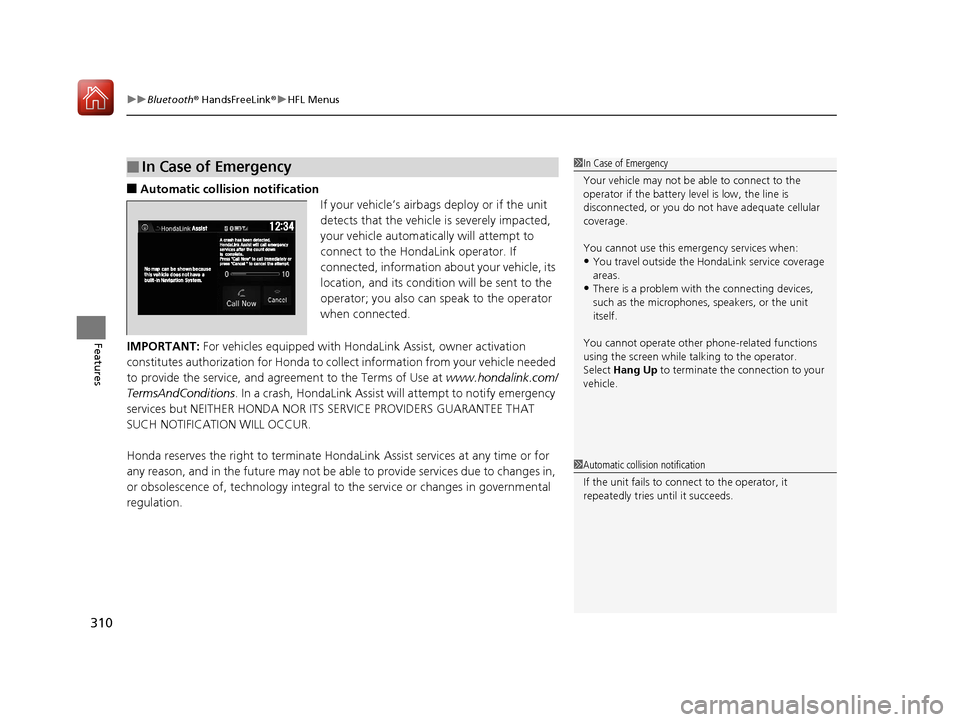
■Automatic collisi on notification
If your vehicle’s airbags deploy or if the unit
detects that the vehicle is severely impacted,
your vehicle automatically will attempt to
connect to the HondaLink operator. If
connected, information about your vehicle, its
location, and its condition will be sent to the
operator; you also can speak to the operator
when connected.
IMPORTANT: For vehicles equipped with Ho ndaLink Assist, owner activation
constitutes authorization for Honda to co llect information from your vehicle needed
to provide the service, and agr eement to the Terms of Use at www.hondalink.com/
TermsAndConditions . In a crash, HondaLink Assist w ill attempt to notify emergency
services but NEITHER HONDA NOR ITS SERVICE PROVIDERS GUARANTEE THAT
SUCH NOTIFICATION WILL OCCUR.
Honda reserves the right to terminate HondaLink Assist services at any time or for
any reason, and in the future may not be ab le to provide services due to changes in,
or obsolescence of, technology integral to the service or changes in governmental
regulation.
■In Case of Emergency1 In Case of Emergency
Your vehicle may not be able to connect to the
operator if the battery level is low, the line is
disconnected, or you do not have adequate cellular
coverage.
You cannot use this emergency services when:
•You travel outside the HondaLink service coverage
areas.
•There is a problem with the connecting devices,
such as the microphones, speakers, or the unit
itself.
You cannot operate othe r phone-related functions
using the screen while talking to the operator.
Select Hang Up to terminate the connection to your
vehicle.
1 Automatic collision notification
If the unit fails to connect to the operator, it
repeatedly tries until it succeeds.
17 HR-V HDMC-31T7A6100.book 310 ページ 2016年7月20日 水曜日 午前9時50分