open hood HONDA HR-V 2017 2.G User Guide
[x] Cancel search | Manufacturer: HONDA, Model Year: 2017, Model line: HR-V, Model: HONDA HR-V 2017 2.GPages: 489, PDF Size: 29.22 MB
Page 447 of 489
446
Handling the Unexpected
Jump Starting
Turn off the power to electric devices, such as audio and lights. Turn off the engine,
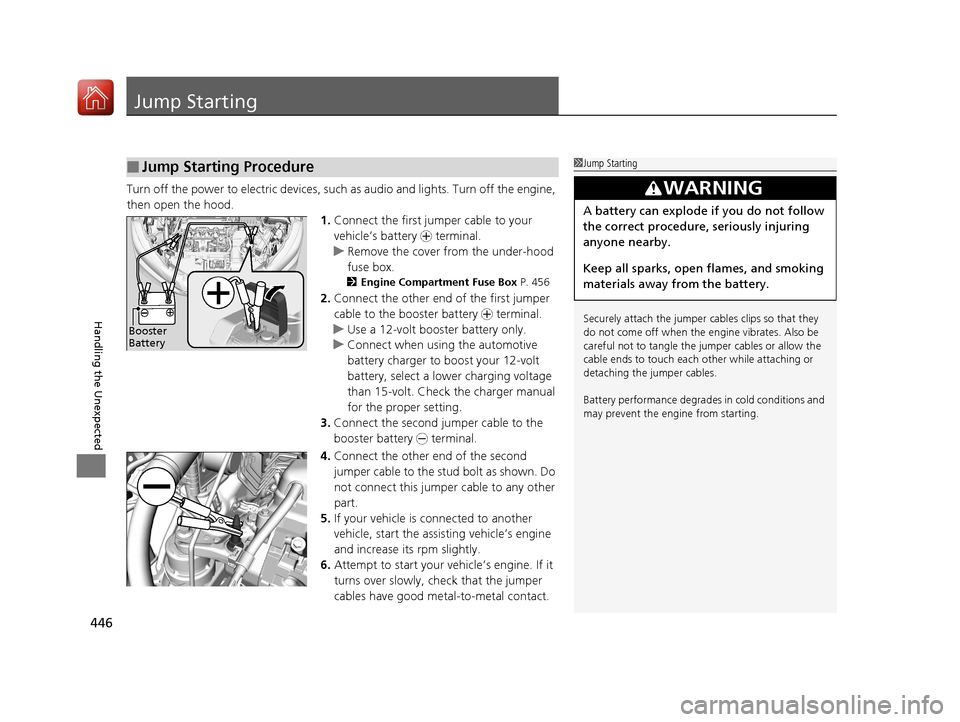
then open the hood. 1.Connect the first jump er cable to your
vehicle’s battery + terminal.
u Remove the cover from the under-hood
fuse box.
2 Engine Compartment Fuse Box P. 456
2.Connect the other end of the first jumper
cable to the booster battery + terminal.
u Use a 12-volt booster battery only.
u Connect when using the automotive
battery charger to boost your 12-volt
battery, select a lo wer charging voltage
than 15-volt. Check the charger manual
for the proper setting.
3. Connect the second jumper cable to the
booster battery - terminal.
4. Connect the other end of the second
jumper cable to the stud bolt as shown. Do
not connect this jumper cable to any other
part.
5. If your vehicle is connected to another
vehicle, start the assisting vehicle’s engine
and increase its rpm slightly.
6. Attempt to start your vehicle’s engine. If it
turns over slowly, check that the jumper
cables have good metal-to-metal contact.
■Jump Starting Procedure1Jump Starting
Securely attach the jumper cables clips so that they
do not come off when the e ngine vibrates. Also be
careful not to tangle the jumper cables or allow the
cable ends to touch each other while attaching or
detaching the jumper cables.
Battery performance degrades in cold conditions and
may prevent the e ngine from starting.
3WARNING
A battery can explode if you do not follow
the correct procedure, seriously injuring
anyone nearby.
Keep all sparks, open flames, and smoking
materials away from the battery.
Booster
Battery
17 HR-V HDMC-31T7A6100.book 446 ページ 2016年7月20日 水曜日 午前9時50分
Page 450 of 489
449Continued
Handling the Unexpected
Overheating
How to Handle Overheating
Overheating symptoms are as follows:
•The high temperature indicator (red) co mes on or the engine suddenly loses
power.
• Steam or spray comes out of the engine compartment.
■First thing to do
1. Immediately park the vehicle in a safe place.
2. Turn off all accessories and turn on the hazard warning lights.
u No steam or spray present: Keep the engine running and open the hood.
u Steam or spray is present: Turn off the engine and wait until it subsides.
Then open the hood.
1 How to Handle Overheating
NOTICE
Continuing to drive with the high temperature
indicator on may da mage the engine.
3WARNING
Steam and spray from an overheated
engine can seriously scald you.
Do not open the hood if steam is coming
out.
17 HR-V HDMC-31T7A6100.book 449 ページ 2016年7月20日 水曜日 午前9時50分
Page 452 of 489
451
Handling the Unexpected
Indicator, Coming On/Blinking
If the Low Oil Pressure Indicator Comes On
■Reasons for the indicator to come on
Comes on when the engine oil pressure is low.
■What to do as soon as the indicator comes on
1. Immediately park the vehicle on level ground in a safe place.
2. If necessary, turn the hazard warning lights on.
■What to do after parking the vehicle
1. Stop the engine and let it sit for about three minutes.
2. Open the hood and check the oil level.
u Add oil as necessary.
2 Oil Check P. 388
3.Start the engine and check th e low oil pressure indicator.
u The indicator goes off: Start driving again.
u The indicator does not go off within 10 seconds: Stop the engine
and contact a dealer for repairs immediately.
If the Charging System Indicator Comes On
■Reasons for the indicator to come on
Comes on when the battery is not being charged.
■What to do when th e indicator comes on
Turn off the heating and cooling system*/climate control system*, rear
defogger, and other electrical system s, and immediately contact a dealer
for repairs.
1 If the Low Oil Pressure Indicator Comes On
NOTICE
Running the engine with low oil pressure can cause
serious mechanical damage almost immediately.
1If the Charging System Indicator Comes On
If you need to stop temporarily, do not turn off the
engine. Restarting the engi ne may rapidly discharge
the battery.
* Not available on all models
17 HR-V HDMC-31T7A6100.book 451 ページ 2016年7月20日 水曜日 午前9時50分
Page 484 of 489
483
Index
Lights................................................ 127, 397
Bulb Replacement ................................... 397
Daytime Running Lights .......................... 131
Fog Lights ............................................... 130
High Beam Indicator ................................. 80
Interior.................................................... 150
Light Switches......................................... 127
Lights On Indicator.................................... 80
Turn Signals ............................................ 127
Load Limits ............................................... 317
Locking/Unlocking ..................................... 96
Auto Door Locking/Unlocking ................. 109
Childproof Door Locks ............................ 108
From Inside ............................................. 105
From Outside ............................................ 99
Keys.......................................................... 96
Lockout Prevention System ..................... 104
Using a Key............................................. 103
Lockout Prevention System ..................... 104
Low Battery Charge ................................. 451
Low Fuel Indicator ..................................... 76
Low Oil Pressure Indicator ................. 75, 451
Lower Anchors ........................................... 62
Lubricant Specifications Chart ................ 467
Luggage (Maximum Load Limit) ............. 317M
Maintenance............................................. 377
Battery .................................................... 419
Brake/Clutch Fluid ................................... 395
Cleaning .................................................. 424
Coolant ................................................... 392
Heating and Cooling Sy stem/Climate Control
System................................................... 423
Maintenance Minder
TM............................ 381
Oil ........................................................... 388
Precautions .............................................. 379
Radiator .................................................. 393
Remote Transmitter ................................. 421
Replacing Light Bulbs ............................... 397
Safety ...................................................... 379
Service Items ........................................... 383
Tires ........................................................ 409
Transmission Fluid ................................... 394
Under the Hood ...................................... 385
Malfunction Indicator Lamp .............. 75, 452
Manual Transmission ................................ 340
Reverse Lockout ...................................... 342
Map Lights ................................................ 151
Maximum Load Limit ............................... 317
Meters, Gauges ........................................... 88 Mirrors
...................................................... 138
Adjusting ................................................ 138
Door ....................................................... 139
Exterior ................................................... 139
Interior Rearview ..................................... 138
Modifications (and Accessories) .............. 429
Moonroof ................................................. 121
MP3 ................................... 191, 197, 214, 222
Multi-View Rear Camera .......................... 372
N
Numbers (Identification).......................... 468
O
Odometer................................................... 90
Off-Highway Driving Guidelines ............. 323
Oil (Engine) ............................................... 387
Adding .................................................... 389
Checking................................................. 388
Displaying Oil Life .................................... 381
Low Oil Pressure Indicator ................. 75, 451
Recommended Engine Oil ....................... 387
Viscosity .................................................. 387
Opening and Closing the Moonroof ....... 121
17 HR-V HDMC-31T7A6100.book 483 ページ 2016年7月20日 水曜日 午前9時50分
Page 485 of 489
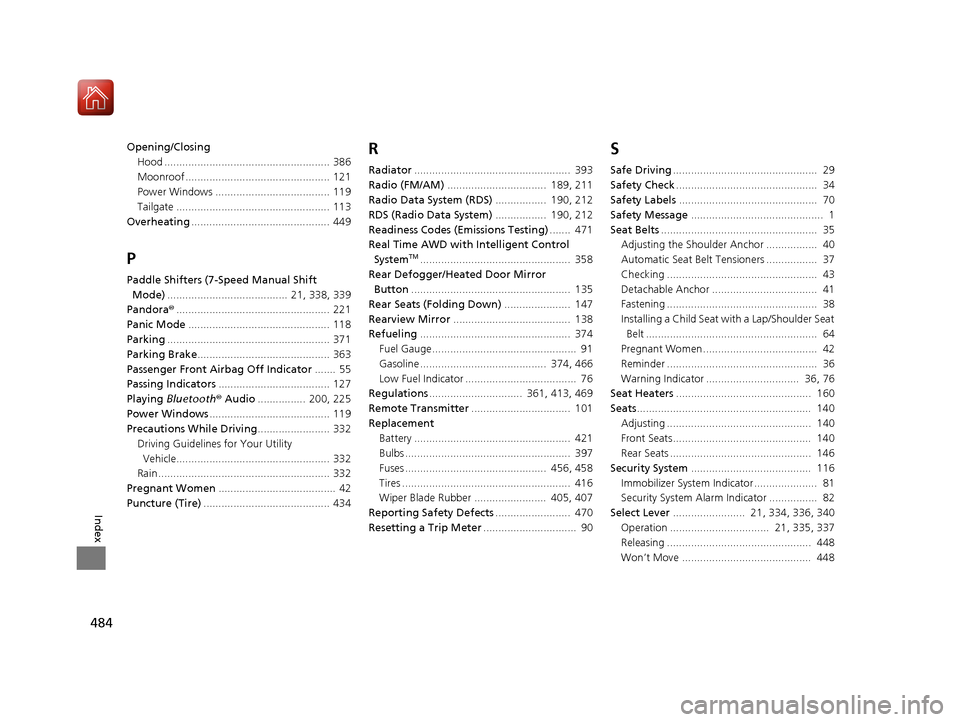
484
Index
Opening/ClosingHood ....................................................... 386
Moonroof ................................................ 121
Power Windows ...................................... 119
Tailgate ................................................... 113
Overheating .............................................. 449
P
Paddle Shifters (7-Speed Manual Shift
Mode) ........................................ 21, 338, 339
Pandora® ................................................... 221
Panic Mode ............................................... 118
Parking ...................................................... 371
Parking Brake ............................................ 363
Passenger Front Airbag Off Indicator ....... 55
Passing Indicators ..................................... 127
Playing Bluetooth ® Audio ................ 200, 225
Power Windows ........................................ 119
Precautions While Driving ........................ 332
Driving Guidelines for Your Utility
Vehicle................................................... 332
Rain ......................................................... 332
Pregnant Women ....................................... 42
Puncture (Tire) .......................................... 434
R
Radiator.................................................... 393
Radio (FM/AM) ................................. 189, 211
Radio Data System (RDS) ................. 190, 212
RDS (Radio Data System) ................. 190, 212
Readiness Codes (Emissions Testing) ....... 471
Real Time AWD with Intelligent Control System
TM.................................................. 358
Rear Defogger/Heated Door Mirror Button ..................................................... 135
Rear Seats (Folding Down) ...................... 147
Rearview Mirror ....................................... 138
Refueling .................................................. 374
Fuel Gauge................................................ 91
Gasoline .......................................... 374, 466
Low Fuel Indicator ..................................... 76
Regulations ............................... 361, 413, 469
Remote Transmitter ................................. 101
Replacement
Battery .................................................... 421
Bulbs ....................................................... 397
Fuses ............................................... 456, 458
Tires ........................................................ 416
Wiper Blade Rubber ........................ 405, 407
Reporting Safety Defects ......................... 470
Resetting a Trip Meter ............................... 90
S
Safe Driving................................................ 29
Safety Check ............................................... 34
Safety Labels .............................................. 70
Safety Message ............................................ 1
Seat Belts .................................................... 35
Adjusting the Shoulder Anchor ................. 40
Automatic Seat Belt Tensioners ................. 37
Checking .................................................. 43
Detachable Anchor ................................... 41
Fastening .................................................. 38
Installing a Child Seat wi th a Lap/Shoulder Seat
Belt ......................................................... 64
Pregnant Women...................................... 42
Reminder .................................................. 36
Warning Indicator ............................... 36, 76
Seat Heaters ............................................. 160
Seats .......................................................... 140
Adjusting ................................................ 140
Front Seats.............................................. 140
Rear Seats ............................................... 146
Security System ........................................ 116
Immobilizer System Indicator..................... 81
Security System Alarm Indicator ................ 82
Select Lever ........................ 21, 334, 336, 340
Operation ................................. 21, 335, 337
Releasing ................................................ 448
Won’t Move ........................................... 448
17 HR-V HDMC-31T7A6100.book 484 ページ 2016年7月20日 水曜日 午前9時50分