ECO mode HONDA HR-V 2017 2.G Owner's Manual
[x] Cancel search | Manufacturer: HONDA, Model Year: 2017, Model line: HR-V, Model: HONDA HR-V 2017 2.GPages: 489, PDF Size: 29.22 MB
Page 82 of 489
81
uuIndicators u
Continued
Instrument Panel
*1:Models with the smart entry system have an ENGINE START/STOP button instead of an ignition switch.
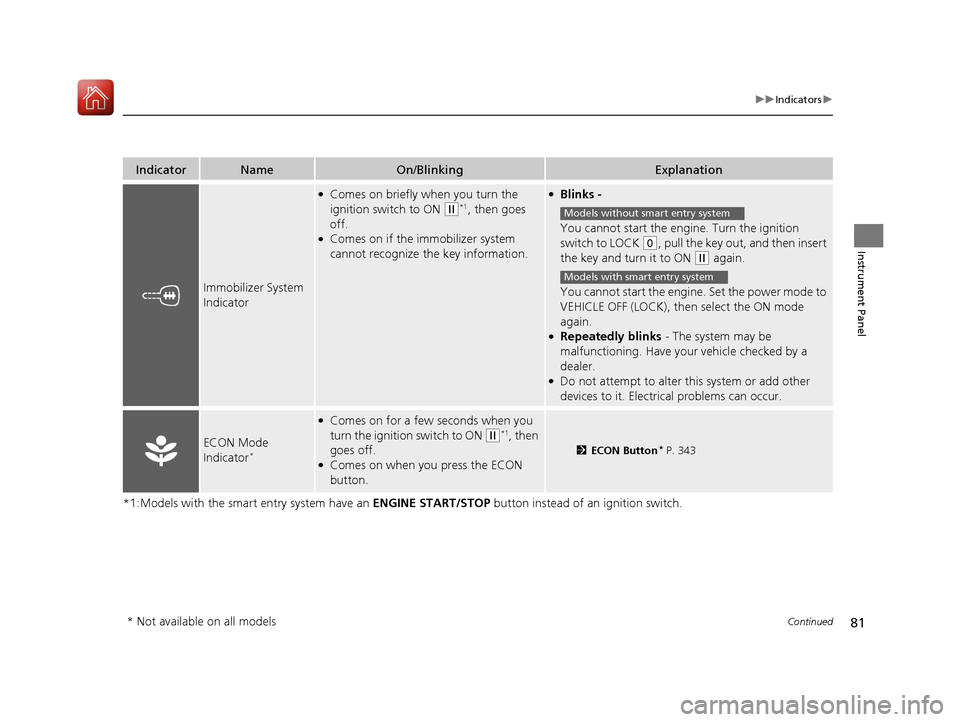
IndicatorNameOn/BlinkingExplanation
Immobilizer System
Indicator
●Comes on briefly when you turn the
ignition switch to ON
(w*1, then goes
off.
●Comes on if the immobilizer system
cannot recognize the key information.
●Blinks -
You cannot start the engine. Turn the ignition
switch to LOCK
(0, pull the key out, and then insert
the key and turn it to ON
(w again.
You cannot start the engine. Set the power mode to
VEHICLE OFF (LOCK), then select the ON mode
again.
●Repeatedly blinks - The system may be
malfunctioning. Have your vehicle checked by a
dealer.
●Do not attempt to alter this system or add other
devices to it. Electrica l problems can occur.
ECON Mode
Indicator*
●Comes on for a few seconds when you
turn the ignition switch to ON
(w*1, then
goes off.
●Comes on when you press the ECON
button.
2 ECON Button* P. 343
Models without smart entry system
Models with smart entry system
* Not available on all models
17 HR-V HDMC-31T7A6100.book 81 ページ 2016年7月20日 水曜日 午前9時50分
Page 83 of 489
82
uuIndicators u
Instrument Panel
*1:Models with the smart entry system have an ENGINE START/STOP button instead of an ignition switch.
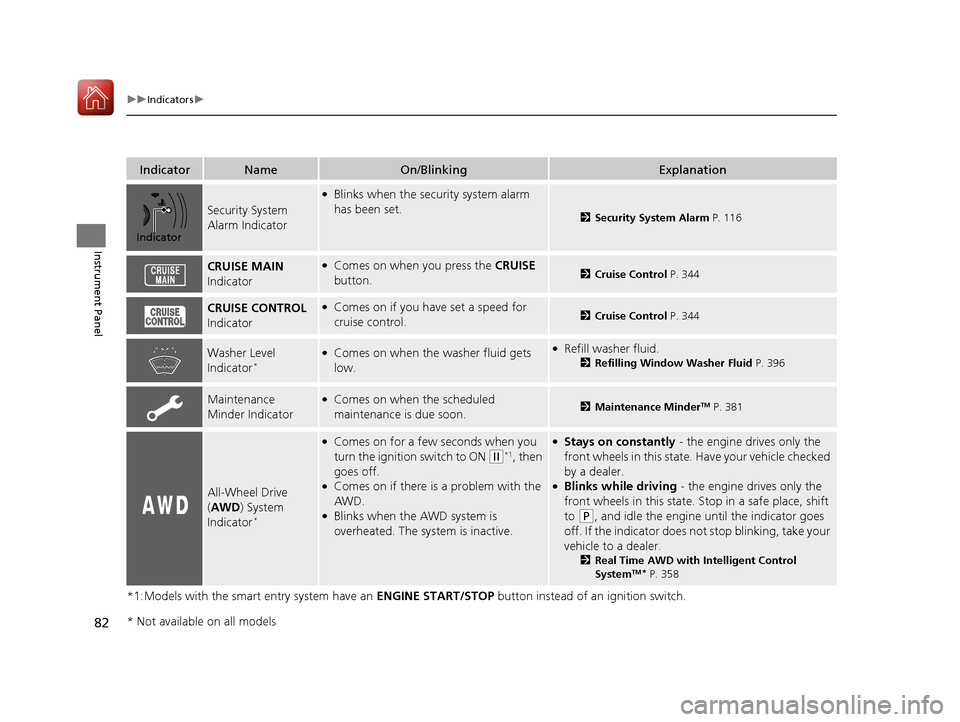
IndicatorNameOn/BlinkingExplanation
Security System
Alarm Indicator
●Blinks when the security system alarm
has been set.
2Security System Alarm P. 116
CRUISE MAIN
Indicator●Comes on when you press the CRUISE
button.2 Cruise Control P. 344
CRUISE CONTROL
Indicator●Comes on if you have set a speed for
cruise control.2 Cruise Control P. 344
Washer Level
Indicator*●Comes on when the washer fluid gets
low.●Refill washer fluid.
2Refilling Window Washer Fluid P. 396
Maintenance
Minder Indicator●Comes on when the scheduled
maintenance is due soon.2Maintenance MinderTM P. 381
All-Wheel Drive
(AWD ) System
Indicator
*
●Comes on for a few seconds when you
turn the ignition switch to ON
(w*1, then
goes off.
●Comes on if there is a problem with the
AWD.
●Blinks when the AWD system is
overheated. The system is inactive.
●Stays on constantly - the engine drives only the
front wheels in this state. Have your vehicle checked
by a dealer.
●Blinks while driving - the engine drives only the
front wheels in this state. Stop in a safe place, shift
to
(P, and idle the engine until the indicator goes
off. If the indicator does not stop blinking, take your
vehicle to a dealer.
2 Real Time AWD with Intelligent Control
SystemTM* P. 358
Indicator
* Not available on all models
17 HR-V HDMC-31T7A6100.book 82 ページ 2016年7月20日 水曜日 午前9時50分
Page 84 of 489
83
uuIndicators u
Continued
Instrument Panel
*1:Models with the smart entry system have an ENGINE START/STOP button instead of an ignition switch.
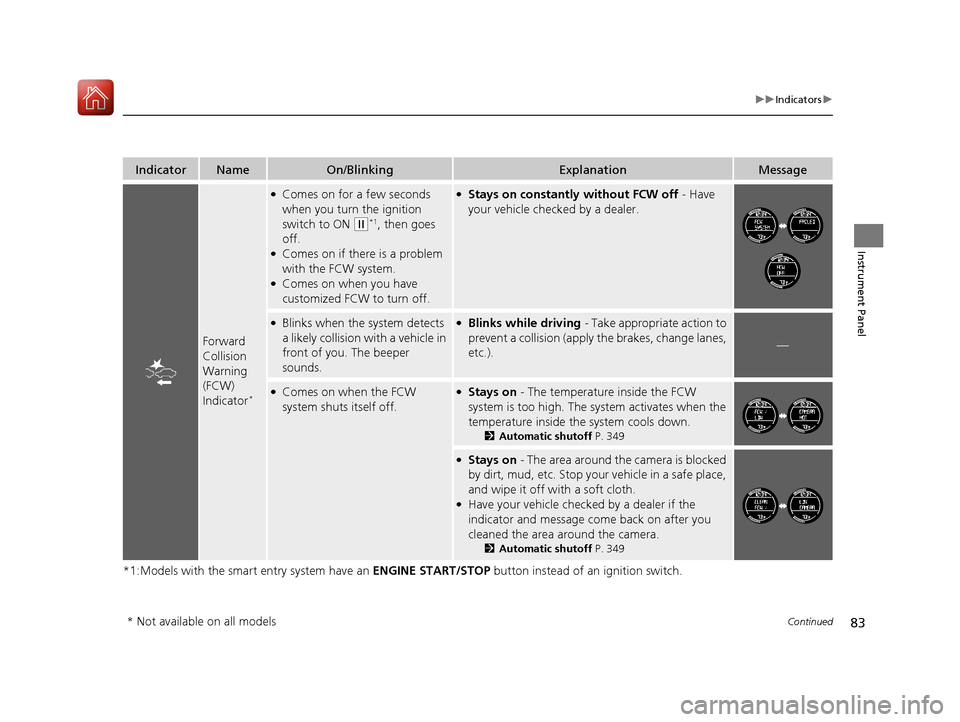
IndicatorNameOn/BlinkingExplanationMessage
Forward
Collision
Warning
(FCW)
Indicator
*
●Comes on for a few seconds
when you turn the ignition
switch to ON
(w*1, then goes
off.
●Comes on if there is a problem
with the FCW system.
●Comes on when you have
customized FCW to turn off.
●Stays on constantly without FCW off - Have
your vehicle checked by a dealer.
●Blinks when the system detects
a likely collision with a vehicle in
front of you. The beeper
sounds.●Blinks while driving - Take appropriate action to
prevent a collisio n (apply the brakes, change lanes,
etc.).
—
●Comes on when the FCW
system shuts itself off.●Stays on - The temperature inside the FCW
system is too high. The sy stem activates when the
temperature inside the system cools down.
2 Automatic shutoff P. 349
●Stays on - The area around the camera is blocked
by dirt, mud, etc. Stop your vehicle in a safe place,
and wipe it off with a soft cloth.
●Have your vehicle checked by a dealer if the
indicator and message come back on after you
cleaned the area around the camera.
2 Automatic shutoff P. 349
* Not available on all models
17 HR-V HDMC-31T7A6100.book 83 ページ 2016年7月20日 水曜日 午前9時50分
Page 85 of 489
84
uuIndicators u
Instrument Panel
*1:Models with the smart entry system have an ENGINE START/STOP button instead of an ignition switch.
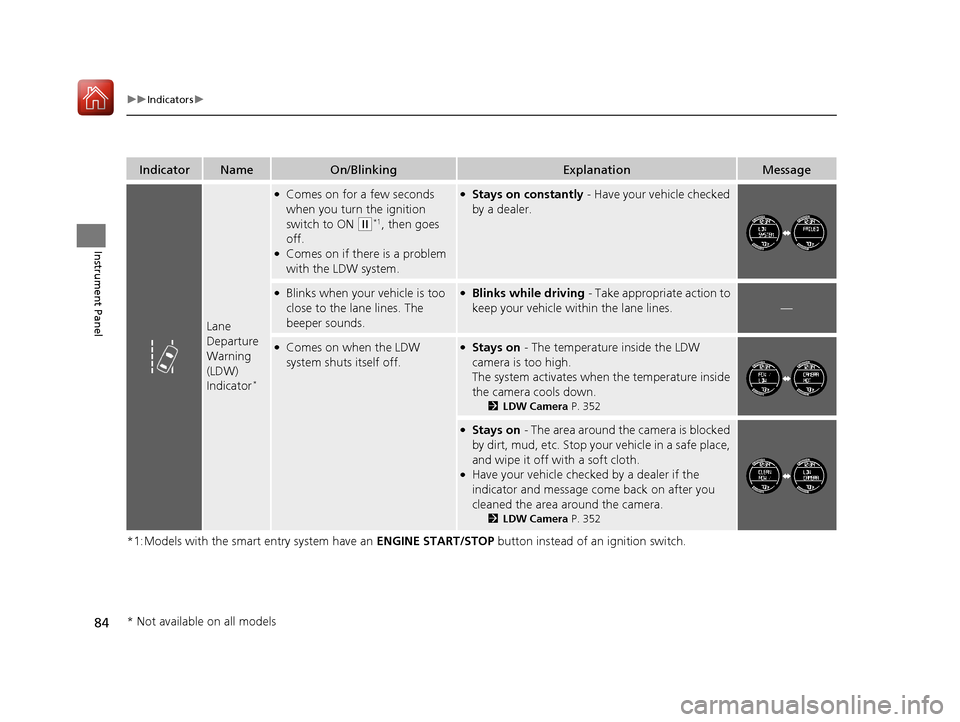
IndicatorNameOn/BlinkingExplanationMessage
Lane
Departure
Warning
(LDW)
Indicator
*
●Comes on for a few seconds
when you turn the ignition
switch to ON
(w*1, then goes
off.
●Comes on if there is a problem
with the LDW system.
●Stays on constantly - Have your vehicle checked
by a dealer.
●Blinks when your vehicle is too
close to the la ne lines. The
beeper sounds.●Blinks while driving - Take appropriate action to
keep your vehicle within the lane lines.
—
●Comes on when the LDW
system shuts itself off.●Stays on - The temperature inside the LDW
camera is too high.
The system activates when the temperature inside
the camera cools down.
2 LDW Camera P. 352
●Stays on - The area around the camera is blocked
by dirt, mud, etc. Stop your vehicle in a safe place,
and wipe it off with a soft cloth.
●Have your vehicle checked by a dealer if the
indicator and message come back on after you
cleaned the area around the camera.
2 LDW Camera P. 352
* Not available on all models
17 HR-V HDMC-31T7A6100.book 84 ページ 2016年7月20日 水曜日 午前9時50分
Page 87 of 489
86
uuIndicators uInformation Display Warning and Information Messages
Instrument Panel
MessageConditionExplanation
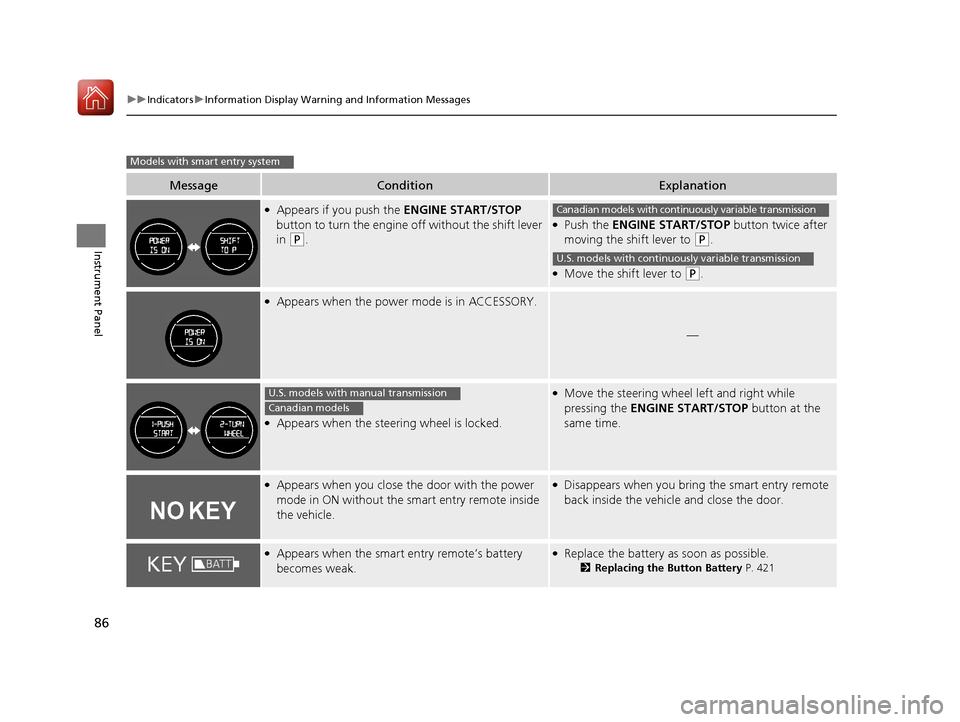
●Appears if you push the ENGINE START/STOP
button to turn the engine off without the shift lever
in
(P.
●Push the ENGINE START/STOP button twice after
moving the shift lever to
(P.
●Move the shift lever to (P.
●Appears when the power mode is in ACCESSORY.
—
●Appears when the steering wheel is locked.
●Move the steering wheel left and right while
pressing the ENGINE START/STOP button at the
same time.
●Appears when you close the door with the power
mode in ON without the smart entry remote inside
the vehicle.●Disappears when you bring the smart entry remote
back inside the vehicle and close the door.
●Appears when the smart entry remote’s battery
becomes weak.●Replace the battery as soon as possible.
2 Replacing the Button Battery P. 421
Models with smart entry system
Canadian models with continuously variable transmission
U.S. models with continuously variable transmission
U.S. models with manual transmission
Canadian models
17 HR-V HDMC-31T7A6100.book 86 ページ 2016年7月20日 水曜日 午前9時50分
Page 88 of 489
87
uuIndicators uInformation Display Warning and Information Messages
Instrument Panel
MessageConditionExplanation
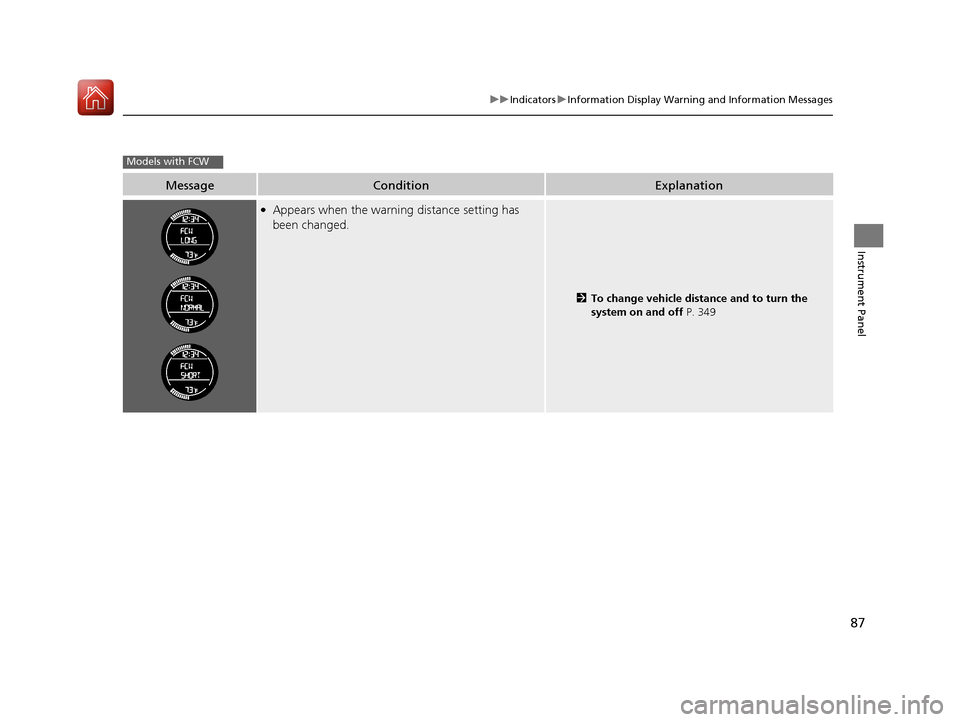
●Appears when the warning distance setting has
been changed.
2 To change vehicle distance and to turn the
system on and off P. 349
Models with FCW
17 HR-V HDMC-31T7A6100.book 87 ページ 2016年7月20日 水曜日 午前9時50分
Page 90 of 489
89
uuGauges and Displays uInformation Display
Continued
Instrument Panel
Information Display
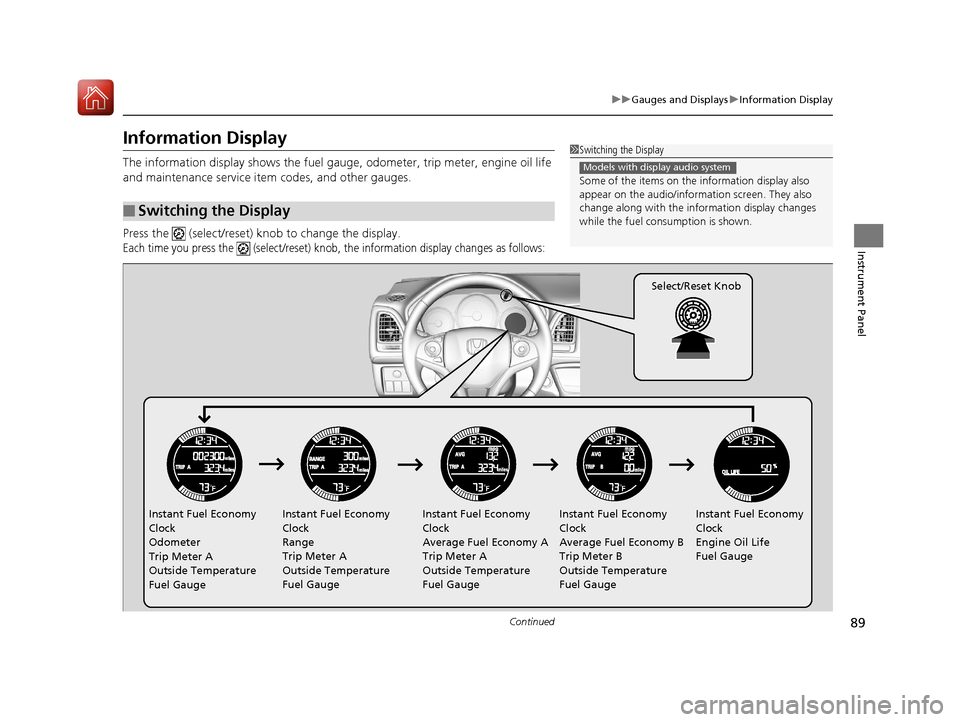
The information display shows the fuel gauge, odometer, trip meter, engine oil life
and maintenance service item codes, and other gauges.
Press the (select/reset) knob to change the display.
Each time you press the (select/reset) knob, the information display changes as follows:
■Switching the Display
1Switching the Display
Some of the items on the information display also
appear on the audio/information screen. They also
change along with the info rmation display changes
while the fuel consumption is shown.
Models with display audio system
Instant Fuel Economy
Clock
Odometer
Trip Meter A
Outside Temperature
Fuel Gauge Instant Fuel Economy
Clock
Range
Trip Meter A
Outside Temperature
Fuel Gauge Instant Fuel Economy
Clock
Average Fuel Economy A
Trip Meter A
Outside Temperature
Fuel GaugeInstant Fuel Economy
Clock
Average Fuel Economy B
Trip Meter B
Outside Temperature
Fuel GaugeInstant Fuel Economy
Clock
Engine Oil Life
Fuel Gauge
Select/Reset Knob
17 HR-V HDMC-31T7A6100.book 89 ページ 2016年7月20日 水曜日 午前9時50分
Page 92 of 489
Continued91
uuGauges and Displays uInformation Display
Instrument Panel
Shows the outside temperature in Fahr enheit (U.S.) or Celsius (Canada).
■Adjusting the outside temperature indicator
Adjust the temperature reading up to ± 5°F or ± 3°C if the temperature reading
seems incorrect.
1. Turn the ignition switch to ON
(w*1.
2. Press and hold the (Select/Reset) knob for 10 seconds or more while the
outside temperature is show n on the information display.
u The information display goes into temp erature adjustment mode. The display
starts showing from -5°F to +5°F (U .S.) or -3°C to +3°C (Canada).
3. Release the knob when the right adjustment amount is shown.
u The adjustment is complete.
Shows the remaining oil life and Maintenance Minder
TM.
2 Maintenance MinderTM P. 381
Displays the amount of fuel left in the fuel tank.
*1: Models with the smart entry system have an ENGINE START/STOP button instead of an
ignition switch.
■Outside Temperature
■Engine Oil Life and Maintenance Items
■Fuel Gauge
1 Outside Temperature
The temperature sensor is in the front bumper.
Road heat and exhaust from another vehicle can
affect the temperature reading when your vehicle
speed is less than 19 mph (30 km/h).
It may take several minutes for the display to be
updated after the temperature reading has stabilized.
When the engine oil life is shown on the information
display, you cannot adjust the outside temperature.
Push the knob to select the other display.
1 Fuel Gauge
NOTICE
You should refuel when the reading approaches .
Running out of fuel can cause the engine to misfire,
damaging the cata lytic converter.
The actual amount of remain ing fuel may differ from
the fuel gauge reading.E
17 HR-V HDMC-31T7A6100.book 91 ページ 2016年7月20日 水曜日 午前9時50分
Page 98 of 489
97
uuLocking and Unlocking the Doors uKey Types and Functions
Controls
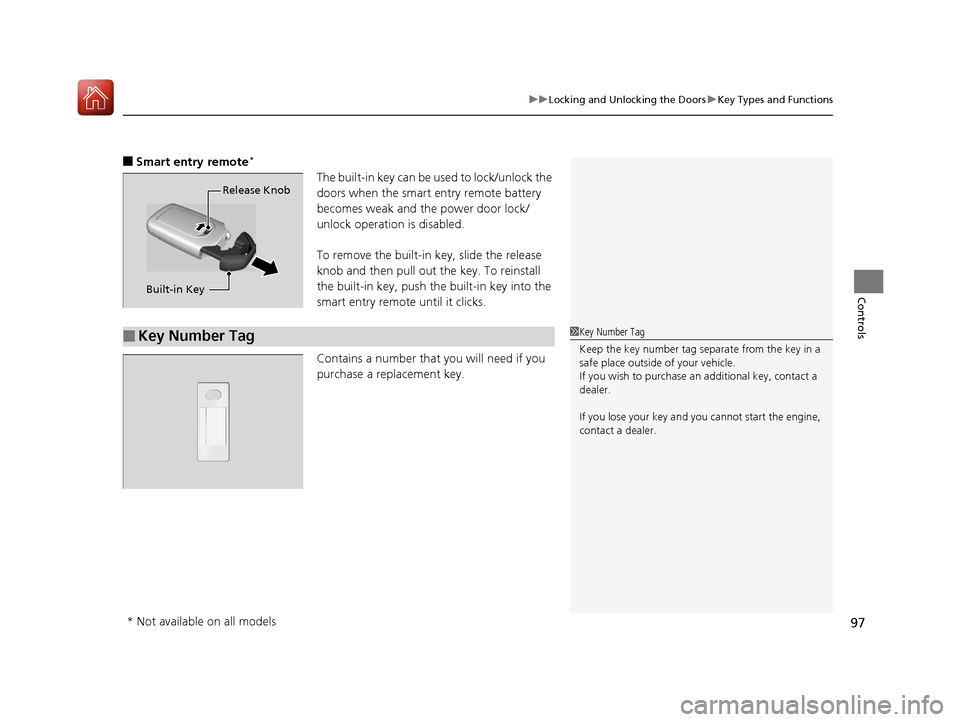
■Smart entry remote*
The built-in key can be us ed to lock/unlock the
doors when the smart entry remote battery
becomes weak and the power door lock/
unlock operation is disabled.
To remove the built-in key, slide the release
knob and then pull out the key. To reinstall
the built-in key, push the built-in key into the
smart entry remote until it clicks.
Contains a number that you will need if you
purchase a replacement key.Release Knob
Built-in Key
■Key Number Tag1 Key Number Tag
Keep the key number tag separate from the key in a
safe place outside of your vehicle.
If you wish to purchase an additional key, contact a
dealer.
If you lose your key and you cannot start the engine,
contact a dealer.
* Not available on all models
17 HR-V HDMC-31T7A6100.book 97 ページ 2016年7月20日 水曜日 午前9時50分
Page 99 of 489
98
uuLocking and Unlocking the Doors uLow Smart Entry Remote Signal Strength*
Controls
Low Smart Entry Remo te Signal Strength*
The vehicle transmits radio waves to loca te the smart entry remote when locking/
unlocking the doors and tailgate, or to start the engine.
In the following cases, locking/unlocking the doors and tailgate, or starting the
engine may be inhibited or operation may be unstable:
• Strong radio waves are being tra nsmitted by nearby equipment.
• You are carrying the smart entry remote together with telecommunications
equipment, laptop computers, ce ll phones, or wireless devices.
• A metallic object is touching or covering the smart entry remote.1Low Smart Entry Remote Signal Strength*
Communication between the smart entry remote and
the vehicle consumes the smart entry remote’s
battery.
Battery life is about two years, but this varies
depending on re gularity of use.
The battery is consumed whenever the smart entry
remote is receivi ng strong radio wave s. Avoid placing
it near electrical appliances such as televisions and
personal computers.
* Not available on all models
17 HR-V HDMC-31T7A6100.book 98 ページ 2016年7月20日 水曜日 午前9時50分