light HONDA HR-V 2017 2.G Quick Guide
[x] Cancel search | Manufacturer: HONDA, Model Year: 2017, Model line: HR-V, Model: HONDA HR-V 2017 2.GPages: 78, PDF Size: 5.33 MB
Page 44 of 78

80 || 81
NAVIGATION
NAVIGATION
Voice Prompt Volume
Adjust volume for navigation and voice command confirmation. This does\
not
affect audio or Bluetooth HandsFreeLink volume, which is controlled by the
volume bar.
1.
From the Home Screen, select Settings.
2.
Select System.
3.
Select V
olume.
4.
Adjust the level, or select off.
Voice PromptTurn the voice feedback feature on or off.
1.
From the Home screen, select Settings.
2.
Select System.
3.
Select V
oice Prompt.
4.
Select On or Off.
Talk Button Tips•
When using the T
alk button, wait until you hear a beep before speaking.
•
T
o bypass the system prompts, simply press the Talk button again to say your
command.
•
When the T
alk button is pressed, all available voice commands are highlighted
in yellow.
•
Speak in a clear
, natural voice.
•
Reduce all background noise.
•
Adjust the dashboard vents away from the microphone on the audio system.\
•
Close the windows and moonroof.
Entering a Destination
Use multiple methods to enter a destination.
Home AddressStore your home address in the system so you can easily route to it.
1.
From the Home screen, select Settings.
2.
Select Navigation.
3.
Select Edit Go Home (1 or 2).
4.
Enter the address, and select OK when complete.
When your home address is stored, you can press the T
alk button and say “Go
home” at any time. You can also select Go home from the navigation menu.
Street Address
Enter a street address using voice commands. Press the Talk button before saying
each command.
You can also enter the address manually when the vehicle is stopped. From the
map screen, press MENU and select Address. Follow the prompts.
U.S. models
1.
From the V
oice Portal screen, say “Address.”
2.
The system prompts you to say the entire
address. For example, say
“1-2-3-4 Main Street,
Los Angeles, California.”
3.
The system interprets the address by state, city
,
street, and address number. If necessary, you
may have to clarify similar matches.
4.
Say
“Set as destination” to set the route.
Canadian models
1.
From the V
oice Portal screen, say “Address.”
2.
Follow the prompts.
Page 46 of 78

84 || 85
DRIVING
NAVIGATION
Taking a Detour
You can calculate a detour route manually if you encounter a road closure\
or other
obstacle.
1.
When en route, press MENU from the map
screen.
2.
Select Detour
. The system attempts to calculate
a new route by avoiding the next 5 miles (8 km)
while on a freeway or 1 mile (1 km) while on a
surface street.
Traffic
View traffic flow, incidents, and construction in major metro areas. You can also
route around congestion or incidents using voice commands. Press the Talk
button before saying each command. Available on U.S. models only.
1.
When en route, say
“Display traffic incidents.”
A list of incidents on your route appears.
2.
Say the number of the incident you want to avoid.
3.
Say
“Avoid” and the incident list returns.
4.
Say
“Recalculate route” to set the new route.
Canceling Your RouteYou can cancel your route at any time.
1.
When en route, press MENU from the map
screen.
2.
Select Cancel Route. The route is cleared and the
map screen returns. Y
ou can also press the Talk
button and say “Cancel route.” Learn about preparation for driving, as well as other features.
Before Driving
Check the following items before you begin driving.
Exterior Checks
•
Make sure there are no obstructions on the windows, door mirrors, exte
rior
lights, or other parts of the vehicle.
•
Remove any frost, snow
, or ice.
•
Make sure the hood is securely closed.
•
Heat from the engine and exhaust can ignite flammable materials left u\
nder
the hood, causing a fire. If you’ve parked your vehicle for an exte\
nded period,
inspect and remove any debris that may have collected, such as dried g
rass
and leaves that have fallen or have been carried in for use as a nest by\
a small
animal. Also check under the hood for leftover flammable materials aft\
er you or
someone else has performed maintenance on your vehicle.
•
Make sure the tires are in good condition.
•
Make sure there are no people or objects behind or around the vehicle.
DRIVING
If the doors are frozen shut, use warm water around the door edges to me\
lt any
ice. Do not try to force them open, as this can damage the rubber trim a\
round the
doors. When done, wipe dry to avoid further freezing.
NOTICE
Interior Checks•
Store or secure all items on board properly
.
•
Do not pile items higher than the seat height.
•
Do not place anything in the front seat footwells. Make sure to secure t\
he floor
mats.
•
If you have any animals on board, do not let them move freely around in \
the
vehicle.
•
Securely close and lock all doors and the tailgate.
•
Adjust your seating position, mirrors, and steering wheel properly
.
•
Make sure items placed on the floor behind the front seats cannot roll\
under the
seats.
•
Everyone in the vehicle must fasten their seat belt.
•
Make sure that the indicators in the instrument panel come on when you s\
tart
the vehicle, and go off soon after
.
Page 48 of 78
88 || 89
DRIVING
DRIVING
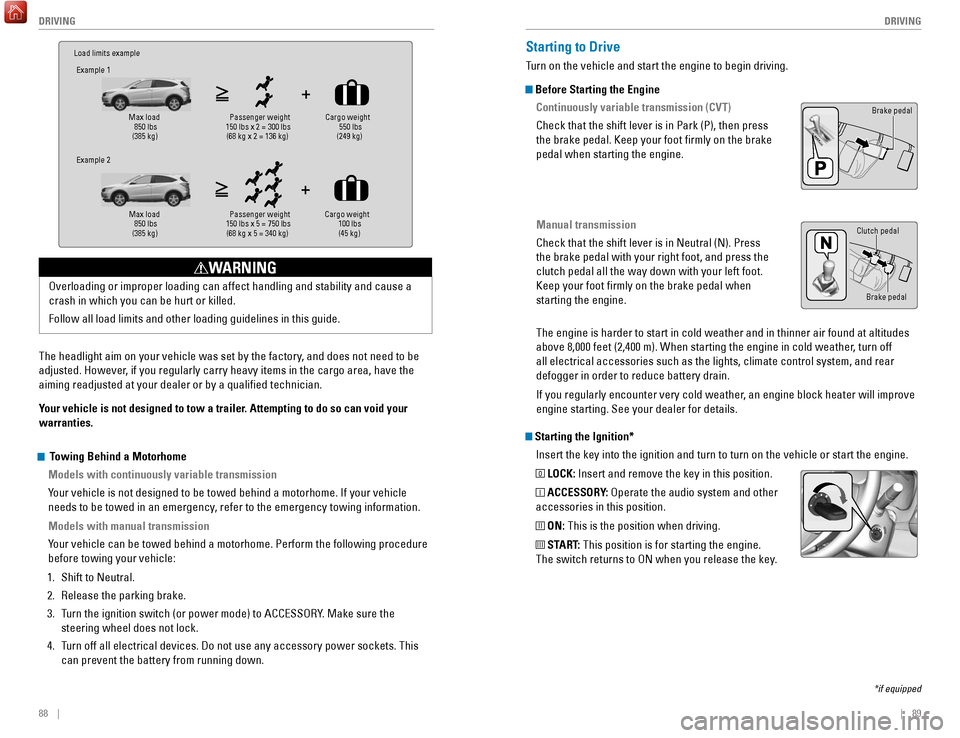
Load limits example
Example 1
Max load 850 lbs
(385 kg ) Passenger weight
150 lbs x 2 = 300 lbs (68 kg x 2 = 136 kg )Cargo weight
550 lbs
(249 kg)
Example 2
Max load 850 lbs
(385 kg ) Passenger weight
150 lbs x 5 = 750 lbs (68 kg x 5 = 340 kg )Cargo weight
100 lbs
(45 kg)
The headlight aim on your vehicle was set by the factory, and does not need to be
adjusted. However, if you regularly carry heavy items in the cargo area, have the
aiming readjusted at your dealer or by a qualified technician.
Your vehicle is not designed to tow a trailer. Attempting to do so can void your
warranties. Overloading or improper loading can affect handling and stability and ca\
use a
crash in which you can be hurt or killed.
Follow all load limits and other loading guidelines in this guide.
WARNING
Starting the Ignition*
Insert the key into the ignition and turn to turn on the vehicle or star\
t the engine.
0 LOCK: Insert and remove the key in this position.
I ACCESSORY: Operate the audio system and other
accessories in this position.
II ON: This is the position when driving.
III START: This position is for starting the engine.
The switch returns to ON when you release the key.
Starting to Drive
Turn on the vehicle and start the engine to begin driving.
Before Starting the Engine
Continuously variable transmission (CVT)
Check that the shift lever is in Park (P), then press
the brake pedal. Keep your foot firmly on the brake
pedal when starting the engine.
Manual transmission
Check that the shift lever is in Neutral (N). Press
the brake pedal with your right foot, and press the
clutch pedal all the way down with your left foot.
Keep your foot firmly on the brake pedal when
starting the engine.
Brake pedal
The engine is harder to start in cold weather and in thinner air found a\
t altitudes
above 8,000 feet (2,400 m). When starting the engine in cold weather, turn off
all electrical accessories such as the lights, climate control system, a\
nd rear
defogger in order to reduce battery drain.
If you regularly encounter very cold weather, an engine block heater will improve
engine starting. See your dealer for details.
*if equipped
Brake pedal
Clutch pedal
Towing Behind a Motorhome
Models with continuously variable transmission
Your vehicle is not designed to be towed behind a motorhome. If your vehi\
cle
needs to be towed in an emergency, refer to the emergency towing information.
Models with manual transmission
Your vehicle can be towed behind a motorhome. Perform the following proce\
dure
before towing your vehicle:
1.
Shift to Neutral.
2.
Release the parking brake.
3.
T
urn the ignition switch (or power mode) to ACCESSORY. Make sure the
steering wheel does not lock.
4.
T
urn off all electrical devices. Do not use any accessory power sockets. This
can prevent the battery from running down.
Page 50 of 78
 before the vehicle comes to a comple")
92 || 93
DRIVING
DRIVING
Manual Transmission*
Fully press the clutch pedal to operate the shift lever and change gears\
.
Do not shift to Reverse (R) before the vehicle comes to a complete sto\
p. This can
damage the transmission.
NOTICE
Before downshifting, make sure the engine will not go into the tachomete\
r’s red
zone. This can severely damage your engine.
NOTICE
Shift up Normal acceleratio n1st to 2n d16 mph (25 km/h)
2nd to 3rd 26 mph (42 km/h)
3rd to 4th35 mph (56 km/h)
4th to 5th 41 mph (66 km/h)
5th to 6th43 mph (69 km/h)
Recommended shift points
*if equipped
Braking
Slow down or stop your vehicle, and keep it from moving when parked.
Foot Brake
Press the brake pedal to slow down or stop your
vehicle from moving.
Brake pedal
Brake pedal
CVT
Manual transmission
Electric Parking Brake
Keep your vehicle from moving while parked using a simple switch.
To apply: Pull up the switch. The PARK indicator
appears in the instrument panel.
To release: Press the brake pedal and make sure
your seat belt is fastened. Press the switch down
to release.
You can also lightly press the accelerator
pedal (and release the clutch pedal for manual
transmission) if your seat belt is fastened, the
vehicle is on, and the shift lever is in Drive (D)
or Reverse (R) (or a gear is engaged for manual
transmission).
The ABS may not function correctly if you use an incorrect tire type and\
size.
NOTICE
Brake Assist System During hard or emergency braking, the system increases braking force. The brake
pedal may move slightly or make a noise; this is normal. Continue to hol\
d the brake
pedal firmly down.
Anti-Lock Brake System (ABS) During hard or emergency braking, the system rapidly pumps the brakes to
prevent wheel lockup and help you maintain steering control. The brake p\
edal may
pulsate slightly during ABS operation; this is normal. Do not pump the b\
rake pedal,
and continue to hold it firmly down.
Pull up to apply.
Push down to release.
Page 51 of 78
94 || 95
DRIVING
DRIVING
Automatic Brake Hold
Maintains rear brake hold even after the brake pedal is released. Make sure the
vehicle is on and your seat belt is fastened when operating this feature\
.
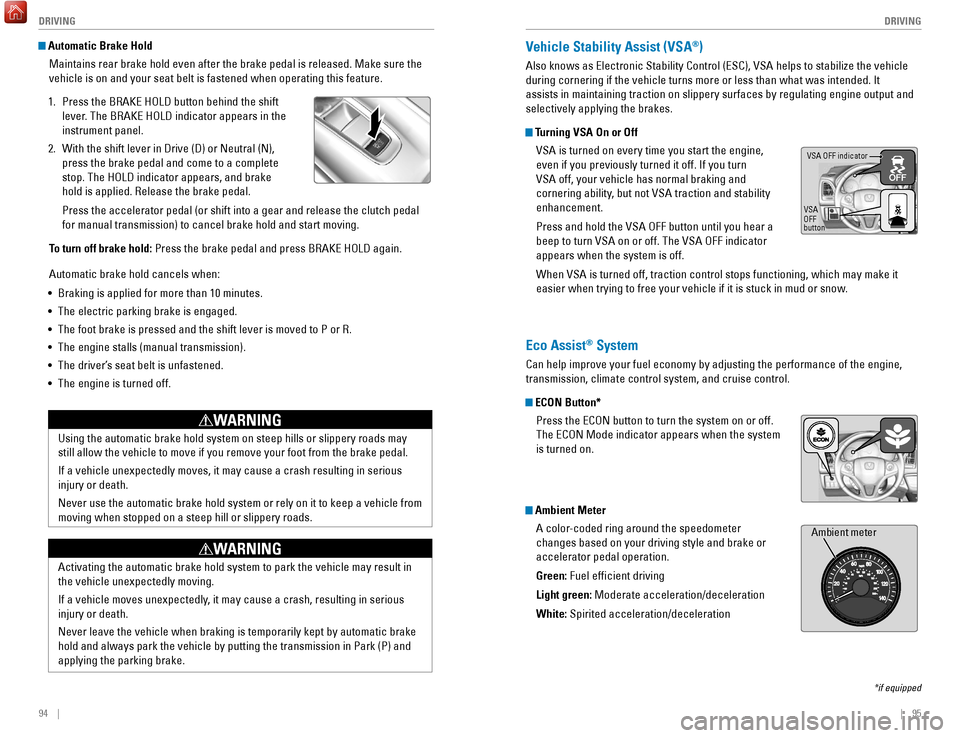
1.
Press the BRAKE HOLD button behind the shift
lever
. The BRAKE HOLD indicator appears in the
instrument panel.
2.
With the shift lever in Drive (D) or Neutral (N),
press the brake pedal and come to a complete
stop. The HOLD indicator appears, and brake
hold is applied. Release the brake pedal.
Press the accelerator pedal (or shift into a gear and release the clutc\
h pedal
for manual transmission) to cancel brake hold and start moving.
T
o turn off brake hold: Press the brake pedal and press BRAKE HOLD again.
Automatic brake hold cancels when:
•
Braking is applied for more than 10 minutes.
•
The electric parking brake is engaged.
•
The foot brake is pressed and the shift lever is moved to P or R.
•
The engine stalls (manual transmission).
•
The driver’
s seat belt is unfastened.
•
The engine is turned off.Using the automatic brake hold system on steep hills or slippery roads m\
ay
still allow the vehicle to move if you remove your foot from the brake p\
edal.
If a vehicle unexpectedly moves, it may cause a crash resulting in serio\
us
injury or death.
Never use the automatic brake hold system or rely on it to keep a vehicl\
e from
moving when stopped on a steep hill or slippery roads.
WARNING
Activating the automatic brake hold system to park the vehicle may resul\
t in
the vehicle unexpectedly moving.
If a vehicle moves unexpectedly, it may cause a crash, resulting in serious
injury or death.
Never leave the vehicle when braking is temporarily kept by automatic brake
hold and always park the vehicle by putting the transmission in Park (P\
) and
applying the parking brake.
WARNING
Vehicle Stability Assist (VSA®)
Also knows as Electronic Stability Control (ESC), VSA helps to stabili\
ze the vehicle
during cornering if the vehicle turns more or less than what was intende\
d. It
assists in maintaining traction on slippery surfaces by regulating engin\
e output and
selectively applying the brakes.
Turning VSA On or Off
VSA is turned on every time you start the engine,
even if you previously turned it off. If you turn
VSA off, your vehicle has normal braking and
cornering ability, but not VSA traction and stability
enhancement.
Press and hold the VSA OFF button until you hear a
beep to turn VSA on or off. The VSA OFF indicator
appears when the system is off.
When VSA is turned off, traction control stops functioning, which may ma\
ke it
easier when trying to free your vehicle if it is stuck in mud or snow.
VSA OFF indicator
VSA
OFF
button
*if equipped
Eco Assist® System
Can help improve your fuel economy by adjusting the performance of the e\
ngine,
transmission, climate control system, and cruise control.
ECON Button* Press the ECON button to turn the system on or off.
The ECON Mode indicator appears when the system
is turned on.
Ambient MeterA color-coded ring around the speedometer
changes based on your driving style and brake or
accelerator pedal operation.
Green: Fuel efficient driving
Light green: Moderate acceleration/deceleration
White: Spirited acceleration/deceleration
Ambient meter
Page 53 of 78
*
A camera mounted between the windshield and the rearview mirror determin\
es if
your vehicle begins to move away from the center of")
98 || 99
DRIVING
DRIVING
Lane Departure Warning (LDW)*
A camera mounted between the windshield and the rearview mirror determin\
es if
your vehicle begins to move away from the center of a detected lane whil\
e driving
between 72–145 km/h.
If you cross a detected lane line without using your
turn signal, the LDW indicator blinks and a beep
sounds.
Turning LDW On or Off
Press LDW to turn the system on or off. A green
indicator light appears on the button when the
system is on.
Important Safety Reminder
Like all assistance systems, LDW has limitations. Over-reliance on LDW may result
in a collision. It is always your responsibility to keep the vehicle wit\
hin your lane.
LDW only alerts you when lane drift is detected without a turn signal in\
use. LDW
may not detect all lane markings or lane departures; accuracy will vary \
based on
weather, speed, and lane marker condition. It is always your responsibility to safely
operate the vehicle and avoid collisions.
LDW button Indicator
Beep
LaneWatch™*
Check the passenger-side rear areas in the display when the right turn signal is
activated.
LaneWatch display
Activating LaneWatch
Activate the right turn signal. The LaneWatch display
appears. Check the display for blind spots, and
visually confirm that it is safe to change lanes.
You can also press the LaneWatch button on the end
of the turn signal switch to view a constant real-time
display. Press it again to turn the display off.
Changing SettingsCustomize the display and how and when the display appears.
1.
From the HOME screen, select Settings.
2.
Select Camera.
3.
Select LaneW
atch.
4.
Select an option and make the preferred changes.
5.
Press BACK to exit the menu.
Important Safety Reminder
Like all assistance systems, LaneW
atch has limitations. Over-reliance on the system
may result in a collision.
*if equipped
Failure to visually confirm that it is safe to change lanes before doi\
ng so may
result in a crash and serious injury or death.
Do not rely only on LaneWatch while driving. Always look in your mirrors, to
either side of your vehicle, and behind you for other vehicles before ch\
anging
lanes.
WARNING
*if equipped. Canadian models only.
Page 54 of 78
, a real-time image of the area behind \
your vehicle is
shown in the display, along with helpful parking")
100 || 101
DRIVING
DRIVING
Multi-View Rear Camera
When you shift into Reverse (R), a real-time image of the area behind \
your vehicle is
shown in the display, along with helpful parking guidelines.
Models with color audio system
Changing Camera Settings
Turn the guidelines on or off. Use the selector knob to make and enter se\
lections.
1.
Press the MENU/CLOCK button.
2.
Select Settings.
3.
Select Rear Camera.
4.
Select Camera Guideline.
5.
Select On or Off.
6.
Press BACK to exit the menu.
Wide view Normal viewTop down view
Press the selector knob to change views.
The rear camera view is restricted. You cannot see the corner ends of the bumper or what is
underneath the bumper. Its unique lens also makes objects appear closer or farther than they \
actually are.
Visually confirm that it is safe to drive before backing up. Certain c\
onditions (such as weather,
lighting, and high temperatures) may also restrict the rear view. Do not rely on the rearview display,
which does not give you all information about conditions at the rear of \
your vehicle.
Changing Camera Settings
Turn the guidelines on or off.
1.
From the HOME screen, select Settings.
2.
Select Camera.
3.
Select Rear Wide Camera.
4.
Select one of the options.
Fixed Guideline: Guidelines appear when you
shift into Reverse. Select On or Off.
Dynamic Guideline: Guidelines move as you turn
the steering wheel. Select On or Off.
5.
Press BACK to exit the menu.
Models with touchscreen
Press the icons on the touchscreen to change views.
Wide view Normal view Top down view
Page 56 of 78

104 || 105
HANDLING THE UNEXPECTED
HANDLING THE UNEXPECTED
WARNING: Battery posts, terminals, and related accessories contain lead and lead\
compounds. Wash your hands after handling.
After the Engine Starts
Once your vehicle’s engine has started, remove the jumper cables in the following
order:
1.
Disconnect the jumper cable from your vehicle’
s stud bolt.
2.
Disconnect the other end of the jumper cable from the assisting vehicle’\
s (-)
terminal.
3.
Disconnect the jumper cable from your vehicle’
s (+) terminal.
4.
Disconnect the other end of the jumper cable from the assisting vehicle’\
s (+)
terminal.
5.
Have your vehicle inspected by a nearby service station or a dealer
.
Overheating
If the high temperature indicator comes on, the engine suddenly loses po\
wer, or
steam or spray comes out from under the hood, your engine is overheating\
.
1.
Immediately park the vehicle in a safe place. T
urn
off all accessories and turn on the hazard warning
lights.
2.
If steam or spray is not present:
Keep the engine
running and open the hood.
If steam or spray is present:
Turn off the engine and
wait until it subsides. Then, open the hood.
3.
Check that the cooling fan is operating and stop the engine once the hig\
h
temperature indicator goes off. If the cooling fan is not operating, imm\
ediately
stop the engine.
4.
Once the engine has cooled down, inspect the coolant level and check the\
cooling system components for leaks. If the coolant level in the reserve\
t
ank
is low, add coolant until it reaches the MAX mark. If there is no coolant in t\
he
reserve tank, make sure the radiator is cool, then cover the radiator ca\
p with a
heavy cloth and open the cap. If necessary, add coolant up to the base of the
filler neck, and put the cap back on.
Once the engine has cooled sufficiently, restart it and check the high temperature
indicator. If the indicator is off, resume driving. If it stays on, contact a dealer for
repairs.
A battery can explode if you do not follow the correct procedure, seriou\
sly
injuring anyone nearby.
Keep all sparks, open flames, and smoking materials away from the batt\
ery.
WARNING
Jump Starting
Turn off the power to electrical devices, such as audio and lights. Turn off the
engine, then open the hood.
1.
Remove the under
-hood fuse box cover (see
page 113). Connect the first jumper cable to your
vehicle’s battery (+) terminal.
2.
Connect the other end of the first jumper cable
to the booster battery (+) terminal. Use a 12-volt
booster battery only
.
3.
Connect the second jumper cable to the booster
battery (-) terminal.
4.
Connect the other end of the second jumper cable
to the stud bolt as shown. Do not connect this
jumper cable to any other part.
5.
If your vehicle is connected to another vehicle,
start the assisting vehicle’
s engine and increase its
rpm slightly.
6.
Attempt to start your vehicle’
s engine. If it turns over slowly, make sure that the
jumper cables have good metal-to-metal contact.
Booster
batteryReserve tank
MAX
MIN
Steam and spray from an overheated engine can seriously scald you.
Do not open the hood if steam is coming out.
WARNING
Removing the radiator cap while the engine is hot can cause the coolant \
to
spray out, seriously scalding you.
Always let the engine and radiator cool down before removing the radiato\
r cap.
WARNING
Continuing to drive with the high temperature indicator on may damage th\
e
engine.
NOTICE
Page 58 of 78
108 || 109
HANDLING THE UNEXPECTED
HANDLING THE UNEXPECTED
Tire Pressure Monitoring System (TPMS) — Required Federal
Explanation
U.S. models only
Each tire, including the spare (if provided), should be checked monthl\
y
when cold and inflated to the inflation pressure recommended by the \
vehicle manufacturer on the vehicle placard or tire inflation pressure\
label.
(If your vehicle has tires of a different size than the size indicated \
on the
vehicle placard or tire inflation pressure label, you should determine\
the
proper tire inflation pressure for those tires.)
As an added safety feature, your vehicle has been equipped
with a tire pressure monitoring system (TPMS) that illuminates
a low tire pressure telltale when one or more of your tires is
significantly under-inflated.
Accordingly, when the low tire pressure telltale illuminates, you should
stop and check your tires as soon as possible, and inflate them to the\
proper pressure.
Driving on a significantly under-inflated tire causes the tire to overheat
and can lead to tire failure. Under-inflation also reduces fuel efficiency
and tire tread life, and may affect the vehicle’s handling and stopping
ability.
Please note that the TPMS is not a substitute for proper tire maintenanc\
e,
and it is the driver’s responsibility to maintain correct tire pressure, even
if under-inflation has not reached the level to trigger illumination of the
TPMS low tire pressure telltale.
Your vehicle has also been equipped with a TPMS malfunction indicator
to indicate when the system is not operating properly. The TPMS
malfunction indicator is combined with the low tire pressure telltale.
When the system detects a malfunction, the telltale will flash for
approximately one minute and then remain continuously illuminated. This \
sequence will continue upon subsequent vehicle start-ups as long as the \
malfunction exists.
When the malfunction indicator is illuminated, the system may not be abl\
e
to detect or signal low tire pressure as intended.
TPMS malfunctions may occur for a variety of reasons, including the
installation of replacement or alternate tires or wheels on the vehicle \
that
prevent the TPMS from functioning properly.
Always check the TPMS malfunction telltale after replacing one or
more tires or wheels on your vehicle to ensure that the replacement
or alternate tires and wheels allow the TPMS to continue to function
properly.Changing a Flat Tire
If a tire goes flat while driving, grasp the steering wheel firmly, and brake gradually
to reduce speed. Then, stop in a safe place. Replace the flat tire wit\
h the compact
spare tire. Go to a dealer as soon as possible to have the full-size tir\
e repaired or
replaced.
Getting Ready to Change the Tire
Park the vehicle on a firm, level, and non-slippery surface. Apply the\
parking
brake, shift to Park (P), and turn the vehicle off. Turn on the hazard warning lights.
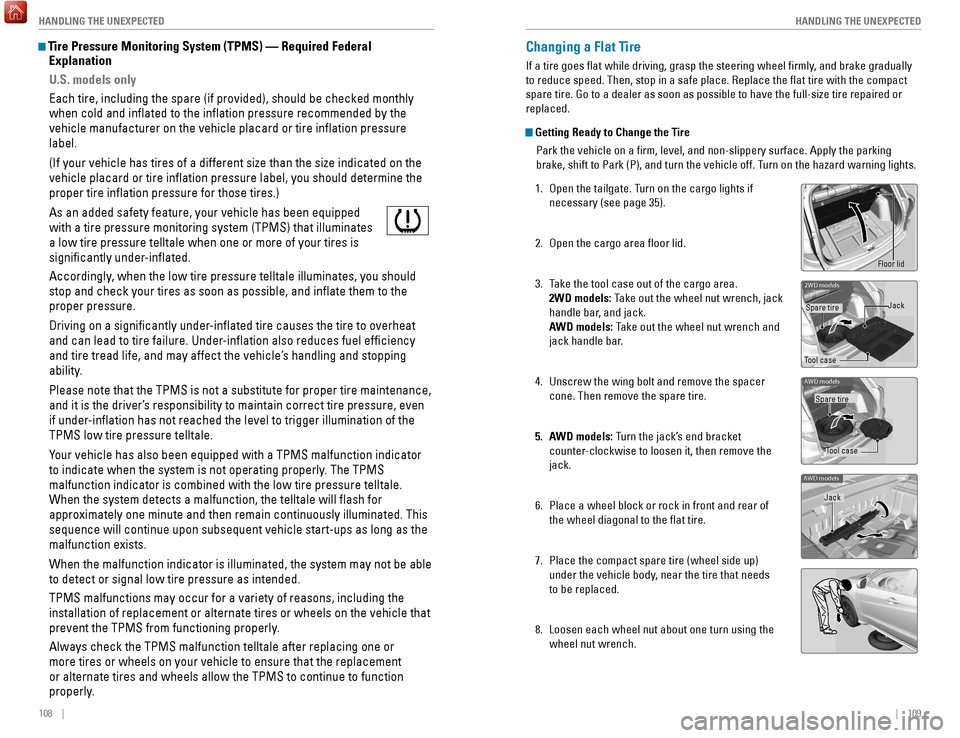
1.
Open the tailgate. T
urn on the cargo lights if
necessary (see page 35).
2.
Open the cargo area floor lid.
3.
T
ake the tool case out of the cargo area.
2WD models: Take out the wheel nut wrench, jack
handle bar, and jack.
AWD models: Take out the wheel nut wrench and
jack handle bar.
4.
Unscrew the wing bolt and remove the spacer
cone. Then remove the spare tire.
5.
A
WD models: Turn the jack’s end bracket
counter-clockwise to loosen it, then remove the
jack.
6.
Place a wheel block or rock in front and rear of
the wheel diagonal to the flat tire.
7.
Place the compact spare tire (wheel side up)
under the vehicle body
, near the tire that needs
to be replaced.
8.
Loosen each wheel nut about one turn using the
wheel nut wrench.
2WD model s
Tool caseSpare tire
Jack
AWD models
Tool case
Spare tire
AWD models
Jack
Floor lid
Page 59 of 78
110 || 111
HANDLING THE UNEXPECTED
HANDLING THE UNEXPECTED
Setting Up the Jack
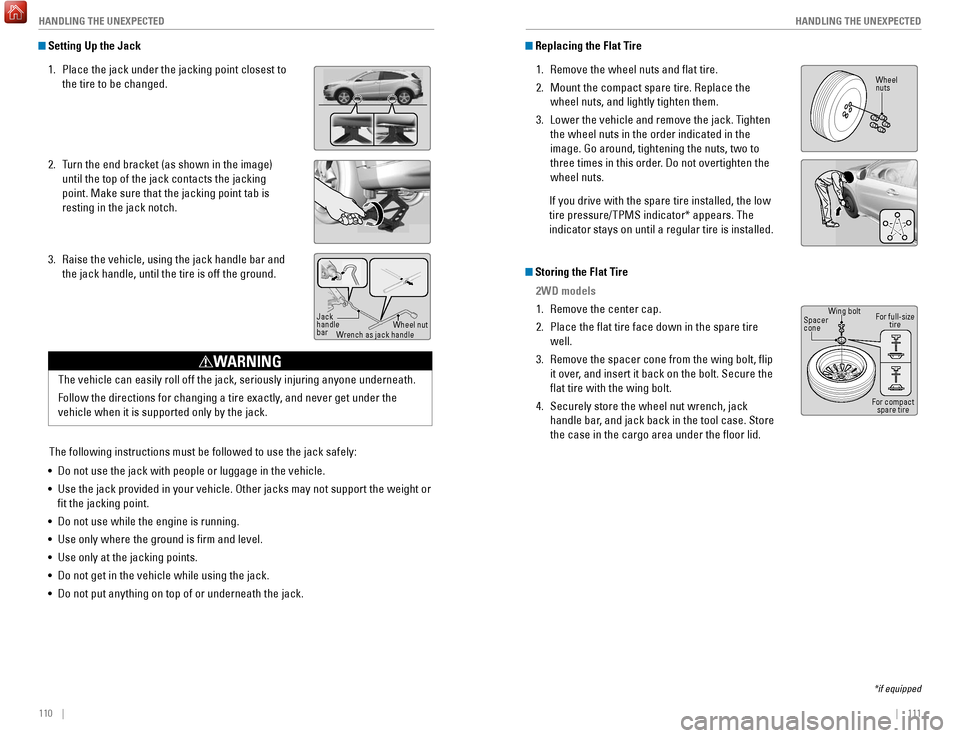
1.
Place the jack under the jacking point closest to
the tire to be changed.
2.
T
urn the end bracket (as shown in the image)
until the top of the jack contacts the jacking
point. Make sure that the jacking point tab is
resting in the jack notch.
3.
Raise the vehicle, using the jack handle bar and
the jack handle, until the tire is off the ground.
The following instructions must be followed to use the jack safely:
•
Do not use the jack with people or luggage in the vehicle.
•
Use the jack provided in your vehicle. Other jacks may not support the w\
eight
or
fit the jacking point.
•
Do not use while the engine is running.
•
Use only where the ground is firm and level.
•
Use only at the jacking points.
•
Do not get in the vehicle while using the jack.
•
Do not put anything on top of or underneath the jack.
Jack
handle
bar Wheel nut
Wrench as jack handle
Replacing the Flat Tire
1.
Remove the wheel nuts and flat tire.
2.
Mount the compact spare tire. Replace the
wheel nuts, and lightly tighten them.
3.
Lower the vehicle and remove the jack. T
ighten
the wheel nuts in the order indicated in the
image. Go around, tightening the nuts, two to
three times in this order. Do not overtighten the
wheel nuts.
If you drive with the spare tire installed, the low
tire pressure/TPMS indicator* appears. The
indicator stays on until a regular tire is installed.
Storing the Flat Tire 2WD models
1.
Remove the center cap.
2.
Place the flat tire face down in the spare tire
well.
3.
Remove the spacer cone from the wing bolt, flip
it over
, and insert it back on the bolt. Secure the
flat tire with the wing bolt.
4.
Securely store the wheel nut wrench, jack
handle bar
, and jack back in the tool case. Store
the case in the cargo area under the floor lid.
*if equipped
Wheel
nuts
Wing bolt
Spacer
cone
For compact spare tire
For full-size
tire
The vehicle can easily roll off the jack, seriously injuring anyone unde\
rneath.
Follow the directions for changing a tire exactly, and never get under the
vehicle when it is supported only by the jack.
WARNING