USB HONDA HR-V 2017 2.G Quick Guide
[x] Cancel search | Manufacturer: HONDA, Model Year: 2017, Model line: HR-V, Model: HONDA HR-V 2017 2.GPages: 78, PDF Size: 5.33 MB
Page 3 of 78

Honda Automobile Customer Service
Your authorized Honda dealer should be able to answer any questions you h\
ave
about your vehicle. However, if you are dissatisfied with the information you receive,
you can call Honda Automobile Customer Service (see page 137).
Honda Roadside Assistance
24-hour emergency road service is available to you in the United States \
and Canada
throughout your 3-year/36,000-mile warranty term. Services include jump starting,
flat tire and lockout assistance, towing, and more (limitations apply\
). This Owner’s Guide is intended to help you quickly get acquainted with your
2017 Honda HR-V. It provides basic information and instructions on technology and
convenience features, as well as emergency procedures and how to get ass\
istance.
This guide is for vehicles sold in the United States and Canada. It cove\
rs all HR-V
models, so you may find descriptions of features and equipment that ar\
e not in your
vehicle. Images throughout this guide are from U.S. vehicles and represe\
nt features
and equipment that are available on some, but not all, models.
This guide is not intended to be a substitute for the Owner’s Manual. The Owner
Information CD enclosed in your glove box kit includes the Owner’s Manual,
Navigation Manual, and vehicle and tire warranties in electronic format.\
This
information can be viewed on a computer (PC or Mac platform) and saved or printed
for your reference. You can also visit owners.honda.com (U.S.) or myhonda.ca
(Canada) to view the complete and most current information.
If you are the first registered owner of your vehicle, you may request\
a complimentary
printed copy of the Owner’s Manual, Navigation Manual, or Vehicle Warranty within
the first six months of vehicle purchase. To request a copy, visit owners.honda.com
(U.S.) and create or log in to your account. In Canada, please request\
a copy from
your Honda dealer.
American Honda Motor Co., Inc. strives to be proactive in protecting our\
environment
and natural resources. By using electronic delivery for a considerable p\
ortion of the
information typically found in a vehicle owner’s manual, we are further reducing our
impact on the environment.
INTRODUCTION TABLE OF CONTENTS
Call (800) 999-1009 (U.S.) or (888) 946-6329 (Canada)
Call (866) 864-5211 (U.S.) or (800) 465-7587 (Canada)
*if equipped
VISUAL INDEX
..............................................................
1
Steering Wheel and Nearby Controls
....................
1
Dashboard and Other Controls
...............................
2
SAFETY INFORMATION
..............................................
3
Important Safety Information
..................................
3
Seat Belts
...................................................................
5
Airbags
........................................................................\
9
Child Safety
..............................................................
15
Safety Label Locations
...........................................
22
Reporting Safety Defects
.......................................
23
INSTRUMENT PANEL
................................................
24
Malfunction Indicators
...........................................
24
Condition Indicators
................................................
26
On/Off Indicators
.....................................................
27
Information Display
.................................................
28
VEHICLE CONTROLS
..................................................
29
Using the Key or Remote T
ransmitter
..................
29
Smart Entry System*
...............................................
30
Door Operation
........................................................
31
Tailgate Operation
...................................................
32
Power Window Operation
.....................................
33
Power Moonroof Operation*
................................
34
Interior and Exterior Lights
....................................
35
One-Touch Turn Signal
...........................................
36
Wiper Operation
......................................................
37
Adjusting the Seats
.................................................
38
Rear Seats
...............................................................
41
Adjusting the Mirrors
..............................................
42
Adjusting the Steering Wheel
...............................
43
Air Conditioning System*
......................................
43
Climate Control System*
.......................................
44
Seat Heaters*
..........................................................
46
Customized Features
..............................................
47
Setting the Clock
.....................................................
48AUDIO AND CONNECTIVITY
....................................
49
Basic Audio Operation
...........................................
49
Color Audio System*
...............................................
52
FM/AM Radio
........................................................
53
Compact Disc (CD)
...............................................
54
iPod® ...................................................................... 55
USB Flash Drive .................................................... 56
Bluetooth
® Audio .................................................. 57
T
ouchscreen Operation* ........................................ 58
HondaLink
® ........................................................... 59
FM/AM Radio ....................................................... 60
SiriusXM
® Radio* ................................................. 61
Compact Disc (CD) .............................................. 62
iPod® ...................................................................... 63
USB Flash Drive .................................................... 64
Bluetooth
® Audio .................................................. 65
Pandora® ............................................................... 66
HDMI Video ........................................................... 67
BLUETOOTH
® HANDSFREELINK® (HFL) ................. 68
Basic HFL Operation
............................................... 68
Pairing a Phone
....................................................... 69
Making a Call
........................................................... 70
Basic HFL Operation
............................................... 71
Pairing a Phone
....................................................... 73
Making a Call
........................................................... 74
SMS Text Messaging and E-Mail*
....................... 76
HondaLink
® Assist ................................................... 77
Siri® Eyes Free ......................................................... 77
NA
VIGATION* ............................................................. 78
Basic Navigation Operation
..................................78
Entering a Destination
............................................ 81
Routing
...................................................................... 83
Page 5 of 78
2 || 3
S AFETY
V
ISUAL I NDEX
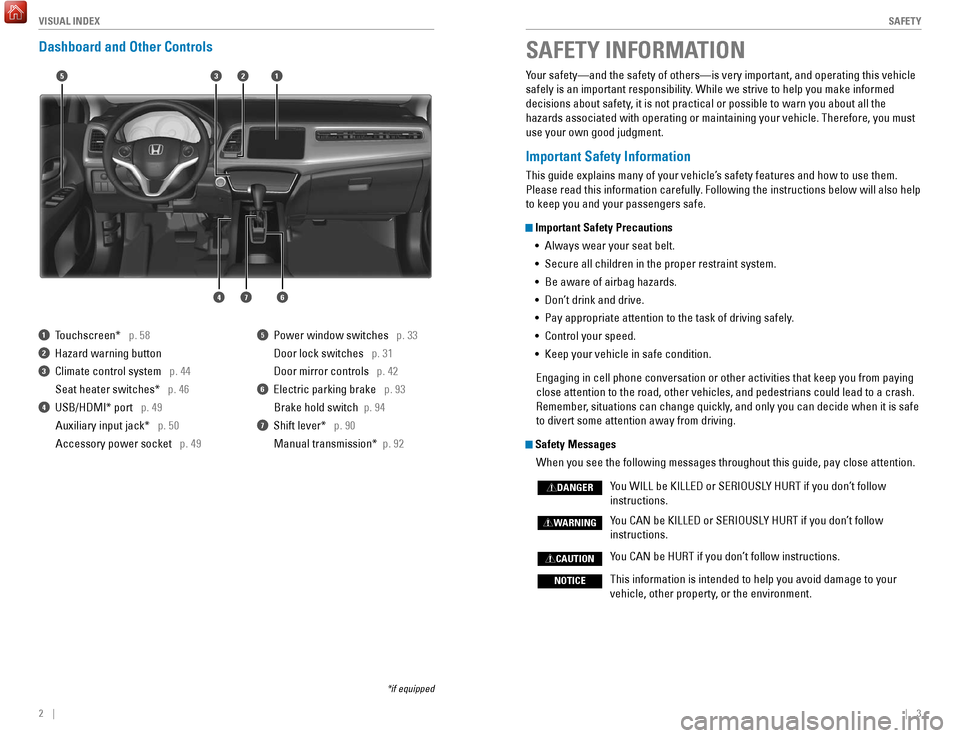
Dashboard and Other Controls
1 Touchscreen* p. 58
2 Hazard warning button
3 Climate control system p. 44
Seat heater switches*
p. 46
4 USB/HDMI* port p. 49Auxiliary input jack* p. 50
Accessory power socket p. 49
5 Power window switches p. 33
Door lock switches
p. 31
Door mirror controls
p. 42
6 Electric parking brake p. 93
Brake hold switch
p. 94
7 Shift lever* p. 90
Manual transmission*
p. 92
*if equipped
Your safety—and the safety of others—is very important, and operati\
ng this vehicle
safely is an important responsibility. While we strive to help you make informed
decisions about safety, it is not practical or possible to warn you about all the
hazards associated with operating or maintaining your vehicle. Therefore\
, you must
use your own good judgment.
Important Safety Information
This guide explains many of your vehicle’s safety features and how to use them.
Please read this information carefully. Following the instructions below will also help
to keep you and your passengers safe.
Important Safety Precautions•
Always wear your seat belt.
•
Secure all children in the proper restraint system.
•
Be aware of airbag hazards.
•
Don’
t drink and drive.
•
Pay appropriate attention to the task of driving safely
.
•
Control your speed.
•
Keep your vehicle in safe condition.
Engaging in cell phone conversation or other activities that keep you fr\
om paying
close attention to the road, other vehicles, and pedestrians could lead \
to a crash.
Remember
, situations can change quickly, and only you can decide when it is safe
to divert some attention away from driving.
Safety Messages
When you see the following messages throughout this guide, pay close att\
ention.
Y
ou WILL be KILLED or SERIOUSLY HURT if you don’t follow
instructions.
Y
ou CAN be KILLED or SERIOUSLY HURT if you don’t follow
instructions.
Y
ou CAN be HURT if you don’t follow instructions.
This information is intended to help you avoid damage to your
vehicle, other property
, or the environment.
DANGER
WARNING
CAUTION
NOTICE
SAFETY INFORMATION
15
46
32
7
Page 28 of 78
48 || 49
AUDIO AND CONNECTIVITY
V EHICLE C ONTROLS
Learn how to operate the vehicle’s audio system.
Basic Audio Operation
Connect audio devices and operate buttons and displays for the audio sys\
tem.
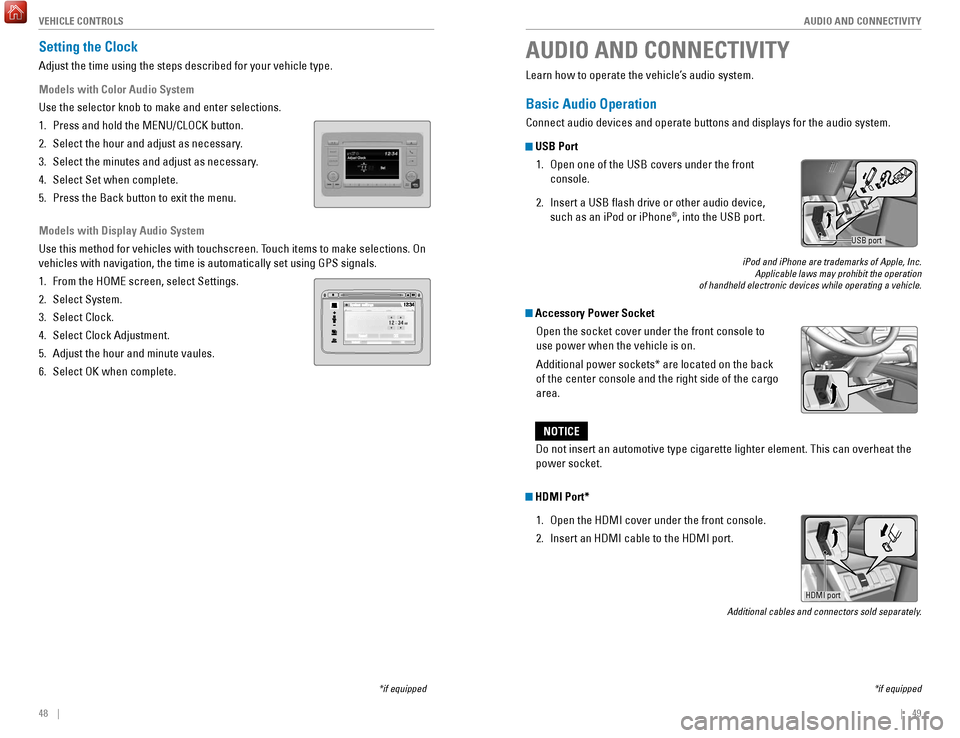
USB Port
1.
Open one of the USB covers under the front
console.
2.
Insert a USB flash drive or other audio device,
such as an iPod or iPhone®, into the USB port.
iPod and iPhone are trademarks of Apple, Inc. Applicable laws may prohibit the operation
of handheld electronic devices while operating a vehicle.
Accessory Power Socket
Open the socket cover under the front console to
use power when the vehicle is on.
Additional power sockets* are located on the back
of the center console and the right side of the cargo
area.
AUDIO AND CONNECTIVITY
*if equipped
Do not insert an automotive type cigarette lighter element. This can ove\
rheat the
power socket.
NOTICE
HDMI Port*
1.
Open the HDMI cover under the front console.
2.
Insert an HDMI cable to the HDMI port.
Additional cables and connectors sold separately.
USB port
Setting the Clock
Adjust the time using the steps described for your vehicle type.
Models with Color Audio System
Use the selector knob to make and enter selections.
1.
Press and hold the MENU/CLOCK button.
2.
Select the hour and adjust as necessary
.
3.
Select the minutes and adjust as necessary
.
4.
Select Set when complete.
5.
Press the Back button to exit the menu.
Models with Display Audio System
Use this method for vehicles with touchscreen. T
ouch items to make selections. On
vehicles with navigation, the time is automatically set using GPS signal\
s.
1.
From the HOME screen, select Settings.
2.
Select System.
3.
Select Clock.
4.
Select Clock Adjustment.
5.
Adjust the hour and minute vaules.
6.
Select OK when complete.
*if equipped
HDMI port
Page 29 of 78
50 || 51
AUDIO AND CONNECTIVITY
AUDIO AND CONNECTIVITY
*if equipped
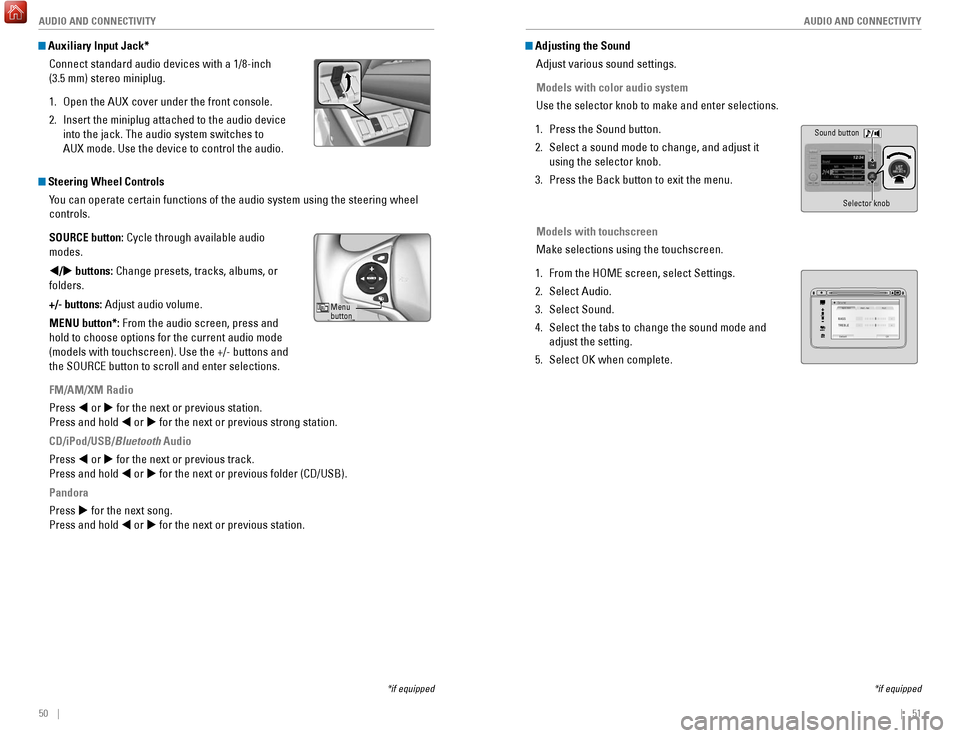
Auxiliary Input Jack*
Connect standard audio devices with a 1/8-inch
(3.5 mm) stereo miniplug.
1.
Open the AUX
cover under the front console.
2.
Insert the miniplug attached to the audio device
into the jack. The audio system switches to
AUX
mode. Use the device to control the audio.
Steering Wheel ControlsYou can operate certain functions of the audio system using the steering \
wheel
controls.
SOURCE button: Cycle through available audio
modes.
t/u buttons: Change presets, tracks, albums, or
folders.
+/- buttons: Adjust audio volume.
MENU button*: From the audio screen, press and
hold to choose options for the current audio mode
(models with touchscreen). Use the +/- buttons and
the SOURCE button to scroll and enter selections.
FM/AM/XM Radio
Press t or u for the next or previous station.
Press and hold t or u for the next or previous strong station.
CD/iPod/USB/Bluetooth Audio
Press t or u for the next or previous track.
Press and hold t or u for the next or previous folder (CD/USB).
Pandora
Press u for the next song.
Press and hold t or u for the next or previous station.
Menu
button
Adjusting the SoundAdjust various sound settings.
Models with color audio system
Use the selector knob to make and enter selections.
1.
Press the Sound button.
2.
Select a sound mode to change, and adjust it
using the selector knob.
3.
Press the Back button to exit the menu.
Models with touchscreen
Make selections using the touchscreen.
1.
From the HOME screen, select Settings.
2.
Select Audio.
3.
Select Sound.
4.
Select the tabs to change the sound mode and
adjust the setting.
5.
Select OK when complete.
*if equipped
Sound button Selector knob
VOLHOME
MENU BA CK
Page 32 of 78
56 || 57
AUDIO AND CONNECTIVITY
AUDIO AND CONNECTIVITY
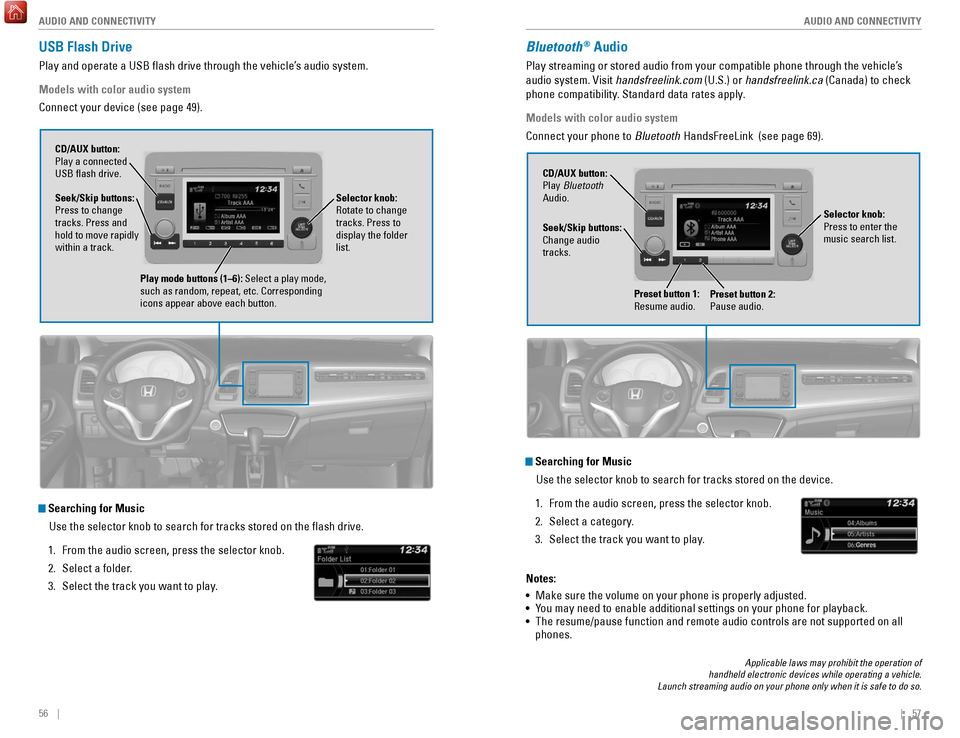
USB Flash Drive
Play and operate a USB flash drive through the vehicle’s audio system.
Models with color audio system
Connect your device (see page 49).
Searching for Music
Use the selector knob to search for tracks stored on the flash drive.
1.
From the audio screen, press the selector knob.
2.
Select a folder
.
3.
Select the track you want to play
.
Selector knob:
Rotate to change
tracks. Press to
display the folder
list.
CD/AUX button:
Play a connected
USB flash drive.
Seek/Skip buttons:
Press to change
tracks. Press and
hold to move rapidly
within a track.
Play mode buttons (1–6): Select a play mode,
such as random, repeat, etc. Corresponding
icons appear above each button.
Bluetooth® Audio
Play streaming or stored audio from your compatible phone through the ve\
hicle’s
audio system. Visit handsfreelink.com (U.S.) or handsfreelink.ca (Canada) to check
phone compatibility. Standard data rates apply.
Models with color audio system
Connect your phone to Bluetooth HandsFreeLink (see page 69).
Searching for Music
Use the selector knob to search for tracks stored on the device.
1.
From the audio screen, press the selector knob.
2.
Select a category
.
3.
Select the track you want to play
.
Notes:
•
Make sure the volume on your phone is properly adjusted.
•
Y
ou may need to enable additional settings on your phone for playback.
•
The resume/pause function and remote audio controls are not supported on\
all
phones.
Seek/Skip buttons:
Change audio
tracks. CD/AUX button:
Play Bluetooth
Audio.
Preset button 1:
Resume audio.
Preset button 2:
Pause audio.
Selector knob:
Press to enter the
music search list.
Applicable laws may prohibit the operation of
handheld electronic devices while operating a vehicle.
Launch streaming audio on your phone only when it is safe to do so.
Page 35 of 78
62 || 63
AUDIO AND CONNECTIVITY
AUDIO AND CONNECTIVITY
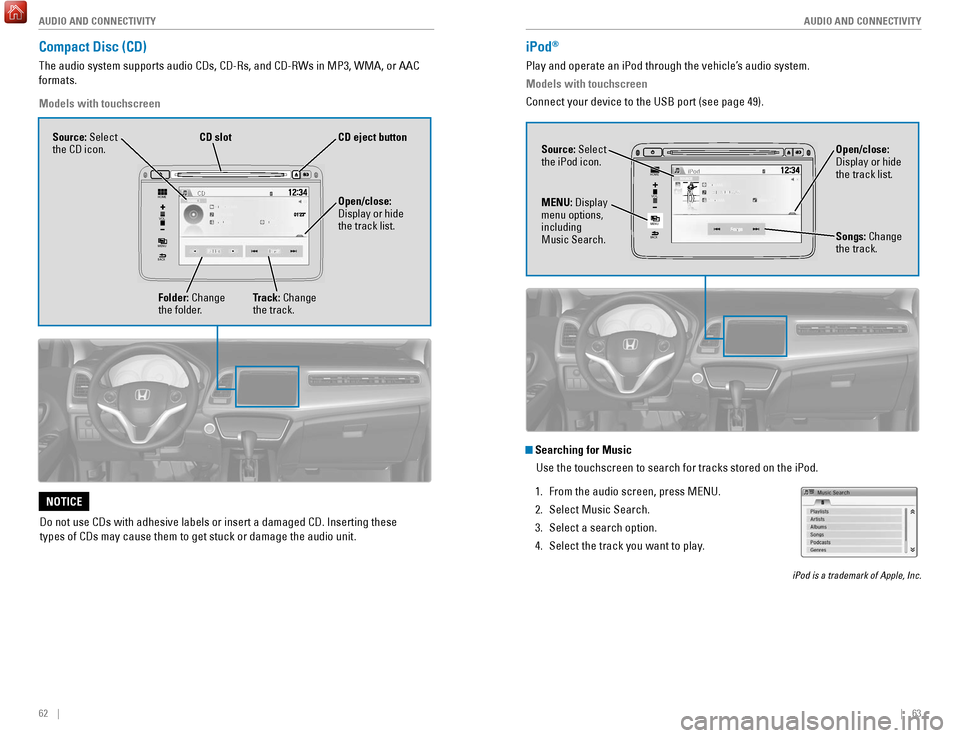
Compact Disc (CD)
The audio system supports audio CDs, CD-Rs, and CD-RWs in MP3, WMA, or AAC
formats.
Models with touchscreen
Do not use CDs with adhesive labels or insert a damaged CD. Inserting th\
ese
types of CDs may cause them to get stuck or damage the audio unit.
NOTICE
VO L
HOME
MENU
BA CK
Source: Select
the CD icon.
Folder: Change
the folder. Open/close:
Display or hide
the track list.
Track: Change
the track.
CD
slotCD eject button
iPod®
Play and operate an iPod through the vehicle’s audio system.
Models with touchscreen
Connect your device to the USB port (see page 49).
VOL
HOME
MENU
BA CK
Source: Select
the iPod icon. Open/close:
Display or hide
the track list.
MENU: Display
menu options,
including
Music Search. Songs: Change
the track.
Searching for Music
Use the touchscreen to search for tracks stored on the iPod.
1.
From the audio screen, press MENU.
2.
Select Music Search.
3.
Select a search option.
4.
Select the track you want to play
.
iPod is a trademark of Apple, Inc.
Page 36 of 78
64 || 65
AUDIO AND CONNECTIVITY
AUDIO AND CONNECTIVITY
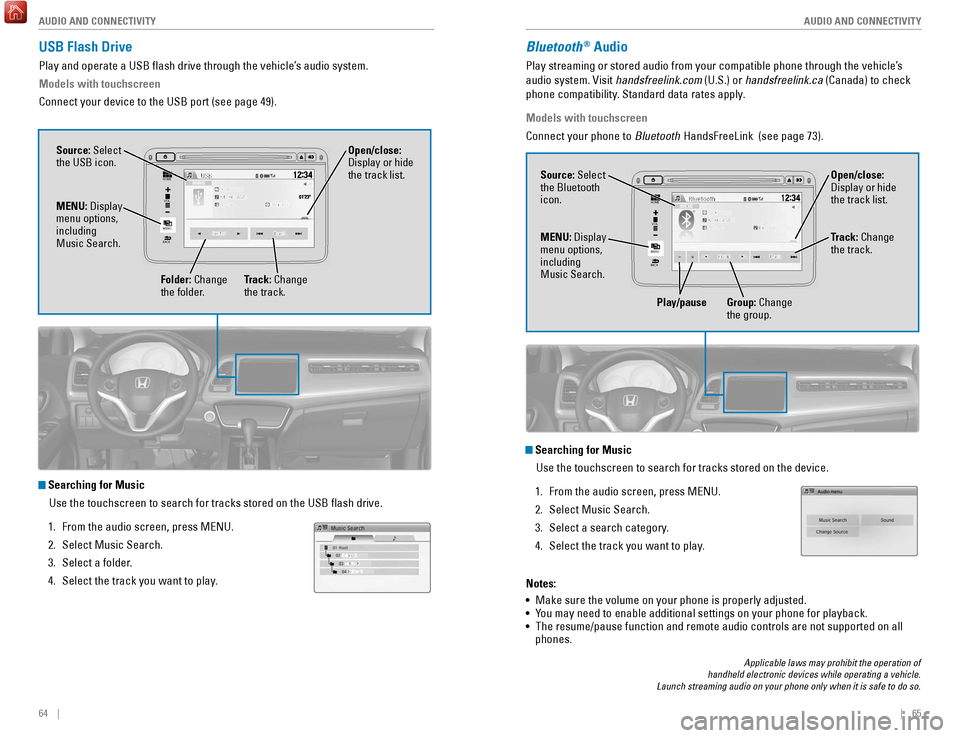
USB Flash Drive
Play and operate a USB flash drive through the vehicle’s audio system.
Models with touchscreen
Connect your device to the USB port (see page 49).
Searching for Music
Use the touchscreen to search for tracks stored on the USB flash drive\
.
1.
From the audio screen, press MENU.
2.
Select Music Search.
3.
Select a folder
.
4.
Select the track you want to play
.
VOL
HOME
MENU
BA CK
Source: Select
the USB icon.
Folder: Change
the folder. Open/close:
Display or hide
the track list.
MENU: Display
menu options,
including
Music Search.
Track: Change
the track.
Bluetooth® Audio
Play streaming or stored audio from your compatible phone through the ve\
hicle’s
audio system. Visit handsfreelink.com (U.S.) or handsfreelink.ca (Canada) to check
phone compatibility. Standard data rates apply.
Models with touchscreen
Connect your phone to Bluetooth HandsFreeLink (see page 73).
VOL
HOME
MENU
BA CK
Source: Select
the Bluetooth
icon. Open/close:
Display or hide
the track list.
MENU: Display
menu options,
including
Music Search. Track: Change
the track.
Play/pause Group: Change the group.
Searching for Music
Use the touchscreen to search for tracks stored on the device.
1.
From the audio screen, press MENU.
2.
Select Music Search.
3.
Select a search category
.
4.
Select the track you want to play
.
Notes:
•
Make sure the volume on your phone is properly adjusted.
•
Y
ou may need to enable additional settings on your phone for playback.
•
The resume/pause function and remote audio controls are not supported on\
all
phones.
Applicable laws may prohibit the operation of
handheld electronic devices while operating a vehicle.
Launch streaming audio on your phone only when it is safe to do so.
Page 37 of 78

66 || 67
AUDIO AND CONNECTIVITY
AUDIO AND CONNECTIVITY
Pandora®
Play and operate Pandora from your compatible phone through the vehicle’\
s audio
system. Visit handsfreelink.com to check phone compatibility. Standard data rates
apply. Available in the U.S. only.
Models with touchscreen
Connect your phone when the vehicle is stopped.
For iPhone:
•
Connect via
Bluetooth HandsFreeLink (see page 73) or USB port (see page 49).
•
A pop-up may appear on your phone requesting you to allow access for Pan\
dora
to be launched.
•
If you cannot operate Pandora through the audio system, it may be stream\
ing
through
Bluetooth Audio. Make sure Pandora is selected on the audio system.
•
If Pandora still does not operate, try rebooting the phone and reconnect\
ing the
cable if necessary.
For other compatible smartphones:
•
Connect via
Bluetooth HandsFreeLink (see page 73).
Applicable laws may prohibit the operation of
handheld electronic devices while operating a vehicle.
Launch streaming audio on your phone only when it is safe to do so.
Source: Select
the Pandora icon.
Station: Change
the station. Skip: Go to
the next song. Open/close:
Display or hide
information.
MENU: Display
menu options,
including the
Station List. Like/dislike
song
Play/Pause
HDMI Video
Play video from a compatible device while your vehicle is stopped.
Models with touchscreen
Connect your device to the HDMI port (see page 49).
From the connected device, launch the video you want to display on the
touchscreen. The device or video resolution must be 720p or lower to vie\
w. This
feature is limited while the vehicle is moving.
VO L
HOME
MENU
BA CK
Source: Select
the HDMI
icon from the
SOURCE screen.
Page 72 of 78

136 || 137
CUSTOMER INFORMATION
CUSTOMER INFORMATION
Learn about information specific to you as a Honda customer and how to\
get help.
Frequently Asked Questions/Troubleshooting
Below are some frequently asked questions and troubleshooting items that\
you may
have about the vehicle.
Q:
How do I set the vehicle clock?
A:
For vehicles without navigation, see page 48. For vehicles with navigati\
on, the
time is automatically set using GPS signals.
Q:
Why doesn’
t the vehicle start when I press the ENGINE START/STOP button?*
A:
The brake pedal must be pressed to start the engine.
Q:
What is the AUTO setting on my headlight lever?
A:
When in the AUTO position, the vehicle’
s exterior lights will automatically turn
on or off depending on the ambient lighting.
Q:
Why won’
t the driver’s door unlock when I grab the door handle, even though
the keyless access remote is within range?*
A:
If you pull the handle too quickly
, the system may not have time to confirm the
door is unlocked. W
ait to hear a beep to confirm the door is unlocked. If you are
wearing gloves, the system may be slow to respond.
Q:
After my battery was disconnected or went dead, the audio system is aski\
ng for
a code. Where do I find this?
A:
In most cases, you do not need to enter a code. T
urn on the vehicle and the
audio system, and press and hold the power button until the system react\
ivates.
Q:
Why can’
t I operate Pandora through the audio system?
A:
Audio may be streaming through
Bluetooth Audio. Make sure Pandora mode
is selected and the phone cable is properly connected to the USB adapter\
.
Some phones may prompt you to “Allow” a connection.
Q:
Is my phone compatible with
Bluetooth features?
A:
Visit handsfreelink.com (U.S.) or handsfreelink.ca (Canada) to check phone
compatibility for
Bluetooth Audio, Bluetooth HandsFreeLink, and SMS text
messaging.
Q:
Every time I press the T
alk button, the system gives me voice prompts. Can I turn
these off?*
A:
From the Home screen, select Settings. Select the V
oice Recog tab, then select
V
oice Prompt. Select Off.
CUSTOMER INFORMATION
*if equipped
Contact Us
Honda dealer personnel are trained professionals. They should be able to\
answer
all your questions. If you encounter a problem that your dealership does\
not solve
to your satisfaction, please discuss it with the dealership’s service manager or
general manager. If you are dissatisfied with the decision made by the dealership’\
s
management, contact Honda Automobile Customer Service.U.S. owners
American Honda Motor Co., Inc.
Honda Automobile Customer Service
1919 Torrance Blvd.
Mail Stop 500-2N-7A
Torrance, CA 90501-2746
Tel: (800) 999-1009
In Puerto Rico and
the U.S. Virgin Islands
Bella International
P.O. Box 190816
San Juan, PR 00919-0816
Tel: (787) 620-7546
When you call or write, please give us the following information:
•
V
ehicle Identification Number
•
Date of purchase
•
Odometer reading of your vehicle
•
Y
our name, address, and telephone number
•
A detailed description of the problem
•
Name of the dealer who sold the vehicle to you Canadian owners
Honda Canada, Inc.
Customer Relations
180 Honda Blvd.
Markham, ON
L6C 0H9
T
el: (888) 946-6329
Fax: (877) 939-0909
e-mail: [email protected]
Q:
Why can’
t I select an item using the selector knob or touchscreen*?
A:
T
o prevent driver distraction, certain items are limited or inoperable wh\
ile the
vehicle is moving. Use voice commands or pull over to select the items.
Q:
Where can I find the vehicle identification number (VIN)?
A:
Check the label on the driver’
s doorjamb.
*if equipped
Honda Roadside Assistance
24-hour emergency road service is available to you in the United States \
and Canada
throughout your 3-year/36,000-mile warranty term. Services include jump starting,
flat tire and lockout assistance, towing, and more (limitations apply\
).
Call (866) 864-5211 (U.S.) or (800) 465-7587 (Canada).
Page 75 of 78
142 || 143
VOICE COMMAND INDEX
VOICE COMMAND INDEX
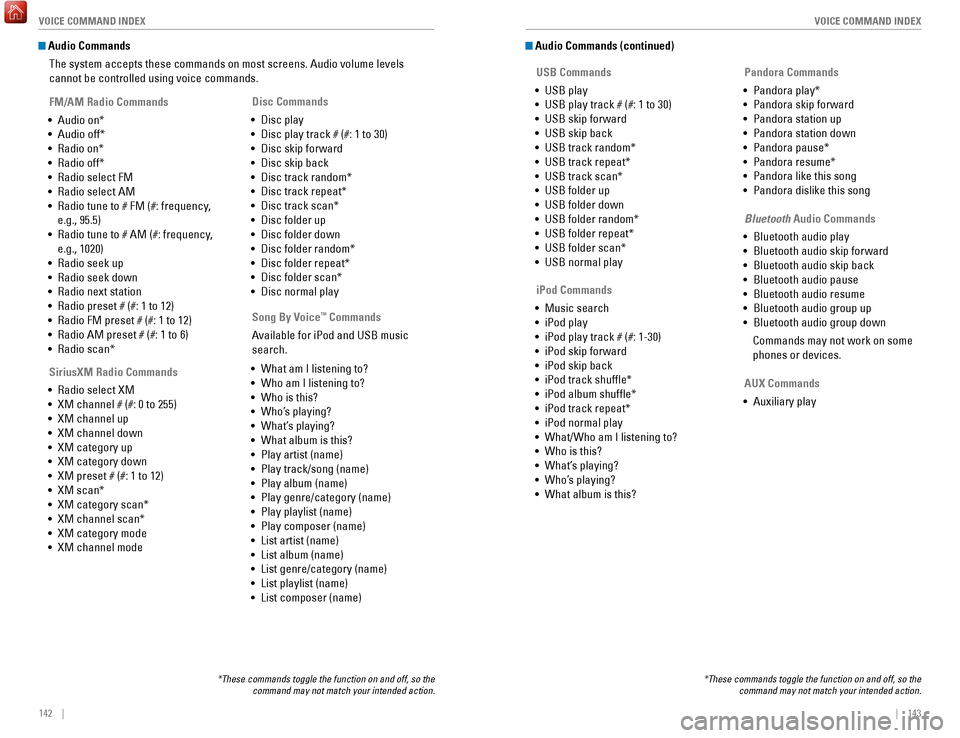
Audio Commands
The system accepts these commands on most screens. Audio volume levels
cannot be controlled using voice commands.
FM/AM Radio Commands
•
Audio on*
•
Audio off*
•
Radio on*
•
Radio off*
•
Radio select FM
•
Radio select AM
•
Radio tune to # FM (#: frequency
,
e.g., 95.5)
•
Radio tune to # AM (#: frequency
,
e.g., 1020)
•
Radio seek up
•
Radio seek down
•
Radio next station
•
Radio preset # (#: 1 to 12)
•
Radio FM preset # (#: 1 to 12)
•
Radio AM preset # (#: 1 to 6)
•
Radio scan*
SiriusXM Radio Commands
•
Radio select XM
•
XM channel # (#: 0 to 255)
•
XM channel up
•
XM channel down
•
XM category up
•
XM category down
•
XM preset # (#: 1 to 12)
•
XM scan*
•
XM category scan*
•
XM channel scan*
•
XM category mode
•
XM channel mode Disc Commands
•
Disc play
•
Disc play track # (#: 1 to 30)
•
Disc skip forward
•
Disc skip back
•
Disc track random*
•
Disc track repeat*
•
Disc track scan*
•
Disc folder up
•
Disc folder down
•
Disc folder random*
•
Disc folder repeat*
•
Disc folder scan*
•
Disc normal play
*These commands toggle the function on and off, so the command may not match your intended action.
Song By Voice™ Commands
Available for iPod and USB music
search.
•
What am I listening to?
•
Who am I listening to?
•
Who is this?
•
Who’
s playing?
•
What’
s playing?
•
What album is this?
•
Play artist (name)
•
Play track/song (name)
•
Play album (name)
•
Play genre/category (name)
•
Play playlist (name)
•
Play composer (name)
•
List artist (name)
•
List album (name)
•
List genre/category (name)
•
List playlist (name)
•
List composer (name)
Audio Commands (continued) USB Commands
•
USB play
•
USB play track # (#: 1 to 30)
•
USB skip forward
•
USB skip back
•
USB track random*
•
USB track repeat*
•
USB track scan*
•
USB folder up
•
USB folder down
•
USB folder random*
•
USB folder repeat*
•
USB folder scan*
•
USB normal play Pandora Commands
•
Pandora play*
•
Pandora skip forward
•
Pandora station up
•
Pandora station down
•
Pandora pause*
•
Pandora resume*
•
Pandora like this song
•
Pandora dislike this song
*These commands toggle the function on and off, so the command may not match your intended action.
iPod Commands
•
Music search
•
iPod play
•
iPod play track # (#: 1-30)
•
iPod skip forward
•
iPod skip back
•
iPod track shuffle*
•
iPod album shuffle*
•
iPod track repeat*
•
iPod normal play
•
What/Who am I listening to?
•
Who is this?
•
What’
s playing?
•
Who’
s playing?
•
What album is this? Bluetooth
Audio Commands
•
Bluetooth audio play
•
Bluetooth audio skip forward
•
Bluetooth audio skip back
•
Bluetooth audio pause
• Bluetooth audio resume
•
Bluetooth audio group up
•
Bluetooth audio group down
Commands may not work on some
phones or devices.
AUX Commands
•
Auxiliary play