change wheel HONDA HR-V 2017 2.G Quick Guide
[x] Cancel search | Manufacturer: HONDA, Model Year: 2017, Model line: HR-V, Model: HONDA HR-V 2017 2.GPages: 78, PDF Size: 5.33 MB
Page 23 of 78

38 || 39
V EHICLE C ONTROLS
V
EHICLE C ONTROLS
Reclining the seat-back too far can result in serious injury or death in\
a crash.
Adjust the seat-back to an upright position, and sit well back in the se\
at.
WARNING
Adjusting the Seats
Make seat adjustments before driving to ensure the best comfort and safe\
ty.
Adjusting the Front Seats
Adjust the driver’s seat as far back as possible while
allowing you to maintain full control of the vehicle.
You should be able to sit upright and well back in the
seat, adequately press the pedals without leaning
forward, and grip the steering wheel comfortably.
The passenger’s seat should be adjusted so that it
is as far back from the front airbag in the dashboard
as possible.
The National Highway Traffic Safety Administration and Transport Canada
recommend that drivers allow at least 10 inches (25 cm) between the ce\
nter of the
steering wheel and the chest.
Move back and allow sufficient space.
Height adjustment
(Driver’s seat only) Pull up or push down
the lever to raise or lower the seat.
Seat-back angle
adjustment
Pull up the lever to
change the angle.
Horizontal position adjustment
Pull up on the bar to move the
seat, then release the bar.
Sitting improperly or out of position can result in serious injury or de\
ath in a
crash.
Always sit upright, well back in the seat, with your feet on the floor\
.
WARNING
Adjusting the Rear Seats Pull the release lever on the right to change the
angle of the right half of the seat-back. Repeat for
the left seat-back.
Floor MatsPosition the front seat floor mats properly, and
anchor them. If they are not properly positioned,
the floor mats can interfere with the front seat
functions.
Do not put additional floor mats on top of the
anchored mats.
Unlock
Lock
Sitting too close to a front airbag can result in serious injury or deat\
h if the
front airbags inflate.
Always sit as far back from the front airbags as possible while maintain\
ing
control of the vehicle.
WARNING
Release lever
Page 29 of 78
50 || 51
AUDIO AND CONNECTIVITY
AUDIO AND CONNECTIVITY
*if equipped
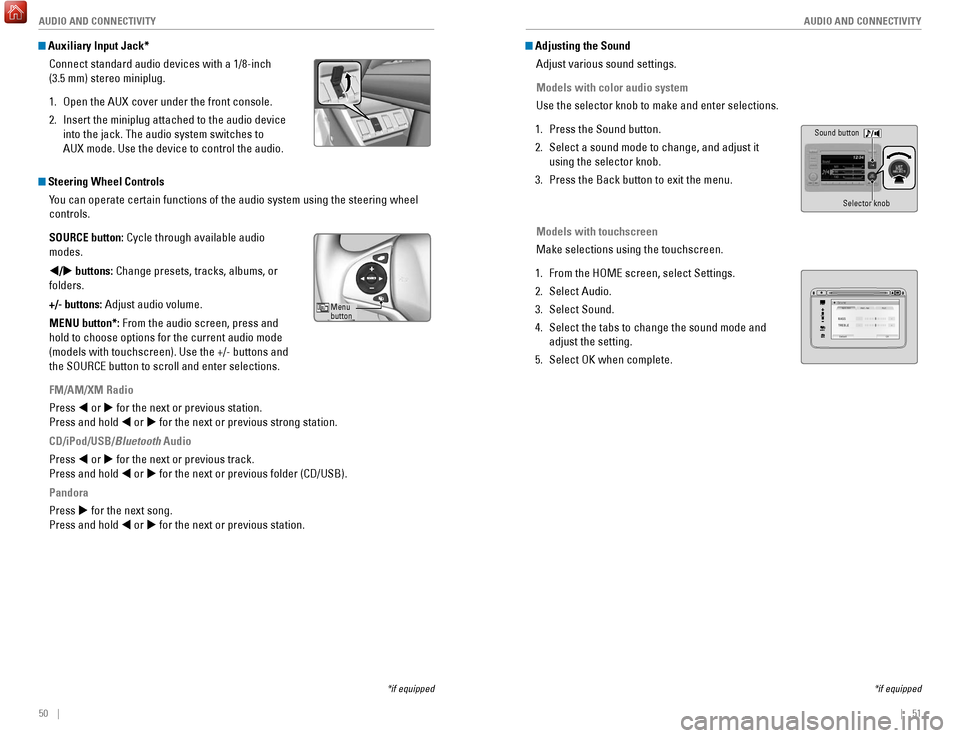
Auxiliary Input Jack*
Connect standard audio devices with a 1/8-inch
(3.5 mm) stereo miniplug.
1.
Open the AUX
cover under the front console.
2.
Insert the miniplug attached to the audio device
into the jack. The audio system switches to
AUX
mode. Use the device to control the audio.
Steering Wheel ControlsYou can operate certain functions of the audio system using the steering \
wheel
controls.
SOURCE button: Cycle through available audio
modes.
t/u buttons: Change presets, tracks, albums, or
folders.
+/- buttons: Adjust audio volume.
MENU button*: From the audio screen, press and
hold to choose options for the current audio mode
(models with touchscreen). Use the +/- buttons and
the SOURCE button to scroll and enter selections.
FM/AM/XM Radio
Press t or u for the next or previous station.
Press and hold t or u for the next or previous strong station.
CD/iPod/USB/Bluetooth Audio
Press t or u for the next or previous track.
Press and hold t or u for the next or previous folder (CD/USB).
Pandora
Press u for the next song.
Press and hold t or u for the next or previous station.
Menu
button
Adjusting the SoundAdjust various sound settings.
Models with color audio system
Use the selector knob to make and enter selections.
1.
Press the Sound button.
2.
Select a sound mode to change, and adjust it
using the selector knob.
3.
Press the Back button to exit the menu.
Models with touchscreen
Make selections using the touchscreen.
1.
From the HOME screen, select Settings.
2.
Select Audio.
3.
Select Sound.
4.
Select the tabs to change the sound mode and
adjust the setting.
5.
Select OK when complete.
*if equipped
Sound button Selector knob
VOLHOME
MENU BA CK
Page 49 of 78
90 || 91
DRIVING
DRIVING
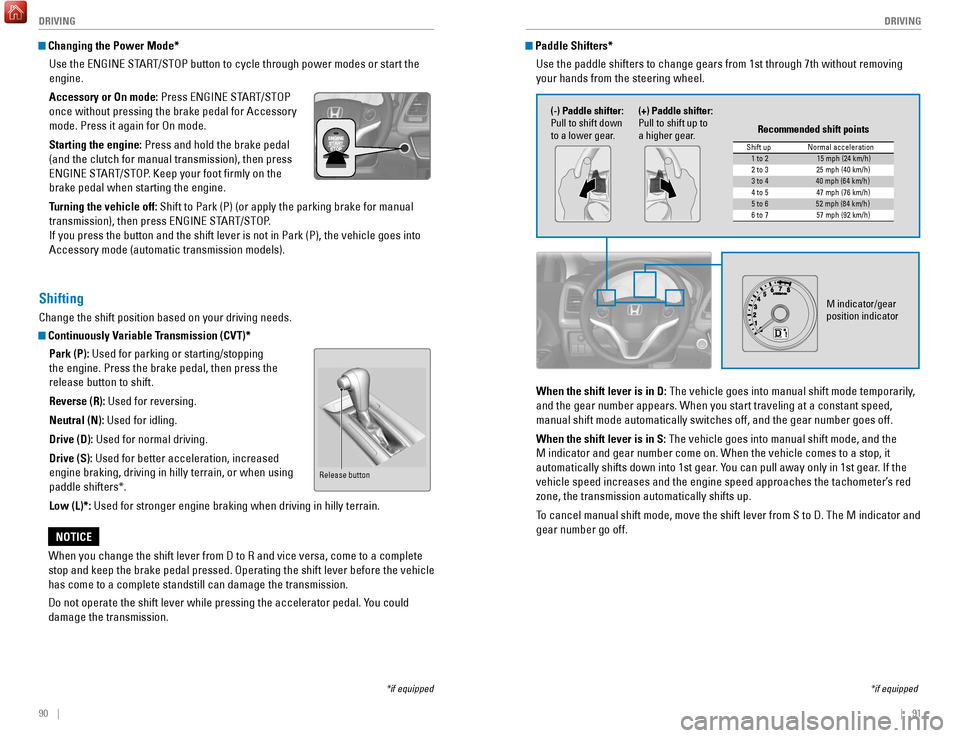
Changing the Power Mode*
Use the ENGINE START/STOP button to cycle through power modes or start the
engine.
Accessory or On mode: Press ENGINE START/STOP
once without pressing the brake pedal for Accessory
mode. Press it again for On mode.
Starting the engine: Press and hold the brake pedal
(and the clutch for manual transmission), then press
ENGINE START/STOP. Keep your foot firmly on the
brake pedal when starting the engine.
Turning the vehicle off: Shift to Park (P) (or apply the parking brake for manual
transmission), then press ENGINE START/STOP.
If you press the button and the shift lever is not in Park (P), the ve\
hicle goes into
Accessory mode (automatic transmission models).
*if equipped
Shifting
Change the shift position based on your driving needs.
Continuously Variable Transmission (CVT)*Park (P): Used for parking or starting/stopping
the engine. Press the brake pedal, then press the
release button to shift.
Reverse (R): Used for reversing.
Neutral (N): Used for idling.
Drive (D): Used for normal driving.
Drive (S): Used for better acceleration, increased
engine braking, driving in hilly terrain, or when using
paddle shifters*.
Low (L)*: Used for stronger engine braking when driving in hilly terrain.
When you change the shift lever from D to R and vice versa, come to a co\
mplete
stop and keep the brake pedal pressed. Operating the shift lever before \
the vehicle
has come to a complete standstill can damage the transmission.
Do not operate the shift lever while pressing the accelerator pedal. You could
damage the transmission.
NOTICE
Release button
Paddle Shifters* Use the paddle shifters to change gears from 1st through 7th without rem\
oving
your hands from the steering wheel.
*if equipped
When the shift lever is in D: The vehicle goes into manual shift mode temporarily,
and the gear number appears. When you start traveling at a constant spee\
d,
manual shift mode automatically switches off, and the gear number goes o\
ff.
When the shift lever is in S: The vehicle goes into manual shift mode, and the
M indicator and gear number come on. When the vehicle comes to a stop, i\
t
automatically shifts down into 1st gear. You can pull away only in 1st gear. If the
vehicle speed increases and the engine speed approaches the tachometer’\
s red
zone, the transmission automatically shifts up.
To cancel manual shift mode, move the shift lever from S to D. The M indi\
cator and
gear number go off.
M indicator/gear
position indicator
Shift up Normal acceleration1 to 215 mph (24 km/h)
2 to 32 5 mph (40 km/h)
3 to 440 mph (64 km/h)
4 to 54 7 mph (76 km/h)
5 to 652 mph (84 km/h)
6 to 75 7 mph (92 km/h)
Recommended shift points
(-) Paddle shifter:
Pull to shift down
to a lower gear. (+) Paddle shifter:
Pull to shift up to
a higher gear.
Page 50 of 78
 before the vehicle comes to a comple")
92 || 93
DRIVING
DRIVING
Manual Transmission*
Fully press the clutch pedal to operate the shift lever and change gears\
.
Do not shift to Reverse (R) before the vehicle comes to a complete sto\
p. This can
damage the transmission.
NOTICE
Before downshifting, make sure the engine will not go into the tachomete\
r’s red
zone. This can severely damage your engine.
NOTICE
Shift up Normal acceleratio n1st to 2n d16 mph (25 km/h)
2nd to 3rd 26 mph (42 km/h)
3rd to 4th35 mph (56 km/h)
4th to 5th 41 mph (66 km/h)
5th to 6th43 mph (69 km/h)
Recommended shift points
*if equipped
Braking
Slow down or stop your vehicle, and keep it from moving when parked.
Foot Brake
Press the brake pedal to slow down or stop your
vehicle from moving.
Brake pedal
Brake pedal
CVT
Manual transmission
Electric Parking Brake
Keep your vehicle from moving while parked using a simple switch.
To apply: Pull up the switch. The PARK indicator
appears in the instrument panel.
To release: Press the brake pedal and make sure
your seat belt is fastened. Press the switch down
to release.
You can also lightly press the accelerator
pedal (and release the clutch pedal for manual
transmission) if your seat belt is fastened, the
vehicle is on, and the shift lever is in Drive (D)
or Reverse (R) (or a gear is engaged for manual
transmission).
The ABS may not function correctly if you use an incorrect tire type and\
size.
NOTICE
Brake Assist System During hard or emergency braking, the system increases braking force. The brake
pedal may move slightly or make a noise; this is normal. Continue to hol\
d the brake
pedal firmly down.
Anti-Lock Brake System (ABS) During hard or emergency braking, the system rapidly pumps the brakes to
prevent wheel lockup and help you maintain steering control. The brake p\
edal may
pulsate slightly during ABS operation; this is normal. Do not pump the b\
rake pedal,
and continue to hold it firmly down.
Pull up to apply.
Push down to release.
Page 54 of 78
, a real-time image of the area behind \
your vehicle is
shown in the display, along with helpful parking")
100 || 101
DRIVING
DRIVING
Multi-View Rear Camera
When you shift into Reverse (R), a real-time image of the area behind \
your vehicle is
shown in the display, along with helpful parking guidelines.
Models with color audio system
Changing Camera Settings
Turn the guidelines on or off. Use the selector knob to make and enter se\
lections.
1.
Press the MENU/CLOCK button.
2.
Select Settings.
3.
Select Rear Camera.
4.
Select Camera Guideline.
5.
Select On or Off.
6.
Press BACK to exit the menu.
Wide view Normal viewTop down view
Press the selector knob to change views.
The rear camera view is restricted. You cannot see the corner ends of the bumper or what is
underneath the bumper. Its unique lens also makes objects appear closer or farther than they \
actually are.
Visually confirm that it is safe to drive before backing up. Certain c\
onditions (such as weather,
lighting, and high temperatures) may also restrict the rear view. Do not rely on the rearview display,
which does not give you all information about conditions at the rear of \
your vehicle.
Changing Camera Settings
Turn the guidelines on or off.
1.
From the HOME screen, select Settings.
2.
Select Camera.
3.
Select Rear Wide Camera.
4.
Select one of the options.
Fixed Guideline: Guidelines appear when you
shift into Reverse. Select On or Off.
Dynamic Guideline: Guidelines move as you turn
the steering wheel. Select On or Off.
5.
Press BACK to exit the menu.
Models with touchscreen
Press the icons on the touchscreen to change views.
Wide view Normal view Top down view
Page 57 of 78
106 || 107
HANDLING THE UNEXPECTED
HANDLING THE UNEXPECTED
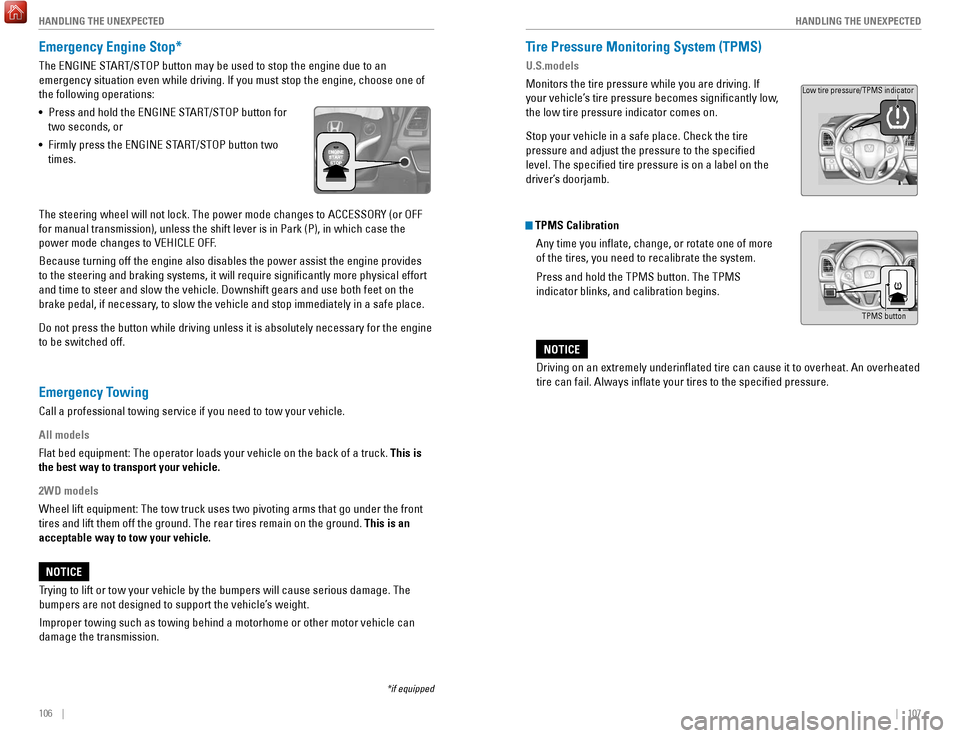
Emergency Engine Stop*
The ENGINE START/STOP button may be used to stop the engine due to an
emergency situation even while driving. If you must stop the engine, cho\
ose one of
the following operations:
•
Press and hold the ENGINE ST
ART/STOP button for
two seconds, or
•
Firmly press the ENGINE ST
ART/STOP button two
times.
The steering wheel will not lock. The power mode changes to ACCESSORY (\
or OFF
for manual transmission), unless the shift lever is in Park (P), in w\
hich case the
power mode changes to VEHICLE OFF.
Because turning off the engine also disables the power assist the engine\
provides
to the steering and braking systems, it will require significantly mor\
e physical effort
and time to steer and slow the vehicle. Downshift gears and use both fee\
t on the
brake pedal, if necessary, to slow the vehicle and stop immediately in a safe place.
Do not press the button while driving unless it is absolutely necessary \
for the engine
to be switched off.
*if equipped
Tire Pressure Monitoring System (TPMS)
U.S.models
Monitors the tire pressure while you are driving. If
your vehicle’s tire pressure becomes significantly low,
the low tire pressure indicator comes on.
Stop your vehicle in a safe place. Check the tire
pressure and adjust the pressure to the specified
level. The specified tire pressure is on a label on the
driver’s doorjamb.
TPMS Calibration Any time you inflate, change, or rotate one of more
of the tires, you need to recalibrate the system.
Press and hold the TPMS button. The TPMS
indicator blinks, and calibration begins.
Driving on an extremely underinflated tire can cause it to overheat. A\
n overheated
tire can fail. Always inflate your tires to the specified pressure.
NOTICE
TPMS button
Low tire pressure/TPMS indicator
Trying to lift or tow your vehicle by the bumpers will cause serious dama\
ge. The
bumpers are not designed to support the vehicle’s weight.
Improper towing such as towing behind a motorhome or other motor vehicle\
can
damage the transmission.
NOTICE
Emergency Towing
Call a professional towing service if you need to tow your vehicle.
All models
Flat bed equipment: The operator loads your vehicle on the back of a tru\
ck. This is
the best way to transport your vehicle.
2WD models
Wheel lift equipment: The tow truck uses two pivoting arms that go under\
the front
tires and lift them off the ground. The rear tires remain on the ground.\
This is an
acceptable way to tow your vehicle.
Page 58 of 78
108 || 109
HANDLING THE UNEXPECTED
HANDLING THE UNEXPECTED
Tire Pressure Monitoring System (TPMS) — Required Federal
Explanation
U.S. models only
Each tire, including the spare (if provided), should be checked monthl\
y
when cold and inflated to the inflation pressure recommended by the \
vehicle manufacturer on the vehicle placard or tire inflation pressure\
label.
(If your vehicle has tires of a different size than the size indicated \
on the
vehicle placard or tire inflation pressure label, you should determine\
the
proper tire inflation pressure for those tires.)
As an added safety feature, your vehicle has been equipped
with a tire pressure monitoring system (TPMS) that illuminates
a low tire pressure telltale when one or more of your tires is
significantly under-inflated.
Accordingly, when the low tire pressure telltale illuminates, you should
stop and check your tires as soon as possible, and inflate them to the\
proper pressure.
Driving on a significantly under-inflated tire causes the tire to overheat
and can lead to tire failure. Under-inflation also reduces fuel efficiency
and tire tread life, and may affect the vehicle’s handling and stopping
ability.
Please note that the TPMS is not a substitute for proper tire maintenanc\
e,
and it is the driver’s responsibility to maintain correct tire pressure, even
if under-inflation has not reached the level to trigger illumination of the
TPMS low tire pressure telltale.
Your vehicle has also been equipped with a TPMS malfunction indicator
to indicate when the system is not operating properly. The TPMS
malfunction indicator is combined with the low tire pressure telltale.
When the system detects a malfunction, the telltale will flash for
approximately one minute and then remain continuously illuminated. This \
sequence will continue upon subsequent vehicle start-ups as long as the \
malfunction exists.
When the malfunction indicator is illuminated, the system may not be abl\
e
to detect or signal low tire pressure as intended.
TPMS malfunctions may occur for a variety of reasons, including the
installation of replacement or alternate tires or wheels on the vehicle \
that
prevent the TPMS from functioning properly.
Always check the TPMS malfunction telltale after replacing one or
more tires or wheels on your vehicle to ensure that the replacement
or alternate tires and wheels allow the TPMS to continue to function
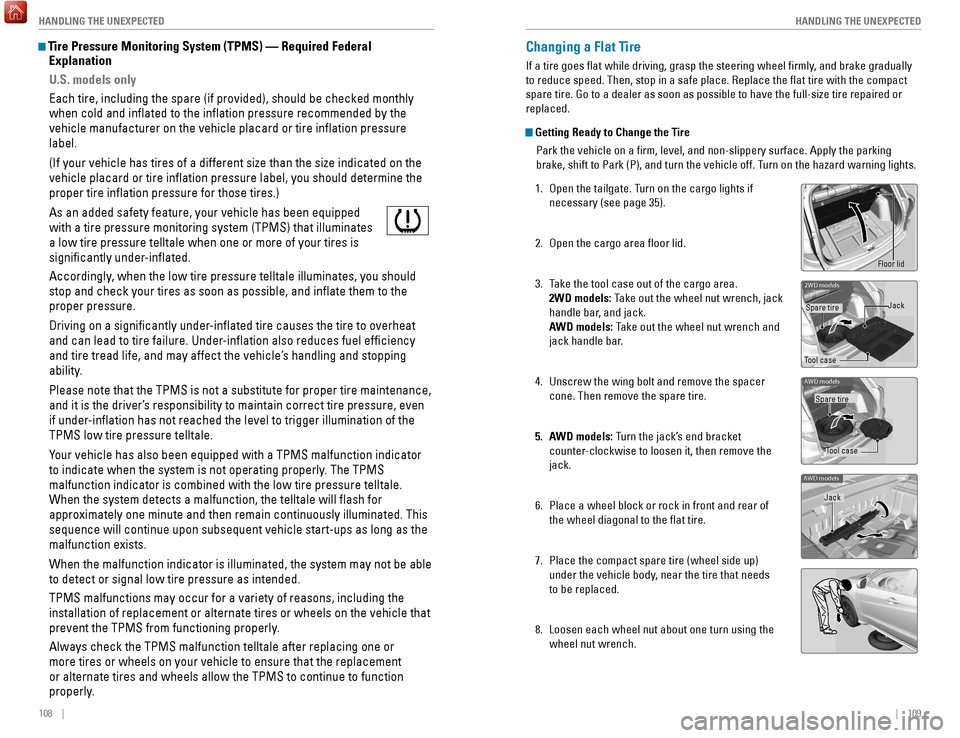
properly.Changing a Flat Tire
If a tire goes flat while driving, grasp the steering wheel firmly, and brake gradually
to reduce speed. Then, stop in a safe place. Replace the flat tire wit\
h the compact
spare tire. Go to a dealer as soon as possible to have the full-size tir\
e repaired or
replaced.
Getting Ready to Change the Tire
Park the vehicle on a firm, level, and non-slippery surface. Apply the\
parking
brake, shift to Park (P), and turn the vehicle off. Turn on the hazard warning lights.
1.
Open the tailgate. T
urn on the cargo lights if
necessary (see page 35).
2.
Open the cargo area floor lid.
3.
T
ake the tool case out of the cargo area.
2WD models: Take out the wheel nut wrench, jack
handle bar, and jack.
AWD models: Take out the wheel nut wrench and
jack handle bar.
4.
Unscrew the wing bolt and remove the spacer
cone. Then remove the spare tire.
5.
A
WD models: Turn the jack’s end bracket
counter-clockwise to loosen it, then remove the
jack.
6.
Place a wheel block or rock in front and rear of
the wheel diagonal to the flat tire.
7.
Place the compact spare tire (wheel side up)
under the vehicle body
, near the tire that needs
to be replaced.
8.
Loosen each wheel nut about one turn using the
wheel nut wrench.
2WD model s
Tool caseSpare tire
Jack
AWD models
Tool case
Spare tire
AWD models
Jack
Floor lid
Page 59 of 78
110 || 111
HANDLING THE UNEXPECTED
HANDLING THE UNEXPECTED
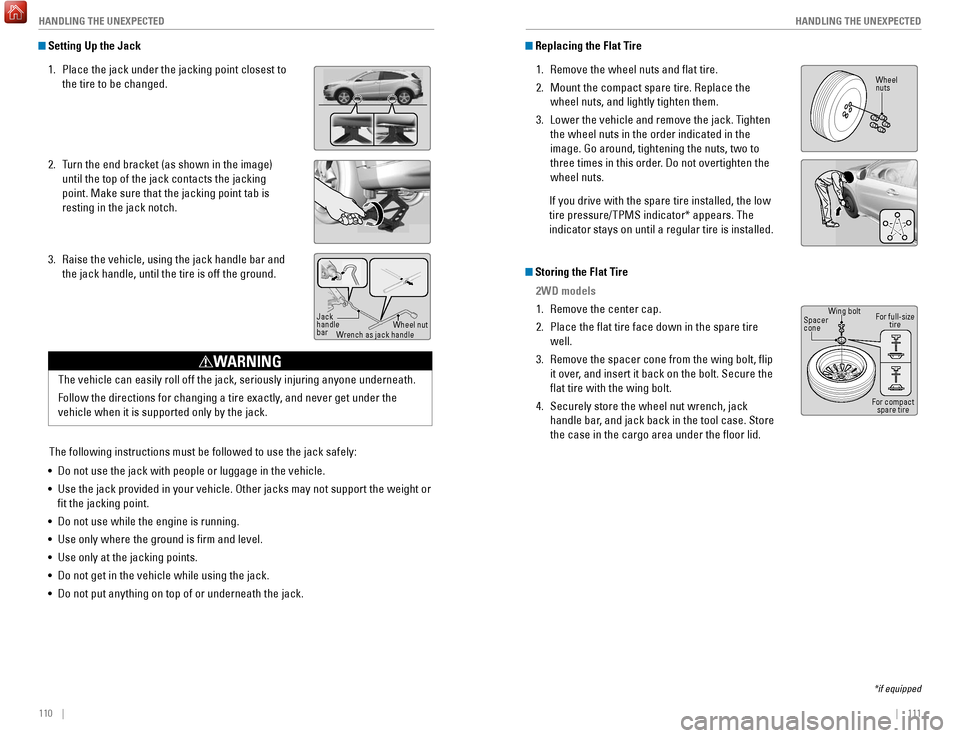
Setting Up the Jack
1.
Place the jack under the jacking point closest to
the tire to be changed.
2.
T
urn the end bracket (as shown in the image)
until the top of the jack contacts the jacking
point. Make sure that the jacking point tab is
resting in the jack notch.
3.
Raise the vehicle, using the jack handle bar and
the jack handle, until the tire is off the ground.
The following instructions must be followed to use the jack safely:
•
Do not use the jack with people or luggage in the vehicle.
•
Use the jack provided in your vehicle. Other jacks may not support the w\
eight
or
fit the jacking point.
•
Do not use while the engine is running.
•
Use only where the ground is firm and level.
•
Use only at the jacking points.
•
Do not get in the vehicle while using the jack.
•
Do not put anything on top of or underneath the jack.
Jack
handle
bar Wheel nut
Wrench as jack handle
Replacing the Flat Tire
1.
Remove the wheel nuts and flat tire.
2.
Mount the compact spare tire. Replace the
wheel nuts, and lightly tighten them.
3.
Lower the vehicle and remove the jack. T
ighten
the wheel nuts in the order indicated in the
image. Go around, tightening the nuts, two to
three times in this order. Do not overtighten the
wheel nuts.
If you drive with the spare tire installed, the low
tire pressure/TPMS indicator* appears. The
indicator stays on until a regular tire is installed.
Storing the Flat Tire 2WD models
1.
Remove the center cap.
2.
Place the flat tire face down in the spare tire
well.
3.
Remove the spacer cone from the wing bolt, flip
it over
, and insert it back on the bolt. Secure the
flat tire with the wing bolt.
4.
Securely store the wheel nut wrench, jack
handle bar
, and jack back in the tool case. Store
the case in the cargo area under the floor lid.
*if equipped
Wheel
nuts
Wing bolt
Spacer
cone
For compact spare tire
For full-size
tire
The vehicle can easily roll off the jack, seriously injuring anyone unde\
rneath.
Follow the directions for changing a tire exactly, and never get under the
vehicle when it is supported only by the jack.
WARNING
Page 68 of 78

128 || 129
MAINTENANCE
MAINTENANCE
Tire Information
To safely operate your vehicle, your tires must be of the proper type and\
size, in good
condition with adequate tread, and properly inflated.
Inflation Guidelines
•
Properly inflated tires provide the best combination of handling, trea\
d life, and
comfort. Refer to the driver’
s doorjamb label or the specifications (see page
135) for the specified pressure.
•
Underinflated tires wear unevenly
, adversely affect handling and fuel economy,
and are more likely to fail from overheating.
•
Overinflated tires make your vehicle ride harshly
, are more prone to road
hazards, and wear unevenly.
•
Every day before you drive, look at each of the tires. If one looks lowe\
r than t
he
others, check the pressure with a tire gauge.
•
Measure the air pressure when tires are cold. This means the vehicle ha
s been
parked for at least 3 hours, or driven less than 1 mile (1.6 km). If n\
ecessary, add
or release air until the specified pressure is reached, and then calib\
rate the
system (see page 107). If checked when hot, tire pressure can be as mu\
ch as
4–6 psi (30–40 kPa, 0.3–0.5 kgf/cm
2) higher than checked when cold.
•
At least once a month or before long trips, use a gauge to measure the p\
ressure
in all tires, including the spare. Even tires in good condition can lose\
1–2 ps
i
(10–20 kPa, 0.1–0.2 kgf/cm
2) per month.
Inspection Guidelines
Every time you inflate the tires, check for the following:
•
Any damage to tires, including bumps, bulges, cuts, splits, or cracks in\
t
he side
or tread. Remove any foreign objects and inspect for air leaks. Replace \
tires if
you see fabric or cord.
•
Uneven or excessive tread wear
. Have a dealer check the wheel alignment.
•
Cracks or other damage around the valve stems.
Wear IndicatorsThe groove where the wear indicator is located is
1/16 inch (1.6 mm) shallower than elsewhere on the
tire. If the tread has worn so low that the indicator is
exposed, replace the tire. Worn out tires have poor
traction on wet roads.
Example of a wear
indicator mark
Tire and Loading Information LabelThe label attached to the driver’s doorjamb provides necessary tire and
loading information. Using tires that are excessively worn or improperly inflated can cause\
a crash in which you can be seriously hurt or killed.
Follow all instructions in this owner’s manual regarding tire inflation
and maintenance
.
WARNING
Original
tire sizes
Number of
people your
vehicle can
carry Proper cold
tire pressure
Total weight
your vehicle
can carry
(do not exceed)
Tire and Wheel Replacement
Replace your tires with radials of the same size, load range, speed rati\
ng, and
maximum cold tire pressure rating (as shown on the tire’s sidewall). Using tires
of a different size or construction can cause certain vehicle systems to\
work
incorrectly. It is best to replace all four tires at the same time. If that isn’\
t possible,
replace the front or rear tires in pairs.
If you change or replace a wheel, make sure that the wheel’s specifications match
those of the original wheels.
Installing improper tires on your vehicle can affect handling and stabil\
ity.
This can cause a crash in which you can be seriously hurt or killed.
Always use the size and type of tires recommended in the Owner’s Manual.
WARNING
Page 71 of 78

134 || 135
SPECIFICATIONS
MAINTENANCE
Testing of Readiness Codes
Your vehicle has readiness codes as part of the onboard self-diagnostic s\
ystem.
Some states use these codes for testing to verify whether your vehicle’\
s emissions
components are working properly. The codes may not be read if you go through the
emissions testing just after the battery has gone dead or been disconnec\
ted.
To check if they are set, turn the vehicle on without starting the engine\
. The
malfunction indicator lamp will come on for several seconds. If it goes \
off, the
readiness codes are set. If it blinks five times, the readiness codes \
are not set.
If you are required to have your vehicle emissions tested before the rea\
diness codes
are set, prepare the vehicle for retesting by doing the following:
1.
Fill the gas tank to approximately 3/4 full.
2.
Park the vehicle and leave the engine off for 6 hours or more.
3.
Make sure the ambient temperature is between 40°F and 95°F (4°\
C and 3
5°C).
4.
Start the engine without touching the accelerator pedal, and let it idle\
for 20
seconds.
5.
Keep the vehicle in Park (P) or Neutral (manual transmission). Incre\
ase
the
engine speed to 2,000 rpm, and hold it there for about 3 minutes.
6.
Let the engine idle with your foot off the accelerator for 20 seconds.
7.
Select a nearby
, lightly traveled major highway where you can maintain a speed
of 50 to 60 mph (80 to 97 km/h) for at least 20 minutes. Drive on the \
highway with
the vehicle in Drive (D) or 5th gear (manual transmission). Do not u\
se cruise
control. When traffic allows, drive for 90 seconds without using the a\
ccelerator
pedal. (Vehicle speed may vary slightly; this is OK.) If you cannot do this for
a continuous 90 seconds because of traffic conditions, drive for at le\
ast 30
seconds, then repeat two more times (for a total of 90 seconds).
8.
Drive in city or suburban traffic for at least 10 minutes. When traffi\
c con
ditions
allow, let the vehicle coast for several seconds without using the accelerator
pedal or the brake pedal.
9.
Park the vehicle and leave the engine off for 30 minutes.
The readiness codes are erased when the battery is disconnected, and set\
again
only after several days of driving under a variety of conditions.
If an emissions testing facility determines that the readiness codes are\
not
set, you
may be requested to return at a later date to complete the test, or see \
your dealer.
Vehicle
Engine and Fuel
Tires
Light Bulbs
Fluids*1: 2WD
*2: AWD
ModelHR-VNo. of Passengers:
Front 2
Rear 3
Tota l5
Weights:Gross Vehicle
Weight Rating 4,001 lbs (1,815 kg )*14,166 lbs (1,890 kg)*2Gross Axle Weight
Rating (Front )2,127 lbs (965 kg )*12,178 lbs (988 kg)*2Gross Axle Weight
Rating (Rear)1,873 lbs (850 kg )*11,988 lbs (902 kg)*2Air Conditioning:
Refrigerant Type HFC-134a (R-134a)
Charge Quantity 14.3 - 16.0 oz (405 - 455 g)
Lubricant Type ND-OIL8
Quantity4.27 - 5.00 oz (70 - 82 cm³)
Engine Specication
s
FuelDisplacemen t109.8 cu-in (1,799 cm3)
Spark Plugs NG
KD ILZKR7B11GS
DENSODXU22HCR-D11S
Fuel:
TypeUnleaded gasoline, Pump octane number of 87 or higher
Fuel Tank Capacity 13.2 US gal (50 liters)
Re gularSize215/55R17 94 VPressure
psi (kPa[kgf/cm2])Front32 (220 [2.2])Rear30 (210 [2.1])
Compact
Spar e Size
T135/90D16 102M
Pressure
psi (kPa[kgf/cm
2]) 60 (420 [4.2])
Wheel SizeRegular17 x 7 1/2JCo
mpact Spar e16 x 4T
Headlights (High/Low Beam )60/55W (HB2)Fog Lights*35W (H8)Side Marker Lights5W
Front Turn Signal/Parking Light s28/8W (Amber )
Brake/Tail/Side Marker LightsLED
Back-Up Lights 16W
Rear Turn Signal Lights21W (Amber)
High-M ount Brake Light LED
Side Turn Signal Light s*LED
Rear License Plate Light s5W
Interior Light sVanity Mirror Ligh t*1.8WMap Lights8WCeiling Light8WCargo Area Light5W
Brake Fluid
Continuously Variable Transmission Fluid
*
*1: 2WD
*2: AWD
Manual Transmission Fluid*
SpeciedHonda Heavy Duty Brake Fluid DOT 3
SpeciedHonda HCF-2 Transmission Fluid
Capacity Change 3.7 US qt (3.5 L)*14.2 US qt (4.0 L)*2
Specie
dHonda Manual Transmission Flui d
Capacity Change 2.0 US qt (1.9 L)
Engine Oil
Engine Coolan t
*1: Continuously variable transmission models
*2: Manual transmission models
Recommended·Genuine Honda Motor Oil 0W-2 0
·API Premium-grade 0W-20 detergent oi l
Capacity Change
3.7 US qt (3.5 L)
Change
including
lter 3.9 US qt (3.7 L)
Specie
dHonda Long-Life Anti freeze/Coolant Type 2
Ratio 50/50 with distilled wate r
Capacity
1.39 US gal (5.25 L)*1(change including the remaining
0.13 US gal (0.5 L) in the reserve tank )
1.38 US gal (5.24 L)*2
(change including the remaining
0.13 US gal (0.5 L) in the reserve tank )
Washer Fluid
Tank CapacityU.S.: 2.6 US qt (2.5 L)
Canada: 4.8 US qt (4.5 L)
Rear Differential Fluid*SpeciedHonda Dual Pump Fluid II
Capacity Change 1.318 US qt (1.247 )
SPECIFICATIONS
*if equipped