instrument panel HONDA HR-V 2017 2.G Quick Guide
[x] Cancel search | Manufacturer: HONDA, Model Year: 2017, Model line: HR-V, Model: HONDA HR-V 2017 2.GPages: 78, PDF Size: 5.33 MB
Page 3 of 78

Honda Automobile Customer Service
Your authorized Honda dealer should be able to answer any questions you h\
ave
about your vehicle. However, if you are dissatisfied with the information you receive,
you can call Honda Automobile Customer Service (see page 137).
Honda Roadside Assistance
24-hour emergency road service is available to you in the United States \
and Canada
throughout your 3-year/36,000-mile warranty term. Services include jump starting,
flat tire and lockout assistance, towing, and more (limitations apply\
). This Owner’s Guide is intended to help you quickly get acquainted with your
2017 Honda HR-V. It provides basic information and instructions on technology and
convenience features, as well as emergency procedures and how to get ass\
istance.
This guide is for vehicles sold in the United States and Canada. It cove\
rs all HR-V
models, so you may find descriptions of features and equipment that ar\
e not in your
vehicle. Images throughout this guide are from U.S. vehicles and represe\
nt features
and equipment that are available on some, but not all, models.
This guide is not intended to be a substitute for the Owner’s Manual. The Owner
Information CD enclosed in your glove box kit includes the Owner’s Manual,
Navigation Manual, and vehicle and tire warranties in electronic format.\
This
information can be viewed on a computer (PC or Mac platform) and saved or printed
for your reference. You can also visit owners.honda.com (U.S.) or myhonda.ca
(Canada) to view the complete and most current information.
If you are the first registered owner of your vehicle, you may request\
a complimentary
printed copy of the Owner’s Manual, Navigation Manual, or Vehicle Warranty within
the first six months of vehicle purchase. To request a copy, visit owners.honda.com
(U.S.) and create or log in to your account. In Canada, please request\
a copy from
your Honda dealer.
American Honda Motor Co., Inc. strives to be proactive in protecting our\
environment
and natural resources. By using electronic delivery for a considerable p\
ortion of the
information typically found in a vehicle owner’s manual, we are further reducing our
impact on the environment.
INTRODUCTION TABLE OF CONTENTS
Call (800) 999-1009 (U.S.) or (888) 946-6329 (Canada)
Call (866) 864-5211 (U.S.) or (800) 465-7587 (Canada)
*if equipped
VISUAL INDEX
..............................................................
1
Steering Wheel and Nearby Controls
....................
1
Dashboard and Other Controls
...............................
2
SAFETY INFORMATION
..............................................
3
Important Safety Information
..................................
3
Seat Belts
...................................................................
5
Airbags
........................................................................\
9
Child Safety
..............................................................
15
Safety Label Locations
...........................................
22
Reporting Safety Defects
.......................................
23
INSTRUMENT PANEL
................................................
24
Malfunction Indicators
...........................................
24
Condition Indicators
................................................
26
On/Off Indicators
.....................................................
27
Information Display
.................................................
28
VEHICLE CONTROLS
..................................................
29
Using the Key or Remote T
ransmitter
..................
29
Smart Entry System*
...............................................
30
Door Operation
........................................................
31
Tailgate Operation
...................................................
32
Power Window Operation
.....................................
33
Power Moonroof Operation*
................................
34
Interior and Exterior Lights
....................................
35
One-Touch Turn Signal
...........................................
36
Wiper Operation
......................................................
37
Adjusting the Seats
.................................................
38
Rear Seats
...............................................................
41
Adjusting the Mirrors
..............................................
42
Adjusting the Steering Wheel
...............................
43
Air Conditioning System*
......................................
43
Climate Control System*
.......................................
44
Seat Heaters*
..........................................................
46
Customized Features
..............................................
47
Setting the Clock
.....................................................
48AUDIO AND CONNECTIVITY
....................................
49
Basic Audio Operation
...........................................
49
Color Audio System*
...............................................
52
FM/AM Radio
........................................................
53
Compact Disc (CD)
...............................................
54
iPod® ...................................................................... 55
USB Flash Drive .................................................... 56
Bluetooth
® Audio .................................................. 57
T
ouchscreen Operation* ........................................ 58
HondaLink
® ........................................................... 59
FM/AM Radio ....................................................... 60
SiriusXM
® Radio* ................................................. 61
Compact Disc (CD) .............................................. 62
iPod® ...................................................................... 63
USB Flash Drive .................................................... 64
Bluetooth
® Audio .................................................. 65
Pandora® ............................................................... 66
HDMI Video ........................................................... 67
BLUETOOTH
® HANDSFREELINK® (HFL) ................. 68
Basic HFL Operation
............................................... 68
Pairing a Phone
....................................................... 69
Making a Call
........................................................... 70
Basic HFL Operation
............................................... 71
Pairing a Phone
....................................................... 73
Making a Call
........................................................... 74
SMS Text Messaging and E-Mail*
....................... 76
HondaLink
® Assist ................................................... 77
Siri® Eyes Free ......................................................... 77
NA
VIGATION* ............................................................. 78
Basic Navigation Operation
..................................78
Entering a Destination
............................................ 81
Routing
...................................................................... 83
Page 4 of 78
| 1
V
ISUAL
I
NDEX
Quickly locate items in the vehicle’s interior.
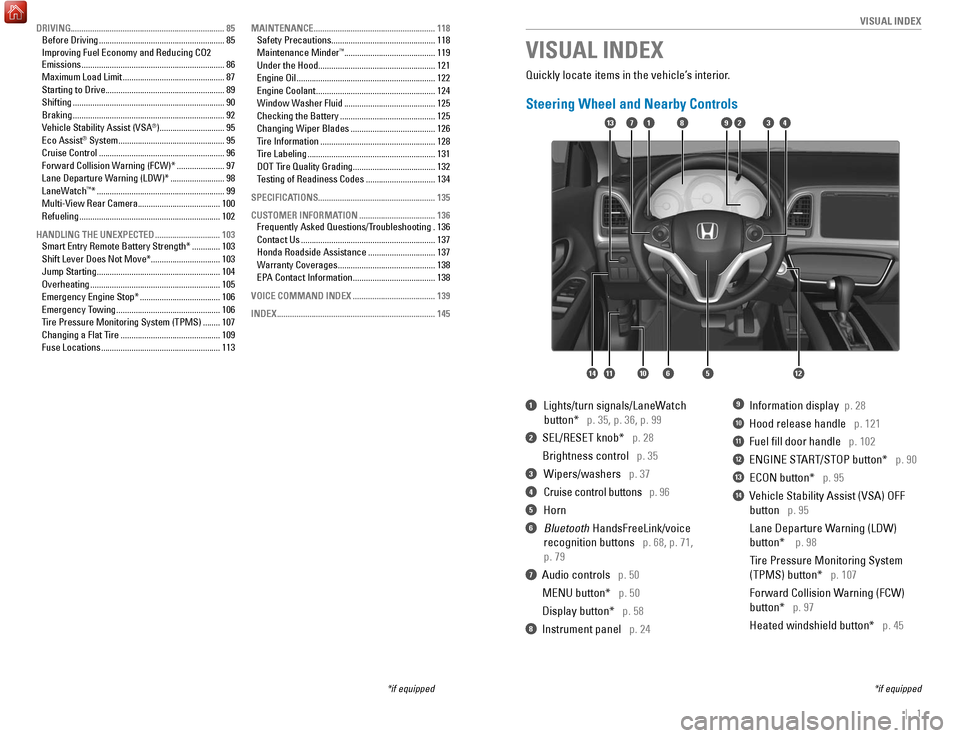
Steering Wheel and Nearby Controls
1 Lights/turn signals/LaneW
atch
button* p. 35, p. 36, p. 99
2 SEL/RESET knob* p. 28
Brightness control
p. 35
3 Wipers/washers p. 37
4 Cruise control buttons p. 96
5 Horn
6 Bluetooth HandsFreeLink/voice
recognition buttons
p. 68, p. 71,
p. 79
7 Audio controls p. 50
MENU button*
p. 50
Display button*
p. 58
8 Instrument panel p. 24
9 Information display p. 28
10 Hood release handle p. 121
11 Fuel fill door handle p. 102
12 ENGINE START/STOP button* p. 90
13 ECON button* p. 95
14 Vehicle Stability Assist (VSA) OFF
button
p. 95
Lane Departure W
arning (LDW)
button*
p. 98
T
ire Pressure Monitoring System
(TPMS) button*
p. 107
Forward Collision W
arning (FCW)
button*
p. 97
Heated windshield button*
p. 45
VISUAL INDEX
*if equipped
*if equipped
82
1456121011
1713394
DRIVING....................................................................... 85
Before Driving .......................................................... 85
Improving Fuel Economy and Reducing CO2
Emissions
.................................................................. 86
Maximum Load Limit
............................................... 87
Starting to Drive
....................................................... 89
Shifting
...................................................................... 90
Braking
...................................................................... 92
Vehicle Stability Assist (VSA
®) .............................. 95
Eco Assist® System ................................................. 95
Cruise Control .......................................................... 96
Forward Collision Warning (FCW)*
......................97
Lane Departure Warning (LDW)*
.........................98
LaneWatch
™* ........................................................... 99
Multi-View Rear Camera ...................................... 100
Refueling
................................................................. 102
HANDLING THE UNEXPECTED
.............................. 103
Smart Entry Remote Battery Strength*
.............103
Shift Lever Does Not Move*
................................ 103
Jump Starting
......................................................... 104
Overheating
............................................................ 105
Emergency Engine Stop*
..................................... 106
Emergency Towing
................................................ 106
T
ire Pressure Monitoring System (TPMS) ........107
Changing a Flat Tire
.............................................. 109
Fuse Locations
....................................................... 113MAINTENANCE
........................................................
118
Safety Precautions
................................................
118
Maintenance Minder™ .......................................... 119
Under the Hood
...................................................... 121
Engine Oil
................................................................ 122
Engine Coolant
....................................................... 124
Window Washer Fluid
.......................................... 125
Checking the Battery
............................................ 125
Changing Wiper Blades
....................................... 126
Tire Information
..................................................... 128
Tire Labeling
........................................................... 131
DOT Tire Quality Grading
...................................... 132
T
esting of Readiness Codes ................................ 134
SPECIFICATIONS...................................................... 135 CUSTOMER INFORMATION
................................... 136
Frequently Asked Questions/Troubleshooting
.136
Contact Us
.............................................................. 137
Honda Roadside Assistance
............................... 137
Warranty Coverages
............................................. 138
EP
A Contact Information ...................................... 138
VOICE COMMAND INDEX
...................................... 139
INDEX
........................................................................\
. 145
Page 10 of 78
12 || 13
S AFETY
S
AFETY
Passenger Airbag Off indicator
The indicator comes on to alert you that the front
passenger’s front airbag has been turned off. This
occurs when the front passenger’s weight sensors
detect 65 lbs (29 kg) or less, the weight of an infant
or small child, on the seat.
Infants and small children should always ride properly restrained in a b\
ack seat.
Objects placed on the seat can also cause the indicator to come on.
If the front passenger‘s seat is empty, the passenger’s front airbag will not deploy
and the indicator will not come on.
If the indicator comes on with no occupant or objects in the front passe\
nger’s
seat, something may be interfering with the weight sensors, such as:
•
An object hanging on the seat or in the seat-back pocket.
•
A child seat or other object pressing against the rear of the seat-back.\
•
A rear passenger pushing or pulling on the back of the front passenger’\
s seat.
•
The front seat or seat-back is forced against an object on the seat or fl\
oor
behind it.
•
An object placed under the front passenger’
s seat.
If none of these conditions exist, have your vehicle checked by a dealer\
as soon
as possible.
The passenger airbag off indicator may go on and off repeatedly if the t\
otal weight
on the seat is near the airbag cutoff threshold.
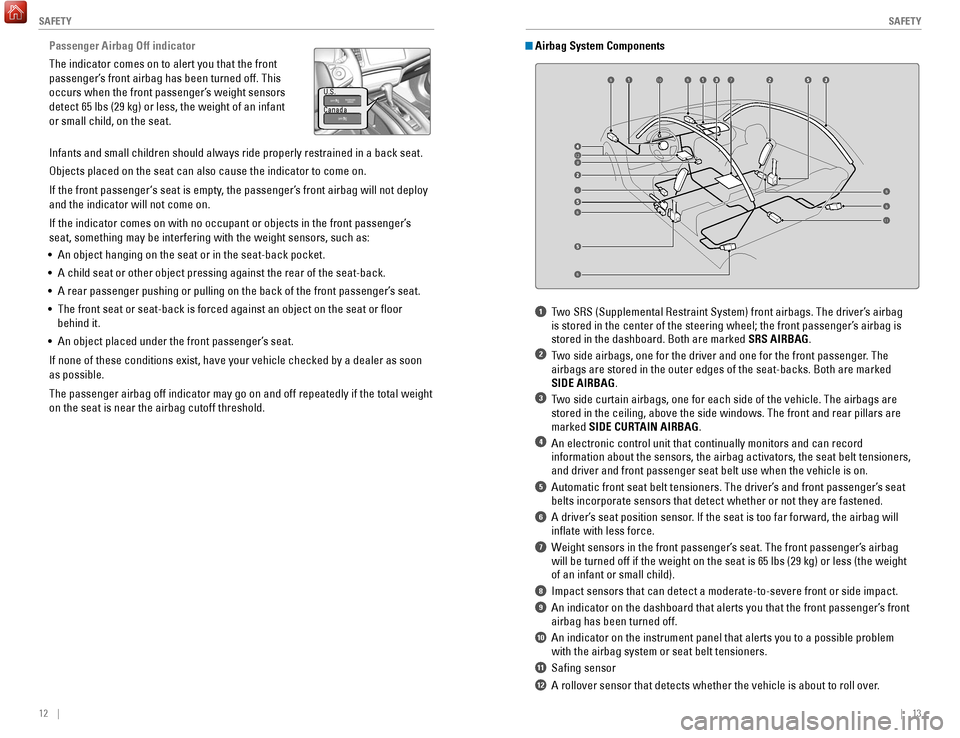
1 Two SRS (Supplemental Restraint System) front airbags. The driver’s airbag is stored in the center of the steering wheel; the front passenger’s airbag is
stored in the dashboard. Both are marked SRS AIRBAG.
2 Two side airbags, one for the driver and one for the front passenger. The airbags are stored in the outer edges of the seat-backs. Both are marked\
SIDE AIRBAG.
3 Two side curtain airbags, one for each side of the vehicle. The airbags a\
re stored in the ceiling, above the side windows. The front and rear pillar\
s are
marked SIDE CURTAIN AIRBAG.
4 An electronic control unit that continually monitors and can record information about the sensors, the airbag activators, the seat belt tens\
ioners,
and driver and front passenger seat belt use when the vehicle is on.
5 Automatic front seat belt tensioners. The driver’s and front passenger’s seat belts incorporate sensors that detect whether or not they are fastened.
6 A driver’s seat position sensor. If the seat is too far forward, the airbag will inflate with less force.
7 Weight sensors in the front passenger’s seat. The front passenger’s airbag will be turned off if the weight on the seat is 65 lbs (29 kg) or less\
(the weight
of an infant or small child).
8 Impact sensors that can detect a moderate-to-severe front or side impa\
ct.
9 An indicator on the dashboard that alerts you that the front passenger\
’s front airbag has been turned off.
10 An indicator on the instrument panel that alerts you to a possible pro\
blem with the airbag system or seat belt tensioners.
11 Safing sensor
12 A rollover sensor that detects whether the vehicle is about to roll ov\
er.
Airbag System Components
6
78
912
810
8
8
8
8
11
U.S.
Canada
Page 16 of 78

• The emissions control system may have a problem, or the fuel cap is\
loose
or mi")
24 || 25
I NSTRUMENT P
ANELI
NSTRUMENT P
ANEL
Malfunction indicator lamp (check engine light)
• The emissions control system may have a problem, or the fuel cap is\
loose
or missing.
• (Blinks) A
misfire in the engine’s cylinders is detected. Stop in a safe place,
and wait for the engine to cool down.
Anti-lock Brake System (ABS)
There is a problem with the anti-lock brake system. Your vehicle still has
normal braking ability, but no anti-lock function.
Tire Pressure Monitoring System (TPMS) (U.S. models only)
There is a problem with the tire pressure monitoring system, or the vehi\
cle is
fitted with the compact spare tire.
Forward Collision Warning (FCW)* (Canadian models only)
There is a problem with the FCW system.
Lane Departure Warning (LDW)* (Canadian models only)
There is a problem with the LDW system.
Vehicle Stability Assist (VSA)
There is a problem with the VSA system or hill start assist system.
Brake system
There is a problem with the automatic brake hold system.
Electric parking brake system
There is a problem with the electric parking brake system. Avoid using the
parking brake. Have your vehicle inspected immediately.
Electric Power Steering (EPS)
There is a problem with the EPS system. Stop in a safe place, and restar\
t the
vehicle.
Starter system*
There is a problem with the starter system.
All Wheel Drive (AWD)*
There is a problem with the AWD system. If the indicator blinks, the system
is overheated and inactive. Stop in a safe place, and idle until the ind\
icator
goes off.
High temperature
The engine coolant temperature is high. Drive slowly to prevent overheat\
ing.
If the indicator remains on, immediately stop the vehicle in a safe plac\
e (see
page 105).
Canada U.S.
U.S.
Canada
Learn about the indicators, gauges, and displays related to driving the \
vehicle.
Indicators briefly appear with each engine start and then go out. Red \
and amber
indicators are most critical. Blue and green indicators are used for gen\
eral
information.
Malfunction Indicators
These are the most critical indicators. If they come on and stay lit whi\
le driving or at
any other time, there may be a problem. See your dealer if necessary. Brake system
• Brake fluid is low.
• The brake system has a problem.
Press the brake pedal lightly to check pedal pressure. If normal, check \
the brake fluid level when you stop. If abnormal, take immediate actio\
n. If
necessary, downshift the transmission to slow the vehicle using engine
braking. Have your vehicle repaired immediately.
Low oil pressure
Engine oil pressure is low. Stop in a safe place. Open the hood. Check the oil
level, and add oil if necessary (see page 123). If the indicator does \
not turn
off, have your vehicle repaired immediately.
Charging system
The battery is not charging. Turn off all electrical items, but do not turn off
the vehicle to prevent further battery discharge. Have your vehicle repa\
ired
immediately.
Supplemental Restraint System (SRS)
There is a problem with one of the airbag systems or seat belt tensioner\
s.
Smart Entry system*
There is a problem with the smart entry system.
Canada
U.S.
INSTRUMENT PANEL
*if equipped
*if equipped
Low temperature
The engine coolant temperature is low. If the indicator remains on for
more than 10 minutes (2–8 minutes is normal), there may be a proble\
m with
temperature sensors.
Page 18 of 78
28 || 29
V EHICLE C ONTROLS
I
NSTRUMENT P
ANEL
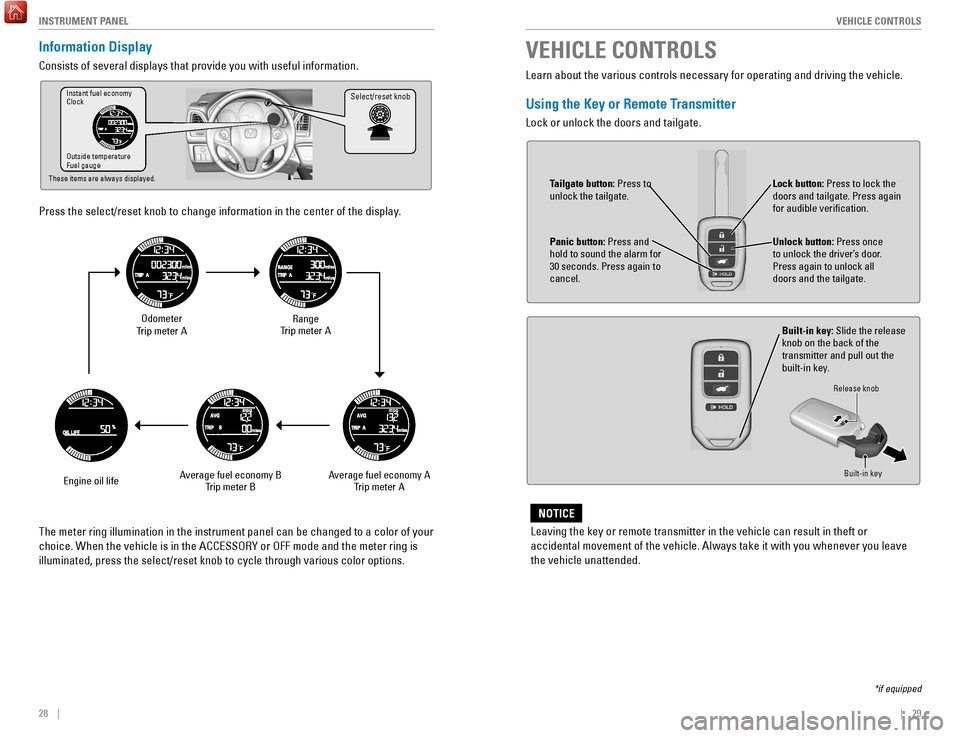
Information Display
Consists of several displays that provide you with useful information.
Press the select/reset knob to change information in the center of the d\
isplay.
Select/reset knobInstant fuel economy
Clock
Outside temperature
Fuel gauge
These items are always displayed.
Odometer
Trip meter A
Engine oil life Range
Trip meter A
Average fuel economy A Trip meter A
Average fuel economy B
Trip meter B
The meter ring illumination in the instrument panel can be changed to a \
color of your
choice. When the vehicle is in the ACCESSORY or OFF mode and the meter r\
ing is
illuminated, press the select/reset knob to cycle through various color \
options. Learn about the various controls necessary for operating and driving the\
vehicle.
Using the Key or Remote Transmitter
Lock or unlock the doors and tailgate.
VEHICLE CONTROLS
*if equipped
Leaving the key or remote transmitter in the vehicle can result in theft\
or
accidental movement of the vehicle. Always take it with you whenever you\
leave
the vehicle unattended.
NOTICE
Unlock button: Press once
to unlock the driver’s door.
Press again to unlock all
doors and the tailgate.
Built-in key: Slide the release
knob on the back of the
transmitter and pull out the
built-in key.
Lock button: Press to lock the
doors and tailgate. Press again
for audible verification.
Panic button: Press and
hold to sound the alarm for
30 seconds. Press again to
cancel.
Release knob
Built-in key
Tailgate button: Press to
unlock the tailgate.
Page 21 of 78

34 || 35
V EHICLE C ONTROLS
V
EHICLE C ONTROLS
Power Moonroof Operation*
The moonroof can be opened and closed when the vehicle is on by using th\
e switch
on the ceiling.
Automatic Operation
To open: Push the switch back firmly to the second
detent, then release.
To close: Push the switch forward firmly to the second
detent, then release.
The moonroof opens or closes completely. To stop
the moonroof at any time, push the switch briefly.
Manual OperationTo open: Push and hold the switch back to the first detent until the desired p\
osition
is reached.
To close: Push and hold the switch forward to the first detent until the desire\
d
position is reached.
Moonroof TiltTo tilt: Push the center of the switch.
To close: Push the switch forward firmly, then release.
*if equipped
Close Open
Tilt
Interior and Exterior Lights
Operate interior and exterior lights when the vehicle is on or off.
Brightness ControlAdjust instrument panel brightness when the
vehicle is on.
To brighten: Turn the knob to the right.
To dim: Turn the knob to the left.
A beep sounds when the brightness reaches
minimum or maximum.
Interior LightsChange the interior light settings using the switches
on the ceiling.
ON position (rear only): Interior lights remain on.
Door-activated position: Interior lights come on
when any of the doors are opened, the driver’s door
is unlocked, or the vehicle is turned off.
OFF position: Interior lights remain off.
Map LightsPress the front map lights to turn on or off.
Cargo Area LightsLocated on the driver’s side in the cargo area.
ON position: Cargo lights remain on.
OFF position: Cargo area lights remain off.
Off
Door-activated position Front
Off
Rear
Door-activated position
On
Opening the moonroof in below freezing temperatures or when it is covere\
d with
snow or ice can damage the moonroof panel or motor.
NOTICEClosing the moonroof on someone’s hands or fingers can cause serious injury.
Make sure your passengers are away from the moonroof before closing it.
WARNING
Select/reset knob
Model with moonroof shown
OnOff
Page 46 of 78

84 || 85
DRIVING
NAVIGATION
Taking a Detour
You can calculate a detour route manually if you encounter a road closure\
or other
obstacle.
1.
When en route, press MENU from the map
screen.
2.
Select Detour
. The system attempts to calculate
a new route by avoiding the next 5 miles (8 km)
while on a freeway or 1 mile (1 km) while on a
surface street.
Traffic
View traffic flow, incidents, and construction in major metro areas. You can also
route around congestion or incidents using voice commands. Press the Talk
button before saying each command. Available on U.S. models only.
1.
When en route, say
“Display traffic incidents.”
A list of incidents on your route appears.
2.
Say the number of the incident you want to avoid.
3.
Say
“Avoid” and the incident list returns.
4.
Say
“Recalculate route” to set the new route.
Canceling Your RouteYou can cancel your route at any time.
1.
When en route, press MENU from the map
screen.
2.
Select Cancel Route. The route is cleared and the
map screen returns. Y
ou can also press the Talk
button and say “Cancel route.” Learn about preparation for driving, as well as other features.
Before Driving
Check the following items before you begin driving.
Exterior Checks
•
Make sure there are no obstructions on the windows, door mirrors, exte
rior
lights, or other parts of the vehicle.
•
Remove any frost, snow
, or ice.
•
Make sure the hood is securely closed.
•
Heat from the engine and exhaust can ignite flammable materials left u\
nder
the hood, causing a fire. If you’ve parked your vehicle for an exte\
nded period,
inspect and remove any debris that may have collected, such as dried g
rass
and leaves that have fallen or have been carried in for use as a nest by\
a small
animal. Also check under the hood for leftover flammable materials aft\
er you or
someone else has performed maintenance on your vehicle.
•
Make sure the tires are in good condition.
•
Make sure there are no people or objects behind or around the vehicle.
DRIVING
If the doors are frozen shut, use warm water around the door edges to me\
lt any
ice. Do not try to force them open, as this can damage the rubber trim a\
round the
doors. When done, wipe dry to avoid further freezing.
NOTICE
Interior Checks•
Store or secure all items on board properly
.
•
Do not pile items higher than the seat height.
•
Do not place anything in the front seat footwells. Make sure to secure t\
he floor
mats.
•
If you have any animals on board, do not let them move freely around in \
the
vehicle.
•
Securely close and lock all doors and the tailgate.
•
Adjust your seating position, mirrors, and steering wheel properly
.
•
Make sure items placed on the floor behind the front seats cannot roll\
under the
seats.
•
Everyone in the vehicle must fasten their seat belt.
•
Make sure that the indicators in the instrument panel come on when you s\
tart
the vehicle, and go off soon after
.
Page 50 of 78
 before the vehicle comes to a comple")
92 || 93
DRIVING
DRIVING
Manual Transmission*
Fully press the clutch pedal to operate the shift lever and change gears\
.
Do not shift to Reverse (R) before the vehicle comes to a complete sto\
p. This can
damage the transmission.
NOTICE
Before downshifting, make sure the engine will not go into the tachomete\
r’s red
zone. This can severely damage your engine.
NOTICE
Shift up Normal acceleratio n1st to 2n d16 mph (25 km/h)
2nd to 3rd 26 mph (42 km/h)
3rd to 4th35 mph (56 km/h)
4th to 5th 41 mph (66 km/h)
5th to 6th43 mph (69 km/h)
Recommended shift points
*if equipped
Braking
Slow down or stop your vehicle, and keep it from moving when parked.
Foot Brake
Press the brake pedal to slow down or stop your
vehicle from moving.
Brake pedal
Brake pedal
CVT
Manual transmission
Electric Parking Brake
Keep your vehicle from moving while parked using a simple switch.
To apply: Pull up the switch. The PARK indicator
appears in the instrument panel.
To release: Press the brake pedal and make sure
your seat belt is fastened. Press the switch down
to release.
You can also lightly press the accelerator
pedal (and release the clutch pedal for manual
transmission) if your seat belt is fastened, the
vehicle is on, and the shift lever is in Drive (D)
or Reverse (R) (or a gear is engaged for manual
transmission).
The ABS may not function correctly if you use an incorrect tire type and\
size.
NOTICE
Brake Assist System During hard or emergency braking, the system increases braking force. The brake
pedal may move slightly or make a noise; this is normal. Continue to hol\
d the brake
pedal firmly down.
Anti-Lock Brake System (ABS) During hard or emergency braking, the system rapidly pumps the brakes to
prevent wheel lockup and help you maintain steering control. The brake p\
edal may
pulsate slightly during ABS operation; this is normal. Do not pump the b\
rake pedal,
and continue to hold it firmly down.
Pull up to apply.
Push down to release.
Page 51 of 78
94 || 95
DRIVING
DRIVING
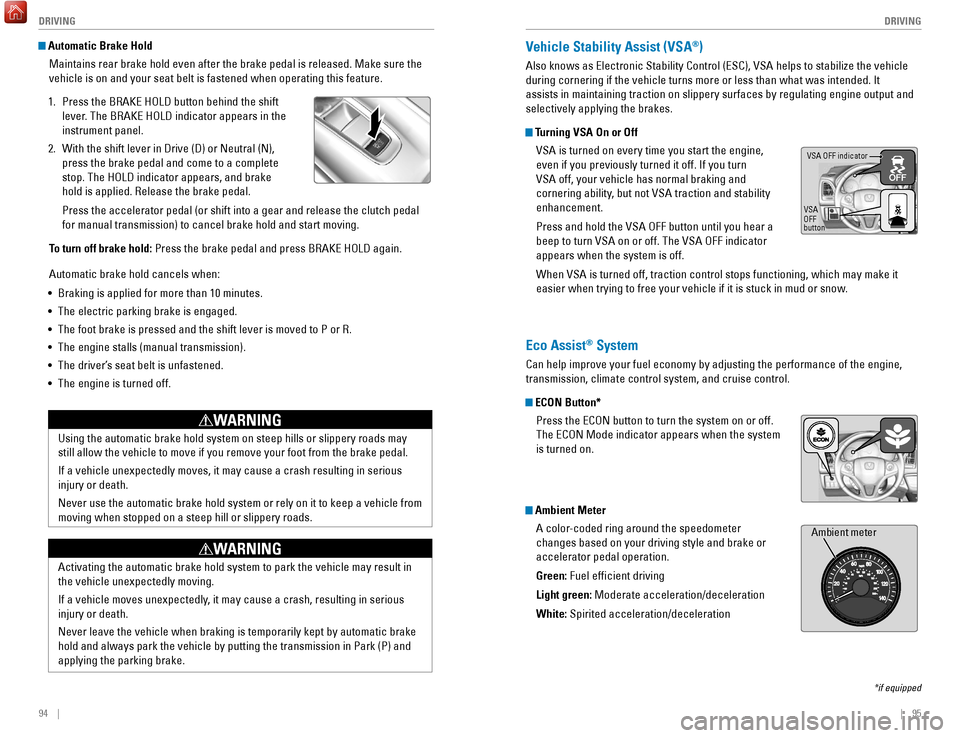
Automatic Brake Hold
Maintains rear brake hold even after the brake pedal is released. Make sure the
vehicle is on and your seat belt is fastened when operating this feature\
.
1.
Press the BRAKE HOLD button behind the shift
lever
. The BRAKE HOLD indicator appears in the
instrument panel.
2.
With the shift lever in Drive (D) or Neutral (N),
press the brake pedal and come to a complete
stop. The HOLD indicator appears, and brake
hold is applied. Release the brake pedal.
Press the accelerator pedal (or shift into a gear and release the clutc\
h pedal
for manual transmission) to cancel brake hold and start moving.
T
o turn off brake hold: Press the brake pedal and press BRAKE HOLD again.
Automatic brake hold cancels when:
•
Braking is applied for more than 10 minutes.
•
The electric parking brake is engaged.
•
The foot brake is pressed and the shift lever is moved to P or R.
•
The engine stalls (manual transmission).
•
The driver’
s seat belt is unfastened.
•
The engine is turned off.Using the automatic brake hold system on steep hills or slippery roads m\
ay
still allow the vehicle to move if you remove your foot from the brake p\
edal.
If a vehicle unexpectedly moves, it may cause a crash resulting in serio\
us
injury or death.
Never use the automatic brake hold system or rely on it to keep a vehicl\
e from
moving when stopped on a steep hill or slippery roads.
WARNING
Activating the automatic brake hold system to park the vehicle may resul\
t in
the vehicle unexpectedly moving.
If a vehicle moves unexpectedly, it may cause a crash, resulting in serious
injury or death.
Never leave the vehicle when braking is temporarily kept by automatic brake
hold and always park the vehicle by putting the transmission in Park (P\
) and
applying the parking brake.
WARNING
Vehicle Stability Assist (VSA®)
Also knows as Electronic Stability Control (ESC), VSA helps to stabili\
ze the vehicle
during cornering if the vehicle turns more or less than what was intende\
d. It
assists in maintaining traction on slippery surfaces by regulating engin\
e output and
selectively applying the brakes.
Turning VSA On or Off
VSA is turned on every time you start the engine,
even if you previously turned it off. If you turn
VSA off, your vehicle has normal braking and
cornering ability, but not VSA traction and stability
enhancement.
Press and hold the VSA OFF button until you hear a
beep to turn VSA on or off. The VSA OFF indicator
appears when the system is off.
When VSA is turned off, traction control stops functioning, which may ma\
ke it
easier when trying to free your vehicle if it is stuck in mud or snow.
VSA OFF indicator
VSA
OFF
button
*if equipped
Eco Assist® System
Can help improve your fuel economy by adjusting the performance of the e\
ngine,
transmission, climate control system, and cruise control.
ECON Button* Press the ECON button to turn the system on or off.
The ECON Mode indicator appears when the system
is turned on.
Ambient MeterA color-coded ring around the speedometer
changes based on your driving style and brake or
accelerator pedal operation.
Green: Fuel efficient driving
Light green: Moderate acceleration/deceleration
White: Spirited acceleration/deceleration
Ambient meter
Page 77 of 78
146 || 147
INDEX
INDEX
Dialing a Number ................................................ 70 , 74
Door Mirrors .............................................................. 42
Door Operation
.......................................................... 31
Doors
........................................................................\
... 30
Door/tailgate open
.................................................... 26
DOT Tire Quality Grading
.......................................132
Driving
........................................................................\
. 85
Braking
..................................................................... 92
Cruise Control
......................................................... 96
Eco Assist System
.................................................. 95
Forward Collision Warning (FCW)
.......................97
Ignition
..................................................................... 89
Lane Departure Warning (LDW)
..........................98
LaneWatch™........................................................... 99 Maximum Load Limit
.............................................. 87
Multi-View Rear Camera
.....................................100
Paddle Shifters
....................................................... 91
Power Mode
............................................................ 90
Refueling
................................................................ 102
Shifting
..................................................................... 90
Vehicle Stability Assist (VSA®)
...........................95
Eco Assist System..................................................... 95
ECON Button
.............................................................. 95
ECON mode
................................................................ 27
Electric Parking Brake
.......................................27
, 93
Electric parking brake system
................................25
Electric Power Steering (EPS)
................................25
E-Mail
........................................................................\
.. 76
Emergency Engine Stop
.........................................106
Emergency T
owing ................................................. 106
Engine and Fuel
....................................................... 135
Engine Coolant......................................................... 124 Engine Oil.................................................................. 122ENGINE START/STOP button
..................................90
Exterior Lights
...................................................... 27, 36
Fastening a Seat Belt
................................................. 7
FCW
....................................................................... 25, 27
Find Nearest Place
................................................... 82
Find Place Commands
............................................ 140
Flat T
ire ..................................................................... 109
Floor Mats
.................................................................. 39
Fluids
........................................................................\
. 135
FM/AM Radio
....................................................... 53, 60
FM/AM Radio Commands
......................................142
Fog lights
.............................................................. 27, 36
Foot Brake
.................................................................. 92
Forward Collision Warning (FCW)
..............25, 27, 97
Frequently Asked Questions
.................................136
Front Airbags (SRS)
.................................................... 9
Front Door Inner Handle
..........................................31
Front Seats
................................................................. 38
Front Wipers
.............................................................. 37
Fuel Information
...................................................... 102
Fuse Locations......................................................... 113 Handling Information
.................................................. 4Hang-Up/Back button................................... 68
, 71, 78
Hazard Lights .............................................................27
HDMI Port................................................................... 49 HDMI Video
................................................................67
Headlight-Wiper Integration
...................................37
Head Restraints
.........................................................40
Heated Windshield Button
................................45, 46
HFL Controls
.........................................................68, 71
High beams
................................................................27
High temperature
......................................................25
Home Address
...........................................................81
HondaLink™
...............................................................59
HondaLink™ Assist
...................................................77
Honda Roadside Assistance
.................................137
Hood
........................................................................\
..121
Ignition
........................................................................\
89
Immobilizer
.................................................................27
Info Commands........................................................ 144 Information Display................................................... 28
Instrument Panel
.......................................................24
Condition Indicators
...............................................26
Malfunction Indicators
..........................................24
On/Off Indicators
....................................................27
Interior Lights............................................................. 35 Intermittent Wipers................................................... 37
iPod®
....................................................................55, 63
iPod® Commands
...................................................143
Jump Starting
..........................................................104
Key
........................................................................\
.......29
Lane Departure Warning (LDW)
.................25, 26, 98
LaneWatch™
.............................................................99
Lap/Shoulder Seat Belts
............................................5
LA
TCH-Compatible Child Seat .................................18
LDW
...........................................................25, 26, 27, 98
Light Bulbs................................................................ 135 Lights
........................................................................\
...35
Locking the Tailgate
..................................................30
Lock T
ab ......................................................................31
Low fuel
......................................................................26
Low oil pressure
........................................................24
Low temperature
.......................................................25
Low tire pressure
......................................................26
Maintenance............................................................ 118 Maintenance Minder™
.......................................119
Safety Precautions
...............................................118
Service Codes
.......................................................120
Under the Hood
.....................................................121
Maintenance Minder................................................ 27
Making a Call
.......................................................70, 74
Malfunction indicator lamp
.....................................25
Manual Transmission
...............................................92
Map Display Commands
........................................139
Map Legend
...............................................................83
Map Lights.................................................................. 35 Master Door Lock Switch
........................................31Maximum Load Limit................................................. 87
Mirrors
........................................................................\
42
Moonroof
....................................................................34
Multi-View Rear Camera
.......................................100
Navigation
..................................................................78
Detour
.......................................................................84
Display and Controls
..............................................79
Entering a Destination
...........................................81
Find Nearest Place
.................................................82
Home Address
........................................................81
Map Legend
............................................................83
Place Category
....................................................... 82
Routing
..................................................................... 83
Steering Wheel Controls
....................................... 78
Street Address
........................................................ 81
Talk Button Tips
...................................................... 80
Traffic
....................................................................... 84
Voice Prompt
........................................................... 80
Voice Recognition Tips
.......................................... 80
Navigation Commands
........................................... 139
One-T
ouch Turn Signal
............................................. 36
On-screen Commands............................................ 144
Opening the Hood
................................................... 121
Overheating.............................................................. 105 Paddle Shifters
.......................................................... 91
Pairing a Phone
................................................... 69, 73
Pandora®
................................................................... 66
Pandora® Commands
............................................ 143
Panic button
............................................................... 29
Parking brake............................................................. 26 Passenger Airbag Off Indicator
.............................. 12
Phone
.................................................................... 69, 73
Phonebook
........................................................... 70, 74
PHONE
button
............................................................ 68
Phone Commands
................................................... 144
Pick-Up button
..................................................... 68, 71
Place Category
.......................................................... 82
Power Door Mirrors.................................................. 42
Power Mode
.............................................................. 90
Power Moonroof
....................................................... 34
Power Window
.......................................................... 33
Radio
..................................................................... 53, 60
Readiness Codes..................................................... 134 Rear Camera
............................................................ 100
Rear Seats
............................................................ 39, 41
Rearview Mirror
........................................................ 42
Rear Wiper
................................................................. 37
Refueling................................................................... 102 Remote Battery Strength
....................................... 103
Remote Transmitter
.................................................. 29
Reporting Safety Defects......................................... 23
Roadside Assistance
.............................................. 137
Route Commands
.................................................... 141
Routing
........................................................................\
83
Safety Information
...................................................... 3Carbon Monoxide Gas
.............................................
4
Childproof Door Locks
...........................................
31
Child Safety
.............................................................
15
Handling Information
...............................................
4
Reporting Safety Defects
......................................
23
Safety Label Locations
..........................................
22
Safety Messages
......................................................
3
Safety Label Locations
.............................................
22
Safety Messages
........................................................
3
Seat Belt Inspection ...................................................
6
Seat belt reminder .................................................... 26
Seat Belts ..................................................................... 5
Fastening a Seat Belt
...............................................7
Lap/Shoulder Seat Belts
.........................................5
Seat Belt Inspection
................................................6
Seat Belt with Detachable Anchor........................ 8
Shoulder Anchor
...................................................... 7
Seat Belt with Detachable Anchor
..........................8
Seat Heaters
.............................................................. 46
Seats
........................................................................\
... 38
Front Seats
.............................................................. 38
Rear Seats
......................................................... 39, 41
Selector knob............................................................. 68 Select/reset knob
................................................ 28, 47
Service Codes.......................................................... 120 Settings
....................................................................... 47
Shifting
........................................................................\
90
Shift Lever Does Not Move
...................................103
Shoulder Anchor
......................................................... 7
Side Airbags............................................................... 10 Side Curtain Airbags................................................. 10
Siri Eyes Free
............................................................. 77
SiriusXM® Radio
...................................................... 61
SiriusXM® Radio Commands
...............................142
Smart Entry system
................................................... 24
Smart Entry System
.................................................. 30
SMS Text Messaging
...............................................76
Song By V
oice™ Commands .................................142
Sound
........................................................................\
.. 51
Specifications
.......................................................... 135
Speed Dial
............................................................ 70, 75
SRS (Supplemental Restraint System) Indicator
.11
Starter system
........................................................... 25
Steering Wheel.......................................................... 43 Steering Wheel and Nearby Controls
.....................1
Steering Wheel Controls.................................... 50, 78
Street Address........................................................... 81 Supplemental Restraint System (SRS)
..................24
System message
....................................................... 26
Tailgate
....................................................................... 30
Tailgate button
........................................................... 29
Tailgate Operation
..................................................... 32
Talk button
...................................................... 68, 71, 78
Talk Button Tips
................................................... 72, 80
Text Messaging
......................................................... 76