phone HONDA HR-V 2017 2.G Quick Guide
[x] Cancel search | Manufacturer: HONDA, Model Year: 2017, Model line: HR-V, Model: HONDA HR-V 2017 2.GPages: 78, PDF Size: 5.33 MB
Page 3 of 78

Honda Automobile Customer Service
Your authorized Honda dealer should be able to answer any questions you h\
ave
about your vehicle. However, if you are dissatisfied with the information you receive,
you can call Honda Automobile Customer Service (see page 137).
Honda Roadside Assistance
24-hour emergency road service is available to you in the United States \
and Canada
throughout your 3-year/36,000-mile warranty term. Services include jump starting,
flat tire and lockout assistance, towing, and more (limitations apply\
). This Owner’s Guide is intended to help you quickly get acquainted with your
2017 Honda HR-V. It provides basic information and instructions on technology and
convenience features, as well as emergency procedures and how to get ass\
istance.
This guide is for vehicles sold in the United States and Canada. It cove\
rs all HR-V
models, so you may find descriptions of features and equipment that ar\
e not in your
vehicle. Images throughout this guide are from U.S. vehicles and represe\
nt features
and equipment that are available on some, but not all, models.
This guide is not intended to be a substitute for the Owner’s Manual. The Owner
Information CD enclosed in your glove box kit includes the Owner’s Manual,
Navigation Manual, and vehicle and tire warranties in electronic format.\
This
information can be viewed on a computer (PC or Mac platform) and saved or printed
for your reference. You can also visit owners.honda.com (U.S.) or myhonda.ca
(Canada) to view the complete and most current information.
If you are the first registered owner of your vehicle, you may request\
a complimentary
printed copy of the Owner’s Manual, Navigation Manual, or Vehicle Warranty within
the first six months of vehicle purchase. To request a copy, visit owners.honda.com
(U.S.) and create or log in to your account. In Canada, please request\
a copy from
your Honda dealer.
American Honda Motor Co., Inc. strives to be proactive in protecting our\
environment
and natural resources. By using electronic delivery for a considerable p\
ortion of the
information typically found in a vehicle owner’s manual, we are further reducing our
impact on the environment.
INTRODUCTION TABLE OF CONTENTS
Call (800) 999-1009 (U.S.) or (888) 946-6329 (Canada)
Call (866) 864-5211 (U.S.) or (800) 465-7587 (Canada)
*if equipped
VISUAL INDEX
..............................................................
1
Steering Wheel and Nearby Controls
....................
1
Dashboard and Other Controls
...............................
2
SAFETY INFORMATION
..............................................
3
Important Safety Information
..................................
3
Seat Belts
...................................................................
5
Airbags
........................................................................\
9
Child Safety
..............................................................
15
Safety Label Locations
...........................................
22
Reporting Safety Defects
.......................................
23
INSTRUMENT PANEL
................................................
24
Malfunction Indicators
...........................................
24
Condition Indicators
................................................
26
On/Off Indicators
.....................................................
27
Information Display
.................................................
28
VEHICLE CONTROLS
..................................................
29
Using the Key or Remote T
ransmitter
..................
29
Smart Entry System*
...............................................
30
Door Operation
........................................................
31
Tailgate Operation
...................................................
32
Power Window Operation
.....................................
33
Power Moonroof Operation*
................................
34
Interior and Exterior Lights
....................................
35
One-Touch Turn Signal
...........................................
36
Wiper Operation
......................................................
37
Adjusting the Seats
.................................................
38
Rear Seats
...............................................................
41
Adjusting the Mirrors
..............................................
42
Adjusting the Steering Wheel
...............................
43
Air Conditioning System*
......................................
43
Climate Control System*
.......................................
44
Seat Heaters*
..........................................................
46
Customized Features
..............................................
47
Setting the Clock
.....................................................
48AUDIO AND CONNECTIVITY
....................................
49
Basic Audio Operation
...........................................
49
Color Audio System*
...............................................
52
FM/AM Radio
........................................................
53
Compact Disc (CD)
...............................................
54
iPod® ...................................................................... 55
USB Flash Drive .................................................... 56
Bluetooth
® Audio .................................................. 57
T
ouchscreen Operation* ........................................ 58
HondaLink
® ........................................................... 59
FM/AM Radio ....................................................... 60
SiriusXM
® Radio* ................................................. 61
Compact Disc (CD) .............................................. 62
iPod® ...................................................................... 63
USB Flash Drive .................................................... 64
Bluetooth
® Audio .................................................. 65
Pandora® ............................................................... 66
HDMI Video ........................................................... 67
BLUETOOTH
® HANDSFREELINK® (HFL) ................. 68
Basic HFL Operation
............................................... 68
Pairing a Phone
....................................................... 69
Making a Call
........................................................... 70
Basic HFL Operation
............................................... 71
Pairing a Phone
....................................................... 73
Making a Call
........................................................... 74
SMS Text Messaging and E-Mail*
....................... 76
HondaLink
® Assist ................................................... 77
Siri® Eyes Free ......................................................... 77
NA
VIGATION* ............................................................. 78
Basic Navigation Operation
..................................78
Entering a Destination
............................................ 81
Routing
...................................................................... 83
Page 5 of 78
2 || 3
S AFETY
V
ISUAL I NDEX
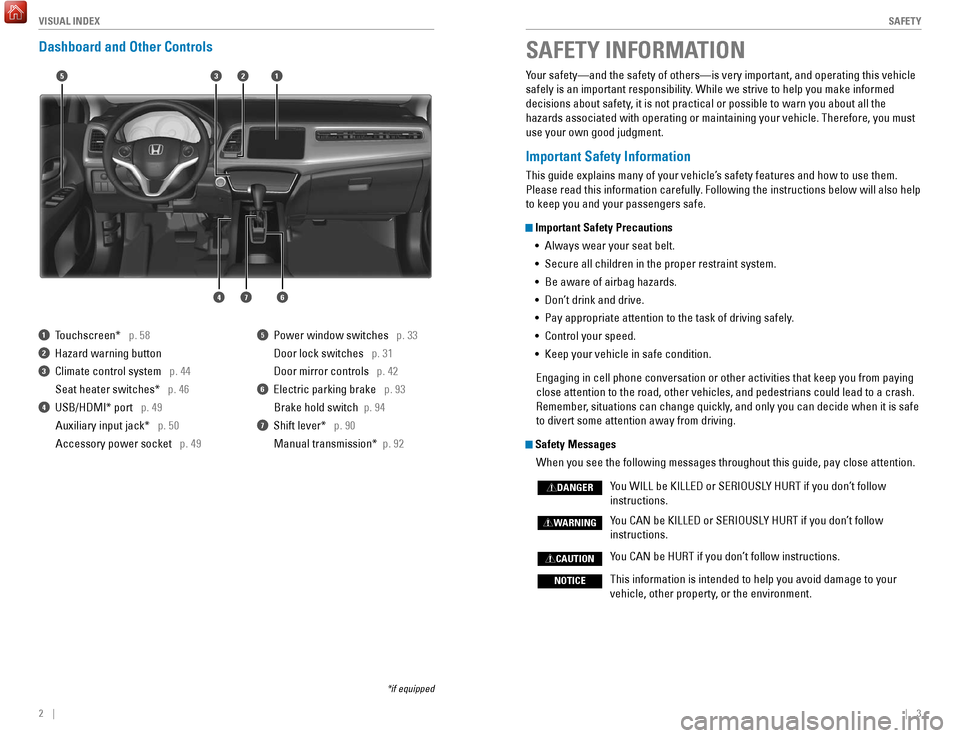
Dashboard and Other Controls
1 Touchscreen* p. 58
2 Hazard warning button
3 Climate control system p. 44
Seat heater switches*
p. 46
4 USB/HDMI* port p. 49Auxiliary input jack* p. 50
Accessory power socket p. 49
5 Power window switches p. 33
Door lock switches
p. 31
Door mirror controls
p. 42
6 Electric parking brake p. 93
Brake hold switch
p. 94
7 Shift lever* p. 90
Manual transmission*
p. 92
*if equipped
Your safety—and the safety of others—is very important, and operati\
ng this vehicle
safely is an important responsibility. While we strive to help you make informed
decisions about safety, it is not practical or possible to warn you about all the
hazards associated with operating or maintaining your vehicle. Therefore\
, you must
use your own good judgment.
Important Safety Information
This guide explains many of your vehicle’s safety features and how to use them.
Please read this information carefully. Following the instructions below will also help
to keep you and your passengers safe.
Important Safety Precautions•
Always wear your seat belt.
•
Secure all children in the proper restraint system.
•
Be aware of airbag hazards.
•
Don’
t drink and drive.
•
Pay appropriate attention to the task of driving safely
.
•
Control your speed.
•
Keep your vehicle in safe condition.
Engaging in cell phone conversation or other activities that keep you fr\
om paying
close attention to the road, other vehicles, and pedestrians could lead \
to a crash.
Remember
, situations can change quickly, and only you can decide when it is safe
to divert some attention away from driving.
Safety Messages
When you see the following messages throughout this guide, pay close att\
ention.
Y
ou WILL be KILLED or SERIOUSLY HURT if you don’t follow
instructions.
Y
ou CAN be KILLED or SERIOUSLY HURT if you don’t follow
instructions.
Y
ou CAN be HURT if you don’t follow instructions.
This information is intended to help you avoid damage to your
vehicle, other property
, or the environment.
DANGER
WARNING
CAUTION
NOTICE
SAFETY INFORMATION
15
46
32
7
Page 27 of 78

46 || 47
V EHICLE C ONTROLS
V
EHICLE C ONTROLS
Passenger Side Vents
Three separate front passenger side air vents allow for different air fl\
ow rates
through the vehicle.
Adjust each vent to optimize airflow throughout the
vehicle.
Open or close individual vents to adjust passenger
comfort levels.
Adjust from side to side or up and down.
MidLowHigh
Seat Heaters*
Quickly warm the front seats when the vehicle is on.
Touch the seat heater icon on the climate control
panel.
Once: HI setting (two indicators)
Twice: LO setting (one indicator)
Three times: Turn the seat heaters off.
Heat-induced burns are possible when using seat heaters.
Persons with a diminished ability to sense temperature (e.g., persons w\
ith
diabetes, lower-limb nerve damage, or paralysis) or with sensitive skin should
not use the seat heaters.
WARNING
Changing Settings Using the Display Audio System*
Select items on the touchscreen to make selections.
1.
From the HOME screen, select
SETTINGS.
2.
Select an option (Phone, Audio,
Bluetooth, Info, Camera, System,
or Navi*).
3.
Select a setting option, and make
your preferred changes.
4.
Press BACK to exit the menus.
Customized Features
Use the Settings menu to customize certain features when the vehicle is \
stopped.
Changing Settings Using the Color Audio System*Use the selector knob to make and enter selections.
1.
Press the MENU/CLOCK button.
2.
Select Settings.
3.
Select a setting option, and make
your preferred changes.
4.
Press BACK to exit the menus.
*if equipped
VO LHOME
MENU
BA CK
MENU/CLOCK button
Selector knob
Page 28 of 78
48 || 49
AUDIO AND CONNECTIVITY
V EHICLE C ONTROLS
Learn how to operate the vehicle’s audio system.
Basic Audio Operation
Connect audio devices and operate buttons and displays for the audio sys\
tem.
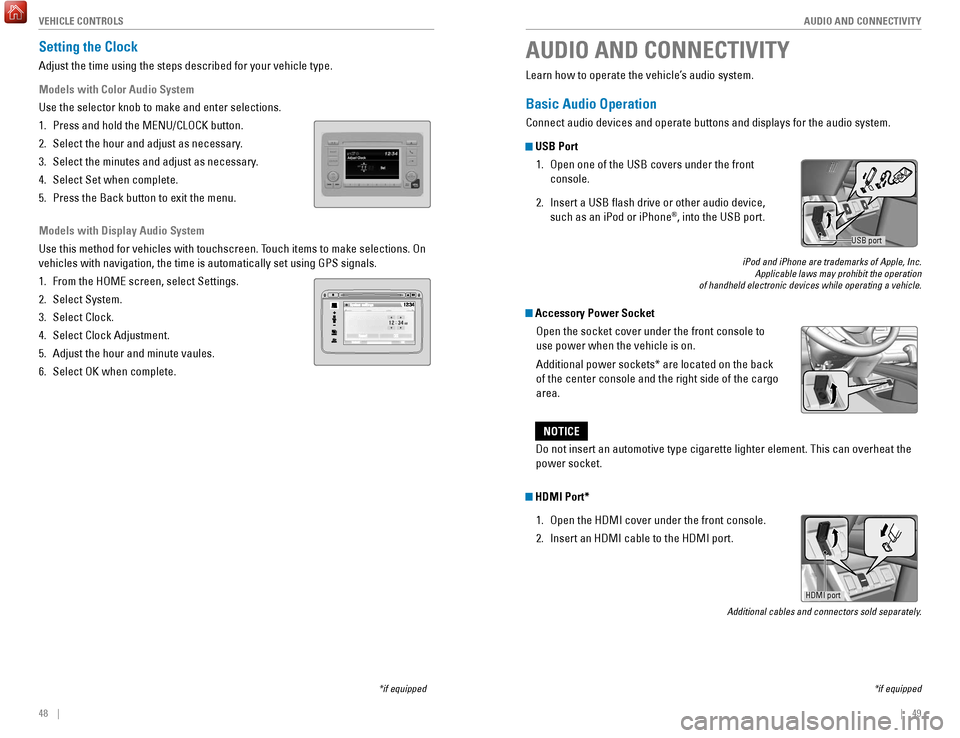
USB Port
1.
Open one of the USB covers under the front
console.
2.
Insert a USB flash drive or other audio device,
such as an iPod or iPhone®, into the USB port.
iPod and iPhone are trademarks of Apple, Inc. Applicable laws may prohibit the operation
of handheld electronic devices while operating a vehicle.
Accessory Power Socket
Open the socket cover under the front console to
use power when the vehicle is on.
Additional power sockets* are located on the back
of the center console and the right side of the cargo
area.
AUDIO AND CONNECTIVITY
*if equipped
Do not insert an automotive type cigarette lighter element. This can ove\
rheat the
power socket.
NOTICE
HDMI Port*
1.
Open the HDMI cover under the front console.
2.
Insert an HDMI cable to the HDMI port.
Additional cables and connectors sold separately.
USB port
Setting the Clock
Adjust the time using the steps described for your vehicle type.
Models with Color Audio System
Use the selector knob to make and enter selections.
1.
Press and hold the MENU/CLOCK button.
2.
Select the hour and adjust as necessary
.
3.
Select the minutes and adjust as necessary
.
4.
Select Set when complete.
5.
Press the Back button to exit the menu.
Models with Display Audio System
Use this method for vehicles with touchscreen. T
ouch items to make selections. On
vehicles with navigation, the time is automatically set using GPS signal\
s.
1.
From the HOME screen, select Settings.
2.
Select System.
3.
Select Clock.
4.
Select Clock Adjustment.
5.
Adjust the hour and minute vaules.
6.
Select OK when complete.
*if equipped
HDMI port
Page 32 of 78
56 || 57
AUDIO AND CONNECTIVITY
AUDIO AND CONNECTIVITY
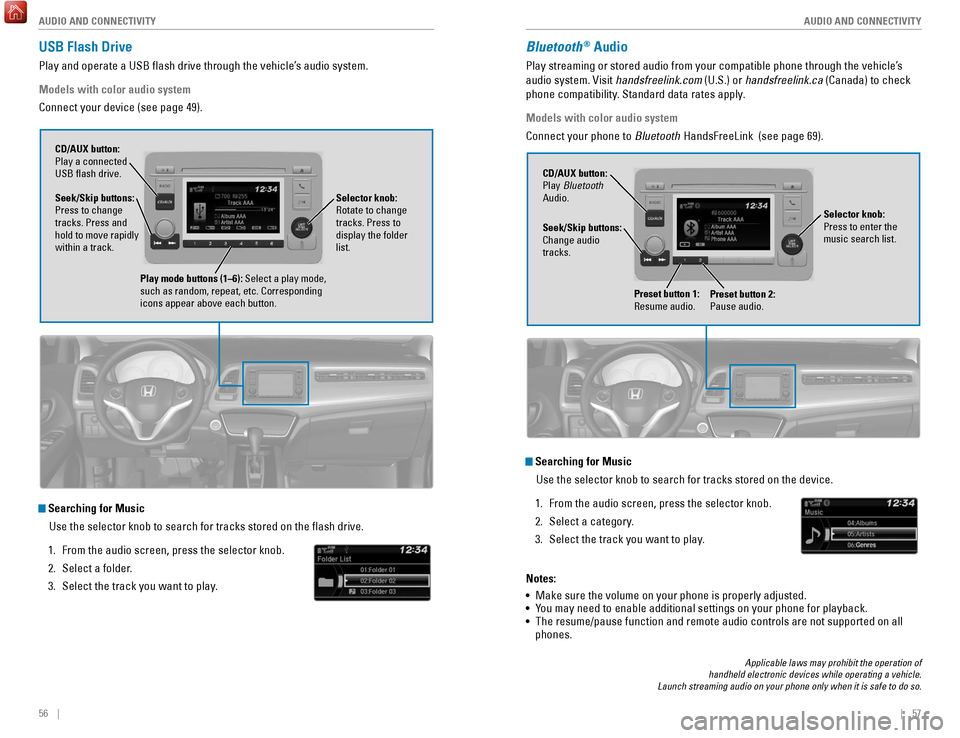
USB Flash Drive
Play and operate a USB flash drive through the vehicle’s audio system.
Models with color audio system
Connect your device (see page 49).
Searching for Music
Use the selector knob to search for tracks stored on the flash drive.
1.
From the audio screen, press the selector knob.
2.
Select a folder
.
3.
Select the track you want to play
.
Selector knob:
Rotate to change
tracks. Press to
display the folder
list.
CD/AUX button:
Play a connected
USB flash drive.
Seek/Skip buttons:
Press to change
tracks. Press and
hold to move rapidly
within a track.
Play mode buttons (1–6): Select a play mode,
such as random, repeat, etc. Corresponding
icons appear above each button.
Bluetooth® Audio
Play streaming or stored audio from your compatible phone through the ve\
hicle’s
audio system. Visit handsfreelink.com (U.S.) or handsfreelink.ca (Canada) to check
phone compatibility. Standard data rates apply.
Models with color audio system
Connect your phone to Bluetooth HandsFreeLink (see page 69).
Searching for Music
Use the selector knob to search for tracks stored on the device.
1.
From the audio screen, press the selector knob.
2.
Select a category
.
3.
Select the track you want to play
.
Notes:
•
Make sure the volume on your phone is properly adjusted.
•
Y
ou may need to enable additional settings on your phone for playback.
•
The resume/pause function and remote audio controls are not supported on\
all
phones.
Seek/Skip buttons:
Change audio
tracks. CD/AUX button:
Play Bluetooth
Audio.
Preset button 1:
Resume audio.
Preset button 2:
Pause audio.
Selector knob:
Press to enter the
music search list.
Applicable laws may prohibit the operation of
handheld electronic devices while operating a vehicle.
Launch streaming audio on your phone only when it is safe to do so.
Page 33 of 78

58 || 59
AUDIO AND CONNECTIVITY
AUDIO AND CONNECTIVITY
Touchscreen Operation*
Use simple gestures—including touching, swiping, and scrolling—to \
operate certain
audio functions.
Some items may be grayed out during driving to reduce the potential for \
distraction.
You can select them when the vehicle is stopped or use voice commands*.
Wearing gloves may limit or prevent touchscreen response.
*if equipped
**HondaLink can be accessed only if the app is installed on your
smartphone, and the phone is connected to the system (see page 59).
HOME
MENU
BA CK
VO L
Power button:
Turn audio on
or off.
HOME
(screen shown)
MENU: Display
menu items for the
selected screen.
BACK: Go back to
the previous screen. button:
Change screen
brightness.
Settings: Choose
Audio for options. HondaLink: View apps when
your phone is connected
through HondaLink**. Audio: Display
current audio
information.
Volume
Display button:
Change the display.
Changing Icon Order You can change the order of the icons on the Home screen.
1.
From the Home screen, select Settings.
2.
Select System.
3.
Select Home.
4.
Select Home Screen Edit Order
.
5.
Select and hold the icon you want to move and slide
it to a different position.
HondaLink®
You can connect a compatible smartphone to the audio system to enable int\
egration
between the smartphone’s approved apps and the vehicle. This allows you to control
the phone’s apps through the touchscreen.
To check smartphone compatibility and connection instructions, visit
handsfreelink.com.
To get more information on HondaLink features and apps, visit www.hondalink.com.
Page 36 of 78
64 || 65
AUDIO AND CONNECTIVITY
AUDIO AND CONNECTIVITY
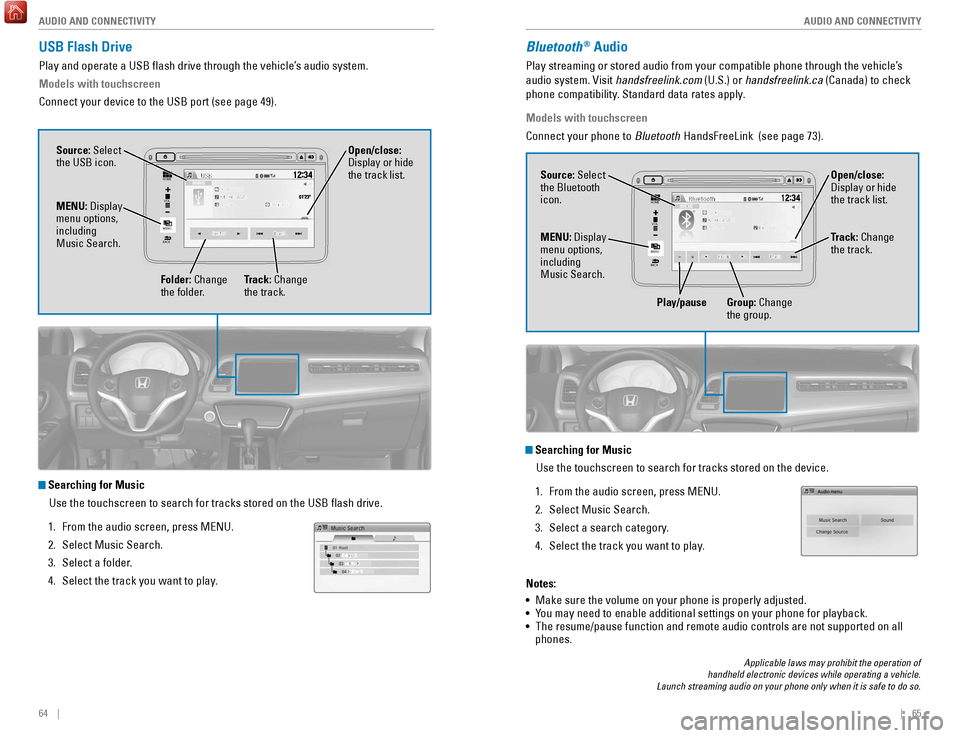
USB Flash Drive
Play and operate a USB flash drive through the vehicle’s audio system.
Models with touchscreen
Connect your device to the USB port (see page 49).
Searching for Music
Use the touchscreen to search for tracks stored on the USB flash drive\
.
1.
From the audio screen, press MENU.
2.
Select Music Search.
3.
Select a folder
.
4.
Select the track you want to play
.
VOL
HOME
MENU
BA CK
Source: Select
the USB icon.
Folder: Change
the folder. Open/close:
Display or hide
the track list.
MENU: Display
menu options,
including
Music Search.
Track: Change
the track.
Bluetooth® Audio
Play streaming or stored audio from your compatible phone through the ve\
hicle’s
audio system. Visit handsfreelink.com (U.S.) or handsfreelink.ca (Canada) to check
phone compatibility. Standard data rates apply.
Models with touchscreen
Connect your phone to Bluetooth HandsFreeLink (see page 73).
VOL
HOME
MENU
BA CK
Source: Select
the Bluetooth
icon. Open/close:
Display or hide
the track list.
MENU: Display
menu options,
including
Music Search. Track: Change
the track.
Play/pause Group: Change the group.
Searching for Music
Use the touchscreen to search for tracks stored on the device.
1.
From the audio screen, press MENU.
2.
Select Music Search.
3.
Select a search category
.
4.
Select the track you want to play
.
Notes:
•
Make sure the volume on your phone is properly adjusted.
•
Y
ou may need to enable additional settings on your phone for playback.
•
The resume/pause function and remote audio controls are not supported on\
all
phones.
Applicable laws may prohibit the operation of
handheld electronic devices while operating a vehicle.
Launch streaming audio on your phone only when it is safe to do so.
Page 37 of 78

66 || 67
AUDIO AND CONNECTIVITY
AUDIO AND CONNECTIVITY
Pandora®
Play and operate Pandora from your compatible phone through the vehicle’\
s audio
system. Visit handsfreelink.com to check phone compatibility. Standard data rates
apply. Available in the U.S. only.
Models with touchscreen
Connect your phone when the vehicle is stopped.
For iPhone:
•
Connect via
Bluetooth HandsFreeLink (see page 73) or USB port (see page 49).
•
A pop-up may appear on your phone requesting you to allow access for Pan\
dora
to be launched.
•
If you cannot operate Pandora through the audio system, it may be stream\
ing
through
Bluetooth Audio. Make sure Pandora is selected on the audio system.
•
If Pandora still does not operate, try rebooting the phone and reconnect\
ing the
cable if necessary.
For other compatible smartphones:
•
Connect via
Bluetooth HandsFreeLink (see page 73).
Applicable laws may prohibit the operation of
handheld electronic devices while operating a vehicle.
Launch streaming audio on your phone only when it is safe to do so.
Source: Select
the Pandora icon.
Station: Change
the station. Skip: Go to
the next song. Open/close:
Display or hide
information.
MENU: Display
menu options,
including the
Station List. Like/dislike
song
Play/Pause
HDMI Video
Play video from a compatible device while your vehicle is stopped.
Models with touchscreen
Connect your device to the HDMI port (see page 49).
From the connected device, launch the video you want to display on the
touchscreen. The device or video resolution must be 720p or lower to vie\
w. This
feature is limited while the vehicle is moving.
VO L
HOME
MENU
BA CK
Source: Select
the HDMI
icon from the
SOURCE screen.
Page 38 of 78
68 || 69
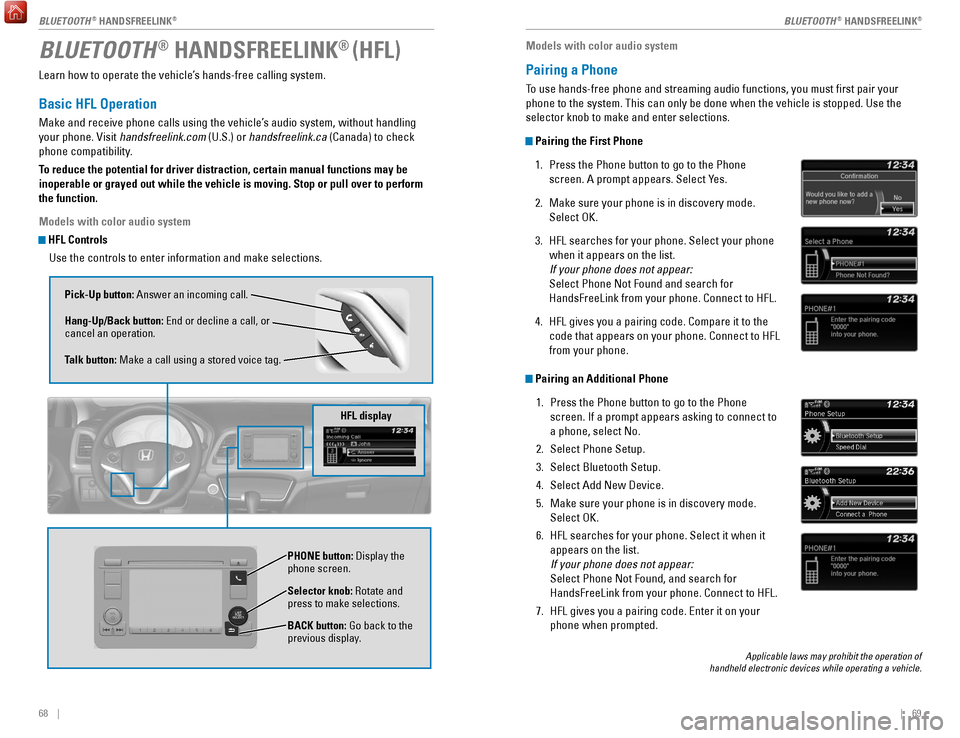
Learn how to operate the vehicle’s hands-free calling system.
Basic HFL Operation
Make and receive phone calls using the vehicle’s audio system, without handling
your phone. Visit handsfreelink.com (U.S.) or handsfreelink.ca (Canada) to check
phone compatibility.
To reduce the potential for driver distraction, certain manual functions \
may be
inoperable or grayed out while the vehicle is moving. Stop or pull over \
to perform
the function.
Models with color audio system
HFL Controls
Use the controls to enter information and make selections.
BLUETOOTH® HANDSFREELINK® (HFL)
Pick-Up button: Answer an incoming call.
Hang-Up/Back button: End or decline a call, or
cancel an operation.
Talk button: Make a call using a stored voice tag.
Selector knob: Rotate and
press to make selections.
BACK button: Go back to the
previous display. PHONE button: Display the
phone screen.
HFL display
Models with color audio system
Pairing a Phone
To use hands-free phone and streaming audio functions, you must first p\
air your
phone to the system. This can only be done when the vehicle is stopped. \
Use the
selector knob to make and enter selections.
Pairing the First Phone
1.
Press the Phone button to go to the Phone
screen. A prompt appears. Select Y
es.
2.
Make sure your phone is in discovery mode.
Select OK.
3.
HFL searches for your phone. Select your phone
when it appears on the list.
If your phone does not appear:
Select Phone Not Found and search for
HandsFreeLink from your phone. Connect to HFL.
4.
HFL gives you a pairing code. Compare it to the
code that appears on your phone. Connect to HFL
from your phone.
Pairing an Additional Phone1.
Press the Phone button to go to the Phone
screen. If a prompt appears asking to connect to
a phone, select No.
2.
Select Phone Setup.
3.
Select Bluetooth Setup.
4.
Select Add New Device.
5.
Make sure your phone is in discovery mode.
Select OK.
6.
HFL searches for your phone. Select it when it
appears on the list.
If your phone does not appear:
Select Phone Not Found, and search for
HandsFreeLink from your phone. Connect to HFL.
7.
HFL gives you a pairing code. Enter it on your
phone when prompted.
Applicable laws may prohibit the operation of
handheld electronic devices while operating a vehicle.
BLUETOOTH® HANDSFREELINK®BLUETOOTH® HANDSFREELINK®
Page 39 of 78

70 || 71
Models with color audio system
Making a Call
You can make a call using several methods.
Dialing a Number
Enter a 10-digit phone number to call. Use the selector knob to make and\
enter
selections. This method is inoperable while the vehicle is moving.
1.
Press the Phone button.
2.
Select Dial.
3.
Enter the phone number
. Select the green phone
icon to call.
Using the Phonebook
When your phone is paired, its phonebook is automatically imported to th\
e system.
Use the selector knob to make and enter selections. This method is inope\
rable
while the vehicle is moving.
1.
Press the Phone button.
2.
Select Phonebook.
3.
Scroll through the list to find the name and
number you want to call, and select it to call.
Storing Speed Dial EntriesStore up to 20 numbers for quick dialing. Use the selector knob to make \
and enter
selections.
1.
Press the Phone button.
2.
Select Phone Setup
3.
Select Speed Dial, then select Add New
.
4.
Select an entry method.
5.
If desired, you can create a voice tag for the number
. Follow the prompts.
Using Speed DialMake calls quickly using stored speed dial entries. Use the selector kno\
b to make
and enter selections.
1.
Press the Phone button.
2.
Select Speed Dial.
3.
Scroll through the list to find the entry you want
to call, and select it to call.
Speed dial entries with stored voice tags can be called using the T
alk button.
Press the Talk button and follow the prompts.
Basic HFL Operation
Make and receive phone calls using the vehicle’s audio system, without handling
your phone. Visit handsfreelink.com (U.S.) or handsfreelink.ca (Canada) to check
phone compatibility.
To reduce the potential for driver distraction, certain manual functions \
may be
inoperable or grayed out while the vehicle is moving. Stop or pull over \
to perform
the function. Voice commands are also available.
Models with touchscreen
HFL Controls
Use the controls to enter information and make selections.
Pick-Up button: Answer an incoming call.
Hang-Up/Back button: End or decline a call, or cancel
an operation.
Talk button: Make a call using a stored voice tag.
+ / - buttons: Scroll the list after pressing and holding
the Menu button.
SOURCE button: Press to enter a selection after
pressing and holding the Menu button.
MENU button: From the phone screen, press and hold
to display speed dial, call history, or redial.
BLUETOOTH® HANDSFREELINK®BLUETOOTH® HANDSFREELINK®