buttons HONDA HR-V 2018 (in English) User Guide
[x] Cancel search | Manufacturer: HONDA, Model Year: 2018, Model line: HR-V, Model: HONDA HR-V 2018Pages: 503, PDF Size: 32.79 MB
Page 200 of 503
uuAudio System Basic Operation uPlaying an iPod
198
Features
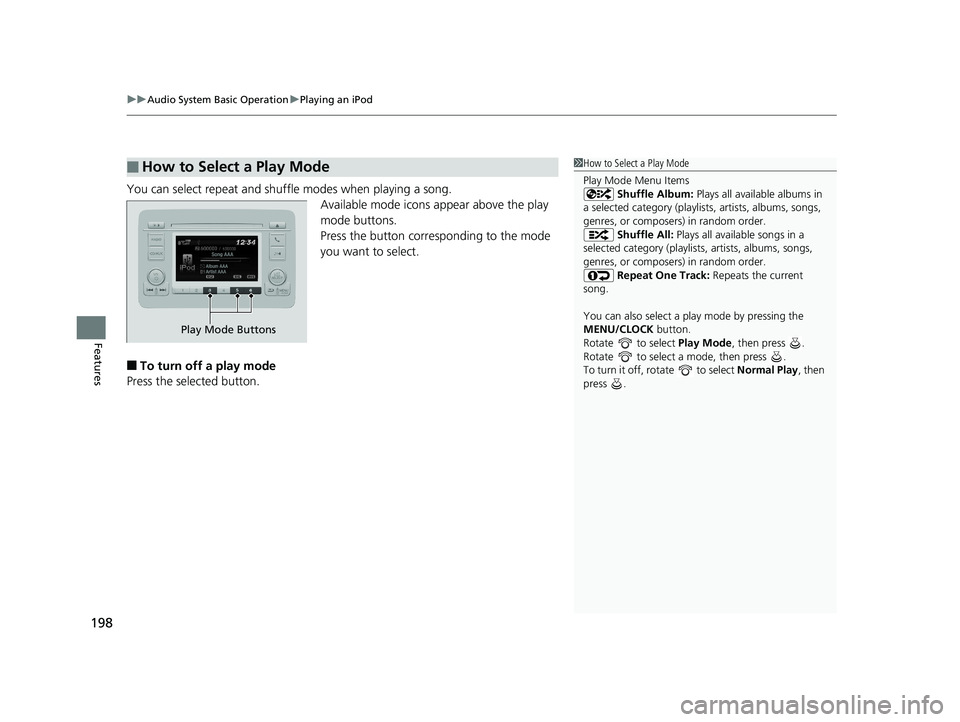
You can select repeat and shuffle modes when playing a song.
Available mode icons appear above the play
mode buttons.
Press the button corresponding to the mode
you want to select.
■To turn off a play mode
Press the selected button.
■How to Select a Play Mode1 How to Select a Play Mode
Play Mode Menu Items
Shuffle Album: Plays all available albums in
a selected category (playlists, artists, albums, songs,
genres, or composers) in random order. Shuffle All: Plays all available songs in a
selected category (playlists , artists, albums, songs,
genres, or composers) in random order. Repeat One Track: Repeats the current
song.
You can also select a pl ay mode by pressing the
MENU/CLOCK button.
Rotate to select Play Mode, then press .
Rotate to select a mode, then press .
To turn it off, rotate to select Normal Play, then
press .
Play Mode Buttons
18 HR-V-31T7A6200.book 198 ページ 2017年6月30日 金曜日 午後1時23分
Page 201 of 503
199
uuAudio System Basic Operation uPlaying a USB Flash Drive
Continued
Features
Playing a USB Flash Drive
Your audio system reads and plays sound files on a USB flash drive in either MP3,
WMA or AAC*1 format.
Connect your USB flash drive to the USB port, then press the CD/AUX button.
2USB Port(s) P. 179
*1:Only AAC format files recorded with iTunes are playable on this unit.
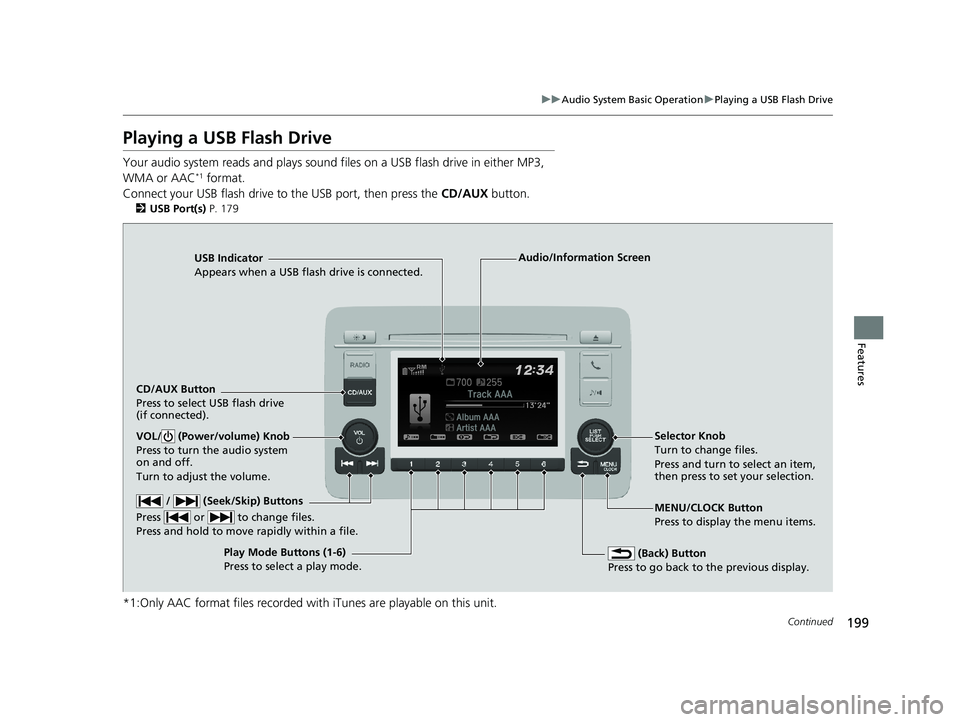
USB Indicator
Appears when a USB flash drive is connected.
CD/AUX Button
Press to select USB flash drive
(if connected).
(Back) Button
Press to go back to the previous display.
/ (Seek/Skip) Buttons
Press or to change files.
Press and hold to move rapidly within a file.
VOL/ (Power/volume) Knob
Press to turn the audio system
on and off.
Turn to adjust the volume.Selector Knob
Turn to change files.
Press and turn to select an item,
then press to set your selection.
MENU/CLOCK Button
Press to display the menu items.
Audio/Information Screen
Play Mode Buttons (1-6)
Press to select a play mode.
18 HR-V-31T7A6200.book 199 ページ 2017年6月30日 金曜日 午後1時23分
Page 203 of 503
201
uuAudio System Basic Operation uPlaying a USB Flash Drive
Features
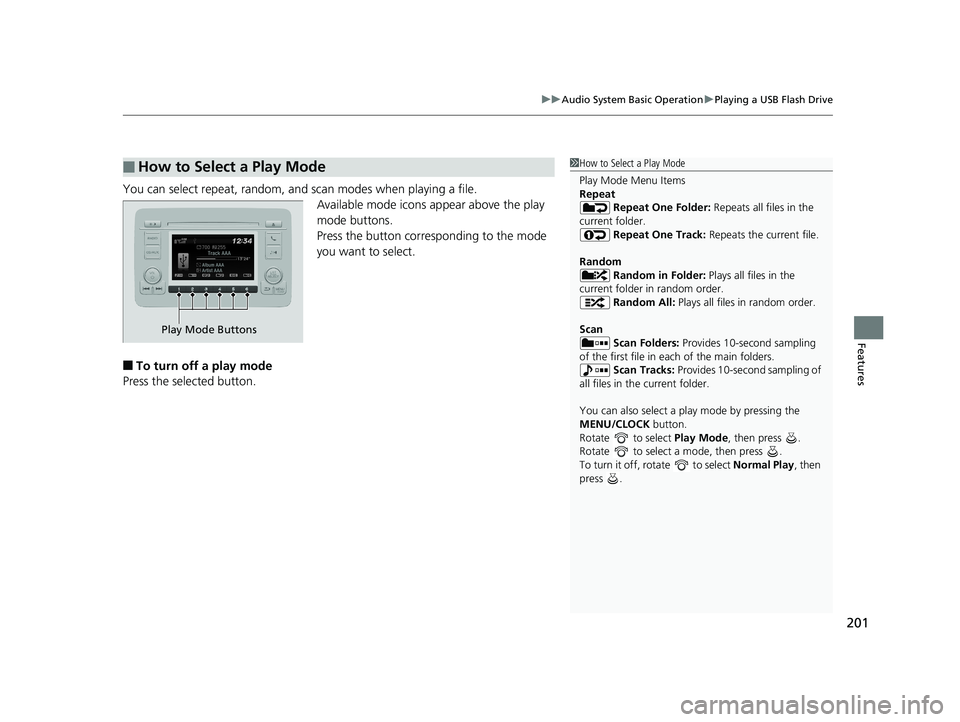
You can select repeat, random, and scan modes when playing a file.
Available mode icons appear above the play
mode buttons.
Press the button corresponding to the mode
you want to select.
■To turn off a play mode
Press the selected button.
■How to Select a Play Mode1 How to Select a Play Mode
Play Mode Menu Items
Repeat
Repeat One Folder: Repeats all files in the
current folder. Repeat One Track: Repeats the current file.
Random Random in Folder: Plays all files in the
current folder in random order. Random All: Plays all files in random order.
Scan Scan Folders: Provides 10-second sampling
of the first file in each of the main folders.
Scan Tracks: Provides 10-second sampling of
all files in the current folder.
You can also select a pl ay mode by pressing the
MENU/CLOCK button.
Rotate to select Play Mode, then press .
Rotate to select a mode, then press .
To turn it off, rotate to select Normal Play, then
press .
Play Mode Buttons
18 HR-V-31T7A6200.book 201 ページ 2017年6月30日 金曜日 午後1時23分
Page 204 of 503
202
uuAudio System Basic Operation uPlaying Bluetooth ® Audio
Features
Playing Bluetooth ® Audio
Your audio system allows you to listen to music from your Bluetooth-compatible
phone.
This function is available when the phone is paired and connected to the vehicle’s
Bluetooth ® HandsFreeLink ® (HFL) system.
2 Phone Setup P. 280
1Playing Bluetooth ® Audio
Not all Bluetooth -enabled phones with streaming
audio capabilities are comp atible with the system.
For a list of compatible phones:
•U.S.: Visit automobiles.honda.com /handsfreelink/,
or call 1-888-528-7876.
•Canada: Visit www.handsfreelink.ca , or call 1-888-
528-7876.
In some states, it may be il legal to perform some data
device functions while driving.
Only one phone can be used with HFL at a time.
When there are more than two paired phones in the
vehicle, the first paired phone the system finds is
automatically connected.
If more than one phone is paired to the HFL system,
there will be a delay before the system begins to play.
In some cases, the name of the artist, album, or track
may not appear correctly.
Some functions may not be available on some
devices.
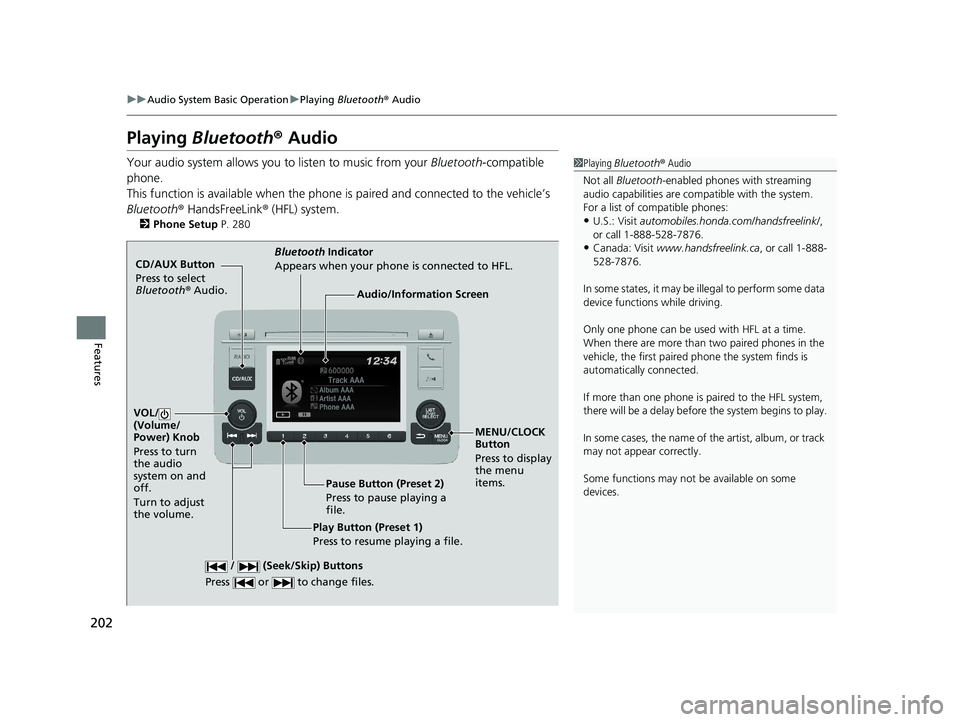
CD/AUX Button
Press to select
Bluetooth ® Audio.
VOL/
(Volume/
Power) Knob
Press to turn
the audio
system on and
off.
Turn to adjust
the volume.
MENU/CLOCK
Button
Press to display
the menu
items.
Audio/Information Screen
Bluetooth Indicator
Appears when your phone is connected to HFL.
/ (Seek/Skip) Buttons
Press or to change files.
Play Button (Preset 1)
Press to resume playing a file. Pause Button (Preset 2)
Press to pause playing a
file.
18 HR-V-31T7A6200.book 202 ページ 2017年6月30日 金曜日 午後1時23分
Page 276 of 503
274
Features
Bluetooth® HandsFreeLink ®
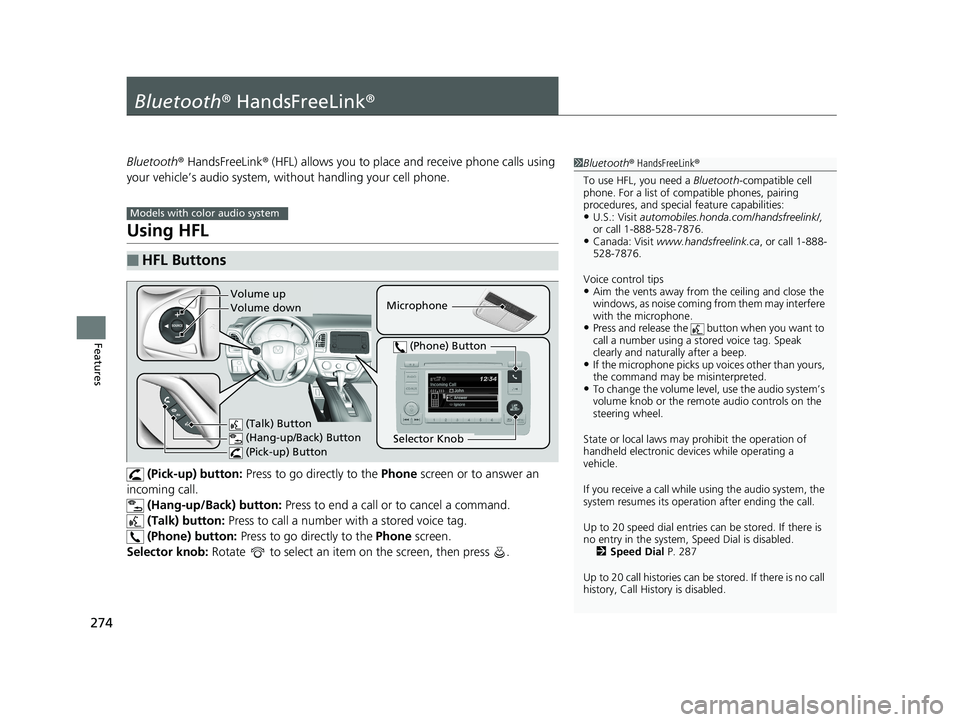
Bluetooth® HandsFreeLink ® (HFL) allows you to place and receive phone calls using
your vehicle’s audio system, without handling your cell phone.
Using HFL
(Pick-up) button: Press to go directly to the Phone screen or to answer an
incoming call. (Hang-up/Back) button: Press to end a call or to cancel a command.
(Talk) button: Press to call a number wi th a stored voice tag.
(Phone) button: Press to go directly to the Phone screen.
Selector knob: Rotate to select an item on the screen, then press .
■HFL Buttons
1 Bluetooth ® HandsFreeLink ®
To use HFL, you need a Bluetooth-compatible cell
phone. For a list of compatible phones, pairing
procedures, and special feature capabilities:
•U.S.: Visit automobiles.honda.com /handsfreelink/,
or call 1-888-528-7876.
•Canada: Visit www.handsfreelink.ca , or call 1-888-
528-7876.
Voice control tips
•Aim the vents away from the ceiling and close the
windows, as noise coming fr om them may interfere
with the microphone.
•Press and release the button when you want to
call a number using a st ored voice tag. Speak
clearly and naturally after a beep.
•If the microphone picks up vo ices other than yours,
the command may be misinterpreted.
•To change the volume level, use the audio system’s
volume knob or the remote audio controls on the
steering wheel.
State or local laws may pr ohibit the operation of
handheld electronic devices while operating a
vehicle.
If you receive a call while using the audio system, the
system resumes its operati on after ending the call.
Up to 20 speed dial entries can be stored. If there is
no entry in the system, Speed Dial is disabled. 2 Speed Dial P. 287
Up to 20 call histories can be stored. If there is no call
history, Call History is disabled.
Models with color audio system
Microphone
(Talk) Button
(Hang-up/Back) Button
(Pick-up) Button
Selector Knob
(Phone) Button
Volume up
Volume down
18 HR-V-31T7A6200.book 274 ページ 2017年6月30日 金曜日 午後1時23分
Page 289 of 503
Continued287
uuBluetooth ® HandsFreeLink ®u HFL Menus
Features
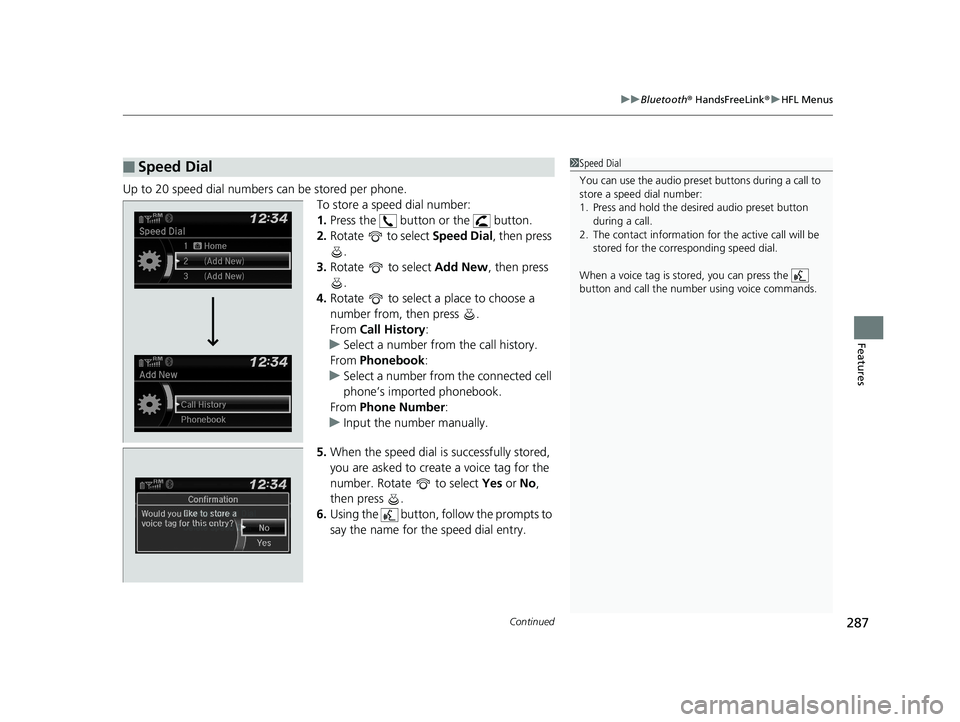
Up to 20 speed dial numbers can be stored per phone.
To store a speed dial number:
1.Press the button or the button.
2. Rotate to select Speed Dial, then press
.
3. Rotate to select Add New, then press
.
4. Rotate to select a place to choose a
number from, then press .
From Call History :
u Select a number from the call history.
From Phonebook :
u Select a number from the connected cell
phone’s imported phonebook.
From Phone Number:
u Input the number manually.
5. When the speed dial is successfully stored,
you are asked to create a voice tag for the
number. Rotate to select Yes or No,
then press .
6. Using the button, follow the prompts to
say the name for the speed dial entry.
■Speed Dial1Speed Dial
You can use the audio preset buttons during a call to
store a speed dial number:
1. Press and hold the desired audio preset button
during a call.
2. The contact information for the active call will be
stored for the corresponding speed dial.
When a voice tag is stored, you can press the
button and call the numbe r using voice commands.
Change Speed Dial
Delete Speed DialChaChaChaChahaChangengengengegenge Sp SpSpSpSpSpeedeedeedeedeedeed Dial
DelDelDelDleteeteetet SpSpSpSeedeedeedd DiDiDiDiDiDiDiDiDiDiiDiDiiDiilalaaaaalaa
18 HR-V-31T7A6200.book 287 ページ 2017年6月30日 金曜日 午後1時23分
Page 296 of 503
uuBluetooth ® HandsFreeLink ®u HFL Menus
294
Features
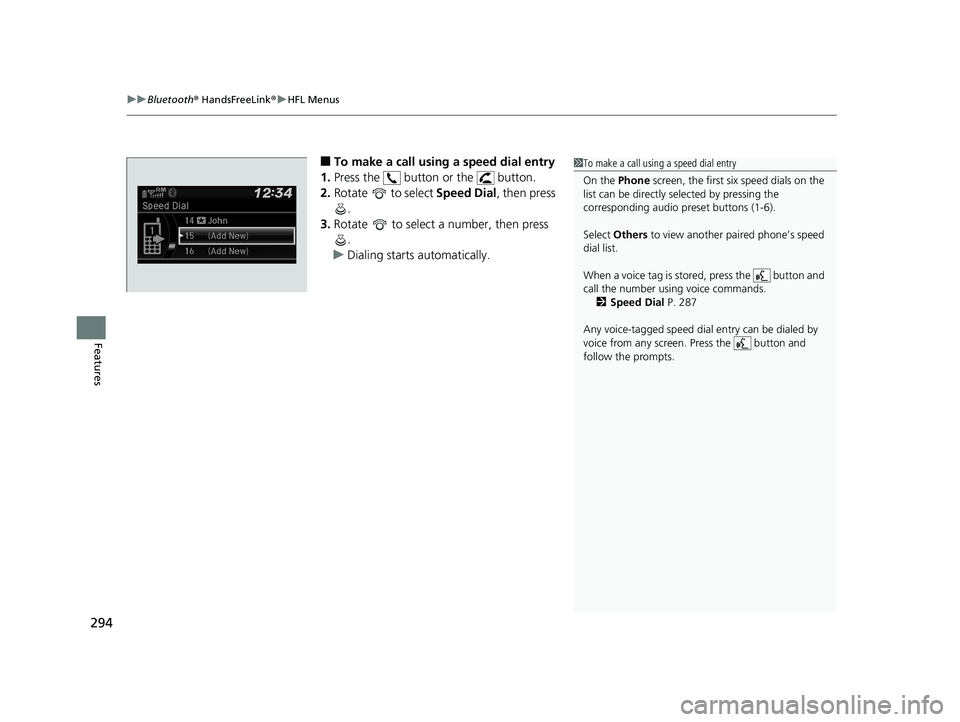
■To make a call using a speed dial entry
1. Press the button or the button.
2. Rotate to select Speed Dial, then press
.
3. Rotate to select a number, then press
.
u Dialing starts automatically.1To make a call using a speed dial entry
On the Phone screen, the first six speed dials on the
list can be directly selected by pressing the
corresponding audio preset buttons (1-6).
Select Others to view another paired phone’s speed
dial list.
When a voice tag is stored, press the button and
call the number using voice commands. 2 Speed Dial P. 287
Any voice-tagged speed dial entry can be dialed by
voice from any screen. Press the button and
follow the prompts.
18 HR-V-31T7A6200.book 294 ページ 2017年6月30日 金曜日 午後1時23分
Page 297 of 503
Continued295
uuBluetooth ® HandsFreeLink ®u HFL Menus
Features
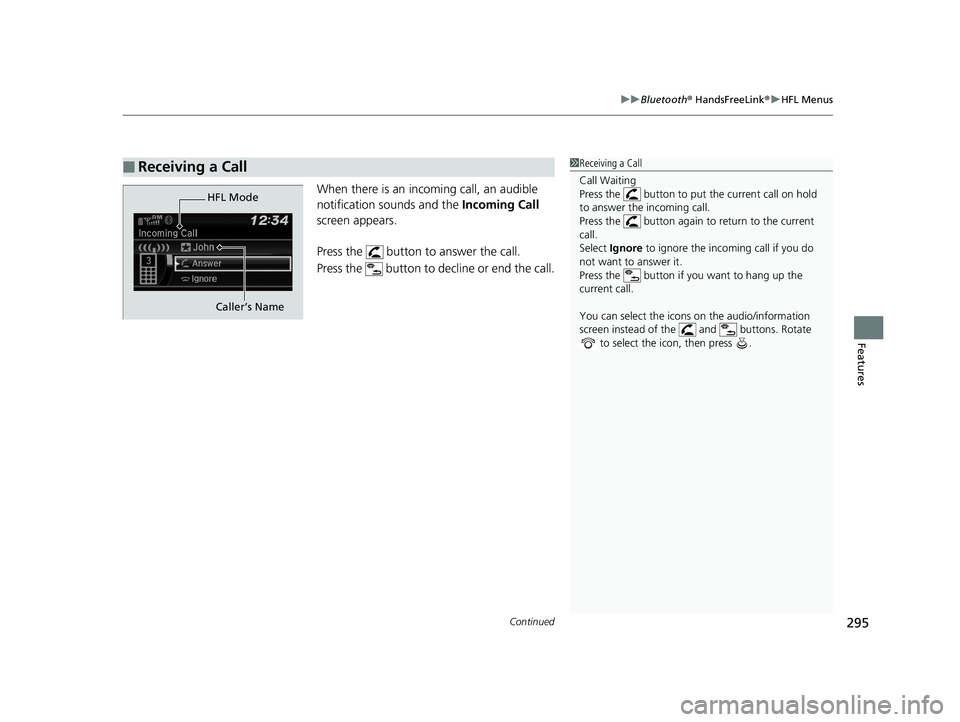
When there is an inco ming call, an audible
notification sounds and the Incoming Call
screen appears.
Press the button to answer the call.
Press the button to decline or end the call.
■Receiving a Call1 Receiving a Call
Call Waiting
Press the button to put the current call on hold
to answer the incoming call.
Press the button again to return to the current
call.
Select Ignore to ignore the incoming call if you do
not want to answer it.
Press the button if you want to hang up the
current call.
You can select the icons on the audio/information
screen instead of the and buttons. Rotate to select the icon, then press .
HFL Mode
Caller’s Name
18 HR-V-31T7A6200.book 295 ページ 2017年6月30日 金曜日 午後1時23分
Page 299 of 503
297Continued
Features
Bluetooth® HandsFreeLink ®
Bluetooth® HandsFreeLink ® (HFL) allows you to place and receive phone calls using
your vehicle’s audio system, without handling your cell phone.
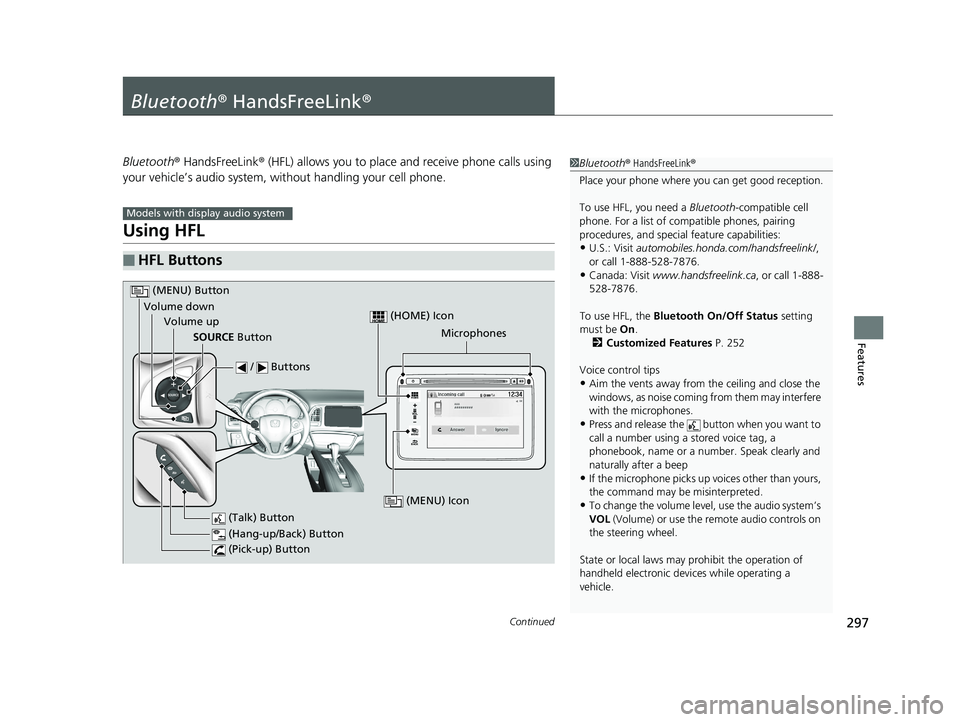
Using HFL
■HFL Buttons
1 Bluetooth ® HandsFreeLink ®
Place your phone where y ou can get good reception.
To use HFL, you need a Bluetooth-compatible cell
phone. For a list of compatible phones, pairing
procedures, and special feature capabilities:
•U.S.: Visit automobiles.honda.com /handsfreelink/,
or call 1-888-528-7876.
•Canada: Visit www.handsfreelink.ca , or call 1-888-
528-7876.
To use HFL, the Bluetooth On/Off Status setting
must be On .
2 Customized Features P. 252
Voice control tips
•Aim the vents away from the ceiling and close the
windows, as noise coming fr om them may interfere
with the microphones.
•Press and release the button when you want to
call a number using a stored voice tag, a
phonebook, name or a numbe r. Speak clearly and
naturally after a beep
•If the microphone picks up vo ices other than yours,
the command may be misinterpreted.
•To change the volume level, use the audio system’s
VOL (Volume) or use the remote audio controls on
the steering wheel.
State or local laws may pr ohibit the operation of
handheld electronic devi ces while operating a
vehicle.
Models with display audio system
VOL
HOME
MENU
BACK
Microphones
(Pick-up) Button
(Hang-up/Back) Button
Volume up (Talk) Button
(MENU) Button
Volume downSOURCE Button
/ Buttons
(MENU) Icon
(HOME) Icon
18 HR-V-31T7A6200.book 297 ページ 2017年6月30日 金曜日 午後1時23分
Page 319 of 503
Continued317
uuBluetooth ® HandsFreeLink ®u HFL Menus
Features
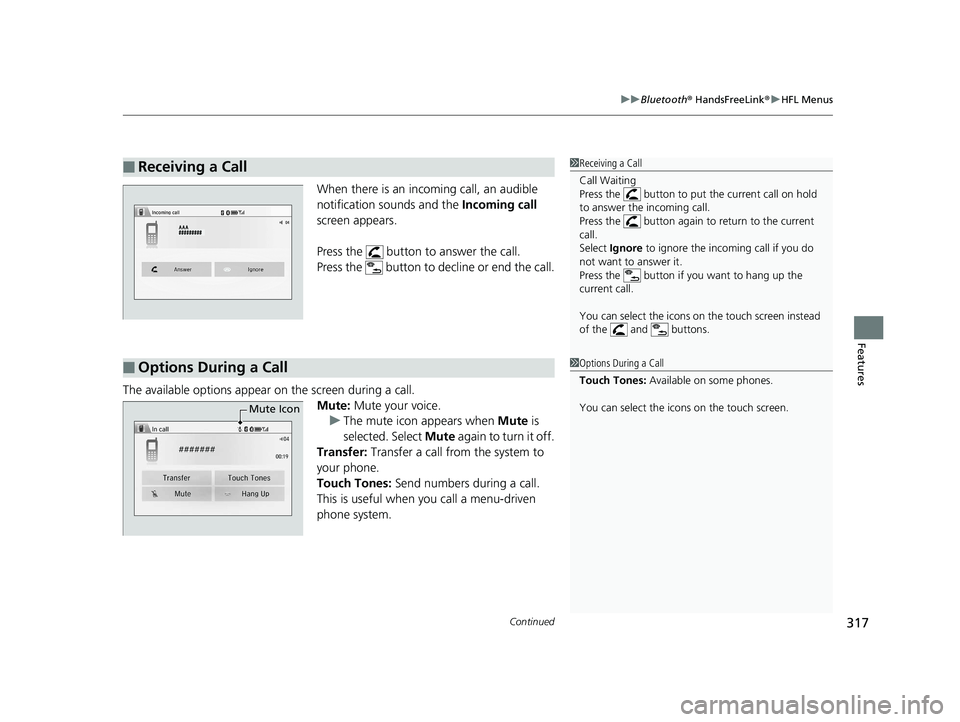
When there is an inco ming call, an audible
notification sounds and the Incoming call
screen appears.
Press the button to answer the call.
Press the button to decline or end the call.
The available options appear on the screen during a call.
Mute: Mute your voice.u The mute icon appears when Mute is
selected. Select Mute again to turn it off.
Transfer: Transfer a call from the system to
your phone.
Touch Tones: Send numbers during a call.
This is useful when you call a menu-driven
phone system.
■Receiving a Call1 Receiving a Call
Call Waiting
Press the button to put the current call on hold
to answer the incoming call.
Press the button again to return to the current
call.
Select Ignore to ignore the incoming call if you do
not want to answer it.
Press the button if you want to hang up the
current call.
You can select the icons on the touch screen instead
of the and buttons.
■Options During a Call1 Options During a Call
Touch Tones: Available on some phones.
You can select the icons on the touch screen.
Mute Icon
18 HR-V-31T7A6200.book 317 ページ 2017年6月30日 金曜日 午後1時23分