warning HONDA HR-V 2018 (in English) Owner's Guide
[x] Cancel search | Manufacturer: HONDA, Model Year: 2018, Model line: HR-V, Model: HONDA HR-V 2018Pages: 503, PDF Size: 32.79 MB
Page 87 of 503
85
uuIndicators u
Continued
Instrument Panel
*1:Models with the smart entry system have an ENGINE START/STOP button instead of an ignition switch.
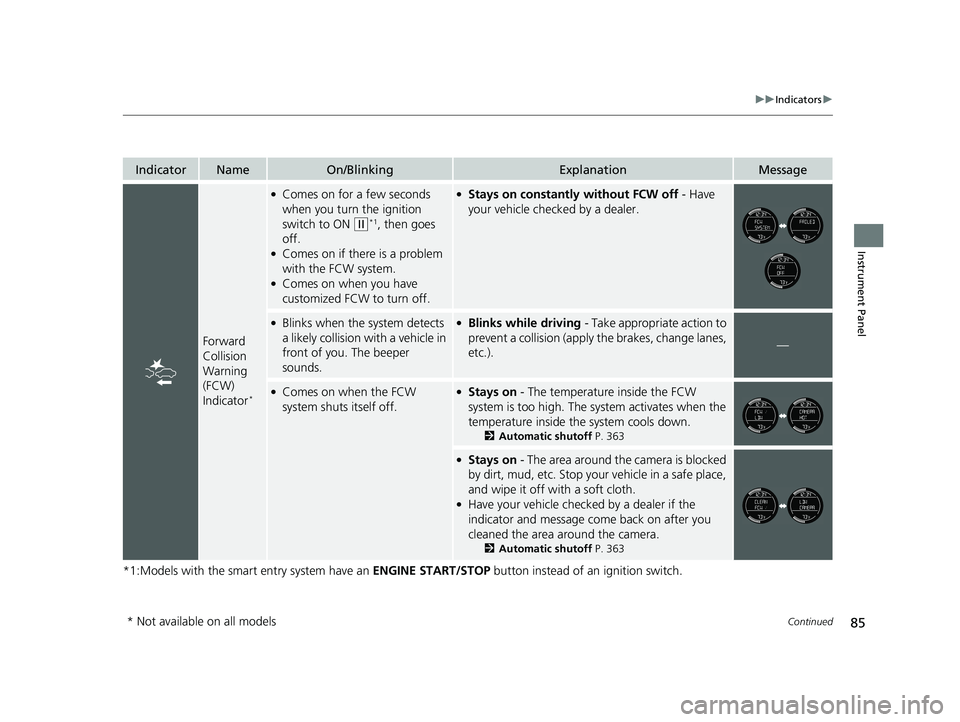
IndicatorNameOn/BlinkingExplanationMessage
Forward
Collision
Warning
(FCW)
Indicator
*
●Comes on for a few seconds
when you turn the ignition
switch to ON
(w*1, then goes
off.
●Comes on if there is a problem
with the FCW system.
●Comes on when you have
customized FCW to turn off.
●Stays on constantly without FCW off - Have
your vehicle checked by a dealer.
●Blinks when the system detects
a likely collision with a vehicle in
front of you. The beeper
sounds.●Blinks while driving - Take appropriate action to
prevent a collisio n (apply the brakes, change lanes,
etc.).
—
●Comes on when the FCW
system shuts itself off.●Stays on - The temperature inside the FCW
system is too high. The sy stem activates when the
temperature inside the system cools down.
2 Automatic shutoff P. 363
●Stays on - The area around the camera is blocked
by dirt, mud, etc. Stop your vehicle in a safe place,
and wipe it off with a soft cloth.
●Have your vehicle checked by a dealer if the
indicator and message come back on after you
cleaned the area around the camera.
2 Automatic shutoff P. 363
* Not available on all models
18 HR-V-31T7A6200.book 85 ページ 2017年6月30日 金曜日 午後1時23分
Page 88 of 503
86
uuIndicators u
Instrument Panel
*1:Models with the smart entry system have an ENGINE START/STOP button instead of an ignition switch.
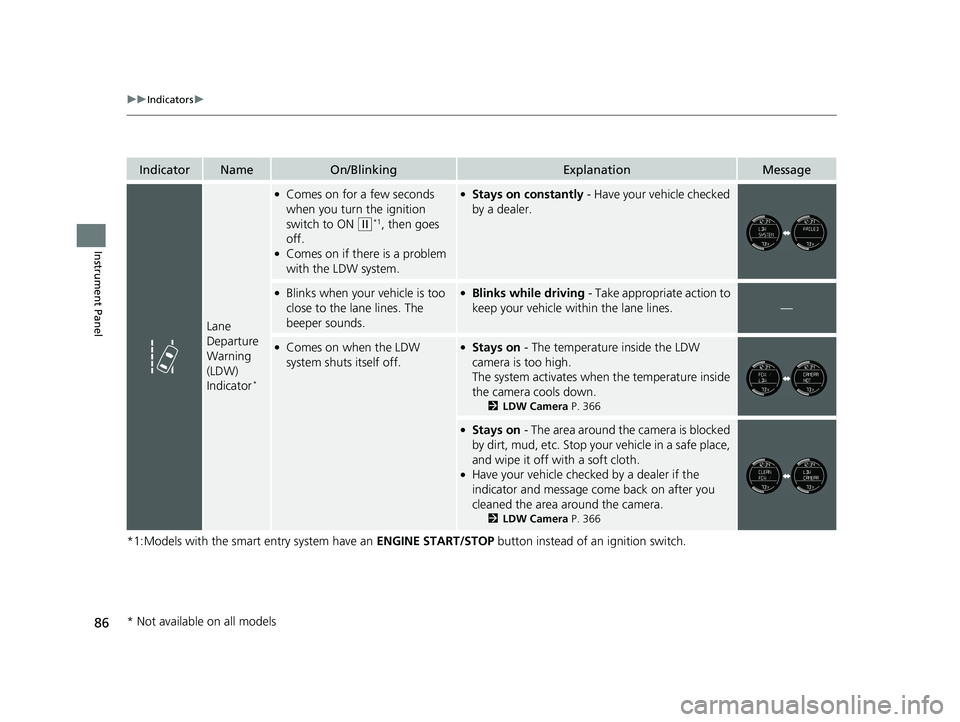
IndicatorNameOn/BlinkingExplanationMessage
Lane
Departure
Warning
(LDW)
Indicator
*
●Comes on for a few seconds
when you turn the ignition
switch to ON
(w*1, then goes
off.
●Comes on if there is a problem
with the LDW system.
●Stays on constantly - Have your vehicle checked
by a dealer.
●Blinks when your vehicle is too
close to the la ne lines. The
beeper sounds.●Blinks while driving - Take appropriate action to
keep your vehicle within the lane lines.
—
●Comes on when the LDW
system shuts itself off.●Stays on - The temperature inside the LDW
camera is too high.
The system activates when the temperature inside
the camera cools down.
2 LDW Camera P. 366
●Stays on - The area around the camera is blocked
by dirt, mud, etc. Stop your vehicle in a safe place,
and wipe it off with a soft cloth.
●Have your vehicle checked by a dealer if the
indicator and message come back on after you
cleaned the area around the camera.
2 LDW Camera P. 366
* Not available on all models
18 HR-V-31T7A6200.book 86 ページ 2017年6月30日 金曜日 午後1時23分
Page 89 of 503
87
uuIndicators uInformation Display Warning and Information Messages
Continued
Instrument Panel
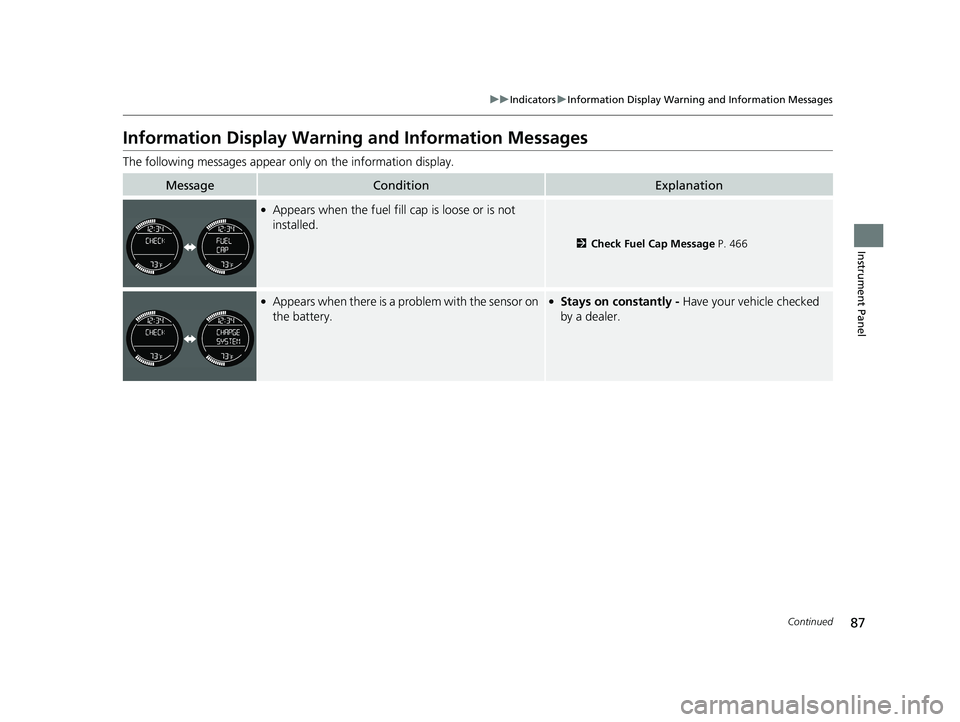
Information Display Warning and Information Messages
The following messages appear only on the information display.
MessageConditionExplanation
●Appears when the fuel fill cap is loose or is not
installed.
2Check Fuel Cap Message P. 466
●Appears when there is a problem with the sensor on
the battery.●Stays on constantly - Have your vehicle checked
by a dealer.
18 HR-V-31T7A6200.book 87 ページ 2017年6月30日 金曜日 午後1時23分
Page 90 of 503
88
uuIndicators uInformation Display Warning and Information Messages
Instrument Panel
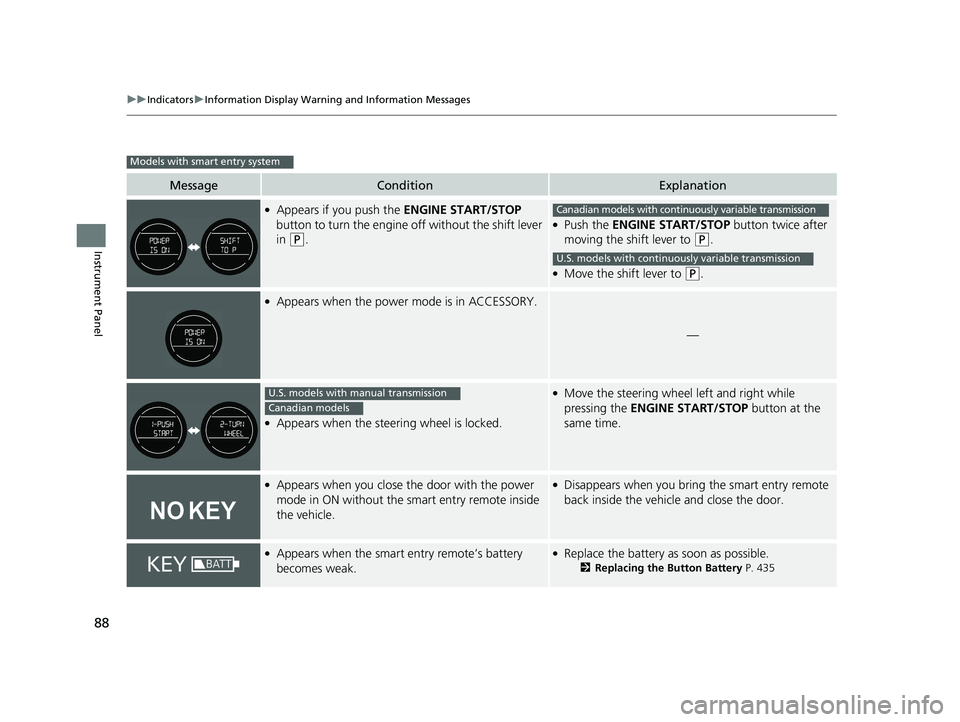
MessageConditionExplanation
●Appears if you push the ENGINE START/STOP
button to turn the engine off without the shift lever
in
(P.
●Push the ENGINE START/STOP button twice after
moving the shift lever to
(P.
●Move the shift lever to (P.
●Appears when the power mode is in ACCESSORY.
—
●Appears when the steering wheel is locked.
●Move the steering wheel left and right while
pressing the ENGINE START/STOP button at the
same time.
●Appears when you close the door with the power
mode in ON without the smart entry remote inside
the vehicle.●Disappears when you bring the smart entry remote
back inside the vehicle and close the door.
●Appears when the smart entry remote’s battery
becomes weak.●Replace the battery as soon as possible.
2 Replacing the Button Battery P. 435
Models with smart entry system
Canadian models with continuously variable transmission
U.S. models with continuously variable transmission
U.S. models with manual transmission
Canadian models
18 HR-V-31T7A6200.book 88 ページ 2017年6月30日 金曜日 午後1時23分
Page 91 of 503
89
uuIndicators uInformation Display Warning and Information Messages
Instrument Panel
MessageConditionExplanation
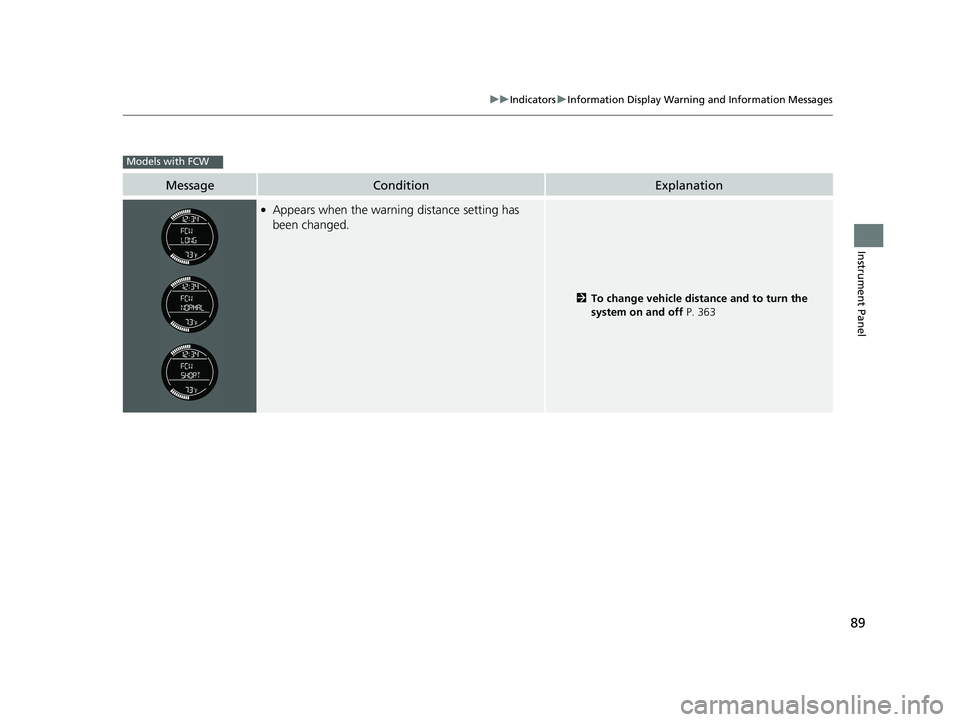
●Appears when the warning distance setting has
been changed.
2 To change vehicle distance and to turn the
system on and off P. 363
Models with FCW
18 HR-V-31T7A6200.book 89 ページ 2017年6月30日 金曜日 午後1時23分
Page 117 of 503
115
Controls
Opening and Closing the Tailgate
Precautions for Opening/Closing the Tailgate
Always make sure individuals and objects are clear of the tailgate before opening or
closing it.
■Opening the tailgate
• Open the tailgate all the way.
u If it is not fully opened, the tailgate may begin to close under its own weight.
• Be careful when it is windy. The wi nd may cause the tailgate to close.
■Closing the tailgate
Keep the tailgate closed while driving to: u Avoid possible damage.
u Prevent exhaust gas from leaking into the vehicle.
2 Carbon Monoxide Gas P. 70
1Precautions for Opening/Closing the Tailgate
Be careful not to hit your head on the tailgate or to
put your hands between th e tailgate and the cargo
area when closing the tailgate.
When you are storing or pi cking up luggage from the
cargo area while the engine is idling, do not stand in
front of the exhaust pipe. You may get burned.
Do not allow any passenger in the cargo space. They
may get hurt during hard braking, a sudden
acceleration, or a crash.
3WARNING
Anyone caught in the path of a tailgate
that is being opened or closed can be
seriously injured.
Make sure that all people are clear of the
tailgate before opening or closing it.
18 HR-V-31T7A6200.book 115 ページ 2017年6月30日 金曜日 午後1時23分
Page 123 of 503
121Continued
Controls
Opening and Closing the Windows
Opening/Closing the Power Windows
The power windows can be opened and clos ed when the ignition switch is in ON
(w*1, using the switches on the doors. The driver’s side switches can be used to
open and close all of the windows.
The power window lock button on the driver’s side must be switched off (not
pushed in, indicator off) to open and cl ose the windows from anywhere other than
the driver’s seat.
When the power window lock button is pushed in, the indicator comes on and you
can only operate the driver’s window. Turn the power window lock button on if a
child is in the vehicle.
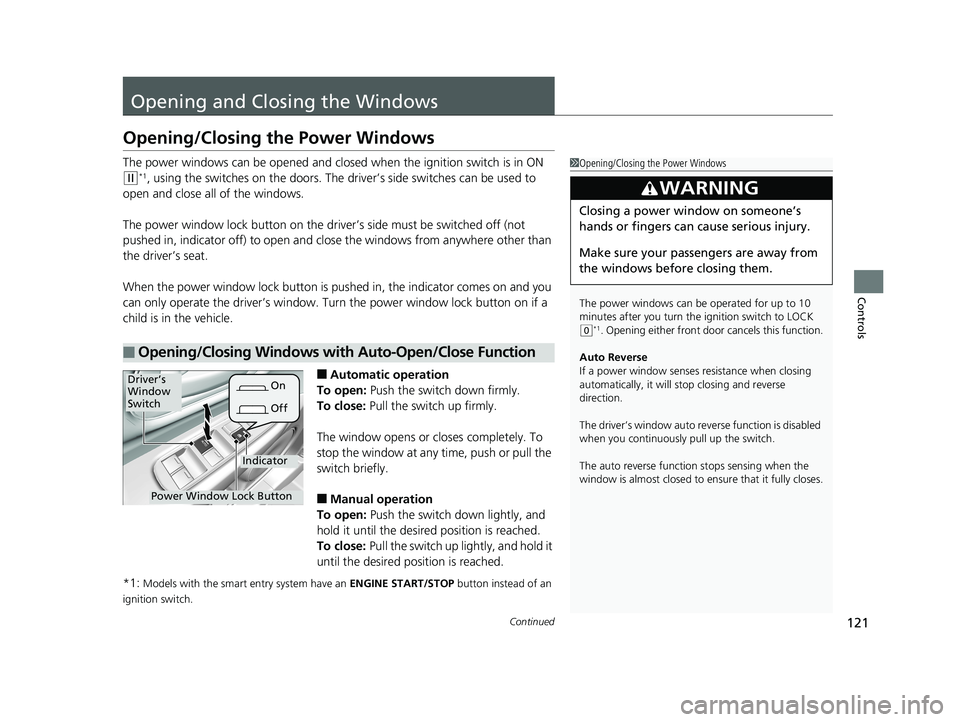
■Automatic operation
To open: Push the switch down firmly.
To close: Pull the switch up firmly.
The window opens or closes completely. To
stop the window at any time, push or pull the
switch briefly.
■Manual operation
To open: Push the switch down lightly, and
hold it until the desired position is reached.
To close: Pull the switch up lightly, and hold it
until the desired position is reached.
*1:
Models with the smart entry system have an ENGINE START/STOP button instead of an
ignition switch.
■Opening/Closing Windows with Auto-Open/Close Function
1 Opening/Closing the Power Windows
The power windows can be operated for up to 10
minutes after you turn the ignition switch to LOCK
( 0*1. Opening either front door cancels this function.
Auto Reverse
If a power window senses resistance when closing
automatically, it will stop closing and reverse
direction.
The driver’s window auto re verse function is disabled
when you continuously pull up the switch.
The auto reverse function stops sensing when the
window is almost closed to en sure that it fully closes.
3WARNING
Closing a power window on someone’s
hands or fingers can cause serious injury.
Make sure your passengers are away from
the windows before closing them.
Power Window Lock Button
Driver’s
Window
Switch
OffOn
Indicator
18 HR-V-31T7A6200.book 121 ページ 2017年6月30日 金曜日 午後1時23分
Page 125 of 503
123
Controls
Opening and Closing the Moonroof*
You can only operate the moonroof when the power mode is in ON. Use the switch
in the front of the ceiling to open and close the moonroof.
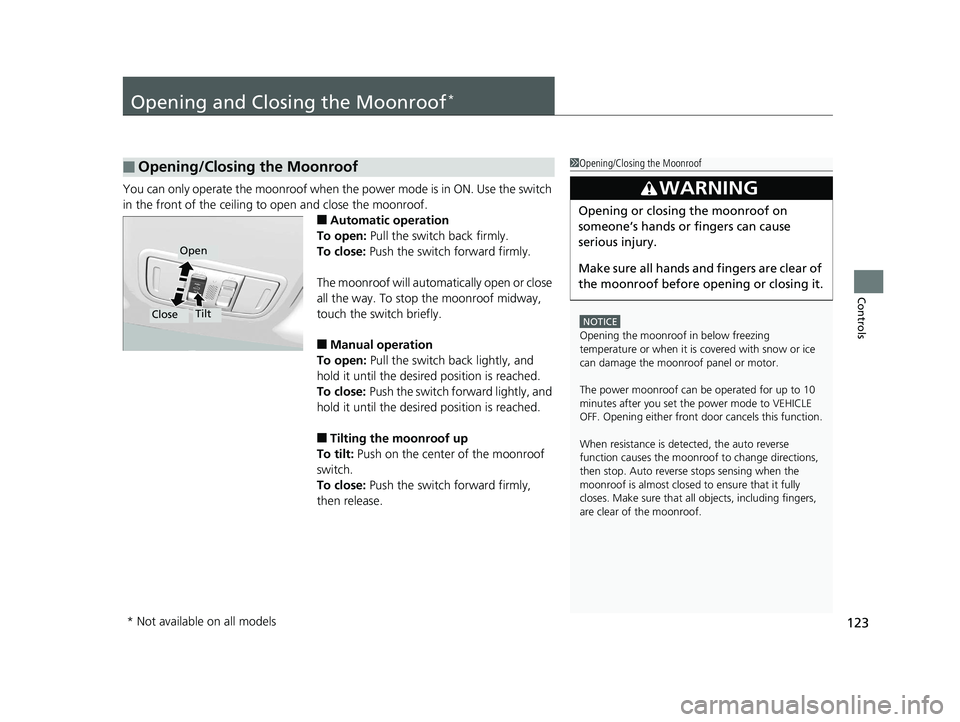
■Automatic operation
To open: Pull the switch back firmly.
To close: Push the switch forward firmly.
The moonroof will automatically open or close
all the way. To stop the moonroof midway,
touch the switch briefly.
■Manual operation
To open: Pull the switch back lightly, and
hold it until the desired position is reached.
To close: Push the switch fo rward lightly, and
hold it until the desired position is reached.
■Tilting the moonroof up
To tilt: Push on the center of the moonroof
switch.
To close: Push the switch forward firmly,
then release.
■Opening/Closing the Moonroof1 Opening/Closing the Moonroof
NOTICE
Opening the moonroof in below freezing
temperature or when it is covered with snow or ice
can damage the moonroof panel or motor.
The power moonroof can be operated for up to 10
minutes after you set the power mode to VEHICLE
OFF. Opening either front door cancels this function.
When resistance is detected, the auto reverse
function causes the moonroof to change directions,
then stop. Auto reverse stops sensing when the
moonroof is almost closed to ensure that it fully
closes. Make sure that all objects, including fingers,
are clear of the moonroof.
3WARNING
Opening or closing the moonroof on
someone’s hands or fingers can cause
serious injury.
Make sure all hands and fingers are clear of
the moonroof before opening or closing it.
Open
CloseTilt
* Not available on all models
18 HR-V-31T7A6200.book 123 ページ 2017年6月30日 金曜日 午後1時23分
Page 126 of 503
124
Controls
Operating the Switches Around the Steering Wheel
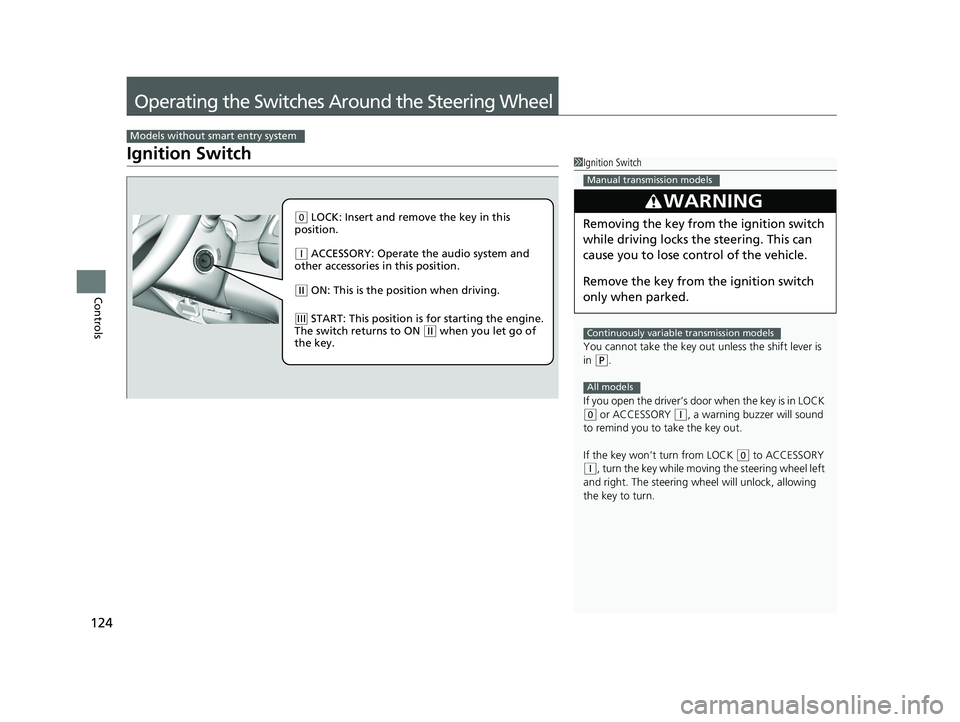
Ignition Switch
Models without smart entry system
1Ignition Switch
You cannot take the key out unless the shift lever is
in
( P.
If you open the driver’s door when the key is in LOCK
(0 or ACCESSORY ( q, a warning buzzer will sound
to remind you to take the key out.
If the key won’t turn from LOCK
( 0 to ACCESSORY
(q, turn the key while moving the steering wheel left
and right. The steering wh eel will unlock, allowing
the key to turn.
3WARNING
Removing the key from the ignition switch
while driving locks the steering. This can
cause you to lose control of the vehicle.
Remove the key from the ignition switch
only when parked.
Manual transmission models
Continuously variable transmission models
All models
( 0 LOCK: Insert and remove the key in this
position.
( q ACCESSORY: Operate the audio system and
other accessories in this position.
( w ON: This is the position when driving.
(e START: This position is for starting the engine.
The switch returns to ON ( w when you let go of
the key.
18 HR-V-31T7A6200.book 124 ページ 2017年6月30日 金曜日 午後1時23分
Page 129 of 503
127
uuOperating the Switches Around the Steering Wheel uENGINE START/STOP Button
Controls
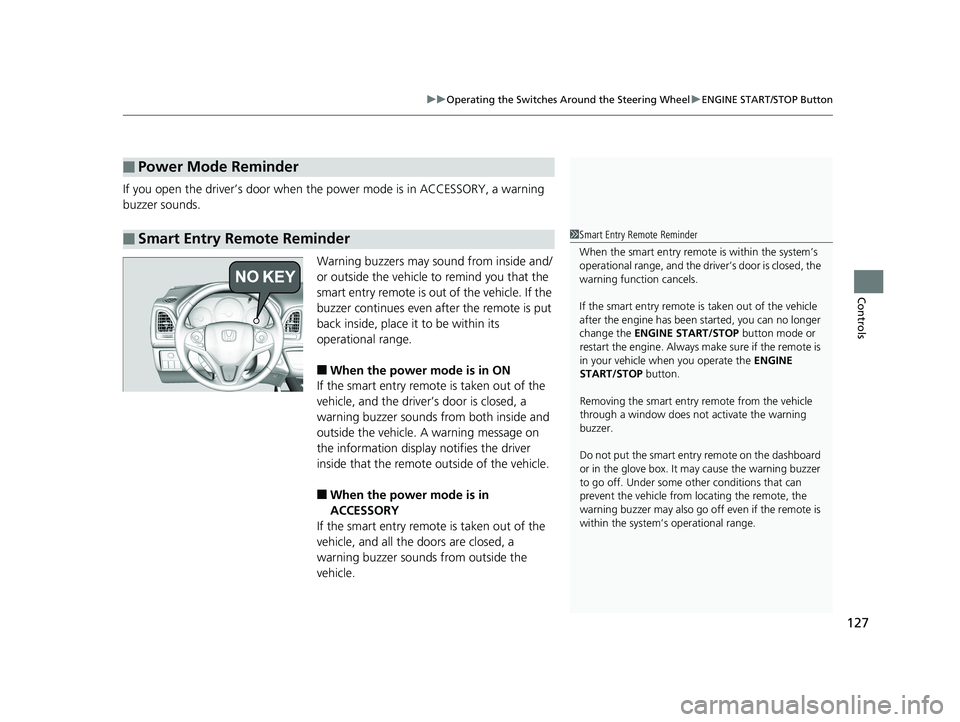
If you open the driver’s door when the power mode is in ACCESSORY, a warning
buzzer sounds.
Warning buzzers may sound from inside and/
or outside the vehicle to remind you that the
smart entry remote is out of the vehicle. If the
buzzer continues even after the remote is put
back inside, place it to be within its
operational range.
■When the power mode is in ON
If the smart entry remote is taken out of the
vehicle, and the driver’s door is closed, a
warning buzzer sounds from both inside and
outside the vehicle. A warning message on
the information display notifies the driver
inside that the remote outside of the vehicle.
■When the power mode is in
ACCESSORY
If the smart entry remote is taken out of the
vehicle, and all the doors are closed, a
warning buzzer sounds from outside the
vehicle.
■Power Mode Reminder
■Smart Entry Remote Reminder1 Smart Entry Remote Reminder
When the smart entry remote is within the system’s
operational range, and the driv er’s door is closed, the
warning function cancels.
If the smart entry remote is taken out of the vehicle
after the engine has been started, you can no longer
change the ENGINE START/STOP button mode or
restart the engine. Always make sure if the remote is
in your vehicle when you operate the ENGINE
START/STOP button.
Removing the smart entry remote from the vehicle
through a window does not activate the warning
buzzer.
Do not put the smart entr y remote on the dashboard
or in the glove box. It may cause the warning buzzer
to go off. Under some other conditions that can
prevent the vehicle from locating the remote, the
warning buzzer may al so go off even if the remote is
within the system’s operational range.
18 HR-V-31T7A6200.book 127 ページ 2017年6月30日 金曜日 午後1時23分