ad blue HONDA HR-V 2018 Owner's Manual (in English)
[x] Cancel search | Manufacturer: HONDA, Model Year: 2018, Model line: HR-V, Model: HONDA HR-V 2018Pages: 503, PDF Size: 32.79 MB
Page 4 of 503
Contents
This owner’s manual should be considered a permanent part of the
vehicle and should remain with the vehicle when it is sold.
This owner’s manual covers all models of your vehicle. You may find
descriptions of equipment and features that are not on your
particular model.
Images throughout this owner’s manual (including the front cover)
represent features and equipment that are available on some, but
not all, models. Your particular mo del may not have some of these
features.
This owner’s manual is for vehicles sold in the United States and
Canada.
The information and specifications in cluded in this publication were
in effect at the time of approval for printing. Honda Motor Co., Ltd.
reserves the right, however, to discontinue or change specifications
or design at any time without notice and without incurring any
obligation.2 Safe Driving P. 29
For Safe Driving P. 30 Seat Belts P. 35 Airbags P. 44
2Instrument Panel P. 73
Indicators P. 74 Gauges and Displays P. 90
2Controls P. 95
Clock P. 96 Locking and Unlocking the Doors P. 98
Opening and Closing the Windows P. 121
Operating the Switches Around the Steering Wheel P. 124
Interior Lights/Interior Convenience Items P. 152
2 Features P. 177
Audio System P. 178 Audio System Basic Operation P. 184, 205
Customized Features P. 252 Bluetooth® HandsFreeLink ® P. 274, 297
2 Driving P. 327
Before Driving P. 328 Towing a Trailer P. 333
Parking Your Vehicle P. 385 Multi-View Rear Camera P. 386
2Maintenance P. 391
Before Performing Maintenance P. 392 Maintenance MinderTM P. 395
Checking and Maintaining Wiper Blades P. 419
Heating and Cooling System
*/Climate Control System* Maintenance P. 437
2 Handling the Unexpected P. 445
Tools P. 446 If a Tire Goes Flat P. 448
Overheating P. 463 Indicator, Coming On/Blinking P. 465 Fuses P. 470
2 Information P. 479
Specifications P. 480 Identification Numbers P. 482
Emissions Testing P. 485 Warranty Coverages P. 487
18 HR-V-31T7A6200.book 2 ページ 2017年6月30日 金曜日 午後1時23分
Page 7 of 503
5
Quick Reference Guide
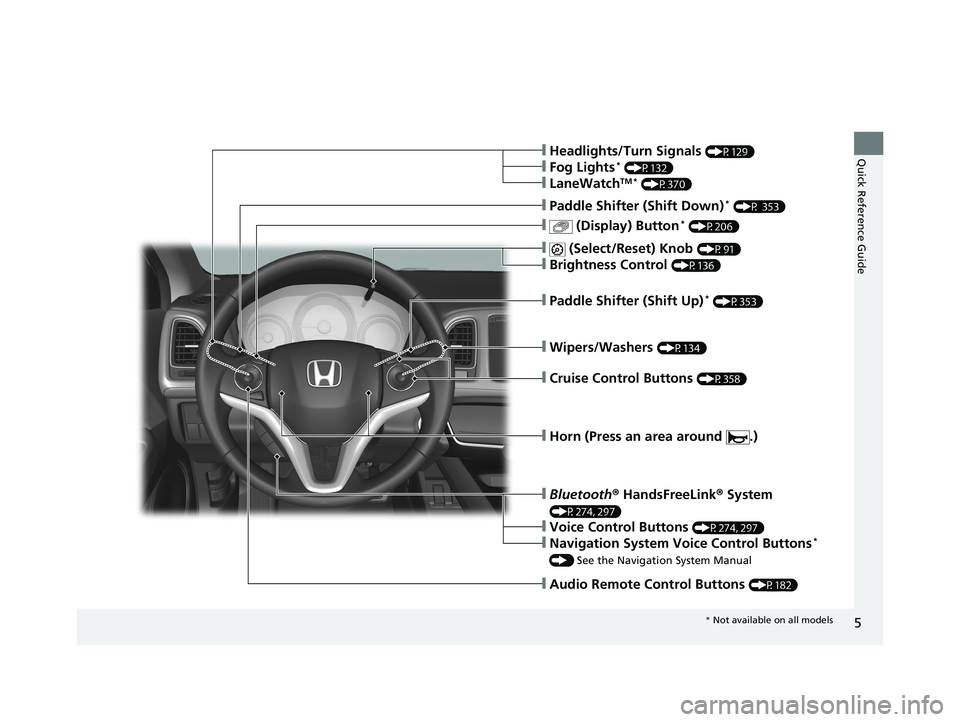
❙Wipers/Washers (P134)
❙Paddle Shifter (Shift Up)* (P353)
❙ (Display) Button* (P206)
❙Paddle Shifter (Shift Down)* (P 353)
❙Audio Remote Control Buttons (P182)
❙Headlights/Turn Signals (P129)
❙Fog Lights* (P132)
❙LaneWatchTM * (P370)
❙ (Select/Reset) Knob (P91)
❙Brightness Control (P136)
❙Cruise Control Buttons (P358)
❙Horn (Press an area around .)
❙Bluetooth® HandsFreeLink ® System
(P274, 297)
❙Voice Control Buttons (P274, 297)
❙Navigation System Voice Control Buttons*
() See the Navigation System Manual
* Not available on all models
18 HR-V-31T7A6200.book 5 ページ 2017年6月30日 金曜日 午後1時23分
Page 11 of 503
9
Quick Reference Guide
Eco Assist® System
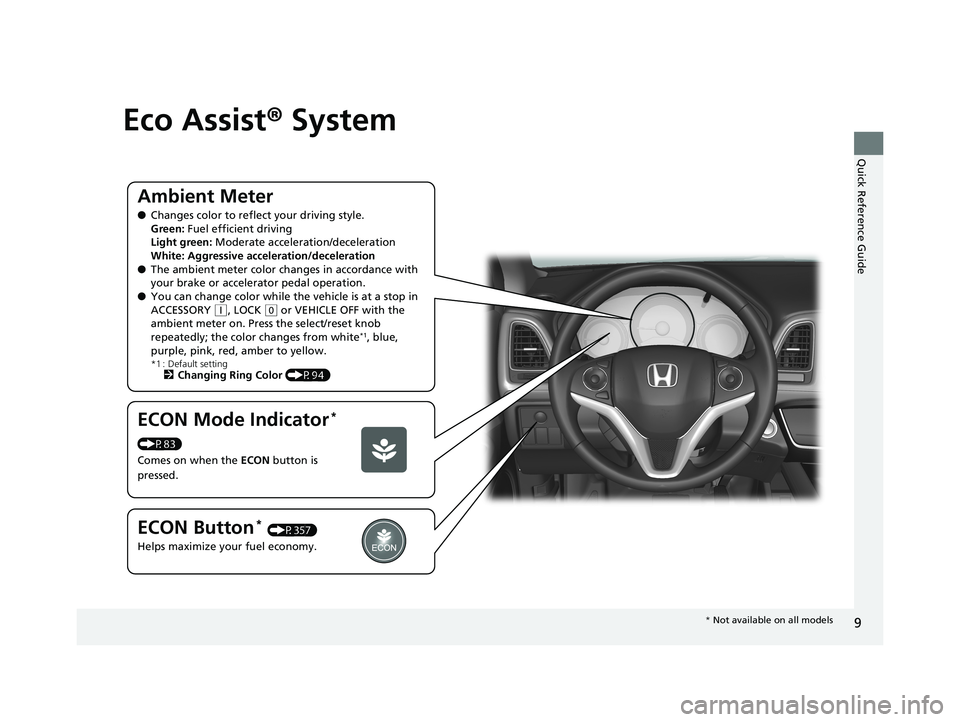
Ambient Meter
●Changes color to reflec t your driving style.
Green: Fuel efficient driving
Light green: Moderate acceleration/deceleration
White: Aggressive acceleration/deceleration
● The ambient meter color changes in accordance with
your brake or accelerator pedal operation.
● You can change color while the vehicle is at a stop in
ACCESSORY
(q, LOCK (0 or VEHICLE OFF with the
ambient meter on. Press the select/reset knob
repeatedly; the color changes from white
*1, blue,
purple, pink, red, amber to yellow.
*1 : Default setting2 Changing Ring Color (P94)
ECON Mode Indicator*
(P83)
Comes on when the ECON button is
pressed.
ECON Button* (P357)
Helps maximize your fuel economy.
* Not available on all models
18 HR-V-31T7A6200.book 9 ページ 2017年6月30日 金曜日 午後1時23分
Page 13 of 503
11
Quick Reference Guide
Instrument Panel (P73)
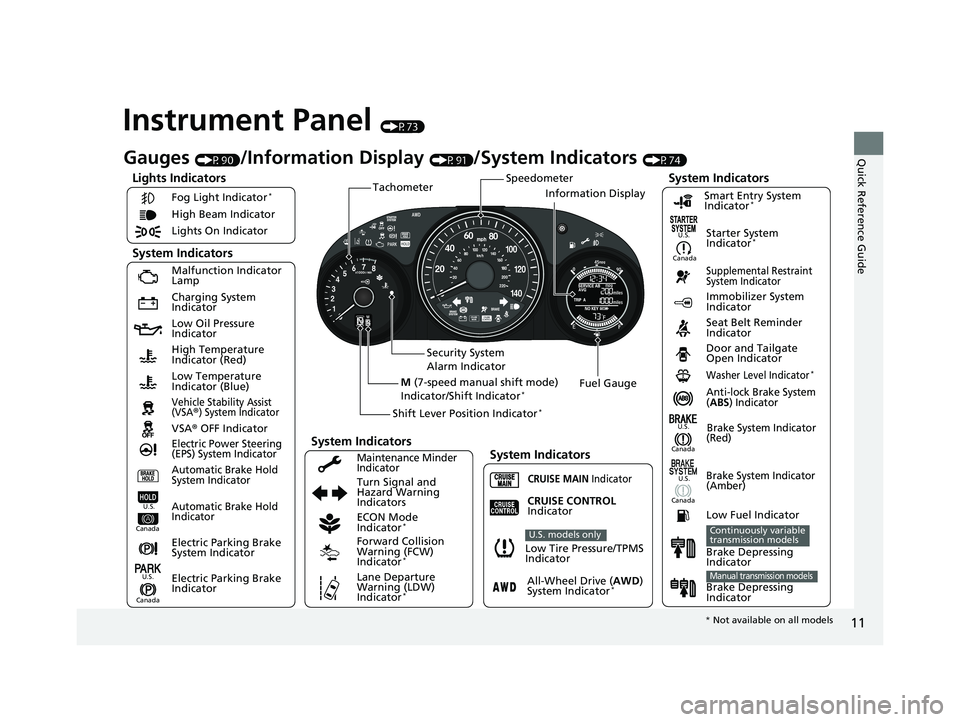
Lights Indicators
Malfunction Indicator
Lamp
Low Oil Pressure
Indicator
Anti-lock Brake System
(ABS) IndicatorVehicle Stability Assist
(VSA®) System Indicator
VSA® OFF Indicator
Electric Power Steering
(EPS) System Indicator
Lights On Indicator High Beam Indicator
Immobilizer System
Indicator
Seat Belt Reminder
Indicator
System Indicators
CRUISE MAIN IndicatorSupplemental Restraint
System Indicator
Starter System
Indicator*
Door and Tailgate
Open Indicator
Tachometer
Speedometer
Fuel Gauge
Security System
Alarm Indicator
Shift Lever Position Indicator
*
Low Fuel Indicator
Gauges (P90)/Information Display (P91)/System Indicators (P74)
Turn Signal and
Hazard Warning
Indicators
High Temperature
Indicator (Red)
Low Temperature
Indicator (Blue)
System Indicators
System Indicators
Low Tire Pressure/TPMS
Indicator
U.S. models only
Brake System Indicator
(Red)
CRUISE CONTROL
Indicator
System Indicators
Charging System
Indicator
U.S. U.S.
Canada
Smart Entry System
Indicator*
Washer Level Indicator*
ECON Mode
Indicator*
Maintenance Minder
Indicator
Fog Light Indicator*
Canada
Brake System Indicator
(Amber)
Canada U.S.
M
(7-speed manual shift mode)
Indicator/Shift Indicator*
Information Display
Automatic Brake Hold
System Indicator
Automatic Brake Hold
IndicatorU.S.
Canada
Electric Parking Brake
System Indicator
Electric Parking Brake
IndicatorU.S.
Canada
All-Wheel Drive ( AWD)
System Indicator*
Forward Collision
Warning (FCW)
Indicator
*
Lane Departure
Warning (LDW)
Indicator
*
Brake Depressing
Indicator
Continuously variable
transmission models
Brake Depressing
IndicatorManual transmission models
* Not available on all models
18 HR-V-31T7A6200.book 11 ページ 2017年6月30日 金曜日 午後1時23分
Page 21 of 503
19
Quick Reference Guide
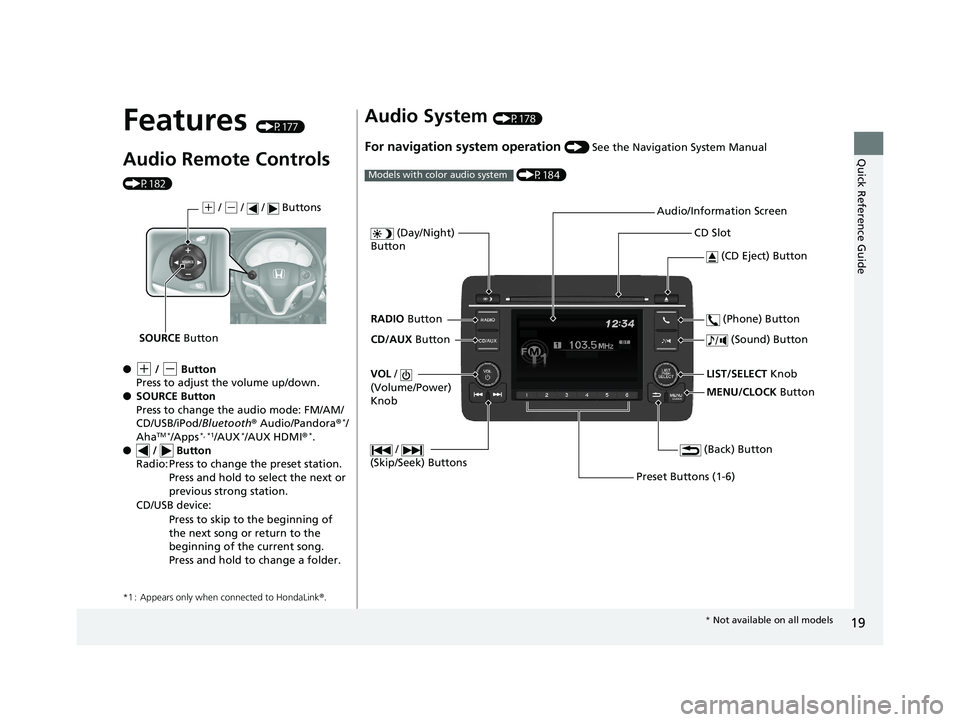
Features (P177)
Audio Remote Controls
(P182)
●
(+ / (- Button
Press to adjust the volume up/down.
● SOURCE Button
Press to change the audio mode: FM/AM/
CD/USB/iPod/ Bluetooth® Audio/Pandora ®
*/
AhaTM */Apps*, *1/AUX*/AUX HDMI ®*.
● / Button
*1 : Appears only when connected to HondaLink ®.
Radio: Press to change the preset station.
Press and hold to select the next or
previous strong station.
CD/USB device: Press to skip to the beginning of
the next song or return to the
beginning of the current song.
Press and hold to change a folder.
(+ / (- / / Buttons
SOURCE Button
Audio System (P178)
For navigation system operation () See the Navigation System Manual
(P184)
Models with color audio system
MENU/CLOCK Button
LIST/SELECT Knob
(Day/Night)
Button
(Back) Button
(Sound) Button
VOL /
(Volume/Power)
Knob
CD Slot
(CD Eject) Button
Preset Buttons (1-6) (Phone) Button
RADIO
Button
/
(Skip/Seek) Buttons
CD/AUX Button Audio/Information Screen
*
Not available on all models
18 HR-V-31T7A6200.book 19 ページ 2017年6月30日 金曜日 午後1時23分
Page 81 of 503
79
uuIndicators u
Continued
Instrument Panel
*1:Models with the smart entry system have an ENGINE START/STOP button instead of an ignition switch.
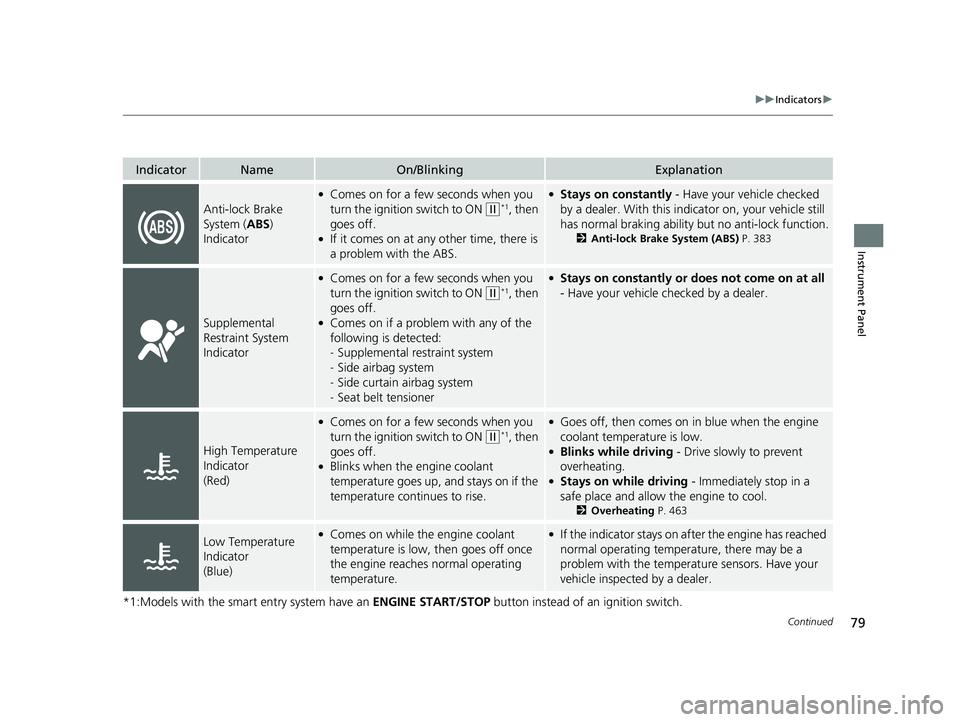
IndicatorNameOn/BlinkingExplanation
Anti-lock Brake
System (ABS)
Indicator
●Comes on for a few seconds when you
turn the ignition switch to ON
(w*1, then
goes off.
●If it comes on at any other time, there is
a problem with the ABS.
●Stays on constantly - Have your vehicle checked
by a dealer. With this indicator on, your vehicle still
has normal braking ability but no anti-lock function.
2 Anti-lock Brake System (ABS) P. 383
Supplemental
Restraint System
Indicator
●Comes on for a few seconds when you
turn the ignition switch to ON
(w*1, then
goes off.
●Comes on if a problem with any of the
following is detected:
- Supplemental restraint system
- Side airbag system
- Side curtain airbag system
- Seat belt tensioner
●Stays on constantly or does not come on at all
- Have your vehicle checked by a dealer.
High Temperature
Indicator
(Red)
●Comes on for a few seconds when you
turn the ignition switch to ON
(w*1, then
goes off.
●Blinks when the engine coolant
temperature goes up, and stays on if the
temperature continues to rise.
●Goes off, then comes on in blue when the engine
coolant temperature is low.
●Blinks while driving - Drive slowly to prevent
overheating.
●Stays on while driving - Immediately stop in a
safe place and allow the engine to cool.
2 Overheating P. 463
Low Temperature
Indicator
(Blue)●Comes on while the engine coolant
temperature is low, then goes off once
the engine reaches normal operating
temperature.●If the indicator stays on after the engine has reached
normal operating temperature, there may be a
problem with the temperature sensors. Have your
vehicle inspected by a dealer.
18 HR-V-31T7A6200.book 79 ページ 2017年6月30日 金曜日 午後1時23分
Page 96 of 503
94
uuGauges and Displays uInformation Display
Instrument Panel
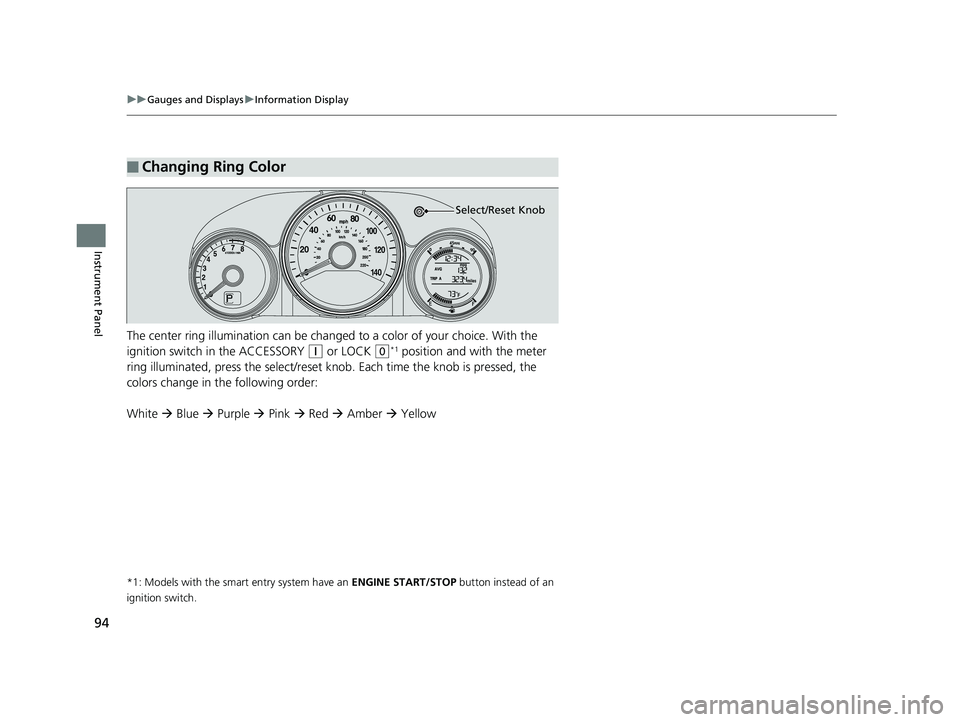
The center ring illumination can be changed to a color of your choice. With the
ignition switch in the ACCESSORY
(q or LOCK (0*1 position and with the meter
ring illuminated, press the select/reset knob. Each time the knob is pressed, the
colors change in the following order:
White Blue Purple Pink Red Amber Yellow
*1: Models with the smart entry system have an ENGINE START/STOP button instead of an
ignition switch.
■Changing Ring Color
Select/Reset Knob
18 HR-V-31T7A6200.book 94 ページ 2017年6月30日 金曜日 午後1時23分
Page 179 of 503
177
Features
This chapter describes how to operate technology features.
Audio SystemAbout Your Audio System .................... 178
USB Port(s) ........................................... 179
HDMI ® Port
*........................................ 180
Auxiliary Input Jack*............................. 180
Audio System Theft Protection ............. 181
Audio Remote Controls ........................ 182
Audio System Basic Operation ............. 184
Audio/Information Screen .................... 185
Adjusting the Sound ............................ 189
Display Setup ....................................... 190
Playing AM/FM Radio ........................... 191
Playing a CD ........................................ 193
Playing an iPod..................................... 196
Models with color audio system
Playing a USB Flash Drive ..................... 199
Playing Bluetooth ® Audio..................... 202
Audio System Basic Operation ............ 205
Audio/Information Screen .................... 206
Adjusting the Sound ............................ 211
Display Setup ....................................... 212
Playing AM/FM Radio........................... 213
Playing a CD ........................................ 216
Playing an iPod .................................... 219
Playing Internet Radio .......................... 222
Playing a USB Flash Drive ..................... 224
Playing Bluetooth ® Audio..................... 227
Playing a Video Using the HDMI ®......... 229
Smartphone Apps ................................ 231
Models with display audio system
Siri ® Eyes Free ....................................... 232
Audio Error Messages ........................... 233
General Information on the Audio
System ............................................. 237
Customized Features ............................. 252
Bluetooth ® HandsFreeLink ®.................. 274
Bluetooth ® HandsFreeLink ®.................. 297Models with color audio system
Models with display audio system
* Not available on all models
18 HR-V-31T7A6200.book 177 ページ 2017年6月30日 金曜日 午後1時23分
Page 180 of 503
178
Features
Audio System
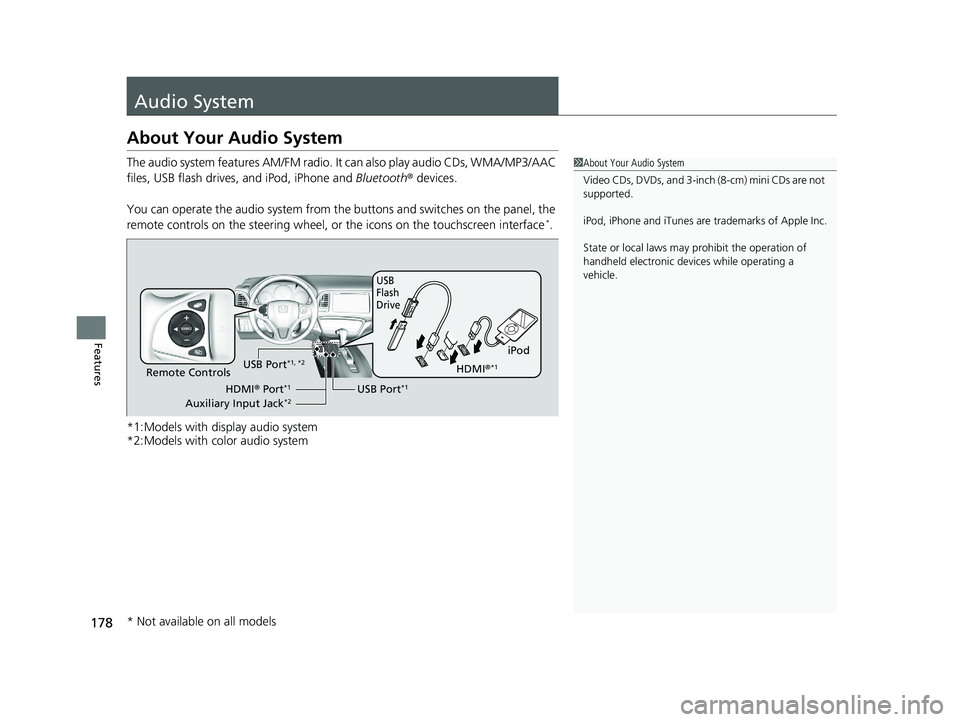
About Your Audio System
The audio system features AM/FM radio. It can also play audio CDs, WMA/MP3/AAC
files, USB flash drives, and iPod, iPhone and Bluetooth® devices.
You can operate the audio system from the buttons and switches on the panel, the
remote controls on the steering wheel, or the icons on the touchscreen interface
*.
*1:Models with display audio system
*2:Models with color audio system
1 About Your Audio System
Video CDs, DVDs, and 3-inch (8-cm) mini CDs are not
supported.
iPod, iPhone and iTunes are trademarks of Apple Inc.
State or local laws may pr ohibit the operation of
handheld electronic devices while operating a
vehicle.
iPod
USB
Flash
Drive
USB Port*1Remote Controls
HDMI® Port*1
Auxiliary Input Jack*2
USB Port*1, *2HDMI ®*1
* Not available on all models
18 HR-V-31T7A6200.book 178 ページ 2017年6月30日 金曜日 午後1時23分
Page 184 of 503
182
uuAudio System uAudio Remote Controls
Features
Audio Remote Controls
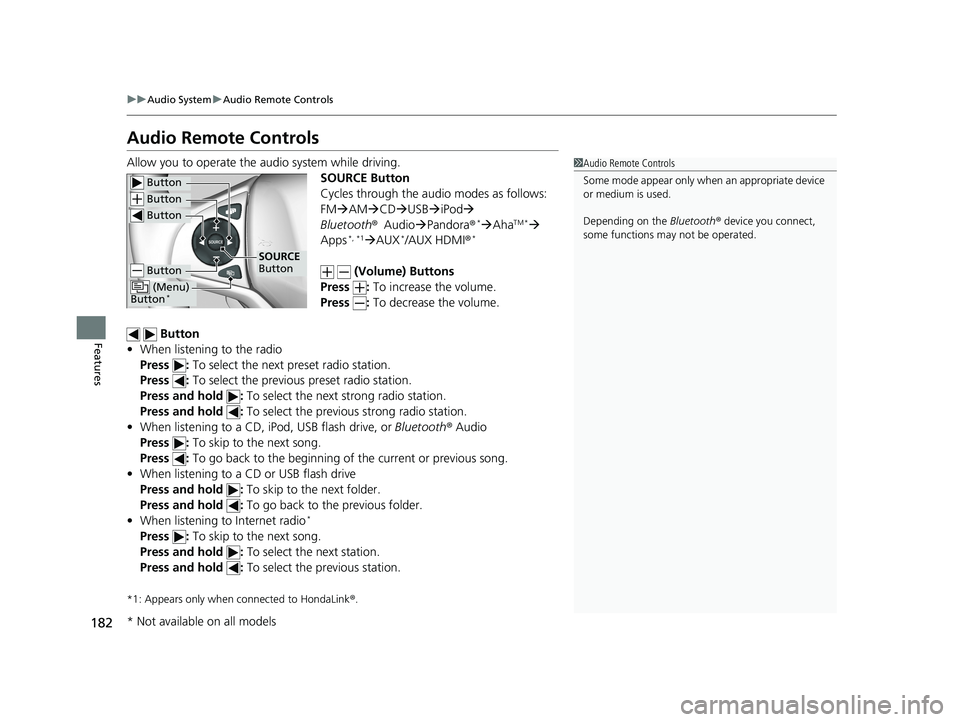
Allow you to operate the audio system while driving.
SOURCE Button
Cycles through the audio modes as follows:
FMAM CD USBiPod
Bluetooth ®Audio Pandora ®
*AhaTM *
Apps*, *1 AUX*/AUX HDMI ®*
(Volume) Buttons
Press : To increase the volume.
Press : To decrease the volume.
Button
• When listening to the radio
Press : To select the next preset radio station.
Press : To select the previous preset radio station.
Press and hold : To select the next strong radio station.
Press and hold : To select the previous strong radio station.
• When listening to a CD, iPod, USB flash drive, or Bluetooth® Audio
Press : To skip to the next song.
Press : To go back to the beginning of the current or previous song.
• When listening to a CD or USB flash drive
Press and hold : To skip to the next folder.
Press and hold : To go back to the previous folder.
• When listening to Internet radio
*
Press : To skip to the next song.
Press and hold : To select the next station.
Press and hold : To select the previous station.
*1: Appears only when connected to HondaLink ®.
1 Audio Remote Controls
Some mode appear only wh en an appropriate device
or medium is used.
Depending on the Bluetooth® device you connect,
some functions ma y not be operated.
Button
Button
Button
Button
(Menu)
Button*
SOURCE
Button
* Not available on all models
18 HR-V-31T7A6200.book 182 ページ 2017年6月30日 金曜日 午後1時23分