audio HONDA HR-V 2018 Owner's Manual (in English)
[x] Cancel search | Manufacturer: HONDA, Model Year: 2018, Model line: HR-V, Model: HONDA HR-V 2018Pages: 503, PDF Size: 32.79 MB
Page 4 of 503
Contents
This owner’s manual should be considered a permanent part of the
vehicle and should remain with the vehicle when it is sold.
This owner’s manual covers all models of your vehicle. You may find
descriptions of equipment and features that are not on your
particular model.
Images throughout this owner’s manual (including the front cover)
represent features and equipment that are available on some, but
not all, models. Your particular mo del may not have some of these
features.
This owner’s manual is for vehicles sold in the United States and
Canada.
The information and specifications in cluded in this publication were
in effect at the time of approval for printing. Honda Motor Co., Ltd.
reserves the right, however, to discontinue or change specifications
or design at any time without notice and without incurring any
obligation.2 Safe Driving P. 29
For Safe Driving P. 30 Seat Belts P. 35 Airbags P. 44
2Instrument Panel P. 73
Indicators P. 74 Gauges and Displays P. 90
2Controls P. 95
Clock P. 96 Locking and Unlocking the Doors P. 98
Opening and Closing the Windows P. 121
Operating the Switches Around the Steering Wheel P. 124
Interior Lights/Interior Convenience Items P. 152
2 Features P. 177
Audio System P. 178 Audio System Basic Operation P. 184, 205
Customized Features P. 252 Bluetooth® HandsFreeLink ® P. 274, 297
2 Driving P. 327
Before Driving P. 328 Towing a Trailer P. 333
Parking Your Vehicle P. 385 Multi-View Rear Camera P. 386
2Maintenance P. 391
Before Performing Maintenance P. 392 Maintenance MinderTM P. 395
Checking and Maintaining Wiper Blades P. 419
Heating and Cooling System
*/Climate Control System* Maintenance P. 437
2 Handling the Unexpected P. 445
Tools P. 446 If a Tire Goes Flat P. 448
Overheating P. 463 Indicator, Coming On/Blinking P. 465 Fuses P. 470
2 Information P. 479
Specifications P. 480 Identification Numbers P. 482
Emissions Testing P. 485 Warranty Coverages P. 487
18 HR-V-31T7A6200.book 2 ページ 2017年6月30日 金曜日 午後1時23分
Page 5 of 503
Contents
Child Safety P. 57Exhaust Gas Hazard P. 70Safety Labels P. 71
Opening and Closing the Tailgate P. 115 Security System P. 118
Opening and Closing the Moonroof* P. 123
Adjusting the Mirrors P. 140 Adjusting the Seats P. 142
Heating and Cooling System
* P. 163 Climate Control System* P. 167
Audio Error Messages P. 233General Information on the Audio System P. 237
Off-Highway Driving Guidelines P. 337 When Driving P. 339 Braking P. 377
Refueling P. 388 Fuel Economy and CO
2 Emissions P. 390
Maintenance Under the Hood P. 399 Replacing Light Bulbs P. 411
Checking and Maintaining Tires P. 423 Battery P. 433 Remote Transmitter Care P. 435
Cleaning P. 438 Accessories and Modifications P. 443
Engine Does Not Start P. 457Jump Starting P. 460 Shift Lever Does Not Move P. 462
Emergency Towing P. 475 When You Cannot Open the Tailgate P. 476
Devices that Emit Radio Waves P. 483 Reporting Safety Defects P. 484
Authorized Manuals P. 489 Customer Service Information P. 490
Quick Reference GuideP. 4
Safe DrivingP. 29
Instrument PanelP. 73
ControlsP. 95
FeaturesP. 177
DrivingP. 327
MaintenanceP. 391
Handling the UnexpectedP. 445
InformationP. 479
IndexP. 492
18 HR-V-31T7A6200.book 3 ページ 2017年6月30日 金曜日 午後1時23分
Page 6 of 503
4
Quick Reference Guide
Quick Reference Guide
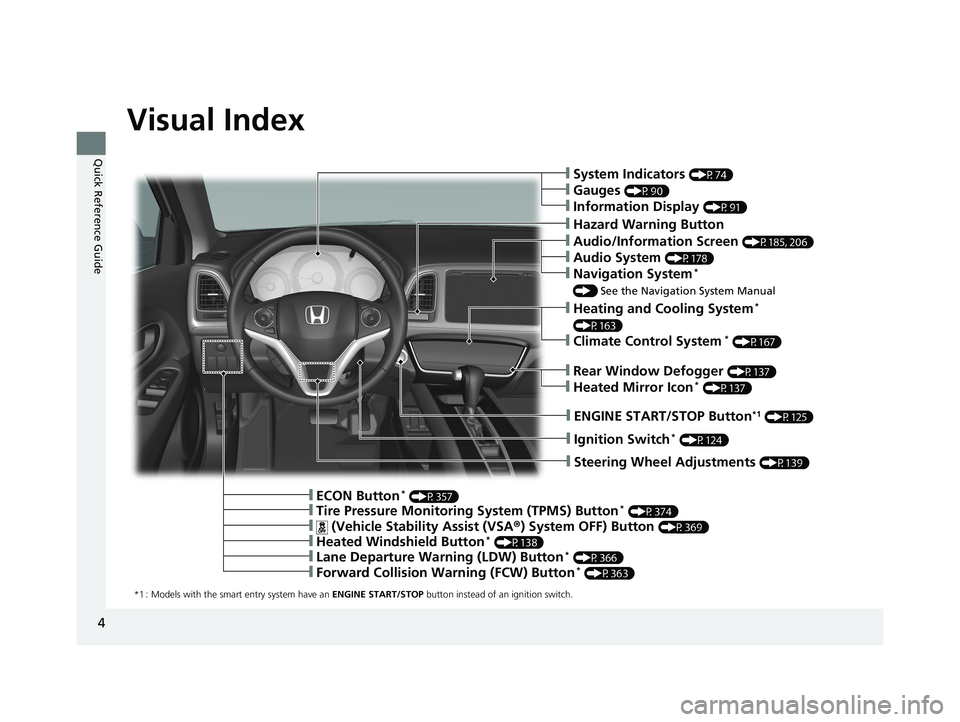
Visual Index
*1 : Models with the smart entry system have an ENGINE START/STOP button instead of an ignition switch.
❙ENGINE START/STOP Button*1 (P125)
❙Steering Wheel Adjustments (P139)
❙Hazard Warning Button
❙Ignition Switch* (P124)
❙Tire Pressure Monitoring System (TPMS) Button* (P374)
❙ (Vehicle Stability Assist (VSA ®) System OFF) Button (P369)
❙Heated Windshield Button* (P138)
❙Lane Departure Warning (LDW) Button* (P366)
❙Forward Collision Warning (FCW) Button* (P363)
❙ECON Button* (P357)
❙System Indicators (P74)
❙Gauges (P90)
❙Information Display (P91)
❙Audio/Information Screen (P185, 206)
❙Audio System (P178)
❙Navigation System*
() See the Navigation System Manual
❙Heating and Cooling System*
(P163)
❙Climate Control System* (P167)
❙Rear Window Defogger (P137)
❙Heated Mirror Icon* (P137)
18 HR-V-31T7A6200.book 4 ページ 2017年6月30日 金曜日 午後1時23分
Page 7 of 503
5
Quick Reference Guide
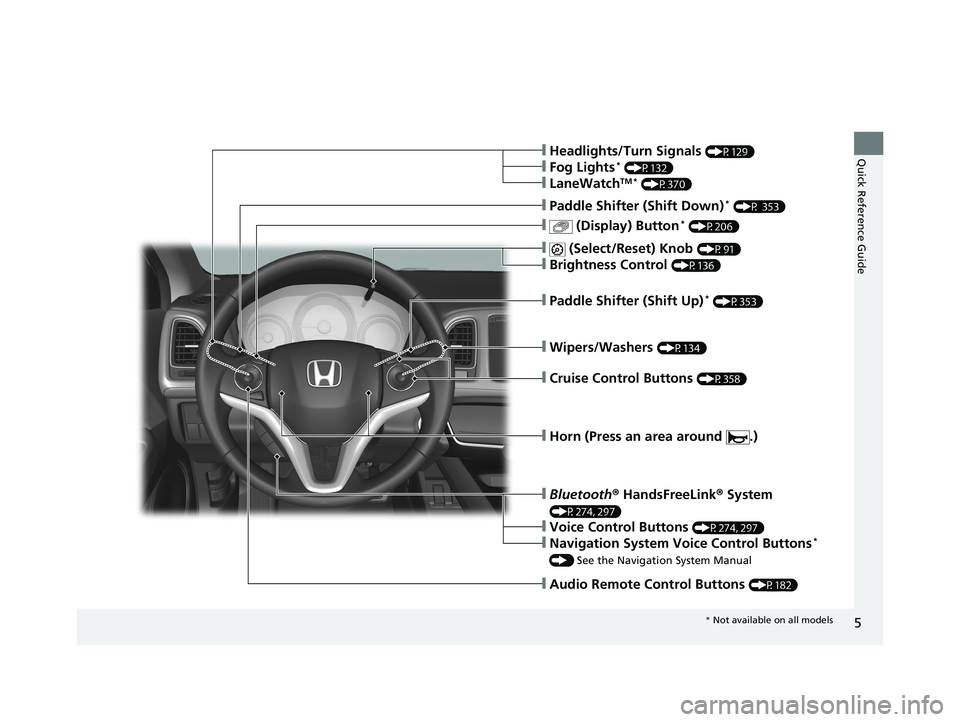
❙Wipers/Washers (P134)
❙Paddle Shifter (Shift Up)* (P353)
❙ (Display) Button* (P206)
❙Paddle Shifter (Shift Down)* (P 353)
❙Audio Remote Control Buttons (P182)
❙Headlights/Turn Signals (P129)
❙Fog Lights* (P132)
❙LaneWatchTM * (P370)
❙ (Select/Reset) Knob (P91)
❙Brightness Control (P136)
❙Cruise Control Buttons (P358)
❙Horn (Press an area around .)
❙Bluetooth® HandsFreeLink ® System
(P274, 297)
❙Voice Control Buttons (P274, 297)
❙Navigation System Voice Control Buttons*
() See the Navigation System Manual
* Not available on all models
18 HR-V-31T7A6200.book 5 ページ 2017年6月30日 金曜日 午後1時23分
Page 14 of 503
12
Quick Reference Guide
Controls (P95)
Clock (P96)
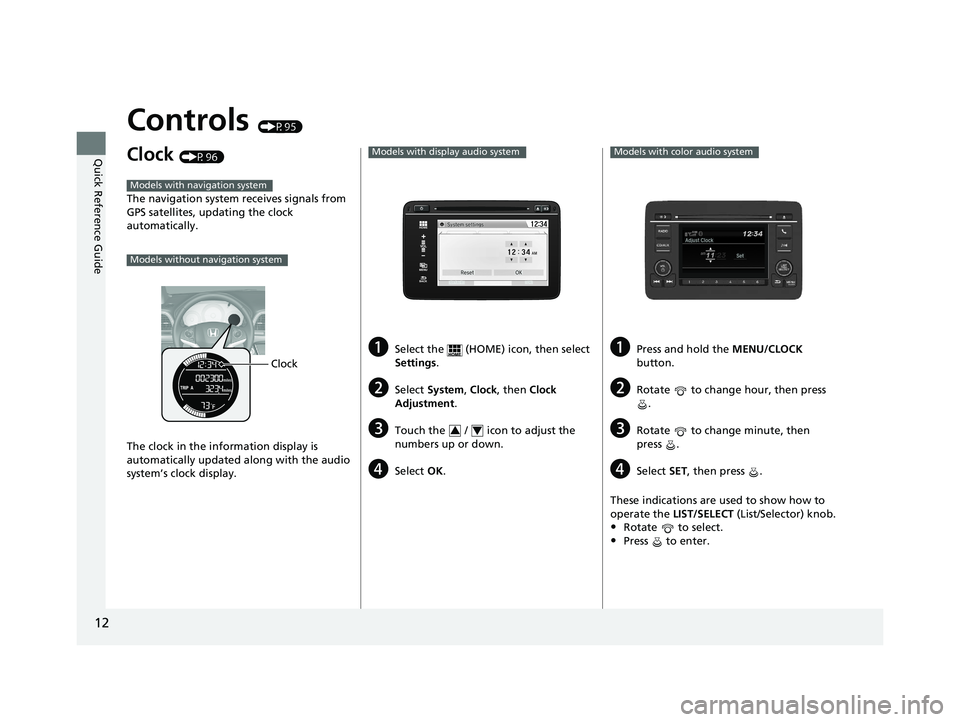
The navigation system receives signals from
GPS satellites, updating the clock
automatically.
The clock in the information display is
automatically updated along with the audio
system’s clock display.
Models with navigation system
Models without navigation system
Clock
aSelect the (HOME) icon, then select
Settings.
bSelect System , Clock, then Clock
Adjustment .
cTouch the / icon to adjust the
numbers up or down.
dSelect OK.
Models with display audio system
VOL
HOME
MENU
BACK
34
aPress and hold the MENU/CLOCK
button.
bRotate to change hour, then press .
cRotate to change minute, then
press .
dSelect SET, then press .
These indications are used to show how to
operate the LIST/SELECT (List/Selector) knob.
•Rotate to select.
•Press to enter.
Models with color audio system
18 HR-V-31T7A6200.book 12 ページ 2017年6月30日 金曜日 午後1時23分
Page 21 of 503
19
Quick Reference Guide
Features (P177)
Audio Remote Controls
(P182)
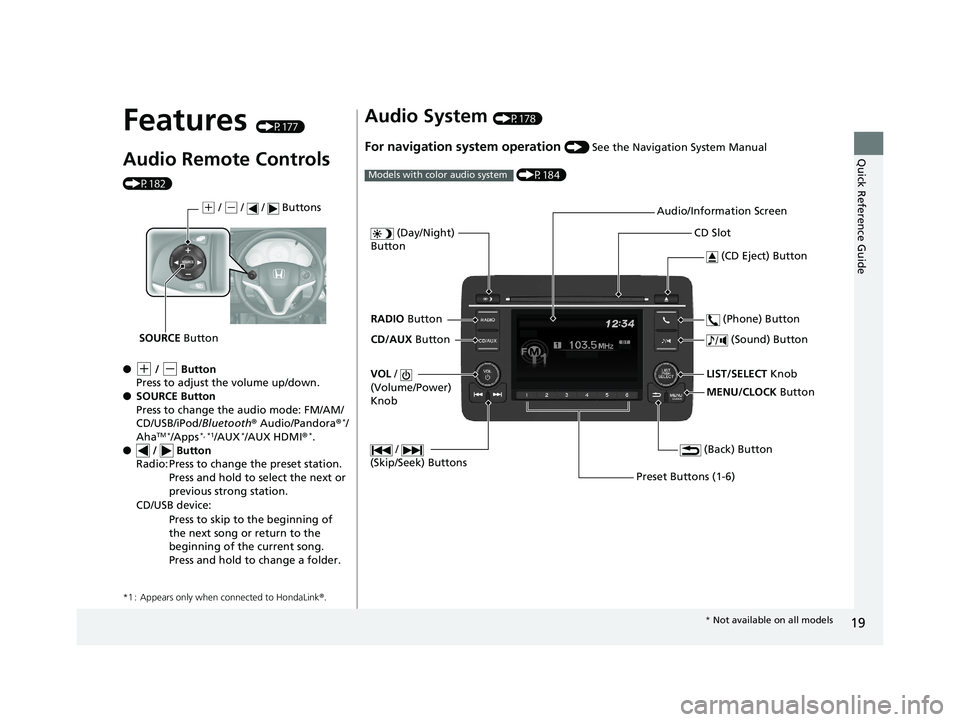
●
(+ / (- Button
Press to adjust the volume up/down.
● SOURCE Button
Press to change the audio mode: FM/AM/
CD/USB/iPod/ Bluetooth® Audio/Pandora ®
*/
AhaTM */Apps*, *1/AUX*/AUX HDMI ®*.
● / Button
*1 : Appears only when connected to HondaLink ®.
Radio: Press to change the preset station.
Press and hold to select the next or
previous strong station.
CD/USB device: Press to skip to the beginning of
the next song or return to the
beginning of the current song.
Press and hold to change a folder.
(+ / (- / / Buttons
SOURCE Button
Audio System (P178)
For navigation system operation () See the Navigation System Manual
(P184)
Models with color audio system
MENU/CLOCK Button
LIST/SELECT Knob
(Day/Night)
Button
(Back) Button
(Sound) Button
VOL /
(Volume/Power)
Knob
CD Slot
(CD Eject) Button
Preset Buttons (1-6) (Phone) Button
RADIO
Button
/
(Skip/Seek) Buttons
CD/AUX Button Audio/Information Screen
*
Not available on all models
18 HR-V-31T7A6200.book 19 ページ 2017年6月30日 金曜日 午後1時23分
Page 22 of 503
20
Quick Reference Guide
(P205)Models with display audio system
VOL
HOMEMENU
BACK
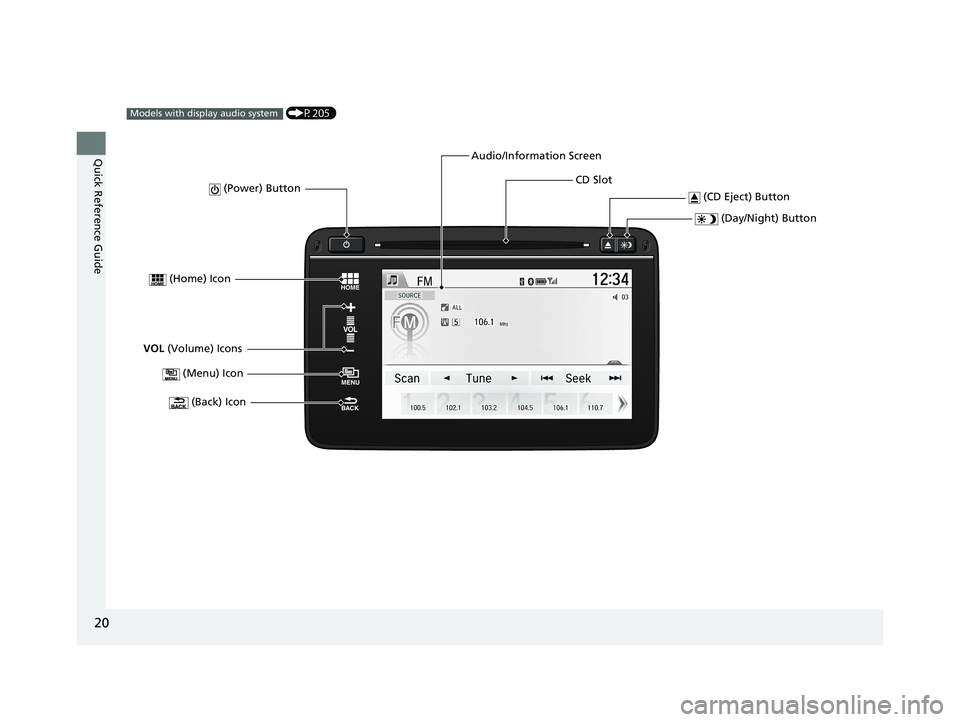
(Day/Night) Button
CD Slot (CD Eject) Button
Audio/Information Screen
VOL (Volume) Icons
(Back) Icon
(Power) Button
(Menu) Icon
(Home) Icon
18 HR-V-31T7A6200.book 20 ページ 2017年6月30日 金曜日 午後1時23分
Page 93 of 503
91
uuGauges and Displays uInformation Display
Continued
Instrument Panel
Information Display
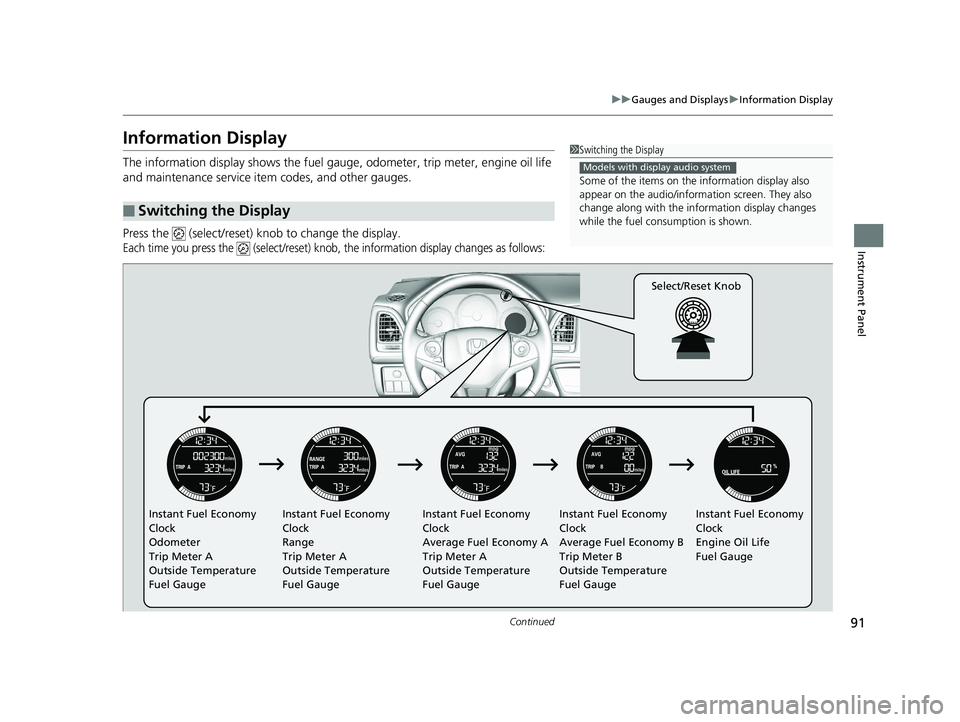
The information display shows the fuel gauge, odometer, trip meter, engine oil life
and maintenance service item codes, and other gauges.
Press the (select/reset) knob to change the display.
Each time you press the (select/reset) knob, the information display changes as follows:
■Switching the Display
1Switching the Display
Some of the items on the information display also
appear on the audio/information screen. They also
change along with the info rmation display changes
while the fuel consumption is shown.
Models with display audio system
Instant Fuel Economy
Clock
Odometer
Trip Meter A
Outside Temperature
Fuel Gauge Instant Fuel Economy
Clock
Range
Trip Meter A
Outside Temperature
Fuel Gauge Instant Fuel Economy
Clock
Average Fuel Economy A
Trip Meter A
Outside Temperature
Fuel GaugeInstant Fuel Economy
Clock
Average Fuel Economy B
Trip Meter B
Outside Temperature
Fuel GaugeInstant Fuel Economy
Clock
Engine Oil Life
Fuel Gauge
Select/Reset Knob
18 HR-V-31T7A6200.book 91 ページ 2017年6月30日 金曜日 午後1時23分
Page 98 of 503
96
Controls
Clock
Adjusting the Clock
You can adjust the time in the clock display with the ignition switch is in ON (w*1.
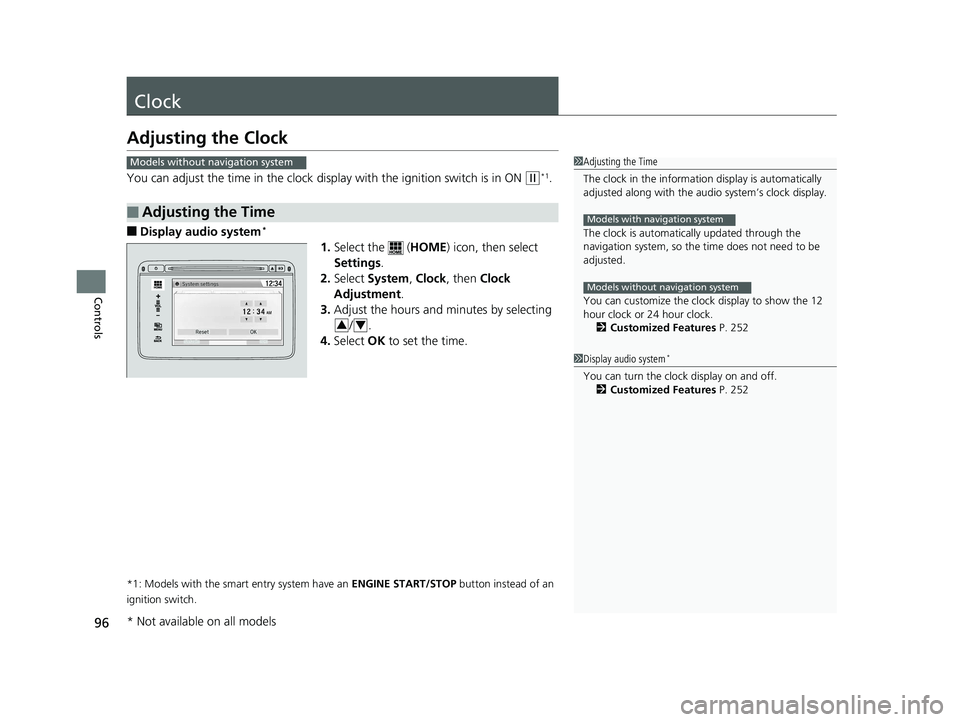
■Display audio system*
1.Select the ( HOME) icon, then select
Settings .
2. Select System , Clock , then Clock
Adjustment .
3. Adjust the hours and minutes by selecting
/.
4. Select OK to set the time.
*1: Models with the smart entry system have an ENGINE START/STOP button instead of an
ignition switch.
■Adjusting the Time
Models without navigation system1 Adjusting the Time
The clock in the information display is automatically
adjusted along with the audio system’s clock display.
The clock is automatica lly updated through the
navigation system, so the ti me does not need to be
adjusted.
You can customize the clock display to show the 12
hour clock or 24 hour clock. 2 Customized Features P. 252
Models with navigation system
Models without navigation system
1Display audio system*
You can turn the clock display on and off.
2 Customized Features P. 252
34
* Not available on all models
18 HR-V-31T7A6200.book 96 ページ 2017年6月30日 金曜日 午後1時23分
Page 99 of 503
97
uuClock uAdjusting the Clock
Controls
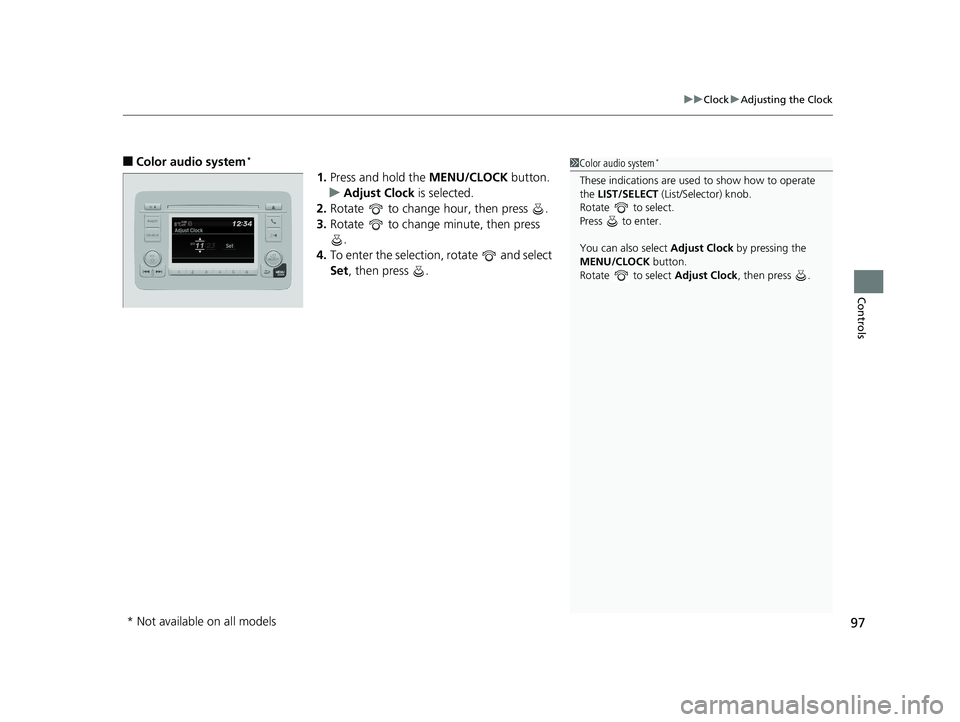
■Color audio system*
1. Press and hold the MENU/CLOCK button.
u Adjust Clock is selected.
2. Rotate to change hour, then press .
3. Rotate to change minute, then press
.
4. To enter the selection, rotate and select
Set, then press .
1Color audio system*
These indications are used to show how to operate
the LIST/SELECT (List/Selector) knob.
Rotate to select.
Press to enter.
You can also select Adjust Clock by pressing the
MENU/CLOCK button.
Rotate to select Adjust Clock, then press .
* Not available on all models
18 HR-V-31T7A6200.book 97 ページ 2017年6月30日 金曜日 午後1時23分