TPMS HONDA HR-V 2019 Owner's Manual (in English)
[x] Cancel search | Manufacturer: HONDA, Model Year: 2019, Model line: HR-V, Model: HONDA HR-V 2019Pages: 631, PDF Size: 39.76 MB
Page 6 of 631
4
Quick Reference Guide
Quick Reference Guide
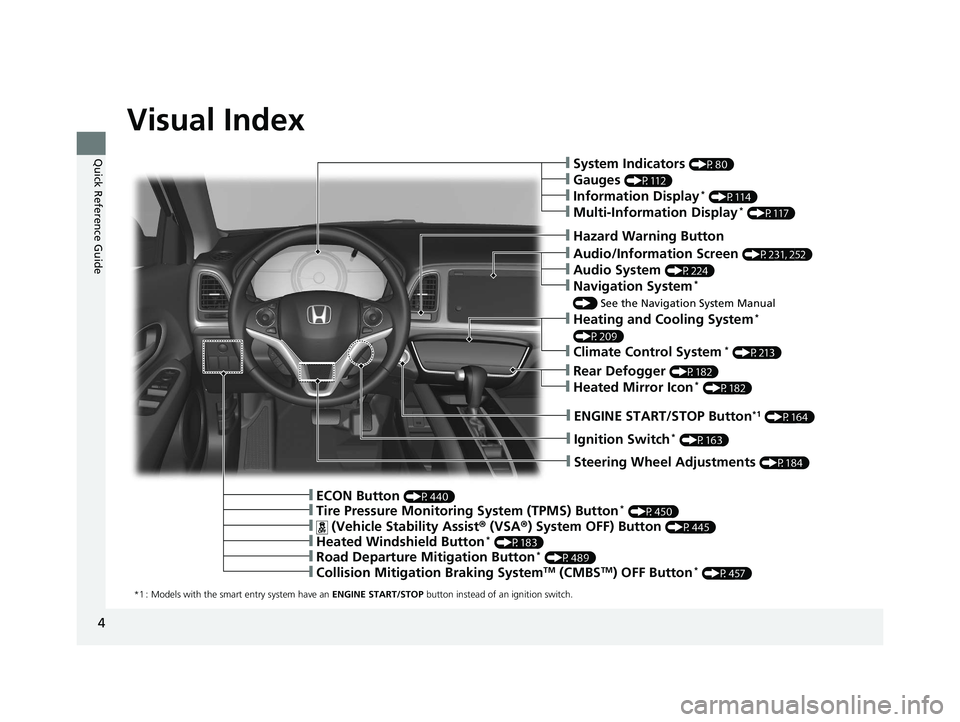
Visual Index
*1 : Models with the smart entry system have an ENGINE START/STOP button instead of an ignition switch.
❙ENGINE START/STOP Button*1 (P164)
❙Steering Wheel Adjustments (P184)
❙Hazard Warning Button
❙Ignition Switch* (P163)
❙Tire Pressure Monitoring System (TPMS) Button* (P450)
❙ (Vehicle Stability Assist® (VSA ®) System OFF) Button (P445)
❙Heated Windshield Button* (P183)
❙Road Departure Mitigation Button* (P489)
❙Collision Mitigation Braking SystemTM (CMBSTM) OFF Button* (P457)
❙ECON Button (P440)
❙Rear Defogger (P182)
❙Heated Mirror Icon* (P182)
❙Heating and Cooling System*
(P209)
❙Climate Control System* (P213)
❙Audio/Information Screen (P231, 252)
❙Audio System (P224)
❙Navigation System*
() See the Navigation System Manual
❙System Indicators (P80)
❙Gauges (P112)
❙Information Display* (P114)
❙Multi-Information Display* (P117)
19 HR-V HDMC HDMG-31T7A6300.book 4 ページ 2018年6月1日 金曜日 午後1時14分
Page 13 of 631
11
Quick Reference Guide
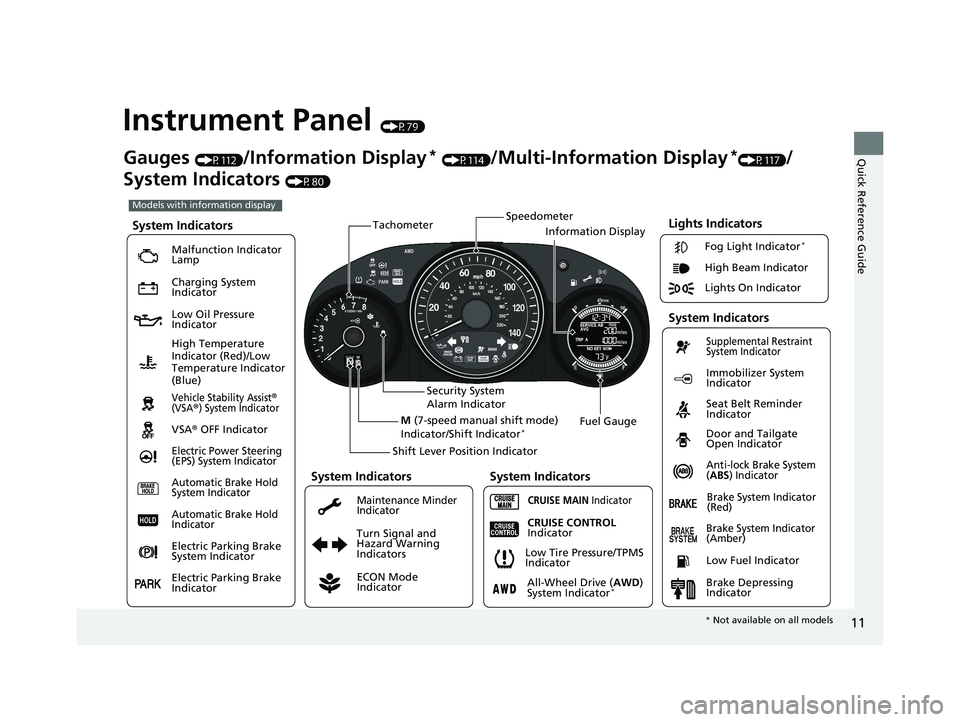
Instrument Panel (P79)
Lights Indicators
Malfunction Indicator
Lamp
Low Oil Pressure
Indicator
Anti-lock Brake System
(ABS) Indicator
Vehicle Stability Assist®
(VSA®) System Indicator
VSA ® OFF Indicator
Electric Power Steering
(EPS) System Indicator
Lights On Indicator High Beam Indicator
Immobilizer System
Indicator
Seat Belt Reminder
Indicator
System Indicators
CRUISE MAIN Indicator Supplemental Restraint
System Indicator
Door and Tailgate
Open Indicator
Tachometer
Speedometer
Fuel Gauge
Security System
Alarm Indicator
Shift Lever Position Indicator
Low Fuel Indicator
Gauges (P112)/Information Display* (P114)/Multi-Information Display*(P117)/
System Indicators
(P80)
Turn Signal and
Hazard Warning
Indicators
High Temperature
Indicator (Red)/Low
Temperature Indicator
(Blue)
System Indicators
System Indicators
Brake System Indicator
(Red)
CRUISE CONTROL
Indicator
System Indicators
Charging System
Indicator
ECON Mode
Indicator
Maintenance Minder
Indicator
Fog Light Indicator*
Brake System Indicator
(Amber)
M (7-speed manual shift mode)
Indicator/Shift Indicator*
Information Display
Automatic Brake Hold
System Indicator
Automatic Brake Hold
Indicator
Electric Parking Brake
System Indicator
Electric Parking Brake
Indicator All-Wheel Drive (
AWD)
System Indicator*Brake Depressing
Indicator
Low Tire Pressure/TPMS
Indicator
Models with information display
*
Not available on all models
19 HR-V HDMC HDMG-31T7A6300.book 11 ページ 2018年6月1日 金曜日 午後1時14分
Page 14 of 631
12
Quick Reference Guide
002300
Lights On Indicator
System Indicators
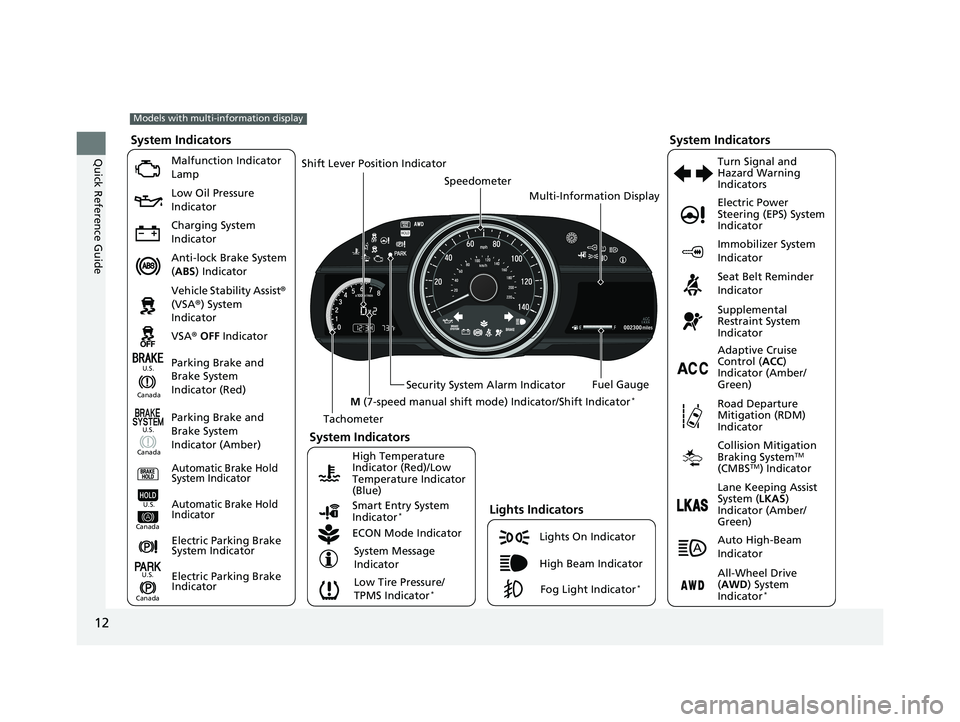
Malfunction Indicator
Lamp
Low Oil Pressure
Indicator
Charging System
Indicator
Anti-lock Brake System
(ABS ) Indicator
Vehicle Stability Assist ®
(VSA ®) System
Indicator
VSA ® OFF Indicator
Low Tire Pressure/
TPMS Indicator
*
Electric Power
Steering (EPS) System
Indicator
Seat Belt Reminder
Indicator
System Indicators
Parking Brake and
Brake System
Indicator (Red) Supplemental
Restraint System
Indicator
Tachometer Speedometer
Fuel Gauge
Security System Alarm Indicator
Shift Lever Position Indicator
Immobilizer System
Indicator
ECON Mode Indicator Turn Signal and
Hazard Warning
Indicators
Models with multi-information display
Parking Brake and
Brake System
Indicator (Amber)
System Indicators
Lights Indicators
High Beam Indicator
Fog Light Indicator*
Adaptive Cruise
Control (
ACC)
Indicator (Amber/
Green)
System Message
Indicator Collision Mitigation
Braking System
TM
(CMBSTM) Indicator
Road Departure
Mitigation (RDM)
Indicator
Lane Keeping Assist
System (
LKAS)
Indicator (Amber/
Green)
Smart Entry System
Indicator
*
U.S.
Canada
Canada U.S.
High Temperature
Indicator (Red)/Low
Temperature Indicator
(Blue)Automatic Brake Hold
System Indicator
Automatic Brake Hold
IndicatorU.S.
Canada
Electric Parking Brake
System Indicator
Electric Parking Brake
IndicatorU.S.
Canada
Auto High-Beam
Indicator
All-Wheel Drive
(
AWD ) System
Indicator
*
M (7-speed manual shift mode ) Indicator/Shift Indicator*
Multi-Information Display
19 HR-V HDMC HDMG-31T7A6300.book 12 ページ 2018年6月1日 金曜日 午後1時14分
Page 26 of 631
24
Quick Reference Guide
VSA® On and Off (P445)
● The Vehicle Stability Assist ® (VSA ®) system
helps stabilize the vehicle during
cornering, and helps maintain traction
while accelerating on loose or slippery
road surfaces.
● VSA ® comes on automatically every time
you start the engine.
● To partially disable or fully restore VSA ®
function, press and ho ld the button until
you hear a beep.
Cruise Control* (P441)
● Cruise control allows you to maintain a
set speed without keeping your foot on
the accelerator pedal.
● To use cruise control, press the CRUISE
button, then press the -/SET button once
you have achieved the desired speed
(above 25 mph or 40 km/h).
Tire Pressure Monitoring
System (TPMS)
(P449)
● Detects a change in tire conditions and
overall dimensions due to decrease in tire
pressures.
● TPMS is turned on automatically every
time you start the engine.
● A calibration procedure must be
performed when certain conditions arise.
U.S. models only
CMBSTM On and Off*
(P460)
● When a possible collision is likely
unavoidable, the CMBS
TM can help you to
reduce the vehicle speed and the severity
of the collision.
● The CMBS
TM is turned on every time you
start the engine.
● To turn the CMBS
TM on or off, press and
hold the button until you hear a beep.
19 HR-V HDMC HDMG-31T7A6300.book 24 ページ 2018年6月1日 金曜日 午後1時14分
Page 33 of 631
31
Quick Reference Guide
Why does the beeper
sound when I start driving?The beeper sounds when the driver and/or front passenger are
not wearing their seat belts.
Why do I hear a screeching
sound when I apply the
brake pedal?The brake pads may need to be replaced. Have your vehicle
inspected by a dealer.
Pressing the electric
parking brake switch does
not release the parking
brake. Why?Press the electric parking brake switch with the brake pedal
depressed.
Depressing the accelerator
pedal does not release the
parking brake
automatically. Why?●Fasten the driver’s seat belt.
●Check if the transmission is in (P or (N. If so, select any other
position.
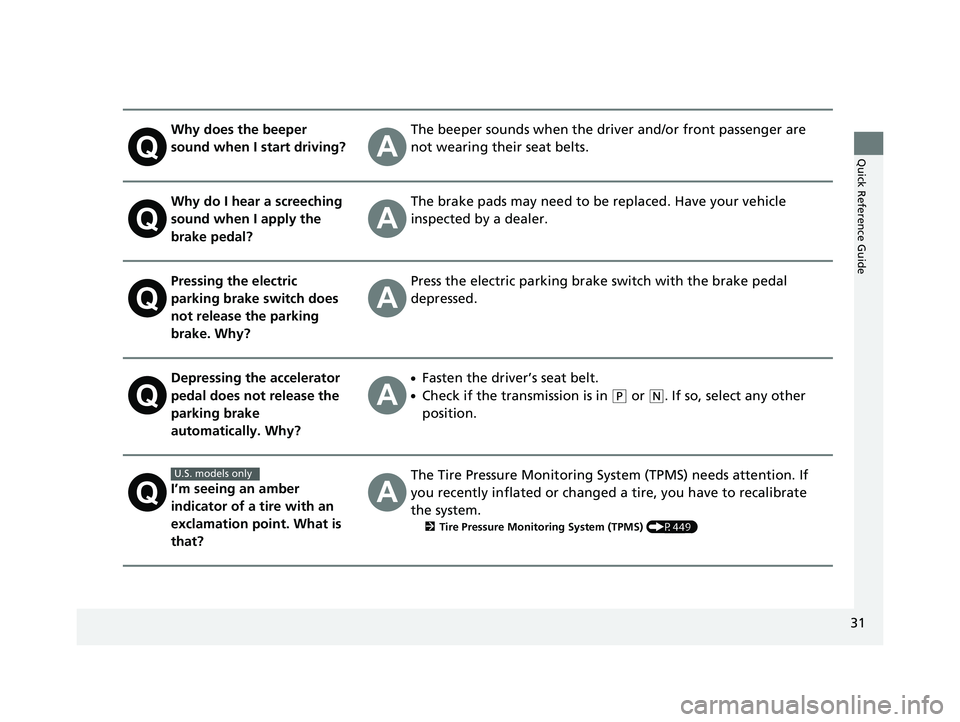
I’m seeing an amber
indicator of a tire with an
exclamation point. What is
that?The Tire Pressure Monitoring Syst em (TPMS) needs attention. If
you recently inflated or changed a tire, you have to recalibrate
the system.
2 Tire Pressure Monitoring System (TPMS) (P449)
U.S. models only
19 HR-V HDMC HDMG-31T7A6300.book 31 ページ 2018年6月1日 金曜日 午後1時14分
Page 92 of 631
90
uuIndicators u
Instrument Panel
*1:Models with the smart entry system have an ENGINE START/STOP button instead of an ignition switch.
IndicatorNameOn/BlinkingExplanationMessage*
Electric Power
Steering (EPS)
System
Indicator●Comes on when you turn the
ignition switch to ON
(w*1, and
goes off when the engine starts.
●Comes on if there is a problem
with the EPS system.
●Stays on constantly or does not come
on at all - Have your vehicle checked by a
dealer.
2 If the Electric Power Steering (EPS)
System Indicator Comes On P. 595
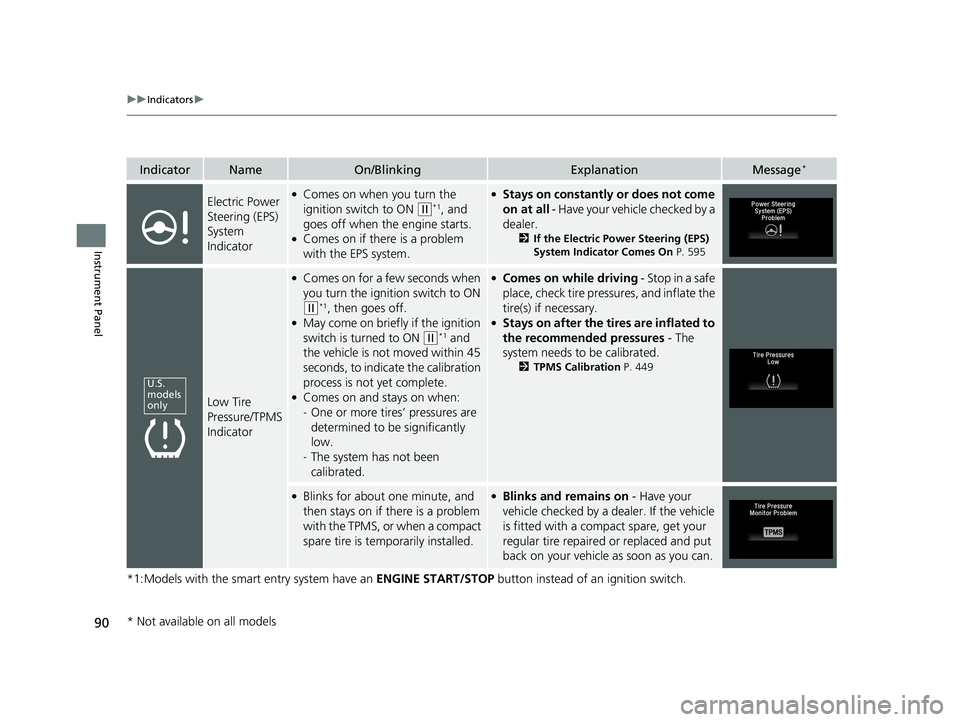
Low Tire
Pressure/TPMS
Indicator
●Comes on for a few seconds when
you turn the ignition switch to ON
(w*1, then goes off.●May come on briefly if the ignition
switch is turned to ON
(w*1 and
the vehicle is not moved within 45
seconds, to indica te the calibration
process is not yet complete.
●Comes on and stays on when:
- One or more tires’ pressures are
determined to be significantly
low.
- The system has not been
calibrated.
●Comes on while driving - Stop in a safe
place, check tire pressures, and inflate the
tire(s) if necessary.
●Stays on after the tires are inflated to
the recommended pressures - The
system needs to be calibrated.
2 TPMS Calibration P. 449
●Blinks for about one minute, and
then stays on if there is a problem
with the TPMS, or when a compact
spare tire is temporarily installed.●Blinks and remains on - Have your
vehicle checked by a dealer. If the vehicle
is fitted with a compact spare, get your
regular tire repaired or replaced and put
back on your vehicle as soon as you can.
U.S.
models
only
* Not available on all models
19 HR-V HDMC HDMG-31T7A6300.book 90 ページ 2018年6月1日 金曜日 午後1時14分
Page 125 of 631
123
uuGauges and Displays uMulti-Information Display*
Continued
Instrument Panel
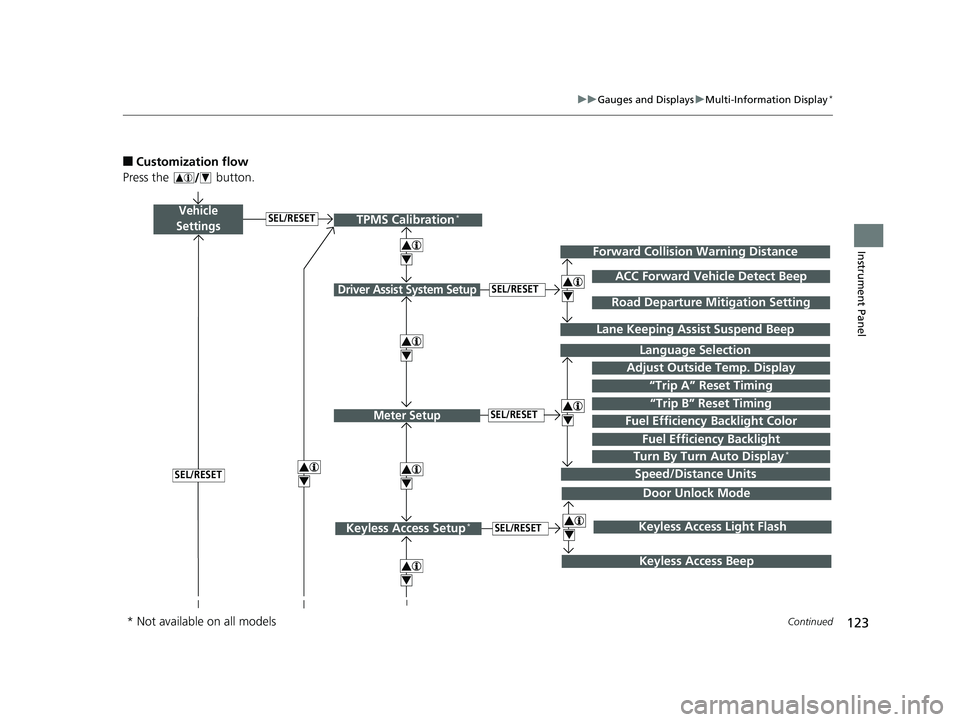
■Customization flow
Press the button.
Vehicle
Settings
Adjust Outside Temp. Display
Language Selection
Driver Assist System Setup
Meter Setup“Trip B” Reset TimingSEL/RESET
SEL/RESET
“Trip A” Reset Timing
4
ACC Forward Vehicle Detect Beep
Lane Keeping Assist Suspend Beep
4
SEL/RESET
Forward Collision Warning Distance
4
SEL/RESET
Speed/Distance Units
Road Departure Mitigation Setting
Fuel Efficiency Backlight
Turn By Turn Auto Display*
TPMS Calibration*
4
Fuel Efficiency Backlight Color
4
4
Door Unlock Mode
Keyless Access Setup*SEL/RESET
Keyless Access Beep
4Keyless Access Light Flash
4
* Not available on all models
19 HR-V HDMC HDMG-31T7A6300.book 123 ページ 2018年6月1日 金曜日 午後1時14分
Page 127 of 631
125
uuGauges and Displays uMulti-Information Display*
Continued
Instrument Panel
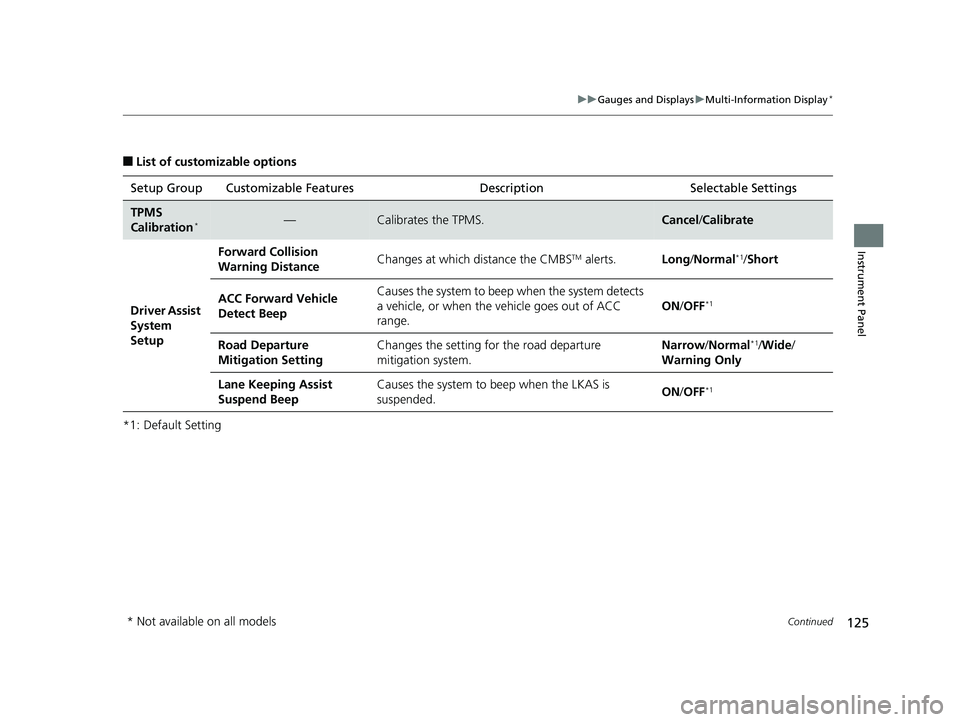
■List of customizable options
*1: Default Setting Setup Group Customizable Features
Description Selectable Settings
TPMS
Calibration*—Calibrates the TPMS.Cancel/Calibrate
Driver Assist
System
Setup Forward Collision
Warning Distance
Changes at which distance the CMBS
TM alerts.
Long/Normal*1/ Short
ACC Forward Vehicle
Detect Beep Causes the system to beep
when the system detects
a vehicle, or when the vehicle goes out of ACC
range. ON
/OFF
*1
Road Departure
Mitigation Setting Changes the setting fo
r the road departure
mitigation system. Narrow/
Normal*1/Wide /
Warning Only
Lane Keeping Assist
Suspend Beep Causes the system to b
eep when the LKAS is
suspended. ON
/OFF
*1
* Not available on all models
19 HR-V HDMC HDMG-31T7A6300.book 125 ページ 2018年6月1日 金曜日 午後1時14分
Page 419 of 631
417
Driving
This chapter discusses driving and refueling.
Before DrivingDriving Preparation .......................... 418
Maximum Load Limit........................ 421
Towing a Trailer Towing Your Vehicle ........................ 423
Off-Highway Driving Guidelines ..... 424
When Driving Starting the Engine .................. 426, 429
Precautions While Driving................. 432
Continuously Variable Transmission.. 433
Shifting .................................... 434, 436
ECON Button ................................... 440
Cruise Control
*................................ 441
Vehicle Stability Assist® (VSA®), aka Electronic
Stability Control (ESC), System ...............444
LaneWatchTM*.................................. 446Real Time AWD with Intelligent Control
SystemTM*............................................. 448Tire Pressure Monito ring System (TPMS) ....449Tire Pressure Monitoring System (TPMS) -
Required Federal Explanation ......... 452
Honda Sensing ®
*.............................. 454
Collision Mitigati on Braking SystemTM
(CMBSTM) ....................................... 457
Adaptive Cruise Control (ACC)......... 467
Lane Keeping Assist System (LKAS) .. 480
Road Departure Mitigation (RDM) System .. 489
Front Sensor Camera ....................... 494
Radar Sensor ................................... 496
Braking Brake System ................................... 497
Anti-lock Brake System (ABS) ........... 502
Brake Assist System ......................... 503
Parking Your Vehicle When Stopped ................................ 504
Multi-View Rear Camera .................. 505
Refueling Fuel Information .............................. 507
How to Refuel ................................. 508
Fuel Economy and CO
2 Emissions .... 509
* Not available on all models
19 HR-V HDMC HDMG-31T7A6300.book 417 ページ 2018年6月1日 金曜日 午後1時14分
Page 451 of 631
449
uuWhen Driving uTire Pressure Monitoring System (TPMS)
Continued
Driving
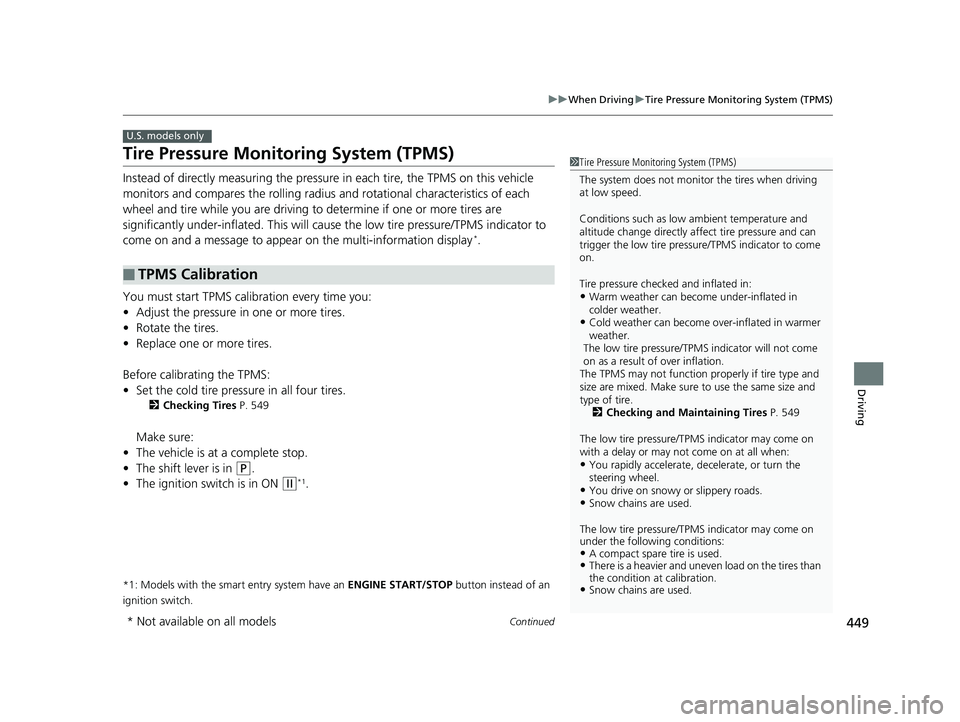
Tire Pressure Monitoring System (TPMS)
Instead of directly measuring the pressure in each tire, the TPMS on this vehicle
monitors and compares the rolling radius and rotational characteristics of each
wheel and tire while you are driving to determine if one or more tires are
significantly under-inflated. This will caus e the low tire pressure/TPMS indicator to
come on and a message to appear on the multi-information display
*.
You must start TPMS calibration every time you:
• Adjust the pressure in one or more tires.
• Rotate the tires.
• Replace one or more tires.
Before calibrating the TPMS:
• Set the cold tire pressure in all four tires.
2 Checking Tires P. 549
Make sure:
• The vehicle is at a complete stop.
• The shift lever is in
(P.
• The ignition switch is in ON
(w*1.
*1: Models with the smart entry system have an ENGINE START/STOP button instead of an
ignition switch.
■TPMS Calibration
U.S. models only
1 Tire Pressure Monitoring System (TPMS)
The system does not monitor the tires when driving
at low speed.
Conditions such as low ambient temperature and
altitude change directly affect tire pressure and can
trigger the low tire pressure/TPMS indicator to come
on.
Tire pressure checked and inflated in:
•Warm weather can beco me under-inflated in
colder weather.
•Cold weather can become over-inflated in warmer
weather.
The low tire pressure/TPMS indicator will not come
on as a result of over inflation.
The TPMS may not function pr operly if tire type and
size are mixed. Make sure to use the same size and
type of tire.
2 Checking and Maintaining Tires P. 549
The low tire pressure/TPMS indicator may come on
with a delay or may not come on at all when:
•You rapidly accelerate, decelerate, or turn the
steering wheel.
•You drive on snowy or slippery roads.•Snow chains are used.
The low tire pressure/TPMS indicator may come on
under the following conditions:
•A compact spare tire is used.•There is a heavier and uneve n load on the tires than
the condition at calibration.
•Snow chains are used.
* Not available on all models
19 HR-V HDMC HDMG-31T7A6300.book 449 ページ 2018年6月1日 金曜日 午後1時14分