service HONDA HR-V 2020 (in English) User Guide
[x] Cancel search | Manufacturer: HONDA, Model Year: 2020, Model line: HR-V, Model: HONDA HR-V 2020Pages: 639, PDF Size: 40.6 MB
Page 306 of 639
304
uuAudio System Basic Operation uHondaLink ®
Features
HondaLink ®
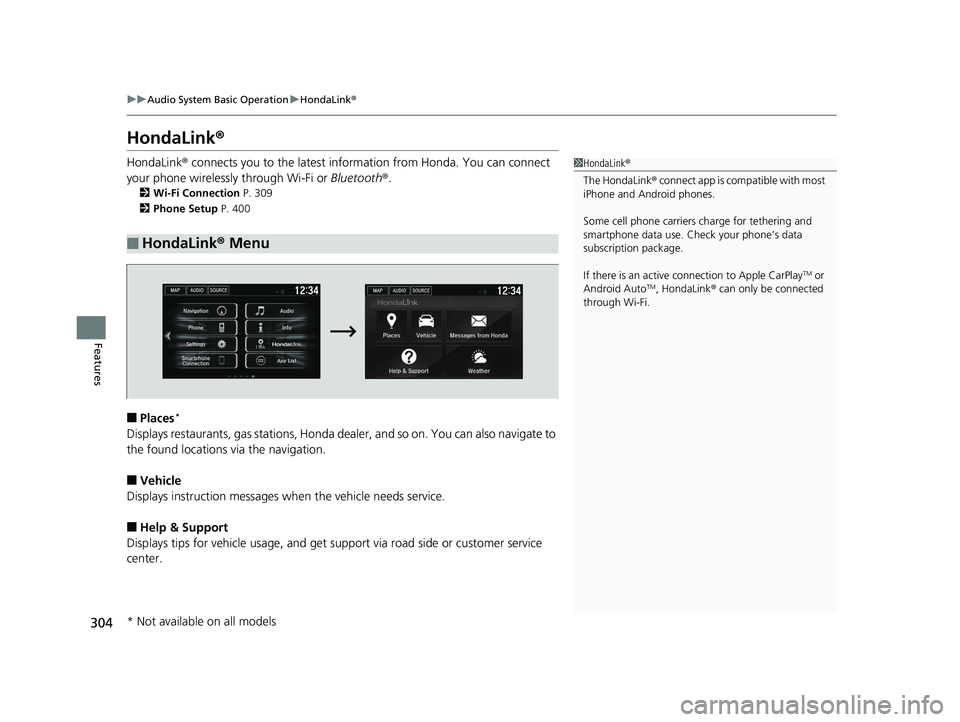
HondaLink® connects you to the latest information from Honda. You can connect
your phone wirelessly through Wi-Fi or Bluetooth®.
2Wi-Fi Connection P. 309
2 Phone Setup P. 400
■Places*
Displays restaurants, gas stations, Honda d ealer, and so on. You can also navigate to
the found locations via the navigation.
■Vehicle
Displays instruction messages wh en the vehicle needs service.
■Help & Support
Displays tips for vehicle usage, and get support via road side or customer service
center.
■HondaLink® Menu
1HondaLink ®
The HondaLink ® connect app is compatible with most
iPhone and Android phones.
Some cell phone carriers charge for tethering and
smartphone data use. Check your phone’s data
subscription package.
If there is an active c onnection to Apple CarPlay
TM or
Android AutoTM, HondaLink ® can only be connected
through Wi-Fi.
* Not available on all models
20 HR-V HDMC HDMG-31T7A6400.book 304 ページ 2019年8月8日 木曜日 午後3時52分
Page 307 of 639
305
uuAudio System Basic Operation uHondaLink ®
Continued
Features
■Messages from Honda
Displays helpful and important information from Honda.
■Weather*
Displays a weekly five-day weather forecast for any location you wa nt. You can
change the ZIP Code at any time.
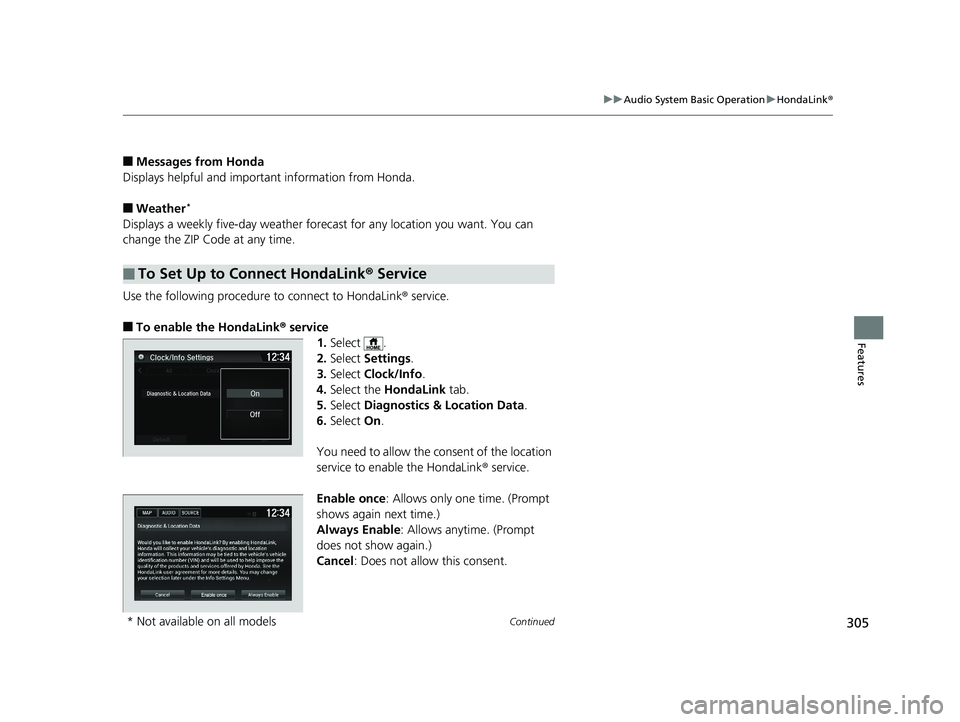
Use the following procedure to connect to HondaLink ® service.
■To enable the HondaLink® service
1.Select .
2. Select Settings .
3. Select Clock/Info .
4. Select the HondaLink tab.
5. Select Diagnostics & Location Data .
6. Select On.
You need to allow the co nsent of the location
service to enable the HondaLink ® service.
Enable once : Allows only one time. (Prompt
shows again next time.)
Always Enable: Allows anytime. (Prompt
does not show again.)
Cancel : Does not allow this consent.
■To Set Up to Connect HondaLink ® Service
* Not available on all models
20 HR-V HDMC HDMG-31T7A6400.book 305 ページ 2019年8月8日 木曜日 午後3時52分
Page 311 of 639
309
uuAudio System Basic Operation uWi-Fi Connection
Continued
Features
Wi-Fi Connection
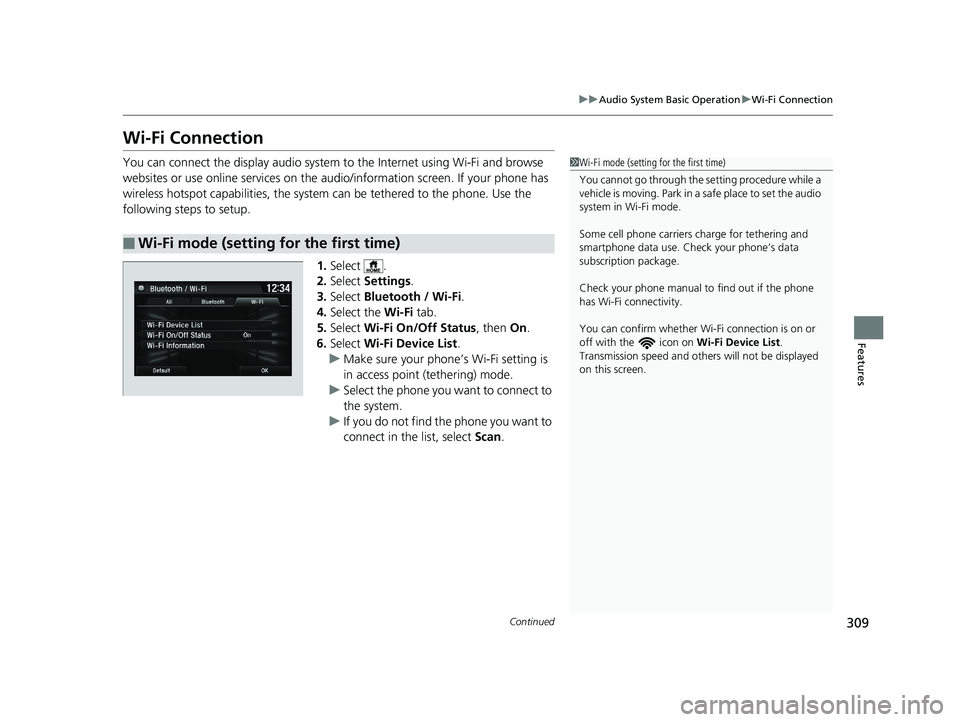
You can connect the display audio system to the Internet using Wi-Fi and browse
websites or use online services on the audio/information screen. If your phone has
wireless hotspot capabilities, the system can be tethered to the phone. Use the
following steps to setup.
1.Select .
2. Select Settings .
3. Select Bluetooth / Wi-Fi .
4. Select the Wi-Fi tab.
5. Select Wi-Fi On/Off Status , then On.
6. Select Wi-Fi Device List .
u Make sure your phone’ s Wi-Fi setting is
in access point (tethering) mode.
u Select the phone you want to connect to
the system.
u If you do not find the phone you want to
connect in the list, select Scan.
■Wi-Fi mode (setting for the first time)
1Wi-Fi mode (setting for the first time)
You cannot go through the setting procedure while a
vehicle is moving. Park in a safe place to set the audio
system in Wi-Fi mode.
Some cell phone carriers charge for tethering and
smartphone data use. Check your phone’s data
subscription package.
Check your phone manual to find out if the phone
has Wi-Fi connectivity.
You can confirm whether Wi -Fi connection is on or
off with the icon on Wi-Fi Device List.
Transmission speed and others will not be displayed
on this screen.
20 HR-V HDMC HDMG-31T7A6400.book 309 ページ 2019年8月8日 木曜日 午後3時52分
Page 315 of 639
Continued313
uuAudio System Basic Operation uApple CarPlayTM
Features
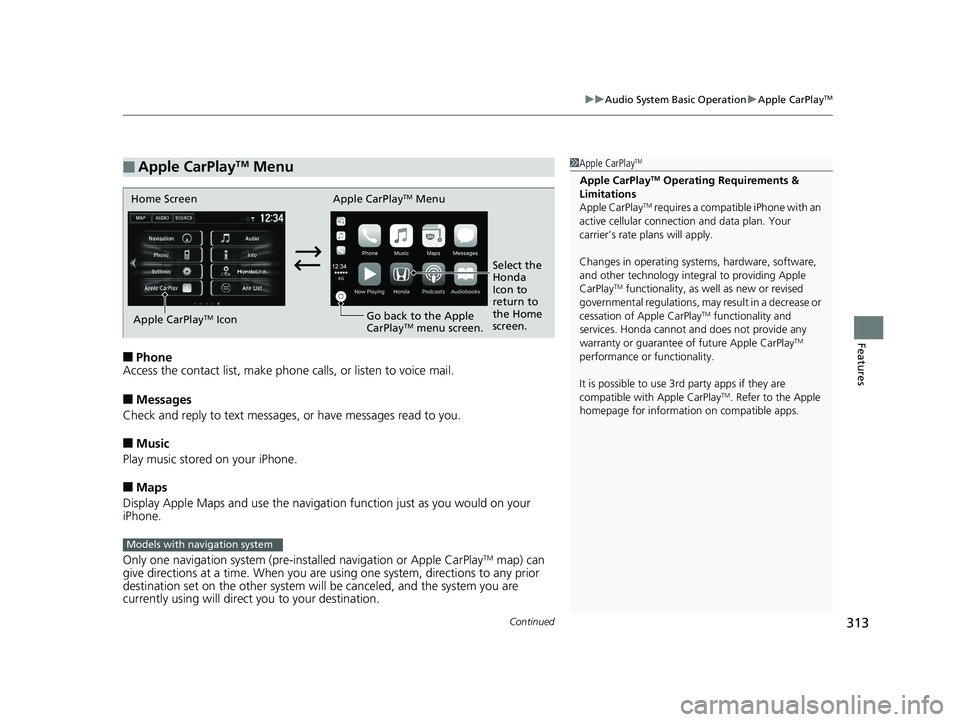
■Phone
Access the contact list, make phone ca lls, or listen to voice mail.
■Messages
Check and reply to text messages, or have messages read to you.
■Music
Play music stored on your iPhone.
■Maps
Display Apple Maps and use the navigation function just as you would on your
iPhone.
Only one navigation system (pre-ins talled navigation or Apple CarPlay
TM map) can
give directions at a time. When you are using one system, directions to any prior
destination set on the other system will be canceled, and the system you are
currently using will direct you to your destination.
■Apple CarPlayTM Menu1 Apple CarPlayTM
Apple CarPlayTM Operating Requirements &
Limitations
Apple CarPlay
TM requires a compatible iPhone with an
active cellular connecti on and data plan. Your
carrier’s rate plans will apply.
Changes in operating systems, hardware, software,
and other technology integral to providing Apple
CarPlay
TM functionality, as we ll as new or revised
governmental regulations, may result in a decrease or
cessation of Apple CarPlay
TM functionality and
services. Honda cannot a nd does not provide any
warranty or guarantee of future Apple CarPlay
TM
performance or functionality.
It is possible to use 3r d party apps if they are
compatible with Apple CarPlay
TM. Refer to the Apple
homepage for information on compatible apps.
Home Screen Apple CarPlayTM Menu
Select the
Honda
Icon to
return to
the Home
screen.
Apple CarPlay
TM Icon
Go back to the Apple
CarPlayTM menu screen.
Models with navigation system
20 HR-V HDMC HDMG-31T7A6400.book 313 ページ 2019年8月8日 木曜日 午後3時52分
Page 319 of 639
Continued317
uuAudio System Basic Operation uAndroid AutoTM
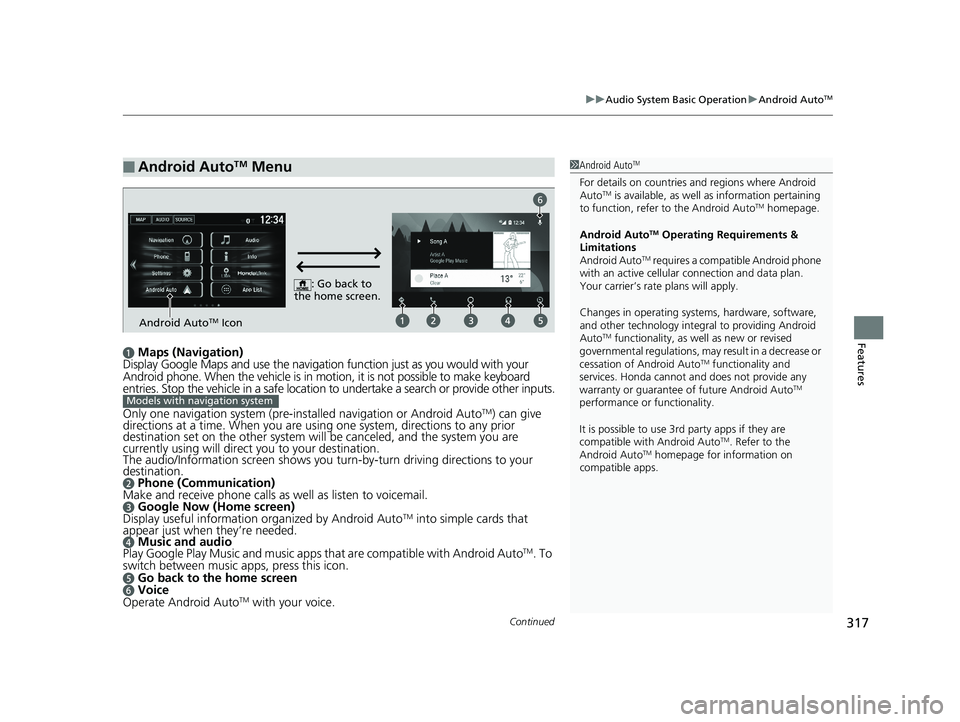
Featuresa Maps (Navigation)
Display Google Maps and use the navigation function just as you would with your
Android phone. When the vehicle is in motion, it is not possible to make keyboard
entries. Stop the vehicle in a safe location to undertake a search or provide other inputs.
Only one navigation system (pre-installed navigation or Android Auto
TM) can give
directions at a time. When you are using one system, directions to any prior
destination set on the other system will be canceled, and the system you are
currently using will direct you to your destination.
The audio/Information screen shows you turn-by-turn dr iving directions to your
destination.
b Phone (Communication)
Make and receive phone calls as well as listen to voicemail.
c Google Now (Home screen)
Display useful information organized by Android AutoTM into simple cards that
appear just when they’re needed.
d Music and audio
Play Google Play Music and music apps that are compatible with Android AutoTM. To
switch between music apps, press this icon.
e Go back to the home screenf Voice
Operate Android AutoTM with your voice.
■Android AutoTM Menu1 Android AutoTM
For details on c ountries and regions where Android
AutoTM is available, as well as information pertaining
to function, refer to the Android AutoTM homepage.
Android Auto
TM Operating Requirements &
Limitations
Android Auto
TM requires a compatib le Android phone
with an active cellular connection and data plan.
Your carrier’s rate plans will apply.
Changes in operating systems, hardware, software,
and other technology integral to providing Android
Auto
TM functionality, as we ll as new or revised
governmental regulations, may result in a decrease or
cessation of Android Auto
TM functionality and
services. Honda cannot a nd does not provide any
warranty or guarantee of future Android Auto
TM
performance or functionality.
It is possible to use 3r d party apps if they are
compatible with Android Auto
TM. Refer to the
Android AutoTM homepage for information on
compatible apps.
: Go back to
the home screen.
Android AutoTM Icon
6
Models with navigation system
20 HR-V HDMC HDMG-31T7A6400.book 317 ページ 2019年8月8日 木曜日 午後3時52分
Page 322 of 639
320
uuAudio System Basic Operation uLegal Information on Apple CarPlayTM/Android AutoTM
Features
Legal Information on Apple CarPlayTM/Android AutoTM
USE OF APPLE CARPLAY IS SUBJECT TO YOUR AGREEMENT TO THE CARPLAY TERMS OF USE, WHICH ARE INCLUDED AS PART OF THE
APPLE iOS TERMS OF USE. IN SUMMARY, THE CARPLAY TERMS OF USE DISCLAIM APPLE AND I TS SERVICE PROVIDERS’ LIABILITY IF THE
SERVICES FAIL TO PERFORM CORRECTLY OR ARE DISCONTINUED, STRICTLY LIMIT APPLE AND ITS SERVICE PROVIDERS’ OTHER
LIABILITIES, DESCRIBE THE KINDS OF USER INFORMATION (INCLUDING, FOR EXAMPLE, VE HICLE LOCATION, VEHICLE SPEED, AND
VEHICLE STATUS) BEING GATHERED AND STORED BY APPLE AND I TS SERVICE PROVIDERS, AND DISCLOSE CERTAIN POSSIBLE RISKS
ASSOCIATED WITH THE USE OF CARPLAY, INCLUDING THE POTENTI AL FOR DRIVER DISTRACTION. SEE APPLE’S PRIVACY POLICY FOR
DETAILS REGARDING APPLE’S USE AND HANDLING OF DATA UPLOADED BY CARPLAY.
USE OF ANDROID AUTO IS SUBJECT TO YOUR AGREEMENT TO TH E ANDROID AUTO TERMS OF USE WHICH MUST BE AGREED TO WHEN
THE ANDROID AUTO APPLICATION IS DOWNLOADED TO YOUR ANDROI D PHONE. IN SUMMARY, THE ANDROID AUTO TERMS OF USE
DISCLAIM GOOGLE AND ITS SERVICE PROVIDERS’ LIABILITY IF THE SERVICES FAIL TO PERFORM CORRECTLY OR ARE DISCONTINUED,
STRICTLY LIMIT GOOGLE AND ITS SERVICE PROVIDERS’ OTHER LIABILIT IES, DESCRIBE THE KINDS OF USER INFORMATION (INCLUDING,
FOR EXAMPLE, VEHICLE LOCATION, VEHICLE SPEED, AND VEHICLE STATUS) BEING GATHERED AND STORED BY GOOGLE AND ITS
SERVICE PROVIDERS, AND DISCLOSE CERT AIN POSSIBLE RISKS ASSOCIATED WITH TH E USE OF ANDROID AUTO, INCLUDING THE
POTENTIAL FOR DRIVER DISTRACTION. SEE GOOGLE’S PRIVACY POLICY FOR DETAIL S REGARDING GOOGLE’S USE AND HANDLING OF
DATA UPLOADED BY ANDROID AUTO.
■OWNER’S MANUAL LICENSE/LIABILITY STATEMENTS
20 HR-V HDMC HDMG-31T7A6400.book 320 ページ 2019年8月8日 木曜日 午後3時52分
Page 323 of 639
321
uuAudio System Basic Operation uLegal Information on Apple CarPlayTM/Android AutoTM
Features
YOU EXPRESSLY ACKNOWLEDGE AND AGREE THAT USE OF APPLE CARPLAY OR ANDROID AUTO (“THE APPLICATIONS”) IS AT YOUR
SOLE RISK AND THAT THE ENTIRE RISK AS TO SATISFACTORY Q UALITY, PERFORMANCE, ACCURACY AND EFFORT IS WITH YOU TO THE
MAXIMUM EXTENT PERMITTED BY APPLICABLE LAW, AND THAT TH E APPLICATIONS AND INFORMATION ON THE APPLICATIONS IS
PROVIDED “AS IS” AND “AS AVAILABLE,” WITH ALL FAUL TS AND WITHOUT WARRANTY OF ANY KIND, AND HONDA HEREBY
DISCLAIMS ALL WARRANTIES AND CONDITIONS WITH RESPECT TO THE APPLICATIONS AND INFORMATION ON THE APPLICATIONS,
EITHER EXPRESS, IMPLIED OR STATUTORY, INCLUDING, BUT NOT LIMITED TO, THE IMPLIED WARRANTIES AND/OR CONDITIONS OF
MERCHANTABILITY, SATISFACTORY QUALITY, FITNESS FOR A PA RTICULAR PURPOSE, ACCURACY, QUIET ENJOYMENT, AND NON-
INFRINGEMENT OF THIRD PARTY RIGHTS. NO ORAL OR WRITTEN INFORMATION OR ADVICE GIVEN BY HONDA OR AN AUTHORIZED
REPRESENTATIVE SHALL CREATE A WARRANTY. AS EXAMPLES, AND WITHOUT LIMITATION, HONDA DISCLAIMS ANY WARRANTY
REGARDING THE ACCURACY OF DATA PROVIDED BY THE APPLI CATIONS, SUCH AS THE ACCURACY OF DIRECTIONS, ESTIMATED
TRAVEL TIME, SPEED LIMITS, ROAD CONDITIONS, NEWS, WEATHER, TRAF FIC, OR OTHER CONTENT PROVIDED BY APPLE, GOOGLE, THEIR
AFFILIATES, OR THIRD PARTY PROVIDERS; HONDA DOES NOT GUARANTEE AGAINST LO SS OF APPLICATION DATA, WHICH MAY BE LOST
AT ANY TIME; HONDA DOES NOT GUARANTEE THAT THE APPLICATIO NS OR ANY SERVICES PROVIDED THROUGH THEM WILL BE
PROVIDED AT ALL TIMES OR THAT ANY OR ALL SERVICES WILL BE AVAILABLE AT ANY PA RTICULAR TIME OR LOCATION. FOR EXAMPLE,
SERVICES MAY BE SUSPENDED OR INTERRUPTED WITHOUT NOTICE FOR REPAIR, MAINTENANCE, SECURITY FIXES, UPDATES, ETC.,
SERVICES MAY BE UNAVAILABLE IN YOUR AREA OR LOCATION, ETC. IN ADDITION, YOU UNDERSTAND THAT CHANGES IN THIRD PARTY
TECHNOLOGY OR GOVERNMENT REGULATION MAY RENDER THE SERVICES AND/OR APPLICATIONS OBSOLETE AND/OR UNUSABLE.
TO THE EXTENT NOT PROHIBITED BY LAW, IN NO EVENT SHALL HONDA OR ITS AFFILIATES BE LIABLE FOR PERSONAL INJURY, OR ANY
INCIDENTAL, SPECIAL, INDIRECT OR CO NSEQUENTIAL DAMAGES WHATSOEVER, INCLUDING, WITHOUT LIMITATION, DAMAGES FOR
LOSS OF PROFITS, CORRUPTION OR LOSS OF DATA, FAILURE TO TRANSMIT OR RECEIVE ANY DATA, BUSINESS INTERRUPTION OR ANY
OTHER COMMERCIAL DAMAGES OR LOSSES, ARISIN G OUT OF OR RELATED TO THE APPLICATIONS OR YOUR USE OF OR INABILITY TO
USE THE APPLICATIONS OR INFORMATION ON THE APPLICATIONS, HOWEVER CAUSED, REGARDLESS OF THE THEORY OF LIABILITY
(CONTRACT, TORT OR OTHERWISE) AND EVEN IF HONDA WERE ADVISED OF THE POSSIBILITY OF SUCH DAMAGES. SOME STATES AND
JURISDICTIONS DISALLOW THE EXCLUSION OR LIMITATION OF LI ABILITY FOR DAMAGES, SO THESE LIMITATIONS AND EXCLUSIONS MAY
NOT APPLY TO YOU. IN NO EVENT SHALL HONDA’S TOTAL LIABILITY TO YOU FOR ALL DAM AGES (OTHER THAN AS MAY BE REQUIRED
BY APPLICABLE LAW IN CASES INVOLVING PERSONAL INJURY) EXCE ED THE AMOUNT OF FIVE DOLLARS ($5.00). THE FOREGOING
LIMITATIONS WILL APPLY EVEN IF THE ABOVE STATED REMEDY FAILS OF ITS ESSENTIAL PURPOSE.
■DISCLAIMER OF WARRANTIES; LIMITATION ON LIABILITY
20 HR-V HDMC HDMG-31T7A6400.book 321 ページ 2019年8月8日 木曜日 午後3時52分
Page 329 of 639
327
uuAudio Error Messages uPandora ®
Features
Error MessageSolution
Unable to connect to Pandora . When stopped, check your
mobile phone.
• Appears when failed to connec t. Check your device and try
again.No Internet Connection. Pand ora will automatically resume
when the connecti on is restored.
Unable to play Pandora. Please try again later.
Connect Retry
Unable to play Pandora in this country.
•Appears when you travel outside the Pandora ® service coverage
areas. Pandora ® can only be played in U.S. and will not work in
other countries.
Unsupported• Appears when the device is not supported. Use another device.
Unsupported Version•Appears when Pandora® version is not supported. Update
Pandora ® to the latest version.Pandora app version is unsupported. When stopped, please
update the app.
Unable to connect to the device. Please make sure the
phone’s Bluetooth setting is ON and try again.•Appears when Pandora® is unable to play music. Check the
Bluetooth status on your device.
No Data• Appears when no data is available with Pandora ® activated.
Reboot the app and reconnect the device.
A charging error has occurre d with the connected USB
device.
When safe please check the compatibility of the device and
USB cable and try again.• Appears when an incompatible device is connected. Disconnect
the device. Then turn th e audio system off, and turn it again. Do
not reconnect the device that caused the error.
20 HR-V HDMC HDMG-31T7A6400.book 327 ページ 2019年8月8日 木曜日 午後3時52分
Page 331 of 639
329
Features
General Information on the Audio System
SiriusXM® Radio Service*
1.You need your radio ID ready before regist ering for subscription. To see the ID in
the display: Select Channel 000.
2. Have your radio ID and credit card numb er ready, and either call or visit the
SiriusXM ® website to subscribe.
Switch to the SiriusXM ® mode by using the SOURCE button on the steering wheel,
or through the audio/informations screen, and stay in this mode for about 30
minutes until the service is activated. Make sure your vehicle is in an open area with
good reception.
Check antenna:
The SiriusXM ® antenna is disconnected or shorted. Contact a dealer.
No Signal:
The signal is too weak in the current location.
Channel Not Subscribed:
You are not subscribed to the channel selected.
Subscription Updated:
SiriusXM ® radio is receiving informati on update from the network.
Replay Memory Almost Full:
The recording memory is nearly full.
Replay Memory Full:
The recording memory is full.
■Subscribing to SiriusXM ® Radio
■Receiving SiriusXM ® Radio
■SiriusXM ® Radio Display Messages
1 Subscribing to SiriusXM ® Radio
Contact Information for SiriusXM ® Radio:
•U.S.: SiriusXM ® Radio at www.siriusxm.com/
subscribenow or 1-866-635-2349
•Canada: SiriusXM ® Canada at www.siriusxm.ca/
subscribe-now , or 1-877-209-0079
1Receiving SiriusXM ® Radio
The SiriusXM ® satellites are in orbit over the equator;
therefore, objects south of the vehicle may cause
satellite reception interruptions. Sa tellite signals are
more likely to be blocked by tall buildings and
mountains the farther north you travel from the
equator.
You may experience rece ption problems under the
following circumstances:
•In a location with an obstruction to the south of
your vehicle.
•In tunnels
•On the lower level of a multi-tiered road•Large items carried on the roof rack
* Not available on all models
20 HR-V HDMC HDMG-31T7A6400.book 329 ページ 2019年8月8日 木曜日 午後3時52分
Page 335 of 639
333
uuGeneral Information on the Audio System uHonda App License Agreement
Continued
Features
Honda App License Agreement
PLEASE CAREFULLY READ THIS END USER LICENSE AGREEMENT (THI S “AGREEMENT”) WHICH GOVERNS YOUR USE OF THE SOFTWARE
INSTALLED ON YOUR HONDA OR ACURA VEHICLE (YOUR “VEHICLE”) AS WELL AS THE APPLICATIONS, SERVICES, FUNCTIONS, AND
CONTENT PROVIDED THROUGH THE SOFTWARE (COLLECTIVELY, THE “SERVICES”). YOUR USE OF THE SOFTWARE OR SERVICES WILL
SERVE AS YOUR CONSENT TO THE TERMS OF THIS AGREEMENT. THE SOFTWARE IS OWNED (OR LICENSED), PROVIDED, AND/OR
OPERATED BY AMERICAN HONDA MOTOR CO . INC., (“HONDA,” “US,” “WE,” OR “OUR”), WITH ITS BUSINESS ADDRESS AT 1919
TORRANCE BLVD., TORRANCE, CA 90501. REFERENCE TO “HONDA” IN THIS AGREEMENT INCLUDES HONDA’S PARENT COMPANY AND
ITS AFFILIATES AND DESIGNATED AGENTS. THE SERVICES ARE OWNED (OR LICENSED), PR OVIDED, AND/OR OPERATED BY HONDA OR A
THIRD-PARTY SERVICE PROVIDER (A “PROVI DER”). REFERENCE TO A “PROVIDER” IN THIS AGREEMENT INCLUDES SUCH PROVIDER’S
PARENT COMPANY, AFFILIATES, AND DESIGNATED AGENTS.
A. Description of the Software. The SOFTWARE includes the software, firmware and the like, installed and executing on your VEHICLE
during manufacture, and thereafter updated from time to time by HONDA, you or an authorized HONDA dealer (a “DEALER”). The
SOFTWARE allows you to access and use a variety of SERVICES, including but not limited to: (a) HONDA applications, services, an d content
provided through the SOFTWARE (together, “H ONDA SERVICES”); and (b) PROVIDER applicatio ns, services, and content provided through
the SOFTWARE (together, “PROVIDER SERVICES” ), each of which may provide access to various information, media, content, and services.
B. SOFTWARE Licensing and Intellectual Property.
1. SOFTWARE. This AGREEMENT grants you a non-exclus ive, limited, and revocable license to use the SOFTWARE and SERVICES solely (a)
as installed on your VEHICLE by HONDA, (b) as updated on your Vehicle by HONDA, you (but only as and when directed by HONDA), or a
DEALER and (c) as permitted under the terms of this AGREEMENT.
2. HONDA Services. The SOFTWARE may provide you with access to various HONDA SERVICES. Inst allation, activation, or use of HONDA
SERVICES may require your consent to addi tional terms, conditions, and privacy policies applicable to those HONDA SERVICES (the
“HONDA TERMS”). You acknowledge and agree that any collection, use, sharing of data generated by yo ur VEHICLE or your use of your
VEHICLE, and your use of the HONDA SERVIC ES shall be subject to this AGREEMENT and any additional HONDA TERMS that may be
specifically applicable to such HONDA SERVICES or data generation. The HONDA SERVI CES may collect, use, and share such data while
you are using the SOFTWARE.
■END USER LICENSE AGREEMENT
20 HR-V HDMC HDMG-31T7A6400.book 333 ページ 2019年8月8日 木曜日 午後3時52分