buttons HONDA HR-V 2020 Owner's Manual (in English)
[x] Cancel search | Manufacturer: HONDA, Model Year: 2020, Model line: HR-V, Model: HONDA HR-V 2020Pages: 639, PDF Size: 40.6 MB
Page 7 of 639
5
Quick Reference Guide
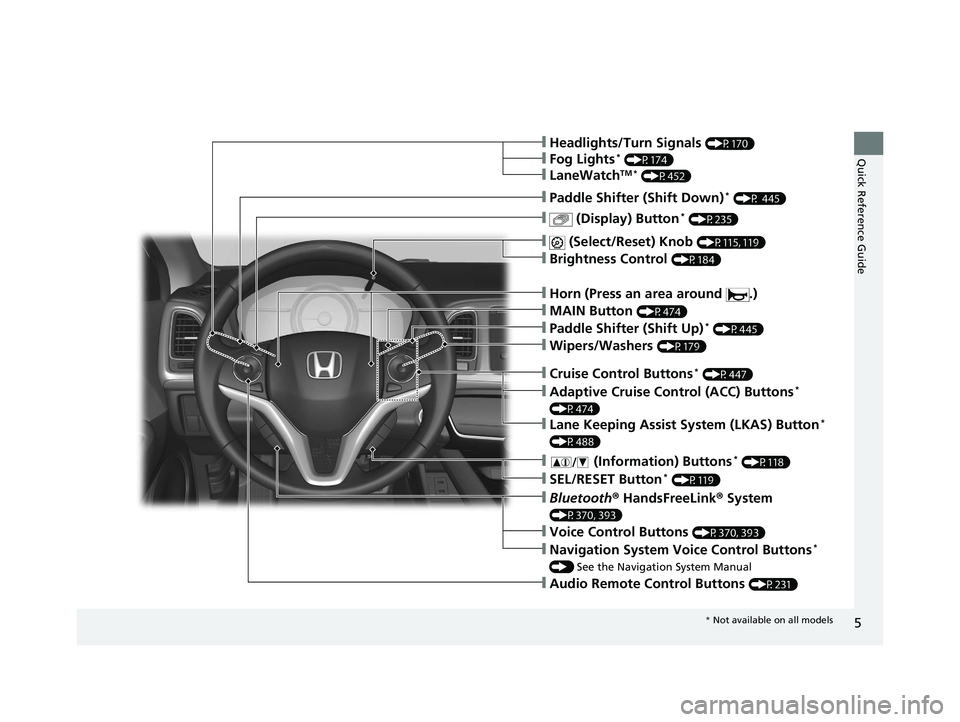
❙Wipers/Washers (P179)
❙Paddle Shifter (Shift Up)* (P445)
❙ (Display) Button* (P235)
❙Paddle Shifter (Shift Down)* (P 445)
❙Audio Remote Control Buttons (P231)
❙Headlights/Turn Signals (P170)
❙ (Select/Reset) Knob (P115, 119)
❙Bluetooth® HandsFreeLink ® System
(P370, 393)
❙ (Information) Buttons* (P118)
❙SEL/RESET Button* (P119)
❙Adaptive Cruise Control (ACC) Buttons*
(P474)
❙Lane Keeping Assist System (LKAS) Button*
(P488)
❙Cruise Control Buttons* (P447)
❙Horn (Press an area around .)
❙Fog Lights* (P174)
❙LaneWatchTM * (P452)
❙Brightness Control (P184)
❙Voice Control Buttons (P370, 393)
❙Navigation System Voice Control Buttons*
() See the Navigation System Manual
❙MAIN Button (P474)
* Not available on all models
20 HR-V HDMC HDMG-31T7A6400.book 5 ページ 2019年8月8日 木曜日 午後3時52分
Page 9 of 639
7
Quick Reference Guide
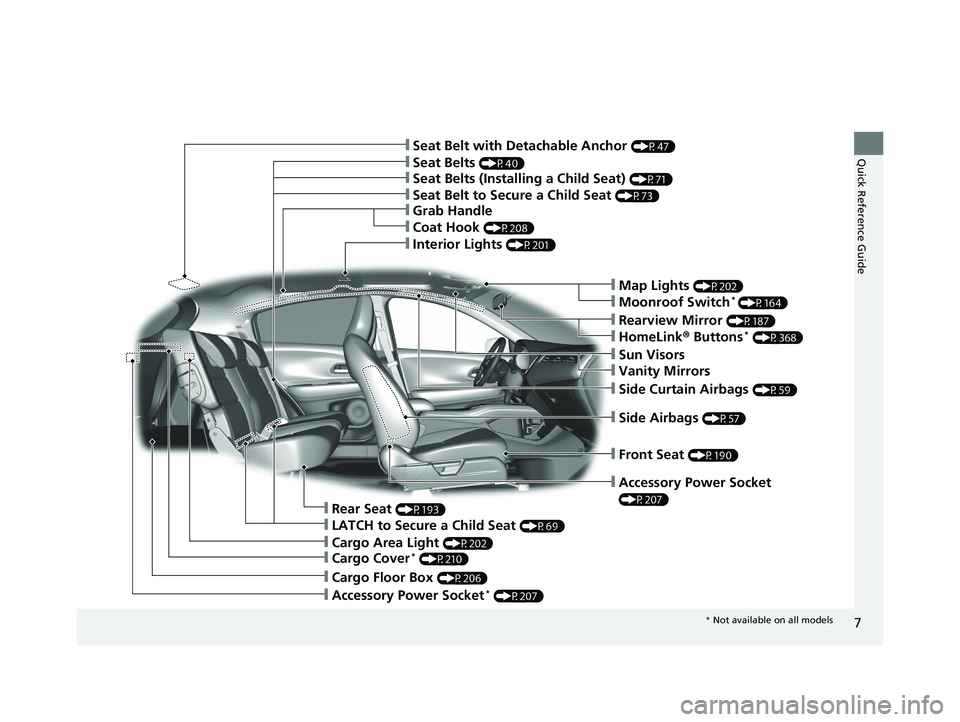
❙Front Seat (P190)
❙Side Airbags (P57)
❙Accessory Power Socket
(P207)
❙Side Curtain Airbags (P59)
❙Interior Lights (P201)
❙Seat Belts (P40)
❙Seat Belt with Detachable Anchor (P47)
❙Cargo Area Light (P202)
❙Cargo Floor Box (P206)
❙Accessory Power Socket* (P207)
❙Rear Seat (P193)
❙Map Lights (P202)
❙Sun Visors
❙Grab Handle
❙Coat Hook (P208)
❙Seat Belts (Installing a Child Seat) (P71)
❙Seat Belt to Secure a Child Seat (P73)
❙Moonroof Switch* (P164)
❙Vanity Mirrors
❙Rearview Mirror (P187)
❙HomeLink® Buttons* (P368)
❙Cargo Cover* (P210)
❙LATCH to Secure a Child Seat (P69)
* Not available on all models
20 HR-V HDMC HDMG-31T7A6400.book 7 ページ 2019年8月8日 木曜日 午後3時52分
Page 22 of 639
20
Quick Reference Guide
Features (P227)
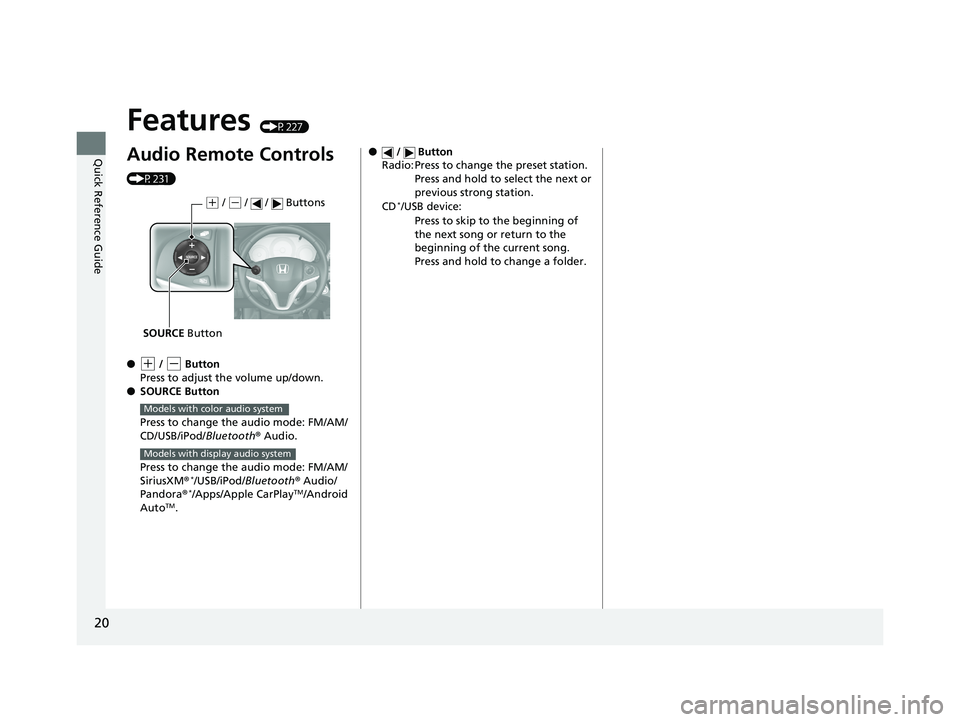
Audio Remote Controls
(P231)
●
(+ / (- Button
Press to adjust the volume up/down.
● SOURCE Button
Press to change the audio mode: FM/AM/
CD/USB/iPod/Bluetooth® Audio.
Press to change the audio mode: FM/AM/
SiriusXM ®
*/USB/iPod/Bluetooth ® Audio/
Pandora®*/Apps/Apple CarPlayTM/Android
AutoTM.
( + / (- / / Buttons
SOURCE Button
Models with color audio system
Models with display audio system
● / Button
Radio: Press to change the preset station.
Press and hold to select the next or
previous strong station.
CD
*/USB device: Press to skip to the beginning of
the next song or return to the
beginning of the current song.
Press and hold to change a folder.
20 HR-V HDMC HDMG-31T7A6400.book 20 ページ 2019年8月8日 木曜日 午後3時52分
Page 23 of 639
21
Quick Reference Guide
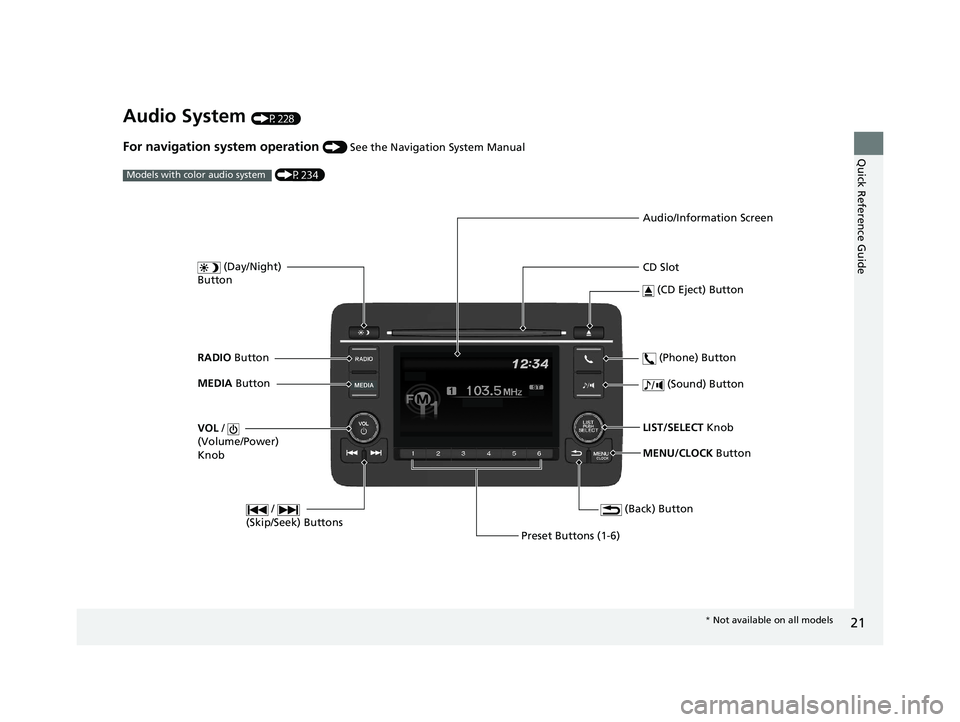
Audio System (P228)
For navigation system operation () See the Navigation System Manual
(P234)
Models with color audio system
MENU/CLOCK Button
LIST/SELECT
Knob
(Day/Night)
Button
(Back) Button
(Sound) Button
VOL /
(Volume/Power)
Knob
CD Slot
(CD Eject) Button
Preset Buttons (1-6) (Phone) Button
RADIO
Button
/
(Skip/Seek) Buttons
MEDIA Button Audio/Information Screen
*
Not available on all models
20 HR-V HDMC HDMG-31T7A6400.book 21 ページ 2019年8月8日 木曜日 午後3時52分
Page 81 of 639
79
Instrument Panel
This chapter describes the buttons, indicators, and gauges that are used while driving.
Indicators............................................ 80
Information Display Warning and Information Messages
*.................... 99
Multi-Information Display Warning and Information Messages
*.................. 100
Gauges and Displays Gauges ............................................ 113
Information Display
*........................ 115
Multi-Information Display*............... 118
* Not available on all models
20 HR-V HDMC HDMG-31T7A6400.book 79 ページ 2019年8月8日 木曜日 午後3時52分
Page 121 of 639
119
uuGauges and Displays uMulti-Information Display*
Continued
Instrument Panel
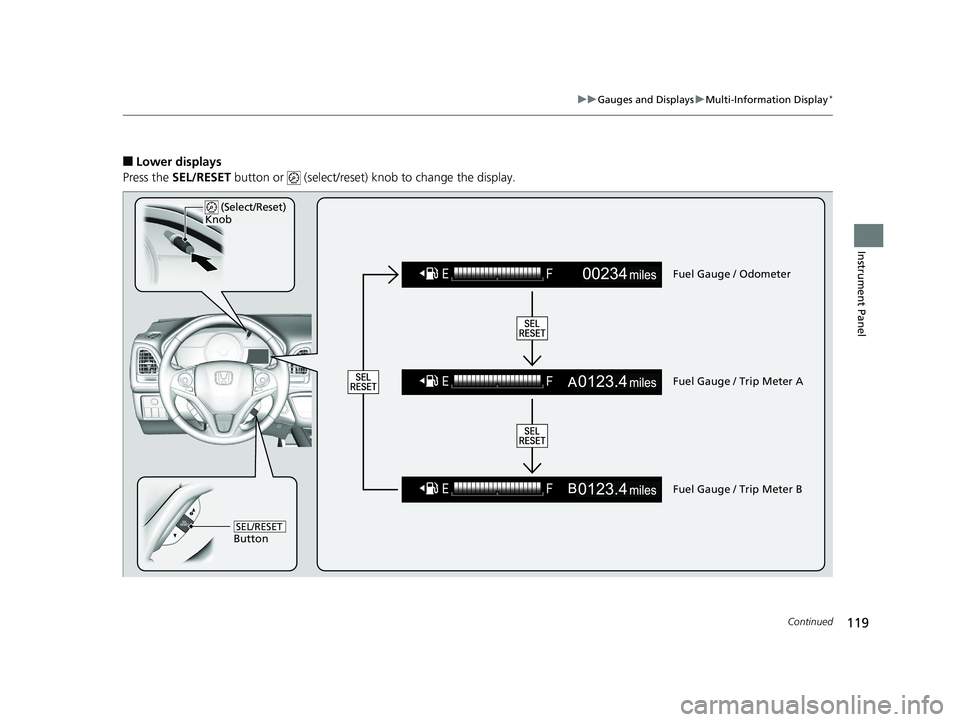
■Lower displays
Press the SEL/RESET button or (select/reset) knob to change the display.
Fuel Gauge / Odometer
Fuel Gauge / Trip Meter A
Fuel Gauge / Trip Meter B
(Select/Reset)
Knob
ButtonSEL/RESET
20 HR-V HDMC HDMG-31T7A6400.book 119 ページ 2019年8月8日 木曜日 午後3時52分
Page 190 of 639
uuAdjusting the Mirrors uInterior Rearview Mirror
188
Controls
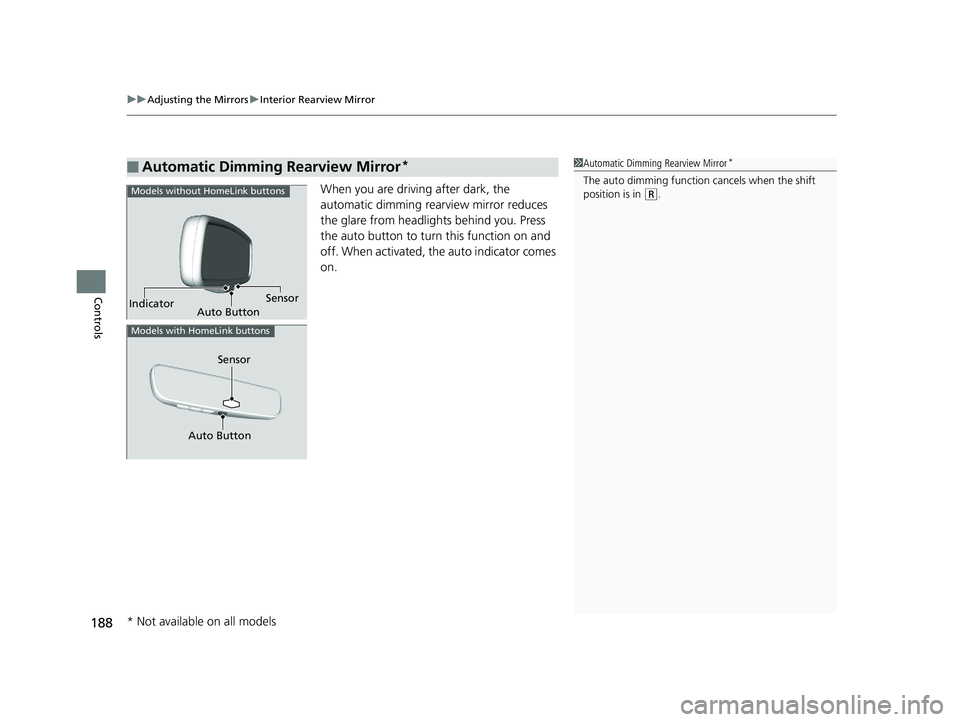
When you are driving after dark, the
automatic dimming rearview mirror reduces
the glare from headlights behind you. Press
the auto button to turn this function on and
off. When activated, the auto indicator comes
on.
■Automatic Dimming Rearview Mirror*1Automatic Dimming Rearview Mirror*
The auto dimming function cancels when the shift
position is in (R.
Sensor
Auto Button
Indicator
Models without HomeLink buttons
Sensor
Auto Button
Models with HomeLink buttons
* Not available on all models
20 HR-V HDMC HDMG-31T7A6400.book 188 ページ 2019年8月8日 木曜日 午後3時52分
Page 230 of 639
228
Features
Audio System
About Your Audio System
The audio system features AM/FM radio and SiriusXM® Radio service*. It can also
play audio CDs*, WMA/MP3/AAC files, USB flash drives, and iPod, iPhone and
Bluetooth ® devices.
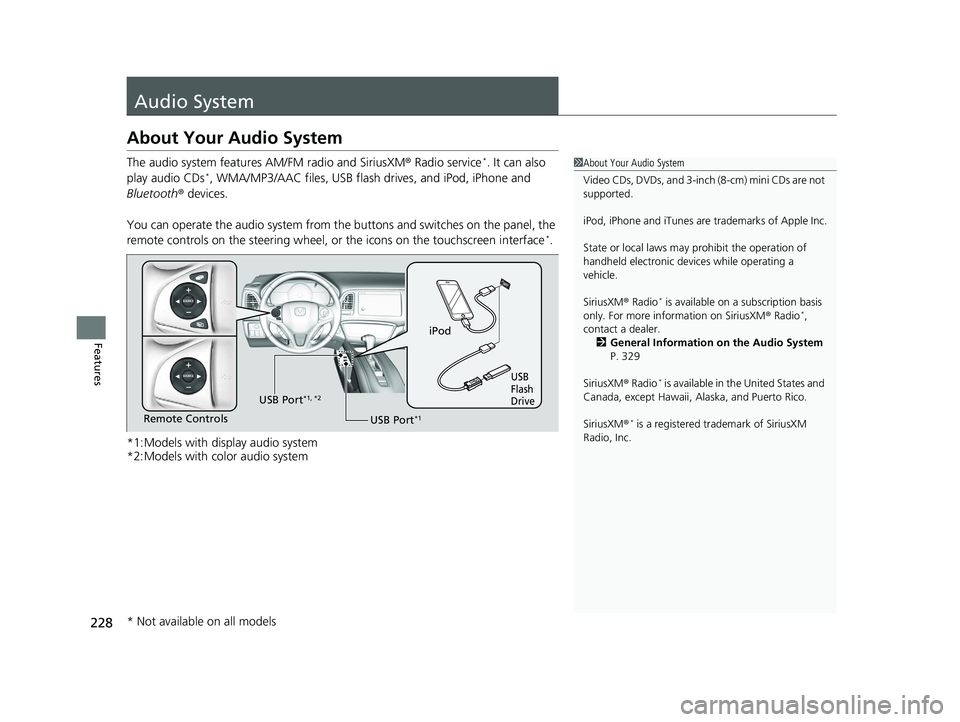
You can operate the audio system from the buttons and switches on the panel, the
remote controls on the steering wheel, or the icons on the touchscreen interface
*.
*1:Models with display audio system
*2:Models with color audio system
1 About Your Audio System
Video CDs, DVDs, and 3-inch (8-cm) mini CDs are not
supported.
iPod, iPhone and iTunes are trademarks of Apple Inc.
State or local laws may pr ohibit the operation of
handheld electronic devices while operating a
vehicle.
SiriusXM ® Radio
* is available on a subscription basis
only. For more information on SiriusXM ® Radio*,
contact a dealer.
2 General Information on the Audio System
P. 329
SiriusXM ® Radio
* is available in the United States and
Canada, except Ha waii, Alaska, and Puerto Rico.
SiriusXM ®
* is a registered trademark of SiriusXM
Radio, Inc.
iPod
USB
Flash
Drive
USB Port*1Remote Controls USB Port
*1, *2
* Not available on all models
20 HR-V HDMC HDMG-31T7A6400.book 228 ページ 2019年8月8日 木曜日 午後3時52分
Page 233 of 639
231
uuAudio System uAudio Remote Controls
Continued
Features
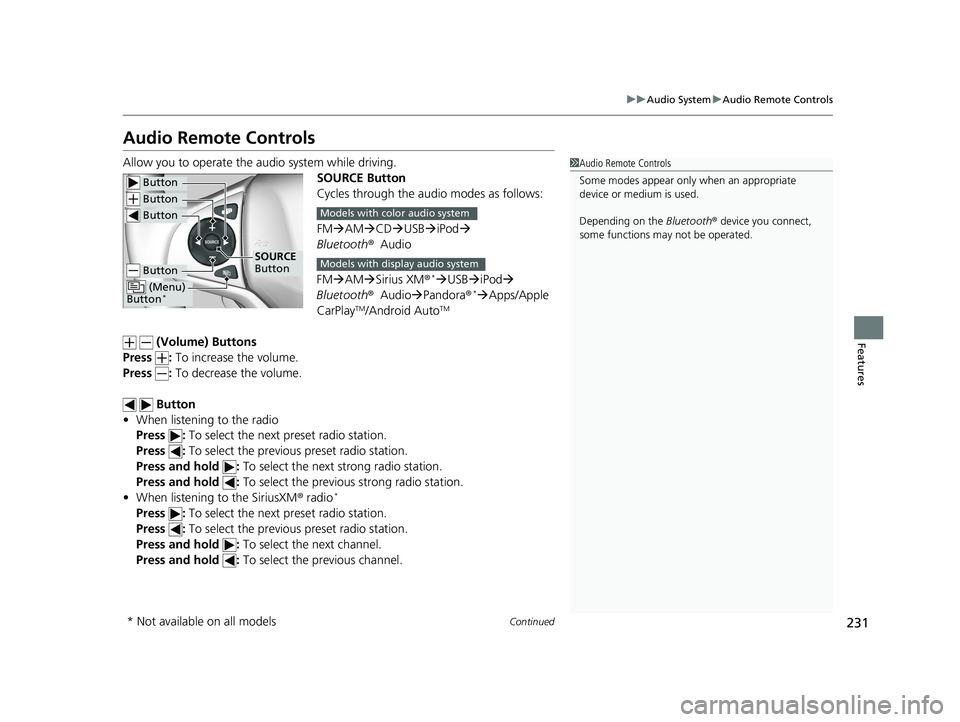
Audio Remote Controls
Allow you to operate the au dio system while driving.
SOURCE Button
Cycles through the audio modes as follows:
FMAM CD USB iPod
Bluetooth ®Audio
FM AM Sirius XM®
*USB iPod
Bluetooth ®Audio Pandora®*Apps/Apple
CarPlayTM/Android AutoTM
(Volume) Buttons
Press : To increase the volume.
Press : To decrease the volume.
Button
• When listening to the radio
Press : To select the next preset radio station.
Press : To select the previous preset radio station.
Press and hold : To select the next strong radio station.
Press and hold : To select the previous strong radio station.
• When listening to the SiriusXM ® radio
*
Press : To select the next preset radio station.
Press : To select the previous preset radio station.
Press and hold : To select the next channel.
Press and hold : To select the previous channel.
1Audio Remote Controls
Some modes appear only when an appropriate
device or medium is used.
Depending on the Bluetooth® device you connect,
some functions ma y not be operated.
Button
Button
Button
Button
(Menu)
Button*
SOURCE
Button
Models with color audio system
Models with display audio system
* Not available on all models
20 HR-V HDMC HDMG-31T7A6400.book 231 ページ 2019年8月8日 木曜日 午後3時52分
Page 243 of 639
241
uuAudio System Basic Operation uPlaying AM/FM Radio
Continued
Features
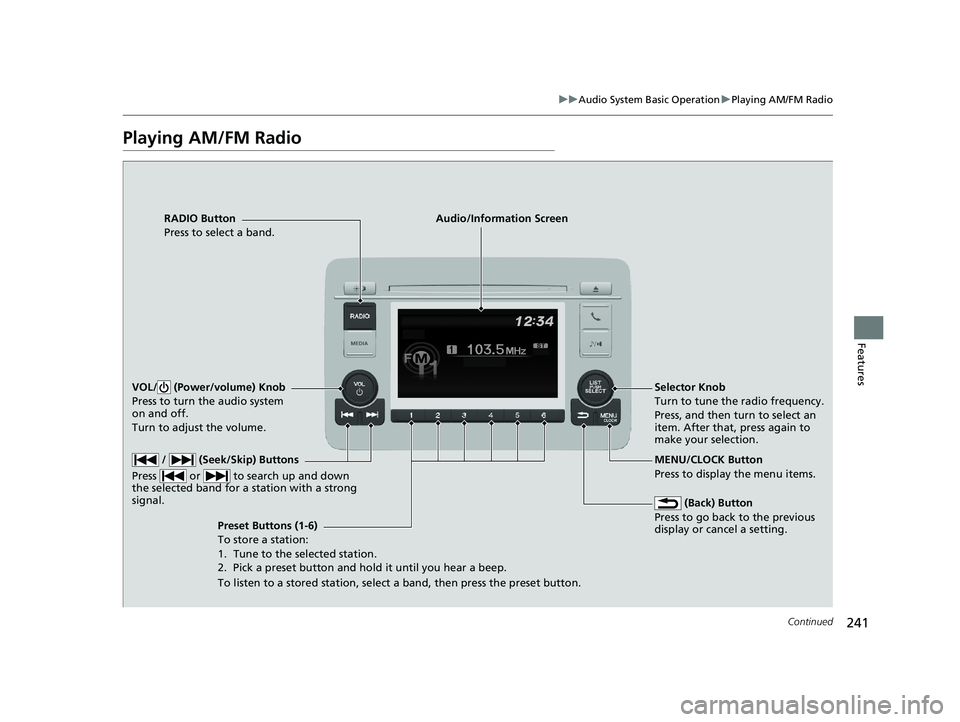
Playing AM/FM Radio
RADIO Button
Press to select a band.
(Back) Button
Press to go back to the previous
display or cancel a setting.
/ (Seek/Skip) Buttons
Press or to search up and down
the selected band for a station with a strong
signal.
VOL/ (Power/volume) Knob
Press to turn the audio system
on and off.
Turn to adjust the volume.
Preset Buttons (1-6)
To store a station:
1. Tune to the selected station.
2. Pick a preset button and hold it until you hear a beep.
To listen to a stored station, select a band, then press the preset button. Selector Knob
Turn to tune the radio frequency.
Press, and then turn to select an
item. After that, press again to
make your selection.
MENU/CLOCK Button
Press to display the menu items.
Audio/Information Screen
20 HR-V HDMC HDMG-31T7A6400.book 241 ページ 2019年8月8日 木曜日 午後3時52分