tire HONDA HR-V 2021 Navigation Manual (in English)
[x] Cancel search | Manufacturer: HONDA, Model Year: 2021, Model line: HR-V, Model: HONDA HR-V 2021Pages: 139, PDF Size: 3.46 MB
Page 63 of 139
61
uu Entering a Destination u Address
Navigation
Address
H u u Address
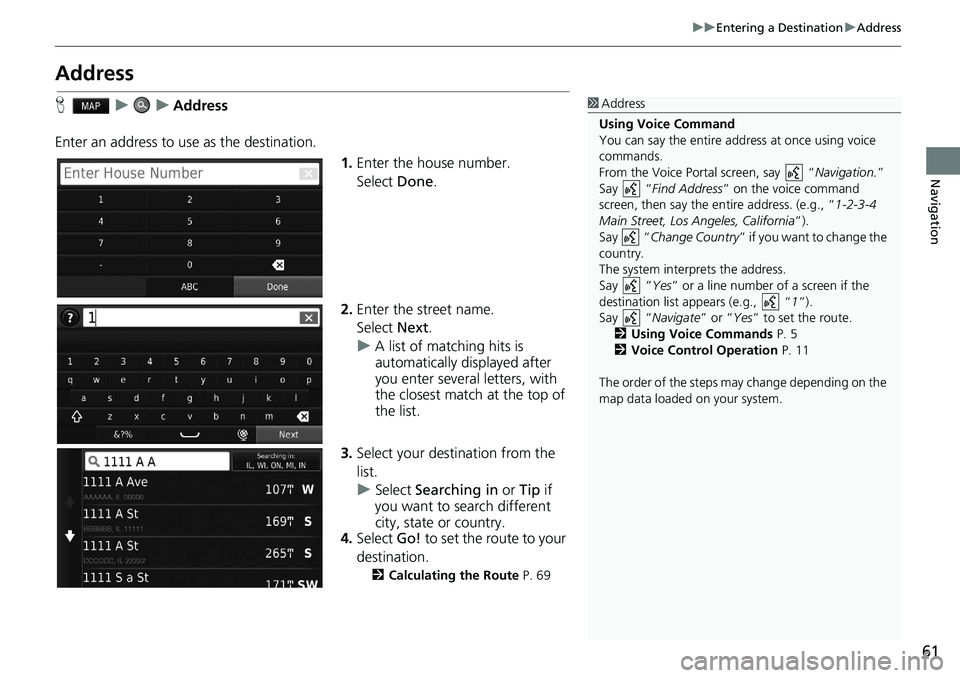
Enter an address to us e as the
destination.
1.Enter
the house number.
Select Done.
2. Enter the
street name.
Select Next.
u A
list of matching hits is
automatically displayed after
you enter several letters, with
the closest match at the top of
the list.
3. Select your destination fr
om the
list.
u Select Searching in or Tip if
you want to search diff
erent
city, state or country.
4. Select Go! to
set the route to your
destination.
2 Calculating the Route P. 69
1 Address
Using Voice Command
You can say the entire a ddress at once using voice
commands.
From the Voice Portal screen, say “ Navigation.”
Say “ Find Address ” on the voice command
screen, then say the entire address. (e.g., “1-2-3-4
Main Street, Los Angeles, California ”).
Say “ Change Country ” if you want to change the
country.
The system interprets the address.
Say “ Yes” or a line number of a screen if the
destination list appears (e.g., “ 1”).
Say “ Navigate” or “Yes ” to set the route.
2 Using Voice Commands P. 5
2 Voice Control Operation P. 11
The order of the steps may change depending on the
map data loaded on your system.
Page 75 of 139
Continued73
uu Driving to Your Destination u Viewing the Route
Navigation
• Select the map dashboards when you want to change the information that is
displayed. Select the following options:
Arrival Time , Distance , Time to Destination , Via Arrival , Distance to Via ,
Time to Via , Direction of Travel , Elevation .
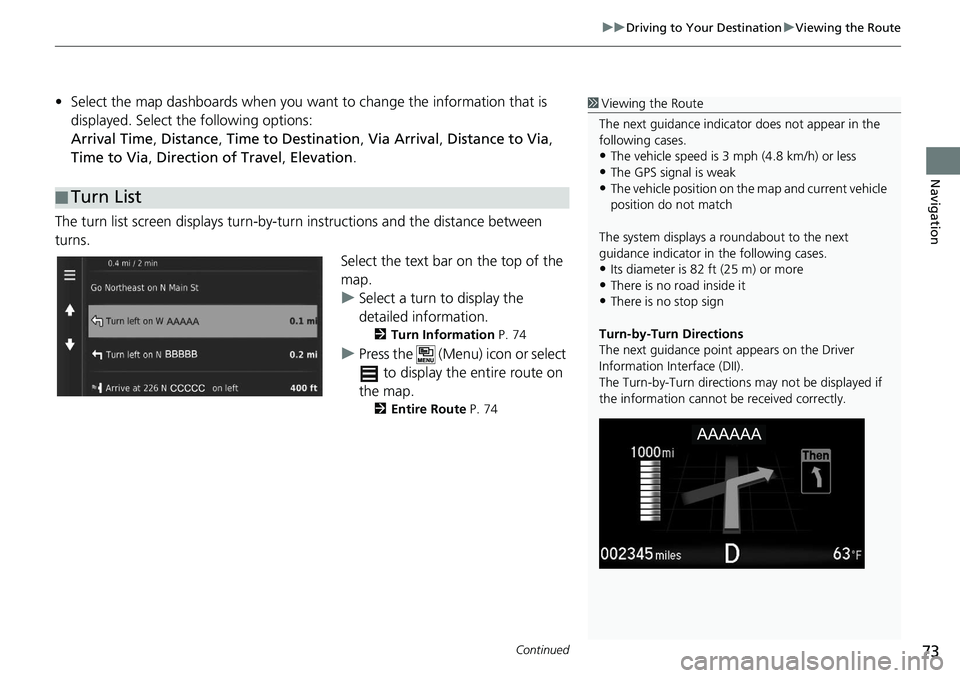
The turn list screen displa ys turn-by-turn instructions and the
distance between
turns.
Select the text bar on the top of the
ma
p.
u S
elect a turn to display the
detailed information.
2 Turn Information P. 74
u Press the (Menu) icon or select
to display the entire route on
the map.
2 Entire Route P. 74
■Turn List
1
Viewing the Route
The next guidance indicator does not appear in the
following cases.
•The vehicle speed is 3 mph (4.8 km/h) or less
•The GPS signal is weak•The vehicle position on the map and current vehicle
position do not match
The system displays a roundabout to the next
guidance indicator in the following cases.
•Its diameter is 82 ft (25 m) or more•There is no road inside it
•There is no stop sign
Turn-by-Turn Directions
The next guidance point appears on the Driver
Information Interface (DII).
The Turn-by-Turn directions may not be displayed if
the information cannot be received correctly.
Page 76 of 139
uu Driving to Your Destination u Viewing the Route
74
Navigation
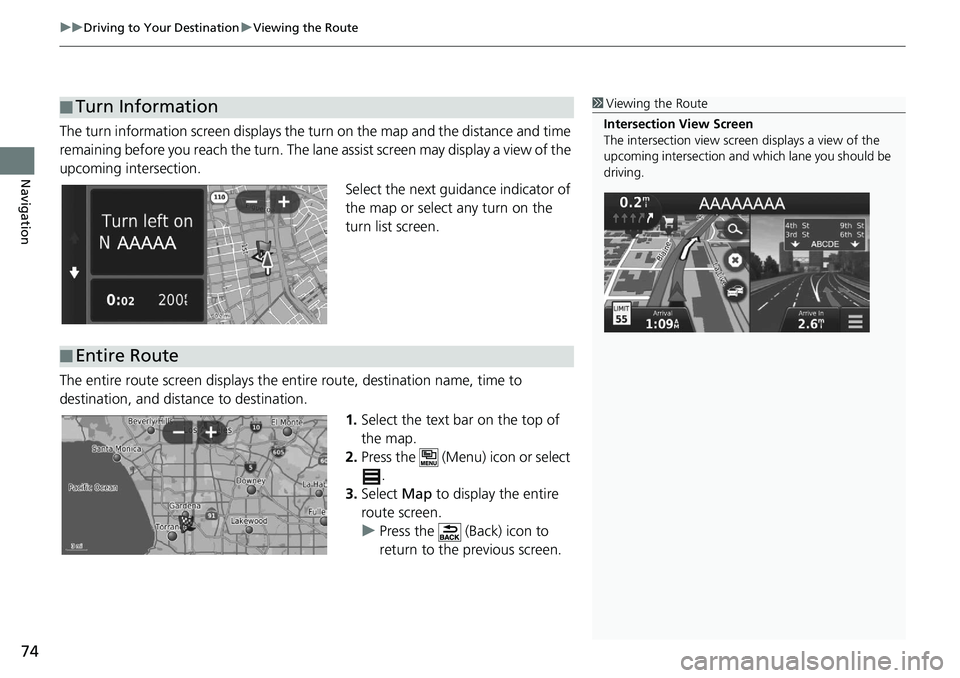
The turn information screen displays the turn on the map and the distance and time
remaining before you reach the turn. The lane assist screen may display a view of the
upcoming intersection.
Select the next guidance indicator of
the map or select any turn on the
turn list screen.
The entire route screen displays the entire route,
destination name, time to
destination, and distance to destination.
1.Select the
text bar on the top of
the map.
2. Press the (Menu) icon or select
.
3. Select Ma
p to display the entire
route screen.
u Press the (Back) icon to
return to the previous screen.
■ Turn Information1
Viewing the Route
Intersection View Screen
The intersection view screen displays a view of the
upcoming intersection and which lane you should be
driving.
■ Entire Route
Page 132 of 139
130
uu Legal Information u User Agreement
Reference Information
Entire Agreement: These terms and
conditions constitute the entire agreement
between HERE (and its licensors, including
their licensors and suppliers) and you
pertaining to the subject matter hereof, and
supersedes in their entirety any and all
written or oral agreements previously
existing between us wi th respect to such
subject matter.
Severability: You and HERE agree that if
any
portion of this agreement is found
illegal or unenforceable, that portion shall
be severed and the remainder of the
Agreement shall be given full force and
effect.
Governing Law: The above terms and
co
nditions shall be governed by the laws of
the State of Illinois (for Data for the
Americas and/or the Asia Pacific region) or
The Netherlands (for Data for Europe, the
Middle East and Africa), without giving
effect to (i) its conflict of laws provisions, or
(ii) the United Nati ons Convention for
Contracts for the International Sale of
Goods, which is explicitly excluded. For any
and all disputes, claims and actions arising
from or in connection with the Data (“Claims”), you agree
to submit to the
personal jurisdiction of (a) the State of
Illinois for Claims related to Data for the
Americas and/or the Asia Pacific region
provided to you hereunder, and (b) The
Netherlands for Data for Europe, the Middle
East and/or Africa provided to you
hereunder.
Government End Users: If the Data is
b
eing acquired by or on behalf of the
United States government or any other
entity seeking or applying rights similar to
those customarily claimed by the United
States government, this Data is a
“commercial item” as th at term is defined
at 48 C.F.R. (“FAR”) 2.101, is licensed in
accordance with this End User License
Agreement, and each copy of Data
delivered or otherwise furnished shall be
marked and embedded as appropriate with
the following “Notice of Use”, and be
treated in accordance with such Notice: This Data is a commercial item as defined in
FAR
2.101 and is subject to the End User
License Agreement unde r which this Data
was provided.
© 1987-2013 HERE. All rights reserved.
If the Contracting Officer, federal
government a
gency, or any federal official
refuses to use the legend provided herein,
the Contracting Officer, federal
government agency, or any federal official
must notify HERE prior to seeking additional
or alternative rights in the Data.
© 1987-2013 HERE. All rights reserved. NOTICE OF USE
CONTRACTOR (MANUFACTURER/ SUPPLIER) NAME:
HERE
CONTRACTOR (MANUFACTURER/ SUPPLIE
R) ADDRESS:
425 West Randolph Street, Chicago, IL 606
06.