Vehicle settings HONDA HR-V 2021 Owner's Manual (in English)
[x] Cancel search | Manufacturer: HONDA, Model Year: 2021, Model line: HR-V, Model: HONDA HR-V 2021Pages: 643, PDF Size: 39.63 MB
Page 129 of 643
Continued127
uuGauges and Displays uMulti-Information Display*
Instrument Panel
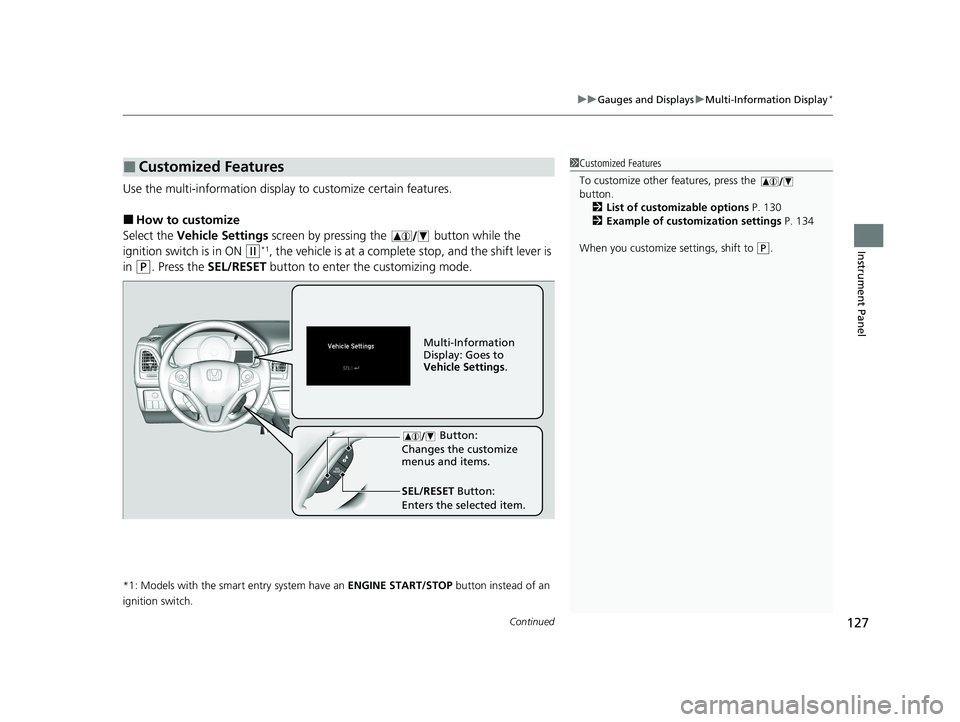
Use the multi-information display to customize certain features.
■How to customize
Select the Vehicle Settings screen by pressing the button while the
ignition switch is in ON
(w*1, the vehicle is at a complete stop, and the shift lever is
in
(P. Press the SEL/RESET button to enter the customizing mode.
*1: Models with the smart entry system have an ENGINE START/STOP button instead of an
ignition switch.
■Customized Features1 Customized Features
To customize other features, press the
button.
2 List of customizable options P. 130
2 Example of customization settings P. 134
When you customize settings, shift to
( P.
Button:
Changes the customize
menus and items.
Multi-Information
Display: Goes to
Vehicle Settings .
SEL/RESET Button:
Enters the selected item.
21 HR-V HDMC-31T7A6500.book 127 ページ 2020年9月23日 水曜日 午前7時0分
Page 130 of 643
128
uuGauges and Displays uMulti-Information Display*
Instrument Panel
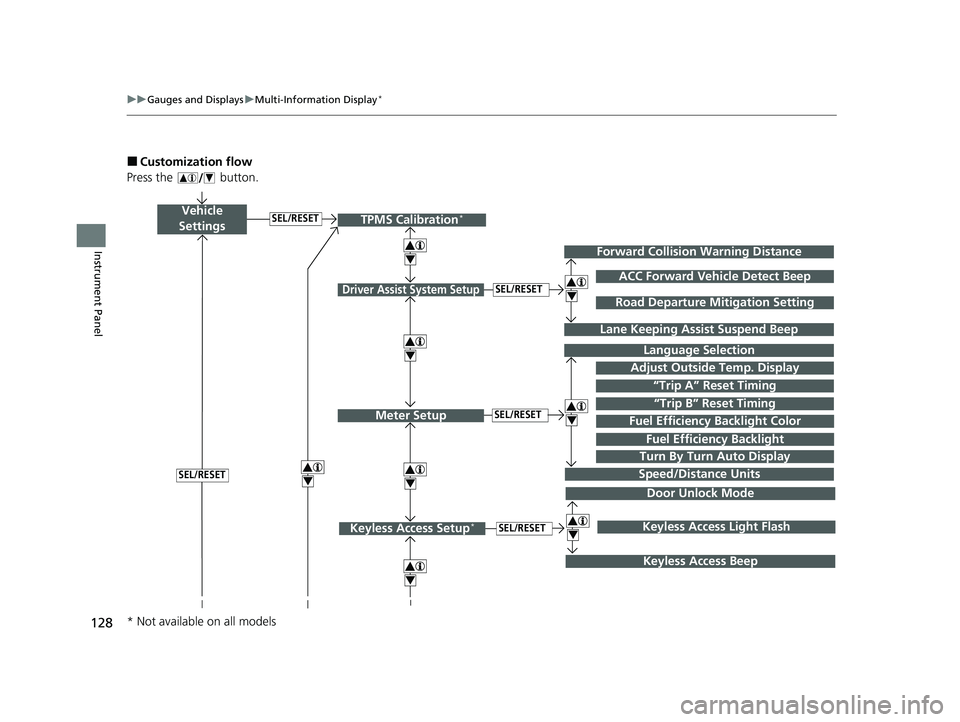
■Customization flow
Press the button.
Vehicle
Settings
Adjust Outside Temp. Display
Language Selection
Driver Assist System Setup
Meter Setup“Trip B” Reset TimingSEL/RESET
SEL/RESET
“Trip A” Reset Timing
4
ACC Forward Vehicle Detect Beep
Lane Keeping Assist Suspend Beep
4
SEL/RESET
Forward Collision Warning Distance
4
SEL/RESET
Speed/Distance Units
Road Departure Mitigation Setting
Fuel Efficien cy Backlight
Turn By Turn Auto Display
TPMS Calibration*
4
Fuel Efficiency Backlight Color
4
4
Door Unlock Mode
Keyless Access Setup*SEL/RESET
Keyless Access Beep
4Keyless Access Light Flash
4
* Not available on all models
21 HR-V HDMC-31T7A6500.book 128 ページ 2020年9月23日 水曜日 午前7時0分
Page 132 of 643
130
uuGauges and Displays uMulti-Information Display*
Instrument Panel
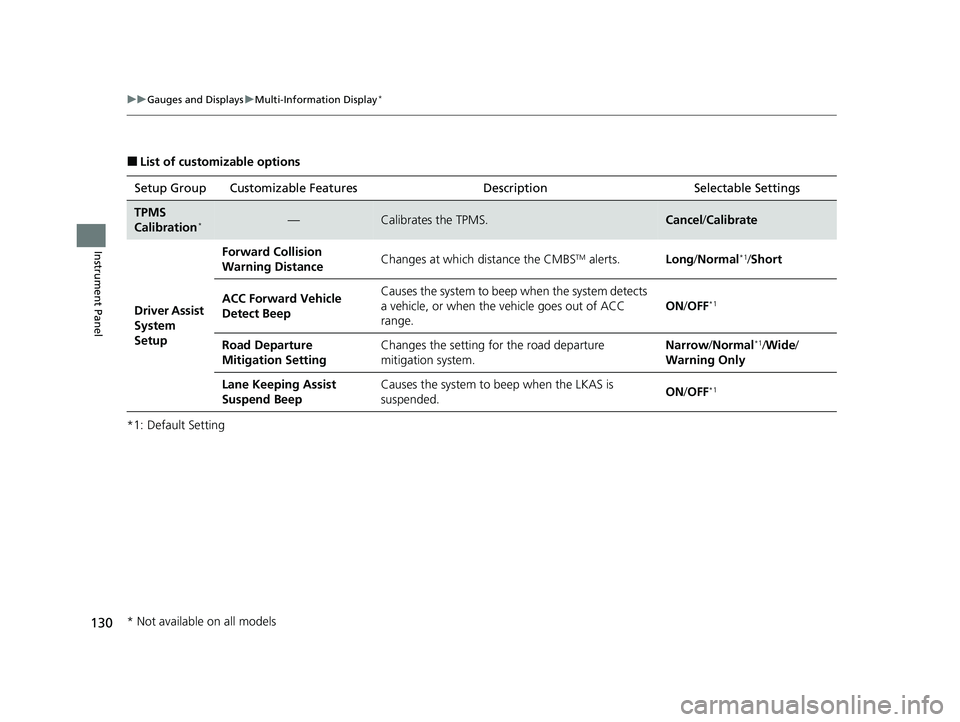
■List of customizable options
*1: Default Setting Setup Group Customizable Features Description Selectable Settings
TPMS
Calibration*—Calibrates the TPMS.Cancel
/Calibrate
Driver Assist
System
Setup Forward Collision
Warning Distance
Changes at which distance the CMBS
TM alerts.
Long/Normal*1/Short
ACC Forward Vehicle
Detect Beep Causes the system to beep
when the system detects
a vehicle, or when the vehicle goes out of ACC
range. ON
/OFF
*1
Road Departure
Mitigation Setting Changes the setting for the road departure
mitigation system. Narrow
/Normal*1/Wide /
Warning Only
Lane Keeping Assist
Suspend Beep Causes the system to beep when the LKAS is
suspended.
ON
/OFF
*1
* Not available on all models
21 HR-V HDMC-31T7A6500.book 130 ページ 2020年9月23日 水曜日 午前7時0分
Page 135 of 643
133
uuGauges and Displays uMulti-Information Display*
Continued
Instrument Panel
*1:Default SettingSetup Group Customizable Features
Description Selectable Settings
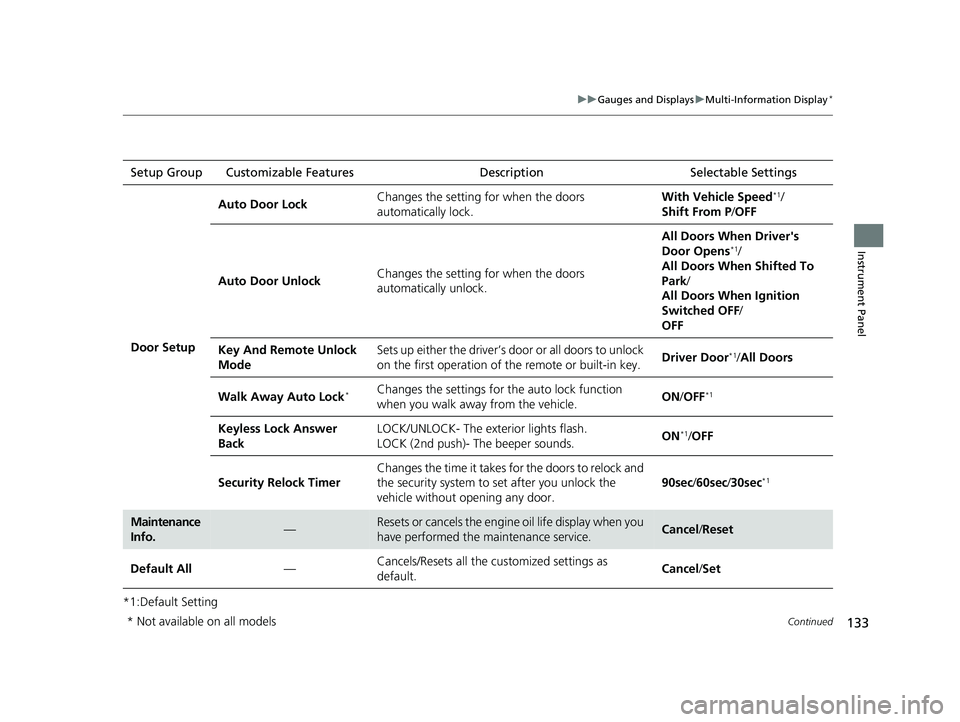
Door Setup Auto Door Lock
Changes the setting for when the doors
automatically lock. With Vehicle Speed
*1/
Shift From P /OFF
Auto Door Unlock Changes the setting for when the doors
automatically unlock. All Doors When Driver's
Door Opens
*1/
All Doors When Shifted To
Park /
All Doors When Ignition
Switched OFF /
OFF
Key And Remote Unlock
Mode Sets up either the driver’s door or all doors to unlock
on the first operation of
the remote or built-in key. Driver Door
*1/
All Doors
Walk Away Auto Lock
*Changes the settings for the auto lock function
when you walk away from the vehicle. ON
/OFF*1
Keyless Lock Answer
Back LOCK/UNLOCK- The exterior lights flash.
LOCK (2nd push)- The beeper sounds.
ON*1/
OFF
Security Relock Timer Changes the time it takes for the doors to relock and
the security system to set after you unlock the
vehicle without op
ening any door. 90sec
/60sec /30sec
*1
Maintenance
Info.—Resets or cancels the engine oil life display when you
have performed the maintenance service.Cancel /Reset
Default All —Cancels/Resets all the customized settings as
default.
Cancel
/Set
* Not available on all models
21 HR-V HDMC-31T7A6500.book 133 ページ 2020年9月23日 水曜日 午前7時0分
Page 136 of 643
134
uuGauges and Displays uMulti-Information Display*
Instrument Panel
■Example of customization settings
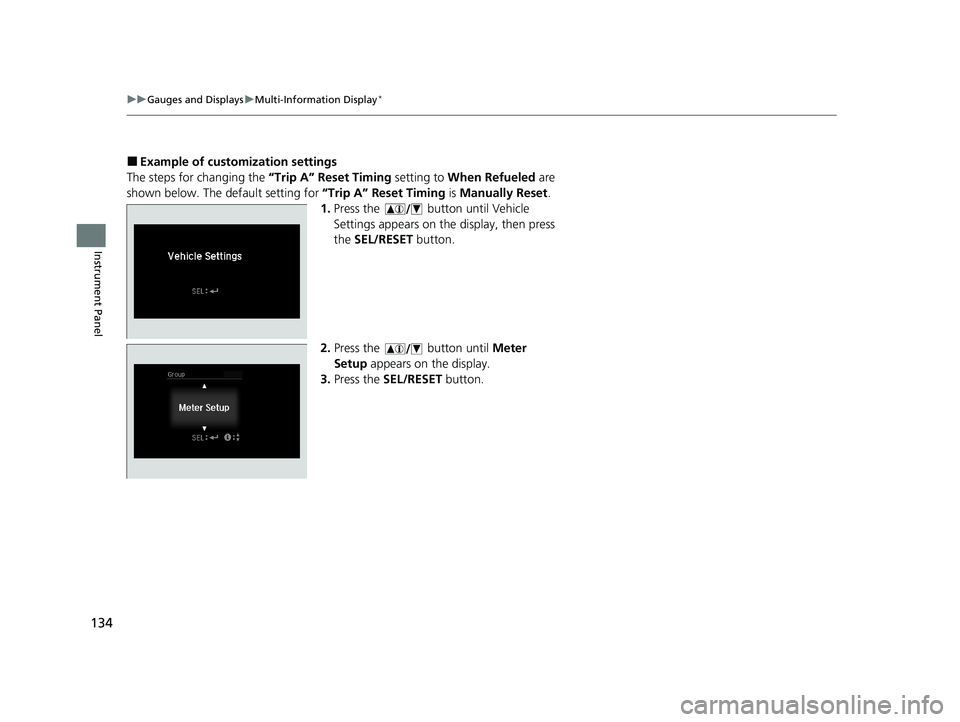
The steps for changing the “Trip A” Reset Timing setting to When Refueled are
shown below. The default setting for “Trip A” Reset Timing is Manually Reset .
1. Press the button until Vehicle
Settings appears on the display, then press
the SEL/RESET button.
2. Press the button until Meter
Setup appears on the display.
3. Press the SEL/RESET button.
21 HR-V HDMC-31T7A6500.book 134 ページ 2020年9月23日 水曜日 午前7時0分
Page 264 of 643
uuAudio System Basic Operation uAudio/Information Screen
262
Features
■Info
Displays Trip Computer , Voice Info , Clock/Wallpaper , or System/Device
Information . Select on the Info Menu screen to see all available options: Trip
Computer , Voice Info , Clock/Wallpaper and System/Device Information .
Trip Computer:
• Current Drive tab: Displays the current trip information.
• History of Trip A tab: Displays information for the three previous drives. The
information is stored every time you reset Trip A.
To delete the history manually, select Delete History on the History of Trip A
tab. The confirmation message app ears on the screen, then select Yes.
Voice Info: Displays the all commands list.
Clock/Wallpaper: Displays the clock and wallpaper.
System/Device Information:
• System Info: Displays the software version of the audio system.
• USB Info : Displays the memory usage of the USB device.
• Switch USB Device : Connects or disconnects USB device to this audio system.
■Settings
Enters the customiz ing menu screen.
2Customized Features P. 356
■Smartphone Connection
Displays the Apple CarPlay or Android Auto.
2 Apple CarPlay P. 316
2 Android Auto P. 320
1Audio/Information Screen
Touchscreen operation
•Use simple gestures - in cluding touching, swiping
and scrolling - to operate certain audio functions.
•Some items may be grayed out during driving to
reduce the potential for distraction.
•You can select them when the vehicle is stopped or
use voice commands.
•Wearing gloves may limit or prevent touchscreen
response.
You can change the touchs creen sensitivity setting.
2 Customized Features P. 356
21 HR-V HDMC-31T7A6500.book 262 ページ 2020年9月23日 水曜日 午前7時0分
Page 270 of 643
uuAudio System Basic Operation uAudio/Information Screen
268
Features
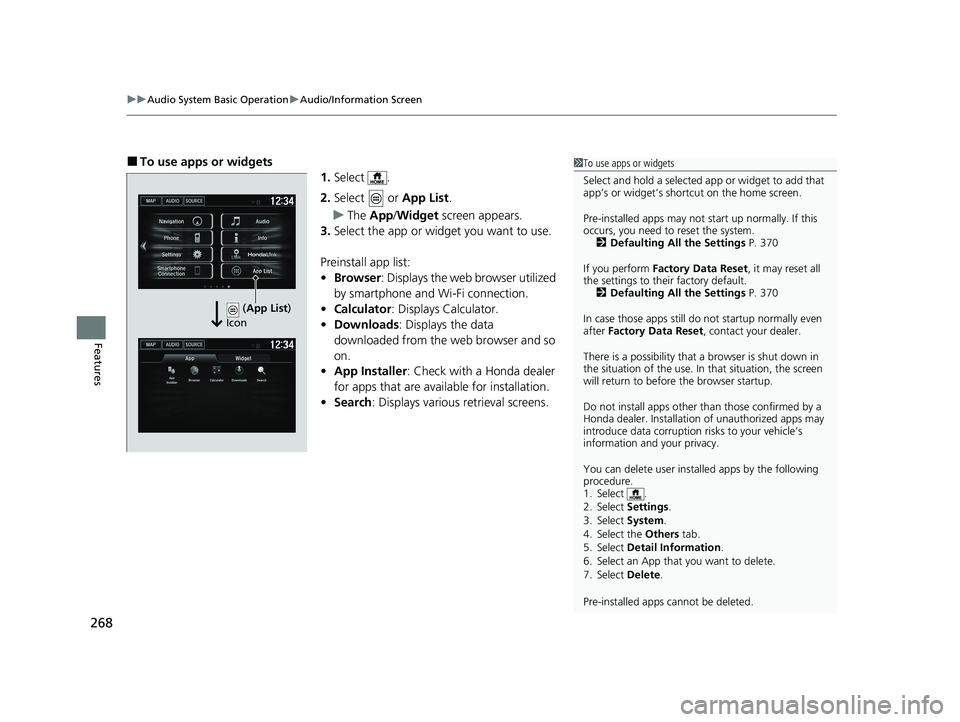
■To use apps or widgets
1.Select .
2. Select or App List.
u The App /Widget screen appears.
3. Select the app or widget you want to use.
Preinstall app list:
• Browser : Displays the web browser utilized
by smartphone and Wi-Fi connection.
• Calculator : Displays Calculator.
• Downloads : Displays the data
downloaded from the web browser and so
on.
• App Installer : Check with a Honda dealer
for apps that are available for installation.
• Search : Displays various retrieval screens.1To use apps or widgets
Select and hold a selected app or widget to add that
app’s or widget’s shortcut on the home screen.
Pre-installed apps may not start up normally. If this
occurs, you need to reset the system. 2 Defaulting All the Settings P. 370
If you perform Factory Data Reset , it may reset all
the settings to their factory default. 2 Defaulting All the Settings P. 370
In case those apps still do not startup normally even
after Factory Data Reset , contact your dealer.
There is a possibility that a browser is shut down in
the situation of the use. In that situation, the screen
will return to before the browser startup.
Do not install apps other than those confirmed by a
Honda dealer. Installation of unauthorized apps may
introduce data corruption risks to your vehicle’s
information and your privacy.
You can delete user installed apps by the following
procedure.
1. Select .
2. Select Settings .
3. Select System .
4. Select the Others tab.
5. Select Detail Information .
6. Select an App that you want to delete.
7. Select Delete .
Pre-installed apps cannot be deleted.
(App List )
Icon
21 HR-V HDMC-31T7A6500.book 268 ページ 2020年9月23日 水曜日 午前7時0分
Page 277 of 643
275
uuAudio System Basic Operation uAdjusting the Sound
Features
Adjusting the Sound
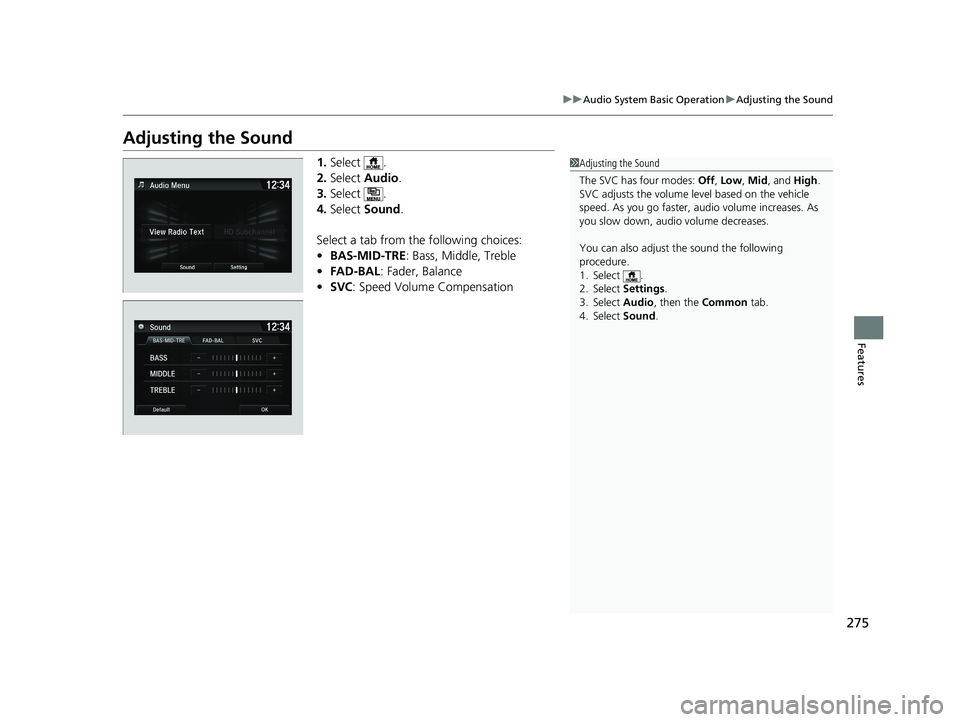
1. Select .
2. Select Audio .
3. Select .
4. Select Sound .
Select a tab from the following choices:
• BAS-MID-TRE: Bass, Middle, Treble
• FAD-BAL : Fader, Balance
• SVC : Speed Volume Compensation1Adjusting the Sound
The SVC has four modes: Off, Low , Mid , and High.
SVC adjusts the volume level based on the vehicle
speed. As you go faster, audio volume increases. As
you slow down, audi o volume decreases.
You can also adjust the sound the following
procedure.
1. Select .
2. Select Settings .
3. Select Audio , then the Common tab.
4. Select Sound .
21 HR-V HDMC-31T7A6500.book 275 ページ 2020年9月23日 水曜日 午前7時0分
Page 315 of 643
313
uuAudio System Basic Operation uWi-Fi Connection
Continued
Features
Wi-Fi Connection
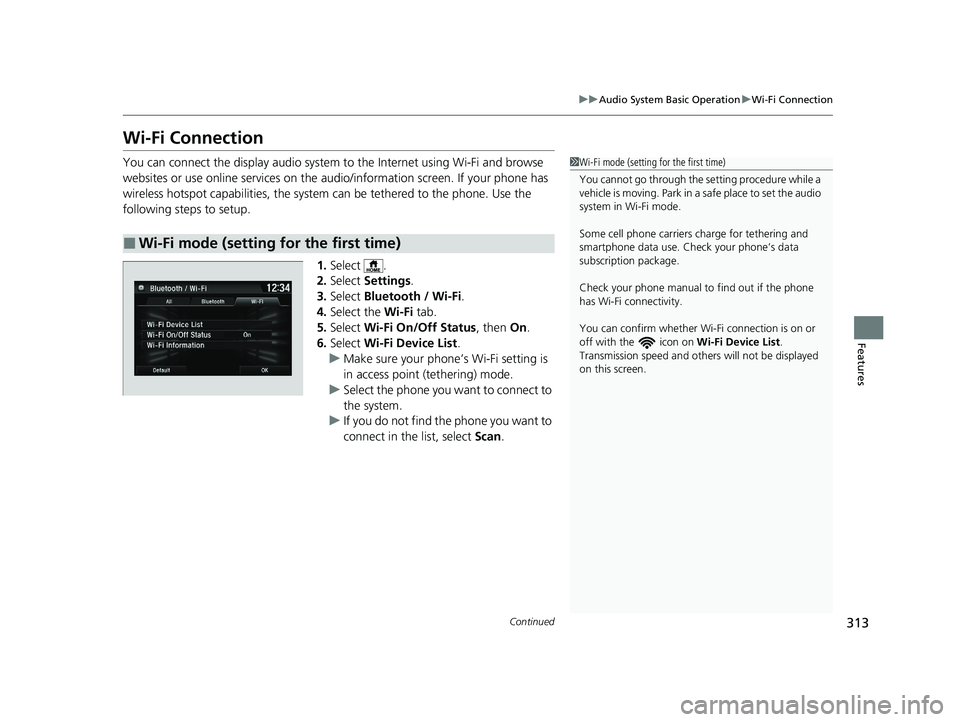
You can connect the display audio system to the Internet using Wi-Fi and browse
websites or use online services on the audio/information screen. If your phone has
wireless hotspot capabilities, the system can be tethered to the phone. Use the
following steps to setup.
1.Select .
2. Select Settings .
3. Select Bluetooth / Wi-Fi .
4. Select the Wi-Fi tab.
5. Select Wi-Fi On/Off Status , then On.
6. Select Wi-Fi Device List .
u Make sure your phone’s Wi-Fi setting is
in access point (tethering) mode.
u Select the phone you want to connect to
the system.
u If you do not find the phone you want to
connect in the list, select Scan.
■Wi-Fi mode (setting for the first time)
1Wi-Fi mode (setting for the first time)
You cannot go through the se tting procedure while a
vehicle is moving. Park in a safe place to set the audio
system in Wi-Fi mode.
Some cell phone carriers charge for tethering and
smartphone data use. Check your phone’s data
subscription package.
Check your phone manual to find out if the phone
has Wi-Fi connectivity.
You can confirm whether Wi -Fi connection is on or
off with the icon on Wi-Fi Device List.
Transmission speed and others will not be displayed
on this screen.
21 HR-V HDMC-31T7A6500.book 313 ページ 2020年9月23日 水曜日 午前7時0分
Page 320 of 643
uuAudio System Basic Operation uApple CarPlay
318
Features
■Maps
Display Apple Maps and use the navigation function just as you would on your
iPhone.
Only one navigation system (pre-installed navigation or Apple CarPlay map) can give
directions at a time. When you are using one system, directions to any prior
destination set on the other system wi ll be canceled, and the system you are
currently using will direct you to your destination.
After you have connected your iPhone to the system via USB, use the following
procedure to set up Apple CarPlay. Us e of Apple CarPlay will result in the
transmission of certain user and vehicle information (such as vehicle location, speed,
and status) to your iPhone to enhance th e Apple CarPlay experience. You will need
to consent to the sharing of this information on the audio/information touch screen.
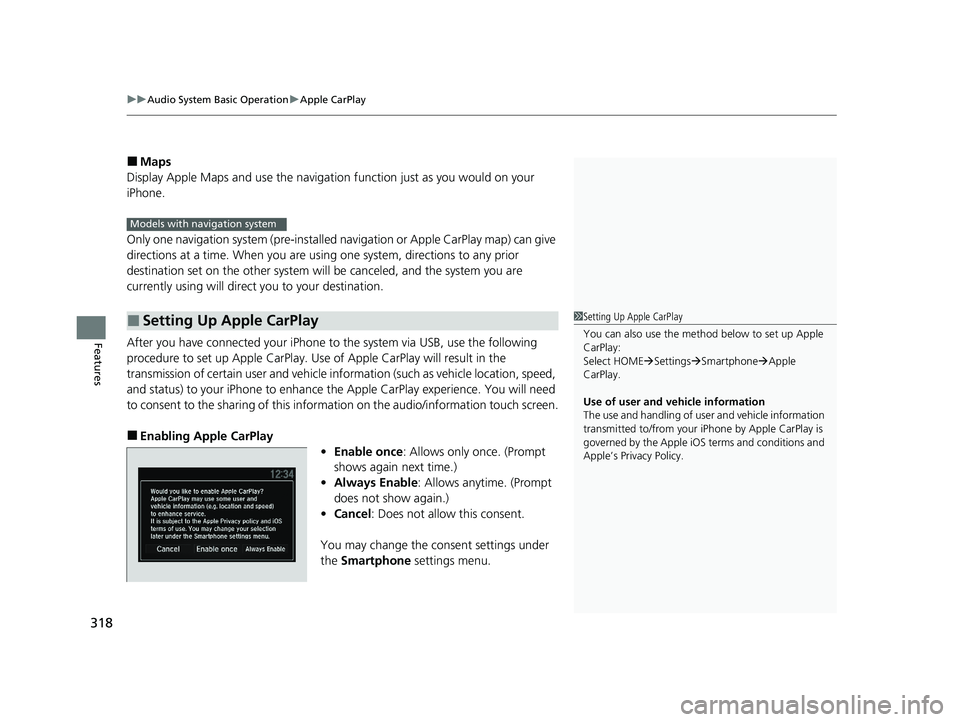
■Enabling Apple CarPlay
•Enable once : Allows only once. (Prompt
shows again next time.)
• Always Enable : Allows anytime. (Prompt
does not show again.)
• Cancel : Does not allo w this consent.
You may change the consent settings under
the Smartphone settings menu.
■Setting Up Apple CarPlay
Models with navigation system
1Setting Up Apple CarPlay
You can also use the method below to set up Apple
CarPlay:
Select HOME Settings Smartphone Apple
CarPlay.
Use of user and vehicle information
The use and handling of user and vehicle information
transmitted to/from your iP hone by Apple CarPlay is
governed by the Apple iOS terms and conditions and
Apple’s Privacy Policy.
21 HR-V HDMC-31T7A6500.book 318 ページ 2020年9月23日 水曜日 午前7時0分