change time HONDA HRV 2022 User Guide
[x] Cancel search | Manufacturer: HONDA, Model Year: 2022, Model line: HRV, Model: HONDA HRV 2022Pages: 641, PDF Size: 21.37 MB
Page 133 of 641
131
uuGauges and Displays uMulti-Information Display*
Continued
Instrument Panel
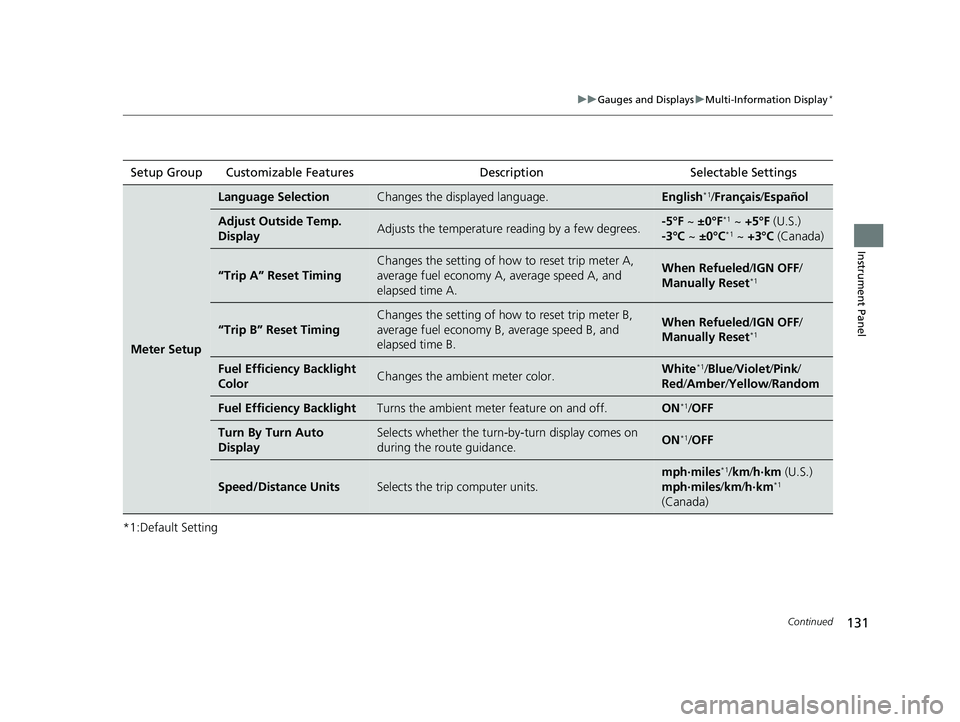
*1:Default SettingSetup Group Customizable Features
Description Selectable Settings
Meter Setup
Language SelectionChanges the displayed language.English*1/Français /Español
Adjust Outside Temp.
DisplayAdjusts the temperature r eading by a few degrees.-5°F ~ ±0°F*1 ~ +5°F (U.S.)
-3°C ~ ±0°C*1 ~ +3°C (Canada)
“Trip A” Reset Timing
Changes the setting of how to reset trip meter A,
average fuel economy A, average speed A, and
elapsed time A.When Refueled /IGN OFF /
Manually Reset*1
“Trip B” Reset Timing
Changes the setting of ho w to reset trip meter B,
average fuel economy B, average speed B, and
elapsed time B.When Refueled /IGN OFF /
Manually Reset*1
Fuel Efficiency Backlight
ColorChanges the ambient meter color.White*1/ Blue /Violet/ Pink/
Red /Amber /Yellow /Random
Fuel Efficiency BacklightTurns the ambient meter feature on and off.ON*1/OFF
Turn By Turn Auto
DisplaySelects whether the turn-b y-turn display comes on
during the route guidance.ON*1/ OFF
Speed/Distance UnitsSelects the trip computer units.
mph∙miles*1/ km/ h∙km (U.S.)
mph∙miles /km/ h∙km*1
(Canada)
22 HR-V HDMC-31T7A6600.book 131 ページ 2021年4月12日 月曜日 午前10時50分
Page 134 of 641
132
uuGauges and Displays uMulti-Information Display*
Instrument Panel
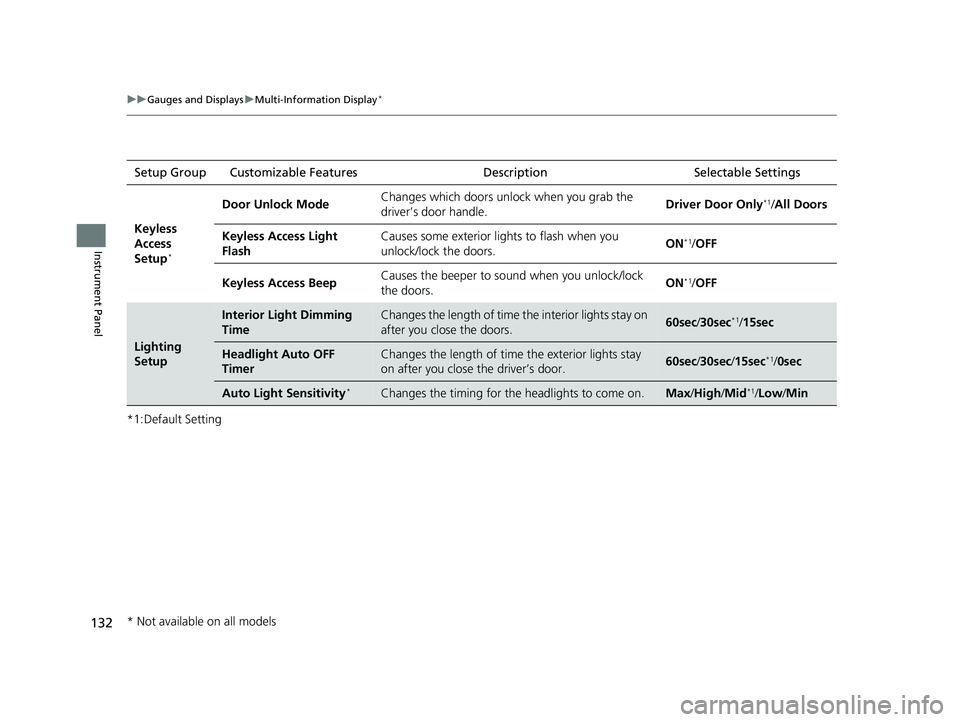
*1:Default SettingSetup Group Customizable Features
DescriptionSelectable Settings
Keyless
Access
Setup
*
Door Unlock Mode Changes which doors unlock when you grab the
driver’s door handle. Driver Door Only*1/
All Doors
Keyless Access Light
Flash Causes some exterior lights to flash when you
unlock/lock the doors.
ON
*1/
OFF
Keyless Access Beep Causes the beeper to sound when you unlock/lock
the doors.
ON
*1/
OFF
Lighting
Setup
Interior Light Dimming
TimeChanges the length of time th e interior lights stay on
after you close the doors.60sec /30sec*1/15sec
Headlight Auto OFF
TimerChanges the length of time the exterior lights stay
on after you close the driver’s door.60sec /30sec /15sec*1/ 0sec
Auto Light Sensitivity*Changes the timing for the headlights to come on.Max/High /Mid*1/Low/ Min
* Not available on all models
22 HR-V HDMC-31T7A6600.book 132 ページ 2021年4月12日 月曜日 午前10時50分
Page 135 of 641
133
uuGauges and Displays uMulti-Information Display*
Continued
Instrument Panel
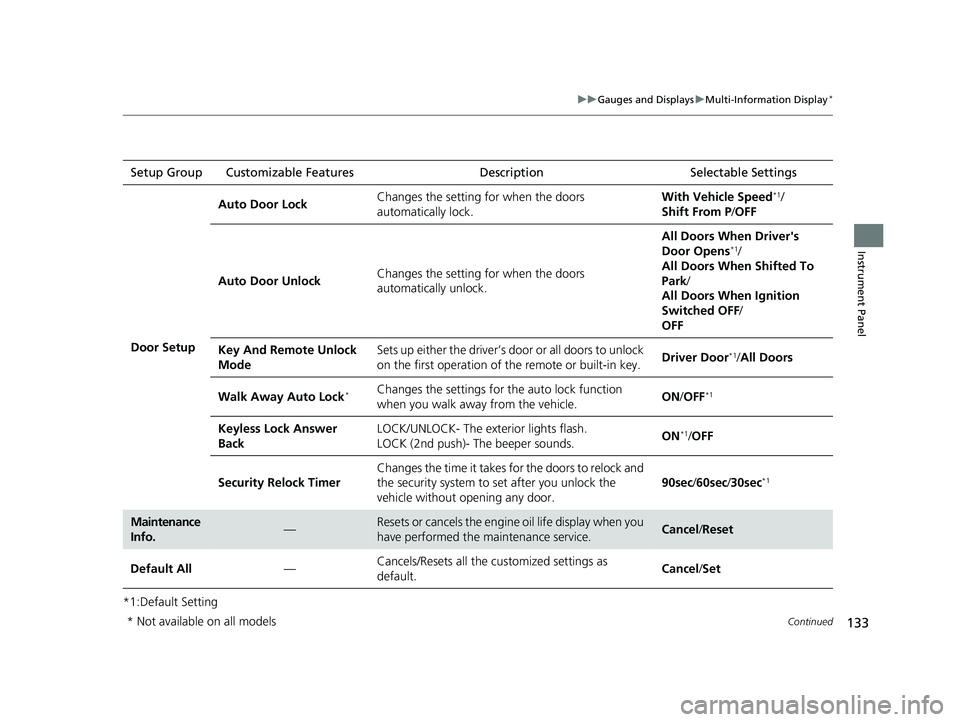
*1:Default SettingSetup Group Customizable Features
Description Selectable Settings
Door Setup Auto Door Lock
Changes the setting for when the doors
automatically lock. With Vehicle Speed
*1/
Shift From P /OFF
Auto Door Unlock Changes the setting for when the doors
automatically unlock. All Doors When Driver's
Door Opens
*1/
All Doors When Shifted To
Park /
All Doors When Ignition
Switched OFF /
OFF
Key And Remote Unlock
Mode Sets up either the driver’s door or all doors to unlock
on the first operation of
the remote or built-in key. Driver Door
*1/
All Doors
Walk Away Auto Lock
*Changes the settings for the auto lock function
when you walk away from the vehicle. ON
/OFF*1
Keyless Lock Answer
Back LOCK/UNLOCK- The exterior lights flash.
LOCK (2nd push)- The beeper sounds.
ON*1/
OFF
Security Relock Timer Changes the time it takes for the doors to relock and
the security system to set after you unlock the
vehicle without op
ening any door. 90sec
/60sec /30sec
*1
Maintenance
Info.—Resets or cancels the engine oil life display when you
have performed the maintenance service.Cancel /Reset
Default All —Cancels/Resets all the customized settings as
default.
Cancel
/Set
* Not available on all models
22 HR-V HDMC-31T7A6600.book 133 ページ 2021年4月12日 月曜日 午前10時50分
Page 141 of 641
139
uuClock uAdjusting the Clock
Controls
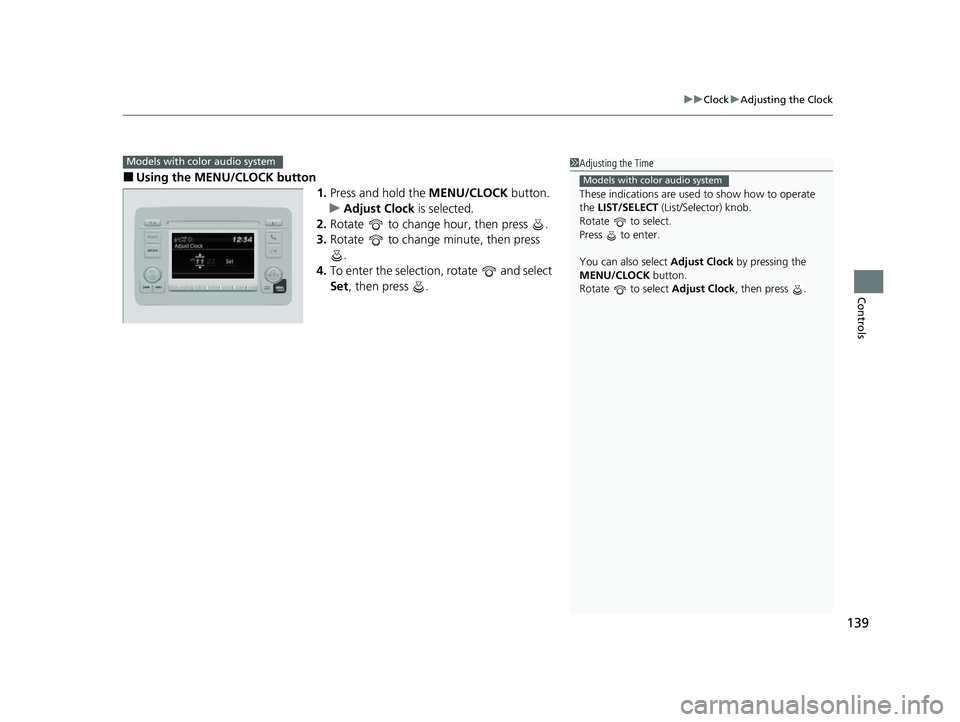
■Using the MENU/CLOCK button
1.Press and hold the MENU/CLOCK button.
u Adjust Clock is selected.
2. Rotate to change hour, then press .
3. Rotate to change minute, then press
.
4. To enter the selection, rotate and select
Set, then press .
Models with color audio system1Adjusting the Time
These indications are used to show how to operate
the LIST/SELECT (List/Selector) knob.
Rotate to select.
Press to enter.
You can also select Adjust Clock by pressing the
MENU/CLOCK button.
Rotate to select Adjust Clock, then press .
Models with color audio system
22 HR-V HDMC-31T7A6600.book 139 ページ 2021年4月12日 月曜日 午前10時50分
Page 150 of 641
uuLocking and Unlocking the Doors uLocking/Unlocking the Doors from the Outside
148
Controls
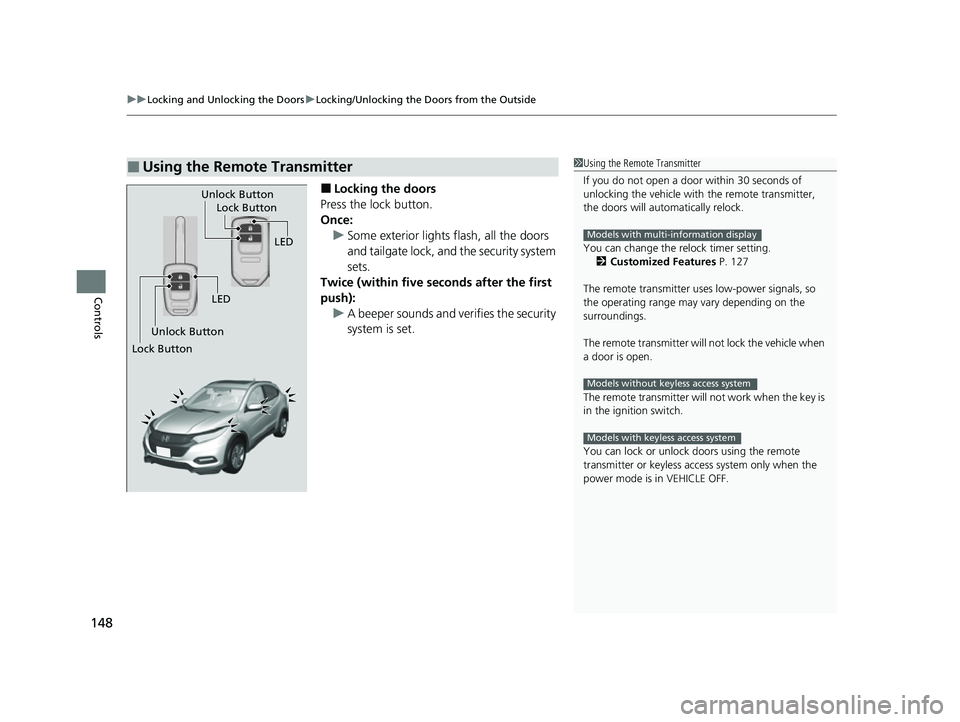
■Locking the doors
Press the lock button.
Once: u Some exterior lights flash, all the doors
and tailgate lock, and the security system
sets.
Twice (within five se conds after the first
push): u A beeper sounds and verifies the security
system is set.
■Using the Remote Transmitter1Using the Remote Transmitter
If you do not open a door within 30 seconds of
unlocking the vehicle with the remote transmitter,
the doors will automatically relock.
You can change the relock timer setting. 2 Customized Features P. 127
The remote transmitter us es low-power signals, so
the operating range may vary depending on the
surroundings.
The remote transmitter will not lock the vehicle when
a door is open.
The remote transmitter will not work when the key is
in the ignition switch.
You can lock or unlock doors using the remote
transmitter or keyless access system only when the
power mode is in VEHICLE OFF.
Models with multi-information display
Models without keyless access system
Models with keyless access system
LED
Unlock Button Lock Button
Unlock Button
LED
Lock Button
22 HR-V HDMC-31T7A6600.book 148 ページ 2021年4月12日 月曜日 午前10時50分
Page 166 of 641
uuSecurity System uSecurity System Alarm
164
Controls
■To deactivate the security system alarm
Unlock the vehicle using the remo te transmitter or keyless remote*, or turn the
ignition switch to ON
(w*1. The system, along with the horn and flashing lights, is
deactivated.
■Setting the security system alarm
The security system alarm automatically sets when the following conditions have
been met:
• The ignition switch is in LOCK
(0*1.
• The hood is closed.
• All doors and the tailgate are locked from outside with the key, remote
transmitter, or keyless access system
*.
• The key has been removed from the ignition switch.
■When the security system alarm sets
The security system alarm indicator in the instrument panel blinks. When the
blinking interval changes after about 15 seconds, the security system alarm is set.
■To cancel the security system alarm
The security system alarm is canceled when the vehicle is unlocked using the remote
transmitter or keyless access system
*, or when the ignition sw itch is turned to ON
(w*1. The security system alarm indica tor goes off at the same time.
*1: Models with the keyless access system have an ENGINE START/STOP button instead of an
ignition switch.
1 Security System Alarm
Do not set the security system alarm when someone
is in the vehicle or a window is open. The system can
accidentally activate when:
•Unlocking the door with the lock tab.•Opening the hood with the hood release handle.
•Moving the shift lever out of ( P.
If the battery goes dead after you have set the
security system alarm, the security alarm may activate
once the battery is re charged or replaced.
If this occurs, deactivate the security system alarm by
unlocking a door using the ke y, remote transmitter,
or keyless access system
*.
Do not alter the system or add other devices to it.
Doing so may damage the system and make your
vehicle inoperable.Models without keyless access system
* Not available on all models
22 HR-V HDMC-31T7A6600.book 164 ページ 2021年4月12日 月曜日 午前10時50分
Page 179 of 641
177
uuOperating the Switches Around the Steering Wheel uLight Switches
Controls
The headlights automatically come on when the wipers are used several times within
a number of certain intervals with the headlight switch in AUTO.
The headlights automatically go off a few minutes later if the wipers are stopped.
The headlights, all other exterior lights, a nd the instrument panel lights turn off 15
seconds after you remove the key or set the power mode to VEHICLE OFF (LOCK),
take the remote with you, and close the driver’s door.
If you turn the igniti on switch to LOCK
(0*1 with the headlight switch on, but do
not open the door, the lights tu rn off after 10 minutes (3 minutes, if the switch is in
the AUTO
* position).
The lights turn on again when you unlock or open the driver’s door. If you unlock
the door, but do not open it within 15 seconds, the lights go off. If you open the
driver’s door, you will hear a lights on reminder chime.
*1: Models with the keyless access system have an ENGINE START/STOP button instead of an
ignition switch.
■Headlight Integration with Wipers*
■Automatic Lighting Off Feature
1 Automatic Operation (aut omatic lighting control)*
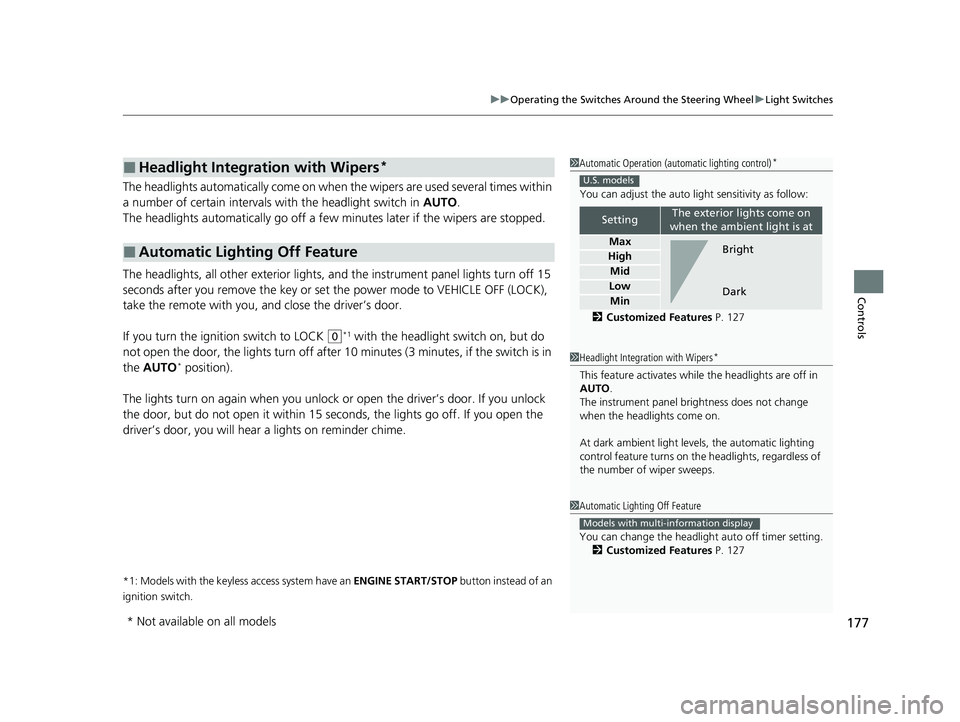
You can adjust the auto li ght sensitivity as follow:
2 Customized Features P. 127
SettingThe exterior lights come on
when the ambient light is at
Max
High
Mid
Low
Min
U.S. models
Bright
Dark
1 Headlight Integration with Wipers*
This feature activates while the headlights are off in
AUTO .
The instrument panel br ightness does not change
when the headlights come on.
At dark ambient light levels, the automatic lighting
control feature turns on the headlights, regardless of
the number of wiper sweeps.
1 Automatic Lighting Off Feature
You can change the headlight auto off timer setting.
2 Customized Features P. 127
Models with multi-information display
* Not available on all models
22 HR-V HDMC-31T7A6600.book 177 ページ 2021年4月12日 月曜日 午前10時50分
Page 185 of 641
183
uuOperating the Switches Around the Steering Wheel uWipers and Washers
Continued
Controls
Wipers and Washers
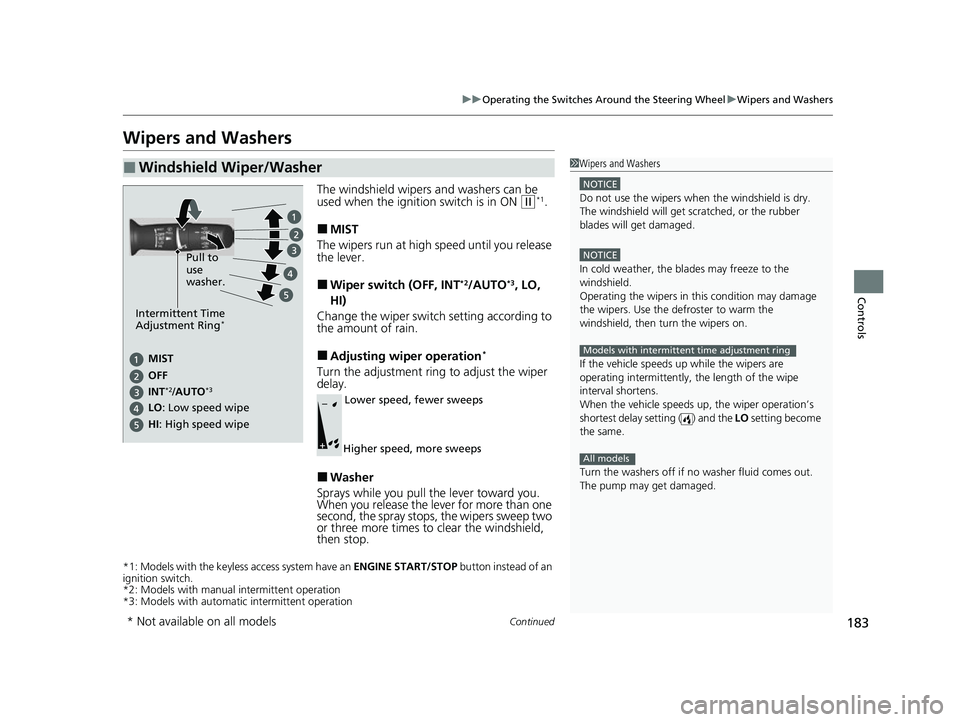
The windshield wipers and washers can be
used when the ignition switch is in ON (w*1.
■MIST
The wipers run at high speed until you release
the lever.
■Wiper switch (OFF, INT*2/AUTO*3, LO,
HI)
Change the wiper switch setting according to
the amount of rain.
■Adjusting wiper operation*
Turn the adjustment ring to adjust the wiper
delay.
■Washer
Sprays while you pull the lever toward you.
When you release the le ver for more than one
second, the spray stops, the wipers sweep two
or three more times to clear the windshield,
then stop.
*1: Models with the keyless access system have an ENGINE START/STOP button instead of an
ignition switch.
*2: Models with manual intermittent operation
*3: Models with automati c intermittent operation
■Windshield Wiper/Washer1Wipers and Washers
NOTICE
Do not use the wipers when the windshield is dry.
The windshield will get sc ratched, or the rubber
blades will get damaged.
NOTICE
In cold weather, the blades may freeze to the
windshield.
Operating the wipers in th is condition may damage
the wipers. Use the defroster to warm the
windshield, then turn the wipers on.
If the vehicle speeds up while the wipers are
operating intermittently, the length of the wipe
interval shortens.
When the vehicle speeds up, the wiper operation’s
shortest delay setting ( ) and the LO setting become
the same.
Turn the washers off if no washer fluid comes out.
The pump may get damaged.
Models with intermittent time adjustment ring
All models
Pull to
use
washer.
MIST
INs
*2/AUTO*3OFF
LO : Low speed wipe
HI: High speed wipe
Intermittent Time
Adjustment Ring*
Lower speed, fewer sweeps
Higher speed, more sweeps
* Not available on all models
22 HR-V HDMC-31T7A6600.book 183 ページ 2021年4月12日 月曜日 午前10時50分
Page 207 of 641
205Continued
Controls
Interior Lights/Interior Convenience Items
Interior Lights
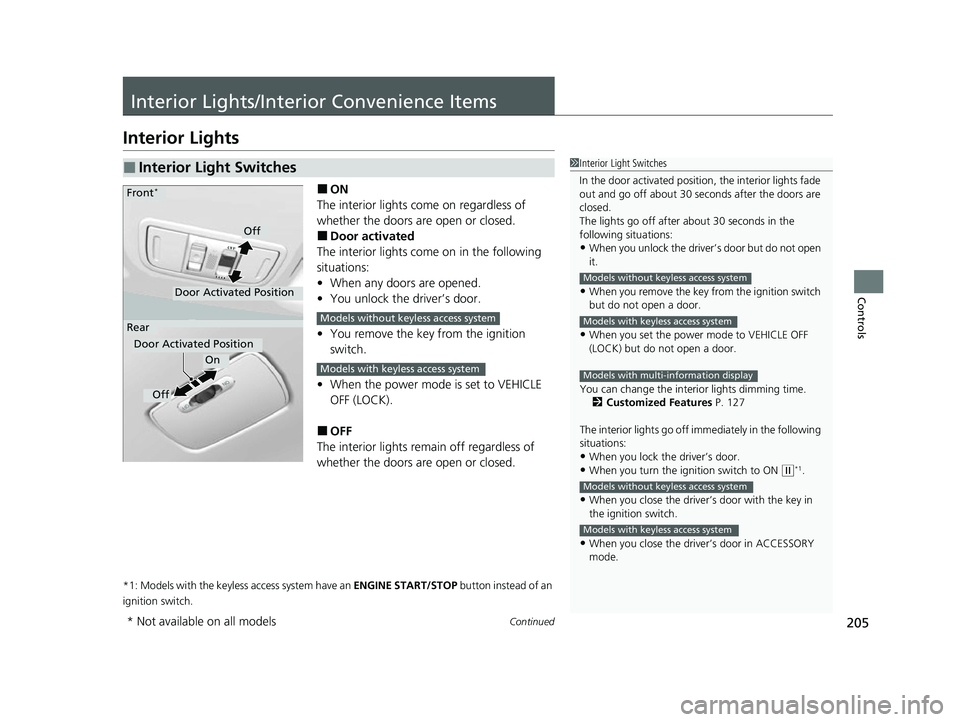
■ON
The interior lights come on regardless of
whether the doors are open or closed.
■Door activated
The interior lights come on in the following
situations:
• When any doors are opened.
• You unlock the driver’s door.
• You remove the key from the ignition
switch.
• When the power mode is set to VEHICLE
OFF (LOCK).
■OFF
The interior lights remain off regardless of
whether the doors are open or closed.
*1: Models with the keyless access system have an ENGINE START/STOP button instead of an
ignition switch.
■Interior Light Switches1 Interior Light Switches
In the door activated position, the interior lights fade
out and go off about 30 se conds after the doors are
closed.
The lights go off after about 30 seconds in the
following situations:
•When you unlock the driver’s door but do not open
it.
•When you remove the key from the ignition switch
but do not open a door.
•When you set the power mode to VEHICLE OFF
(LOCK) but do not open a door.
You can change the interi or lights dimming time.
2 Customized Features P. 127
The interior lights go off im mediately in the following
situations:
•When you lock the driver’s door.•When you turn the ignition switch to ON ( w*1.
•When you close the driver’s door with the key in
the ignition switch.
•When you close the driver’s door in ACCESSORY
mode.
Models without keyless access system
Models with keyless access system
Models with multi-information display
Models without keyless access system
Models with keyless access system
On
Off
Door Activated Position
Front*
Rear
Door Activated Position
Off
Models without keyless access system
Models with keyless access system
* Not available on all models
22 HR-V HDMC-31T7A6600.book 205 ページ 2021年4月12日 月曜日 午前10時50分
Page 240 of 641
238
Features
Audio System Basic Operation
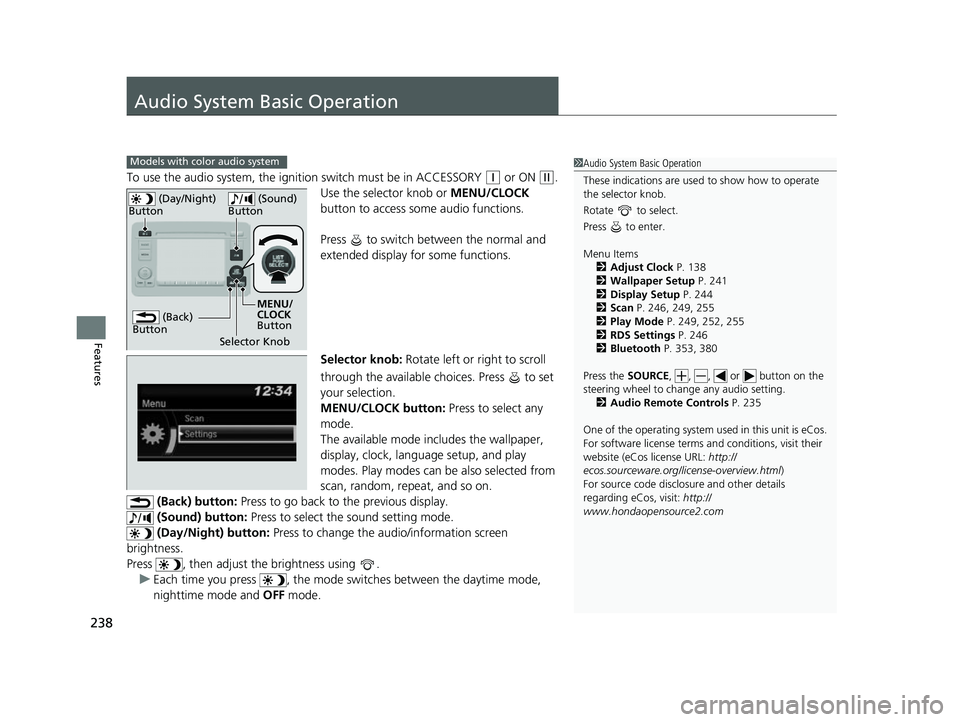
To use the audio system, the ignition switch must be in ACCESSORY (q or ON (w.
Use the selector knob or MENU/CLOCK
button to access some audio functions.
Press to switch between the normal and
extended display fo r some functions.
Selector knob: Rotate left or right to scroll
through the available choices. Press to set
your selection.
MENU/CLOCK button: Press to select any
mode.
The available mode includes the wallpaper,
display, clock, langu age setup, and play
modes. Play modes can be also selected from
scan, random, rep eat, and so on.
(Back) button: Press to go back to the previous display.
(Sound) button: Press to select the sound setting mode.
(Day/Night) button: Press to change the audio/information screen
brightness.
Press , then adjust th e brightness using .
u Each time you press , the mode switches between the daytime mode,
nighttime mode and OFF mode.
Models with color audio system1Audio System Basic Operation
These indications are used to show how to operate
the selector knob.
Rotate to select.
Press to enter.
Menu Items 2 Adjust Clock P. 138
2 Wallpaper Setup P. 241
2 Display Setup P. 244
2 Scan P. 246, 249, 255
2 Play Mode P. 249, 252, 255
2 RDS Settings P. 246
2 Bluetooth P. 353, 380
Press the SOURCE, , , or button on the
steering wheel to cha nge any audio setting.
2 Audio Remote Controls P. 235
One of the operating system us ed in this unit is eCos.
For software license terms and conditions, visit their
website (eCos license URL: http://
ecos.sourceware.org/li cense-overview.html)
For source code disclo sure and other details
regarding eCos, visit: http://
www.hondaopensource2.com
(Back)
Button
Selector Knob MENU/
CLOCK
Button
(Day/Night)
Button
(Sound)
Button
22 HR-V HDMC-31T7A6600.book 238 ページ 2021年4月12日 月曜日 午前10時50分