ad blue HONDA HRV 2022 Owner's Manual
[x] Cancel search | Manufacturer: HONDA, Model Year: 2022, Model line: HRV, Model: HONDA HRV 2022Pages: 641, PDF Size: 21.37 MB
Page 309 of 641
307
uuAudio System Basic Operation uPlaying Bluetooth ® Audio
Features
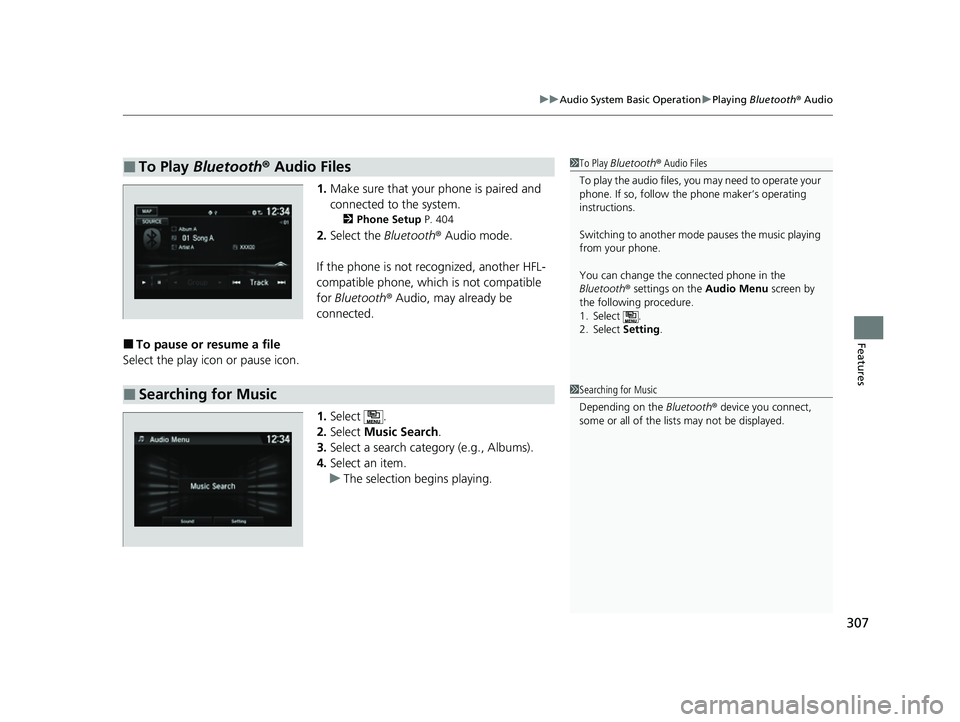
1. Make sure that your phone is paired and
connected to the system.
2 Phone Setup P. 404
2.Select the Bluetooth® Audio mode.
If the phone is not recognized, another HFL-
compatible phone, which is not compatible
for Bluetooth ® Audio, may already be
connected.
■To pause or resume a file
Select the play icon or pause icon.
1.Select .
2. Select Music Search.
3. Select a search catego ry (e.g., Albums).
4. Select an item.
u The selection begins playing.
■To Play Bluetooth® Audio Files1To Play Bluetooth ® Audio Files
To play the audio files, y ou may need to operate your
phone. If so, follow the phone maker’s operating
instructions.
Switching to another mode pauses the music playing
from your phone.
You can change the connected phone in the
Bluetooth ® settings on the Audio Menu screen by
the following procedure.
1. Select .
2. Select Setting .
■Searching for Music1Searching for Music
Depending on the Bluetooth® device you connect,
some or all of the list s may not be displayed.
22 HR-V HDMC-31T7A6600.book 307 ページ 2021年4月12日 月曜日 午前10時50分
Page 310 of 641
308
uuAudio System Basic Operation uHondaLink ®
Features
HondaLink ®
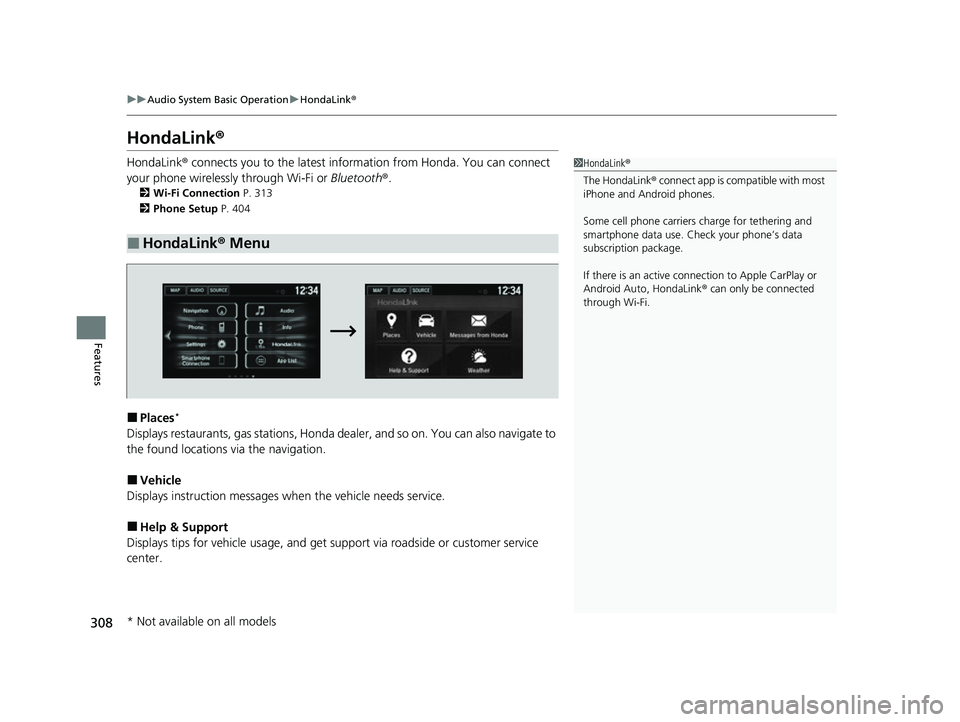
HondaLink® connects you to the latest information from Honda. You can connect
your phone wirelessly through Wi-Fi or Bluetooth®.
2Wi-Fi Connection P. 313
2 Phone Setup P. 404
■Places*
Displays restaurants, gas stations, Honda d ealer, and so on. You can also navigate to
the found locations via the navigation.
■Vehicle
Displays instruction messages wh en the vehicle needs service.
■Help & Support
Displays tips for vehicle usage, and get support via roadside or customer service
center.
■HondaLink® Menu
1HondaLink ®
The HondaLink® connect app is compatible with most
iPhone and Android phones.
Some cell phone carriers charge for tethering and
smartphone data use. Check your phone’s data
subscription package.
If there is an active connection to Appl e CarPlay or
Android Auto, HondaLink ® can only be connected
through Wi-Fi.
* Not available on all models
22 HR-V HDMC-31T7A6600.book 308 ページ 2021年4月12日 月曜日 午前10時50分
Page 315 of 641
313
uuAudio System Basic Operation uWi-Fi Connection
Continued
Features
Wi-Fi Connection
You can connect the display audio system to the Internet using Wi-Fi and browse
websites or use online services on the audio/information screen. If your phone has
wireless hotspot capabilities, the system can be tethered to your phone. Use the
following steps to set up.
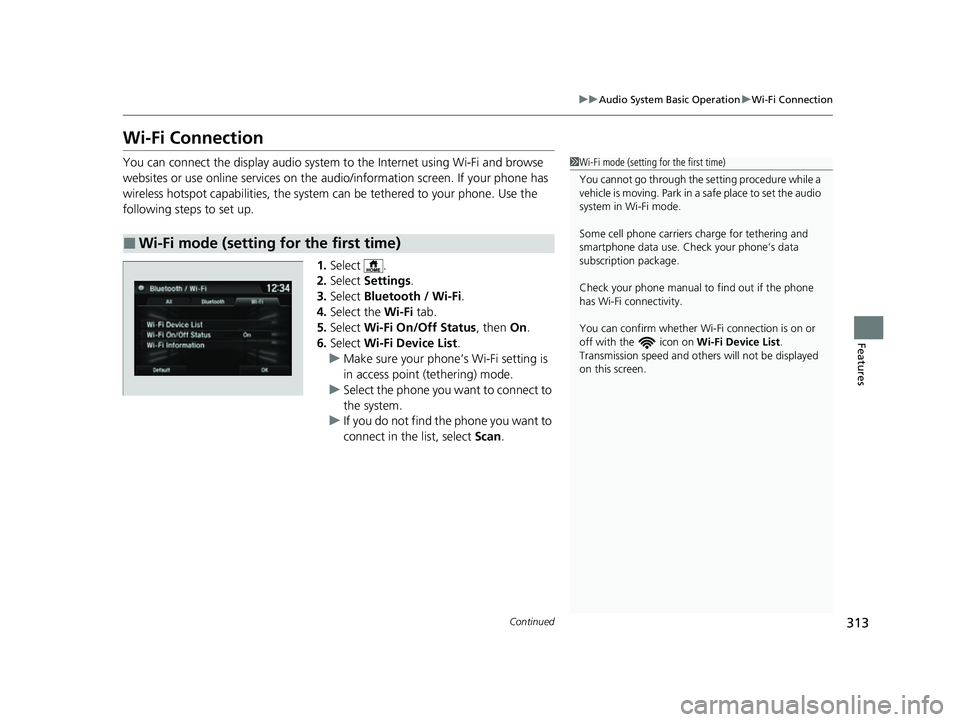
1.Select .
2. Select Settings .
3. Select Bluetooth / Wi-Fi .
4. Select the Wi-Fi tab.
5. Select Wi-Fi On/Off Status , then On.
6. Select Wi-Fi Device List .
u Make sure your phone’s Wi-Fi setting is
in access point (tethering) mode.
u Select the phone you want to connect to
the system.
u If you do not find the phone you want to
connect in the list, select Scan.
■Wi-Fi mode (setting for the first time)
1Wi-Fi mode (setting for the first time)
You cannot go through the se tting procedure while a
vehicle is moving. Park in a safe place to set the audio
system in Wi-Fi mode.
Some cell phone carriers charge for tethering and
smartphone data use. Check your phone’s data
subscription package.
Check your phone manual to find out if the phone
has Wi-Fi connectivity.
You can confirm whether Wi -Fi connection is on or
off with the icon on Wi-Fi Device List.
Transmission speed and others will not be displayed
on this screen.
22 HR-V HDMC-31T7A6600.book 313 ページ 2021年4月12日 月曜日 午前10時50分
Page 317 of 641
315
uuAudio System Basic Operation uSiri Eyes Free
Features
Siri Eyes Free
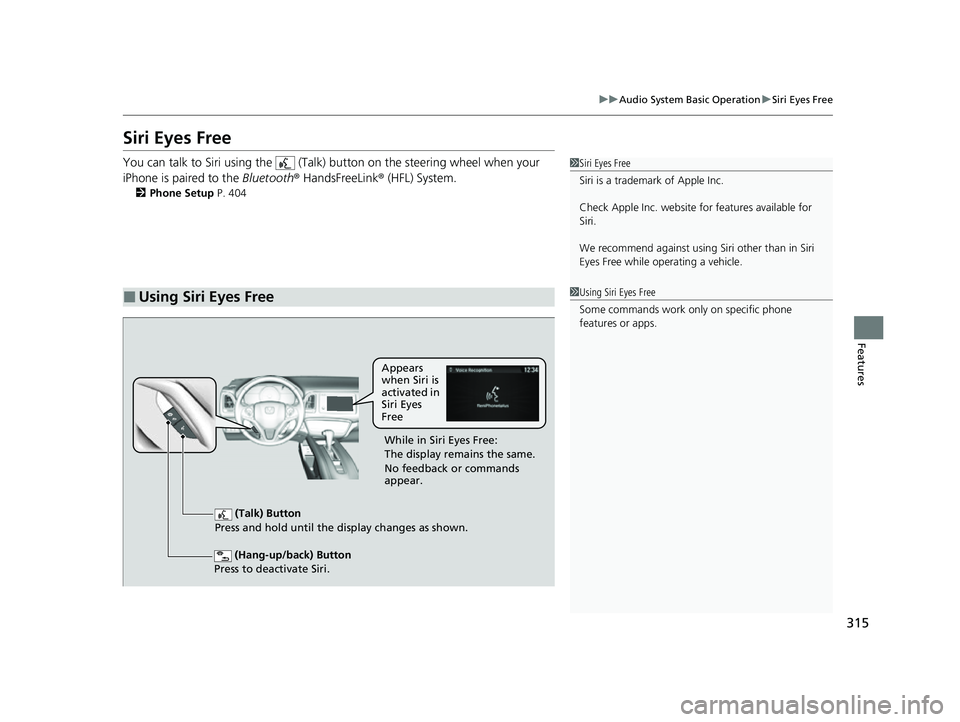
You can talk to Siri using the (Talk) button on the steering wheel when your
iPhone is paired to the Bluetooth® HandsFreeLink ® (HFL) System.
2Phone Setup P. 404
■Using Siri Eyes Free
1Siri Eyes Free
Siri is a trademark of Apple Inc.
Check Apple Inc. website for features available for
Siri.
We recommend against using Si ri other than in Siri
Eyes Free while operating a vehicle.
1 Using Siri Eyes Free
Some commands work only on specific phone
features or apps.
(Hang-up/back) Button
Press to deactivate Siri.
(Talk) Button
Press and hold until the display changes as shown.
Appears
when Siri is
activated in
Siri Eyes
Free
While in Siri Eyes Free:
The display remains the same.
No feedback or commands
appear.
22 HR-V HDMC-31T7A6600.book 315 ページ 2021年4月12日 月曜日 午前10時50分
Page 318 of 641
316
uuAudio System Basic Operation uApple CarPlay
Features
Apple CarPlay
If you connect an Apple CarPlay-compatible iPhone to the system via the 1.5A USB
port, you can use the audio/information touch screen, instead of the iPhone display,
to make a phone call, listen to music, vi ew maps (navigation), and access messages.
2USB Port(s) P. 233
1Apple CarPlay
Only iPhone5 or newer versio ns with iOS 8.4 or later
are compatible with Apple CarPlay.
Park in a safe place before connecting your iPhone to
Apple CarPlay and when launching any compatible
apps.
To use Apple CarPlay, connect the USB cable to the
1.5A USB port. Other USB po rts will not enable Apple
CarPlay operation. 2 USB Port(s) P. 233
To directly access the Appl e CarPlay phone function,
select Phone on the home screen. While connected
to Apple CarPlay, calls are only made through Apple
CarPlay. If you want to make a call with Bluetooth®
HandsFreeLink ®, turn Apple CarPlay OFF or detach
the USB cable from your iPhone. 2 Setting Up Apple CarPlay P. 318
When your iPhone is connected to Apple CarPlay, it is
not possible to use the Bluetooth® Audio or
Bluetooth ® HandsFreeLink ®. However, other
previously paired phones can stream audio via
Bluetooth ® while Apple CarPlay is connected.
2 Phone Setup P. 404
For details on c ountries and regions where Apple
CarPlay is available, as well as information pertaining
to function, refer to the Apple homepage.
22 HR-V HDMC-31T7A6600.book 316 ページ 2021年4月12日 月曜日 午前10時50分
Page 322 of 641
320
uuAudio System Basic Operation uAndroid Auto
Features
Android Auto
When you connect an Android phone to the Display Audio system via the 1.5A USB
port, Android Auto is automatically initiated. When connected via Android Auto,
you can use the audio/information touch screen to access the Phone, Google Maps
(Navigation), Google Play Music, and Google Now functions. When you first use
Android Auto, a tutorial will appear on the screen. We recommend that you
complete this tutorial while safely parked before using Android Auto.
2 USB Port(s) P. 233
2 Auto Pairing Connection P. 322
1Android Auto
To use Android Auto, you need to download the
Android Auto app from Google Play to your
smartphone.
Only Android 5.0 (Lollipop) or later versions are
compatible with Android Auto. Bluetooth A2DP
cannot be used while your phone is connected to
Android Auto.
Park in a safe place befo re connecting your Android
phone to Android Auto and when launching any
compatible apps.
To use Android Auto, connect the USB cable to the
1.5A USB port. Other USB ports will not enable
Android Auto operation. 2 USB Port(s) P. 233
To directly access the Android Auto phone function,
select Phone on the home screen. While connected to
Android Auto, calls are only made through Android
Auto. If you want to make a call with Bluetooth ®
HandsFreeLink ®, turn Android Auto OFF or detach the
USB cable from your Android phone.
2 Auto Pairing Connection P. 322
When your Android phone is connected to Android
Auto, it is not possible to use Bluetooth® Audio or
Bluetooth ® HandsFreeLink ®. However, other
previously paired phones can stream audio via
Bluetooth ® while Android Auto is connected.
2 Phone Setup P. 404
22 HR-V HDMC-31T7A6600.book 320 ページ 2021年4月12日 月曜日 午前10時50分
Page 333 of 641
331
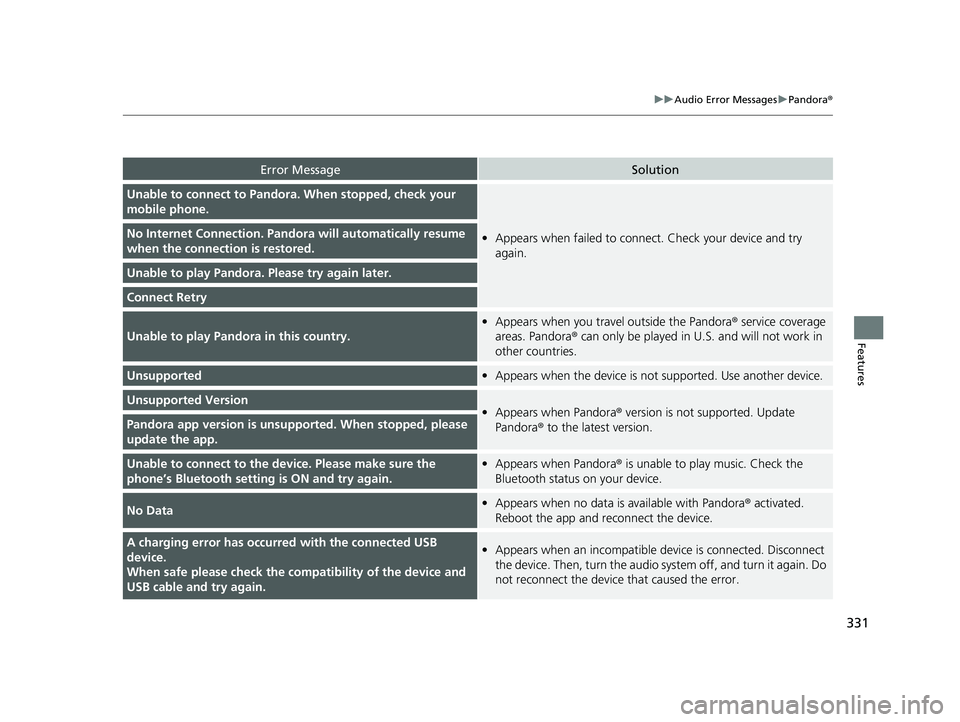
uuAudio Error Messages uPandora ®
Features
Error MessageSolution
Unable to connect to Pandora. When stopped, check your
mobile phone.
•Appears when failed to connec t. Check your device and try
again.No Internet Connection. Pand ora will automatically resume
when the connecti on is restored.
Unable to play Pandora. Please try again later.
Connect Retry
Unable to play Pandora in this country.
•Appears when you trave l outside the Pandora® service coverage
areas. Pandora ® can only be played in U.S. and will not work in
other countries.
Unsupported• Appears when the device is not supported. Use another device.
Unsupported Version•Appears when Pandora® version is not supported. Update
Pandora ® to the latest version.Pandora app version is unsupported. When stopped, please
update the app.
Unable to connect to the device. Please make sure the
phone’s Bluetooth setting is ON and try again.•Appears when Pandora® is unable to play music. Check the
Bluetooth status on your device.
No Data• Appears when no data is available with Pandora® activated.
Reboot the app and reconnect the device.
A charging error has occurre d with the connected USB
device.
When safe please check the compatibility of the device and
USB cable and try again.• Appears when an incompatible device is connected. Disconnect
the device. Then, turn the audio syst em off, and turn it again. Do
not reconnect the device that caused the error.
22 HR-V HDMC-31T7A6600.book 331 ページ 2021年4月12日 月曜日 午前10時50分
Page 352 of 641
350
uuCustomized Features u
Features
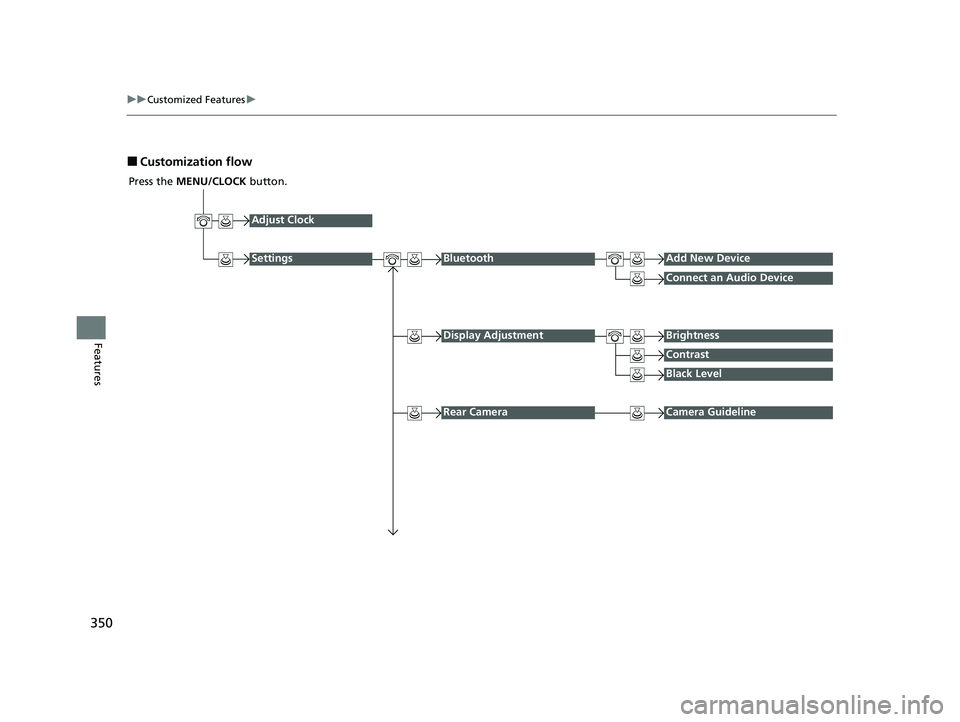
■Customization flow
Press the MENU/CLOCK button.
Adjust Clock
SettingsBluetoothAdd New Device
Connect an Audio Device
Display AdjustmentBrightness
Contrast
Black Level
Rear CameraCamera Guideline
22 HR-V HDMC-31T7A6600.book 350 ページ 2021年4月12日 月曜日 午前10時50分
Page 353 of 641
351
uuCustomized Features u
Continued
Features
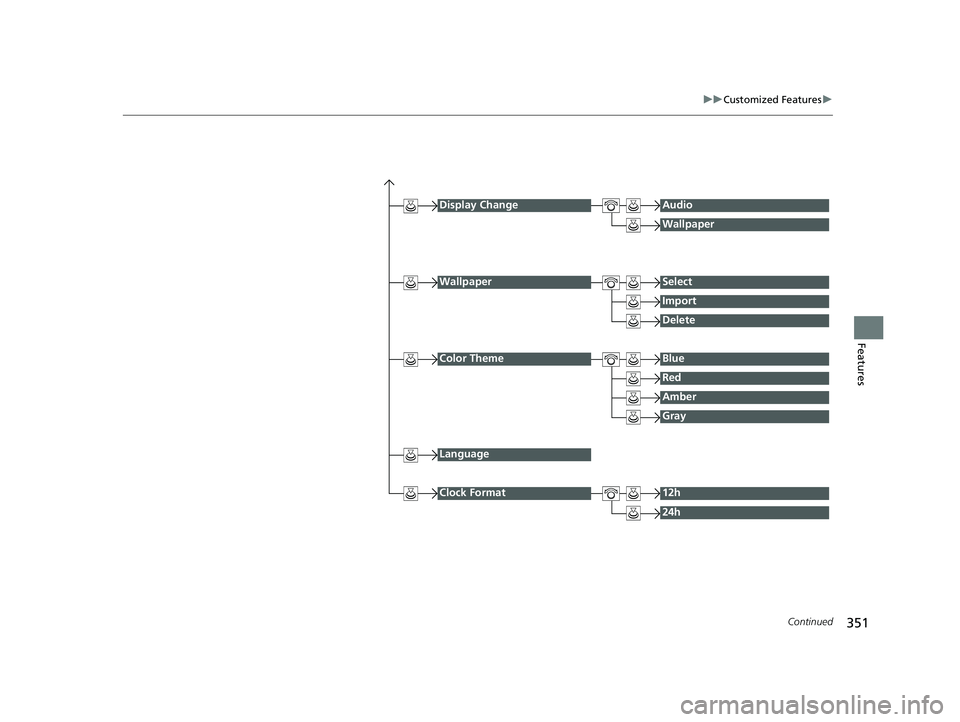
Display ChangeAudio
Wallpaper
WallpaperSelect
Import
Delete
Color ThemeBlue
Red
Amber
Gray
Language
Clock Format12h
24h
22 HR-V HDMC-31T7A6600.book 351 ページ 2021年4月12日 月曜日 午前10時50分
Page 354 of 641
352
uuCustomized Features u
Features
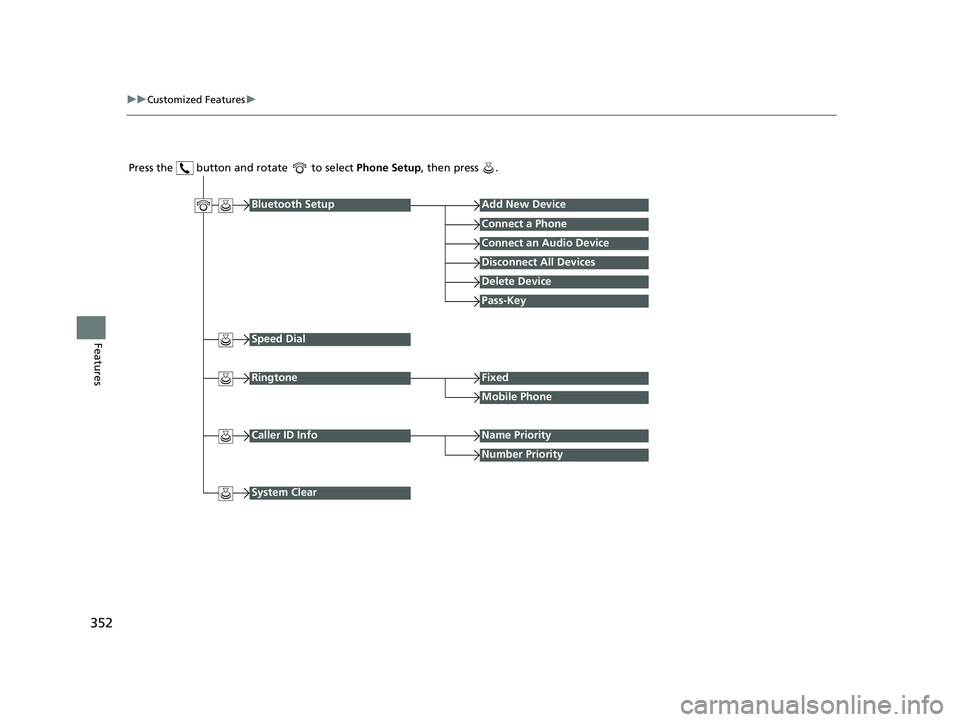
Press the button and rotate to select Phone Setup, then press .
RingtoneFixed
Mobile Phone
Bluetooth SetupAdd New Device
Connect a Phone
Connect an Audio Device
Disconnect All Devices
Delete Device
Pass-Key
Speed Dial
Caller ID InfoName Priority
Number Priority
System Clear
22 HR-V HDMC-31T7A6600.book 352 ページ 2021年4月12日 月曜日 午前10時50分