brake HONDA HRV 2022 Owner's Manual
[x] Cancel search | Manufacturer: HONDA, Model Year: 2022, Model line: HRV, Model: HONDA HRV 2022Pages: 641, PDF Size: 21.37 MB
Page 159 of 641
157
uuLocking and Unlocking the Doors uCustomizing the Auto Door Locking/Unlocking Setting*
Continued
Controls
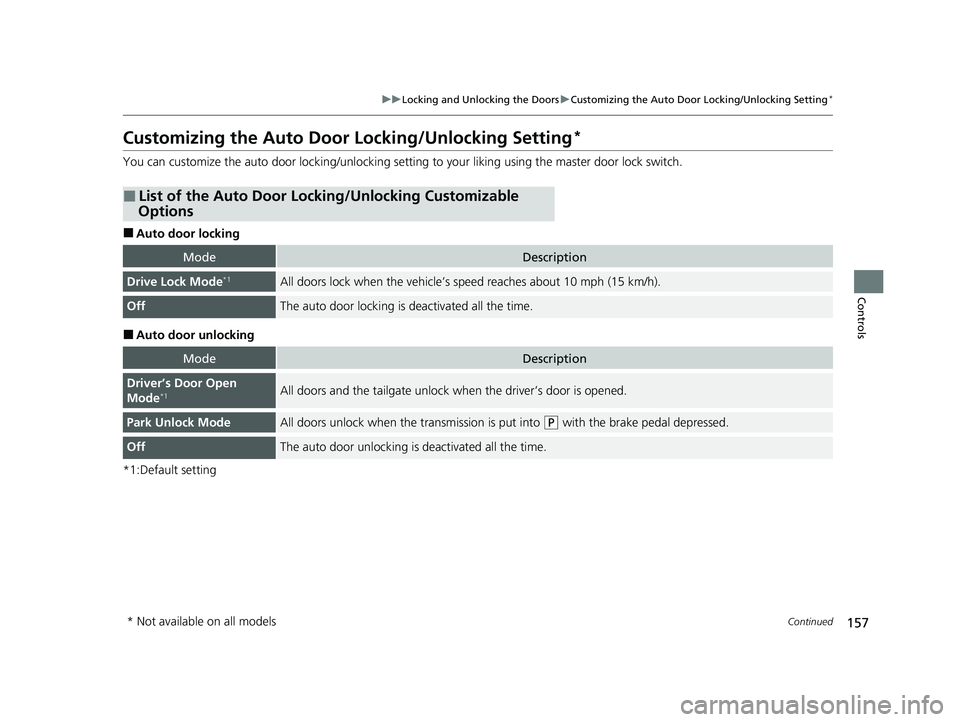
Customizing the Auto Door Locking/Unlocking Setting*
You can customize the auto door locking/unlocking setting to your liking using the master door lock switch.
■Auto door locking
■Auto door unlocking
*1:Default setting
■List of the Auto Door Locking/Unlocking Customizable
Options
ModeDescription
Drive Lock Mode*1All doors lock when the vehicle’s speed reaches about 10 mph (15 km/h).
OffThe auto door locking is deactivated all the time.
ModeDescription
Driver’s Door Open
Mode*1All doors and the tailgate unlock when the driver’s door is opened.
Park Unlock ModeAll doors unlock when the transmission is put into (P with the brake pedal depressed.
OffThe auto door unlocking is deactivated all the time.
* Not available on all models
22 HR-V HDMC-31T7A6600.book 157 ページ 2021年4月12日 月曜日 午前10時50分
Page 160 of 641
158
uuLocking and Unlocking the Doors uCustomizing the Auto Door Locking/Unlocking Setting*
Controls
*1:Default setting
*2:Models with the keyless access system have an ENGINE START/STOP button instead of an ignition switch.
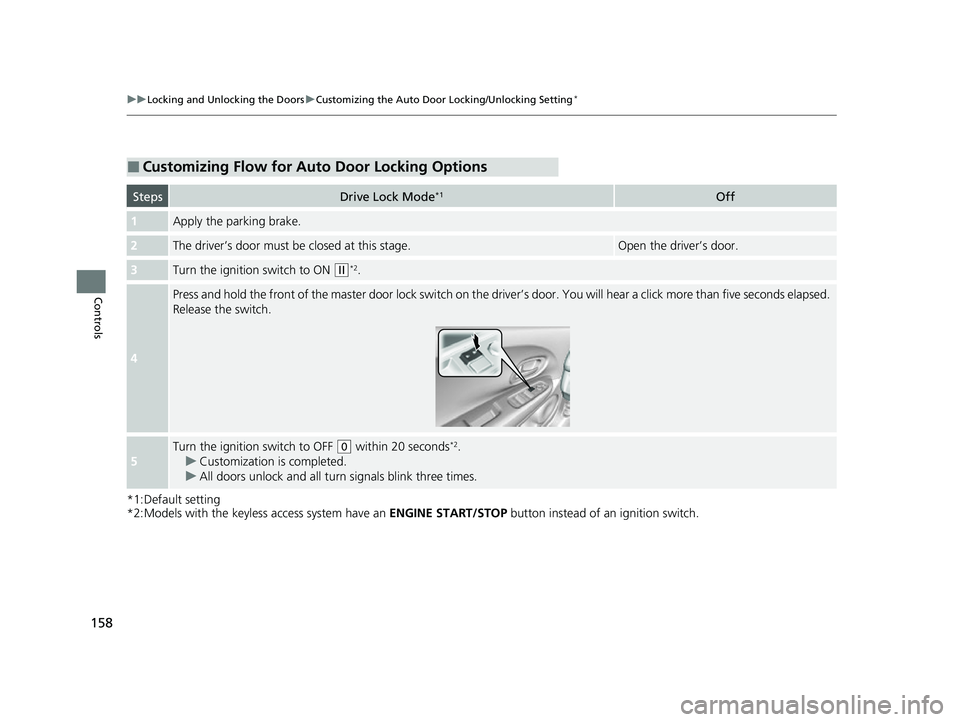
■Customizing Flow for Auto Door Locking Options
StepsDrive Lock Mode*1Off
1Apply the parking brake.
2The driver’s door must be closed at this stage.Open the driver’s door.
3Turn the ignition switch to ON (w*2.
4
Press and hold the front of the master door lock switch on the driver’s door. You will hear a click more than five seconds elapsed.
Release the switch.
5
Turn the ignition switch to OFF (0 within 20 seconds*2.
u Customization is completed.
u All doors unlock and all turn signals blink three times.
22 HR-V HDMC-31T7A6600.book 158 ページ 2021年4月12日 月曜日 午前10時50分
Page 161 of 641
159
uuLocking and Unlocking the Doors uCustomizing the Auto Door Locking/Unlocking Setting*
Controls
*1:Default setting
*2:Models with the keyless access system have an ENGINE START/STOP button instead of an ignition switch.
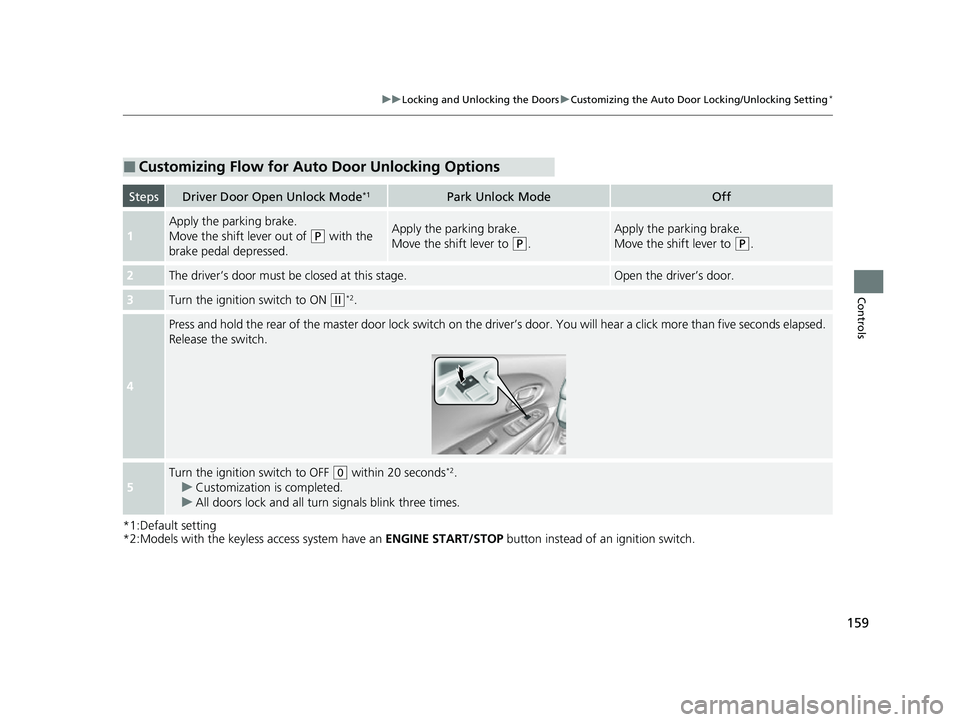
■Customizing Flow for Auto Door Unlocking Options
StepsDriver Door Open Unlock Mode*1Park Unlock ModeOff
1
Apply the parking brake.
Move the shift lever out of
(P with the
brake pedal depressed.Apply the parking brake.
Move the shift lever to
(P.
Apply the parking brake.
Move the shift lever to
(P.
2The driver’s door must be closed at this stage.Open the driver’s door.
3Turn the ignition switch to ON (w*2.
4
Press and hold the rear of the master door lock switch on the driver’s door. You will hear a click more than five seconds elapsed.
Release the switch.
5
Turn the ignition switch to OFF (0 within 20 seconds*2.
u Customization is completed.
u All doors lock and all turn signals blink three times.
22 HR-V HDMC-31T7A6600.book 159 ページ 2021年4月12日 月曜日 午前10時50分
Page 172 of 641
170
uuOperating the Switches Around the Steering Wheel uENGINE START/STOP Button
Controls
ENGINE START/STOP Button
*1: Canadian models
*2: U.S. models
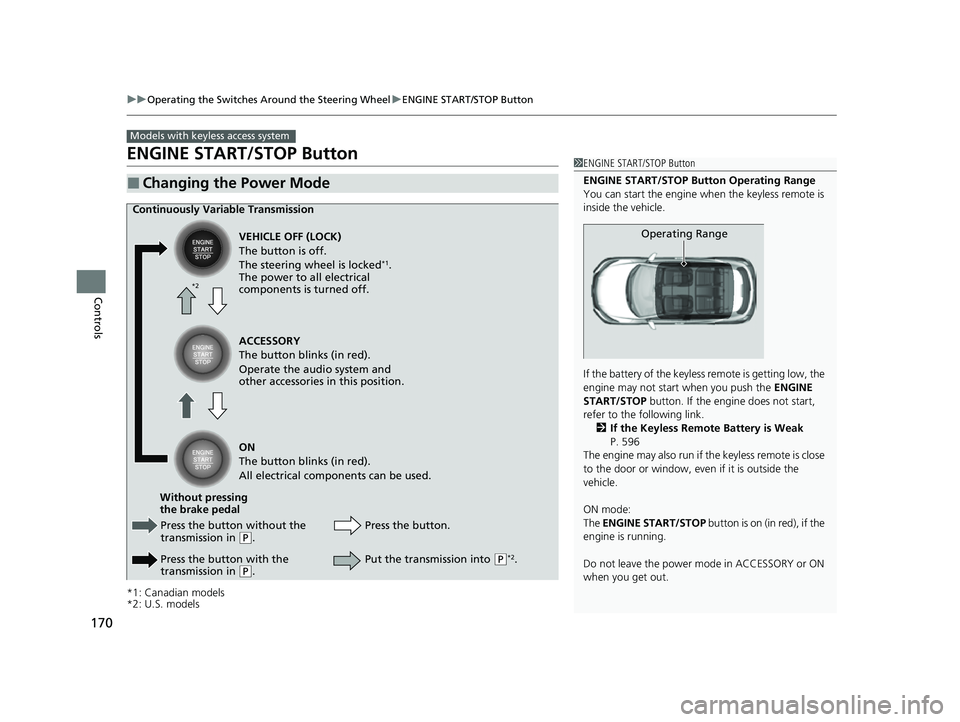
■Changing the Power Mode
Models with keyless access system
1ENGINE START/STOP Button
ENGINE START/STOP Button Operating Range
You can start the engine when the keyless remote is
inside the vehicle.
If the battery of the keyless remote is getting low, the
engine may not start when you push the ENGINE
START/STOP button. If the engi ne does not start,
refer to the following link. 2 If the Keyless Remote Battery is Weak
P. 596
The engine may also run if the keyless remote is close
to the door or window, even if it is outside the
vehicle.
ON mode:
The ENGINE START/STOP button is on (in red), if the
engine is running.
Do not leave the power mode in ACCESSORY or ON
when you get out.
Operating Range
Continuously Variable Transmission
VEHICLE OFF (LOCK)
The button is off.
The steering wheel is locked
*1.
The power to all electrical
components is turned off.
Press the button without the
transmission in
( P.
Press the button with the
transmission in
( P. Press the button.
Without pressing
the brake pedal ACCESSORY
The button blinks (in red).
Operate the audio system and
other accessories in this position.
ON
The button blinks (in red).
All electrical components can be used.
Put the transmission into (P*2.
*2
22 HR-V HDMC-31T7A6600.book 170 ページ 2021年4月12日 月曜日 午前10時50分
Page 177 of 641
175
uuOperating the Switches Around the Steering Wheel uLight Switches
Continued
Controls
Light Switches
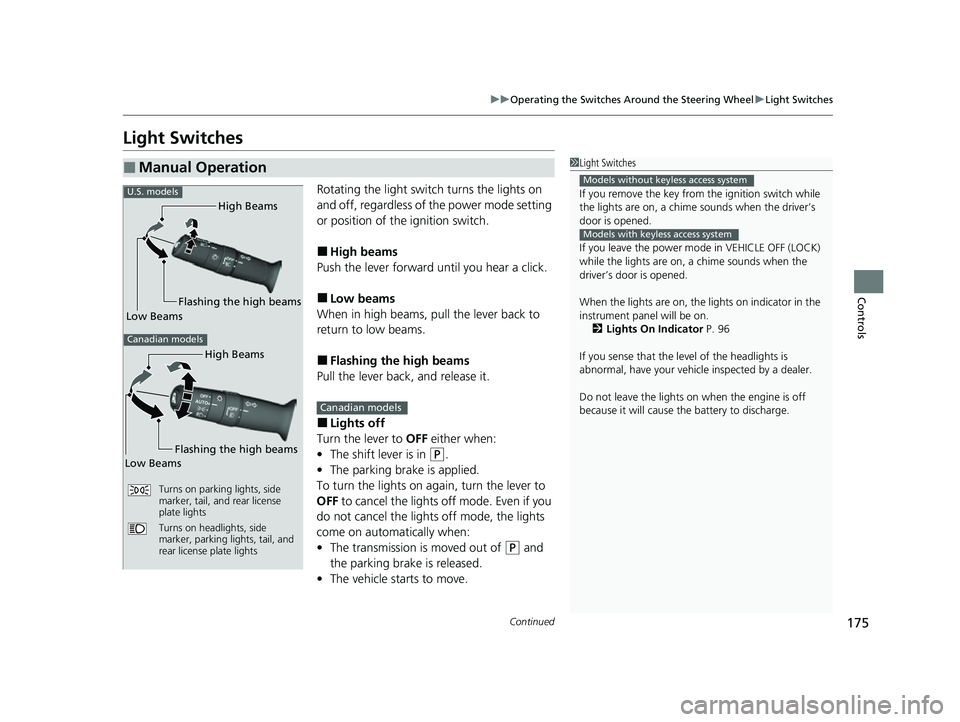
Rotating the light switch turns the lights on
and off, regardless of the power mode setting
or position of the ignition switch.
■High beams
Push the lever forward until you hear a click.
■Low beams
When in high beams, pull the lever back to
return to low beams.
■Flashing the high beams
Pull the lever back, and release it.
■Lights off
Turn the lever to OFF either when:
• The shift lever is in
(P.
• The parking brake is applied.
To turn the light s on again, turn the lever to
OFF to cancel the lights off mode. Even if you
do not cancel the lights off mode, the lights
come on automatically when:
• The transmission is moved out of
(P and
the parking brake is released.
• The vehicle starts to move.
■Manual Operation1Light Switches
If you remove the key from the ignition switch while
the lights are on, a chime sounds when the driver’s
door is opened.
If you leave the power mode in VEHICLE OFF (LOCK)
while the lights are on, a chime sounds when the
driver’s door is opened.
When the lights are on, the lights on indicator in the
instrument pane l will be on.
2 Lights On Indicator P. 96
If you sense that the le vel of the headlights is
abnormal, have your vehicle inspected by a dealer.
Do not leave the lights on when the engine is off
because it will cause the battery to discharge.
Models without keyless access system
Models with keyless access system
High Beams
Flashing the high beams
Low Beams
Turns on parking lights, side
marker, tail, and rear license
plate lights
Turns on headlights, side
marker, parking lights, tail, and
rear license plate lights
U.S. models
Canadian models
High Beams
Flashing the high beams
Low Beams
Canadian models
22 HR-V HDMC-31T7A6600.book 175 ページ 2021年4月12日 月曜日 午前10時50分
Page 181 of 641
179
uuOperating the Switches Around the Steering Wheel uDaytime Running Lights
Controls
Daytime Running Lights
The parking/daytime running lights come on when the following conditions have
been met:
• The ignition switch is in ON
(w*1.
• The headlight switch is OFF.
• The headlight switch is AUTO.
• The parking brake is released.
The lights remain on even if you set th e parking brake. Turning off the ignition
switch or setting the power mode to VEHI CLE OFF will turn off the daytime running
lights.
The daytime running lights are off once the h eadlight switch is turned on, or when
the head light switch is in AUTO
* and it is getting darker outside.
*1: Models with the keyless access system have an ENGINE START/STOP button instead of an
ignition switch.
1 Daytime Running Lights
The daytime running lights come on dimmer when
the headlight switch is in than when it is in
AUTO
*. In AUTO*, if the ambient br ightness is dark,
the low beam headlights come on.U.S. models
Canadian models
All models
* Not available on all models
22 HR-V HDMC-31T7A6600.book 179 ページ 2021年4月12日 月曜日 午前10時50分
Page 200 of 641
uuAdjusting the Seats uRear Seats
198
Controls
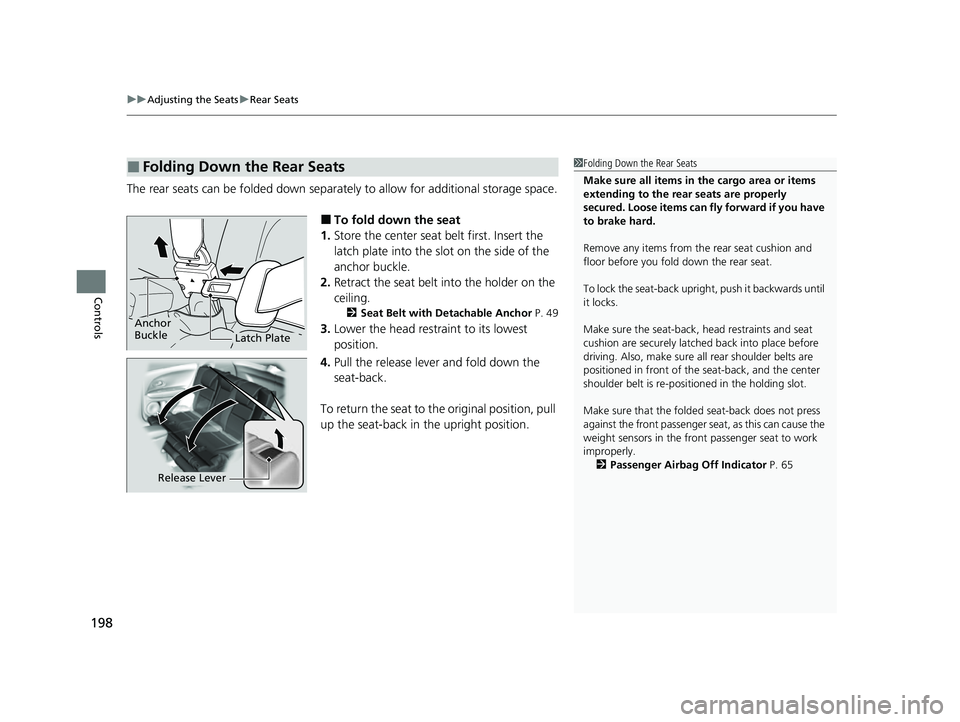
The rear seats can be folded down separate ly to allow for additional storage space.
■To fold down the seat
1. Store the center seat belt first. Insert the
latch plate into the slot on the side of the
anchor buckle.
2. Retract the seat belt into the holder on the
ceiling.
2 Seat Belt with Detachable Anchor P. 49
3.Lower the head restra int to its lowest
position.
4. Pull the release lever and fold down the
seat-back.
To return the seat to th e original position, pull
up the seat-back in the upright position.
■Folding Down the Rear Seats1Folding Down the Rear Seats
Make sure all items in the cargo area or items
extending to the rear seats are properly
secured. Loose items can fly forward if you have
to brake hard.
Remove any items from th e rear seat cushion and
floor before you fold down the rear seat.
To lock the seat-back upri ght, push it backwards until
it locks.
Make sure the seat-back, head restraints and seat
cushion are securely latche d back into place before
driving. Also, make sure all rear shoulder belts are
positioned in front of the seat-back, and the center
shoulder belt is re-posit ioned in the holding slot.
Make sure that the folded seat-back does not press
against the front passenger seat, as this can cause the
weight sensors in the front passenger seat to work
improperly.
2 Passenger Airbag Off Indicator P. 65
Anchor
Buckle
Latch Plate
Release Lever
22 HR-V HDMC-31T7A6600.book 198 ページ 2021年4月12日 月曜日 午前10時50分
Page 216 of 641
uuInterior Lights/Interior Convenience Items uInterior Convenience Items
214
Controls
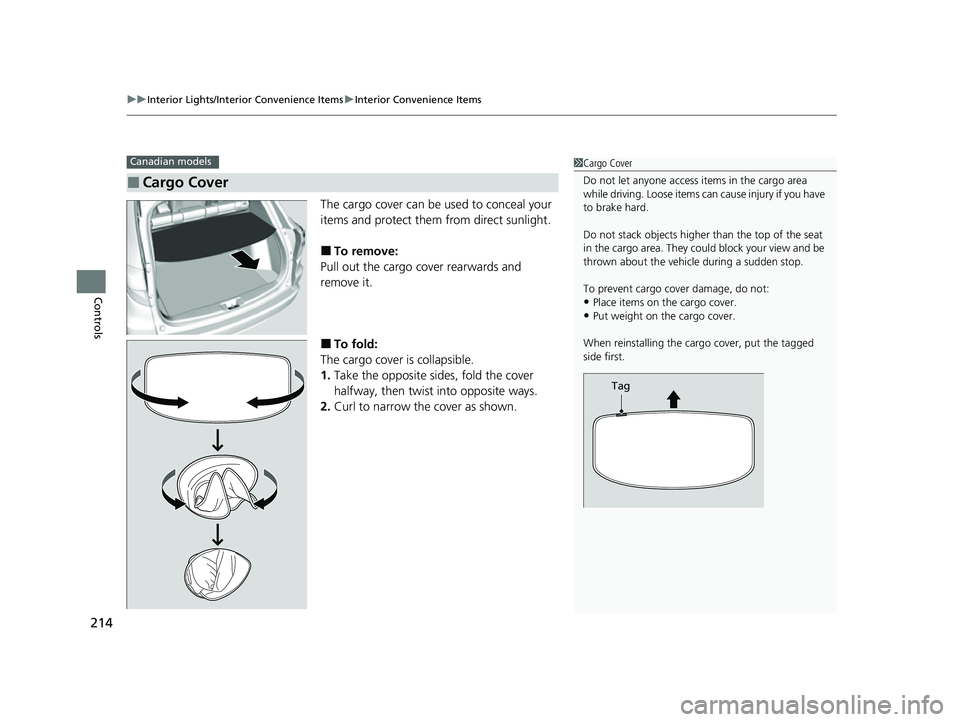
The cargo cover can be used to conceal your
items and protect them from direct sunlight.
■To remove:
Pull out the cargo cover rearwards and
remove it.
■To fold:
The cargo cover is collapsible.
1. Take the opposite sides, fold the cover
halfway, then twist into opposite ways.
2. Curl to narrow the cover as shown.
■Cargo Cover
Canadian models1Cargo Cover
Do not let anyone access items in the cargo area
while driving. Loose items can cause injury if you have
to brake hard.
Do not stack objects higher than the top of the seat
in the cargo area. They could block your view and be
thrown about the vehicle during a sudden stop.
To prevent cargo cover damage, do not:
•Place items on the cargo cover.•Put weight on the cargo cover.
When reinstalling the carg o cover, put the tagged
side first.
Tag
22 HR-V HDMC-31T7A6600.book 214 ページ 2021年4月12日 月曜日 午前10時50分
Page 429 of 641
427
Driving
This chapter discusses driving and refueling.
Before DrivingDriving Preparation .......................... 428
Maximum Load Limit........................ 431
Towing a Trailer Towing Behind a Motorhome .......... 433
Off-Highway Driving Guidelines ..... 434
When Driving Starting the Engine .................. 436, 439
Precautions While Driving................. 442
Continuously Variable Transmission ..... 443Shifting .................................... 444, 446
ECON Button ................................... 450
Cruise Control
*................................ 451
Vehicle Stability AssistTM (VSA®), aka Electronic
Stability Control (ESC), System .............. 454
LaneWatchTM*.................................. 456
Real Time AWD with Intelligent Control System
TM*...................................... 458Tire Pressure Monitoring System (TPMS) ...... 459Tire Pressure Monitoring System (TPMS) - Required Federal Explanation ......... 462
Honda Sensing ®
*.............................. 464
Collision Mitigati on Braking SystemTM
(CMBSTM) ....................................... 467
Adaptive Cruise Control (ACC)......... 477
Lane Keeping Assist System (LKAS)...... 490
Road Departure Mitigation (RDM) System.... 499Front Sensor Camera ....................... 504
Radar Sensor ................................... 506
Braking Brake System ................................... 507
Anti-lock Brake System (ABS) ........... 512
Brake Assist System ......................... 513
Parking Your Vehicle When Stopped ................................ 514
Multi-View Rear Camera .................. 515
Refueling Fuel Information .............................. 517
How to Refuel ................................. 518
Fuel Economy and CO
2 Emissions .... 520
* Not available on all models
22 HR-V HDMC-31T7A6600.book 427 ページ 2021年4月12日 月曜日 午前10時50分
Page 431 of 641
Continued429
uuBefore Driving uDriving Preparation
Driving
• Store or secure all items on board properly.
u Carrying too much cargo, or improperly storing it, can affect your vehicle’s
handling, stability, sto pping distance, and tires, and make it unsafe.
2Maximum Load Limit P. 431
•Do not pile items higher than the seat height.
u They can block your view and may be thrown forward in the event of sudden
braking.
• Do not place anything in the front seat footwells. Make sure to secure the floor
mat.
u An object or unsecured floor mat can in terfere with your brake and accelerator
pedal operation while driving.
• If you have any animals on board, do not let them move around in the vehicle.
u They may interfere with driv ing and a crash could occur.
• Securely close and lock al l doors and the tailgate.
2Locking/Unlocking the Doors from the Inside P. 152
•Adjust your seating position properly.
u Adjust the head restraint, too.
2Adjusting the Seats P. 194
2 Adjusting the front head restraint positions P. 201
•Adjust the mirrors and steering wh eel properly for your driving.
u Adjust them while sitting in the proper driving position.
2 Adjusting the Mirrors P. 191
2 Adjusting the Steering Wheel P. 190
■Interior Checks1Interior Checks
The headlight aim is set by the factory, and does not
need to be adjusted. Howeve r, if you regularly carry
heavy items in the cargo area, have the aiming
readjusted at a dealer or by a qualified technician.
22 HR-V HDMC-31T7A6600.book 429 ページ 2021年4月12日 月曜日 午前10時50分