fuel HONDA HRV 2022 Owner's Manual
[x] Cancel search | Manufacturer: HONDA, Model Year: 2022, Model line: HRV, Model: HONDA HRV 2022Pages: 641, PDF Size: 21.37 MB
Page 136 of 641
134
uuGauges and Displays uMulti-Information Display*
Instrument Panel
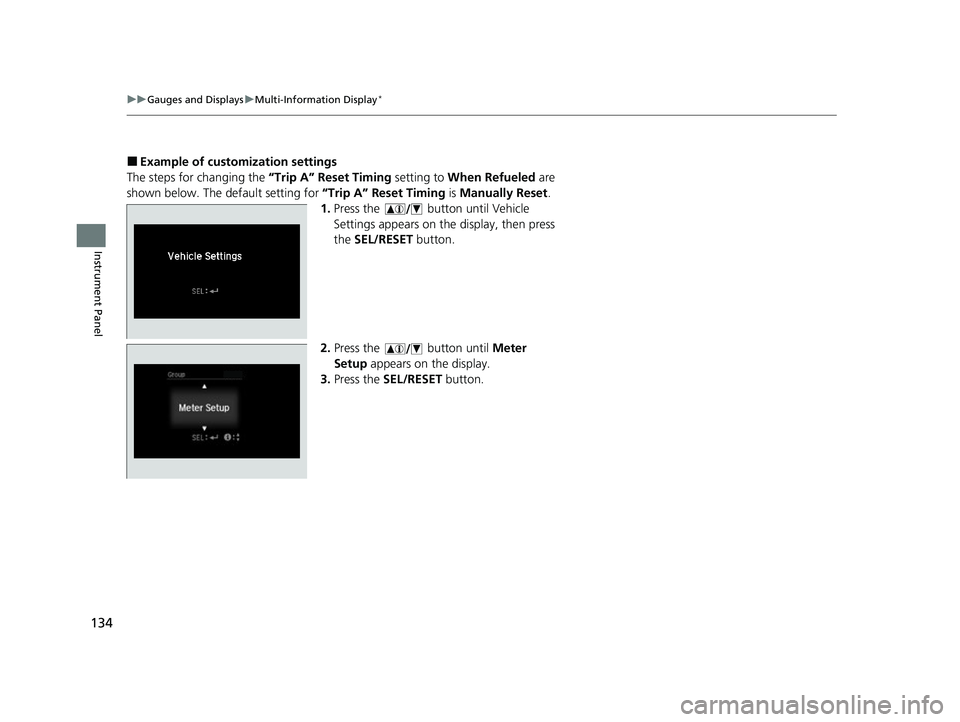
■Example of customization settings
The steps for changing the “Trip A” Reset Timing setting to When Refueled are
shown below. The default setting for “Trip A” Reset Timing is Manually Reset .
1. Press the button until Vehicle
Settings appears on the display, then press
the SEL/RESET button.
2. Press the button until Meter
Setup appears on the display.
3. Press the SEL/RESET button.
22 HR-V HDMC-31T7A6600.book 134 ページ 2021年4月12日 月曜日 午前10時50分
Page 137 of 641
135
uuGauges and Displays uMulti-Information Display*
Instrument Panel
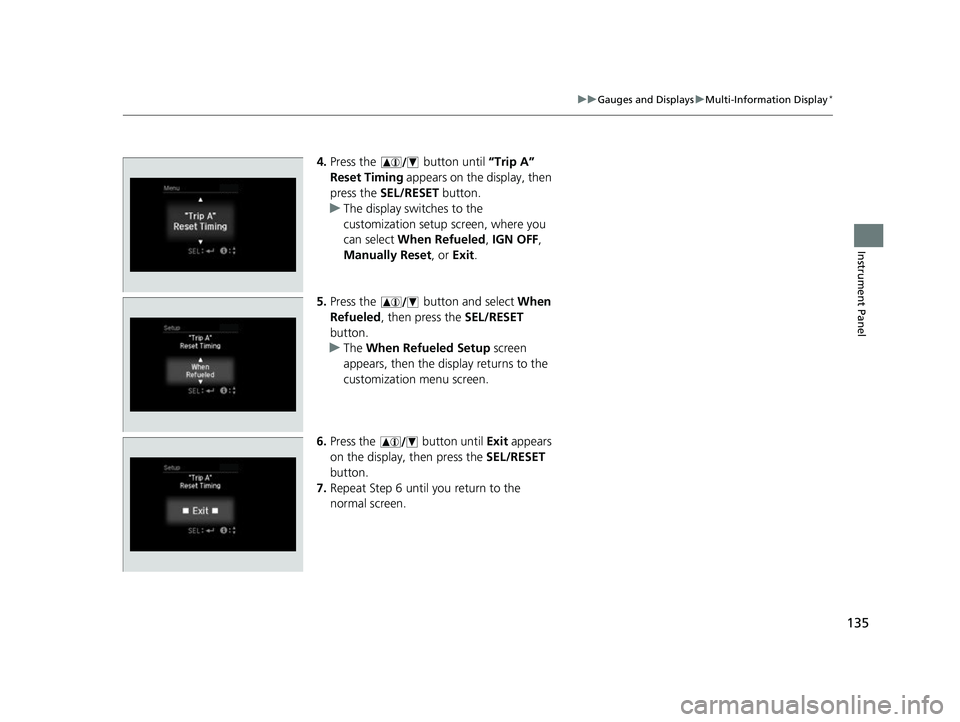
4. Press the button until “Trip A”
Reset Timing appears on the display, then
press the SEL/RESET button.
u The display swit ches to the
customization setup screen, where you
can select When Refueled , IGN OFF ,
Manually Reset , or Exit .
5. Press the button and select When
Refueled , then press the SEL/RESET
button.
u The When Refueled Setup screen
appears, then the di splay returns to the
customization menu screen.
6. Press the button until Exit appears
on the display, then press the SEL/RESET
button.
7. Repeat Step 6 until you return to the
normal screen.
22 HR-V HDMC-31T7A6600.book 135 ページ 2021年4月12日 月曜日 午前10時50分
Page 345 of 641
343
uuGeneral Information on the Audio System uHonda App License Agreement
Continued
Features
E. Information Collection and Storage
1. Information Collection , Use, Transmission and Storage of Data. Consent to Use of Data:
You agree that HONDA and PROVIDERS may
collect and use your information gathered in any manner as part of product support services related to the SOFTWARE or related services.
HONDA may share such information with third parties, including, without limitation, PR OVIDERS, third party software and services
suppliers, their affiliates and/or their designated agents, solely to improve their products or to provide services or technolo gies to you.
HONDA, third party software and syst ems suppliers, their affiliates and/or their de signated agent may disclose this information to others,
but not in a form that pe rsonally identifies you.
2. Information Storage.
Depending on the type of mult imedia system you have in your VEHICLE, certain information may be stored for ease
of use of the SOFTWARE including, without limitation, search hi story, location history in certain applications, previous and saved
destinations, map locations within certain applications, and device numbers and contact information.
(a) Vehicle Health Information.
Your VEHICLE may remotely transmit information re garding the status and health of your VEHICLE
(“VEHICLE INFORMATION”) to HONDA without notification to you. VEHICLE INFORMATION may contain VEHICLE maintenance and
malfunction status that is derived from VEHICLE diagnostic data and includes, but is not limited to, status of powered doors and windows,
battery life data, battery charging data, VE HICLE speed, coolant temperature, air comp ressor revolution, output power, warning codes,
diagnostic trouble codes, fuel injection volume, and engine rotati ons per minute. VEHICLE HEALTH INFORMATION may be used by HON DA
for research and development, to deliver HONDA SERVICES and informat ion to you, and to contact you, and is retained only for a period
of time necessary to fulfill these goals.
(b) VEHICLE Geolocation Data (non-navigation/map based).
If you opt-in to geolocation-based SERVICES, your vehicle’s geolocation data
(latitude and longitude) will be automatically sent from your VEHICLE to HONDA and PROVIDERS.
(c) You understand that the inputting or uploading of information to your VEHICLE’s multimedia system or the SOFTWARE or SERVIC ES is
at your own risk and that HONDA is not responsible for unauthori zed access to or use of any personal or other information. All information
uploaded to the SOFTWARE and SERVICES may be stored on your VEHICLES’s multimedia system and you understand that the security and
safety of your VEHICLE’s multimedia system is your sole responsibility.
22 HR-V HDMC-31T7A6600.book 343 ページ 2021年4月12日 月曜日 午前10時50分
Page 429 of 641
427
Driving
This chapter discusses driving and refueling.
Before DrivingDriving Preparation .......................... 428
Maximum Load Limit........................ 431
Towing a Trailer Towing Behind a Motorhome .......... 433
Off-Highway Driving Guidelines ..... 434
When Driving Starting the Engine .................. 436, 439
Precautions While Driving................. 442
Continuously Variable Transmission ..... 443Shifting .................................... 444, 446
ECON Button ................................... 450
Cruise Control
*................................ 451
Vehicle Stability AssistTM (VSA®), aka Electronic
Stability Control (ESC), System .............. 454
LaneWatchTM*.................................. 456
Real Time AWD with Intelligent Control System
TM*...................................... 458Tire Pressure Monitoring System (TPMS) ...... 459Tire Pressure Monitoring System (TPMS) - Required Federal Explanation ......... 462
Honda Sensing ®
*.............................. 464
Collision Mitigati on Braking SystemTM
(CMBSTM) ....................................... 467
Adaptive Cruise Control (ACC)......... 477
Lane Keeping Assist System (LKAS)...... 490
Road Departure Mitigation (RDM) System.... 499Front Sensor Camera ....................... 504
Radar Sensor ................................... 506
Braking Brake System ................................... 507
Anti-lock Brake System (ABS) ........... 512
Brake Assist System ......................... 513
Parking Your Vehicle When Stopped ................................ 514
Multi-View Rear Camera .................. 515
Refueling Fuel Information .............................. 517
How to Refuel ................................. 518
Fuel Economy and CO
2 Emissions .... 520
* Not available on all models
22 HR-V HDMC-31T7A6600.book 427 ページ 2021年4月12日 月曜日 午前10時50分
Page 439 of 641
Continued437
uuWhen Driving uStarting the Engine
Driving
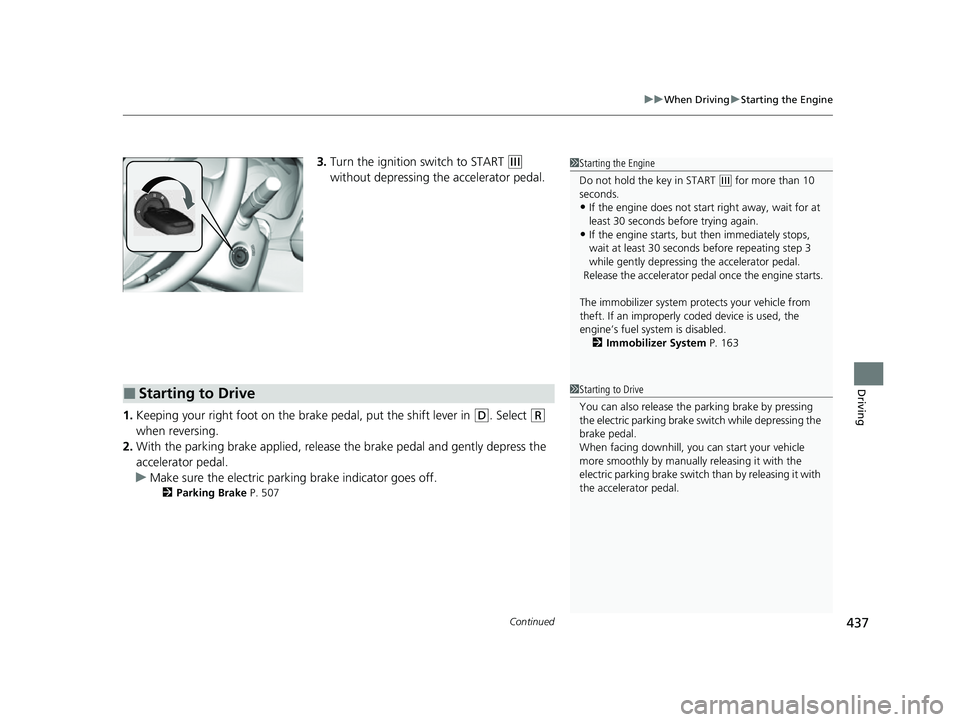
3. Turn the ignition switch to START (e
without depressing the accelerator pedal.
1. Keeping your right foot on the br ake pedal, put the shift lever in
(D. Select (R
when reversing.
2. With the parking brake applied, release the brake pedal and gently depress the
accelerator pedal.
u Make sure the electric parkin g brake indicator goes off.
2Parking Brake P. 507
1Starting the Engine
Do not hold the key in START
(e for more than 10
seconds.
•If the engine does not sta rt right away, wait for at
least 30 seconds before trying again.
•If the engine starts, but then immediately stops,
wait at least 30 seconds before repeating step 3
while gently depressing the accelerator pedal.
Release the accelerator pedal once the engine starts.
The immobilizer system pr otects your vehicle from
theft. If an improperly c oded device is used, the
engine’s fuel system is disabled. 2 Immobilizer System P. 163
■Starting to Drive1Starting to Drive
You can also release the parking brake by pressing
the electric parking brake sw itch while depressing the
brake pedal.
When facing downhill, you can start your vehicle
more smoothly by manually releasing it with the
electric parking brake switch than by releasing it with
the accelerator pedal.
22 HR-V HDMC-31T7A6600.book 437 ページ 2021年4月12日 月曜日 午前10時50分
Page 441 of 641
439
uuWhen Driving uStarting the Engine
Continued
Driving
Starting the Engine
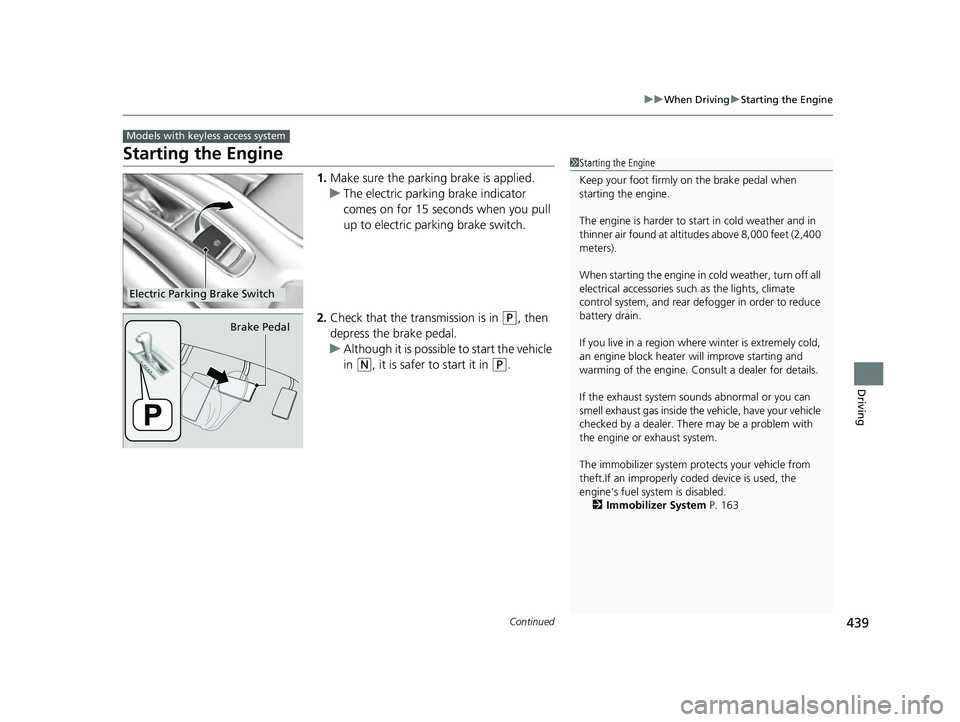
1. Make sure the parkin g brake is applied.
u The electric parking brake indicator
comes on for 15 seconds when you pull
up to electric parking brake switch.
2. Check that the transmission is in
(P, then
depress the brake pedal.
u Although it is possible to start the vehicle
in
(N, it is safer to start it in (P.
Models with keyless access system
1Starting the Engine
Keep your foot firmly on the brake pedal when
starting the engine.
The engine is harder to st art in cold weather and in
thinner air found at altit udes above 8,000 feet (2,400
meters).
When starting the engine in cold weather, turn off all
electrical accessories such as the lights, climate
control system, and rear de fogger in order to reduce
battery drain.
If you live in a region where winter is extremely cold,
an engine block heater will improve starting and
warming of the engine. Cons ult a dealer for details.
If the exhaust system sounds abnormal or you can
smell exhaust gas inside the vehicle, have your vehicle
checked by a dealer. There may be a problem with
the engine or exhaust system.
The immobilizer system pr otects your vehicle from
theft.If an improperly c oded device is used, the
engine’s fuel system is disabled.
2 Immobilizer System P. 163
Electric Parking Brake Switch
Brake Pedal
22 HR-V HDMC-31T7A6600.book 439 ページ 2021年4月12日 月曜日 午前10時50分
Page 447 of 641
445
uuWhen Driving uShifting
Driving
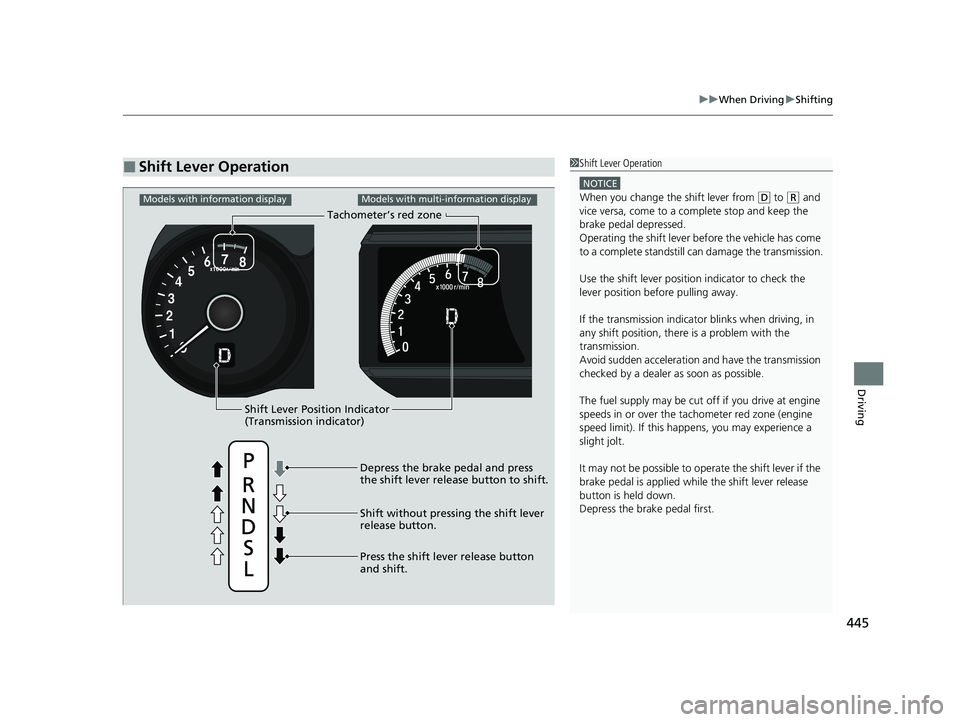
■Shift Lever Operation1Shift Lever Operation
NOTICE
When you change the shift lever from (D to ( R and
vice versa, come to a complete stop and keep the
brake pedal depressed.
Operating the shift lever be fore the vehicle has come
to a complete standstill can damage the transmission.
Use the shift lever position indicator to check the
lever position befo re pulling away.
If the transmission indicator blinks when driving, in
any shift position, there is a problem with the
transmission.
Avoid sudden acceleration and have the transmission
checked by a dealer as soon as possible.
The fuel supply may be cut of f if you drive at engine
speeds in or over the ta chometer red zone (engine
speed limit). If this happe ns, you may experience a
slight jolt.
It may not be possible to operate the shift lever if the
brake pedal is applied while the shift lever release
button is held down.
Depress the brake pedal first.
Shift Lever Position Indicator
(Transmission indicator) Tachometer’s red zone
Depress the brake pedal and press
the shift lever rel ease button to shift.
Shift without pressing the shift lever
release button.
Press the shift lever release button
and shift.
Models with information displayModels with multi-information display
22 HR-V HDMC-31T7A6600.book 445 ページ 2021年4月12日 月曜日 午前10時50分
Page 449 of 641
Continued447
uuWhen Driving uShifting
Driving
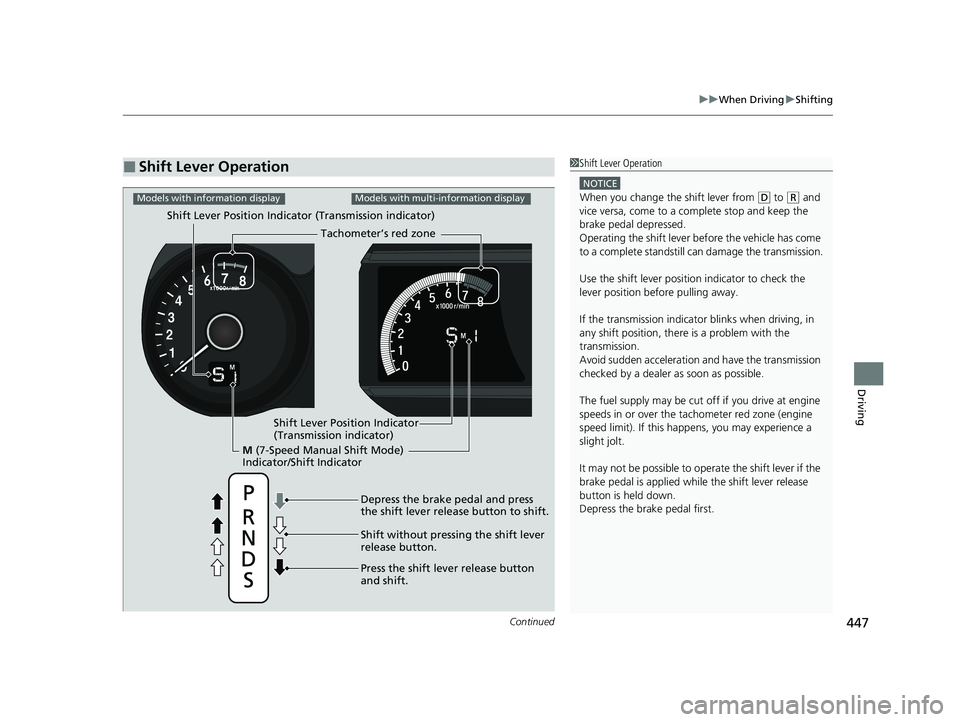
■Shift Lever Operation1Shift Lever Operation
NOTICE
When you change the shift lever from (D to ( R and
vice versa, come to a complete stop and keep the
brake pedal depressed.
Operating the shift lever be fore the vehicle has come
to a complete standstill can damage the transmission.
Use the shift lever position indicator to check the
lever position befo re pulling away.
If the transmission indicator blinks when driving, in
any shift position, there is a problem with the
transmission.
Avoid sudden acceleration and have the transmission
checked by a dealer as soon as possible.
The fuel supply may be cut of f if you drive at engine
speeds in or over the ta chometer red zone (engine
speed limit). If this happe ns, you may experience a
slight jolt.
It may not be possible to operate the shift lever if the
brake pedal is applied while the shift lever release
button is held down.
Depress the brake pedal first.
M (7-Speed Manual Shift Mode)
Indicator/Shift Indicator Tachometer’s red zone
Depress the brake pedal and press
the shift lever rel ease button to shift.
Shift without pressing the shift lever
release button.
Press the shift lever release button
and shift.
Models with information displayModels with multi-information display
Shift Lever Position Indicator (Transmission indicator)
Shift Lever Position Indicator
(Transmission indicator)
22 HR-V HDMC-31T7A6600.book 447 ページ 2021年4月12日 月曜日 午前10時50分
Page 452 of 641
450
uuWhen Driving uECON Button
Driving
ECON Button
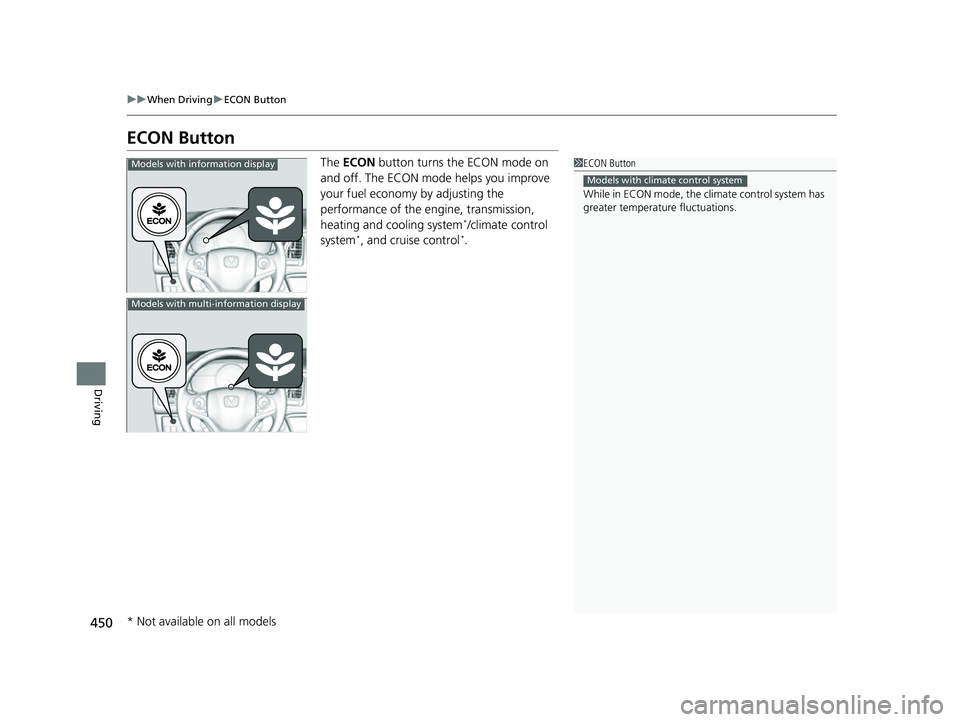
The ECON button turns the ECON mode on
and off. The ECON mode helps you improve
your fuel economy by adjusting the
performance of the engine, transmission,
heating and cooling system
*/climate control
system*, and cruise control*.
1 ECON Button
While in ECON mode, the climate control system has
greater temperature fluctuations.
Models with climate control system
Models with information display
Models with multi-information display
* Not available on all models
22 HR-V HDMC-31T7A6600.book 450 ページ 2021年4月12日 月曜日 午前10時50分
Page 464 of 641
462
uuWhen Driving uTire Pressure Monitoring System (TPMS) - Required Federal Explanation
Driving
Tire Pressure Monitoring System (TPMS) - Required
Federal Explanation
Each tire, including the spare (i f provided), should be checked
monthly when cold and inflated to the inflation pressure
recommended by the vehicle manufacturer on the vehicle placard
or tire inflation pressure label.
(If your vehicle has tires of a different size than the size indicated
on the vehicle placard or tire infl ation pressure label, you should
determine the proper tire inflat ion pressure for those tires.)
As an added safety feature, your vehicle has been equipped with
a tire pressure monitoring system (TPMS) that illuminates a low
tire pressure telltale
when one or more of your tire s is significantly under-inflated.
Accordingly, when the low tire pr essure telltale illuminates, you
should stop and check your tires as soon as possible, and inflate
them to the proper pressure.
Driving on a significantly under-in flated tire causes the tire to
overheat and can lead to tire fail ure. Under-inflation also reduces
fuel efficiency and tire tread li fe, and may affect the vehicle’s
handling and stopping ability.
U.S. models
22 HR-V HDMC-31T7A6600.book 462 ページ 2021年4月12日 月曜日 午前10時50分