mirror HONDA HRV 2022 Owner's Manual
[x] Cancel search | Manufacturer: HONDA, Model Year: 2022, Model line: HRV, Model: HONDA HRV 2022Pages: 641, PDF Size: 21.37 MB
Page 469 of 641
467
uuHonda Sensing ®*uCollision Mitigation Braking SystemTM (CMBSTM)
Continued
Driving
Collision Mitigation Braking SystemTM (CMBSTM)
The system can assist you when it determines there is a possibility of your vehicle
colliding with a vehicle or a pedestrian dete cted in front of your vehicle. The CMBSTM
is designed to alert you when the potential for a collision is determined, as well \
as to
reduce your vehicle speed to help minimize collision severity when a collision is
deemed unavoidable.
■How the system works
1 Collision Mitigation Braking SystemTM (CMBSTM)
Important Safety Reminder
The CMBS
TM is designed to reduce the severity of an
unavoidable collision. It do es not prevent a collision
nor stop the vehicle automati cally. It is still your
responsibility to operate the brake pedal and steering
wheel appropriately acco rding to the driving
conditions.
The CMBS
TM may not activate or may not detect a
vehicle in front of y our vehicle under certain
conditions:
2 CMBS
TM Conditions and Limitations P. 471
You can read about handling information for the
camera equipped with this system. 2 Front Sensor Camera P. 504
For directions on the prop er handling of the radar
sensor, refer to the following page. 2 Radar Sensor P. 506
1How the system works
Rapid vibrations on the steering wheel alert you
when your vehicle speed is between 19 and 62 mph
(30 and 100 km/h) with an oncoming vehicle
detected in front of you.
When the CMBS
TM activates, it may automatically
apply the brake. It will be canceled when your vehicle
stops or a potential coll ision is not determined.
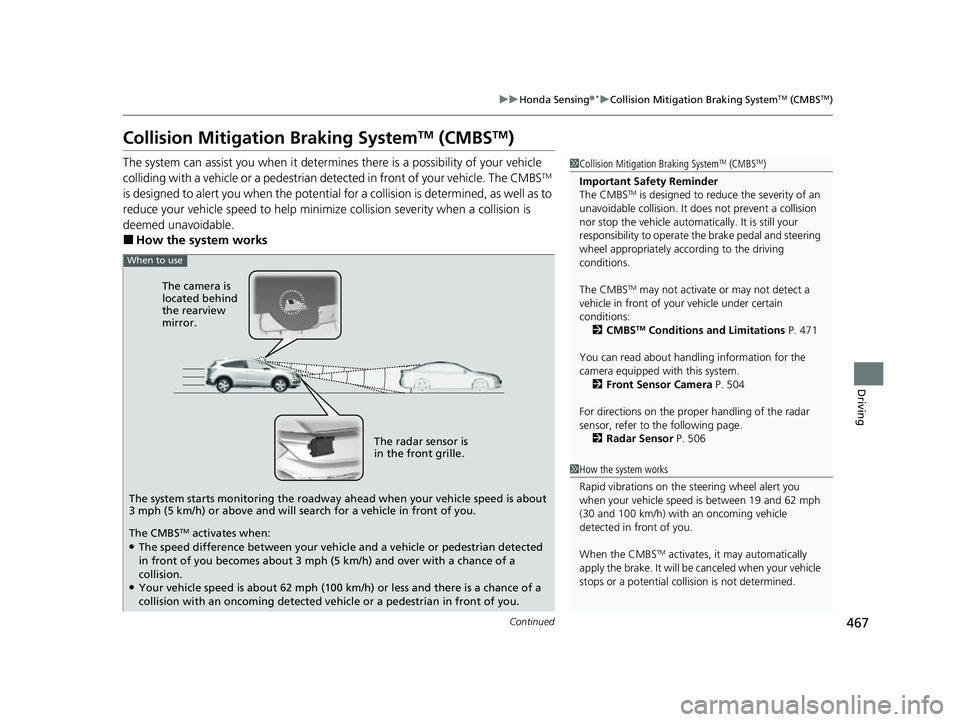
When to use
The camera is
located behind
the rearview
mirror.
The radar sensor is
in the front grille.
The system starts monitoring the roadway ahead when your vehicle speed is about
3 mph (5 km/h) or above and will search for a vehicle in front of you.
The CMBS
TM activates when:●The speed difference between your vehicl e and a vehicle or pedestrian detected
in front of you becomes about 3 mph (5 km/h) and over with a chance of a
collision.
●Your vehicle speed is about 62 mph (100 km/h) or less and there is a chance of a
collision with an oncoming detected ve hicle or a pedestrian in front of you.
22 HR-V HDMC-31T7A6600.book 467 ページ 2021年4月12日 月曜日 午前10時50分
Page 476 of 641
474
uuHonda Sensing ®*uCollision Mitigation Braking SystemTM (CMBSTM)
Driving
■Automatic shutoff
CMBSTM may automatically shut itself off and the CMBSTM indicator comes and stays
on when:
• The temperature inside the system is high.
• You drive off-road or on a mountain road, or curved and wi nding road for an
extended period.
• An abnormal tire condition is detected (incorrect tire size, flat tire, etc.).
• The camera behind the rearview mirror, or the area around the camera, including
the windshield, gets dirty.
Once the conditions that caused CMBS
TM to shut off improve or are addressed (e.g.,
cleaning), the system comes back on.
22 HR-V HDMC-31T7A6600.book 474 ページ 2021年4月12日 月曜日 午前10時50分
Page 479 of 641
477
uuHonda Sensing ®*uAdaptive Cruise Control (ACC)
Continued
Driving
Adaptive Cruise Control (ACC)
Helps maintain a constant vehicle speed a nd a set following-interval behind a vehicle
detected ahead of yours, without you having to keep your foot on the brake or the
accelerator.1 Adaptive Cruise Control (ACC)
3WARNING
Improper use of ACC can lead to a crash.
Use ACC only when driving on expressways
or freeways and in go od road and weather
conditions.
3WARNING
ACC has limited braking capability.
When your vehicle speed drops below 22
mph (35 km/h), ACC will automatically
cancel and no longer will apply your
vehicle’s brakes.
Always be prepared to apply the brake
pedal when conditions require.
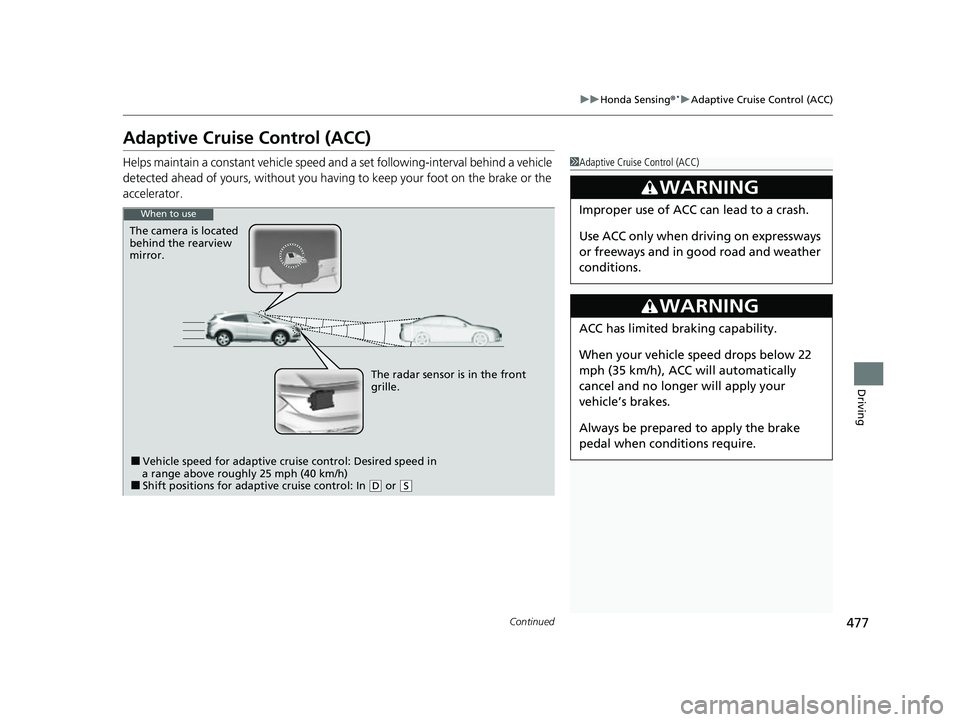
When to use
The camera is located
behind the rearview
mirror.
The radar sensor is in the front
grille.
■Vehicle speed for adaptive cruise control: Desired speed in
a range above roughly 25 mph (40 km/h)
■Shift positions for adaptive cruise control: In ( D or (S
22 HR-V HDMC-31T7A6600.book 477 ページ 2021年4月12日 月曜日 午前10時50分
Page 489 of 641
Continued487
uuHonda Sensing ®*uAdaptive Cruise Control (ACC)
Driving
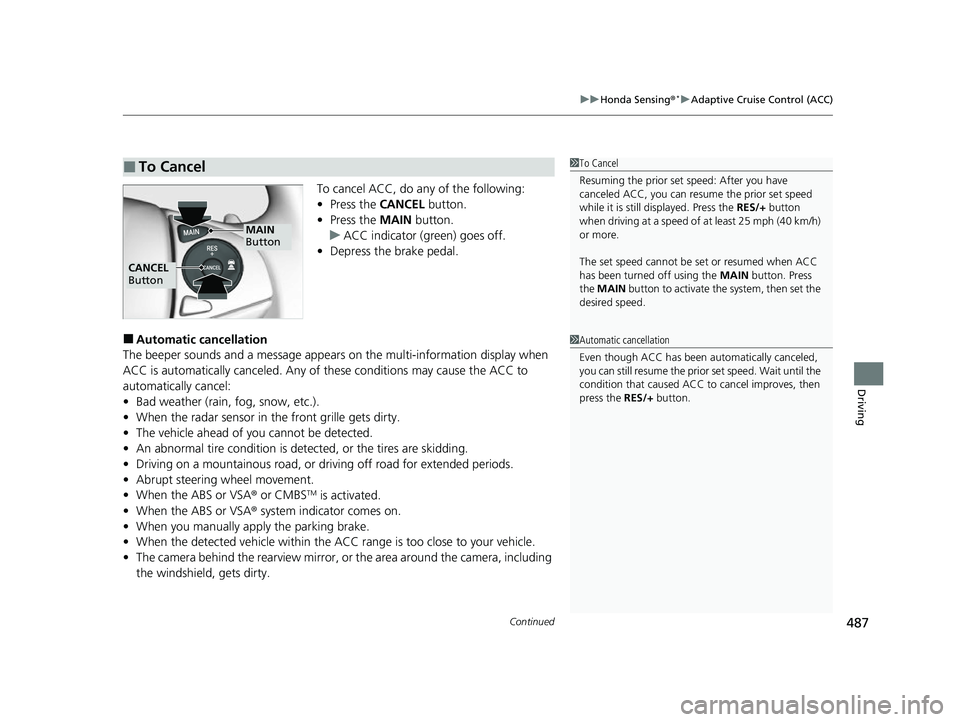
To cancel ACC, do any of the following:
• Press the CANCEL button.
• Press the MAIN button.
u ACC indicator (green) goes off.
• Depress the brake pedal.
■Automatic cancellation
The beeper sounds and a message appears on the multi-information display when
ACC is automatically cancel ed. Any of these conditions may cause the ACC to
automatically cancel:
• Bad weather (rain, fog, snow, etc.).
• When the radar sensor in the front grille gets dirty.
• The vehicle ahead of yo u cannot be detected.
• An abnormal tire condition is de tected, or the tires are skidding.
• Driving on a mountainous road, or driving off road for extended periods.
• Abrupt steering wheel movement.
• When the ABS or VSA ® or CMBS
TM is activated.
• When the ABS or VSA ® system indicator comes on.
• When you manually apply the parking brake.
• When the detected vehicle within the AC C range is too close to your vehicle.
• The camera behind the rearview mirror, or the area around the camera, including
the windshield, gets dirty.
■To Cancel1 To Cancel
Resuming the prior set speed: After you have
canceled ACC, you can resume the prior set speed
while it is still displayed. Press the RES/+ button
when driving at a speed of at least 25 mph (40 km/h)
or more.
The set speed cannot be set or resumed when ACC
has been turned off using the MAIN button. Press
the MAIN button to activate the system, then set the
desired speed.
MAIN
Button
CANCEL
Button
1 Automatic cancellation
Even though ACC has been automatically canceled,
you can still resume the prior set speed. Wait until the
condition that caused ACC to cancel improves, then
press the RES/+ button.
22 HR-V HDMC-31T7A6600.book 487 ページ 2021年4月12日 月曜日 午前10時50分
Page 497 of 641
495
uuHonda Sensing ®*uLane Keeping Assist System (LKAS)
Continued
Driving
■The LKAS may be automatically suspended when:
• The system fails to detect lane lines.
• The steering wheel is quickly turned.
• You fail to steer the vehicle.
• Driving through a sharp curve.
• Driving at a speed in excess of approximately 90 mph (145 km/h).
Once these conditions no longer exist, the LKAS automatically resumes.
■The LKAS may be automatically canceled when:
• The camera temperature gets extremely high.
• The camera behind the rearview mirror, or the area around the camera, including
the windshield, gets dirty.
• The ABS or VSA ® system engages.
The beeper sounds if the LKAS is automatically canceled.
22 HR-V HDMC-31T7A6600.book 495 ページ 2021年4月12日 月曜日 午前10時50分
Page 501 of 641
499
uuHonda Sensing ®*uRoad Departure Mitigation (RDM) System
Continued
Driving
Road Departure Mitigation (RDM) System
Alerts and helps to assist you when the system detects a possibility of your vehicle
unintentionally crossing over detected lane markings and/or leaving the roadway
altogether.
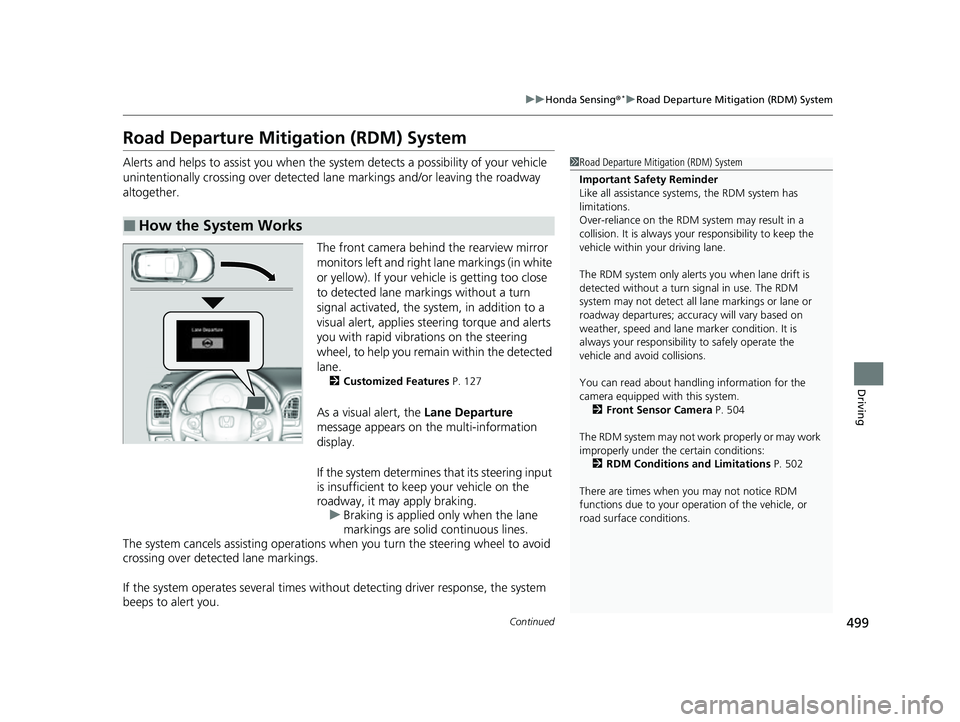
The front camera behind the rearview mirror
monitors left and right lane markings (in white
or yellow). If your vehicle is getting too close
to detected lane markings without a turn
signal activated, the system, in addition to a
visual alert, applies st eering torque and alerts
you with rapid vibrations on the steering
wheel, to help you remain within the detected
lane.
2 Customized Features P. 127
As a visual alert, the Lane Departure
message appears on the multi-information
display.
If the system determines that its steering input
is insufficient to keep your vehicle on the
roadway, it may apply braking. u Braking is applied only when the lane
markings are solid continuous lines.
The system cancels assisting operations wh en you turn the steering wheel to avoid
crossing over detected lane markings.
If the system operates several times with out detecting driver response, the system
beeps to alert you.
■How the System Works
1 Road Departure Mitigation (RDM) System
Important Safety Reminder
Like all assistance systems, the RDM system has
limitations.
Over-reliance on the RDM system may result in a
collision. It is always your responsibility to keep the
vehicle within your driving lane.
The RDM system only alerts you when lane drift is
detected without a turn signal in use. The RDM
system may not detect all la ne markings or lane or
roadway departures; accu racy will vary based on
weather, speed and lane marker condition. It is
always your responsibilit y to safely operate the
vehicle and avoid collisions.
You can read about handling information for the
camera equipped with this system. 2 Front Sensor Camera P. 504
The RDM system may not wo rk properly or may work
improperly under the certain conditions:
2 RDM Conditions and Limitations P. 502
There are times when you may not notice RDM
functions due to your opera tion of the vehicle, or
road surface conditions.
22 HR-V HDMC-31T7A6600.book 499 ページ 2021年4月12日 月曜日 午前10時50分
Page 506 of 641
504
uuHonda Sensing ®*uFront Sensor Camera
Driving
Front Sensor Camera
The camera, used in systems such as Lane Keeping Assist System, Road Departure
Mitigation, Adaptive Cruise Control, and Collision Mitigation Braking SystemTM, is
designed to detect an object that triggers any of the systems to operate its
functions.
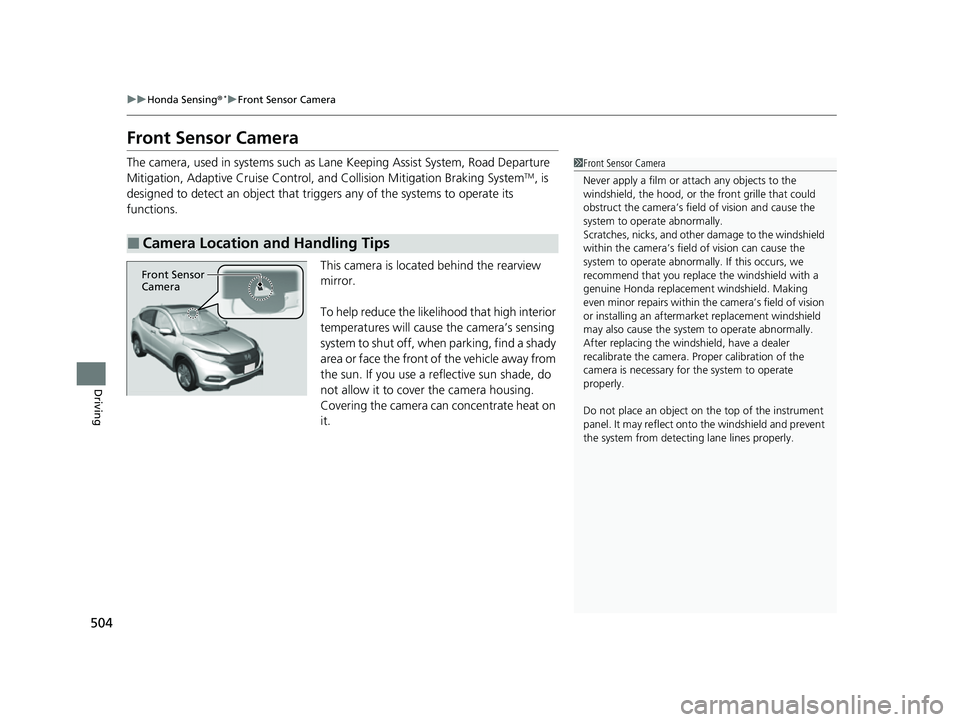
This camera is located behind the rearview
mirror.
To help reduce the likelihood that high interior
temperatures will cause the camera’s sensing
system to shut off, when parking, find a shady
area or face the front of the vehicle away from
the sun. If you use a reflective sun shade, do
not allow it to cover the camera housing.
Covering the camera can concentrate heat on
it.
■Camera Location and Handling Tips
1 Front Sensor Camera
Never apply a film or attach any objects to the
windshield, the hood, or th e front grille that could
obstruct the camera’s fiel d of vision and cause the
system to operate abnormally.
Scratches, nicks, and othe r damage to the windshield
within the camera’s fiel d of vision can cause the
system to operate abnormall y. If this occurs, we
recommend that you replac e the windshield with a
genuine Honda replacem ent windshield. Making
even minor repairs within th e camera’s field of vision
or installing an aftermarket replacement windshield
may also cause the system to operate abnormally.
After replacing the winds hield, have a dealer
recalibrate the camera. Pr oper calibration of the
camera is necessary for the system to operate
properly.
Do not place an object on the top of the instrument
panel. It may reflect onto the windshield and prevent
the system from detecting lane lines properly.
Front Sensor
Camera
22 HR-V HDMC-31T7A6600.book 504 ページ 2021年4月12日 月曜日 午前10時50分
Page 552 of 641
uuReplacing Light Bulbs uSide Turn Signal/Emergency Indicator Lights*
550
Maintenance
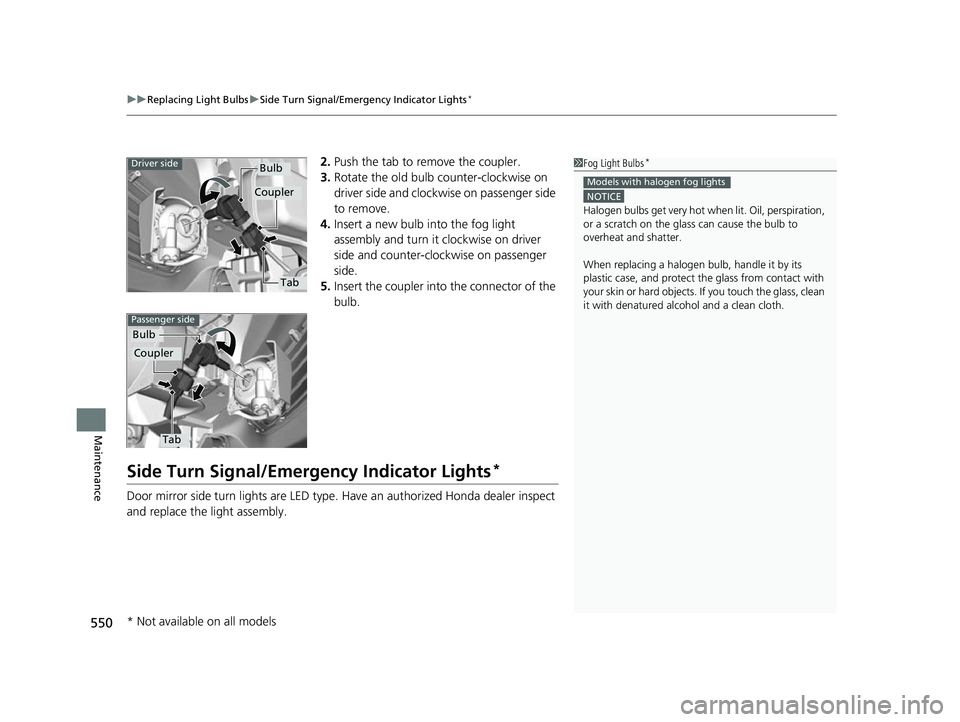
2. Push the tab to remove the coupler.
3. Rotate the old bulb counter-clockwise on
driver side and clockw ise on passenger side
to remove.
4. Insert a new bulb into the fog light
assembly and turn it clockwise on driver
side and counter-clockwise on passenger
side.
5. Insert the coupler into the connector of the
bulb.
Side Turn Signal/Emergency Indicator Lights*
Door mirror side turn lights are LED type. Have an authorized Honda dealer inspect
and replace the light assembly.
1 Fog Light Bulbs*
NOTICE
Halogen bulbs get very hot wh en lit. Oil, perspiration,
or a scratch on the glass can cause the bulb to
overheat and shatterM
When replacing a halogen bulb, handle it by its
plastic case, and protect th e glass from contact with
your skin or hard objects. If you touch the glass, clean
it with denatured alc ohol and a clean clothM
Models with halogen fog lights
Tab
Bulb
Coupler
Driver side
Tab
Bulb
Coupler
Passenger side
* Not available on all models
22 HR-V HDMC-31T7A6600.book 550 ページ 2021年4月12日 月曜日 午前10時50分
Page 579 of 641
577
uuCleaning uExterior Care
Continued
Maintenance
Exterior Care
Dust off the vehicle body after you drive.
Regularly inspect your vehi cle for scratches on painted surfaces. A scratch on a
painted surface can result in body rust. If you find a scratch, promptly repair it.
Wash the vehicle regularly. Wash more frequently when driving in the following
conditions:
• If driving on roads with road salt.
• If driving in coastal areas.
• If tar, soot, bird droppings, insects, or tree sap are stuck to painted surfaces.
• Make sure to follow the instructions indicated on the automated car wash.
• Fold in the door mirrors.
• For models equipped with automatic inte rmittent wipers, turn the wipers off.
• Keep sufficient distance between the cleaning nozzle and the vehicle body.
• Take particular care around the windows. Standing too close may cause water to
enter the vehicle interior.
• Do not spray high pressure water directly into the engine compartment. Instead,
use low pressure water and a mild detergent.
■Washing the Vehicle
■Using an Automated Car Wash
■Using High Pressure Cleaners
1 Washing the Vehicle
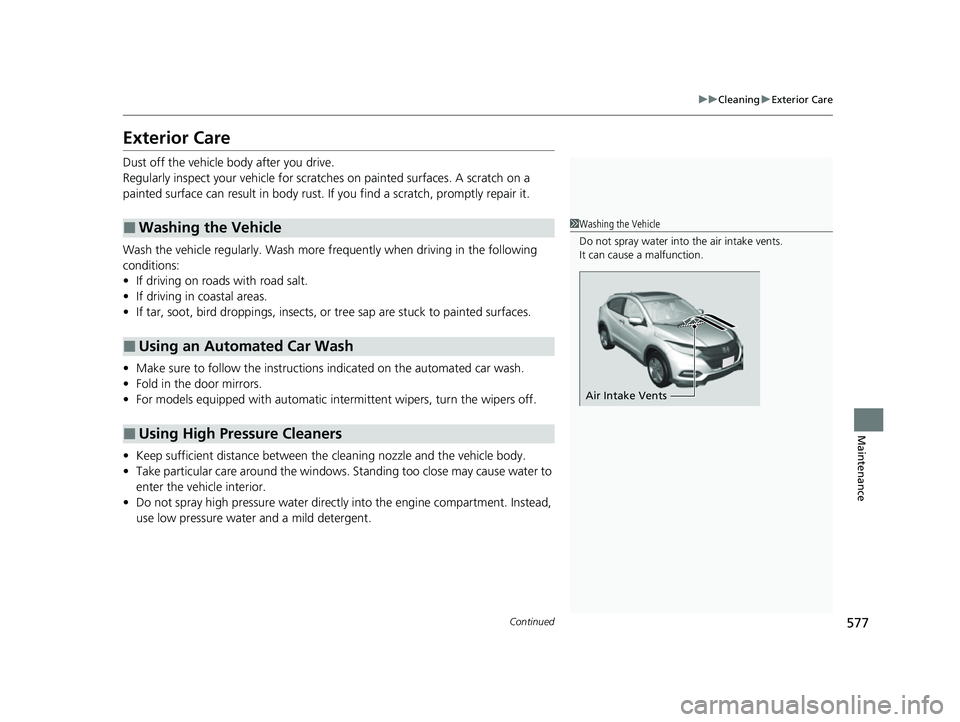
Do not spray water into the air intake vents.
It can cause a malfunction.
Air Intake Vents
22 HR-V HDMC-31T7A6600.book 577 ページ 2021年4月12日 月曜日 午前10時50分
Page 613 of 641
611
uuFuses uFuse Locations
Handling the Unexpected
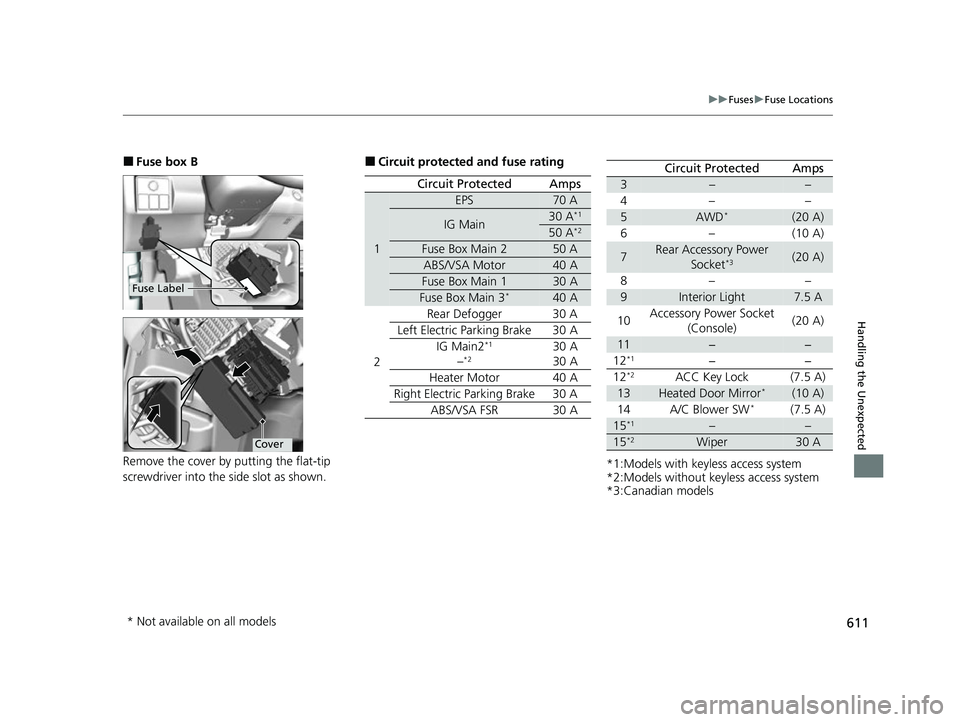
■Fuse box B
Remove the cover by putting the flat-tip
screwdriver into the side slot as shown.
Fuse Label
Cover
■Circuit protected and fuse rating
Circuit ProtectedAmps
1
EPS70 A
IG Main30 A*1
50 A*2
Fuse Box Main 250 A
ABS/VSA Motor40 A
Fuse Box Main 130 A
Fuse Box Main 3*40 A
2 Rear Defogger 30 A
Left Electric Parking Brake 30 A IG Main2
*1
–*230 A
30 A
Heater Motor 40 A
Right Electric Parking Brake 30 A ABS/VSA FSR 30 A
*1:Models with keyless access system
*2:Models without keyless access system
*3:Canadian models
Circuit ProtectedAmps
3––
4– –
5AWD*(20 A)
6–(10 A)
7Rear Accessory Power Socket*3(20 A)
8– –
9Interior Light7.5 A
10 Accessory Power Socket
(Console) (20 A)
11−−
12*1−−
12*2ACC Key Lock (7.5 A)
13Heated Door Mirror*(10 A)
14 A/C Blower SW*(7.5 A)
15*1––
15*2Wiper30 A
* Not available on all models
22 HR-V HDMC-31T7A6600.book 611 ページ 2021年4月12日 月曜日 午前10時50分